FANUC Series 30i/300i/300is-MODEL A. Machining Center System. User's manual - page 75
 

  Index      Manuals     FANUC Series 30i/300i/300is-MODEL A. Machining Center System. User's manual (B-63944EN/03)


Search            copyright infringement  


Content      ..     73      74      75      76     ..


FANUC Series 30i/300i/300is-MODEL A. Machining Center System. User's manual - page 75


16.CUSTOM MACRO

 PROGRAMMING 

B-63944EN/03


- 556 - 

 - 

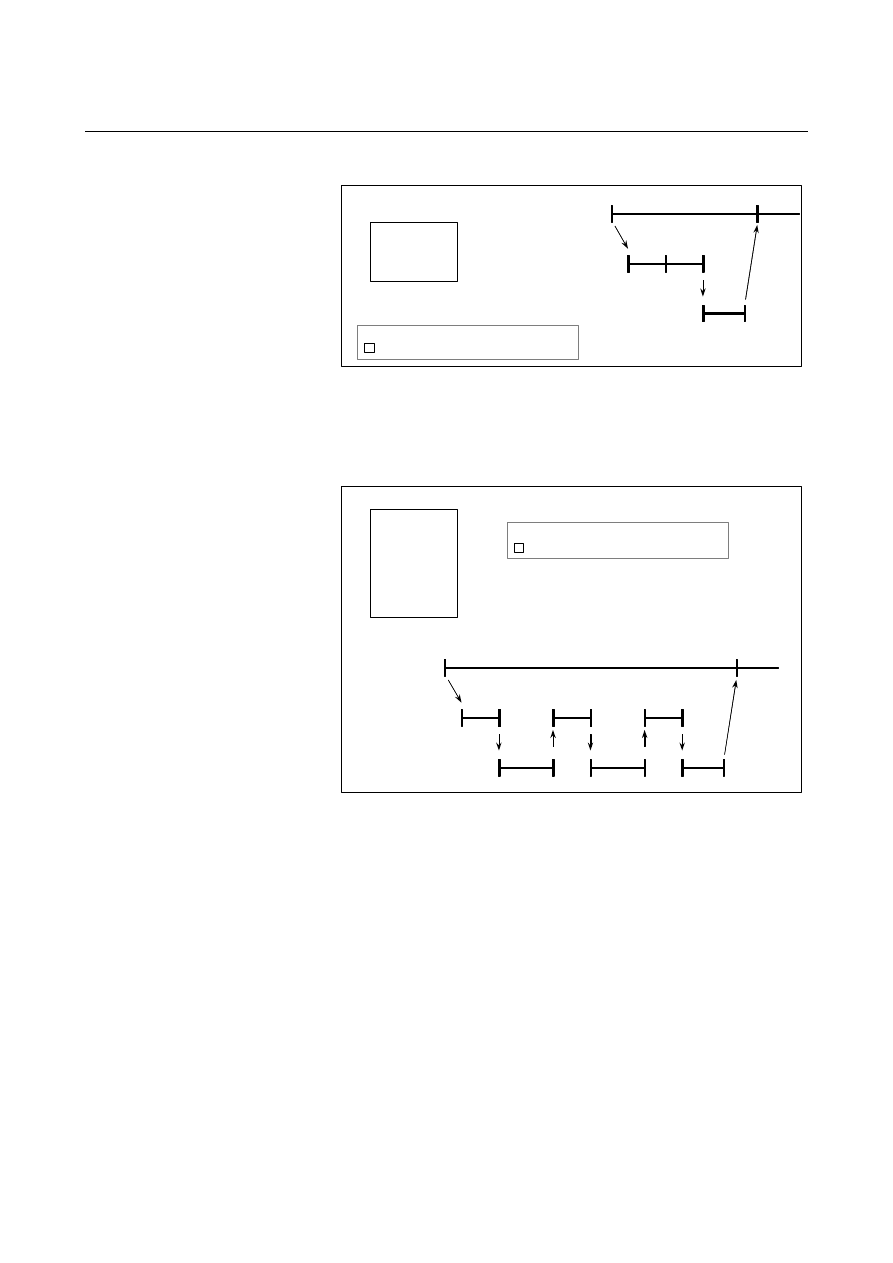
Buffering the next block in other than cutter compensation mode (G41, G42)   

N1

N2

N3

N4

N4

>

N1 X100.0 ;

> : Block being executed
      : Block read into the buffer

NC statement
execution

Macro statement
execution

Buffer

N2 #1=100 ;
N3 #2=200 ;
N4 Y200.0 ;


When N1 is being executed, the next NC statement (N4) is read into 
the buffer.    The macro statements (N2, N3) between N1 and N4 are 
processed during execution of N1.   
 

 - 

In cutter compensation mode (G41, G42) 

>      N1 G01 G41 X100.0 F100 Dd ;

> : Block being executed

    : Blocks read into the buffer

NC statement
execution

Macro statement
execution

Buffer

N1

N2

N3

N2 #1=100 ;
N3 Y100.0 ;
N4 #2=200 ;
N5 Y150.0 ;
N6 #3=300 ;
N7 X200.0 ;

        :

N4

N3

N5

N6

N7


When N1 is being executed, the NC statements in the next three 
blocks (up to N7) are read into the buffer.    The macro statements (N1, 
N4, N6) between N1 and N7 are processed during execution of N1. 
 

B-63944EN/03

 PROGRAMMING 

16.CUSTOM MACRO


- 557 - 

16.9 

REGISTERING CUSTOM MACRO PROGRAMS 

 
Custom macro programs are similar to subprograms.  They can be 
registered and edited in the same way as subprograms.    The storage 
capacity is determined by the total length of tape used to store both 
custom macros and subprograms. 
 

16.CUSTOM MACRO

 PROGRAMMING 

B-63944EN/03


- 558 - 

16.10 

CODES AND RESERVED WORDS USED IN CUSTOM 
MACROS 


In addition to the codes used in ordinary programs, the following 
codes are used in custom macro programs. 


Explanation 
 - Codes 

(1)  When the ISO code is used or when bit 4 (ISO) of parameter No. 

6008 is set to 0 


(The codes are represented in hexadecimal.) 

Meaning Code 

* 0AAh 

= 0BDh 
# 0A3h 

[ 0DBh 
] 0DDh 

? 03Fh 

@ 0C0h 

& 0A6h 

_ 05Fh 

O 0CFh 


(2)  When the EIA code is used or when the ISO code is used with bit 

4 (ISO) of parameter No. 6008 set to 1 

Meaning Code 

Code set in parameter No. 6010 

Code set in parameter No. 6011 

Code set in parameter No. 6012 

Code set in parameter No. 6013 

Code set in parameter No. 6014 

Code set in parameter No. 6015 

Code set in parameter No. 6016 

Code set in parameter No. 6017 

Code set in parameter No. 6018 


For O, the same code as for O indicating a program number is used.   
Set a hole pattern for each of *, =, #, [, ], ?, @, &, and _ in the ISO or 
EIA code in the corresponding parameter (Nos. 6010 to 6018). 
The code 00h cannot be used.  The code indicating an alphabetic 
character can be used for the code indicating a character listed above, 
but the code can be no longer used to indicate the original character. 


 - Reserved words 

The following reserved words are used in custom macros: 

AND, OR, XOR, MOD, EQ, NE, GT, LT, GE, LE,   
SIN, COS, TAN, ASIN, ACOS, ATAN, ATN, SQRT, SQR, ABS, 
BIN, BCD, ROUND, RND, FIX, FUP, LN, EXP, POW, ADP, IF, 
GOTO, WHILE, DO, END, BPRNT, DPRNT, POPEN, PCLOS, 
SETVN, AX, AXNUM 

System variable (constant) names and registered common variable 
names are also used as reserved words. 

B-63944EN/03

 PROGRAMMING 

16.CUSTOM MACRO


- 559 - 

16.11 

EXTERNAL OUTPUT COMMANDS 

 
In addition to the standard custom macro commands, the following 
macro commands are available.  They are referred to as external 
output commands. 

 BPRNT 

 DPRNT 

 POPEN 

 PCLOS 

These commands are provided to output variable values and characters 
through the reader/puncher interface. 
 

Explanation 

Specify these commands in the following order: 
 
Open command:  POPEN 

Before specifying a sequence of data output commands, specify 
this command to establish a connection to an external input/output 
device. 

Data output command:    BPRNT or DPRNT 

Specify necessary data output. 

Close command:  PCLOS 

When all data output commands have completed, specify PCLOS 
to release a connection to an external input/output device. 
 

  - Open command POPEN 

The POPEN command establishes a connection to an external 
input/output device.    It must be specified before a sequence of data 
output commands.    The CNC outputs a DC2 control code. 
 

  - Data output command BPRNT 

The BPRNT command outputs characters and variable values in 
binary. 


Number of significant decimal places

BPRNT [ a    #b                [c] … ] 

Variable

Character

16.CUSTOM MACRO

 PROGRAMMING 

B-63944EN/03


- 560 - 

(i)  Specified characters are converted to the codes according to the 

setting data (ISO) that is output at that time. 


Specifiable characters are as follows: 


    Letters (A to Z) 


  Numbers 


    Special characters (*, /, +, -, ?, @, &, _) 


NOTE 

1  An asterisk (*) is output by a space code. 
2   When using ?, @, &, and/or _, use the ISO code as 

the punch code (setting data (ISO) = 1). 

 
(ii)  All variables are stored with a decimal point.    Specify a variable 

followed by the number of significant decimal places enclosed in 
brackets.  A variable value is treated as 2-word (32-bit) data, 
including the decimal digits.    It is output as binary data starting 
from the highest byte. 

(iii) When specified data has been output, an EOB code is output 

according to the setting code (ISO). 

(iv)  <Null> variables are regarded as 0. 
 

Example 

BPRNT [ C** X#100 [3] Y#101 [3] M#10 [0] ] 

  Variable value 
    #100=0.40956 
    #101=-1638.4 
    #10=12.34 
    are output as follows: 


  - Data output command DPRNT 


DPRNT  [ a          #b                [c        d] … ]

Character 

Number of significant digits in the integer part

Number of significant decimal places

Variable 


The DPRNT command outputs characters and each digit in the value 
of a variable according to the code set in the settings (ISO). 


C  sp sp   X0000019A    YFFE70000   M0000000C   LF 
    ( * * )     (410)        (-1638400)       (12)       ( ; ) 

C3 A0 A0 D8 00 00 01 9A 59 FF E7 00 00 4D 00 00 00 0C 0A     

B-63944EN/03

 PROGRAMMING 

16.CUSTOM MACRO


- 561 - 

(i)  For an explanation of the DPRNT command, see Items (i), (iii), 

and (iv) for the BPRNT command. 

(ii)  When outputting a variable, specify # followed by the variable 

number, then specify the number of digits in the integer part and 
the number of decimal places enclosed in brackets.     


For the value of a variable, as many codes as the specified 
number of digits are output according to the settings one by one, 
starting with the highest digit.    The decimal point is also output 
using the set code. 


Each variable must be a numeric value consisting of up to nine 
digits.  When high-order digits are zeros, these zeros are not 
output if bit 1 (PRT) of parameter No. 6001 is 1.    If parameter 
PRT is 0, a space code is output each time a zero is encountered. 


When the number of decimal places is not zero, digits in the 
decimal part are always output.    If the number of decimal places 
is zero, no decimal point is output. 


When bit 1 (PRT) of parameter No. 6001 is 0, a space code is 
output to indicate a positive number instead of +; if parameter 
PRT is 1, no code is output. 


Example 
DPRNT [ X#2 [53] Y#5 [53] T#30 [20] ] 

Variable value 
    #2=128.47398 
    #5=-91.2 
    #30=123.456 
are output as follows: 

 
(1) Parameter PRT (No.6001#1) = 0 


(2) Parameter PRT (No.6001#1) = 1 


D8 B1 B2 B8 2E B4 B7 B4 59 2D 39 B1 2E B2 30 30 D4 A0 B2 33 0A 


         X128.474               Y-91.200           T023   LF 

X  sp sp sp       128.474         Y-  sp sp sp       91.200      T  sp  023  LF

D8 A0 A0 A0 B1 B2 B8 2E B4 B7 B4 59 2D A0 A0 A0 39 B1 2E B2 30 30 D4 A0 B2 33 0A


16.CUSTOM MACRO

 PROGRAMMING 

B-63944EN/03


- 562 - 

 - 

Close command PCLOS 

The PCLOS command releases a connection to an external 
input/output device.  Specify this command when all data output 
commands have terminated.  DC4 control code is output from the 
CNC. 
 

 - Required setting 

Specify the specification number of an input/output device to be used 
for the I/O device specification number.     
According to the above settings, set data items (such as the baud rate) 
for the reader/puncher interface. 
Never specify the output device FANUC Cassette or Floppy for 
punching.   
When specifying a DPRNT command to output data, specify whether 
leading zeros are output as spaces (by setting bit 1 (PRT) of parameter 
No. 6001 to 1 or 0). 
To indicate the end of a line of data in ISO code, specify whether to 
use only an LF (bit 4 (CRO) of parameter 6001 is 0) or an LF and CR 
bit 4 (CRO) of parameter 6001 is 1). 
 

NOTE 

1  It is not necessary to always specify the open 

command (POPEN), data output command 
(BPRNT, DPRNT), and close command (PCLOS) 
together.    Once an open command is specified at 
the beginning of a program, it does not need to be 
specified again except after a close command was 
specified. 

2  Be sure to specify open commands and close 

commands in pairs.  Specify the close command 
at the end of the program.  However, do not 
specify a close command if no open command has 
been specified. 

3 When a reset operation is performed while 

commands are being output by a data output 
command, output is stopped and subsequent data 
is erased.  Therefore, when a reset operation is 
performed by a code such as M30 at the end of a 
program that performs data output, specify a close 
command at the end of the program so that 
processing such as M30 is not performed until all 
data is output. 


B-63944EN/03

 PROGRAMMING 

16.CUSTOM MACRO


- 563 - 

16.12 

RESTRICTIONS 


  - Sequence number search   

A custom macro program cannot be searched for a sequence number. 
 

 - Single block 

Even while a macro program is being executed, blocks can be stopped 
in the single block mode. 
A block containing a macro call command (G66, G66.1, Ggg, Mmm, 
or G67) does not stop even when the single block mode is on.     
Whether blocks containing arithmetic and logic operation commands 
and control commands are stopped depends on the settings of bits 5 
(SBM) and 7 (SBV) of parameter No. 6000 as shown in the following 
table. 
 

Bit 5 (SBM) of parameter No. 6000


0 1 

0

Not stopped when the 
single block mode is on. 

Bit 7 (SBV) 

of 

parameter 

No. 6000 

1

Can be stopped in the 
single bock mode. 
(Variable #3003 can be 
used to enable or disable 
single block stop.) 

Can be stopped in the 
single block mode. 
(Variable #3003 cannot be 
used to disable single 
block stop.  Single block 
stop is always enabled.) 

 
Note that when a single block stop occurs at a macro statement in 
cutter compensation mode, the statement is assumed to be a block that 
does not involve movement, and proper compensation cannot be 
performed in some cases.    (Strictly speaking, the block is regarded as 
specifying a movement with a travel distance 0.) 
 

  - Optional block skip 

A / appearing in the middle of an <expression> (enclosed in brackets 
[    ] on the right-hand side of an arithmetic expression) is regarded as 
a division operator; it is not regarded as the specifier for an optional 
block skip code. 
 

  - Operation in EDIT mode 

By setting bit 0 (NE8) of parameter No.3202 and bit 4 (NE9) of 
parameter No.3202 to 1, deletion and editing are disabled for custom 
macro programs and subprograms with program numbers 8000 to 
8999 and 9000 to 9999.  This prevents registered custom macro 
programs and subprograms from being destroyed by accident.    When 
the entire memory is cleared, the contents of memory such as custom 
macro programs are deleted. 


Content      ..     73      74      75      76     ..