FANUC Series 30i/300i/300is-MODEL A. Machining Center System. User's manual - page 73
 

  Index      Manuals     FANUC Series 30i/300i/300is-MODEL A. Machining Center System. User's manual (B-63944EN/03)


Search            copyright infringement  


Content      ..     71      72      73      74     ..


FANUC Series 30i/300i/300is-MODEL A. Machining Center System. User's manual - page 73


16.CUSTOM MACRO

 PROGRAMMING 

B-63944EN/03


- 540 - 

16.7.4 

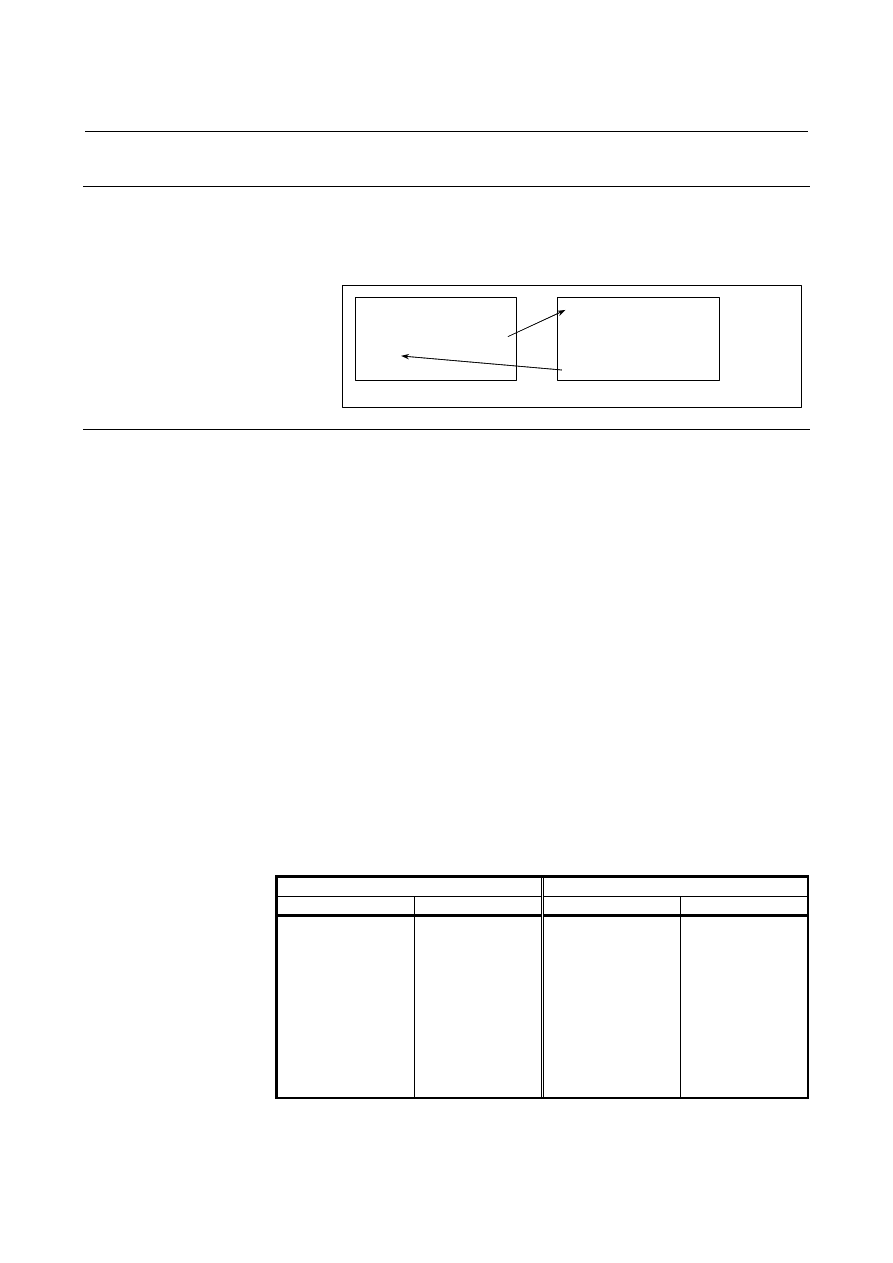
Macro Call Using a G Code 

 
By setting a G code number used to call a macro program in a 
parameter, the macro program can be called in the same way as for a 
simple call (G65). 
 

O0001 ;
        :
G81 X10.0 Y20.0 Z-10.0 ;
        :
M30 ;

O9010 ;
        :
        :
        :
N9 M99 ;

Parameter  No.6050=81


Explanation 

By setting a G code number from -9999 to 9999 used to call a custom 
macro program (O9010 to O9019) in the corresponding parameter 
(No.6050 to No.6059), the macro program can be called in the same 
way as with G65.    To call custom macro program O9040 to O9049 
using a G code with a decimal point, set bit 0 (DPG) of parameter No. 
6007 to 1 and set the G code number in the corresponding parameter 
(Nos. 6060 to 6069). 
The number of decimal places of a G code is 1.  Set the value 
obtained by multiplying a desired G code number by 10 in the 
corresponding parameter. 

[Example]  When parameter No. 6060 is set to 234, custom macro program 

O9040 is called using G23.4. 

 
When a negative G code is set, a modal call is performed.  In this 
case, bit 3 (MGE) of parameter No. 6007 can be set to select the G66 
or G66.1 mode. 
For example, when a parameter is set so that macro program O9010 
can be called with G81, a user-specific cycle created using a custom 
macro can be called without modifying the machining program.   
 

  - Correspondence between parameter numbers and program numbers 


G code with no decimal point 

G code with a decimal point 

Parameter number

Program number

Parameter number 

Program number

6050 
6051 
6052 
6053 
6054 
6055 
6056 
6057 
6058 
6059 

O9010 
O9011 
O9012 
O9013 
O9014 
O9015 
O9016 
O9017 
O9018 
O9019 

6060 
6061 
6062 
6063 
6064 
6065 
6066 
6067 
6068 
6069 

O9040 
O9041 
O9042 
O9043 
O9044 
O9045 
O9046 
O9047 
O9048 
O9049 


B-63944EN/03

 PROGRAMMING 

16.CUSTOM MACRO


- 541 - 

 - Repetition 

As with a simple call, a number of repetitions from 1 to 999999999 
can be specified at address L. 
 

 - Argument specification 

As with a simple call, two types of argument specification are 
available:  Argument specification I and argument specification II.  
The type of argument specification is determined automatically 
according to the addresses used. 
 

Limitation 
  - Nesting of calls using G codes 

  To call another program in a program called using a G code, only 

G65, M98, G66, or G66.1 can be used normally. 

  When bit 6 (GMP) of parameter No. 6008 is set to 1, a call using 

an M, T, or S code, second auxiliary function, or specific code can 
be performed in a program called using a G code. 


16.CUSTOM MACRO

 PROGRAMMING 

B-63944EN/03


- 542 - 

16.7.5 

Macro Call Using a G Code (Specification of Multiple 

Definitions) 

 
By setting the starting G code number used to call a macro program, 
the number of the starting program to be called, and the number of 
definitions, macro calls using multiple G codes can be defined. 
 

Explanation 

As many custom macros as the number specified in parameter No. 
6040 can be called using as many G codes as the number specified in 
parameter No. 6040.    The numeric value set in parameter No. 6038 
indicates the starting G code number and the program number set in 
parameter No. 6039 indicates the starting program number.  To 
disable this type of call, set 0 in parameter No. 6040. 
When a negative G code is set in parameter No. 6038, modal calls are 
performed.    In this case, bit 3 (MGE) of parameter No. 6007 can be 
set to select the G66 or G66.1 mode. 
The number of repetitions and argument specification are set in the 
same way as with a macro call using a G code. 

[Example] 

Set parameter No. 6038 to 900, parameter No. 6039 to 10000000, and 
parameter No. 6040 to 100. 

G900 

 O1000 

G901 

 O1001 

G902 

 O1002 

          : 
G999 

 O1099 

Custom macro calls (simple calls) for 100 combinations are defined as 
shown above.    When parameter No. 6038 is changed to -900, custom 
macro calls (modal calls) for the same combinations are defined. 
 

NOTE 

1  The calls defined by this setting become all invalid 

in the following cases: 

<1>  A value outside the valid data range is set in 

one of the above parameters. 

<2>  (No. 6039 + No. 6040 - 1) > 99999999 

2  Simple and modal calls cannot be mixed in the 

specification. 

3  If the G code set in parameter Nos. 6050 to 6059 

to call the corresponding macro program is within 
the G code range for calling programs using 
multiple G codes, the macro program 
corresponding to the G code set in parameter Nos. 
6050 to 6059 is called.   

B-63944EN/03

 PROGRAMMING 

16.CUSTOM MACRO


- 543 - 

16.7.6 

Macro Call Using a G Code with a Decimal Point 

(Specification of Multiple Definitions) 

 
When bit 0 (DPG) of parameter No. 6007, by setting the starting G 
code number with a decimal point used to call a macro program, the 
number of the starting program to be called, and the number of 
definitions, multiple macro calls using multiple G codes with a 
decimal point can be defined. 
 

Explanation 

As many custom macros as the number specified in parameter No. 
6043 can be called using as many G codes with a decimal point as the 
number specified in parameter No. 6043.    The numeric value set in 
parameter No. 6041 indicates the starting G code number with a 
decimal point and the program number set in parameter No. 6042 
indicates the starting program number.    To disable this type of call, 
set 0 in parameter No. 6043. 
When a negative G code is set in parameter No. 6041, modal calls are 
performed.    In this case, bit 3 (MGE) of parameter No. 6007 can be 
set to select the G66 or G66.1 mode. 
The number of repetitions and argument specification are set in the 
same way as with a macro call using a G code. 

[Example] 

Set parameter No. 6041 to 900, parameter No. 6042 to 2000, and 
parameter No. 6043 to 100. 

G90.0 

 O2000 

G90.1 

 O2001 

G90.2 

 O2002 

            : 
G99.9 

 O2099 

Custom macro calls (simple calls) for 100 combinations are defined as 
shown above.    When parameter No. 6041 is changed to -900, custom 
macro calls (modal calls) for the same combinations are defined. 
 

NOTE 

1  The calls defined by this setting become all invalid in 

the following cases: 

<1>  A value outside the valid data range is set in 

one of the above parameters. 

<2>  (No. 6042 + No. 6043 - 1) > 99999999 
<3>  Bit 0 (DPG) of parameter No. 6007 is set to 0 

(this setting invalidates a macro call using a G 
code with a decimal point). 

2  Simple and modal calls cannot be mixed in the 

specification. 

3  If the G code set in parameter Nos. 6060 to 6069 to 

call the corresponding macro program is within the 
G code range for calling programs using multiple G 
codes, the macro program corresponding to the G 
code set in parameter Nos. 6060 to 6069 is called. 

16.CUSTOM MACRO

 PROGRAMMING 

B-63944EN/03


- 544 - 

16.7.7 

Macro Call Using an M Code 

 
By setting an M code number used to call a macro program in a 
parameter, the macro program can be called in the same way as with a 
simple call (G65). 
 

O0001 ; 
        : 
M50 A1.0 B2.0 ; 
        : 
M30 ; 

O9020 ; 
        : 
        : 
        : 
M99 ; 

Parameter No.6080=50 


Explanation 

By setting an M code number from 3 to 99999999 used to call custom 
macro program O9020 to O9029 in the corresponding parameter (Nos. 
6080 to 6089), the macro program can be called in the same way as 
with G65. 
 

  - Correspondence between parameter numbers and program numbers 


Parameter number 

Corresponding program number 

6080 
6081 
6082 
6083 
6084 
6085 
6086 
6087 
6088 
6089 

O9020 
O9021 
O9022 
O9023 
O9024 
O9025 
O9026 
O9027 
O9028 
O9029 

 
Example) 
 

When parameter No. 6080 is set to 990, O9020 is called using 
M990. 


 - Repetition 

As with a simple call, a number of repetitions from 1 to 99999999 can 
be specified at address L. 
 

 - Argument specification 

As with a simple call, two types of argument specification are 
available:  Argument specification I and argument specification II.  
The type of argument specification is determined automatically 
according to the addresses used. 
 

B-63944EN/03

 PROGRAMMING 

16.CUSTOM MACRO


- 545 - 

Limitation 

  An M code used to call a macro program must be specified at the 

start of a block. 

  To call another program in a program called using an M code, only 

G65, M98, G66, or G66.1 can be used normally. 

  When bit 6 (GMP) of parameter No. 6008 is set to 1, a call using a 

G code can be performed in a program called using an M code. 


16.7.8 

Macro Call Using an M Code (Specification of Multiple 

Definitions) 

 
By setting the starting M code number used to call a macro program, 
the number of the starting program to be called, and the number of 
definitions, macro calls using multiple M codes can be defined. 
 

Explanation 

As many custom macros as the number specified in parameter No. 
6049 can be called using as many M codes as the number specified in 
parameter No. 6049.    The numeric value set in parameter No. 6047 
indicates the starting M code number and the program number set in 
parameter No. 6048 indicates the starting program number.  To 
disable this type of call, set 0 in parameter No. 6049. 
The number of repetitions and argument specification are set in the 
same way as with a macro call using a M code. 

[Example] 

Set parameter No. 6047 to 9000, parameter No. 6048 to 4000, and 
parameter No. 6049 to 100. 

M90000000 

 O4000 

M90000001 

 O4001 

M90000002 

 O4002 

                      : 
M90000099 

 O4099 

Custom macro calls (simple calls) for 100 combinations are defined as 
shown above. 
 

NOTE 

1   The calls defined by this setting become all invalid 

in the following cases: 

  <1>  A value outside the valid data range is set in 

one of the above parameters. 

  <2>  (No. 6048 + No. 6049 - 1) > 99999999 
2   If the M code set in parameter Nos. 6080 to 6089 

to call the corresponding macro program is within 
the M code range for calling programs using multiple 
M codes, the macro program corresponding to the M 
code set in parameter Nos. 6080 to 6089 is called. 


16.CUSTOM MACRO

 PROGRAMMING 

B-63944EN/03


- 546 - 

16.7.9 

Subprogram Call Using an M Code 

 
By setting an M code number used to call a subprogram (macro 
program) in a parameter, the macro program can be called in the same 
way as with a subprogram call (M98). 


Explanation 

By setting an M code number from 3 to 99999999 used to call 
subprogram O9001 to O9009 in the corresponding parameters Nos. 
6071 to 6079, the subprogram can be called in the same way as with 
M98. 
 

  - Correspondence between parameter numbers and program numbers 


Parameter number 

Program number 

6071 
6072 
6073 
6074 
6075 
6076 
6077 
6078 
6079 

O9001 
O9002 
O9003 
O9004 
O9005 
O9006 
O9007 
O9008 
O9009 


 - Repetition 

As with a simple call, a number of repetitions from 1 to 99999999 can 
be specified at address L. 
 

 - Argument specification 

Argument specification is not allowed. 
 

 - M code 

An M code in a macro program that has been called is treated as an 
ordinary M code. 
 

Limitation 

  To call another program in a program called using an M code, only 

G65, M98, G66, or G66.1 can be used normally. 

  When bit 6 (GMP) of parameter No. 6008 is set to 1, a call using a 

G code can be performed in a program called using an M code. 


O0001 

        : 
M03 ;
        : 

O9001 

        : 
        : 
        : 

Parameter No.6071=03 

B-63944EN/03

 PROGRAMMING 

16.CUSTOM MACRO


- 547 - 

16.7.10 

Subprogram Call Using an M Code (Specification of Multiple 

Definitions) 

 
By setting the starting M code number used to call a subprogram, the 
number of the starting subprogram to be called, and the number of 
definitions, subprogram calls using multiple M codes can be defined. 
 

Explanation 

As many subprograms as the number specified in parameter No. 6046 
can be called using as many M codes as the number specified in 
parameter No. 6046.    The numeric value set in parameter No. 6044 
indicates the starting M code number and the numeric value set in 
parameter No. 6045 indicates the starting subprogram number.  To 
disable this type of call, set 0 in parameter No. 6046. 

[Example] 

Set parameter No. 6044 to 80000000, parameter No. 6045 to 30000000, 
and parameter No. 6046 to 100. 

M80000000 

 O3000 

M80000001 

 O3001 

M80000002 

 O3002 

                      : 
M80000099 

 O3099 

Subprogram calls for 100 combinations are defined as shown above. 
 

NOTE 

1 The calls defined by this setting become all invalid in 

the following cases: 

  <1>  A value outside the valid data range is set in 

one of the above parameters. 

  <2>  (No. 6045 + No. 6046 - 1) > 99999999 
2 If the M code set in parameter Nos. 6071 to 6079 to 

call the corresponding subprogram is within the M 
code range for calling subprograms using multiple M 
codes, the subprogram corresponding to the M code 
set in parameter Nos. 6071 to 6079 is called.   


Content      ..     71      72      73      74     ..