FANUC Series 30i/300i/300is-MODEL A. Machining Center System. User's manual - page 49
 

  Index      Manuals     FANUC Series 30i/300i/300is-MODEL A. Machining Center System. User's manual (B-63944EN/03)


Search            copyright infringement  


Content      ..     47      48      49      50     ..


FANUC Series 30i/300i/300is-MODEL A. Machining Center System. User's manual - page 49


13.PROGRAM CONFIGURATION

 PROGRAMMING 

B-63944EN/03


- 348 - 

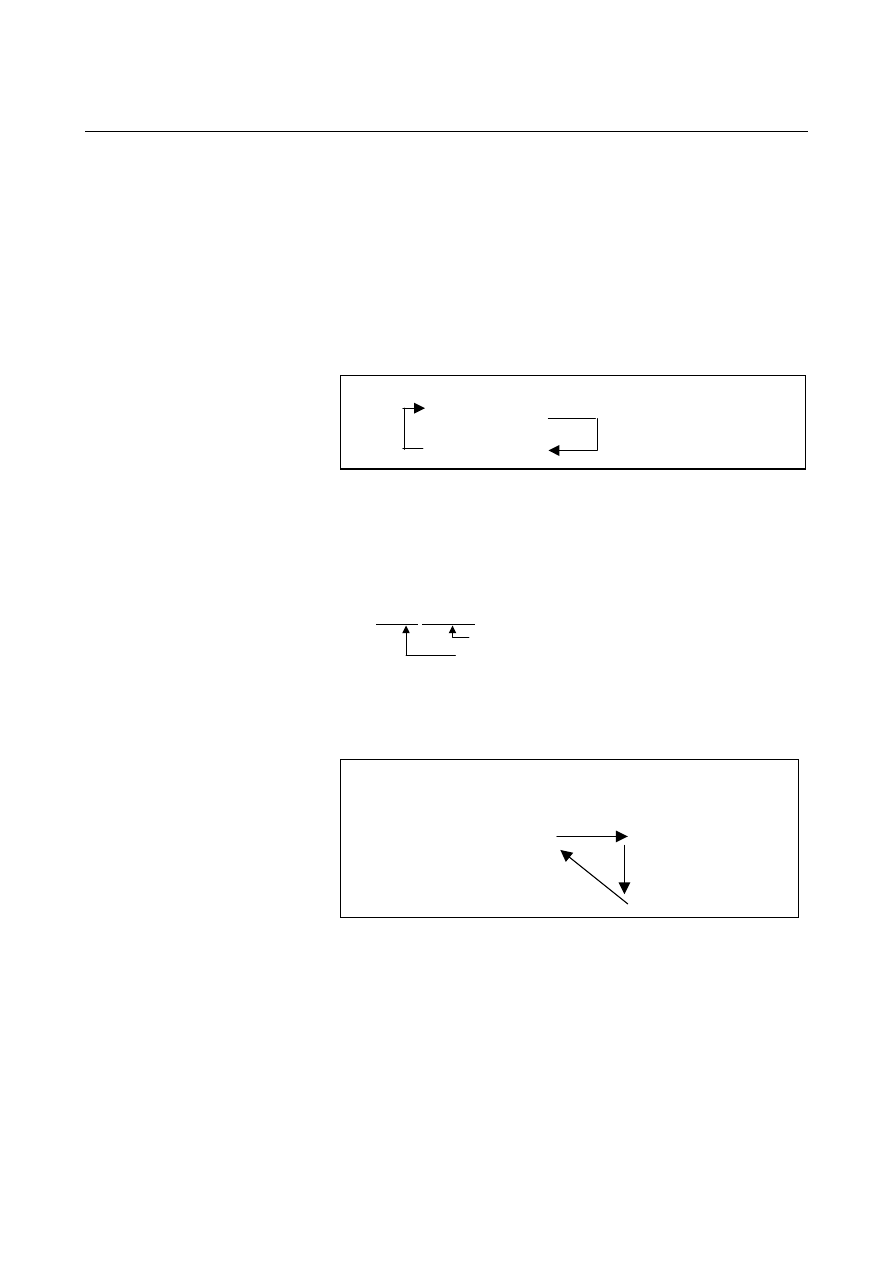
  - Using a subprogram only 

A subprogram can be executed just like a main program by searching 
for the start of the subprogram with the MDI. 
(See III-10.4 for information about search operation.) 
In this case, if a block containing M99 is executed, control returns to 
the start of the subprogram for repeated execution. If a block 
containing M99Pn is executed, control returns to the block with 
sequence number n in the subprogram for repeated execution. To 
terminate this program, a block containing /M02 ; or /M30 ; must be 
placed at an appropriate location, and the optional block switch must 
be set to off ; this switch is to be set to on first. 


N1010 . . . ; 

N1020 . . . ; 

N1030 . . . ; 

N1040 . . . M02 ;

N1050 M99 P1020 ;

/

Optional block skip ON 


  - Subprogram call with sequence number 

Setting bit 0 (SQC) of parameter No. 6005 to 1 can call a specified 
sequence number in the subprogram for execution. 
In a subprogram call command, specify the letter Q followed by a 
sequence number to be called after the letter P for specifying a 
program number. 
M98 Pxxxx Qxxxxx ; 
      

Sequence 

number 


Program 

number 

This command causes program execution to start at the called 
sequence number in the subprogram.  If a repetition count is 
specified, program execution is repeated from the specified sequence 
number. 


Main program 
N0010

;  

N0020

N0030 M98 P1010 Q1030 ; 
N0040

N0050

N0060

;


Sub program 
O1010

N1020

N1030

N1040

N1050

N1060

M99 ;


This function enables a sequence number in the same program to be 
called for execution as shown below. 
This method, however, requests the programmer to be aware of an 
allowable call nesting level.  If an attempt is made to exceed the 
allowable nesting level, alarm PS0077 meaning “TOO MANY 
SUB,MACRO NESTING” is issued. 
 

B-63944EN/03

 PROGRAMMING 

13.PROGRAM CONFIGURATION


- 349 - 


O0001 ; 
N0010

N0020 M98 (P0001) Q0050 ; 
N0030

N0040

N0050

;


N0060

N0070

M99; 


For a call within the same program, specification of Pxxxx in a block 
can be omitted when the block includes M98. 
 
This function is usable only for subprogram calls by M98; it is 
unusable for non-M98 calls, such as macro calls or external 
subprogram calls based on M198. 
 

 PROGRAMMING 

B-63944EN/03


- 350 - 

14. FUNCTIONS TO SIMPLIFY 

PROGRAMMING 

14 

FUNCTIONS TO SIMPLIFY 
PROGRAMMING 

 
Chapter 14, "FUNCTIONS TO SIMPLIFY PROGRAMMING", 
consists of the following sections: 
 
14.1  FIGURE COPYING (G72.1, G72.2)......................................351 
14.2  THREE-DIMENSIONAL COORDINATE SYSTEM 

CONVERSION ......................................................................359 


B-63944EN/03

 PROGRAMMING 


- 351 - 

14.FUNCTIONS TO SIMPLIFY

PROGRAMMING

14.1 

FIGURE COPYING (G72.1, G72.2) 

 
Machining can be repeated after moving or rotating the figure using a 
subprogram. 
 

Format 
 - Rotational copying 

Xp-Yp plane (specified by G17) :   

    G72.1 P_ L_ Xp_Yp_R_ ; 

Zp-Xp plane (specified by G18) :   

    G72.1 P_ L_ Zp_Xp_R_ ; 

Yp-Zp plane (specified by G19) :   

    G72.1 P_ L_ Yp_Zp_R _; 

 
P :Subprogram 

number 

L  :Number of times the operation is repeated 
Xp  :Center of rotation on the Xp axis   
 

(Xp : X-axis or an axis parallel to the X-axis) 

Yp  :Center of rotation on the Yp axis 
 

(Yp: Y-axis or an axis parallel to the Y-axis) 

Zp  :Center of rotation on the Zp axis 
 

(Zp: Z-axis or an axis parallel to the Z-axis) 

R :Angular 

displacement 


(A positive value indicates a counterclockwise angular 
displacement. Specify an incremental value.)   

Specify a plane selection command (G17, G18, or G19) to 
select the plane on which the rotational copying is made. 


 - Linear copying 

Xp-Yp plane (specified by G17) :   

    G72.2 P_ L_ I_ J_ ; 

Zp-Xp plane (specified by G18) :   

    G72.2 P_ L_ K_ I_ ;   

Yp-Zp plane (specified by G19) :   

    G72.2 P_ L_ J_ K_;   

P :Subprogram number 
L  :Number of times the operation is repeated 
I  :Shift along the Xp axis 
J  :Shift along the Yp axis 
K  :Shift along the Zp axis 
Specify a plane selection command (G17, G18, or G19) to 
select the plane on which the linear copying is made. 


 PROGRAMMING 

B-63944EN/03


- 352 - 

14. FUNCTIONS TO SIMPLIFY 

PROGRAMMING 

Explanation 
  - First block of the subprogram 

Always specify a move command in the first block of a subprogram 
that performs a rotational or linear copying.  If the first block 
contains only the program number such as O1234; and does not have a 
move command, movement may stop at the start point of the figure 
made by the n-th (n = 1, 2, 3, ...) copying.   
Specify the first move command in the absolute mode. 
(Example of an incorrect program) 
O1234 ; 
G00 G90 X100.0 Y200.0 ; 
. . . . . ; 
. . . . . ; 
M99 ; 
(Example of a correct program) 
O1000 G00 G90 X100.0 Y200.0 ; 
. . . . . ; 
. . . . . ; 
M99 ; 
 

  - Combination of rotational and linear copying 

The linear copying command can be specified in a subprogram for a 
rotational copying. Also, the rotational copying command can be 
specified in a subprogram for a linear copying.     
 

 - Subprogram call 

In a subprogram for rotational or linear copying, M98 for calling 
another subprogram or G65 for calling a macro can be specified. 
 

  - Specifying the center of rotation 

The center of rotation specified with G72.1 is processed as an absolute 
position even in the incremental mode. 
 

 - Specifying address 

In a block with G72.1, addresses other than P, L, Xp, Yp, Zp, or R are 
ignored. The subprogram number (P), coordinates of the center of 
rotation (Xp, Yp, Zp), and angular displacement (R) must be 
specified.  
In a block with G72.2, addresses other than P, L, I, J, or K are ignored. 
The subprogram number (P) and shift (I, J, K) must be specified. 
 

 - Address P 

If the subprogram number specified with P is not found, alarm PS0078 
occurs. If P is not specified, alarm PS0076 occurs. 
 

 - Address L 

If L is omitted, the repetition count is assumed to be 1 and the 
subprogram is called only once. 
 

B-63944EN/03

 PROGRAMMING 


- 353 - 

14.FUNCTIONS TO SIMPLIFY

PROGRAMMING

  - Increment in angular displacement or shift 

In a block with G72.1, an increment in angular displacement is 
specified with address R. The angular displacement of the figure made 
by the n-th rotation is calculated as follows : R 

×

 (n - 1). 

In a block with G72.2, an increment in shift is specified with 
addresses I, J, and K. The shift of the figure made by the n-th 
movement is calculated as follows : (Programmed shift) 

×

 (n - 1). 


  - Nesting level of a subprogram 

If a subprogram is called by G72.1 or G72.2, the nesting level is 
increased by one in the same manner as when M98 is specified. 
 

  - Block end position 

The coordinates of a figure moved rotationally or linearly (block end 
position) can be read from #5001 and subsequent system variables of 
the custom macro of rotational or linear copying.   
 

 PROGRAMMING 

B-63944EN/03


- 354 - 

14. FUNCTIONS TO SIMPLIFY 

PROGRAMMING 

  - Disagreement between end point and start point 

If the end point of the figure made by the n-th copy does not agree 
with the start point of the figure to be made by the next (n + 1) copy, 
the figure is moved from the end point to the start point, then copying 
is started. (Generally, this disagreement occurs if an incorrect angular 
displacement or shift is specified.) 


Start point 

End point of the first copy

Start point of the second copy 

70

P0 

P1 

P2 

P3 

P4 P5

P6

P7

30 

20


Main program 

O1000 ; 
N10 G92 X-20.0 Y0 ; 
N20 G00 G90 X0 Y0 ; 
N30 G01 G17 G41 X20. Y0 D01 F10 ;  (P0) 
N40 Y20. ; 

(P1) 

N50 X30. ; 

(P2) 

N60 G72.2 P2000 L3 I90. J0 ; 

Although a shift of 70 mm was 
required, I90.0 was specified instead 
of I70.0. Since an incorrect shift was 
specified, the end point of the figure 
made by the n-th copy disagrees 
with the start point of the figure to be 
made by the next (n + 1) copy. 


Subprogram 

O2000 G90 G01 X40. ; 

(P3) 

N100 Y40. ; 

(P4) 

N200 G01 X80. ; 

(P5) 

N300 G01 Y20. ; 

(P6) 

N400 X100. ; 

(P7) 

N500 M99; 


B-63944EN/03

 PROGRAMMING 


- 355 - 

14.FUNCTIONS TO SIMPLIFY

PROGRAMMING

Limitation 
  - Specifying two or more commands to copy a figure 

G72.1 cannot be specified more than once in a subprogram for making 
a rotational copying (If this is attempted, alarm PS0160 will occur). 
G72.2 cannot be specified more than once in a subprogram for making 
a linear copying (If this is attempted, alarm PS0161 will occur).   
 

  - Commands that must not be specified 

Within a program that performs a rotational or linear copying, the 
following must not be specified: 


Command for changing the selected plane (G17 to G19) 


Command for specifying polar coordinates 


Reference position return command   


Coordinate system rotation, scaling, programmable mirror image 

The command for rotational or linear copying can be specified after a 
command for coordinate system rotation, scaling, or programmable 
mirror image is executed. 
 

  - Modes that must not be selected 

The figure cannot be copied during chamfering, corner rounding, or 
tool offset. 
 

 - Unit system 

The two axes of the plane for copying a figure must have an identical 
unit system. 
 

 - Single block 

Single-block stops are not performed in a block with G72.1 or G72.2. 
 

  - Specifying tool radius compensation and the workpiece coordinate system 

In a subprogram for copying a figure, the G code for tool radius / tool 
nose radius compensation or compensation amount (H or D code) 
cannot be changed. G92 and G54 to G59 cannot be changed either. 
Those codes must be specified before figure copying is started. 


Content      ..     47      48      49      50     ..