FANUC Series 30i/300i/300is-MODEL A. Machining Center System. User's manual - page 46
 

  Index      Manuals     FANUC Series 30i/300i/300is-MODEL A. Machining Center System. User's manual (B-63944EN/03)


Search            copyright infringement  


Content      ..     44      45      46      47     ..


FANUC Series 30i/300i/300is-MODEL A. Machining Center System. User's manual - page 46


12.PROGRAM MANAGEMENT

 PROGRAMMING 

B-63944EN/03


- 324 - 

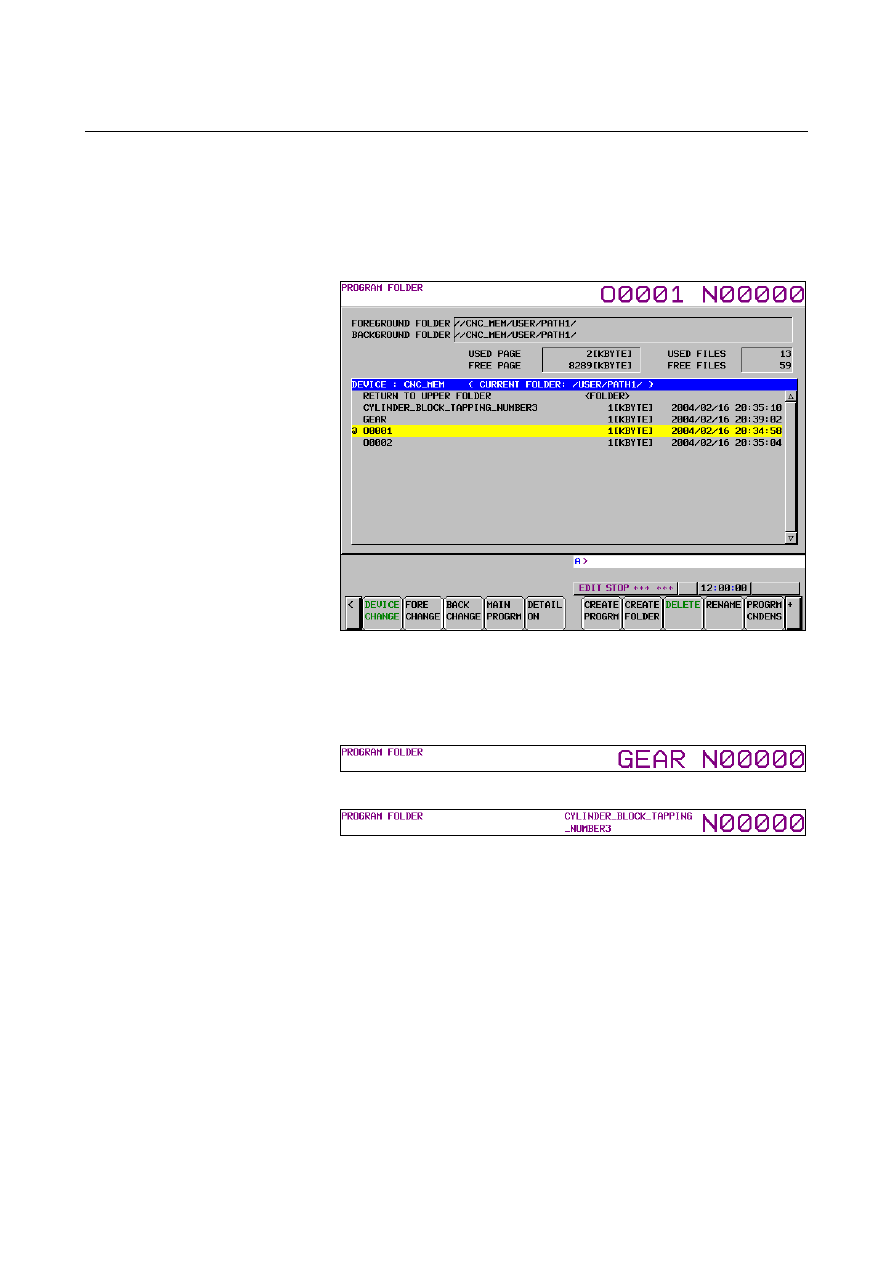
  - Displaying File Names and Program Numbers


The file name of the program selected or being executed as the main 
program is displayed as shown in Figs. 12.2.1 (a) to 12.2.2 (c). 


For file names that can be handled as program numbers, the 
program number is displayed. 


Fig. 12.2.1 (a)    File name display 1 


For file names that cannot be handled as program numbers, the 
file name is displayed. 
The display layout varies as shown below, depending on the 
length of a file name. 


Fig. 12.2.1 (b)    File name display 2 


Fig. 12.2.1 (c)    File name display 3 


B-63944EN/03

 PROGRAMMING 

12.PROGRAM MANAGEMENT


- 325 - 

12.2.2 

File Attributes 


The following attributes can be set for files: 

 Edit 

disable 

 Edit/display 

disable 

 Encoding 


Change protection level/output protection level 


 - Edit disable 

Editing of a specified program can be disabled. 
A program cannot be input (registered) from an external device to the 
folder. 
 

 - Edit/display disable 

Editing and display of a specified program can be disabled. 
When this attribute is set, the program becomes invisible. 
(The folder appears not to contain this program.) 
An output to an external device and an input from an external device 
(program registration) cannot be made. 
 

 - Encoding 

A specified program can be encoded. 
For details of encoding, see the description of the “Program 
encryption” function. 
An output to an external device and an input from an external device 
(program registration) cannot be made. 
 

  - Change protection level/output protection level 

With the 8-level data protection function, change and output 
protection can be provided for a specified program. 
For details of the 8-level data protection function, see the description 
of the “Protection of data at eight levels” function. 
 

12.PROGRAM MANAGEMENT

 PROGRAMMING 

B-63944EN/03


- 326 - 

12.3 

RELATION WITH CONVENTIONAL FUNCTIONS 

 
This section explains relation with conventional functions when folder 
names and file names are used. 
 

12.3.1 

Relation with Folders 

 
This subsection explains how folders are used for operations and 
editing. 
 

 - Automatic operation 
 Main 

program 

As the main program running for an automatic operation, a program in 
a desired folder can be selected. 
 

  Subprogram (called by M98/G72.1/G72.2) 
  Macro program (called by G65/G66/G66.1/M96) 


Subprogram call (M98) 


Macro call (simple call G65/modal call G66, G66.1) 


Macro interrupt (M96) 


Figure copying (G72.1, G72.2) 

When a call listed above is made, folders are searched in the following 
order, and the program found first is called: 
<1>  Folders containing the main program 
<2>  Common program folder, which is an initial folder (LIBRARY) 


Bit 7 (SCF) of parameter No. 3457 can be used to add the following 
search folders.    (The folders are searched in the order listed below.)   
The folder to be actually enabled is separately set by bits 1 to 3 of 
parameters No. 3457. 
<3>  MTB dedicated folder 2, which is an initial folder (MTB2) 
<4>  MTB dedicated folder 1, which is an initial folder (MTB1) 
<5>  System folder, which is an initial folder (SYSTEM) 


  Subprogram (called by M code/specific address/2nd auxiliary function) 
  Macro program (called by G code/M code/T code/one touch macro) 

  Subprogram call by M code/specific address/2nd auxiliary 

function code 


Macro call by G code/M code/T code 


One touch macro call 

For programs called as listed above, the folders to be searched are set 
in bits 0 to 3 of parameter No.3457 in advance.    (The search order is 
described below.) 
The folders set as the search targets are searched, and the program 
found first is called. 
<1>  Common program folder, which is an initial folder (LIBRARY) 
<2>  MTB dedicated folder 2, which is an initial folder (MTB2) 
<3>  MTB dedicated folder 1, which is an initial folder (MTB1) 
<4>  System folder, which is an initial folder (SYSTEM) 

B-63944EN/03

 PROGRAMMING 

12.PROGRAM MANAGEMENT


- 327 - 


 - Program editing 

A program in any folder can be edited. 
 

 - Program I/O 

The following functions are performed for default folders: 


Program input from external devices 


Program output to external devices 


(Except the format with folder names) 


The following functions are performed for a set background default 
folder: 


External I/O device control 


  - External data input 

A set foreground default folder is searched for an external program. 
 

  - External workpiece number search 

A set foreground default folder is searched for an external workpiece 
number. 
 

 - Macro executor 

Programs called by execution macros, conversational macros, and 
auxiliary macros are programs in P-Code files regardless of the default 
folder. 
For programs on the macro executor, the folder function and file name 
function are unavailable. 


12.PROGRAM MANAGEMENT

 PROGRAMMING 

B-63944EN/03


- 328 - 

12.3.2 

Relation with File Names 

 
File names can be used with the following functions: 


Subprogram call (M98) 


Macro call (simple call G65/modal call G66, G66.1) 


Interruption type macro call (M96) 


Subprogram call in figure copying (G72.1, G72.2) 


Program I/O with external devices 


  - Subprogram call by file name 
  - Macro call by file name 


Subprogram call (M98) 


Macro call (G65/G66/G66.1) 


Interruption type macro call (M96) 


Figure copying (G72.1, G72.2) 

When a program is called in the above functions, a subprogram call by 
file name and a macro call by file name can be used. 


Subprogram call by file name 
 

    M98 <file-name> Lxx ; 


Macro call by file name 
 

    G65 <file-name> Lxx argument-specification ; 


    G66 <file-name> Lxx argument-specification ; 


    G66.1 <file-name> Lxx argument-specification ; 


Interruption type macro call 
 

  M96 <file-name> ; 


Subprogram call by file name in figure copying (G72.1, G72.2) 
 

    G72.1 <file-name> Lxx Xxx Yxx Rxx ; 


    G72.2 <file-name> Lxx Ixx Jxx ; 

 
In the above subprogram and macro calls, the program having the file 
name indicated by <file-name> is called. 
 
Format examples: 

 Subprogram 

call 


    M98 <R50> L1 ; 

 Macro 

call 


    G65 <R50> L1 A0 ; 


    G66 <R50> L1 A1 ; 


    G66.1 <R50> L1 A2 ; 


Interruption type macro call 
 

  M96 <R50> ; 


Subprogram call in figure copy 
 

    G72.1 <R50> L1 X0 Y0 R0 ; 


    G72.2 <R50> L1 I0 J0 ; 


B-63944EN/03

 PROGRAMMING 

12.PROGRAM MANAGEMENT


- 329 - 

NOTE 

1  When characters in <> are read, they are treated in 

the same way as for characters in comments.    So, 
note that these characters are treated differently 
from other significant information portions. 


Refer to Appendix B “PROGRAM CODE LIST” for 
details. 

2  The <file-name> word must be placed immediately 

after each word for calling (M98, G65, and so forth).


12.3.3 

Related Parameters 

 
This subsection lists the meanings of parameters related to program 
numbers and the folders and programs to be manipulated or executed. 
 

Parameter 

No. 

Bit No. 

Description 

Manipulation/execution target 

0 (NE8) 

Disables or enables editing of programs O8000 
to O8999. 

Corresponding programs in all folders

3202 

4 (NE9) 

Disables or enables editing of programs O9000 
to O9999. 

Same as above 

3 (P8E) 

Disables or enables editing of programs 
O80000000 to O8999999. 

Same as above 

4 (P9E) 

Disables or enables editing of programs 
O90000000 to O99999999. 

Same as above 

3204 

5 (SPR) 

Assumes or does not assume a particular 
program number in the nine thousands to be a 
number obtained by adding 90000000. 

Same as above 

3210/3211 - 

Password/keyword for protecting programs in the 
nine thousands 

Same as above 

3222/3223 - 

Program protection range (minimum 
value)/(maximum value) 

Same as above 

3404 2 

(SBP) 

In the subprogram call function, address P in the 
M198 block specifies a file/program number. 

(Not dependent on the folder function 
and file name function) 

6001 

5 (TCS) 

Calls or does not call a custom macro by T code.

The following initial folders can be 
selected by parameter setting: 
- Common program folder (LIBRARY)
- MTB dedicated folder 2 (MTB2) 
- MTB dedicated folder 1 (MTB1) 
- System folder (SYSTEM) 

6050 to 6059 

G code for calling a custom macro with program 
No. 9010 to 9019 

Same as above 

6071 to 6079 

M code for calling a subprogram with program 
No. 9001 to 9009 

Same as above 

6080 to 6089 

M code for calling a custom macro with program 
No. 9020 to 9029 

Same as above 

6090/6091 - 

ASCII code for calling a subprogram with 
program No. 9004/9005 

Same as above 

8341/8343 - 

Target program number (for 4- and 8-digit O 
number) for sequence number comparison and 
stop 

Foreground or background default 
folder depending on the mode 


12.PROGRAM MANAGEMENT

 PROGRAMMING 

B-63944EN/03


- 330 - 

12.3.4 

Part Program Storage Size / Number of Registerable 

Programs


The following table lists the combinations of program storage sizes 
and the total number of registrable programs. 

Part 

program 

storage size

Number of 

registerable 

programs 

Number of 

registerable 

programs 

expansion 1 

Number of 

registerable 

programs 

expansion 2  *2 

32Kbyte *1 

63 

64Kbyte 63 

125 

128Kbyte 63 

250 

256Kbyte 63 

500 

512Kbyte 63 

1000 

1Mbyte 63 

1000 

2000 

2Mbyte 63 

1000 

4000 

4Mbyte *2 

63 

1000 

4000 

8Mbyte *2 

63 

1000 

4000 

*1)  For Series 32

i

-A only 

*2)  For Series 30

i

/31

i

-A, For Series 31

i

-A5 only 


NOTE 

1  Creating one folder results in the number of 

programs yet to be registerable decreasing one. 

2  The program storage size means the maximum 

size of a program if the program is the one and 
only program registered. 

3  If more than one program is registered, the total 

size of registerable programs reduces for the 
following reason. 
The Series 30

i

/31

i

/32

i

-A and Series 31

i

-A5 

manage programs in page units.    The unit of 
program storage is managed also in page units.   
When a program is created, as many pages as 
necessary to store the program are secured, and 
the program is stored on these pages.  Generally, 
the last program storage page has an unused area 
(left figure).    This unused area cannot be used to 
store any other program.    For the sake of program 
management, it is regarded as an area in use. 
The Series 16

i

/18

i

/21

i

 uses a similar way of 

management, but the unit of pages in it differs from 
that in the Series 30

i

/31

i

/32

i

-A and FS31

i

-A5.  So, 

if more than one program is registered in the Series 
30

i

/31

i

/32

i

-A or FS31

i

-A5, the total program size of 

registerable programs in the Series 30

i

/31

i

/32

i

-A or 

Series 31

i

-A5 differs from that in the Series 

16

i

/18

i

/21

i


Example of creating program O0001 

O0001 ; 

N1 G01  ; 

M30 ; 

First page 

Second page 

Last page 

Program O0001 

Unusable for any other 
program 

(Area in use) 

N100 … ; 

(Area in use) 

(Area in use) 

(Unused area) 

B-63944EN/03

 PROGRAMMING 

13.PROGRAM CONFIGURATION


- 331 - 

13 

PROGRAM CONFIGURATION 


Overview 
  - Main program and subprogram 

There are two program types, main program and subprogram.  
Normally, the CNC operates according to the main program.  
However, when a command calling a subprogram is encountered in 
the main program, control is passed to the subprogram. When a 
command specifying a return to the main program is encountered in a 
subprogram, control is returned to the main program. 
 

Follow the direction of the

subprogram

Main program

Subprogram

Instruction 1

Instruction 2

Instruction n

Instruction 1’
Instruction 2’

Instruction n+1

Return to the main program


Fig. 13 (a)    Main program and Subprogram 

 
The CNC memory can hold up to 4000 main programs and 
subprograms (63 as standard). A main program can be selected from 
the stored main programs to operate the machine. See III-9 or III-10.4 
for the methods of registering and selecting programs. 


Content      ..     44      45      46      47     ..