FANUC Series 30i/300i/300is-MODEL A. Machining Center System. User's manual - page 45
 

  Index      Manuals     FANUC Series 30i/300i/300is-MODEL A. Machining Center System. User's manual (B-63944EN/03)


Search            copyright infringement  


Content      ..     43      44      45      46     ..


FANUC Series 30i/300i/300is-MODEL A. Machining Center System. User's manual - page 45


11.AUXILIARY FUNCTION

 PROGRAMMING 

B-63944EN/03


- 316 - 


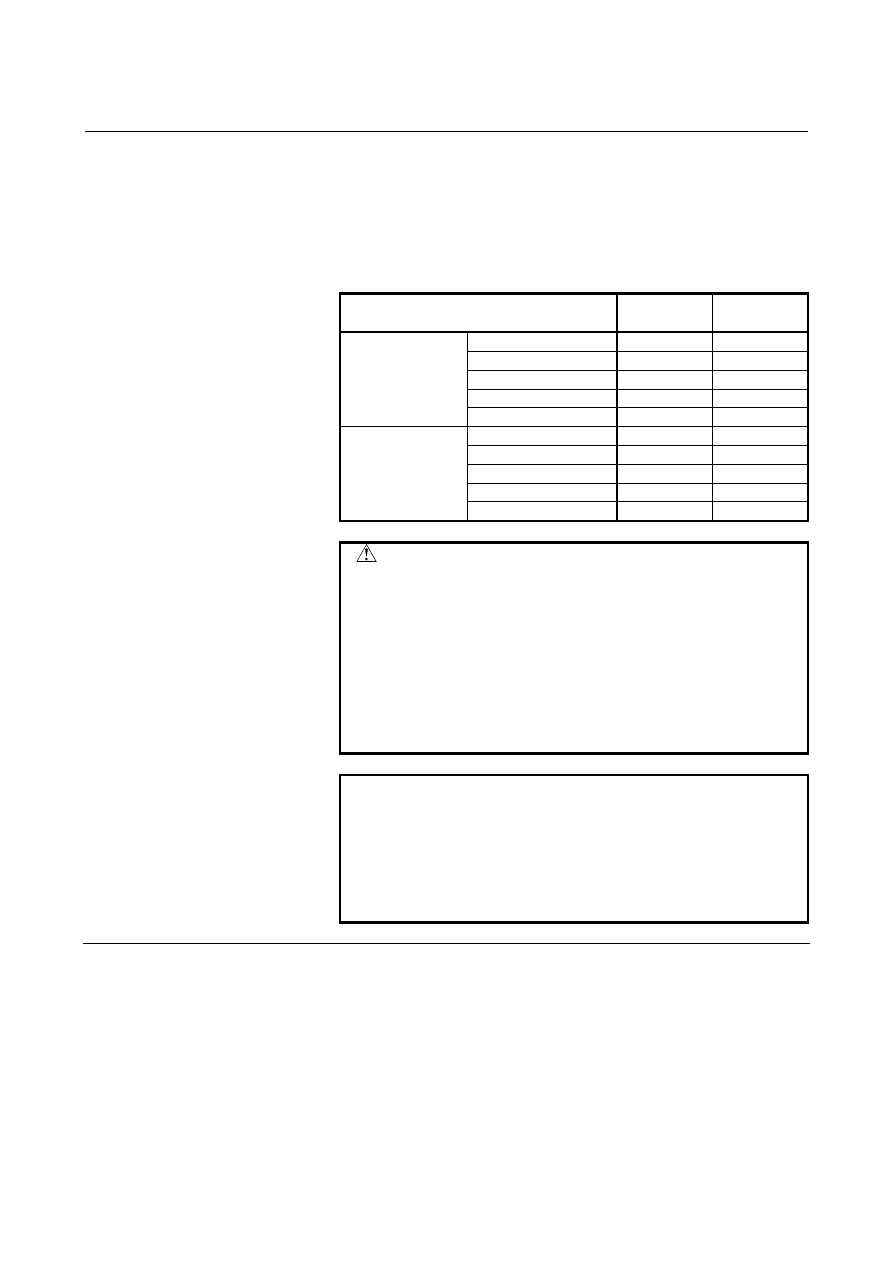
The magnification is determined as shown below according to 
the setting unit of the reference axis (specified by parameter 
No.1031) and bit 0 (AUX) of parameter No.3405. 


Table 11.4 (a)    Magnifications for an output value when the second 

auxiliary function with a decimal point is specified for 
desktop calculator decimal point input 

Setting unit 

Parameter 

AUX = 0 

Parameter 

AUX = 1 

Reference axis:  IS-A

100

×

 100

×

Reference axis:  IS-B

1000

×

 1000

×

Reference axis:  IS-C

10000

×

 10000

×

Reference axis:  IS-D

100000

×

 100000

×

Metric input system

Reference axis:  IS-E

1000000

×

 1000000

×

Reference axis:  IS-A

100

×

 1000

×

Reference axis:  IS-B

1000

×

 10000

×

Reference axis:  IS-C

10000

×

 100000

×

Reference axis:  IS-D

100000

×

 1000000

×

Inch input system 

Reference axis:  IS-E

1000000

×

 10000000

×


 CAUTION 


If a decimal fraction remains after multiplying the 
specified value with a decimal point by a magnitude 
in Table 11.4 (a), the fraction is truncated. 

 Example: 

Specified value  Output value 
B0.12345 

1234 (When inch input is used, 
the reference axis is IS-B, and 
parameter AUX is set to 1.    The 
magnification is 10000.) 


NOTE 


If the number of digits of the specified value 
exceeds the allowable number of digits (set by 
parameter No.3033), alarm PS0003 is issued. 


When the specified value is multiplied by a 
magnitude in Table 11.4 (a), the allowable number 
of digits must be set for the resultant value.   


Limitation 

Addresses used for the second auxiliary functions (addresses specified 
with B or parameter No. 3460) cannot be used as the addresses used 
for controlled axis names. 
 

B-63944EN/03

 PROGRAMMING 

12.PROGRAM MANAGEMENT


- 317 - 

12 

PROGRAM MANAGEMENT 

 
Chapter 12, "PROGRAM MANAGEMENT", consists of the 
following sections: 
 
12.1 FOLDERS ..............................................................................318 
12.2 FILES .....................................................................................323 
12.3  RELATION WITH CONVENTIONAL FUNCTIONS .........326 
 

12.PROGRAM MANAGEMENT

 PROGRAMMING 

B-63944EN/03


- 318 - 

12.1 

FOLDERS 


Overview 

Folders can be created in program memory. 
 

12.1.1 

Folder Configuration 

 
The following folders can be created: 


Folder names are up to 32 characters long. 


The following characters can be used in folder names: 
Alphabetical characters (uppercase and lowercase letters), 
numeric characters, and the symbols below: 


+

 _ . 

Because "." and ".." are reserved folder names, they cannot be 
used. 


 - Initial folders 

When program memory is initialized, folders having predefined 
structures and names are created.  These folders are called initial 
folders. 
 
(1) Root 

folder 

The parent folder of all folders 

(2) System 

folder

 (

SYSTEM

)


Contains subprograms and macro programs of the system. 

(3)  MTB dedicated folder 1 (MTB1) 

Contains subprograms and macro programs created by the 
machine tool builder. 

(4)  MTB dedicated folder 2 (MTB2) 

Contains subprograms and macro programs created by the 
machine tool builder. 

(5) User 

folder 

Contains programs created by the user. 
The following folders are further created in this folder: 
(a)  Path folders (PATHn: As many folders as the number of 

paths are created.) 
Each contains main programs, subprograms, and macro 
programs used for the corresponding path. 

(b)  Common program folder (LIBRARY) 

Contains subprograms and macro programs used 
commonly. 


NOTE 


The initial folders can neither be deleted nor 
renamed. 


B-63944EN/03

 PROGRAMMING 

12.PROGRAM MANAGEMENT


- 319 - 

 [Initial folder configuration]

SYSTEM/

//CNC_MEM

MTB1/ 

USER/ 

PATH1/ 

PATH2/ 

LIBRARY/

(1) Root folder 

(2) System folder (SYSTEM) 

(3) MTB dedicated folder 1 (MTB1)

(5) User folder 

(b) Common program folder (LIBRARY)

(a) Path folders (PATHn) 

The device that used to contain 
programs is called CNC_MEM. 

PATHn/ 

MTB2/ 

(4) MTB dedicated folder 2 (MTB2)


12.PROGRAM MANAGEMENT

 PROGRAMMING 

B-63944EN/03


- 320 - 

  - User created folders 

Folders other than the initial folders are called user created folders. 
User created folders can be created in the following initial folders: 

 User 

folder 

 Path 

folders 

User created folders can contain user created main programs, 
subprograms, and macro programs. 
 

NOTE 

1  Folder names must each be unique in the same 

folder. 

2  Each time a user created folder is created, the 

number of programs that can be registered 
decreases by one. 

3  Folder hierarchical levels of user created folders 

are limited. 
Up to three hierarchical levels starting from the 
user folder (USER/) are permitted. 


/

SYSTEM/

[Sample folder configuration]

//CNC_MEM

MTB1/

USER/

PATH1/

PATH2/

LIBRARY/

User created folders
Programs are grouped by
part to be machined, and the
program groups are stored in

individual folders.

CYLINDER/

PISTON/

GEAR1/

GEAR2/

MTB2/


B-63944EN/03

 PROGRAMMING 

12.PROGRAM MANAGEMENT


- 321 - 

12.1.2 

Folder Attributes 

 
The following attributes can be set for folders except the root folder: 

 Edit 

disable 

 Edit/display 

disable 


 - Edit disable 

Editing of the programs and folders in a folder can be disabled. 
A program in the folder can be output to an external device. 
A program cannot be input (registered) from an external device to the 
folder. 
 

 - Edit/display disable 

Editing and display of the programs and folders in a folder can be 
disabled. 
When this attribute is set for a folder, the programs and folders in the 
folder become invisible.    (The folder appears to contain nothing.) 
A program in the folder cannot be output to an external device and a 
program cannot be input (registered) from an external device to a 
folder. 
 

12.PROGRAM MANAGEMENT

 PROGRAMMING 

B-63944EN/03


- 322 - 

12.1.3 

Default Folders


Default folders are folders on which operations are performed when 
no folder is specified.  There are two types of default folders as 
follows: 


Foreground default folder 


Background default folder 


  - Foreground default folder 

A folder used for foreground operations except automatic operations 
and program editing is set. 
The target operations include: 

 Program 

input/output 


External data input 


External workpiece number search 


  - Background default folder 

A folder used for background operations is set. 
The target operations include: 

 Program 

input/output 


External I/O device control 


NOTE 

1  When the foreground or background default folder 

is not set, a path folder, which is an initial folder, is 
assumed. 

2  Foreground and background default folder settings 

are stored in default folder setting files. 

3  When a program file, program folder, or program 

folder management file is cleared, the default folder 
setting file is cleared at the same time. 


B-63944EN/03

 PROGRAMMING 

12.PROGRAM MANAGEMENT


- 323 - 

12.2 

FILES 


Overview 

Desired file names can be given to part programs in program memory. 
 

12.2.1 

File Name 


File names can be set as follows: 


File names are up to 32 characters long. 


The following characters can be used in file names: 
Alphabetical characters (uppercase and lowercase letters), 
numeric characters, and the symbols below: 


+

 _ . 

Because "." and ".." are reserved file names, they cannot be used. 


  - File names and program numbers


File names are associated with program numbers as explained below. 
When the file name of a program consists of "O" plus a numeric with 
the following limitation, the program can be handled also by program 
number. 


The numeric must be a leading zero suppressed value from 1 to 
9999. 

When the file name of a program does not have the above format, the 
program cannot be handled by program number. 
When a file name consisting of "O" plus a numeric does not satisfy the 
above limitation, the file cannot be created. 
 
Example) 
 

File names that can be treated as program numbers 

  O123 


Program 

number 

123 

  O1 


Program 

number 

  O3000 


Program 

number 

3000 

  O9999 


Program 

number 

9999 


File names that cannot be treated as program numbers 

  ABC 
  o123 
  O123.4 


NOTE 

1  File names must each be unique in the same 

folder. 

2  When the file name of a program is not treated as a 

program number, the program is restricted as 
follows: 

-  The program cannot be specified by program 

number. 

-  Information output by program number is 

impossible.. 


Content      ..     43      44      45      46     ..