FANUC Series 0i-MODEL F Plus. CONNECTION MANUAL (FUNCTION) - page 287
 

  Index      Manuals     FANUC Series 0i-MODEL F Plus. CONNECTION MANUAL (FUNCTION) B-64693EN-1/01


Search            copyright infringement  


Content      ..     285      286      287      288     ..


FANUC Series 0i-MODEL F Plus. CONNECTION MANUAL (FUNCTION) - page 287


12. PROGRAM COMMAND


B-64693EN-1/01


- 2250 - 

Program No. 

Screen 

O9509 

Program to secify character string displayed on the custom macro screen for pattern 
No.9 

O9510 

Program to secify character string displayed on the custom macro screen for pattern 
No.10 


Table 12.21 (b) Macro commands used in the pattern data input function


G code 

H code 

Function 

G65 

H90 

Specifies the menu title. 

G65 

H91 

Specifies the pattern name. 

G65 

H92 

Specifies the pattern data title. 

G65 

H93 

Specifies the variable name. 

G65 

H94 

Specifies the comment. 


Table 12.21 (c) System variables used in the pattern data input function 

System variable 

Description 

#5900 

Pattern No. selected by user. 


NOTE 


The pattern menu screen and the custom macro screen are defined only by 
preserving programs O9500 to O9510 in the above-mentioned folder, and these 
programs need not be executed. If these programs are executed, alarm 
(PS0074), “ILLEGAL PROGRAM NUMBER” is issued. 


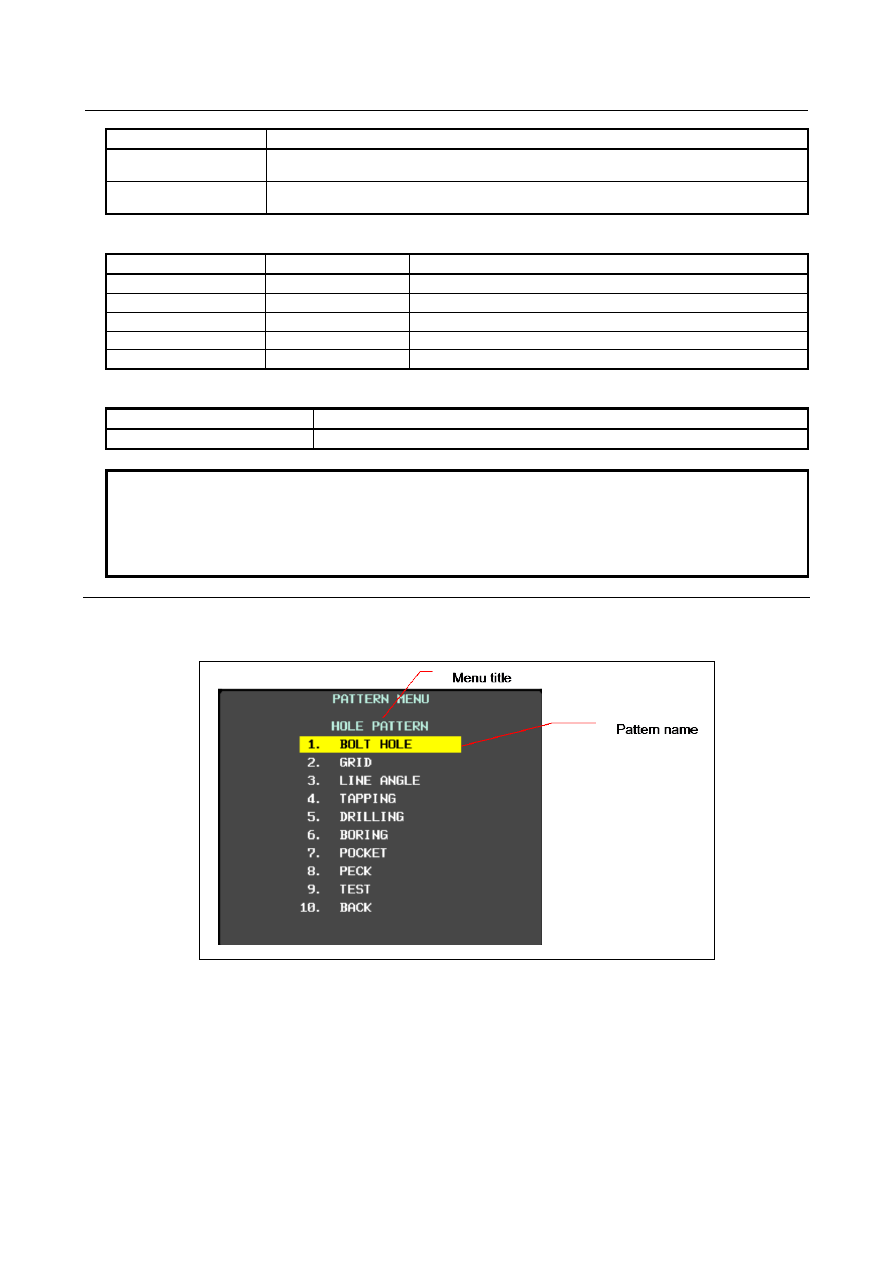
Definition of the pattern menu screen 

Menu title and pattern name are defined as follows. 


Fig. 12.21 (f) Pattern menu screen 


Definition of menu title 

The character string displayed in the menu title of the pattern menu screen is defined. 
The menu title is specified up to 12 characters in a half size letter and up to 6 characters in a full size 
letter. 
 

B-64693EN-1/01


12. PROGRAM COMMAND


- 2251 - 

  - 

Format 

G65 H90 P_ Q_ R_ I_ J_ K_ ; 

H90 

Specifies the menu title 

P_ 

The code of 1st and 2nd characters of title 

Q_ 

The code of 3rd and 4th characters of title 

R_ 

The code of 5th and 6th characters of title 

I_ 

The code of 7th and 8th characters of title 

J_ 

The code of 9th and 10th characters of title 

K_ 

The code of 11th and 12th characters of title 

As for the way of setting the character-code, refer to the Subsection, "Setting the 
Character-codes". 


Definition of pattern name 

The character string displayed in the pattern name which becomes a menu item is defined. 
The pattern name is specified up to 10 characters in a half size letter and up to 5 characters in a full size 
letter. 
 

  - 

Format 

G65 H91 P_ Q_ R_ I_ J_ K_ ; 

H91 

Specifies the pattern name 

P_ 

Specifies the menu number of the pattern name 


The menu number = 1 to 10 

Q_ 

The code of 1st and 2nd characters of pattern name 

R_ 

The code of 3rd and 4th characters of pattern name 

I_ 

The code of 5th and 6th characters of pattern name 

J_ 

The code of 7th and 8th characters of pattern name 

K_ 

The code of 9thd and 10th characters of pattern name 

As for the way of setting the character-code, refer to the Subsection, "Setting the 
Character-codes". 


Example 

The following is example for pattern menu screen. 


Fig. 12.21 (g) Pattern menu screen 


12. PROGRAM COMMAND


B-64693EN-1/01


- 2252 - 

O9500 

N1 G65 H90 P072079 Q076069 R032080 I065084 J084069 K082078; ... "HOLE PATTERN" 
N2 G65 H91 P1 Q066079 R076084 I032072 J079076 K069032; ............ "BOLT HOLE" 
N3 G65 H91 P2 Q071082 R073068; ........................................................ "GRID" 
N4 G65 H91 P3 Q076073 R078069 I032065 J078071 K076069; ............ "LINE ANGLE" 
N5 G65 H91 P4 Q084065 R080080 I073078 J071032;   .......................... "TAPPING" 
N6 G65 H91 P5 Q068082 R073076 I076073 J078071; ............................ "DORILLING" 
N7 G65 H91 P6 Q066079 R082073 I078071; .......................................... "BORING" 
N8 G65 H91 P7 Q080079 R067075 I069084; .......................................... "POCKET" 
N9 G65 H91 P8 Q080069 R067075; ........................................................ "PECK" 
N10 G65 H91 P9 Q084069 R083084; ...................................................... "TEST" 
N11 G65 H91 P10 Q066065 R067075; .................................................... "BACK" 
N12 M99; 


Definition of the custom macro screen 

The title, variable name and comment are defined as follows. 


Fig. 12.21 (h) Custom macro screen 


Definition of title 

The character string displayed in the title of the custom macro screen is defined. 
The title is specified up to 12 characters in a half size letter and up to 6 characters in a full size letter. 
 

  - 

Format 

G65 H92 P_ Q_ R_ I_ J_ K_ ; 

H92 

Specifies the menu title 


P_ 

The code of 1st and 2nd characters of the menu title 

Q_ 

The code of 3rd and 4th characters of the menu title 

R_ 

The code of 5th and 6th characters of the menu title 

I_ 

The code of 7th and 8th characters of the menu title 

J_ 

The code of 9th and 10th characters of the menu title 

K_ 

The code of 11th and 12th characters of the menu title 

As for the way of setting the character-code, refer to the Subsection, "Setting the 
Character-codes". 


B-64693EN-1/01


12. PROGRAM COMMAND


- 2253 - 

Definition of macro variable 

The character string displayed in the macro variable name is defined. 
The macro variable is specified up to 10 characters in a half size letter and up to 5 characters in a full size 
letter. 
 
The following macro variable numbers can be used: 
#100 to 199 (100 variables) 
#500 to 999 (500 variables), 600 variables in total 
 

  - 

Format 

G65 H93 P_ Q_ R_ I_ J_ K_ ; 

H93 

Specifies the variable name 

P_ 

Specifies the variable number 


Specifies 100 to 199 or 500 to 999 

Q_ 

The code of 1st and 2nd characters of the variable name 

R_ 

The code of 3rd and 4th characters of the variable name 

I_ 

The code of 5th and 6th characters of the variable name 

J_ 

The code of 7th and 8th characters of the variable name 

K_ 

The code of 9th and 10th characters of the variable name 

As for the way of setting the character-code, refer to the Subsection, "Setting the 
Character-codes". 


Definition of a comment 

The character string of the comment displayed on the custom macro screen is defined. 
The comment is specified by up to 12 characters in a half size letter and up to 6 characters in a full size 
letter per one block. 
 

When the comment is displayed at the bottom

(

bit 0 of parameter No. 11318=0

)


The number of blocks is defined up to maximum 9 blocks. 


One line is composition of 3 blocks and maximum 3 lines can be displayed. 


The comment is displayed in the order specified by program as the Fig. 12.21 (i). 


The block is arranged in defined order. 


Block 1 

Block 2 

Block 3 

Block 4 

Block 5 

Block 6 

Block 7 

Block 8 

Block 9 

Fig. 12.21 (i) Block layout of comment 


When the comment is displayed at the right (bit 0 of parameter No. 11318=1) 


1 line is composed by 1 blocks, the maximum number of lines is 8 on the 8.4-inch display unit or 12 
on the 10.4-inch display unit. 


  - 

Format 

G65 H94 P_ Q_ R_ I_ J_ K_ ; 

H94 

Specifies the comment 

P_ 

The code of 1st and 2nd characters of comment 

Q_ 

The code of 3rd and 4th characters of comment 

R_ 

The code of 5th and 6th characters of comment 

I_ 

The code of 7th and 8th characters of comment 

J_ 

The code of 9th and 10th characters of comment 

K_ 

The code of 11th and 12th characters of comment 

As for the way of setting the character-code, refer to the Subsection, "Setting the 
Character-codes". 


12. PROGRAM COMMAND


B-64693EN-1/01


- 2254 - 

Example 

The Fig. 12.21 (j) and Fig. 12.21 (k) are example of the custom macro screen. 


Fig. 12.21 (j) Custom macro screen 

(

No. 11318#0=0


Fig. 12.21 (k) Custom macro screen 

(

No. 11318#0=1


O9501; 

N1 G65 H92 P066079 Q076084 R032072 I079076 J069032; .................... "BOLT HOLE" 
N2 G65 H93 P500 Q084079 R079076; ...................................................... "TOOL" 
N3 G65 H93 P501 Q079082 R071032 I08832; .......................................... "ORG X" 
N4 G65 H93 P502 Q079082 R071032 I08932; .......................................... "ORG Y" 
N5 G65 H93 P503 Q082065 R068073 I085803; ........................................ "RADIUS" 
N6 G65 H93 P504 Q083046 R032065 I078071 J076032 ........................... "S. ANGL" 
N7 G65 H93 P505 Q072079 R076079 I083032 J078079 K046032............ "HOLES NO." 
N8 G65 H94 P032042 Q066079 R076084 I032072 J079076 K069032; ..... " *BOLT HOLE" 
N9 G65 H94 P067073 Q082067 R076069 I042032; .................................. "CIRCLE*" 
N10 G65 H94 P083069 Q084032 R080065 I084084 J069082 K078032; ... "SET PATTERN" 
N11 G65 H94 P068065 Q084065 R032084 I079032 J086065 K082046; ... "DATA NO VAR." 
N12 G65 H94 P078079 Q046053 R048048 I045053 J048053 K046032; ... "NO500-505" 
N13 M99; 


B-64693EN-1/01


12. PROGRAM COMMAND


- 2255 - 

Setting the character-codes 

The character cannot be used to specify the NC program. 
Therefore, the code corresponding to the character is specified.   
One character is consist of three figures in a half size letter and six figures in a full size letter. 
The character code is specified for each address of the G65 instruction by six digits.   
 
Refer to the table for the character code for the character code.   
Example) 
 

When "ABCDEFGH" is specified, the description of the code is as follows. 


Encoded character string : 065 066 067 068 069 070 071 072 

        P065066  Q067068  R069070  I071072 ; 
           AB      CD       EF      GH 
 

NOTE


1  Space (032) is added ahead of the character-code, when the character-code of 

three digits or less is specified. 


Example) 


  P065066 Q067; 

 " AB    C " 


  032(space) is put at the end, when "ABC" is displayed. 


  P065066 Q067032; 

 " ABC " 

2  It is assumed in that the space of two characters was defined in the address 

when there is an address not defined. 


Example) 


  P065066 I067068; 

 "AB    CD" 

3  The character string corresponding to the block where G code other than G65 is 

instructed or where undefined character code is specified is not displayed. 


Characters and codes to be used for the pattern data input function 

Character 

Code 

Comment 

Character 

Code 

Comment 

065 


054 


066 


055 


067 


056 


068 


057 


069 


032 

Space 

070 


033 

Exclamation mark 

071 


” 

034 

Quotation mark 

072 


035 

Hash sign 

073 


036 

Dollar sign 

074 


037 

Percent 

075 


038 

Ampersand 

076 


’ 

039 

Apostrophe 

077 


042 

Asterisk 

078 


043 

Plus sign 

079 


044 

Comma 

080 


045 

Minus sign 

081 


046 

Period 

082 


047 

Slash 

083 


058 

Colon 

084 


059 

Semicolon 

085 


060 

Left angle bracket 

086 


061 

Equal sign 

087 


062 

Right angle bracket 

088 


063 

Question mark 

12. PROGRAM COMMAND


B-64693EN-1/01


- 2256 - 

Character 

Code 

Comment 

Character 

Code 

Comment 

089 


064 

At mark 

090 


091 

Left square bracket 

048 


¥ 

092 

Yen sign 

049 


093 

Right square bracket 

050 


094 


051 


095 

Underscore 

052 


053 


The characters and the codes of the katakana is as follows. 

Character 

Code 

Comment 

Character 

Code 

Comment 


177 


209 


178 


210 


179 


211 


180 


212 


181 


213 


182 


214 


183 


215 


184 


216 


185 


217 


186 


218 


187 


219 


188 


220 


189 


166 


190 


221 


191 


167 


192 


168 


193 


169 


194 


170 


195 


171 


196 


172 


197 


173 


198 


174 


199 


175 


200 


222 

voiced dot 


201 


°


223 

semi-voiced dot 


202 


161 

Punctuation 


203 


162 

Left quotation mark 


204 


163 

Right quotation mark 


205 


164 

Comma 


206 


165 

Point 


207 


000 

Space 


208 


NOTE 

Diacritical mark is one character. 

 
The characters and the codes of the hiragana and the kanji  are as follows. The following hiraganas and 
kanjis use two characters of the alphanumeric character. 
 

B-64693EN-1/01


12. PROGRAM COMMAND


- 2257 - 


002 000 

002 002 

002 004 

002 006 

002 008 

002 010 

002 012 

002 014 

002 016 

002 018 


002 020 

002 022 

002 024 

002 026 

002 028 

002 030 

002 032 

002 034 

002 036 

002 038 


002 040 

002 042 

002 044 

002 046 

002 048 

002 050 

002 052 

002 054 

002 056 

002 058 


002 060 

002 062 

002 064 

002 066 

002 068 

002 070 

002 072 

002 074 

002 076 

002 078 


002 080 

002 082 

002 084 

002 086 

002 088 

002 090 

002 092 

002 094 

002 096 

002 098 


002 100 

002 102 

002 104 

002 106 

002 108 

002 110 

002 112 

002 114 

002 116 

002 118 


002 120 

002 122 

002 124 

002 126 

002 128 

002 130 

002 132 

002 134 

002 136 

002 138 


002 140 

002 142 

002 144 

002 146 

002 148 

002 150 

002 152 

002 154 

002 156 

002 158 


002 160 

002 162 

002 164 

002 166 

002 168 

002 170 

002 172 

002 174 

002 176 

002 178 


002 180 

002 182 

002 184 

002 186 

002 188 

002 190 

002 192 

002 194 

002 196 

002 198 


002 200 

002 202 

002 204 

002 206 

002 208 

002 210 

002 212 

002 214 

002 216 

002 218 


002 220 

002 222 

002 224 

002 226 

002 228 

002 230 

002 232 

002 234 

002 236 

002 238 


002 240 

002 242 

002 244 

002 246 

002 248 

002 250 

002 252 

002 254 


003 000 

003 002 

003 004 

003 006 

003 008 

003 010 

003 012 

003 014 

003 016 

003 018 


003 020 

003 022 

003 024 

003 026 

003 028 

003 030 

003 032 

003 034 

003 036 

003 038 


003 040 

003 042 

003 044 

003 046 

003 048 

003 050 

003 052 

003 054 

003 056 

003 058 


003 060 

003 062 

003 064 

003 066 

003 068 

003 070 

003 072 

003 074 

003 076 

003 078 


使


寿


003 080 

003 082 

003 084 

003 086 

003 088 

003 090 

003 092 

003 094 

003 096 

003 098 


003 100 

003 102 

003 104 

003 106 

003 108 

003 110 

003 112 

003 114 

003 116 

003 118 


003 120 

003 122 

003 124 

003 126 

003 128 

003 130 

003 132 

003 134 

003 136 

003 138 


003 140 

003 142 

003 144 

003 146 

003 148 

003 150 

003 152 

003 154 

003 156 

003 158 


003 160 

003 162 

003 164 

003 166 

003 168 

003 170 

003 172 

003 174 

003 176 

003 178 


003 180 

003 182 

003 184 

003 186 

003 188 

003 190 

003 192 

003 194 

003 196 

003 198 


003 200 

003 202 

003 204 

003 206 

003 208 

003 210 

003 212 

003 214 

003 216 

003 218 


003 220 

003 222 

003 224 

003 226 

003 228 

003 230 

003 232 

003 234 

003 236 

003 238 


003 240 

003 242 

003 244 

003 246 

003 248 

003 250 

003 252 

003 254 


Content      ..     285      286      287      288     ..