Scion Q EV. Service Manual - part 26
 

  Index      Manuals     Scion Q EV. Service Manual


Search            copyright infringement  


Content      ..     24      25      26     


Scion Q EV. Service Manual - part 26


415

9-2. Customization

9

Ve
hicle

 spe

c

ifi

c

ations

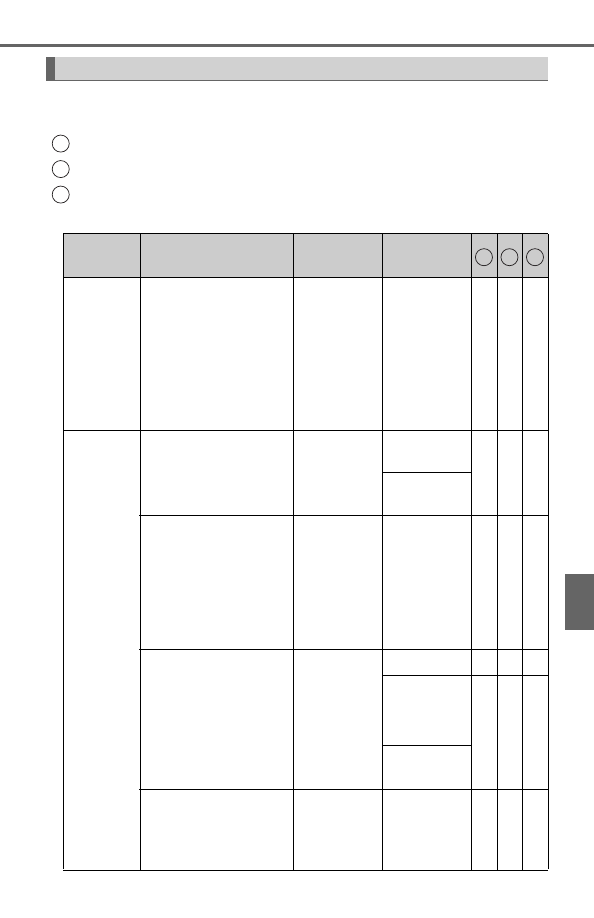
Some function settings are changed simultaneously with other func-
tions being customized. Contact your Scion dealer for further details.

Settings that can be changed using the navigation system

Settings that can be changed using the multi-information display

Settings that can be changed by your Scion dealer

Definition of symbols: O = Available, — = Not available

Customizable features

1
2
3

Item

Function

Default

setting

Customized 

setting

Door lock
(

P. 132, 

384)

“Unlock on Second
Key Turn” 
(Allows all doors to be
unlocked by turning
the mechanical key
twice in the driver’s
door)

On

(Driver’s 

door 

unlocked in 

one step, all 

doors 

unlocked in 

two steps)

Off

(All doors 

unlocked in 

one step)

O — O

Smart key 
system
(

P. 120) 

and 
wireless
remote 
control
(

P. 130)

“Lock/Unlock Feed-
back-Tone” 
(Adjust the volume of
buzzer sounds)

7

Off

O — O

1 to 7

“Lock/Unlock Feed-
back-Lights” 
(Enable/disable the
operation of the emer-
gency flashers when
the vehicle is locked
or unlocked)

On

Off

O — O

“Auto Relock Timer” 
(Adjust the time
elapsed before the
automatic door lock
function is activated if
a door is not opened
after being unlocked)

60 

seconds

Off

— — O

30 

seconds

O — O

120 

seconds

Open door reminder
buzzer 
(When locking the
vehicle)

On

Off

— — O

1 2 3

-------------------------------------------------------------------------------------------------------------------------------------------------------------

416

9-2. Customization

Smart key 
system
(

P. 120)

“Key System with
Elec. Key” 
(Smart key system
can be disabled)

On

Off

O — O

“Select Doors to
Unlock” 
(The doors that are
unlocked using the
smart key system can
be selected)

Driver’s door All the doors O — O

Number of permissi-
ble times of continu-
ous smart lock

Twice

Unlimited

— — O

Wireless
remote 
control
(

P. 130)

Wireless remote con-
trol

On

Off

— — O

“Remote 2-Press
Unlock” 
(Allows all doors to be
unlocked by pressing

 on the elec-

tronic key twice)

On (Driver’s 

door 

unlocked in 

one step, all 

doors 

unlocked in 

two steps)

Off

(All doors 

unlocked in 

one step)

O — O

Alarm (panic mode)

On

Off

— — O

Auto-
matic light
control
system
(

P. 176)

“Headlamps-On Sen-
sitivity” 
(Adjust the sensitivity
of the ambient light
sensor)

Standard

-2 to 2

O — O

“Headlamps Auto-Off
Timer” 
(Adjust the time
elapsed before the
headlights automati-
cally turn off)

30 

seconds

Off

O — O

60 

seconds

90 

seconds

Item

Function

Default

setting

Customized 

setting

1 2 3

-------------------------------------------------------------------------------------------------------------------------------------------------------------

417

9-2. Customization

9

Ve
hicle

 spe

c

ifi

c

ations

Illumina-
tion
(

P. 234)

Interior lights illumina-
tion control

On

Off

— — O

“Interior Lights Off
Timer” 
(Time elapsed before
the interior lights turn
off)

15 

seconds

7.5 

seconds

O — —

30 

seconds

Operation after the
power switch turned
off

On

Off

— — O

Operation when the
doors are unlocked

On

Off

— — O

Operation when you
approach the vehicle
with the electronic key
on your person

On

Off

— — O

Meter and 
instru-
ment
panel
(

P. 105)

Sensor sensitivity for
darkening the bright-
ness of the meter,
navigation system
and instrument panel
depending on the out-
side brightness

0

-2 to +2

— O

O

Sensor sensitivity for
returning the bright-
ness of the meter,
navigation system
and instrument panel
to the original level
depending on the out-
side brightness

0

-2 to +2

— O

O

Item

Function

Default

setting

Customized 

setting

1 2 3

-------------------------------------------------------------------------------------------------------------------------------------------------------------

418

9-2. Customization

Remote
Climate
Control
System 
for EV 
(

P. 228)

Operation using the
“A/C” button on the
wireless remote con-
trol

Push and 

hold for 0.8 

seconds

Push once

— — O

Push twice

Push and 

hold for 2.4 

seconds

Off

Stopping the opera-
tion using the “A/C”
button on the wire-
less remote control

Push twice

Push once

— — O

Push and 

hold for 0.8 

seconds

Push and 

hold for 2.4 

seconds

Off

Multi-infor-
mation
display 
(

P. 108)

Eco Driving Indicator
Light

On 

(Automatic 

lighting)

Off

— O

O

Ambient light

“ECO 

STATUS”

“BLUE”

— O

O

“GREEN”

“RED”

“OFF”

Seat Belt 
Reminder
Buzzer
(

P. 337)

Vehicle speed linked
seat belt reminder
buzzer

On

Off

— — O

Item

Function

Default

setting

Customized 

setting

1 2 3

-------------------------------------------------------------------------------------------------------------------------------------------------------------

419

9-2. Customization

9

Ve
hicle

 spe

c

ifi

c

ations

Vehicle customization

When the smart key system is off, the “Select Doors to Unlock” cannot be
customized.

When the doors remain closed after unlocking the doors and the “Auto
Relock Timer” activates, the signals will be generated in accordance with
the “Lock/Unlock Feedback-Tone” and the “Lock/Unlock Feedback-Lights”
settings.

When customizing using the multi-information display

Stop the vehicle in a safe place, apply the parking brake, and shift the shift
lever to P.
Also, to prevent 12-volt battery discharge, leave the EV system operating
while customizing the features.

NOTICE

During customization

To prevent 12-volt battery discharge, ensure that the EV system is operating
while customizing features.

-------------------------------------------------------------------------------------------------------------------------------------------------------------

420

9-3. Items to initialize

Items to initialize

The following items must be initialized for normal system opera-
tion after such cases as the 12-volt battery being reconnected,
or maintenance being performed on the vehicle:

Item

When to initialize

Reference

Tire pressure warning sys-
tem

When rotating the tires on
vehicles with differing front and
rear tire inflation pressures

P. 286

-------------------------------------------------------------------------------------------------------------------------------------------------------------

421

10

For owners

Reporting safety defects 

for U.S. owners........................ 422

-------------------------------------------------------------------------------------------------------------------------------------------------------------

422

Reporting safety defects for U.S. owners

If you believe that your vehicle has a defect which could cause a
crash or could cause injury or death, you should immediately
inform the National Highway Traffic Safety Administration
(NHTSA) in addition to notifying Scion, a marque of Toyota Motor
Sales, U.S.A., Inc. (Toll-free: 1-866-707-2466).

If NHTSA receives similar complaints, it may open an investiga-
tion, and if it finds that a safety defect exists in a group of vehicles,
it may order a recall and remedy campaign. However, NHTSA can-
not become involved in individual problems between you, your
dealer, or Scion, a marque of Toyota Motor Sales, U.S.A., Inc.

To contact NHTSA, you may call the Vehicle Safety Hotline toll-free at 
1-888-327-4236 (TTY: 1-800-424-9153); go to http://www.safercar.gov;
or write to: Administrator, NHTSA, 1200 New Jersey Ave, S.E.,
Washington, DC 20590. You can also obtain other information about
motor vehicle safety from http://www.safercar.gov.

-------------------------------------------------------------------------------------------------------------------------------------------------------------

423

Index

What to do if... 

(Troubleshooting) .................... 424

Alphabetical index ..................... 428

Refer to the “Navigation System Owner’s Manual” for infor-
mation regarding the equipment listed below.

• Navigation system
• Audio/video system
• Hands-free system for cellular phone

-------------------------------------------------------------------------------------------------------------------------------------------------------------

424

What to do if... (Troubleshooting)

What to do if... (Troubleshooting)

If you lose your mechanical keys, new genuine mechanical keys
can be made by your Scion dealer. (

P. 118)

If you lose your electronic keys, the risk of vehicle theft increases
significantly. Contact your Scion dealer immediately. (

P. 119)

Is the electronic key battery weak or depleted? (

P. 299)

Is the power switch in ON mode? 
When locking the doors, turn the power switch off. (

P. 166)

Is the electronic key left inside the vehicle? 
When locking the doors, make sure that you have the electronic
key on your person.

The function may not operate properly due to the condition of the
radio wave. (

P. 125)

If you have a problem, check the following before contacting
your Scion dealer.

The doors cannot be locked, unlocked, opened or closed

You lose your keys

The doors cannot be locked or unlocked

-------------------------------------------------------------------------------------------------------------------------------------------------------------

425

What to do if... (Troubleshooting)

Is the charging cable attached to the vehicle? (

P. 188)

Did you press the power switch while firmly depressing the brake
pedal? (

P. 165)

Is the shift lever in P? (

P. 168)

Is the electronic key anywhere detectable inside the vehicle? 
(

P. 123)

Is the steering wheel unlocked? (

P. 168)

Is the electronic key battery weak or depleted? 
In this case, the EV system can be started in a temporary way.
(

P. 384)

Is the 12-volt battery discharged? (

P. 386)

Is the power switch in ON mode?
If you cannot release the shift lever by depressing the brake pedal
with the power switch in ON mode. (

P. 383)

It is locked automatically to prevent theft of the vehicle. (

P. 168)

If you think something is wrong

The EV system does not start

The shift lever cannot be shifted from P even if you
depress the brake pedal

The steering wheel cannot be turned after the EV system
is stopped

-------------------------------------------------------------------------------------------------------------------------------------------------------------

426

What to do if... (Troubleshooting)

Is the window lock switch pressed? 
The power window except for the one at the driver’s seat cannot
be operated if the window lock switch is pressed. (

P. 147)

The auto power off function will be operated if the vehicle is left in
ACCESSORY or ON mode (the EV system is not operating) for a
period of time. (

P. 167)

The seat belt reminder light is flashing
Are the driver and the front passenger wearing the seat belts?
(

P. 337338)

The parking brake indicator is on
Is the parking brake released? (

P. 174)

Depending on the situation, other types of warning buzzer may
also sound. (

P. 335, 344)

Is the message displayed on the multi-information display?
Check the message on the multi-information display. (

P. 344)

The windows do not open or close by operating the power
window switches

The power switch is turned off automatically

A warning buzzer sounds during driving

A warning buzzer sounds when leaving the vehicle

-------------------------------------------------------------------------------------------------------------------------------------------------------------

427

What to do if... (Troubleshooting)

When a warning light turns on or a warning message is displayed,
refer to P. 335, 344.

Stop the vehicle in a safe place and repair the flat tire temporarily
with the emergency tire puncture repair kit. (

P. 359)

Try the procedure for when the vehicle becomes stuck in mud, dirt,
or snow. (

P. 393)

A warning light turns on or a warning message is dis-
played

When a problem has occurred

If you have a flat tire

The vehicle becomes stuck

-------------------------------------------------------------------------------------------------------------------------------------------------------------

428

Alphabetical index

Alphabetical index

A/C ............................................ 220

Air conditioning filter ............. 297
HWD (Heated Windshield 

Defroster) ........................... 233

Remote Climate Control 

System for EV .................... 228

ABS (Anti-lock Brake 

System) .................................. 210

Function ................................ 210
Warning light......................... 336

Air conditioning filter .............. 297
Air conditioning system.......... 220

Air conditioning filter ............. 297
HWD (Heated Windshield 

Defroster) ........................... 233

Remote Climate Control 

System for EV .................... 228

Airbags ....................................... 32

Airbag operating conditions .... 40
Airbag precautions 

for your child......................... 35

Airbag warning light .............. 336
Correct driving posture ........... 24
Curtain shield airbag 

operating conditions ............. 40

Curtain shield airbag 

precautions........................... 35

Front passenger occupant 

classification system............. 45

General airbag precautions .... 35
Locations of airbags................ 32
Modification and disposal 

of airbags.............................. 39

Rear window curtain 

shield airbag operating 
conditions ............................. 40

Rear window curtain 

shield airbag 
precautions........................... 35

Side airbag operating 

conditions ............................. 40

Side airbag precautions.......... 35
Side and curtain shield airbags 

operating conditions ............. 40

Side and curtain shield airbags 

precautions........................... 35

SRS airbags ........................... 32

ALR (Automatic locking 

retractor) .................................. 28

Anchor brackets ........................ 57
Antennas (smart key 

system) .................................. 122

Anti-lock Brake System 

(ABS) ...................................... 210

Function................................ 210
Warning light......................... 336

Assist grips.............................. 246
Audio input

*

Audio switches

*

Audio system

*

Automatic light control 

system.................................... 176

Automatic locking 

retractor (ALR) ........................ 28

AUX port

*

Average power 

consumption ......................... 109

Average vehicle speed............ 109

A

-------------------------------------------------------------------------------------------------------------------------------------------------------------

429

Alphabetical index

Back-up lights

Replacing light bulbs............. 323
Wattage ................................ 401

Back door ................................. 134
Battery (12-volt battery) .......... 281

If the 12-volt battery is 

discharged.......................... 386

Location .................................. 72
Preparing and checking 

before winter....................... 215

Warning light......................... 336

Battery (traction battery)........... 72

Charging ....................... 181, 195
Location .................................. 72
Traction battery 

precautions........................... 83

Warning light......................... 337
Warning message................. 348

Bluetooth

®

 audio

*

Bottle holders .......................... 237
Brake

Fluid .............................. 279, 399
Parking brake........................ 174
Regenerative braking.............. 75
Warning buzzer..................... 335
Warning light................. 335, 336
Warning message................. 344

Brake assist ............................. 210

Function ................................ 210
Warning light......................... 336

Brake fluid ........................ 279, 399
Break-in tips............................. 151
Brightness control

Instrument panel light 

control................................. 106

Care .................................. 248, 251

Aluminum wheels ................. 249
Exterior ................................. 248
Interior .................................. 251
Seat belts.............................. 252

Cargo capacity......................... 162
Caution label.............................. 79
CD player

*

Chains ...................................... 216
Charging

After charge .......................... 109
Battery charger ....................... 79
Charging cable ....................... 85
Charging equipment ............... 84
Charging indicator .................. 84
Charging methods .................. 91
Charging precautions ... 192200
Charging station 

information ......................... 444

Displays shown on 

the multi-information 
display ................ 186, 198, 205

If charging cannot be done ... 377
Inspecting the charging 

cable................................... 262

Normal charging ................... 181
Plug-in indicator.................... 337
Power sources precautions .... 90
Power sources that can 

be used ................................ 88

Quick charging...................... 195
Recharge inlet door 

(charging port lid) ................. 84

Recharge inlet door 

opener switch ............. 181195

Safety functions ...................... 86
Timer charging...................... 202
Warning message................. 355

B

C

*

: Refer to the “Navigation System Owner’s Manual”.

-------------------------------------------------------------------------------------------------------------------------------------------------------------

430

Alphabetical index

Child restraint system............... 52

Booster seats, definition ......... 52
Booster seats, installation....... 57
Convertible seats, definition.... 52
Convertible seats, 

installation ............................ 57

Front passenger occupant 

classification system............. 45

Infant seats, definition............. 52
Infant seats, installation .......... 57
Installing CRS 

with LATCH anchors ............ 58

Installing CRS with seat 

belts...................................... 59

Installing CRS 

with top tether strap.............. 63

Child safety ................................ 51

12-volt battery 

precautions................. 282, 389

Airbag precautions.................. 35
Back door precautions .......... 135
Child restraint system ............. 52
How your child should 

wear the seat belt ................. 28

Installing child restraints ......... 57
Power window lock switch .... 147
Power window precautions ... 148
Removed electronic 

key battery precautions ...... 300

Seat belt precautions .............. 29
Seat heater precautions........ 245

Cleaning ........................... 248, 251

Aluminum wheels ................. 249
Exterior ................................. 248
Interior .................................. 251
Seat belts.............................. 252

Clock......................................... 112
Condenser................................ 279
Coolant ..................................... 278

Capacity................................ 398
Checking............................... 278
Preparing and checking 

before winter ...................... 215

Cooling system

Capacity................................ 398
EV system overheating......... 390

Cup holders ............................. 237
Current power 

consumption ......................... 109

Curtain shield airbags............... 32
Customizable features ............ 414

-------------------------------------------------------------------------------------------------------------------------------------------------------------


Content      ..     24      25      26