Lancia VOYAGER. Service Manual - part 1
 

  Index      Manuals     Lancia VOYAGER. Service Manual


Search            copyright infringement  


Content      ..       1      2      ..


Lancia VOYAGER. Service Manual - part 1


A WORD ABOUT YOUR
KEYS

Your vehicle is equipped with a key-
less ignition system. This system con-
sists of a Key Fob with Remote Key-
less Entry (RKE) transmitter and a
Wireless Ignition Node (WIN) with
integral ignition switch. You can in-
sert the Key Fob into the ignition
switch with either side up.

Keyless Enter-N-Go™ Feature for
(versions/markets where provided)

This vehicle may be equipped with
the Keyless Enter-N-Go™ feature, re-
fer to Starting Procedures in Starting
And Operating for further informa-
tion.

IGNITION NODE MODULE
(IGNM) — (for
versions/markets where
provided)

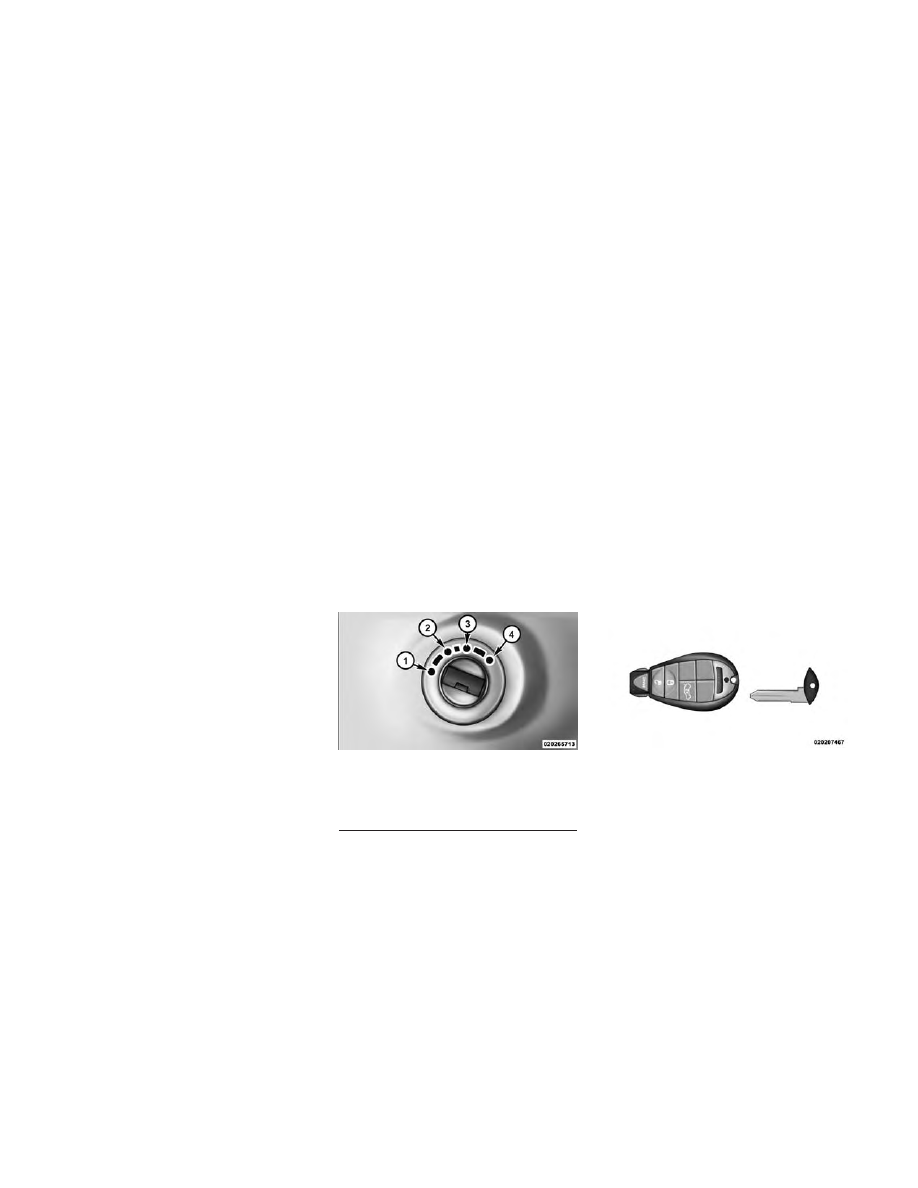
The Ignition Node Module (IGNM) op-
erates similar to an ignition switch. It
has four operating positions, three with
detents and one that is spring-loaded.
The detent positions are OFF, ACC,

and ON/RUN. The START position is a
spring-loaded momentary contact po-
sition. When released from the START
position, the switch automatically re-
turns to the ON/RUN position.

NOTE:

If

your

vehicle

is

equipped with Keyless Enter-N-
Go™, the Electronic Vehicle Infor-
mation Center (EVIC) will display
the ignition switch position (OFF/
ACC/RUN). Refer to “Electronic
Vehicle Information Center (EVIC)
— (for versions/markets where
provided) in “Understanding Your
Instrument Panel” for further in-
formation.

KEY FOB

The Key Fob also contains the Remote
Keyless Entry (RKE) transmitter and
an emergency key, which stores in the
rear of the Key Fob.

The emergency key allows for entry
into the vehicle should the battery in
the vehicle or the Key Fob go dead.
You can keep the emergency key with
you when valet parking.

To remove the emergency key, slide
the mechanical latch on the face of the
Key Fob sideways with your thumb
and then pull the key out with your
other hand.

NOTE: You can insert the double-
sided emergency key into the lock
cylinders with either side up.

Ignition Node Module (IGNM)

1 — OFF

2 — ACC (ACCESSORY)

3 — ON/RUN

4 — START

Ignition Node Module (IGNM)

Emergency Key Removal

13

-------------------------------------------------------------------------------------------------------------------------------------------------------------

REMOVING KEY FOB
FROM IGNITION

Place the shift lever in PARK. Turn
the Key Fob to the OFF position and
then remove the Key Fob.

NOTE: Power window switches
will also remain active for up to 10
minutes after the ignition switch
has been turned to OFF, depending
upon the accessory delay setting.
Opening either front door will can-
cel this feature.

WARNING!

• Before exiting a vehicle, always

apply the parking brake, shift the
transmission into PARK, and
push ignition button to place ig-
nition in OFF position. When
leaving the vehicle, always lock
your vehicle.

• Never leave children alone in a

vehicle, or with access to an un-
locked vehicle.

(Continued)

WARNING!

(Continued)

• Allowing children to be in a ve-

hicle unattended is dangerous for
a number of reasons. A child or
others could be seriously or fa-
tally injured. Children should be
warned not to touch the parking
brake, brake pedal or the shift
lever.

• Do not leave the Key Fob in or

near the vehicle, or in a location
accessible to children, and do not
leave the ignition of a vehicle
equipped with Keyless Enter-N-
Go™ in the ACC or ON/RUN
mode. A child could operate
power windows, other controls, or
move the vehicle.

• Do not leave children or animals

inside parked vehicles in hot
weather. Interior heat build-up
may cause serious injury or
death.

CAUTION!

An unlocked car is an invitation to
thieves. Always remove the Key
Fob from the ignition and lock all
doors when leaving the vehicle un-
attended.

KEY-IN-IGNITION
REMINDER

Opening the driver's door when the
Key Fob is in the ignition and the
ignition switch position is OFF or
ACC, a chime will sound to remind
you to remove the key.

NOTE: The Key-In-Ignition re-
minder only sounds when the Key
Fob is placed in the OFF or ACC
ignition position.

If your vehicle is equipped with Key-
less Enter-N-Go™, opening the driv-
er’s door when the vehicle’s ignition
switch is placed in ACC or ON/RUN
(engine stopped) will cause the re-
minder chime to sound. Refer to
“Starting Procedures” in “Starting
And Operating” for further informa-
tion.

14

-------------------------------------------------------------------------------------------------------------------------------------------------------------

STEERING WHEEL
LOCK — (for
versions/markets where
provided)

Your vehicle may be equipped with a
passive electronic steering wheel lock.
This lock prevents steering the vehicle
without the ignition key. If the steer-
ing wheel is moved to one of the lock
positions with the key in the off posi-
tions, the steering wheel will lock.

TO MANUALLY LOCK THE
STEERING WHEEL

With the engine running, rotate the
steering wheel one-quarter revolution
in either direction, turn off the engine
and remove the key. Turn the steering
wheel slightly in either direction until
the lock engages.

TO RELEASE THE
STEERING WHEEL LOCK

Cycle the ignition and start the en-
gine.

NOTE: If you turned the wheel to
the right to engage the lock, you

must turn the wheel slightly to the
right to disengage it. If you turned
the wheel to the left to engage the
lock, turn the wheel slightly to the
left to disengage it.

SENTRY KEY®

The Sentry Key® Immobilizer system
prevents unauthorized vehicle opera-
tion by disabling the engine. The sys-
tem does not need to be armed or
activated. Operation is automatic, re-
gardless of whether the vehicle is
locked or unlocked.

The system uses a Key Fob with Re-
mote Keyless Entry (RKE) transmit-
ter, a Keyless Ignition Node (KIN) and
a RF receiver to prevent unauthorized
vehicle operation. Therefore, only
Key Fobs that are programmed to the
vehicle can be used to start and oper-
ate the vehicle.

After cycling the ignition to the ON/
RUN position, the Vehicle Security
Light will turn on for three seconds
for a bulb check. If the light remains
on after the bulb check, it indicates

that there is a problem with the elec-
tronics. In addition, if the light begins
to flash after the bulb check, it indi-
cates that someone used an invalid
Key Fob to start the engine. Either of
these conditions will result in the en-
gine being shut off after two seconds.

If the Vehicle Security Light turns on
during normal vehicle operation (ve-
hicle running for longer than 10 sec-
onds), it indicates that there is a fault
in the electronics. Should this occur,
have the vehicle serviced as soon as
possible by an authorized dealer.

CAUTION!

The Sentry Key® Immobilizer sys-
tem is not compatible with some
aftermarket remote starting sys-
tems. Use of these systems may re-
sult in vehicle starting problems
and loss of security protection.

All of the Key Fobs provided with
your new vehicle have been pro-
grammed to the vehicle electronics.

15

-------------------------------------------------------------------------------------------------------------------------------------------------------------

REPLACEMENT KEYS

NOTE: Only Key Fobs that are
programmed to the vehicle elec-
tronics can be used to start and
operate the vehicle. Once a Key
Fob is programmed to a vehicle, it
cannot be programmed to any
other vehicle.

CAUTION!

Always remove the keys from the
vehicle and lock all doors when
leaving the vehicle unattended.

Duplication of Key Fobs may be per-
formed at an authorized dealer.

NOTE: When having the Sentry
Key® Immobilizer system ser-
viced, bring all vehicle ignition
keys with you to an authorized
dealer.

CUSTOMER KEY
PROGRAMMING

Programming Key Fobs or RKE
transmitters may be performed at an
authorized dealer.

GENERAL INFORMATION

The Sentry Key® operates on a car-
rier frequency of 433.92 MHz. The
Sentry Key® Immobilizer system will
be used in the following European
countries, which apply Directive
1999/5/EC: Austria, Belgium, Czech
Republic, Denmark, Finland, France,
Germany, Greece, Hungary, Ireland,
Italy, Luxembourg, Netherlands, Nor-
way, Poland, Portugal, Romania,
Russian Federation, Slovenia, Croa-
tia, Spain, Sweden, Switzerland, and
United Kingdom.

Operation is subject to the following
conditions:

• This device may not cause harmful

interference.

• This device must accept any inter-

ference that may be received, in-
cluding interference that may cause
undesired operation.

VEHICLE SECURITY
ALARM — (for
versions/markets where
provided)

The Vehicle Security Alarm monitors
the vehicle doors, liftgate/power-
liftgate, hood and power sliding doors
for unauthorized entry and the igni-
tion switch for unauthorized opera-
tion. When the alarm is activated, the
interior switches for door locks, power
sliding doors and power liftgate are
disabled. The Vehicle Security Alarm
provides both audible and visual sig-
nals.

CAUTION!

Do not make modifications or al-
terations to the Vehicle Security
Alarm. Modifications or alterations
to the Vehicle Security Alarm may
result in a loss of security protec-
tion.

16

-------------------------------------------------------------------------------------------------------------------------------------------------------------

REARMING OF THE
SYSTEM

If something triggers the alarm, and
no action is taken to disarm it, the
Vehicle Security Alarm will turn off
the horn after 29 seconds, and turn off
all of the visual signals after an addi-
tional 31 seconds, then the Vehicle
Security Alarm will rearm itself.

TO ARM THE SYSTEM

Follow these steps to arm the Vehicle
Security Alarm:

1. Remove the key from the ignition
system (refer to "Starting Proce-
dures" in "Starting And Operating"
for further information).

• For vehicles equipped with Keyless
Enter-N-Go™, make sure the vehicle
ignition system is "OFF".

• For vehicles not equipped with Key-
less Enter-N-Go™, make sure the ve-
hicle ignition system is "OFF" and the
key is physically removed from the
ignition.

2. Perform one of the following
methods to lock the vehicle:

• Press LOCK on the interior power
door lock switch with the driver
and/or passenger door open.

• Press the LOCK button on the exte-
rior Passive Entry Door Handle with a
valid Key Fob available in the same
exterior zone (refer to "Keyless Enter-
N-Go™" in "Things To Know Before
Starting Your Vehicle" for further in-
formation).

• Press the LOCK button on the Re-
mote Keyless Entry (RKE) transmit-
ter.

3. If any doors are open, close them.

TO DISARM THE SYSTEM

The Vehicle Security Alarm can be
disarmed using any of the following
methods:

• Press the UNLOCK button on the

Remote

Keyless

Entry

(RKE)

transmitter.

• Grasp the Passive Entry Unlock

Door

Handle

(for

versions/

markets, where provided), refer to
"Keyless

Enter-N-Go™"

in

"Things To Know Before Starting
Your

Vehicle"

for

further

information).

• Cycle the vehicle ignition system

out of the OFF position.

• For vehicles equipped with Key-

less Enter-N-Go™, press the
Keyless

Enter-N-Go™

Start/

Stop button (requires at least one
valid Key Fob in the vehicle).

• For vehicles not equipped with

Keyless Enter-N-Go™, insert a
valid key into the ignition switch
and turn the key to the ON posi-
tion.

NOTE:

• The driver's door key cylinder

and the liftgate button on the
RKE transmitter cannot arm or
disarm the Vehicle Security
Alarm.

17

-------------------------------------------------------------------------------------------------------------------------------------------------------------

• The Vehicle Security Alarm re-

mains armed during power lift-
gate entry. Pressing the liftgate
button will not disarm the Ve-
hicle Security Alarm. If someone
enters the vehicle through the
liftgate and opens any door the
alarm will sound.

• When

the

Vehicle

Security

Alarm is armed, the interior
power door lock switches will
not unlock the doors.

The Vehicle Security Alarm is de-
signed to protect your vehicle; how-
ever, you can create conditions where
the system will give you a false alarm.
If one of the previously described
arming sequences has occurred, the
Vehicle Security Alarm will arm re-
gardless of whether you are in the
vehicle or not. If you remain in the
vehicle and open a door, the alarm
will sound. If this occurs, disarm the
Vehicle Security Alarm.

If the Vehicle Security Alarm is armed
and the battery becomes discon-
nected, the Vehicle Security Alarm
will remain armed when the battery is

reconnected; the exterior lights will
flash, the horn will sound. If this oc-
curs, disarm the Vehicle Security
Alarm.

ILLUMINATED ENTRY

The courtesy lights will turn on when
you use the Remote Keyless Entry
(RKE) transmitter to unlock the
doors or open any door.

This feature also turns on the ap-
proach lighting in the outside mirrors
(for versions/markets, where pro-
vided). Refer to “Mirrors” in “Under-
standing The Features Of Your Ve-
hicle” for further information.

The lights will fade to off after ap-
proximately 30 seconds, or they will
immediately fade to off once the igni-
tion switch is turned to ON/RUN from
the OFF position.

NOTE:

• The front courtesy overhead

console and door courtesy lights
will not turn off if the dimmer
control is in the “Dome ON” po-
sition (extreme top position).

• The illuminated entry system

will not operate if the dimmer
control is in the “dome defeat”
position (extreme bottom posi-
tion).

REMOTE KEYLESS
ENTRY (RKE) (for
versions/markets, where
provided)

This system allows you to lock or un-
lock the doors and liftgate, open both
front windows, open or close the op-
tional power liftgate, left power slid-
ing door, and right power sliding door
from distances up to approximately
20 m using a hand-held RKE trans-
mitter. The RKE transmitter does not
need to be pointed at the vehicle to
activate the system.

NOTE: Inserting the RKE trans-
mitter with Integrated Key into the
ignition switch disables all but-
tons on that transmitter; however,
the buttons on the remaining
transmitters will continue to work.
Driving at speeds 8 km/h and

18

-------------------------------------------------------------------------------------------------------------------------------------------------------------

above disables all RKE transmit-
ter buttons for all RKE transmit-
ters.

REMOTE UNLOCK DOORS
AND LIFTGATE

Press and release the UNLOCK but-
ton on the RKE transmitter once to
unlock the driver's side or twice to
unlock all doors and liftgate. This will
also turn on the Illuminated Entry
system.

REMOTE LOCK DOORS
AND LIFTGATE

Press and release the lock button on
the RKE transmitter to Lock Doors
And Liftgate.

REMOTE KEY UNLOCK ON
FIRST PRESS

This feature lets you program the sys-
tem to unlock either the driver's side,
or all doors, on the first press of the
UNLOCK button on the RKE trans-
mitter.

• For vehicles equipped with an Elec-

tronic Vehicle Information Center
(EVIC), refer to “Electronic Vehicle
Information

Center

(EVIC)/

Personal

Settings

(Customer-

Programmable Features)” in “Un-
derstanding

Your

Instrument

Panel” for further information.

• For vehicles not equipped with the

EVIC, the Remote Unlock feature
can be enabled or disabled by per-
forming the following steps:

1. Perform

this

operation

while

standing outside the vehicle.

2. Press and hold the LOCK button
on a programmed RKE transmitter
for at least 4 seconds, but no longer
than 10 seconds. Then, press and hold
the UNLOCK button while still hold-
ing the LOCK button.

3. Release both buttons at the same
time.

4. Test the feature while outside of
the vehicle by pressing the LOCK/
UNLOCK buttons on the RKE trans-
mitter with the ignition switch in the
OFF position and the Key Fob re-
moved.

5. Repeat these steps if you want to
return this feature to its previous set-
ting.

NOTE: Pressing the LOCK button
on the RKE transmitter while you
are inside the vehicle will activate
the Vehicle Security Alarm. Open-
ing a door with the Vehicle Secu-
rity Alarm activated will cause the
alarm to sound. Press the UN-
LOCK button to deactivate the Ve-
hicle Security Alarm.

Remote Keyless Entry (RKE)

Transmitter With Integrated Key

19

-------------------------------------------------------------------------------------------------------------------------------------------------------------

POWER OPEN/CLOSE
POWER LIFTGATE (for
versions/markets, where
provided)

Press the LIFTGATE button twice on
the RKE transmitter within five sec-
onds to Open/Close the Power Lift-
gate. The liftgate will beep for three
seconds and then open/close. If the
button is pushed while the liftgate is
being power closed, the liftgate will
reverse to the full open position.

The power liftgate may also be
opened and closed by pressing the
LIFTGATE button located on the
overhead console.

For versions/markets, where pro-
vided with a rear interior switch on
the left rear pillar, pushing this switch
once will close the liftgate only. The
liftgate cannot be opened from this
switch.

If the vehicle is locked and Vehicle
Security Alarm is armed, using RKE
transmitter to open the power liftgate
does not unlock the vehicle or disarm
the Vehicle Security Alarm.

POWER OPEN/CLOSE
LEFT POWER SLIDING
DOOR (for versions/
markets, where provided)

Press the LEFT Power Sliding Door
button twice on the RKE transmitter
within five seconds to Power Open/
Close the Left Power Sliding Door. If
the button on the RKE transmitter is
pushed while the door is being power-
closed, the door will reverse to the full
open position.

If the vehicle is locked and the Vehicle
Security Alarm is armed, pressing the
LEFT Power Sliding Door button
twice unlocks the power sliding door
and disarms Vehicle Security Alarm.

POWER OPEN/CLOSE
RIGHT POWER SLIDING
DOOR (for versions/
markets, where provided

Press the RIGHT Power Sliding Door
button twice on the RKE transmitter
within five seconds to Power Open/
Close the Right Power Sliding Door. If
the button on the RKE transmitter is

pushed while the door is being power-
closed, the door will reverse to the full
open position.

If the vehicle is locked and the Vehicle
Security Alarm is armed, pressing the
RIGHT Power Sliding Door button
twice unlocks the power sliding door
and disarms Vehicle Security Alarm.

TURN OFF FLASH LIGHTS
WITH RKE LOCK (for
versions/markets, where
provided)

This feature will cause the turn signal
lights to flash when the doors are
locked or unlocked with the RKE
transmitter. This feature can be
turned on or turned off. To change the
current setting, proceed as follows:

• For vehicles equipped with the

EVIC, refer to “Electronic Vehicle
Information

Center

(EVIC)/

Personal

Settings

(Customer-

Programmable Features)” in “Un-
derstanding

Your

Instrument

Panel” for further information.

20

-------------------------------------------------------------------------------------------------------------------------------------------------------------

• For vehicles not equipped with the

EVIC, perform the following steps:

1. Perform

this

operation

while

standing outside the vehicle.

2. Press and hold the UNLOCK but-
ton on a programmed RKE transmit-
ter for at least 4 seconds, but no lon-
ger than 10 seconds. Then, press and
hold the LOCK button while still
holding the UNLOCK button.

3. Release both buttons at the same
time.

4. Test the feature while outside of
the vehicle by pressing the LOCK/
UNLOCK buttons on the RKE trans-
mitter with the ignition switch in the
OFF position and the Key Fob re-
moved.

5. Repeat these steps if you want to
return this feature to its previous set-
ting.

NOTE: Pressing the LOCK button
on the RKE transmitter while you

are in the vehicle will activate the
Vehicle Security Alarm. Opening a
door with the Vehicle Security
Alarm activated will cause the
alarm to sound. Press the UN-
LOCK button to deactivate the Ve-
hicle Security Alarm.

PROGRAMMING
ADDITIONAL
TRANSMITTERS

Refer to Sentry Key® “Customer Key
Programming.”

If you do not have a programmed
RKE transmitter, contact your autho-
rized dealer for details.

TRANSMITTER BATTERY
REPLACEMENT

The recommended replacement bat-
tery is one CR2032 battery.

NOTE:

• Perchlorate Material — special

handling may apply. Batteries

could contain dangerous mate-
rials. Please dispose of them ac-
cording to respect for environ-
ment and local laws.

• Do not touch the battery termi-

nals that are on the back hous-
ing or the printed circuit board.

1. Remove the emergency key by
sliding the mechanical latch on the
back of the RKE transmitter sideways
with your thumb and then pull the
key out with your other hand.

Ignition Node Module (IGNM)

Emergency Key Removal

21

-------------------------------------------------------------------------------------------------------------------------------------------------------------

2. separating RKE halves requires
screw removal and gently prying the
two halves of the RKE transmitter
apart. Make sure not to damage the
seal during removal.

3. Remove the battery by turning the
back cover over (battery facing down-
ward) and tapping it lightly on a solid
surface such as a table or similar, then
replace the battery. When replacing
the battery, match the + sign on the
battery to the + sign on the inside of
the battery clip, located on the back
cover. Avoid touching the new battery
with your fingers. Skin oils may cause
battery deterioration. If you touch a
battery, clean it with rubbing alcohol.

4. To assemble the RKE transmitter
case, snap the two halves together.

GENERAL INFORMATION

The RKE transmitter(s) and receivers
operate on a carrier frequency of
433.92 MHz. Operation is subject to
the following conditions:

• This device may not cause harmful

interference.

• This device must accept any inter-

ference received, including interfer-
ence that may cause undesired op-
eration.

If your RKE transmitter fails to oper-
ate from a normal distance, check for
these two conditions.

1. A weak battery in the RKE trans-
mitter. The expected life of the battery
is a minimum of three years.

2. Closeness to a radio transmitter
such as a radio station tower, airport
transmitter, and some mobile or CB
radios.

DOOR LOCKS

MANUAL DOOR LOCKS

Lock the front doors by pushing down
on the lock knobs on each door trim
panel.

If the lock knob is down when you
shut either front door, the door will
lock. Make sure the keys are not inside
the vehicle before closing the door.

If the lock knob is rearward when you
shut either side sliding door, the door
will lock. Make sure the keys are not
inside the vehicle before closing the
door.

Separating Ignition Node Module

(IGNM) Transmitter Case

Manual Door Lock

22

-------------------------------------------------------------------------------------------------------------------------------------------------------------

WARNING!

• For personal security and safety

in the event of a collision, lock the
vehicle doors as you drive as well
as when you park and leave the
vehicle.

• When leaving the vehicle, always

remove the Key Fob from the ig-
nition and lock your vehicle.

• Never leave children alone in a

vehicle, or with access to an un-
locked vehicle. Allowing children
to be in a vehicle unattended is
dangerous for a number of rea-
sons. A child or others could be
seriously or fatally injured. Chil-
dren should be warned not to
touch the parking brake, brake
pedal or the shift lever.

(Continued)

WARNING!

(Continued)

• Do not leave the Key Fob in or

near the vehicle, or in a location
accessible to children, and do not
leave the ignition of a vehicle
equipped with Keyless Enter-N-
Go™ in the ACC or ON/RUN
mode. A child could operate
power windows, other controls, or
move the vehicle.

POWER DOOR LOCKS (for
versions/markets, where
provided)

A power door lock switch is on each
front door trim panel. Use this switch
to lock or unlock the doors.

If you press the power door lock
switch while the Key Fob is in the

ignition, and any front door is open,
the power locks will not operate. This
prevents you from accidentally lock-
ing your keys in the vehicle. Remov-
ing the Key Fob or closing the door
will allow the locks to operate. A
chime will sound if the Key Fob is in
the ignition switch and a door is open,
as a reminder to remove the Key Fob.

If you press the power door lock
switch while the sliding door is open,
the sliding door will lock.

Sliding Door Lock

Driver Power Door Lock Switches

Front Passenger Power Door

Switches

1 - Window Open/Close

2 - Power Door Locks

23

-------------------------------------------------------------------------------------------------------------------------------------------------------------

Automatic Door Locks

When enabled, the door locks will
lock automatically when the vehicle's
speed exceeds 24 km/h. The auto
door lock feature can be enabled or
disabled by your authorized dealer
per written request of the customer.
Please see your authorized dealer for
service.

Unlock Doors Automatically On
Exit (for versions/markets, where
provided)

The Unlock Doors Automatically On
Exit feature unlocks all of the vehicle
doors when any door is opened. This
will occur only after the shift lever has
been shifted into the PARK position,
after the vehicle has been driven (the
shift lever has been shifted out of
PARK and all doors closed).

The Unlock Doors Automatically On
Exit feature will not operate if there is
any manual operation of the power
door locks (lock or unlock).

Refer to “Electronic Vehicle Informa-
tion Center (EVIC)/Personal Settings

(Customer-Programmable

Fea-

tures)” in “Understanding Your In-
strument Panel” for further informa-
tion.

NOTE: Use the Lock Doors Auto-
matically at 24 km/h and Unlock
Doors Automatically On Exit fea-
tures in accordance with local
laws.

KEYLESS ENTER-N-
GO™

The Passive Entry system is an en-
hancement to the vehicle’s Remote
Keyless Entry (RKE) system and a
feature of Keyless Enter-N-Go™.
This feature allows you to lock and
unlock the vehicle’s door(s) without
having to press the RKE transmitter
lock or unlock buttons.

NOTE:

• Passive Entry may be pro-

grammed

ON/OFF;

refer

to

“Electronic Vehicle Information
Center (EVIC)/Personal Settings

(Customer-Programmable Fea-
tures)” in “Understanding Your
Instrument Panel” for further
information.

• If a Passive Entry door handle

has not been used for an ex-
tended period of time, the Pas-
sive Entry feature for the handle
may time out. Pulling the deac-
tivated front door handle will
reactivate the door handle's
Passive Entry feature.

• If wearing gloves on your hands,

or if it has been raining on the
Passive Entry door handle, the
unlock sensitivity can be af-
fected, resulting in a slower re-
sponse time.

• If you unlock the doors using the

Passive Entry door handles, but
do NOT pull the handle, the
doors will automatically lock af-
ter 60 seconds.

To Unlock From The Driver's Side:

With a valid Passive Entry RKE
transmitter within 1.5 m of the driv-
er's door handle, grab the driver's

24

-------------------------------------------------------------------------------------------------------------------------------------------------------------

front door handle to unlock the driv-
er's door automatically. The interior
door panel lock knob will raise when
the door is unlocked.

NOTE: If “Unlock All Doors 1st
Press” is programmed all doors will
unlock when you grab hold of the
driver’s front door handle. To select
between “Unlock Driver Door 1st
Press” and “Unlock All Doors 1st
Press”, refer to “Electronic Vehicle
Information

Center

(EVIC)/

Personal

Settings

(Customer-

Programmable Features)” in “Un-
derstanding

Your

Instrument

Panel” for further information.

To Unlock From The Passenger
Side:

With a valid Passive Entry RKE
transmitter within 1.5 m of the pas-
senger door handle, grab the front
passenger door handle to unlock all
four doors automatically. The interior
door panel lock knob will raise when
the door is unlocked.

NOTE: All

doors

will

unlock

when the front passenger door
handle is grabbed regardless of the
driver’s door unlock preference
setting (“Unlock Driver Door 1st
Press” or “Unlock All Doors 1st
Press”).

Preventing Inadvertent Locking Of
Passive Entry RKE Transmitter In
Vehicle

To minimize the possibility of unin-
tentionally locking a Passive Entry
RKE transmitter inside your vehicle,
the Passive Entry system is equipped
with an automatic door unlock fea-
ture which will function if there is no
Key Fob present in the ignition.

If one of the vehicle doors is open and
the door panel switch is used to lock
the vehicle, once all open doors have
been closed the vehicle checks the in-
side and outside of the vehicle for any
valid Passive Entry RKE transmitters.
If one of the vehicle's Passive Entry
RKE transmitters is detected inside
the vehicle, and no other valid Passive
Entry RKE transmitters are detected
outside the vehicle, the Passive Entry
System automatically unlocks all ve-
hicle doors and chirps the horn three
times (on the third attempt ALL
doors will lock and the Passive Entry
RKE transmitter can be locked in the
vehicle).

To Enter The Liftgate

With a valid Passive Entry RKE
transmitter within 1.5 m of the lift-
gate, cycle the handle to open the
liftgate and pull the liftgate open with
one fluid motion.

NOTE: All doors will remain
locked when the liftgate release
handle is pressed regardless of the
driver’s door unlock preference
setting (“Unlock Driver Door 1st

Grab The Door Handle To Unlock

25

-------------------------------------------------------------------------------------------------------------------------------------------------------------

Press” or “Unlock All Doors 1st
Press”).

To Lock The Vehicle’s Doors

With one of the vehicle’s Passive En-
try RKE transmitters within 1.5 m of
the driver or passenger front door
handle, press the door handle LOCK
button to lock all four doors.

Do NOT grab the door handle, when
pressing the door handle lock button.
This could unlock the door(s).

NOTE:

• After pressing the door handle

LOCK button, you must wait two
seconds before you can lock or
unlock the doors, using either
Passive Entry door handle. This
is done to allow you to check if
the vehicle is locked by pulling
the door handle, without the ve-
hicle reacting and unlocking.

• The Passive Entry system will

not operate if the RKE transmit-
ter battery is dead.

The vehicle doors can also be locked
by using the RKE transmitter lock
button or the lock button located on
the vehicle’s interior door panel.

WINDOWS

POWER VENT WINDOWS

The Power Vent Window Switch lo-
cated on the driver's door trim panel
allows the driver to operate the two
vent windows from the driver's seat.

POWER WINDOWS

You can control either the front or rear
windows using switches located on
the driver's door trim panel. The
switches will operate only when the

Press The Door Handle Button To

Lock

Do NOT Grab The Door Handle

When Locking

Power Vent Window Switch

Open/Close

26

-------------------------------------------------------------------------------------------------------------------------------------------------------------

ignition switch is in the ON/RUN or
ACC position and during power ac-
cessory delay.

NOTE: Power Window switches
will also remain active for up to 10
minutes after the ignition switch
has been turned to OFF, depending
upon the accessory delay setting.
Opening a front door will cancel
this feature.

Power Window Lockout Switch
(for versions/markets, where
provided)

The driver may lock out the rear
power windows by depressing the bar
switch just below the power window
switches.

Front Passenger Power Window
Switch

There is a single switch on the front
passenger's door trim panel which op-
erates the passenger door window and
a set of switches that lock and unlock
all doors. The switches will operate
only when the ignition switch is in the
ON/RUN or ACC position and during
power accessory delay.

Auto-Down Feature (for
versions/markets, where
provided)

The front window switches may be
equipped with an Auto-Down feature.
Press the window switch past the de-
tent, release, and the window will go
down automatically.

To open the window part way, press
the window switch part way and re-
lease it when you want the window to
stop.

Driver's Power Window Switches

Power Window Lockout Switch

Front Passenger Power Door

Switches

1 - Window Open/Close

2 - Power Door Locks

27

-------------------------------------------------------------------------------------------------------------------------------------------------------------

The power window switches remain
active for up to 10 minutes (depend-
ing on the accessory delay setting)
after the ignition switch has been
turned to OFF. Opening a vehicle
front door will cancel this feature.

Auto Up Feature With Anti-Pinch
Protection (for versions/markets,
where provided)

The front driver and front passenger
switches may be equipped with an
Auto Up feature. Lift the window
switch fully upward to the second de-
tent, release, and the window will go
up automatically.

To stop the window from going all the
way up during the Auto Up operation,
push down on the switch briefly.

To close the window part way, lift the
window switch to the first detent and
release when you want the window to
stop.

NOTE:

• If the window runs into any ob-

stacle during auto-closure, it
will reverse direction and then
go back down. Remove the ob-
stacle and use the window
switch again to close the win-
dow.

• Any impact due to rough road

conditions may trigger the auto
reverse function unexpectedly
during auto-closure. If this hap-
pens, pull the switch lightly to
the first detent and hold to close
window manually.

WARNING!

There is no anti-pinch protection
when the window is almost closed.
To avoid personal injury be sure to
clear your arms, hands, fingers and
all objects from the window path
before closing.

Auto Up Reset (for versions/
markets, where provided)

To reactivate the Auto Up feature,
perform the following steps after ve-
hicle power is restored:

1. Pull the window switch up to close
the window completely and continue
to hold the switch up for an additional
two seconds after the window is
closed.

2. Push the window switch down
firmly to the second detent to open the
window completely and continue to
hold the switch down for an addi-
tional two seconds after the window is
fully open.

Sliding Side Door Power Window
Switch

Second row passengers may open and
close the sliding door window by a
single switch on the door handle as-
sembly.

The switches will operate only when
the ignition switch is in the ON/RUN
or ACC position and during power
accessory delay.

28

-------------------------------------------------------------------------------------------------------------------------------------------------------------


Content      ..       1      2     ..