MG GS. Service Manual - part 5
 

  Index      Manuals     MG GS. Service Manual


Search            copyright infringement  


Content      ..     3      4      5      6     ..


MG GS. Service Manual - part 5


AIR CONDITIONING AND AUDIO SYSTEMS

The heating, ventilation and air conditioning system
provides fresh, cooling or heated air to the interior of the
car from the air intake grille in front of the windscreen.

Always keep the air intake grille clear of obstructions such
as leaves, snow or ice.

Particle/Pollen Filter

The particle/pollen filter helps to keep the car interior free
from pollen and dust. To remain fully effective, the filter
should be replaced at the recommended service interval.

Vents

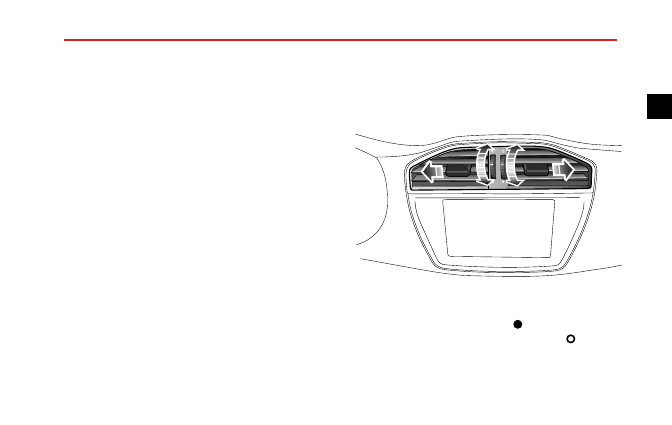
Centre Vents

Rotate the thumb-wheel towards

to close the centre

vents, while rotate the thumb-wheel towards

to open

the centre vents. Direct the air flow by moving the control
in the centre of the louvres up or down, or from side to
side.

65

2

-------------------------------------------------------------------------------------------------------------------------------------------------------------

AIR CONDITIONING AND AUDIO SYSTEMS

Side Vents

Rotate the thumb-wheel towards

to close the side vents,

while rotate the thumb-wheel towards

to open the side

vents. Direct the air flow by moving the control in the
centre of the louvres up or down, or from side to side.

Centre Console Vents

*

Rotate the thumb-wheel towards

to close the centre

console vents, while rotate the thumb-wheel towards
to open the centre console vents. Direct the air flow by
moving the control in the centre of the louvres up or down,
or from side to side.

66

-------------------------------------------------------------------------------------------------------------------------------------------------------------

AIR CONDITIONING AND AUDIO SYSTEMS

Manual Temperature Control

*

Control Panel

A

/C

1 Air Distribution Mode

4 Air Circulation Mode

2 Heated Rear Screen

5 Temperature Control

3 Blower Speed Control

6 A/C On/Off

Blower Speed Control

Rotate the blower control clockwise to increase the
blower speed or rotate anti-clockwise to reduce the
blower speed. The blower is switched off when the blower
speed is 0, and the blower speed increases gradually from
1 to 4.

Note: Select blower speed to 0 to turn off the air
conditioning system; select blower speed 1-4 to turn
on the air conditioning system.

Temperature Control

Rotate the temperature control knob clockwise to
increase the temperature or rotate anti-clockwise to
reduce.

A/C On/Off

A

 / C

Press the A/C Button to switch on the air

cooling function of the air conditioning system. The A/C
button indicator illuminates. Press again to switch off.

67

2

-------------------------------------------------------------------------------------------------------------------------------------------------------------

AIR CONDITIONING AND AUDIO SYSTEMS

Note:

1 A/C will only operate when the engine is running.

2 The heating function is still available, when the air

cooling is switched off.

3 A small amount of water may remain in the

air conditioner after usage, this may produce a
peculiar smell. if this is a particular issue, it is
recommended to switch of the cooling function
and run the blower for 5 seconds with the engine
running prior to switching off.

Air Distribution Mode

Rotate the air distribution mode knob, select the air
distribution mode as required.

For ‘face'. Directs air to the side, centre and

centre console vents.

For ‘feet' and ‘face'. Directs air to the side,

centre, centre console and feet vents.

For ‘feet'. Directs air to the feet vents.

Note: In this mode, a small amount of airflow will be
directed to the side vents and window vents.

For ‘windscreen' and ‘feet'. Directs air to the

windscreen and feet vents.

Note: In this mode, a small amount of air will be
directed to the side vents.

For ‘windscreen/demist/defrost'. Directs air to

the windscreen vents.

Note: In this mode, a small amount of air will be
directed to the side vents.

Note:

Selecting

windscreen/demist/defrost

will

automatically activate the air cooling function and
engage the A/C compressor.

This reduces the time

taken to demist the windscreen.

68

-------------------------------------------------------------------------------------------------------------------------------------------------------------

AIR CONDITIONING AND AUDIO SYSTEMS

Heated Rear Window

The heating elements on the inside of the rear
screen are easily damaged. DO NOT scrape
or scratch the inside of the glass. DO NOT
stick labels over the heating elements.

Press to operate; the indicator in the switch

will illuminate . The heated rear window will switch off
automatically after 12 minutes.

When the heated rear

window is working, press the button to switch off the
function .

Note: The heated rear window function will only
function when the engine is running.

Air Circulation Mode

Press the Air Circulation Mode button to

operate, the lamp in the switch illuminates, the air intake is
closed and the air inside the car is recirculated, preventing
the entry of traffic fumes.

When the engine is off, the air recirculation control flap
stays in current position.

Note: Leaving the system in recirculation mode can
cause the windscreen to mist. If this happens, switch
off recirculation and turn the controls to maximum
demisting.

69

2

-------------------------------------------------------------------------------------------------------------------------------------------------------------

AIR CONDITIONING AND AUDIO SYSTEMS

Automatic Temperature Control

*

Control Panel

A /C

A U T O

1

2

3

4

6

5

8

7

9

1

0

1

0

1

4

1

1

1

3

1

2

1 A/C On/Off
2 AUTO Button
3 Blower Speed Down Button
4 Face Mode Button
5 Feet Mode Button
6 Blower Speed Up Button
7 Sensor (Not Button)
8 Air Circulation Mode Button
9 Heated Rear Window Button

10 Front Seat Heating Button

*

11 Windscreen and Feet Mode Button
12 Temperature Control Knob/System

On/Off

13 Face and Feet Mode Button
14 Defrost/Demist Button

70

-------------------------------------------------------------------------------------------------------------------------------------------------------------

AIR CONDITIONING AND AUDIO SYSTEMS

Air Conditioning System Display

2

3

2 2

2 1

2 0

2 4

A U T O

A

U T O

A /C

1

4 5

3

6

7

9

1

0

1

1

8

M

O D E

2

O

u ts id e :2 3

1 Air Distribution Mode Touch Button
2 Temperature

Control

Touch

Swipe

Control

3 Air Distribution Mode Display
4 Air Circulation Mode Touch Button
5 Blower Speed Control Touch Button
6 System On/Off Touch Button
7 Defrost/Demist Touch Button
8 Outside Ambient Temperature Display
9 Heated Rear window Touch Button

10 AUTO Touch Button
11 A/C On/Off Touch Button

71

2

-------------------------------------------------------------------------------------------------------------------------------------------------------------

AIR CONDITIONING AND AUDIO SYSTEMS

Air Distribution Mode

Press the corresponding distribution mode button or
touch button to select air distribution mode.

The

corresponding

button

indicator

on

control

panel

illuminates, and the air conditioning system display shows
the corresponding icon.

For ‘face'. Directs air to the side, centre and

centre console vents.

For ‘feet' and ‘face'. Directs air to the side,

centre, centre console and feet vents.

For ‘feet'. Directs air to the feet vents.

Note: In this mode, a small amount of airflow will be
directed to the side vents and window vents.

For ‘windscreen' and ‘feet'. Directs air to the

windscreen and feet vents.

Note: In this mode, a small amount of air will be
directed to the side vents.

Temperature Control

Rotate the temperature control knob or press the touch
button on the display to select the air temperature. The
range of the set temperature is 18℃~26℃.

When the requested temperature is lower than 18℃, the
system enters into the maximum cooling status, while the
set temperature column on the air conditioning system
display shows "Lo".

When the requested temperature is higher than 26℃, the
system enters into the maximum heating status, while the
set temperature column on the air conditioning system
display shows "Hi".

Automatic Temperature Control Mode

Rotate the temperature selected knob or press the touch
button on the display, after setting the required target
temperature, press the AUTO button to enter into the
automatic temperature control mode.

72

-------------------------------------------------------------------------------------------------------------------------------------------------------------

AIR CONDITIONING AND AUDIO SYSTEMS

In the "AUTO" mode, the system adjusts the air
distribution mode, the blower speed as well as the
internal/external circulation state automatically, to achieve
and maintain the required target temperature.

At this

time, the "AUTO" icon will be shown on the display.

Note:

In AUTO mode, if external temperature is

low, the blower speed will increase after the engine
temperature has risen.

Note: To ensure the AUTO control operates efficiently,
all windows and the sunroof must be closed and the
inlet vents must be clear of obstruction. Do not shield
the solar sensor (on top of the dashboard) and interior
temperature sensor (on the control panel).

A/C On/Off

A

 / C

Press the A/C Button or the touch button to

switch on the display on the air cooling function of the air
conditioning system. The A/C button indicator illuminates.
Press again to switch off.

Note:

1 A/C will only operate when the engine is running.

2 The heating function is still available, when the air

cooling is switched off.

3 A small amount of water may remain in the

air conditioner after usage, this may produce a
peculiar smell. if this is a particular issue, it is
recommended to switch of the cooling function
and run the blower for 5 seconds with the engine
running prior to switching off.

Blower Speed

Press the Blower Speed Up Button or select the larger
blower speed segments on the display to increase blower
speed; press the Blower Speed Down Button or select
the smaller the blower speed segments on the display
to decrease blower speed. The air conditioning system
display will show the corresponding blower speed with
the quantity of segments.

Press the Blower Speed Button in the AUTO state, the
AUTO icon will disappear, the blower speed enters into

73

2

-------------------------------------------------------------------------------------------------------------------------------------------------------------

AIR CONDITIONING AND AUDIO SYSTEMS

the manual control, other functions will maintain the state
in which they were in.

When the air conditioning system is turned off, press the
blower speed up button, all functions will resume to the
state in which they were in before the system is switched
off.

Defrost/Demist

Press Defrost/Demist Button on the control

panel or the touch button on the display, the indicators
on the button and display illuminate, the A/C and external
circulation functions are switched on, and the system
enters the most effective warm or cold air setting to clear
the windshield and side window .

Pressing the Defrost/Demist Button or the touch button
on the display again will exit the defrost/demist state,
the indicator goes out, and the system will return to the
previous state.

In the defrost/demist mode, operation of the A/C
on/off button will switch the compressor on or off;

operation of the air circulation mode button will switch
between internal circulation and external circulation,
without affecting the defrost/demist mode in either case;
operation of other air distribution modes will switch
to a corresponding air distribution mode and quit the
defrost/demist mode.

Heated Rear Window

The heating elements on the inside of the rear
screen are easily damaged. DO NOT scrape
or scratch the inside of the glass. DO NOT
stick labels over the heating elements.

Press the Heated Rear Window Button on

the control panel or the touch button on the display, the
indicators on the button and display illuminate, and the
heated rear window function starts to operate, and will
stop automatically after 15 minutes; during this period, the
user may press the button again to disable this function.
The indicators on the button and display extinguish when
the heated rear window is turned off.

74

-------------------------------------------------------------------------------------------------------------------------------------------------------------

AIR CONDITIONING AND AUDIO SYSTEMS

Note: The heated rear window function will only
function when the engine is running.

Air Circulation Mode

Press the Air Circulation Mode Button on the

control panel or the touch button on the display, switch
the circulation damper to internal circulation, the indicator
on the key illuminates, and an internal circulation icon is
displayed on the A/C display.

When the vehicle receives a reverse gear or windshield
washing signal, external circulation will automatically switch
to internal recirculation, this automatic switching function
is prohibited in the defrost/demist mode.

Note: Leaving the system in recirculation mode can
cause the windscreen to mist. If this happens, switch
off recirculation and turn the controls to maximum
demisting.

System On/Off

Press the System On/Off button on the control

panel or the System On/Off touch button on the display.
This will switch the system on or off. When switching on,
the lamp and icon will extinguish and the system will revert
to the settings prior to switching off. When switching off,
the lamp and icon will illuminate.

Note: When the air conditioning is switched off, the
exterior ambient temperature and recirculation state
will be displayed. The state of the recirculation system
can be changed using the button.

Note: Turning off the entertainment system will only
turn off the air conditioning system display , not the
air conditioning system.

75

2

-------------------------------------------------------------------------------------------------------------------------------------------------------------

AIR CONDITIONING AND AUDIO SYSTEMS

Radio

Instructions

1 When cleaning the vehicle, ensure that water does not

contact the radio.

2 Use a soft cloth to clean the display.

Use alcohol

to remove stubborn dirt. Do not use water, solvent
or abrasive cleaner, these substances will damage the
display.

3 The

radio

is

designed

to

operate

between

temperatures

of

-20℃ ~ 70℃.

When

the

temperature is very low in the vehicle, do not use this
device immediately after switching on the heater.

4 The radio has precise mechanical parts. Do not open

the housing, dismantle the mechanism or lubricate the
rotating parts.

5 The USB port of the unit does not support portable

hard disks.

6 The USB port of the unit may be used in conjunction

with certain card reader models, support of all types
of card readers cannot be guaranteed.

7 The USB port of the unit does not support connection

with USB hub.

8 The USB port of the unit may not be able to identify

some USB brands and models, some files may not be
recognised and therefore not played correctly. Seek
your MG Authorised Repairer.

IMPORTANT

Only use the radio controls when road conditions
permit.

76

-------------------------------------------------------------------------------------------------------------------------------------------------------------

AIR CONDITIONING AND AUDIO SYSTEMS

Radio Control Panel

1

2
3
4
5

6

7
8
9
1 0

1 6

1 4

1 2

1 1

1 3

1 7

1 5

1 Preset Button [1]

2 Preset Button/Random Button [

]

3 Preset Button/Cycle Button [

]

4 [

] Button

5 [

] Button

6 Preset

Button/Information

Button

[

]

7 Preset Button/Previous Folder [

]

8 Preset Button/Next Folder [

]

9 [ ] Button

10 [ ] Button

11 [

] Mute Button

12 [

] EQ Button

13 [SCAN] Button

14 [Off/On] Button / [Volume] Knob

15 [BAND] Button

16 [MENU] Button

17 [SRC] Button

77

2

-------------------------------------------------------------------------------------------------------------------------------------------------------------

AIR CONDITIONING AND AUDIO SYSTEMS

Basic Operation

Power On/Off

Press [Off/On] button to start the system, and press it
again to turn off the system.

30 Minutes Play Function

When the ignition is switched off, press the On/Off button
to operate the audio unit for up to 30 minutes. After 30
minutes the unit will switch off. To switch on again, press
the On/Off button.

Note: To avoid excessive battery power drain please
use in moderation.

Mute/Pause

In the RADIO/AUX mode, press [

] button to mute the

sound. Press it again to resume audio sound.

If in USB play, press [

] button to pause USB play. Press

it again to resume play.

Select Mode

Repeatedly press [SRC] button, the system will cycle
between RADIO and USB (if any USB is connected)/AUX.

Press [BAND] button, the system will cycle between
[FM1]/[FM2] and [FMA]/[AM].

Note: USB can only be selected when a USB source is
connected.

Volume Adjustment

Turn the [Volume] knob counterclockwise, the volume
will decreases in increments of 1, the minimum volume
is 0. Turn the [Volume] knob clockwise, the volume will
increases in increments of 1, the maximum volume is 32.

78

-------------------------------------------------------------------------------------------------------------------------------------------------------------

AIR CONDITIONING AND AUDIO SYSTEMS

EQ Setting

Sound Effect Setting

For

each

press

of

[

]

button,

the

system

will

cycle

between

BASS/TREBLE/BALANCE/EQ

PRESET/LOUDNESS.

BASS

In [BASS] mode, press [

]/[ ] button or turn [VOLUME]

knob to adjust the BASS effect (adjustment range: -7~+7).

TREBLE

In [TREBLE] mode, press [

]/[ ] button or turn the

[VOLUME] knob to adjust the TREBLE effect (adjustment
range: -7~+7).

BALANCE

In [BALANCE] mode, press [

]/[ ] button or turn

[VOLUME]

knob

to

adjust

the

BALANCE

effect

(adjustment range: L7~R7), "0" represents balance.

EQ PRESET

In

[EQ

PRESET]

mode,

press

[

]/[ ]

button

or

turn

[VOLUME]

knob

to

adjust

the

EQ

to

JAZZ/POP/CLASSIC/VOCAL/ROCK/OFF.

LOUDNESS

In [LOUDNESS] mode, press [

]/[ ] button or turn

[VOLUME] knob to turn on/off the loudness control.

79

2

-------------------------------------------------------------------------------------------------------------------------------------------------------------

AIR CONDITIONING AND AUDIO SYSTEMS

Radio Function

Mode Selection

Press [SRC] button to select radio as the source.

Press [BAND] button to select the band.

Band Selection

Press [BAND] button again to select FM1, FM2, FMA or
AM.

Note: If the radio is in stereo, the top of the screen will
display ‘ST’.

Tuning

There are 3 tuning modes: search tuning, manual tuning
and preset tuning.

Search Tuning

Press [

]/[

] button, the radio automatically searches

the frequency range, looking for a radio station of
acceptable strength. Once a station is found, that station
will be played.

Note:

If no station is found within the selected

waveband, the radio will stop searching after a cycle,
and the screen will display "NO STATION".

Manual Tuning

Press the [

]/[ ] button to adjust the tuning manually.

Preset Tuning

The memory has 24 preset positions (FM1, FM2, FMA, AM)
for storing stations. Press numbers 1~6 to select a stored
frequency.

Storing a Station

There are manual and auto store modes.

Manual Store

• Press [BAND] button to select the desired waveband.

• Use search, manual or preset tuning to tune to the

desired station.

• Press (more than 2 s) any preset button to store current

station frequency into the preset memory (the screen
displays the station waveband and frequency stored).

80

-------------------------------------------------------------------------------------------------------------------------------------------------------------


Content      ..     3      4      5      6     ..