Volvo XC90 (2021 year). Manual in english - page 12
 

  Index      Manuals     Volvo XC90 (2021 year). Manual in english


Search            copyright infringement  


Content      ..     10      11      12      13     ..


Volvo XC90 (2021 year). Manual in english - page 12


CLIMATE CONTROL

* Option/accessory.

211

4-zone climate system

*

Climate zones with 4-zone climate system.

In 4-zone climate systems, the passenger
compartment temperature can be set sepa-
rately for the left and right sides of the vehicle,
and for the front and rear seats.

Related information

Climate (p. 210)

Climate control sensors

The climate system has a number of sensors
to help regulate the climate settings in the
vehicle. Do not cover or block the sensors
with clothing or other objects.

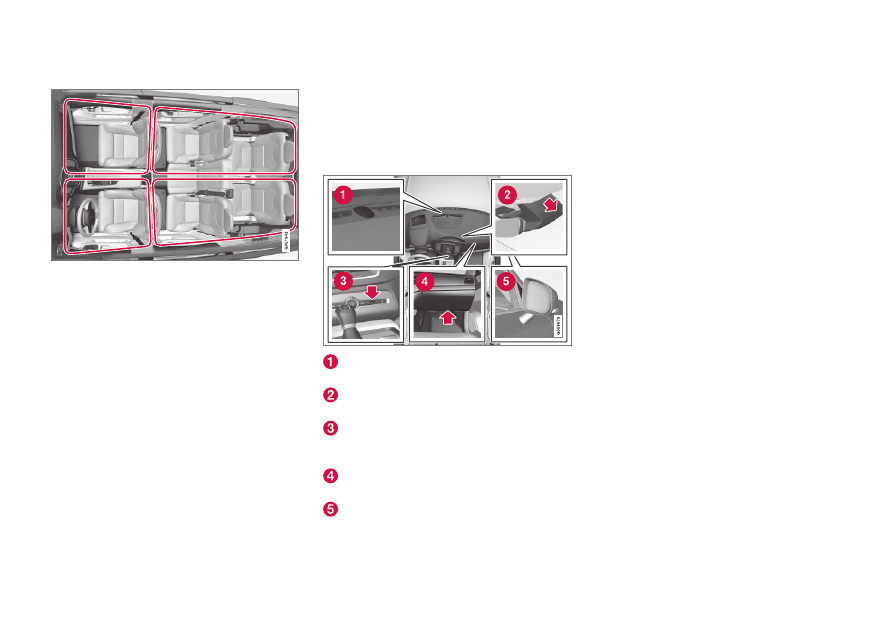
Location of the sensors

Sunlight sensors - on the upper side of the
dashboard.
Humidity sensor - in the rearview mirror
console.
Passenger compartment temperature sen-
sor - near the buttons in the center con-
sole.
Airborne particulate matter sensor

*

 – on

the underside of the glove compartment.
Ambient temperature sensor - in the right-
side door mirror.

On vehicles equipped with the Interior Air
Quality System

*

, there is also an air quality

sensor in the climate system's air intake.

Related information

Climate (p. 210)

Interior Air Quality System

*

 (p. 215)

-------------------------------------------------------------------------------------------------------------------------------------------------------------

CLIMATE CONTROL

* Option/accessory.

212

Perceived temperature

The climate control system regulates the cli-
mate in the passenger compartment based
on perceived temperature, not actual tem-
perature.

The selected passenger compartment tem-
perature is based on the physical perception of
the current ambient temperature, airflow
speed, humidity, sunlight in the passenger
compartment, etc.

The system has a sunlight sensor that detects
which side of the vehicle the sunlight is shin-
ing on and adjusts the temperature accord-
ingly. This means that the temperature of the
air coming out of the vents may be different
for the left and right sides, even if the tem-
perature setting is the same for both sides.

Related information

Climate (p. 210)

Climate control system voice

commands

1

Voice commands can be used for the climate
control system to e.g. change temperature,
activate seat heating

*

 or change blower

speed.

Tap 

 and say one of the following com-

mands:

"

Climate

" - starts a command dialog for

climate controls and provides examples of
commands that can be used.

"

Set temperature to X degrees

" - sets

desired temperature.

"

Raise temperature

"/"

Lower

temperature

" - raises/lowers the set tem-

perature.

"

Sync temperature

" - synchronizes the

temperature for all climate zones in the
vehicle with the temperature set for the
driver's side.

"

Air on feet

"/"

Air on body

" - opens the

desired air vent.

"

Air on feet off

"/"

Air on body off

" -

closes the desired air vent.

"

Set fan to max

"/"

Turn off fan

" -

changes blower speed to 

Max

/

Off

.

"

Raise fan speed

"/"

Lower fan speed

" -

raises/lowers the set blower speed.

"

Turn on auto

" - activates automatic cli-

mate control.

"

Air condition on

"/"

Air condition off

" -

activates/deactivates air conditioning.

"

Recirculation on

"/"

Recirculation off

" -

activates/deactivates air recirculation.

"

Turn on defroster 

"/"

Turn off

defroster

" - activates/deactivates win-

dow and door mirror defrosting.

"

Turn on max defroster

"/"

Turn off max

defroster

" - activates/deactivates max

defroster.

"

Turn on rear defroster

"/"

Turn off rear

defroster

" - Activates/deactivates heated

rear window and door mirrors.

"

Turn steering wheel heat on

"/"

Turn

steering wheel heat off

" - activates/

deactivates heated steering wheel

*

.

"

Raise steering wheel heat

"/"

Lower

steering wheel heat

" - raises/lowers the

level of steering wheel heating

*

.

"

Turn on seat heat

"/"

Turn off seat heat

"

- activates/deactivates seat heating

*

.

"

Raise seat heat

"/"

Lower seat heat

" -

raises/lowers the level of seat heating

*

.

1

Certain markets only.

-------------------------------------------------------------------------------------------------------------------------------------------------------------

CLIMATE CONTROL

* Option/accessory.

213

"

Turn on seat ventilation

"/"

Turn off

seat ventilation

" - activates/deactivates

seat ventilation

*

.

"

Raise seat ventilation

"/"

Lower seat

ventilation

" - raises/lowers the level of

seat ventilation

*

.

NOTE

Not all system languages support voice
control. If a language supports voice con-
trol, it is marked with a 

 symbol in the

list of available system languages. Read
more about where the information is found
in the section on voice control settings.

Related information

Climate (p. 210)

Voice Control (p. 149)

Use voice recognition (p. 150)

Voice control settings (p. 154)

Air quality

The materials used in the passenger compart-
ment and air filtering system have been
selected to ensure a high level of air quality in
the passenger compartment.

Materials used in the passenger
compartment

The materials in the passenger compartment
are designed to be pleasant and comfortable,
even for people with asthma or allergies.

The materials have been developed and tested
to reduce dust in the passenger compartment
and make it easier to keep clean.

The mats in both the passenger compartment
and cargo compartment can be easily
removed for cleaning.

Use Volvo-recommended cleaning agents and
car care products to clean the interior.

Air filtering systems

In addition to the passenger compartment air
filter, the vehicle is also equipped with other
air cleaning systems that help you maintain
high air quality in the passenger compartment.

Related information

Climate (p. 210)

CleanZone

*

 (p. 214)

Clean Zone Interior Package

*

 (p. 214)

Interior Air Quality System

*

 (p. 215)

Advanced Air Cleaner

*

 (p. 216)

Passenger compartment air filter (p. 216)

-------------------------------------------------------------------------------------------------------------------------------------------------------------

CLIMATE CONTROL

* Option/accessory.

214

CleanZone

*

The CleanZone function monitors the condi-
tions affecting good air quality in the passen-
ger compartment and indicates whether they
are fulfilled or not.

The indicator is shown in the center dis-
play's Climate view.
The indicator is shown in the climate bar
when Climate view is not open.

If the conditions are not met, the text 

Clean

Zone

 will be shown in white. When all the

conditions are met, the text will change to
blue.

The following conditions must be met:

All doors and tailgate are closed.

All side windows and panoramic roof

*

 are

closed.

The Interior Air Quality System

*

 is acti-

vated.

The blower is activated.

Air recirculation is deactivated.

NOTE

CleanZone does not indicate that the air
quality is good, but only that the conditions
for good air quality have been met.

Related information

Air quality (p. 213)

Clean Zone Interior Package

*

 (p. 214)

Interior Air Quality System

*

 (p. 215)

Passenger compartment air filter (p. 216)

Clean Zone Interior Package

*

Clean Zone Interior Package (CZIP) is a series
of modifications that filters even more allergy
and asthma-inducing substances and other
pollutants from the passenger compartment.

CZIP includes the following:

An enhanced function that starts the
blower when the vehicle is unlocked using
the remote key. The blower will then fill
the passenger compartment with fresh air.
The function starts when required and
switches off automatically after a period of
time or when one of the passenger com-
partment doors is opened. The amount of
time the blower runs gradually decreases
due to reduced need up until the vehicle is
4 years old.

The fully automatic Interior Air Quality
System (IAQS).

Related information

Air quality (p. 213)

CleanZone

*

 (p. 214)

Interior Air Quality System

*

 (p. 215)

Passenger compartment air filter (p. 216)

-------------------------------------------------------------------------------------------------------------------------------------------------------------

CLIMATE CONTROL

* Option/accessory.

215

Interior Air Quality System

*

Interior Air Quality System (IAQS) is a fully
automatic air quality system that removes
gases and particles to reduce odors and con-
taminants in the passenger compartment.

IAQS is part of the Clean Zone Interior
Package (CZIP) and removes air contaminants
such as particles, hydrocarbons, nitric oxides
and ground-level ozone.

If the system's air quality sensors detect con-
taminants in the outside air, the air intake
closes and air recirculation is activated.

NOTE

To ensure optimal air quality in the passen-
ger compartment, the air quality sensor
should always be engaged.

Recirculation is limited in cold weather to
prevent fogging.

In the event of fogging, use the defroster
functions for the windshield, side windows
and rear window.

Related information

Activating and deactivating the air quality
sensor

*

 (p. 215)

Air quality (p. 213)

CleanZone

*

 (p. 214)

Clean Zone Interior Package

*

 (p. 214)

Passenger compartment air filter (p. 216)

Activating and deactivating the air

quality sensor

*

The air quality sensor is part of the fully auto-
mated Interior Air Quality System (IAQS).

The air quality sensor can be switched on or
off.

1. Tap 

Settings

 in the Top view in the center

display.

2. Tap 

Climate

.

3. Select 

Air Quality Sensor

 to activate/

deactivate the air quality sensor.

Related information

Interior Air Quality System

*

 (p. 215)

-------------------------------------------------------------------------------------------------------------------------------------------------------------

CLIMATE CONTROL

* Option/accessory.

216

Passenger compartment air filter

All air entering the passenger compartment
through the climate control system intake is
filtered.

Replacing the passenger
compartment filter

To maintain the high performance of the cli-
mate control system, the filter must be
replaced regularly. Follow Volvo's service
schedule for recommended replacement inter-
vals. When driving in areas with a lot of smog,
dust, etc., the filter may need to be changed
more frequently.

NOTE

There are two types of passenger compart-
ment filters. Make sure that the correct fil-
ter is installed.

Related information

Air quality (p. 213)

CleanZone

*

 (p. 214)

Clean Zone Interior Package

*

 (p. 214)

Interior Air Quality System

*

 (p. 215)

Advanced Air Cleaner

*

Advanced Air Cleaner is a fully automatic air
cleaner that traps airborne particulate matter,
exhaust and other pollutants in the passenger
compartment air filter, which improves the
climate in the passenger compartment.

The function starts automatically when the
blower starts.

Airborne particulate matter are also known as
PM

2.5

 (particles smaller than 2.5 µm), and the

concentrations of these particles in the vehicle
are measured by one of the vehicle's climate
control sensors. The concentration in the vehi-
cle is presented in the downloadable app Air
Quality.

Related information

Air quality (p. 213)

Interior Air Quality System

*

 (p. 215)

CleanZone

*

 (p. 214)

Clean Zone Interior Package

*

 (p. 214)

Passenger compartment air filter (p. 216)

Climate control sensors (p. 211)

Air distribution

The climate system distributes incoming air
through a number of vents in the passenger
compartment.

Automatic and manual air distribution

When the auto-climate feature is on, air distri-
bution is regulated automatically. Air distribu-
tion can also be controlled manually.

Adjustable air vents

Certain air vents in the vehicle are adjustable,
which means they can be opened/closed and
the direction of the air flow from the vent can
be adjusted.

-------------------------------------------------------------------------------------------------------------------------------------------------------------

CLIMATE CONTROL

* Option/accessory.

217

Location of adjustable air vents in the passenger

compartment.

2-zone system - four vents on the dash-
board and one on each of the pillars
between the front and rear doors.
4-zone system

*

 - two additional vents on

the rear side of the tunnel console.
4-zone system

*

 and a third row of seats –

one additional vent on each of the pillars
behind the rear doors.

Related information

Climate (p. 210)

Adjusting air distribution (p. 217)

Opening, closing and directing air vents
(p. 218)

Air distribution options (p. 219)

Adjusting air distribution

Air distribution can be adjusted manually if
needed.

1. Tap the symbol in the center of the climate

bar to open Climate view in the center dis-
play.

Air distribution buttons in Climate view.

Air distribution - windshield defrost vents

Air distribution - dashboard and center
console air vents
Air distribution - floor air vents

2. Tap one or more air distribution buttons to

open/close the airflow for that vent.
> The air distribution changes and the

buttons will light up or go out.

Related information

Air distribution (p. 216)

Opening, closing and directing air vents
(p. 218)

Air distribution options (p. 219)

-------------------------------------------------------------------------------------------------------------------------------------------------------------

CLIMATE CONTROL

218

Opening, closing and directing air

vents

Some of the air vents in the passenger com-
partment can be individually opened, closed
and directed.

Misting can be eliminated by directing the
outer air vents towards the door windows.

Direct the outer air vents into the passenger
compartment to maintain a comfortable tem-
perature in warm weather.

Opening and closing the air vents

Turn the thumb wheel under the air vent
to open/close the airflow from the vent.

The more white lines that are visible, the
stronger the airflow.

Directing air flow

Move the lever in the center of the air vent
horizontally or vertically to direct the air-
flow from the vent.

Related information

Air distribution (p. 216)

Adjusting air distribution (p. 217)

Air distribution options (p. 219)

-------------------------------------------------------------------------------------------------------------------------------------------------------------

CLIMATE CONTROL

}}

219

Air distribution options

Air distribution can be adjusted manually if
needed. The following options are available.

Air distribution

Purpose

If all air distribution buttons are deselected in manual mode, the climate control system will revert to automatic mode.

Main airflow from defroster vents. Some airflow from other
vents.

Helps remove ice and condensation in cold and humid weather
(blower speed should not be set too low).

Main airflow from dashboard vents. Some airflow from other
vents.

Provides effective cooling in warm weather.

Main airflow from floor vents. Some airflow from other vents.

Provides heating or cooling in footwell areas.

-------------------------------------------------------------------------------------------------------------------------------------------------------------

||

CLIMATE CONTROL

220

Air distribution

Purpose

Main airflow from defroster and dashboard vents. Some air-
flow from other vents.

Provides a comfortable climate in warm and dry weather.

Main airflow from defroster and floor vents. Some airflow from
other vents.

Provides a comfortable climate and effective defogging in cold
and humid weather.

Main airflow from dashboard and floor vents. Some airflow
from other vents.

Provides a comfortable climate in sunny, cool weather.

Main airflow from defroster, dashboard and floor vents.

Provides balanced comfort in the passenger compartment.

-------------------------------------------------------------------------------------------------------------------------------------------------------------

-------------------------------------------------------------------------------------------------------------------------------------------------------------

CLIMATE CONTROL

* Option/accessory.

222

Climate system controls

The climate system functions are controlled
from physical buttons on the center console,
the center display, and the climate panel on
the rear side of the tunnel console

*

.

Physical buttons in the center console

Button for max defroster.

Button for heated rear window and door
mirrors.

Climate bar in the center display

The most common climate system functions
can be controlled from the climate bar.

Temperature controls for driver and pas-
senger side.
Controls for heated

*

 and ventilated

*

 driver

and front passenger seat, as well as
heated steering wheel

*

.

Button for opening Climate view. The
graphic in the button shows activated cli-
mate system settings.

Climate view in the center display

Tap the symbol in the center of the
climate bar to open Climate view.

Depending on equipment level, Cli-
mate view may be divided into sev-

eral tabs. Toggle between the tabs by swiping
the screen to the left/right or by tapping the
desired heading.

Main climate

In addition to the functions in the climate bar,
other main climate system functions can be
controlled from the 

Main climate

 tab.

Max

Rear

 – Controls for defrosting win-

dows and door mirrors.

AC

 - Air conditioning controls.

Recirc

 - Air recirculation controls.

-------------------------------------------------------------------------------------------------------------------------------------------------------------

CLIMATE CONTROL

}}

* Option/accessory.

223

Air distribution controls.

Blower control for front seats.

2

AUTO

 - Automatic climate control.

Rear climate control

*

All climate system functions for the rear seat
can be controlled from the 

Rear climate

 tab.

2nd row climate

 - Climate functions for

the second row of seats. Blower control
for the second row of seats.

3rd row climate

 - Climate functions for

the third row of seats

*

.

Rear seat temperature control.

Rear seat heating control

*

.

Parking climate

*

Parking climate functions can be controlled
from the 

Parking climate

 tab.

Climate controls on the rear side of
the tunnel console

*

Rear seat heating control

*

.

Blower control for rear seats.

Rear seat temperature control.

Button for locking/unlocking climate
panel.

If the vehicle has heated rear seats

*

 but does

not have a climate panel on the rear side of the
tunnel console, there will be buttons on the
rear side of the tunnel console to control this
function.

2

With the 2-zone climate system, the control is shared with the rear seat.

-------------------------------------------------------------------------------------------------------------------------------------------------------------

||

CLIMATE CONTROL

* Option/accessory.

224

The climate panel has a screen lock to help
prevent inadvertently changing blower speed
and temperature. When the screen is locked,
only the controls for seat adjustment

*

 and the

unlock button will be displayed.

After unlocking, blower speed and tempera-
ture can also be changed from the climate
panel and all selected climate settings will be
displayed. The screen locks automatically after
a period of inactivity.

Related information

Climate (p. 210)

Activating and deactivating power front
seats

*

 (p. 224)

Activating and deactivating the heated
rear seats

*

 (p. 225)

Activating and deactivating front seat ven-
tilation

*

 (p. 227)

Activating and deactivating the heated
steering wheel

*

 (p. 227)

Activating auto climate control (p. 228)

Activating and deactivating recirculation
(p. 229)

Activating and deactivating max defroster
(p. 230)

Activating and deactivating the heated
rear window and door mirrors (p. 231)

Setting the blower speed for the front
seats (p. 232)

Setting the blower speed for the rear
seats

*

 (p. 233)

Synchronize temperature (p. 236)

Activating and deactivating air condition-
ing (p. 237)

Activating and deactivating climate con-
trol for the third-row seats

*

 (p. 238)

Activating and deactivating power

front seats

*

The seats can be heated for added comfort
for the driver and passengers in cold weather.

1. Tap the left- or right-side steering wheel

and seat button in the center display's cli-
mate bar to open the controls for steering
wheel and seat heating.

If the vehicle is not equipped with ventila-
ted seats or heated steering wheel (for the
driver's side), the button for seat heating is
directly accessible in the climate bar.

2. Tap the seat heating button repeatedly to

select one of the four levels: 

Off

High

,

Medium

 or 

Low

.

> The level is changed and the set level is

displayed in the button.

-------------------------------------------------------------------------------------------------------------------------------------------------------------

CLIMATE CONTROL

}}

* Option/accessory.

225

WARNING

Heated seats should not be used by people

who have difficulty detecting temperature

increases due to nerve damage or numb-

ness or who for another reason may have

difficulty operating the controls for seat

heating.

Related information

Climate system controls (p. 222)

Activating and deactivating the heated
front seat

*

 (p. 225)

Activating and deactivating the

heated front seat

*

The seats can be heated for added comfort
for the driver and passengers in cold weather.

Seat heating can be set to automatically acti-
vate when the engine is started. When set to
automatically activate, heating will be turned
on at low ambient temperatures.

1. Tap 

Settings

 in the Top view in the center

display.

2. Tap 

Climate

.

3. Select 

Auto Driver Seat Heating Level

and 

Auto Passenger Seat Heating Level

to activate/deactivate automatic start of
heated driver's and passenger seat.
> An "A" will be displayed next to the rel-

evant seat heating button in the climate
bar when auto start has been activated.

4. Select 

Low

Medium

 or 

High

 to select

level after the function has been activated.

Related information

Climate system controls (p. 222)

Activating and deactivating power front
seats

*

 (p. 224)

Activating and deactivating the

heated rear seats

*

The seats can be heated for added comfort
for the driver and passengers in cold weather.

Activating and deactivating the heated
rear seats from the front seats

*

1. Tap the symbol in the center of the climate

bar to open Climate view in the center dis-
play.

2. Select the 

Rear climate

 tab.

3. Tap the seat heating button repeatedly to

select one of the four levels: 

Off

High

,

Medium

 or 

Low

.

> The level is changed and the set level is

displayed in the button.

-------------------------------------------------------------------------------------------------------------------------------------------------------------

||

CLIMATE CONTROL

* Option/accessory.

226

Activating and deactivating the heated
rear seats from the rear seat

With 2-zone system:

Buttons for seat heating on the rear side of the tun-

nel console.

Press repeatedly on the left or right seat
heating buttons on the rear side of the
tunnel console to select one of four levels:

Off

High

Medium

 or 

Low

.

> The level is changed and the indicator

lights in the button display the level.

With 4-zone system

*

:

Seat heating controls and indicator lights on the rear

side of the tunnel console.

Press repeatedly on the left or right seat
heating buttons in the climate panel on
the tunnel console to select one of four
levels: 

Off

High

Medium

 or 

Low

.

> The level will be changed and the cli-

mate panel screen will show the new
level.

WARNING

Heated seats should not be used by people

who have difficulty detecting temperature

increases due to nerve damage or numb-

ness or who for another reason may have

difficulty operating the controls for seat

heating.

Related information

Climate system controls (p. 222)

-------------------------------------------------------------------------------------------------------------------------------------------------------------


Content      ..     10      11      12      13     ..