Volvo V60 Cross Country (2021 year). Manual in english - page 22
 

  Index      Manuals     Volvo V60 Cross Country (2021 year). Manual in english


Search            copyright infringement  


Content      ..     20      21      22      23     ..


Volvo V60 Cross Country (2021 year). Manual in english - page 22


||

DRIVER SUPPORT

374

1. Tap 

Park In

 in Function view or in Camera

view.
> The function will search for a potential

parking space and measure it to deter-
mine if it is big enough.

2. Be prepared to stop the vehicle when a

graphic and message in the center display
indicate that a suitable parking space has
been found.
> A pop-up window will appear.

3. Select 

Parallel parking

 or 

Perpendicular

parking

 and engage reverse gear.

NOTE

The function searches for space for park-
ing, shows instructions and guides the
vehicle on its passenger side. But, if so
desired the vehicle can be parked on the
driver's side of the street:

Activate the turn signals on the driver's
side – the system will then search for
space to park on that side of the vehi-
cle instead.

Backing into a parking space

Backing into a parallel parking spot overview.

Backing into a perpendicular parking spot overview.

1. Make sure the path behind your vehicle is

clear and engage reverse gear.

2. Back up slowly and carefully without

touching the steering wheel and do not
exceed a speed of 7 km/h (4 mph).

3. Be prepared to stop the vehicle when

instructed to do so by a graphic and mes-
sage in the center display.

NOTE

Keep your hands away from the steer-
ing wheel when the function is acti-
vated.

Make sure that the steering wheel is
not hindered in any way and can rotate
freely.

To achieve the best results – wait until
the steering wheel is finished turning
before beginning to drive forward/in
reverse.

-------------------------------------------------------------------------------------------------------------------------------------------------------------

DRIVER SUPPORT

* Option/accessory.

375

Positioning the vehicle in the parking space

Parallel parking positioning overview.

Perpendicular parking positioning overview.

1. Move the gear selector to the gear instruc-

ted by the system. Wait until the steering
wheel turns and then drive slowly forward.

2. Be prepared to stop the vehicle when

instructed to do so by a graphic and mes-
sage in the center display.

3. Engage reverse gear and back up slowly.

4. Be prepared to apply the brakes when

instructed to do so by a graphic and mes-
sage in the center display.

The function will switch off automatically and
a graphic and message will appear to indicate
that parking has been completed. Adjust-
ments can always be made be the driver after-
ward. Only the driver can determine when the
vehicle is correctly parked.

CAUTION

The warning distance is shorter when the
sensors are used by Park Assist Pilot
(PAP

120

) compared to when they are used

by the Parking Assist system.

Auto-brake during a parking sequence

If, while parking, the parking sensors detect a
vehicle or pedestrian in the vehicle's intended
direction of travel behind or in front of the

vehicle, the auto-brake function will bring the
vehicle to a standstill.

A pop-up message will then appear in the
instrument panel and the driver can tap

Cancel

 to cancel the parking sequence or

Resume

 to continue the parking sequence.

After selecting 

Resume

:

Check that the area around the vehicle is
free of obstructions and follow the instruc-
tions on the center display, such as:

To continue

 – 

Gently accelerate away

from object

.

Related information

Park Assist Pilot

*

 (p. 371)

Park Assist Pilot

*

 limitations (p. 376)

120

Park Assist Pilot

-------------------------------------------------------------------------------------------------------------------------------------------------------------

DRIVER SUPPORT

* Option/accessory.

376

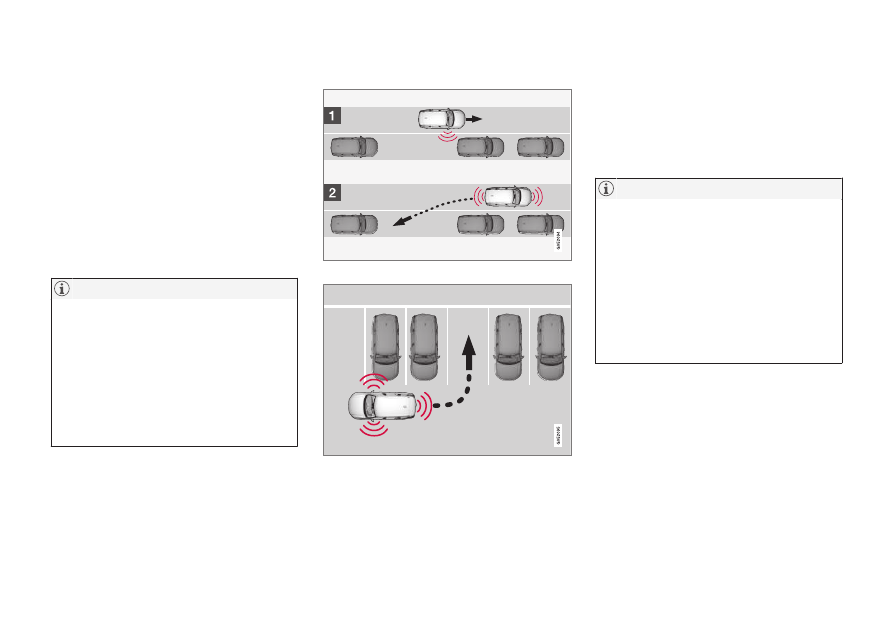
Leaving a parallel parking space

with Park Assist Pilot

*

The 

Park Out

 function can help the driver to

pull out of a parking space when the vehicle
is parallel-parked.

NOTE

Leaving a parking space with the 

Park Out

function should only be used in connection
with parallel parking – it does not work for
perpendicular parking.

The 

Park Out

 function is acti-

vated in the center display's
Function view or in Camera
view.

GREEN button indicator light – the func-
tion is activated.

GRAY button indicator light – the function
is deactivated.

1. Tap 

Park Out

 in Function view or in Cam-

era view.

2. Move the gear selector to the suitable

position (e.g. D or R) for the direction in
which you will be pulling out of the park-
ing space.

3. Be prepared to stop the vehicle when

instructed to do so by a graphic and mes-
sage in the center display. Follow the
instructions in the same way as for the
parking procedure.

Note that the steering wheel can "spring"
back when the procedure is completed and
the driver may need to turn the steering wheel
back to the maximum position in order to pull
out of the parking space.

If the function determines that the driver can
pull out of the parking space without any extra
maneuvers, the function will be deactivated,
even if it seems as though the vehicle is not
completely out of the parking space.

Related information

Park Assist Pilot

*

 (p. 371)

Park Assist Pilot

*

 limitations (p. 376)

Park Assist Pilot

*

 limitations 

Park Assist Pilot (PAP

121

) may not be able to

detect all conditions in all situations and func-
tionality may therefore be limited.

The driver should be aware of the following
limitations for Park Assist Pilot.

WARNING

The parking sensors have dead/blind
spots where objects cannot be
detected.

Pay particular attention to people and
animals near the vehicle.

Bear in mind that the front end of the
vehicle may swing out towards oncom-
ing traffic during the parking maneuver.

CAUTION

Objects situated higher than the detection
area of the sensors are not included when
the parking maneuver is calculated, which
could cause the function to swing into the
parking space too early. Such parking
spaces should be avoided for this reason.

121

Park Assist Pilot

-------------------------------------------------------------------------------------------------------------------------------------------------------------

DRIVER SUPPORT

}}

377

The parking sequence is cancelled

A parking sequence will be cancelled if:

the driver moves the steering wheel

the vehicle's speed exceeds 7 km/h
(4 mph)

the driver taps 

Cancel

 in the center dis-

play

when the anti-lock brakes or the Elec-
tronic stability control are engaged - e.g.
when a wheel loses grip on a slippery road

when speed-dependent power steering
wheel resistance is working at reduced
power – e.g. during cooling due to over-
heating

when, while parking, the parking sensors
detect a vehicle or pedestrian in the vehi-
cle's intended direction of travel behind or
in front of the vehicle, the auto-brake func-
tion will bring the vehicle to a standstill.

A message in the center display will explain
why the parking sequence was cancelled.

CAUTION

Under certain circumstances, the function
may not be able to find parking spaces –
one reason may be that the sensors are
disrupted by external sound sources that
emit the same ultrasonic frequencies that
the system works with.

Examples of such sources include horns,
wet tires on asphalt, pneumatic brakes,
exhaust noise from motorcycles, etc.

NOTE

Dirt, ice and snow covering the sensors
reduce their function and can make meas-
urement impossible.

Driver responsibility

The driver should keep in mind that the func-
tion is a parking aid 

‒ 

not an infallible fully

automatic system. The driver must always be
prepared to take control and cancel a parking
sequence if necessary.

There are a number of things to keep in mind
when parking, including:

The driver is always responsible for deter-
mining if the space suggested by the func-
tion is suitable for parking.

Do not use the function when using snow
chains or a temporary spare tire.

Do not use the function if there are any
objects protruding from the vehicle.

Heavy rain or snowfall may inhibit PAP's
ability to accurately measure a parking
space.

While searching and measuring the park-
ing space, the function may be unable to
detect objects located far into the space.

PAP may not suggest parking spaces on
narrow streets if it does not detect suffi-
cient space for maneuvering the vehicle.

Use approved tires

122

 inflated to the cor-

rect tire pressure because this affects the
function's ability to provide parking assis-
tance.

The function is based on the way the vehi-
cles are parked behind and in front of your
parking space. If they are, for example,
parked too close to the curb, there is a risk
that your vehicle's tires or wheel rims

122

"Approved tires" refers to tires of the same type and make as the vehicle's original, factory-installed tires.

-------------------------------------------------------------------------------------------------------------------------------------------------------------

||

DRIVER SUPPORT

* Option/accessory.

378

could be damaged by the curb during the
parking procedure.

Perpendicular parking spaces may not be
detected or may be suggested unneces-
sarily if a parked vehicle is sticking out
more than other parked vehicles.

The function is intended to provide park-
ing assistance on straight streets, not sec-
tions of street with sharp curves or bends.
Always make sure that your vehicle is par-
allel to relevant parking spaces when the
function is measuring the parking space.

Related information

Park Assist Pilot

*

 (p. 371)

Speed-dependent steering wheel resis-
tance (p. 270)

Camera/radar sensor limitations (p. 383)

-------------------------------------------------------------------------------------------------------------------------------------------------------------

DRIVER SUPPORT

* Option/accessory.

379

Park Assist Pilot

*

 messages

Messages for Park Assist Pilot (PAP

123

) may

be displayed in the instrument panel and/or

the center display. Several examples are pro-
vided below.

Message

Meaning

Park Assist System

Sensors blocked, cleaning needed

One or more of the sensors are blocked. Check and clean/remove the obstacle as soon as possible.

Park Assist System

Unavailable Service required

The system is not functioning as intended. Contact a workshop

A

.

A

An authorized Volvo workshop is recommended.

A text message can be erased by briefly press-
ing the 

 button in the center of the right-

side steering wheel keypad.

If a message cannot be erased, contact a
workshop

A

.

Related information

Park Assist Pilot

*

 (p. 371)

Park Assist Pilot

*

 limitations (p. 376)

123

Park Assist Pilot

-------------------------------------------------------------------------------------------------------------------------------------------------------------

DRIVER SUPPORT

* Option/accessory.

380

Radar sensor

The radar sensor is used by several driver
support systems to detect other vehicles.

Location of radar sensor

The radar sensor is used by the following func-
tions:

Distance Alert

*

Adaptive Cruise Control

*

Pilot Assist

*

Lane Keeping Aid

City Safety

Steering assistance at risk of collision

Any modifications to the radar sensor may
make its use illegal.

Related information

Driver support systems (p. 270)

Camera/radar sensor limitations (p. 383)

Recommended camera and radar sensor
maintenance (p. 386)

Radar sensor type approval (p. 381)

-------------------------------------------------------------------------------------------------------------------------------------------------------------

DRIVER SUPPORT

}}

* Option/accessory.

381

Radar sensor type approval

The type approval for the vehicle's radar units
for adaptive cruise control

*

 (ACC

124

), Pilot

Assist

*

 and BLIS

*

125

 are found here.

Market

ACC & PA

BLIS

Type approval

Canada

FCC ID: L2C0054TR IC: 3432A-0054TR

FCC ID: L2C0055TR IC: 3432A-0055TR

Canada Standard RSS-310

USA

FCC ID: L2C0054TR IC: 3432A-0054TR

FCC ID: L2C0055TR IC: 3432A-0055TR

FCC ID: NBG01RS4

This device complies with Part 15 of the FCC
Rules and with Industry Canada license-
exempt RSS standard(s). Operation is subject
to the following two conditions:

(1) This device may not cause harmful
interference, and

(2) This device must accept any interference
received, including interference that may
cause undesired operation.

Ce dispositif de radiocommunication de
catégorie II respecte la norme CNR-310
d’Industrie Canada. Le présent appareil est
conforme aux CNR d'Industrie Canada

applicables aux appareils radio exempts de
licence. L'exploitation est autorisée aux deux
conditions suivantes:

(1) l'appareil ne doit pas produire de brouillage,
et

(2) l'utilisateur de l'appareil doit accepter tout
brouillage radioélectrique subi, même si le
brouillage est susceptible d'en compromettre
le fonctionnement.

Cet appareil est conforme aux CNR d’Industrie
Canada a applicables aux appareils radio
exempts de licence. L’exploitation est
autorisée à condition que l'appareil ne

produise pas de brouillage préjudiciable et
qu'il accepte tout brouillage, même celui
susceptible d'en compromettre le
fonctionnement.

CAUTION TO USERS: Changes or
modifications not expressively approved by
the party responsible for compliance could
void the user's authority to operate the
equipment. The term “IC:” before the radio
certification number only signifies that
Industry Canada technical specifications were
met.

Note: This equipment complies with radiation
exposure limits set forth for an uncontrolled

124

Adaptive Cruise Control

125

Blind Spot Information

-------------------------------------------------------------------------------------------------------------------------------------------------------------

||

DRIVER SUPPORT

* Option/accessory.

382

environment. This equipment should be
installed and operated with minimum distance
of 20 cm between the radiator and your body.

For detailed information about type approval,
go to volvocars.com/support.

Related information

Radar sensor (p. 380)

Adaptive Cruise Control

*

 (p. 286)

Pilot Assist

*

 (p. 296)

BLIS

*

 (p. 344)

-------------------------------------------------------------------------------------------------------------------------------------------------------------

DRIVER SUPPORT

}}

* Option/accessory.

383

Camera

The camera is used by several driver support
systems to e.g. detect lane marker lines or
road signs.

Location of the camera

The camera is used by the following functions:

Adaptive Cruise Control

*

Pilot Assist

*

Lane Keeping Aid

*

Steering assistance at risk of collision

City Safety

Driver Alert Control

*

Road Sign Information

*

Active high beams

*

Park Assist

*

Related information

Driver support systems (p. 270)

Camera/radar sensor limitations (p. 383)

Recommended camera and radar sensor
maintenance (p. 386)

Camera/radar sensor limitations

The camera and radar sensor used by several
of the driver support functions has certain
limitations, which also affect the functions
using the camera and radar sensor. The driver
should be aware of the following limitations:

-------------------------------------------------------------------------------------------------------------------------------------------------------------

||

DRIVER SUPPORT

384

Common camera and radar limitations

Obstructed camera

The area marked in the illustration must be cleaned

regularly and kept free of decals, objects, solar film,

etc.

The camera is located on the upper interior
section of the windshield along with the radar
sensor.

Do not place, affix or mount anything on the
inside or outside of the windshield, or in front
of or around the camera and radar sensor –
this could disrupt camera and radar-based
functions. It could cause functions to be
reduced, deactivated completely or to produce
an incorrect function response.

High temperatures

If the temperature in the passenger compart-
ment is very high, the camera/radar sensor

will switch off temporarily for
approx. 15 minutes after the engine is started
to protect its electronic components. When
the temperature has cooled sufficiently, the
camera/radar sensor will automatically restart.

Damaged windshield

NOTE

Failure to take action could result in
reduced performance for the driver support
systems that use the camera and radar
unit. It could cause functions to be
reduced, deactivated completely or to pro-
duce an incorrect function response.

To avoid the risk of malfunction of the driver
support systems that use the radar sensor, the
following also apply:

If there are cracks, scratches or stone
chips on the windshield in front of any of
the camera and radar sensor "windows"
and this covers an area of
about 0.5 × 3.0 mm (0.02 × 0.12 in.) or
more, contact a workshop to have the
windshield replaced

126

.

Volvo advises 

against

 repairing cracks,

scratches or stone chips in the area in
front of the camera and radar sensor – the

entire windshield should instead be
replaced.

Before replacing the windshield, contact a
workshop

126

 to verify that the right wind-

shield has been ordered and installed.

The same type of windshield wipers or
wipers approved by Volvo should be used
for replacement.

If the windshield is replaced, the camera
and radar sensor must be recalibrated by a
workshop

126

 to help ensure proper func-

tioning of all of the vehicle's camera and
radar-based systems.

Additional radar limitations

Vehicle speed

The radar sensor's ability to detect a vehicle
ahead is significantly reduced if the speed of
the vehicle ahead differs greatly from your
vehicle's speed.

126

An authorized Volvo workshop is recommended.

-------------------------------------------------------------------------------------------------------------------------------------------------------------

DRIVER SUPPORT

}}

* Option/accessory.

385

Limited field of vision

The radar sensor has a limited field of vision. In
some situations, it may detect a vehicle later
than expected or not at all.

The radar sensor's field of vision

The radar sensor's detection of vehicles
very close to your vehicle may be delayed
in certain situations, e.g. if a vehicle pulls

in between your vehicle and the vehicle
directly ahead.
Small vehicles, such as motorcycles, or
vehicles that are not driving in the center
of the lane may remain undetected.
In curves, the radar may detect the a dif-
ferent vehicle than intended or lose sight
of a target vehicle.

Low trailers

Low trailer in the radar shadow

Low trailers may also be difficult or even
impossible for the radar to detect. The driver
should be extra alert when driving behind vehi-
cles towing low trailers when Adaptive Cruise
Control

*

 or Pilot Assist

*

 is activated.

Additional camera limitations

Reduced visibility

Cameras have the same limitations as the
human eye. In other words, their “vision" is
impaired by adverse weather conditions such
as heavy snowfall/rain, dense fog, swirling

dust/snow, etc. These conditions may reduce
the function of systems that depend on the
camera or cause these systems to temporarily
stop functioning.

Strong sunlight, reflections from the road sur-
face, ice or snow covering the road, a dirty
road surface, or unclear lane marker lines may
drastically reduce the camera’s ability to
detect the side of a lane, a pedestrian, a
cyclist, a large animal or another vehicle.

-------------------------------------------------------------------------------------------------------------------------------------------------------------

||

DRIVER SUPPORT

* Option/accessory.

386

Additional Park Assist Camera

*

limitations

Blind sectors

There are "blind" sectors between the cameras' fields

of vision.

With the Park Assist Camera's 360° view

*

selected, objects/obstacles may not be
detected if they are located in the "joints"
where the edges of the individual camera
views meet.

WARNING

Even if it seems as though only a fairly

small section of the screen image is

obstructed, this may mean that a relatively

large sector is hidden and obstacles there

may not be detected until they are very

near the vehicle.

Lighting conditions

The camera image is automatically adjusted
according to the current lighting conditions.
This means that the brightness and quality of
the image may vary slightly. Poor lighting con-
ditions may result in reduced image quality.

NOTE

A bike carrier and other accessories moun-
ted on the rear of the vehicle can obscure
the camera's view.

Related information

Camera (p. 383)

Radar sensor (p. 380)

Recommended camera and radar sensor
maintenance (p. 386)

Park Assist Camera

*

 (p. 361)

Volvo Cars support site (p. 21)

Recommended camera and radar

sensor maintenance

In order for the camera and radar units to
function properly, they must be kept free of
dirt, ice, snow, etc. and should be washed
regularly with water and car washing deter-
gent.

NOTE

Dirt, ice and snow covering the sensors
could cause false warnings, reduced func-
tion, or no function.

Location of the Park Assist sensors

-------------------------------------------------------------------------------------------------------------------------------------------------------------

DRIVER SUPPORT

* Option/accessory.

387

Location of rear radar sensors. Keep the marked area

clean (on both the left and right sides of the vehicle).

For best possible performance, it is impor-
tant to keep the areas in front of the sen-
sors clean.

Do not attach any objects, tape or decals
to the surface of the sensors.

Clean the camera lenses regularly using
lukewarm water and car washing deter-
gent. Wash gently to avoid scratching the
lens.

CAUTION

Only a workshop may perform mainte-
nance on driver support components – an
authorized Volvo workshop is recom-
mended.

Related information

Camera (p. 383)

Radar sensor (p. 380)

Camera/radar sensor limitations (p. 383)

Park Assist Camera

*

 (p. 361)

-------------------------------------------------------------------------------------------------------------------------------------------------------------

DRIVER SUPPORT

388

Camera and radar unit symbols

and messages

Here are examples of some of the messages
and symbols related to the camera and radar
units that may be displayed in the instrument
panel.

Sensor blocked

If this symbol and the message

Windscreen sensor


Sensor

blocked, see Owner's manual

 is

displayed in the instrument panel, it

means that the camera and radar unit are
unable to detect other vehicles, cyclists,
pedestrians and large animals in front of the
vehicle and that the vehicle's camera and
radar-based functions may be obstructed.

The following table shows some of the situa-
tions that can cause the message to be dis-
played, and suggested actions:

Cause

Action

The area of the windshield in front of the camera/radar sensor is
dirty or covered by ice or snow.

Clean the windshield in front of the camera/radar sensor and remove dirt, ice
and snow.

Thick fog, heavy rain or snow is blocking the radar signals or the
camera's range of visibility.

No action. Heavy precipitation may sometimes prevent the camera/radar sensor
from functioning.

Water or snow is spraying/swirling up and blocking the radar
signals or the camera's range of visibility.

No action. Very wet or snow-covered roads may sometimes prevent the cam-
era/radar sensor from functioning.

There is dirt between the inside of the windshield and the cam-
era/radar sensor.

Consult a workshop to have the area of the windshield on the inside of the cam-
era's casing cleaned. An authorized Volvo workshop is recommended.

Bright sunlight.

No action. The camera/radar sensor will reset automatically when lighting con-
ditions improve.

-------------------------------------------------------------------------------------------------------------------------------------------------------------

DRIVER SUPPORT

389

Defective camera

If a camera sector is dark and
contains this symbol, this
indicates that the camera is
not functioning properly.

The vehicle's left-side camera is malfunctioning.

A dark camera sector may also be displayed in
the following situations, but 

without

 the

defective camera symbol:

a door is open

the tailgate is open

a rearview mirror is folded in

Rear Park Assist Camera

WARNING

Be extra cautious when

reversing if this symbol is

shown when a trailer, bike

carrier or similar is

attached and electrically

connected to the vehicle.
The symbol indicates that

the rear parking assist sensors are 

deacti-

vated

 and will not warn of any obstacles.

Related information

Camera (p. 383)

Radar sensor (p. 380)

Camera/radar sensor limitations (p. 383)

Volvo Cars support site (p. 21)

-------------------------------------------------------------------------------------------------------------------------------------------------------------


Content      ..     20      21      22      23     ..