Volvo V60 (2021 year). Manual in english - page 22
||
DRIVER SUPPORT
374
1. Tap
Park In
in Function view or in Camera
view.
> The function will search for a potential
parking space and measure it to deter-
mine if it is big enough.
2. Be prepared to stop the vehicle when a
graphic and message in the center display
indicate that a suitable parking space has
been found.
> A pop-up window will appear.
3. Select
Parallel parking
or
Perpendicular
parking
and engage reverse gear.
The function searches for space for park-
ing, shows instructions and guides the
vehicle on its passenger side. But, if so
desired the vehicle can be parked on the
driver's side of the street:
•
Activate the turn signals on the driver's
side – the system will then search for
space to park on that side of the vehi-
cle instead.
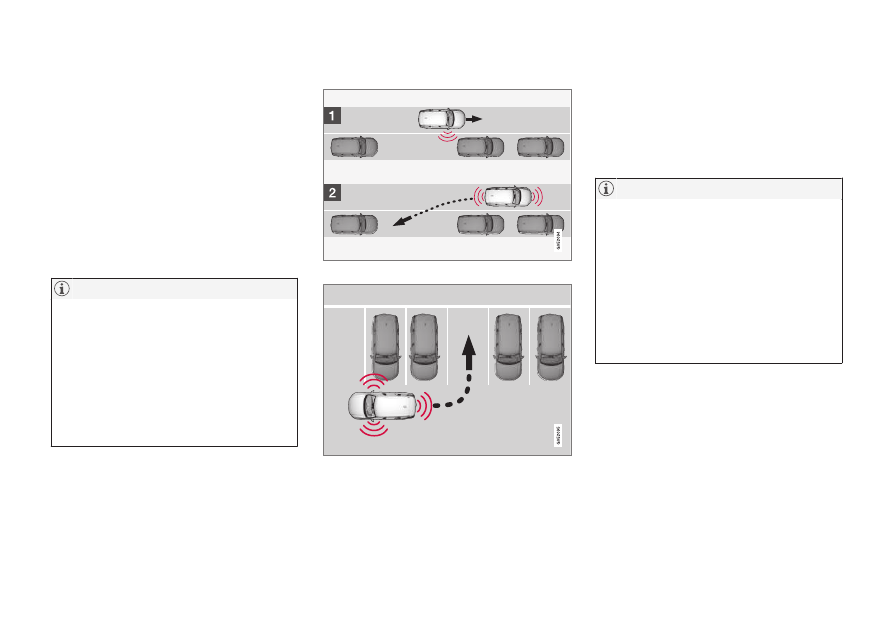
Backing into a parking space
Backing into a parallel parking spot overview.
Backing into a perpendicular parking spot overview.
1. Make sure the path behind your vehicle is
clear and engage reverse gear.
2. Back up slowly and carefully without
touching the steering wheel and do not
exceed a speed of 7 km/h (4 mph).
3. Be prepared to stop the vehicle when
instructed to do so by a graphic and mes-
sage in the center display.
•
Keep your hands away from the steer-
ing wheel when the function is acti-
vated.
•
Make sure that the steering wheel is
not hindered in any way and can rotate
freely.
•
To achieve the best results – wait until
the steering wheel is finished turning
before beginning to drive forward/in
reverse.