Volvo XC60 Twin Engine (2020 year). Manual in english - page 32
SOUND, MEDIA AND INTERNET
}}
549
Change PIN
- a maximum of 4 digits can
be entered.
Disable PIN
- select whether the PIN
code shall be required for access to the
SIM card.
•
Send request code
- used e.g. to top up
or check the balance on a prepaid card.
Functionality depends on the provider.
Note that the SIM card used for Internet
connection via P-SIM cannot have the
same telephone number as the SIM card
that the phone uses. If this is disregarded,
it will not be possible to route calls cor-
rectly to the telephone. Therefore, use a
SIM card with a separate telephone num-
ber for the Internet connection, or a data
card that does not handle telephone calls
and is therefore unable to disrupt the func-
tion of the telephone.
Related information
•
Connect the car to the Internet via car
modem (SIM card) (p. 548)
•
No or poor Internet connection (p. 550)
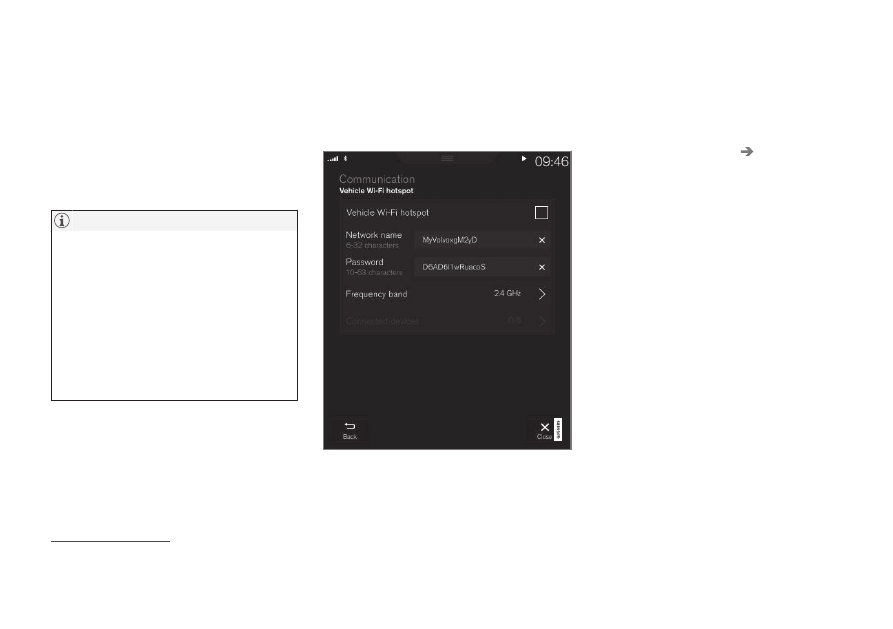
Sharing Internet access from the
car via a Wi-Fi hotspot
When the car is online, its Internet connec-
tion can be shared to allow other devices to
use the Internet connection
14
.
The network operator (SIM card) must sup-
port tethering (sharing of the Internet connec-
tion).
1. Press
Settings
in the top view.
2. Press
Communication
Car Wi-Fi
Hotspot
.
3. Tap on
Network name
and name the
shared connection.
4. Tap on
Password
and select a password
to be entered on connecting devices.
5. Tap on
Frequency band
and select the
frequency on which the hotspot is to
transmit data. Note that selection of fre-
quency band is not available in all markets.
6. Activate/deactivate by ticking/unticking
the box for
Car Wi-Fi Hotspot
.
7. If Wi-Fi has been used as a connection
source, confirm the option to change con-
nection.
> It is now possible for external devices
to connect to the car's tethering (Wi-Fi
hotspot).
14
Does not apply when the car is online via Wi-Fi.