Volvo XC60 Twin Engine (2020 year). Manual in english - page 7
DISPLAYS AND VOICE CONTROL
129
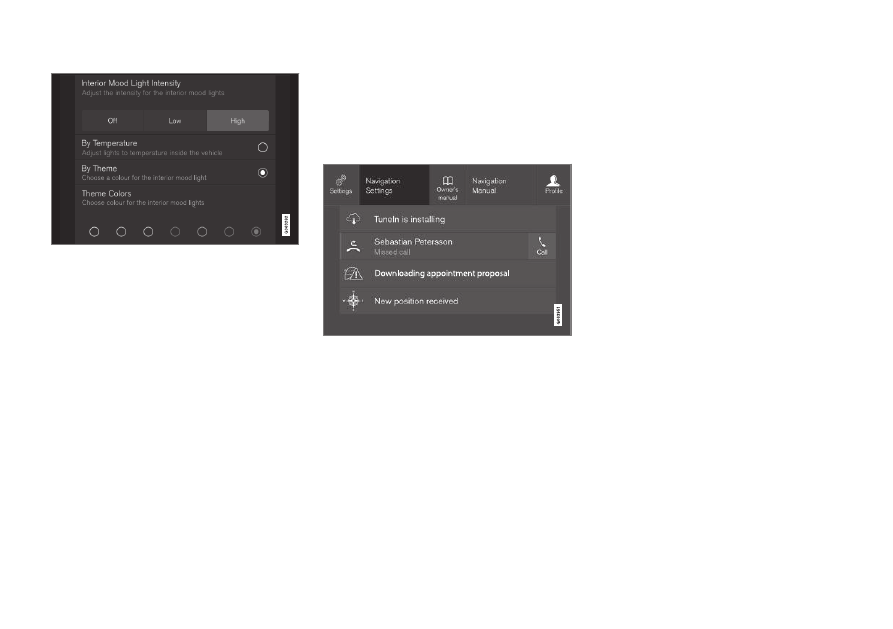
A subcategory in the settings menu with different
types of settings (here, a multi-selector button and
radio buttons).
Related information
•
Overview of centre display (p. 105)
•
Resetting settings in the centre display
(p. 130)
•
Table showing centre display settings
(p. 131)
Open contextual setup in the
centre display
It is possible to use contextual setup for most
of the car's basic apps so that you can
change settings directly in the top view in the
centre display.
Top view with button for contextual setting.
Contextual setting is a shortcut for accessing
a specific setting relating to the active function
shown on screen. The apps installed in the car
from the beginning, e.g.
FM radio
and
USB
,
are a part of Sensus and are part of the car's
embedded functions. The settings for these
apps can be changed directly via contextual
setting in the top view.
When contextual setup is available:
1. Drag down top view when an app is in
expanded mode, e.g.
Navigation
.
2. Press
Navigation Settings
.
> A navigation settings page opens.
3. Change settings as desired and confirm
the selections.
Press
Close
or the physical home button
beneath the centre display to close setup
view.
Most of the car's basic apps have this contex-
tual setting option, but not all.
Third party apps
Third party apps are not included in the car's
system from the beginning, but are the type
that can be downloaded e.g.
Volvo ID
. Here
the settings are always made inside the app
and not from the top view.
Related information
•
Other settings in the centre display's top
view (p. 128)
•
Overview of centre display (p. 105)
•
Resetting settings in the centre display
(p. 130)
•