Volvo V60 Twin Engine (2020 year). Manual in english - page 18
DRIVER SUPPORT
}}
* Option/accessory.
313
Related information
•
Driving support systems (p. 282)
•
Selecting and activating Pilot Assist
•
•
Controls and display view for Pilot Assist
•
Symbols and messages for Pilot Assist
•
Set the stored speed for driver support
(p. 322)
•
Set time interval to vehicle ahead (p. 323)
•
Change of target with driver support
(p. 321)
•
Warning from driver support in the event
of a collision risk (p. 320)
•
Automatic braking with driver support
(p. 324)
•
Overtaking Assistance (p. 328)
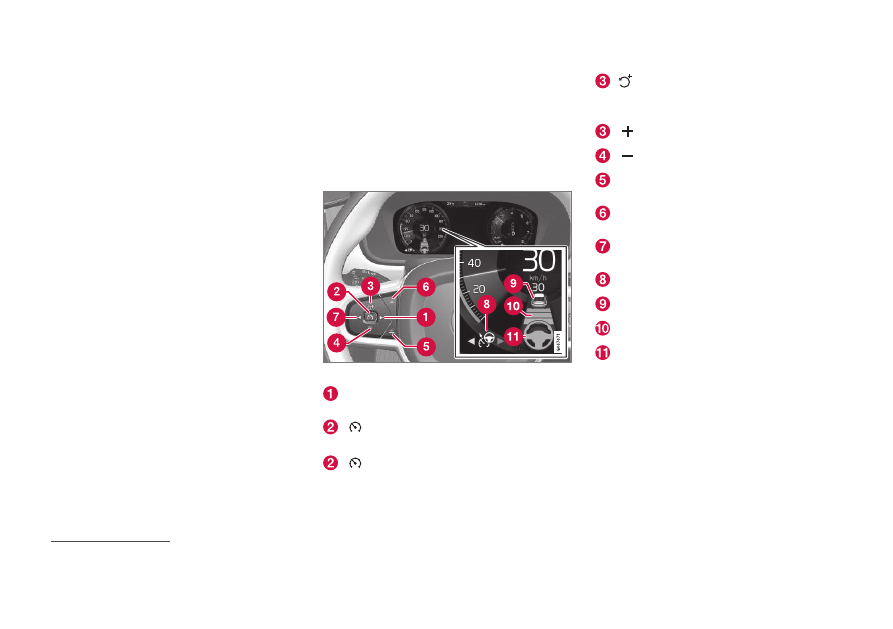
Controls and display view for Pilot
Assist
*
56
A summary of how Pilot Assist is controlled
using the left-hand keypad on the steering
wheel and how the function is shown in the
display.
Controls
Buttons and symbols for the function.
▶
: Switches from adaptive cruise control
*
to Pilot Assist
:
From standby mode
- activates Pilot
Assist and stores the current speed
:
From active mode
- deactivates/
changes Pilot Assist to standby mode
: Activates Pilot Assist from standby
mode and resumes the stored speed and
time interval
: Increases the stored speed
: Reduces stored speed
Increases the time interval to vehicles
ahead
Reduces the time interval to vehicles
ahead
◀
: Switches from Pilot Assist to adaptive
cruise control
Function symbol
Symbols for target car
Symbol for time interval to vehicles ahead
Symbol for activated/deactivated steering
assistance
56
This function can be either standard or optional, depending on market.