Volkswagen Passat (2015 year). Instruction - part 17
 

  Index      Volkswagen     Volkswagen Passat - instruction 2015 year in english


Search            copyright infringement  


Content   ..  15  16  17  18   ..


Volkswagen Passat (2015 year). Instruction - part 17


 Please first read and note the introductory information and heed the WARNINGS 


Display 

Different cruise control versions are available. The stored speed is shown in the instrument cluster 
display on some equipment versions. 

Status 

fig. 166


(A)


Cruise control temporarily deactivated. Stored speed in small numbers. 

(B)


System malfunction. See an authorized Volkswagen dealer or an authorized Volkswagen 
Service Facility. 

(C)


Cruise control activated. No speed stored in memory. 

(D)


Cruise control is active. Stored speed in large numbers. 


Lights up  

Possible cause  


Cruise control is regulating the speed.  


When the ignition is switched on, several warning and indicator lights come on briefly for a function 
check. They go out after a few seconds. 

  WARNING 

Failure to heed warning lights and instrument cluster text messages can cause the vehicle to 
break down in traffic and result in a collision and serious personal injury. 

  Never ignore warning lights or text WARNINGS. 

  Always stop the vehicle as soon as it is safe to do so. 


  NOTICE 

Failure to heed warning lights or text WARNINGS can result in vehicle damage. 

Cruise control operation 


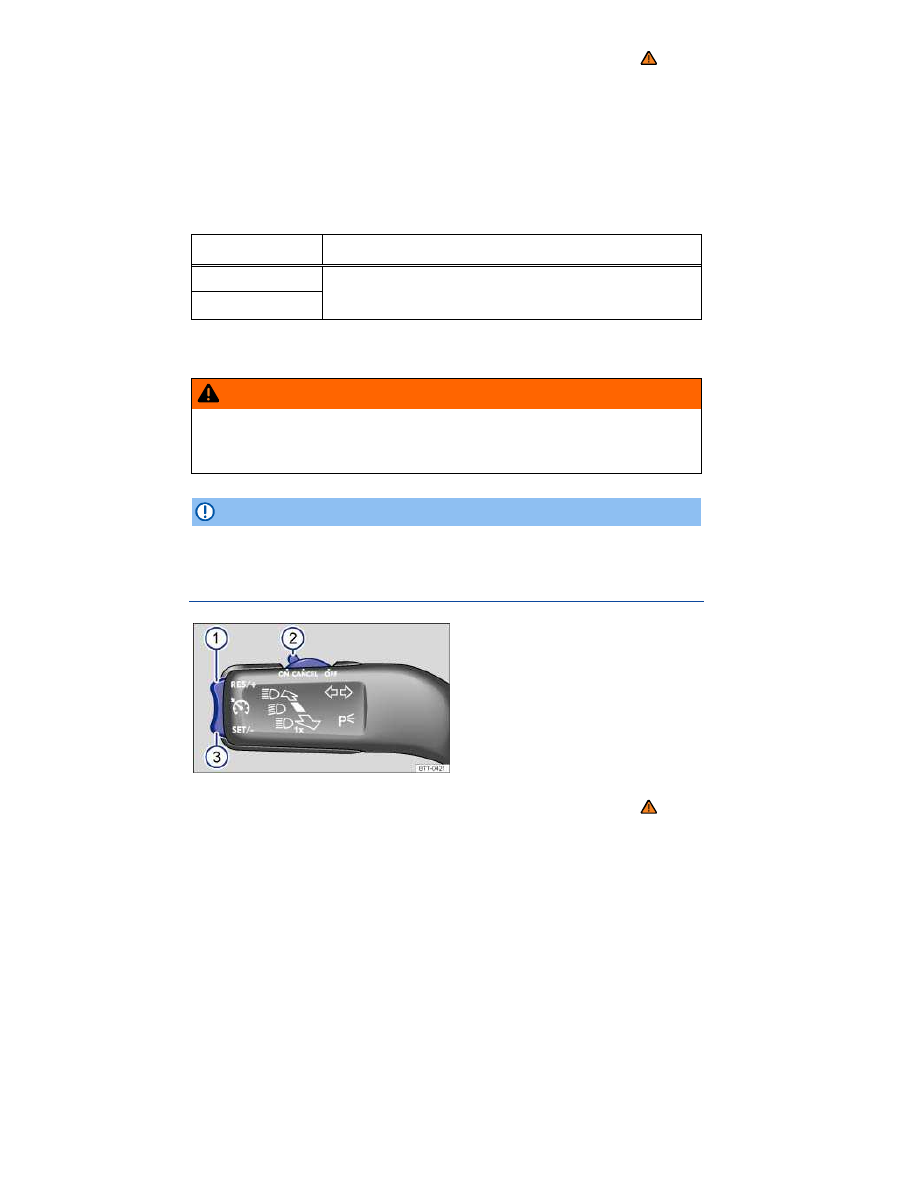
Fig. 168 On the left side of the steering column: Cruise control buttons and switches. 

 Please first read and note the introductory information and heed the WARNINGS 


In order to:  

You must: 

⇒ 

fig. 168


Result:  

Switch on cruise control.  

Move switch 

(2)

 to   position.  

System is switched on, but does not 
regulate vehicle speed until a speed 

is set.  

Set cruise control to 

current vehicle speed.  

Press button 

(3)


.  

Current vehicle speed is set; cruise 

control helps to maintain this speed.  

Temporarily deactivate 

cruise control.  

Move switch 

(2)

 to the 

 posi-

tion. 

OR: depress the brake or clutch 

pedal.  

Cruise control is temporarily deac-

tivated. The speed is still stored in 

the memory.  

Resume speed stored in 

cruise control.  

Press button 

(1)


.  

Cruise control resumes speed 

previously set.  

Increase set speed 

(while cruise control is 

actively controlling 

vehicle speed).  

Press button 

(1)


 briefly to 

increase the set speed in small 

steps of 1 mph (1 km/h) each.  

The vehicle will accelerate until the 

new higher speed is reached and 

saves the new higher speed in the 

memory.  

Press and hold button 

(1)


 to 

increase the set speed until the 

higher desired speed is reached 

and button is released.  

Reduce set speed (while 

cruise control is actively 

controlling vehicle 

speed).  

Press button 

(3)


 briefly to 

reduce the set speed in small steps 

of 1 mph (1 km/h) each.  

Cruise control will slow the vehicle 

down without braking by reducing 

the flow of fuel to the engine until 

the new lower speed is reached and 

saves the new lower speed in the 

memory.  

Press and hold button 

(3)


 to 

reduce the set speed until the lower 

desired speed is reached and the 

button is released.  

Switch off cruise control.  

Move switch 

(2)

 to 

 position.  

System is switched off. The set 

speed is deleted.  


Driving downhill with cruise control 

If cruise control cannot maintain constant speed while driving downhill, slow the vehicle with the foot 
brake and downshift if necessary. 

Automatic deactivation 

Cruise control speed regulation is automatically deactivated or temporarily interrupted: 

  If the system detects an error that could affect the function of the cruise control. 
  If the vehicle has accelerated and goes faster than the stored speed for a longer time. 
  If the brake or clutch pedal is depressed. 
  If the vehicle shifts gear (manual transmission). 
  If an airbag deploys. 


Rear View Camera system 

 Introduction 

In this section you’ll find information about: 

Operation instructions


Parking


There is a camera in the luggage compartment lid to assist the driver while backing up or maneuver-
ing. The camera image is shown together with the orientation lines projected by the system on the 
screen of the factory-installed radio or navigation system. 

Rear View may take a few seconds to bring up the camera image. 

More information and warnings: 

  Exterior views 

⇒  Exterior views 

  Accessories, replacement parts, repairs and modifications 

⇒  Parts, accessories, repairs and 

modifications 


⇒ Booklet 

Radio or ⇒ Booklet Navigation system 

  WARNING 

The Rear View Camera system is not able to give you a clear and undistorted view of all areas 
behind the vehicle. 

  The camera has blind spots in which it cannot detect people and objects. 
  Always be careful and look around you when parking. The camera cannot show people, 

animals, and objects in certain situations. Watch out for small children and animals in partic-
ular. 

  Due to the screen resolution or in low-light conditions, the camera may not pick up thin 

posts, chain-link fences and similar fences, and other objects, or it may not show them clear-
ly. 

  The camera lens enlarges and distorts the field of vision and causes objects on the screen 

to appear altered and imprecise. 

  Always keep the camera lens clean and free of snow and ice; do not cover the lens. 


  WARNING 

The Rear View Camera system technology cannot overcome the laws of physics and the 
limits of the system. Careless or unintentional use of the Rear View Camera system may 
result in accidents and severe injuries. 

  Always adjust your speed and driving style to road, traffic, weather, and visibility condi-

tions. 

  Always keep an eye on the parking direction and the vehicle surroundings. The front of 

the vehicle swings out more than the rear of the vehicle. 

  Never pay so much attention to the graphics shown on the screen that you fail to notice 

what is going on around you. 

  Always watch for people, especially small children, animals, and objects, because the 

camera may not always be able to detect them. 

  The system may not be able to clearly show everything behind the vehicle. 
  Use the Rear View Camera system only when the luggage compartment lid is completely 

closed. 


  NOTICE 

  The camera shows only two-dimensional images on the screen. Due to the lack of depth of 

field, it may be difficult or impossible to identify protruding objects or recesses in the road, for 
example.
 

  Things like thin rods, fences, posts, and trees may not be detected by the camera and could 

damage the vehicle. 

Operation instructions 


Fig. 169 In the luggage compartment lid: Location of the Rear View camera. 


Fig. 170 Rear View Camera system display. 

 Please first read and note the introductory information and heed the WARNINGS 


In order to  

Operation  

Automatically activate display:  

Shift into Reverse when the ignition is switched on or the 

engine is running.  

Manually deactivate display:  

Press a function selection button on the radio or the naviga-

tion system 

⇒ Booklet 

Radio or ⇒ Booklet Navigation 

system.  

OR: Touch the   function button on the screen.  

OR: Switch off the ignition. The Rear View Camera system 

display turns off after a few seconds.  

Switch off display by shifting out of 

Reverse:  

The camera display switches off.  

Deactivate display by driving for-

ward:  

Drive forward faster than about 10 mph (16 km/h).  


Screen 

Function buttons on the screen 

⇒ 

fig. 170

(1)


Display or hide the menu bar. 

(2)


Turn off the rearview camera screen. 

(3)


Turn off the sound. 

(4)


Adjust display: brightness, contrast, color (for vehicles with navigation unit). 

Special considerations 
 

1) Do not use the Rear View Camera system in the following situations:


– When an incorrect or unclear image is displayed, such as when there is poor visibility or the lens is 

dirty.  

– If the area behind the vehicle cannot be seen clearly or completely.  


1) Do not use the Rear View Camera system in the following situations:


– If the rear of the vehicle is heavily loaded.  

– When the luggage compartment lid is open.  

– If the driver is not familiar with the system.  

– If the position or angle of the camera has changed, such as after a rear-end collision. Have the 

system checked by an authorized Volkswagen dealer or an authorized Volkswagen Service Facility.  


2) Examples of optical distortion by the camera


The Rear View Camera system displays only two-dimensional images. Recesses and protruding 

objects on the ground or protruding parts on other vehicles are difficult or impossible to identify due 

to the lack of depth of field.  

Objects or another vehicle may seem closer or farther away on the screen than they really are:  

– When driving from a level surface onto an upward or downward slope.  

– When driving up or down a slope onto a level surface.  

– If the rear of the vehicle is heavily loaded.  

– When approaching protruding objects. These objects can disappear from the field of view when 

backing up.  


Cleaning the camera lens 

Keep the camera lens clean and free of snow and ice: 

  Engage the parking brake. 
  Wet the camera lens with a commercially available alcohol-based glass cleaner and clean with a 

dry cloth 

⇒ 

  Remove snow with a brush. 

  Remove ice with deicer spray 

⇒ 

  NOTICE 

  Never use abrasive cleaning agents to clean the camera lens. 
  Never remove snow or ice on the camera lens with warm or hot water. This can damage the 

camera lens. 

  Volkswagen recommends practicing parking with Rear View Camera system in a safe place with 

little or no traffic or in a parking lot under good visibility and weather conditions in order to familiarize 
yourself with the system, the orientation lines and the way they work. 

  Rear View Camera system does not work when the luggage compartment lid is open. 


Parking 


Fig. 171 On the screen: Static orientation lines for the parking space behind the vehicle. 

 Please first read and note the introductory information and heed the WARNINGS 


Orientation lines overview 

The yellow area displayed stops about 2 yards (meters) behind the vehicle on the road. 

Meaning of the orientation lines on the screen

5


⇒ 

fig. 171

(1)


Safety distance: area up to about 16 inches (40 cm) behind the vehicle on the road. 

(2)


Projection of the vehicle (widened somewhat) toward the rear. The middle markers are about 
40 inches (1 meter) behind the vehicle on the road. 

Parking 

  Position the vehicle in front of a parking space and shift into Reverse. 
  Slowly back up and steer so that the yellow orientation lines lead into the parking space 

(2)

  Align the vehicle in the parking place so that the yellow orientation lines are parallel with the park-

ing space. 


5

  All distances of the orientation lines refer to a vehicle that is on a level surface. 


Heating and air conditioning 

 Introduction 

In this section you’ll find information about: 

Manual controls


Climatronic controls


Operation


Air vents


Air recirculation


Manual air conditioning (A/C) and Climatronic 

Your vehicle is equipped either with a manual air conditioning climate control system or with a 
Climatronic climate control system.
 

Climatronic information appears in the Climatronic display and/or on the screen of the factory-installed 
Radio system or Radio & Navigation system. 

The temperature units (Fahrenheit or Celsius) in the factory installed radio or navigation system 
screen can be changed in the Settings menu in the Premium instrument cluster display in appropri-
ately equipped vehicles. 

The dust and pollen filter 

The dust and pollen filter with an activated carbon insert reduces the entry of pollutants into the pas-
senger compartment. 

The dust and pollen filter must be replaced at the intervals recommended in 

⇒ Booklet 

Warranty and 

Maintenance so that the air conditioner can work properly. 
If the effectiveness of the filter decreases prematurely due to operating the vehicle where the outside 
air is heavily polluted, the dust and pollen filter should be replaced more frequently than indicated. 

More information: 

  Exterior views  
  Passenger compartment  
  Volkswagen Information System  
  Seat functions  
  Windshield wiper and washer  
  Starting and stopping the engine  
  Exterior care and cleaning  


  WARNING 

Poor visibility increases the risk of collisions and other accidents that cause serious person-
al injuries. 

  Always make sure all windows are clear of ice, snow and condensation for good visibility 

to the front, sides, and rear. 

  Maximum heating output and defrosting performance are not possible until the engine has 

reached operating temperature. Wait until you have good visibility before driving off. 

  Always make sure you know how to properly use the heating and ventilation systems as 

well as the rear window defroster that you will need for good visibility. 

  Never use air recirculation for long periods of time. When the air conditioner is off and 

recirculation mode is on, condensation can quickly form on the windows and greatly reduce 
visibility. 

  Always switch off recirculation mode when it is not needed. 


  WARNING 

Stale air causes driver fatigue and reduces driver alertness, which can cause accidents, colli-
sions and serious personal injury. 

  Never switch off the fan for a long period of time and never use air recirculation a long 

period of time because no fresh air will enter the passenger compartment. 


  NOTICE 

  If you think the air conditioner is not working properly or may be damaged, switch it off to 

help prevent more damage. Have the air conditioner checked by an authorized Volkswagen 
dealer or authorized Volkswagen Service Facility.
 

  Air conditioner repair requires specialized knowledge and special tools. Volkswagen rec-

ommends that you see an authorized Volkswagen dealer or an authorized Volkswagen Service 
Facility.
 

  Do not smoke when air recirculation is switched on. Smoke drawn into the ventilation sys-

tem can leave residue on the evaporator and on the dust and pollen active carbon filter, result-
ing in permanent odors whenever the air conditioner is switched on.
 

  If the air conditioner is switched off, the fresh outside air will not be dehumidified. To help keep 

the windows from fogging over, Volkswagen recommends leaving the air conditioner (compressor) 
switched on. Press the  A/C  button. The indicator light in the button must come on. 

  When it is very hot and humid outside, water condensation can drip from the air conditioner 

evaporator and form a puddle under the vehicle. This is normal and does not indicate a leak. 

  Keep the air intake slots in front of the windshield free of ice, snow and leaves in order to main-

tain proper functioning of the heating and ventilation systems. 

  Maximum heating output and defrosting performance are not possible until the engine has 

reached operating temperature. 


  Emergency starting and starting the engine with a very weak vehicle battery or after the vehicle 

battery has been replaced may change or delete settings (including time, date, personal convenience 
settings and programming). Check the settings and correct as necessary once the vehicle battery has 
built up a sufficient charge. 

Manual controls 


Fig. 172 In the center console: Manual air conditioning controls. 

 Please first read and note the introductory information and heed the WARNINGS 


Press the corresponding button to switch a function on or off. If a function is switched on, an indicator 
light in or under the button lights up. To switch off a function, press the button again. 

The LED in a particular button lights up to show that the function is activated. 


Button / 

Knob  

More information 

⇒ 

fig. 172


(1)


 ...    

Temperature: Turn the knob to set the temperature. 

(2)


,   

Fan: Setting 0: the fan and manual air conditioning are switched off, Setting 6: highest 

fan speed. 

(3)


Air distribution: Direct airflow by turning knob to any setting (continously adjustable). 


Defog / defrost button. Airflow is directed to the windshield. Recirculation mode 

switches off automatically in this position or cannot be switched on. Increases the fan 
speed to clear the windshield as quickly as possible. The cooling system switches on 

automatically to dehumidify the air.  


Air distribution to the upper instrument panel outlets.  


Air distribution in the footwells.  


Air distribution to the upper instrument panels outlets and the footwells.  


Air distribution to the windshield and the footwells.  


Button / 

Knob  

More information 

⇒ 

fig. 172


Rear window defroster: Works only when the engine is running and switches off 

automatically after 10 minutes or less.  


Air recirculation mode  

,    

Buttons for seat heating  


Push button to switch the air conditioner on or off.  


Turn knob to position 

  /  for maximum air conditioner cooling. The air recirculation 

and cooling system are switched on automatically. 


Press the 

 button. If the system is switched off, the indicator light in the 

 button 

lights up.  


  WARNING 

Stale air causes driver fatigue and reduces alertness, which can cause accidents, collisions, 
and serious personal injury. 

  Never switch off the fan for a long time, because no fresh air will enter the passenger 

compartment. 

Climatronic controls 


Fig. 173 In the center console: Climatronic controls. 

 Please first read and note the introductory information and heed the WARNINGS 


Press the corresponding button to switch a function on or off. If a function is switched on, an indicator 
light in or under the button lights up. To switch off a function, press the button again. 

The LED in a particular button lights up to show that the function is activated. 


Button / 

Knob  

More information 

⇒ 

fig. 173

.  

(1)


 ...    

Temperature: Left and right sides of the vehicle can be set to different temperatures. 

Turn the knob to set the temperature.  

(2)


Fan: The speed of the fan is automatically adjusted depending on the vehicle speed 

in order to help prevent unnecessary noise. The fan can also be adjusted manually.  

(3)


Air distribution: Air flow is automatically adjusted to a comfortable level. It can also be 

manually adjusted with buttons 

(3)

.  

(4)


Left-side and right-side digital temperature displays.  


Defog / defrost button. The incoming outside air is directed to the windshield, and air 

recirculation automatically switches off. To defrost the windshield as quickly as possi-

ble, humidity is removed from the air at temperatures above about 38 ºF (3 ºC ) and 

the blower is set to a high speed.  


Air distribution to the upper instrument panel outlets.  


Air distribution in the footwells.  


Upwards air distribution.  


Rear window defroster: Works only when the engine is running and switches off 

automatically after 10 minutes or less.  


Automatic air recirculation  

,    

Buttons for seat heating  


Push button to switch the air conditioner on or off.  


Push button for maximum air conditioner cooling. The air recirculation and cooling 

system are switched on automatically and the air distribution is automatically set to 

position  .  


Combines temperature settings for the driver side with the passenger side: If the 

indicator light in the 

 button lights up, the temperature settings for the driver side 

are also in effect for the passenger side. 

Press the button or turn the temperature knob for the passenger side in order to set a 

different temperature for the passenger side. The indicator light goes out.  


Automatic control for temperature, fan and air distribution. Press the 

 button to 

activate this mode. The indicator light in the button lights up.  


Press the 

 button. If the system is switched off, the indicator light in the 

 button 

lights up.  


  WARNING 

Stale air causes driver fatigue and reduces alertness, which can cause accidents, collisions, 
and serious personal injury. 

  Never switch off the fan for a long time, because no fresh air will enter the passenger 

compartment. 

Operation 

 Please first read and note the introductory information and heed the WARNINGS 


The air conditioner works only when the ignition is switched on. The cooling system for the passenger 
compartment works only when the engine is running and the fan is on. 

The air conditioner is most efficient when the windows and the power sunroof are closed. If the vehicle 
is stationary and the passenger compartment becomes very hot due to sunlight, briefly opening the 
windows and the power sunroof may speed up the cooling process. 

Keep the air intake slots in front of the windshield free of ice, snow and leaves so that the heating and 
ventilation systems can work properly. 

Settings for optimum visibility 

When you switch on the cooling system, both the temperature and humidity in the vehicle are reduced. 
This will help make passengers feel more comfortable and help keep the windows from fogging up. 

For manual air conditioning 

  Switch off the air recirculation 

⇒  Air recirculation

  Set the fan to the desired speed. 
  Turn the temperature knob to the center position. 

  Open and adjust all air vents in the instrument panel 

⇒  Air vents

  Turn the air distribution knob to the desired setting. 
  Push the 

 button to switch the air conditioning system on. The indicator light in the button lights 

up. 

For Climatronic 

  Press the 

 button. 

  Set temperature to +72 °F (+22 °C). 

  Open and adjust all air vents in the instrument panel 

⇒  Air vents

Climatronic: Changing the temperature unit on the factory-installed Radio or Radio & 
Navigation system display 

For vehicles with a Premium instrument cluster: The inside and outside temperatures can be displayed 
in either Fahrenheit (F) or Celsius (C). 

Select Units in the instrument cluster display in the Settings main menu 

⇒  Volkswagen Infor-

mation System

⇒  Main menus: Premium version

Press and hold the  

 and 

 buttons to switch the temperature display from Celsius to Fahrenheit 

and vice versa. 

Heating 

Maximum heating output and defrosting performance are not possible until the engine has reached 
operating temperature. 


Air conditioner does not work 

The air conditioner may not switch on for one of the following reasons: 

  The engine is not running. 
  The fan is switched off. 
  The air conditioner fuse has blown. 
  The outside air temperature is colder than about +38 °F (+3 °C). 
  The air conditioner compressor has been temporarily switched off due to excessive engine coolant 

temperature. 

  There is another malfunction in the vehicle. Have the air conditioner checked by an authorized 

Volkswagen dealer or authorized Volkswagen Service Facility. 

Special considerations 

When it is very hot and humid outside, water condensation can drip from the air conditioner evapora-
tor and form a puddle under the vehicle. This is normal and does not indicate a leak. 

  The climate control system adjusts the passenger compartment temperature as fast as possible 

considering the outside temperature. 

  Due to residual moisture in the air conditioner, the windshield may fog up after the engine is 

started. Switch on the windshield defroster to help evaporate the condensation as quickly as possible. 

  The air coming out of the vents flows through the passenger compartment and through the vents 

under the rear window. Do not cover these slots with clothing or other things. 

Air vents 


Fig. 174 In the instrument panel: Air vents. 

 Please first read and note the introductory information and heed the WARNINGS 


Air vents 

To help ensure sufficient heating, cooling and ventilation in the passenger compartment, never close 

the air vents completely 

⇒ 

fig. 174


(1)

  To open and close the air vents, turn the thumbwheel in the desired direction. When the thumb-

wheel is in the   position, the air vent is closed. 

  Use the lever on the vent grille to adjust the airflow direction. 

Additional air vents are located in the instrument panel 

(2)

, in the footwells as well as in the rear area 

of the passenger compartment. 


  NOTICE 

Do not place food, medications, or other heat-sensitive things in front of the air vents. Food, 
medications, and other things that are sensitive to heat or cold can be damaged or made unus-
able by the air flow from the vents.
 

  The air coming out of the vents flows through the passenger compartment and out through vents 

below the rear window. Do not cover these slots with clothing or other things. 

Air recirculation 

 Please first read and note the introductory information and heed the WARNINGS 


General information 

There are different types of air recirculation: 


Manual air recirculation (manual air conditioning).  


The left indicator light under the button lights up: manual air recirculation 
(Climatronic).  

The right indicator light under the button lights up: automatic air recirculation 
(Climatronic).  


The air recirculation mode 

 helps prevent outside air from entering the vehicle interior. 

In very hot or cold outside temperatures, temporarily switch to manual air recirculation in order to cool 
or heat the vehicle interior faster. 

For safety reasons, air recirculation is switched off if you push the 


 button 

⇒ 

Switching air recirculation on and off manually: manual air conditioning


Switching on: Press the 

 button. The indicator light under the button lights up. 

Switching off: Press the 

 button. The indicator light under the button goes out. 

Switching air recirculation on and off manually: Climatronic 


Switching on: Press the 

 button repeatedly until the left indicator light under the button lights up. 

Switching off: Press the 

 button repeatedly until the indicator light under the button goes out. 

Automatic air recirculation 


In the 

 setting, fresh air enters the passenger compartment. If the system detects an increased 

concentration of pollutants in the outside air, it automatically switches to air recirculation. As soon as 
the pollutant level is back in the normal range, air recirculation is switched off. 

Unpleasant odors cannot be detected by the system. 

Air recirculation is not automatically activated under the following outside temperatures and condi-
tions: 

  The outside air temperature is colder than about +38 °F (+3 °C). 
  The cooling system and the windshield wiper are switched off and the outside air temperature is 

cooler than about +50 °F (+10 °C). 


  The cooling system is switched off, the outside air temperature is cooler than about +59 °F 

(+15 °C), and the windshield wiper is switched on. 

Switching automatic air recirculation on and off 

Switching on: Press the 

 button repeatedly until the right indicator light under the button lights up. 

Switching off: Press the 

 button repeatedly until no indicator light under the button is on. 

It is not possible to activate automatic air recirculation when the outside air temperature is colder than 
about +38 °F (+3 °C). 

Temporarily deactivating automatic air recirculation 

  Press the 

 button once to switch to air recirculation temporarily in the event of unpleasant 

odors. The left indicator light lights up. 

  Press the 

 button again after more than 2 seconds to resume automatic air recirculation. The 

right indicator light lights up. 

  WARNING 

Stale air causes driver fatigue and reduces driver alertness, which can cause accidents, colli-
sions and serious personal injury. 

  Never use air recirculation mode over an extended period of time, since no fresh air will 

enter the passenger compartment. 

  When the air conditioner is off and recirculation mode is on, condensation can quickly 

form on the windows and greatly reduce visibility. 

  Always switch off recirculation mode when it is not needed. 


  NOTICE 

Do not smoke when air recirculation is switched on. Smoke drawn into the ventilation system 
can leave residue on the evaporator and on the dust and pollen active carbon filter, resulting in 
permanent odors whenever the air conditioner is switched on.
 

  Climatronic: When backing up and while the automatic wiper/washer is working, air recirculation 

is briefly activated to help keep exhaust fumes from getting into the passenger compartment. 


Content   ..  15  16  17  18   ..