Toyota 4Runner (2024 year). Manual in english - page 12
 

  Index      Toyota     Toyota 4Runner (2024 year). Manual in english


Search            copyright infringement  


Content      ..     10      11      12      13     ..


Toyota 4Runner (2024 year). Manual in english - page 12


353

5-1. Using the air conditioning system and defogger

5

In

te

rior fe

atures

4RUNNER (U)

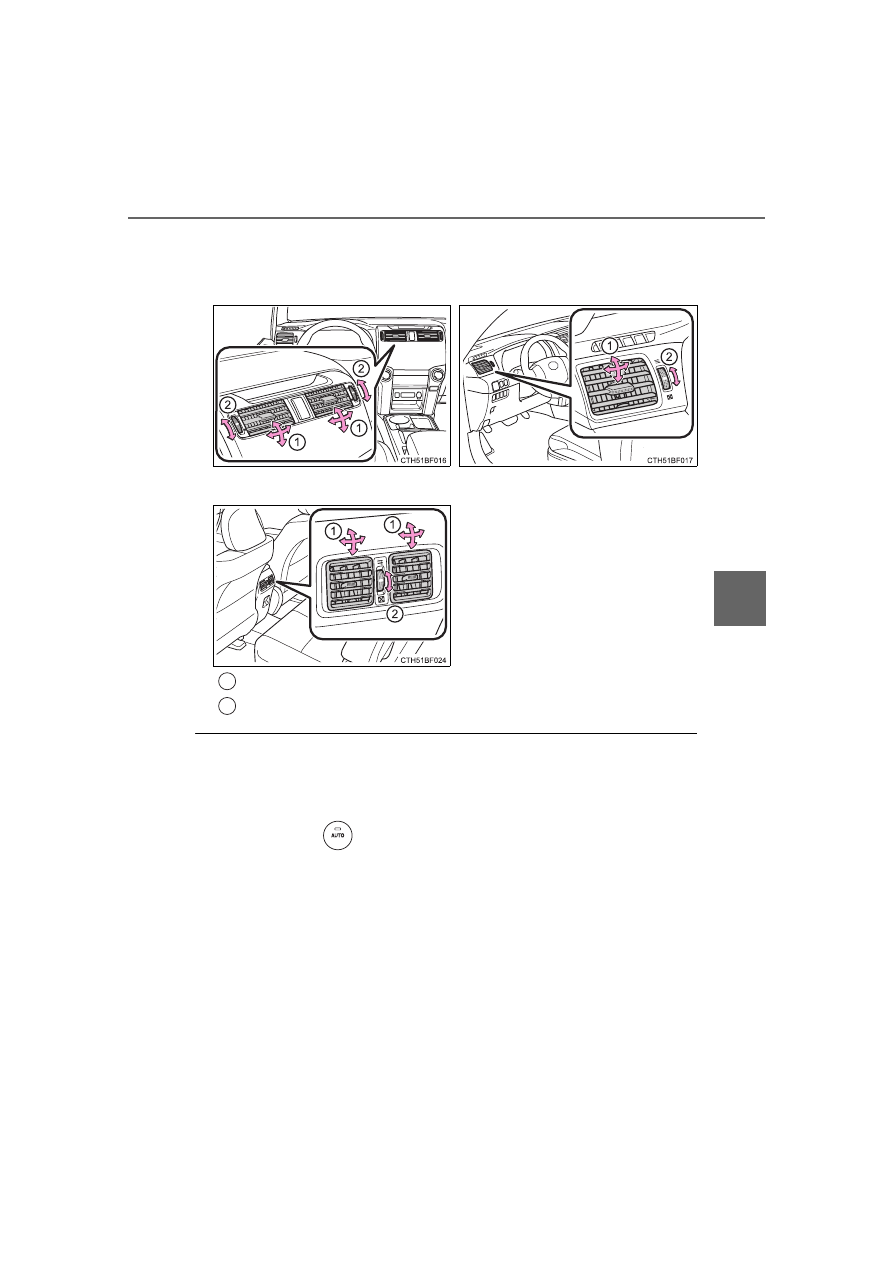
Adjusting the position of and opening and closing the air out-
lets

Using automatic mode

Fan speed is adjusted automatically according to the temperature setting and
the ambient conditions.

Therefore, the fan may stop for a while until warm or cool air is ready to flow

immediately after 

 is pressed.

Front center outlets

Front side outlets

Rear outlets

Direct air flow to the left or right, up or down.

Turn the knob to open or close the vent.

1

2

354

5-1. Using the air conditioning system and defogger

4RUNNER (U)

Fogging up of the windows

The windows will easily fog up when the humidity in the vehicle is high.

Turning 

 on will dehumidify the air from the outlets and defog the wind-

shield effectively.

If you turn 

 off, the windows may fog up more easily.

The windows may fog up if the recirculated air mode is used.

When driving on dusty roads

Close all windows. If dust thrown up by the vehicle is still drawn into the vehi-
cle after closing the windows, it is recommended that the air intake mode be
set to outside air mode and the fan speed to any setting except off.

Outside/recirculated air mode

Setting to the recirculated air mode temporarily is recommended in prevent-
ing dirty air from entering the vehicle interior and helping to cool the vehicle
when the outside air temperature is high.

Outside/recirculated air mode may automatically switch depending on the
temperature setting, outside temperature, pressure, engine coolant tem-
perature or inside temperature.

When the outside temperature exceeds 75°F (24°C) and the air condition-
ing system is on

In order to reduce the air conditioning power consumption, the air condition-
ing system may switch to recirculated air mode automatically. This may also
reduce fuel consumption.

Recirculated air mode is selected as a default mode when the engine switch
is turned to IGNITION ON mode.

It is possible to switch to outside air mode at any time by pressing


 .

When the outside temperature falls to nearly 32

F (0

C)

The dehumidification function may not operate even when 

 is pressed.

When driving on dusty roads

Close all windows. If dust thrown up by the vehicle is still drawn into the vehi-
cle after closing the windows, it is recommended that the air intake mode be
set to outside air mode and the fan speed to any setting except off.

When the indicator light on 

 flashes

Press 


to turn off the cooling and dehumidification function and turn it on

again. There may be a problem in the air conditioning system if the indicator
light continues to flash. Turn the air conditioning system off and have it
inspected by your Toyota dealer.

355

5-1. Using the air conditioning system and defogger

5

In

te

rior fe

atures

4RUNNER (U)

Ventilation and air conditioning odors

To let fresh air in, set the air conditioning system to the outside air mode.

During use, various odors from inside and outside the vehicle may enter into
and accumulate in the air conditioning system. This may then cause odor to
be emitted from the vents.

To reduce potential odors from occurring:

• It is recommended that the air conditioning system be set to outside air

mode prior to turning the vehicle off.

• The start timing of the blower may be delayed for a short period of time

immediately after the air conditioning system is started in automatic
mode.

Air conditioning filter

P. 445

Air conditioning system refrigerant

The meaning of each symbol on the label are as follows:

A label regarding the refrigerant of the
air conditioning system is attached to the
hood at the location shown in the follow-
ing illustration.

Caution

Air conditioning system

Air conditioning system lubricant type

Requires registered technician to service air conditioning
system

Flammable refrigerant

356

5-1. Using the air conditioning system and defogger

4RUNNER (U)

WARNING

To prevent the windshield from fogging up

Do not use 

 during cool air operation in extremely humid weather.

The difference between the temperature of the outside air and that of the

windshield can cause the outer surface of the windshield to fog up, block-

ing your vision.

To prevent burns

Do not touch the rear view mirror surfaces when the outside rear view mir-

ror defoggers are on.

Do not touch the glass at lower part of the windshield or to the side of the

front pillars when the windshield wiper de-icer is on.

NOTICE

To prevent battery discharge

Do not leave the air conditioning system on longer than necessary when the

engine is stopped.

When repairing/replacing parts of the air conditioning system

Have repair/replacement performed by your Toyota dealer.
When a part of the air conditioning system, such as the evaporator, is to be

replaced, it must be replaced with a new one.

Do not place anything on the instrument

panel which may cover the air outlets.

Otherwise, air flow may be obstructed,

preventing the windshield defoggers

from defogging.

357

5-1. Using the air conditioning system and defogger

5

In

te

rior fe

atures

4RUNNER (U)

Heated steering wheel

/Seat heaters

/seat 

ventilators

: If equipped

Heated steering wheel and seat heaters heat the side grips of the

steering wheel and seats, respectively. Seat ventilators maintain

good ventilation by pulling air through the seat upholstery.

WARNING

Care should be taken to prevent injury if anyone in the following categories

comes in contact with the steering wheel and seats when the heater is on:
• Babies, small children, the elderly, the sick and the physically chal-

lenged

• Persons with sensitive skin

• Persons who are fatigued

• Persons who have taken alcohol or drugs that induce sleep (sleeping

drugs, cold remedies, etc.)

Observe the following precautions to prevent minor burns or overheating:
• Do not cover the seat with a blanket or cushion when using the seat

heater.

• Do not use seat heater more than necessary. 

NOTICE

Do not put heavy objects that have an uneven surface on the seat and do

not stick sharp objects (needles, nails, etc.) into the seat.

To prevent battery discharge, do not use the functions when the engine is

off.

358

5-1. Using the air conditioning system and defogger

4RUNNER (U)

Turns the heated steering wheel
on/off

The indicator light comes on when
the heated steering wheel is oper-
ating.

The heated steering wheel can be used when the engine switch is in IGNI-
TION ON mode.

Vehicles with ventilator

Press the knob to release it,
and turn the knob to the desired
temperature setting.

OFF

Press the knob to lock it when not
in use.

Ventilation

Heat

Heated steering wheel

Seat heaters/ventilators

1

2

3

4

359

5-1. Using the air conditioning system and defogger

5

In

te

rior fe

atures

4RUNNER (U)

Vehicles without ventilator

On

The indicator light comes on.

Adjusts the seat temperature

The further you move the dial for-
ward, the warmer the seat
becomes.

Off

Move the dial fully backward. The
indicator light turns off.

The seat heaters/seat ventilators can be used when

The engine switch is in IGNITION ON mode.

1

2

3

360

4RUNNER (U)

5-2. Using the interior lights

Rear interior light (

P. 361)

Front interior light/front personal lights (

P. 361)

Shift lever light (when the engine switch is in ACCESSORY or IGNI-
TION ON mode)

Inside door handle lights (if equipped)

Outer foot lights (if equipped)

Engine switch light

Footwell lights (if equipped)

Door courtesy lights

Turning the instrument panel light control dial fully downward disables
the inside door handle lights, footwell lights and shift lever light. 
(

P. 89)

Interior lights list

1

2

3

4

5

6

7

8

361

5-2. Using the interior lights

5

In

te

rior fe

atures

4RUNNER (U)

Front

Turns the lights off

Turns the door position on

Rear

Turns the door position on

Turns the light off

Turns the light on

Turns the lights on/off

Interior lights

1

2

1

2

3

Personal lights

362

5-2. Using the interior lights

4RUNNER (U)

Illuminated entry system

The lights automatically turn on/off according to engine switch mode, the

presence of the electronic key, whether the doors are locked/unlocked, and

whether the doors are opened/closed.

To prevent battery discharge

If the following lights remain on, the lights will go off automatically after 20

minutes:

Engine switch light

Front interior light

Rear interior light

Personal lights

Footwell lights

Inside door handle lights

Door courtesy lights

Customization

Setting (e.g. the time elapsed before lights turn off) can be changed. 

(Customizable features: 

P. 549)

NOTICE

To prevent battery discharge

Do not leave the lights on longer than necessary when the engine is not

running.

363

5

In

te

rior fe

atures

4RUNNER (U)

5-3. Using the storage features

List of storage features

Auxiliary box (

P. 367)

Glove box (

P. 364)

Bottle holders (

P. 369)

Tissue pocket (

P. 368)

Cup holders (

P. 365)

Pen holder (

P. 368)

Console box (

P. 364)

Coin holder (

P. 368)

WARNING

Do not leave glasses, lighters or spray cans in the storage spaces, as this

may cause the following when cabin temperature becomes high:
• Glasses may be deformed by heat or cracked if they come into contact

with other stored items.

• Lighters or spray cans may explode. If they come into contact with other

stored items, the lighter may catch fire or the spray can may release

gas, causing a fire hazard.

When driving or when the storage compartments are not in use, keep the

lids closed. In the event of sudden braking or sudden swerving, an acci-

dent may occur due to an occupant being struck by an open lid or the

items stored inside.

1

2

3

4

5

6

7

8

364

5-3. Using the storage features

4RUNNER (U)

The glove box can be opened by pressing the lock release button and
can be locked and unlocked by using the mechanical key.

Open

Unlock

Lock

Lift the lid while pulling up the
knob to release the lock.

The separator can be used in either of the positions shown in the illus-
tration

Glove box

1

2

3

Console box

Change the separator position.

365

5-3. Using the storage features

5

In

te

rior fe

atures

4RUNNER (U)

Cup holders

Front seats

Rear seats (without third row
seats)

Pull down the rear seat center
armrest.

Second row seats (with third
row seats)

Third row seats (if equipped)

Pull down the second row seat
center armrest and press down
the button on the armrest.

366

5-3. Using the storage features

4RUNNER (U)

Adjusting the size of the cup holders

Front seats

Rear seats (without third row seats)

Remove the adapter.

Remove the adapter.

WARNING

Items unsuitable for the cup holders

Do not place anything other than cups or aluminum cans in the cup holders.

Even with the lid is closed, items must not be stored in the cup holders.

Other items may be thrown out of the holders in the event of an accident or

sudden braking, causing injury. If possible, cover hot drinks to prevent

burns.

When not in use (second row seat cup holders only)

Keep the cup holders closed. In the event of sudden braking, an accident

may occur due to an occupant being struck by the open cup holders or the

items stored inside.

NOTICE

To prevent damage to the rear cup holders (second row seats only)

Stow the cup holders before stowing the armrest.

367

5-3. Using the storage features

5

In

te

rior fe

atures

4RUNNER (U)

Push the lid.

Auxiliary box (if equipped)

WARNING

Items unsuitable for storing

Do not store items heavier than 0.4 lb. (0.2 kg).

Doing so may cause the auxiliary box to open and the items inside may fall

out, resulting in an accident.

368

5-3. Using the storage features

4RUNNER (U)

Lift the lid while pulling up the knob to release the lock.

Coin holder

Tissue pocket

Pen holder

Coin holder/tissue pocket/pen holder

1

2

3

369

5-3. Using the storage features

5

In

te

rior fe

atures

4RUNNER (U)

When using the bottle holder

When storing a bottle, close the cap.

The bottle may not be stored depending on its size or shape.

Bottle holders

Front seats

Rear seats (without third row

seats)/second row seats (with

third row seats)

WARNING

Items unsuitable for the bottle holder

Do not place anything other than a bottle in the bottle holders.

Other items may be thrown out of the holders in the event of an accident or

sudden braking and cause injury.

NOTICE

Items that should not be stowed in the bottle holders

Put the cap on before stowing a bottle. Do not place open bottles in the bot-

tle holders, or glasses and paper cups containing liquid. The contents may

spill and glasses may break.

370

5-3. Using the storage features

4RUNNER (U)

Cargo hooks

Vehicles with third seats

Fold down the third seats. (

P. 138)

Raise the hook to use.

The cargo hooks are provided
for securing loose items.

Vehicles without third seats

Raise the hook to use.

The cargo hooks are provided
for securing loose items.

Luggage compartment features

1

2

371

5-3. Using the storage features

5

In

te

rior fe

atures

4RUNNER (U)

Cargo net hooks

The cargo net itself is not included as original equipment.

Vehicles with third seats (pattern 1)

Raise the rear cargo hook to
use.

Vehicles with third seats (pattern 2)

Fold down the third seats. (

P. 138)

Raise the cargo hook to use.

Vehicles without third seats (pattern 1)

Raise the rear cargo hook to
use.

1

2

372

5-3. Using the storage features

4RUNNER (U)

Vehicles without third seats (pattern 2)

Raise the cargo hook to use.

Storage compartment

Open the storage compartment as shown.

Type A (if equipped)

Type B (if equipped)

373

5-3. Using the storage features

5

In

te

rior fe

atures

4RUNNER (U)

Slide deck (if equipped)

Slide the deck while turning the
lock release lever, and then
release the lever after sliding
the deck to the lock position.

Half-slide locked position

Full-slide locked position

Grocery bag hooks

Type B only: To use the grocery bag hooks, slide the slide deck to
the full-slide locked position.

1

2

Type A

Type B (if equipped)

374

5-3. Using the storage features

4RUNNER (U)

WARNING

When the cargo hooks are not in use

To avoid injury, always return the cargo hooks to their stowed positions.

Slide deck operating precaution (if equipped)

Be careful not to get hands or feet pinched by the slide deck.

Be careful not to allow the slide deck to hit any persons or luggage while

sliding the deck.

Do not operate the slide deck while someone is on it. 

Doing so may cause an accident.

If operating the slide deck when the vehicle is stopped on an incline, the

slide deck may move faster. Be careful not to allow the slide deck to hit

you or pinch your fingers etc.

After sliding the deck, make sure it is securely locked in position.

Do not close the back door while any person is sitting on the slide deck or

any person is between the slide deck and back door.

Do not stow any objects into the space between the slide deck rails.

NOTICE

To prevent damage to the cargo net hooks 

Avoid hanging things other than a cargo net on them.

Slide deck weight capacity (if equipped)

Do not load anything heavier than 440 lb. (200 kg) on the sliding deck.

Grocery bag hook weight capacity

Do not hang any object heavier than 8.8 lb. (4 kg) on the grocery bag hooks.

When using the slide deck (if equipped)

Do not close the back door while the slide deck is sliding out. Doing so

may cause the back door or slide deck to break.

If operating the slide deck when the vehicle is stopped on an incline, the

slide deck may move faster. Be careful as luggage may become damaged

or fly out and damage the cabin.

375

5

In

te

rior fe

atures

4RUNNER (U)

5-4. Other interior features

To set the visor in the forward

position, flip it down.
To set the visor in the side posi-

tion, flip down, unhook, and

swing it to the side.
To use the side extender, place

the visor in the side position,

then slide it backward. 

Slide the cover to open.

The light turns on when the cover

is opened.

Other interior features

Sun visors

1

2

3

Vanity mirrors

NOTICE

To prevent battery discharge

Do not leave the vanity lights on for extended periods while the engine is off.

376

5-4. Other interior features

4RUNNER (U)

The clock can be adjusted by pressing the buttons.

Adjusts the hours

Adjusts the minutes

The clock is displayed when

The engine switch is in ACCESSORY or IGNITION ON mode.

When disconnecting and reconnecting battery terminals

The clock data will be reset.

Clock

1

2

377

5-4. Other interior features

5

In

te

rior fe

atures

4RUNNER (U)

The power outlet can be used for electrical appliances.

Main switch

To use the power outlet, turn on
the main switch.

The power supply starts a few sec-
onds after the main switch is
pressed.

Power outlet socket (luggage compartment)

Open the lid.

Maximum available capacity of the power outlet

While the vehicle is being driven

The maximum capacity of the power outlet is always 120 V AC/
100 W.

When the vehicle is stationary

The maximum capacity of the power outlet varies depending on
the position of the shift lever.

• The maximum capacity is 120 V AC/100 W when the shift

lever is in any position other than P or N.

• The maximum capacity is 120 V AC/400 W when the shift

lever is in P or N.

The maximum capacity of 400 W can only be restored by turning the
power outlet main switch off and then on again with the shift lever in
P or N.

Power outlets (120 V AC)

378

5-4. Other interior features

4RUNNER (U)

The power outlet can be used when

The engine is running.

The indicator light changes according to the maximum available capac-
ity as follows:

When the power outlet is in operation

The sound of the cooling fan may be heard from the right side of the luggage
compartment. This is normal and does not indicate a malfunction.

If the engine is started with the power outlet main switch on

The maximum capacity of the power supply may decrease to below the stan-
dard, or may be cut off completely, even when the vehicle is stationary.

The protection circuit may be activated to cut the power supply if any of
the following conditions apply:

The engine is started with the power outlet main switch on.

Use of electrical appliances exceeding the maximum capacity is attempted.

A sound may be heard when the protection circuit is activated. This is nor-
mal and does not indicate a malfunction.

Electrical appliances, which consume power exceeding 100 W, have been
used continuously for a long time period.

The total power usage by all electrical features (headlights, air conditioning,
etc.) has exceeded the total vehicle maximum for an extended period of
time.

If the protection circuit is activated and the power supply is cut, conduct
the following procedure:

Park the vehicle in a safe place, and then securely apply the parking brake.

Check and ensure that the shift lever is in P or N.

Make sure that the power consumption of the electric appliance is within
the maximum capacity of the power outlet and the appliance is not broken.

Press the power outlet main switch again.

When the cabin temperature is high, open the windows to cool the tempera-
ture down. Once it reaches the normal temperature, turn the power outlet
main switch on again.

If the power supply does not resume even after the above procedure has
been performed, have the vehicle inspected by your Toyota dealer.

120 V AC/400 W

120 V AC/100 W

1

2

1

2

3

4

379

5-4. Other interior features

5

In

te

rior fe

atures

4RUNNER (U)

WARNING

Using a power outlet

Observe the following precautions to reduce the risk of injury.

Use of the power outlet when it is wet with water or snow may result in

electrical shocks and is extremely dangerous. The power outlet must be

thoroughly dried before use.

Do not allow children to use or play with the power outlet.

Be careful not to get any part of your body caught in the power outlet lid.

When using electrical appliances, strictly follow any cautions and notices

written on their labels and in the manufacturers' instruction manuals.

Do not modify, disassemble or repair the power outlet or its inverter in any

way. Doing so may result in unexpected malfunctions or accidents, which

could cause serious damage or injuries. Contact your Toyota dealer for

any necessary repairs.

To prevent injuries and accidents, secure all electric appliances before

use and do not use any appliances that may do any of the following:

Distract the driver while driving, or hamper safe driving.

Result in a fire or burn injuries due to the appliance rolling, falling or over-

heating while driving.

Emit steam while the windows of the cabin are closed.

To prevent unexpected accidents, such as electric shocks, do not per-

form any of the following actions:

Using the power outlet for electric heaters while sleeping.

Contaminating the power outlet with liquid substances or mud.

Handling electrical appliance plugs at the power outlet with wet hands or

feet.

Inserting foreign objects into the power outlet.

Using malfunctioning electric appliances.

Inserting inappropriate or badly fitting plugs into the power outlet.

380

5-4. Other interior features

4RUNNER (U)

NOTICE

To avoid damaging the power outlet and the plug

Close the power outlet lid when not in use.

Do not allow foreign objects or liquids to enter the power outlet, as this

may cause a short circuit.

Do not use plug adaptors to connect too many plugs to the power outlet.

After removing a plug, gently close the power outlet lid.

To prevent the fuse from being blown

Do not use a 120 V AC appliance that requires more than the maximum

capacity of the power outlet. If a 120 V AC appliance that consumes more

than the maximum capacity is used, the protection circuit will cut the power

supply.

Appliances that may not operate properly (120 V AC)

The following 120 V AC appliances may not operate even if their power con-

sumption is under maximum capacity.

Appliances with high initial peak wattage

Measuring devices that process precise data.

Other appliances that require an extremely stable power supply

To prevent battery discharge

Turn off all the vehicle's electronic equipment and accessories, such as the

headlights and air conditioning, when electrical appliances that consume in

excess of 100 W are used continuously for long periods of time.

To prevent any damage caused by heat

Do not use any electrical appliances that give off intense heat, such as

toasters, in any locations including the internal or external trim, seats and

deck.

Do not use any electrical appliances that are easily affected by vibration or

heat inside the vehicle. Vibration while driving, or the heat of the sun while

parking, may result in damage to those electrical appliances.

381

5-4. Other interior features

5

In

te

rior fe

atures

4RUNNER (U)

Please use as a power supply for electronic goods that use less than

12 VDC / 10 A (power consumption of 120 W).

When using electronic goods, make sure that the power consumption

of all the connected power outlets is less than 120 W.

Center panel

Open the lid.

NOTICE

If any electrical appliances are to be used while driving

Securely fasten both the appliances and their cables to prevent them from

falling or getting caught in any of the power train components.

If the power outlet is loose when an electrical appliance plug is con-

nected

Replace the outlet. Contact your Toyota dealer for any necessary replace-

ments.

If the power outlet gets dirty

Turn the main switch off and use a soft, clean cloth to wipe it gently. Do not

use any cleansing materials, such as organic solvents, wax, or compound

cleaners, as these may damage the power outlet or cause it to malfunction.

Power outlets

382

5-4. Other interior features

4RUNNER (U)

Console box (inside)

Lift the lid while pulling up the
knob to release the lock.

Open the lid.

Luggage compartment

Open the lid.

1

2

383

5-4. Other interior features

5

In

te

rior fe

atures

4RUNNER (U)

The power outlets can be used when

The engine switch is in ACCESSORY or IGNITION ON mode.

When turning the engine switch off

Disconnect electrical devices with charging functions, such as mobile battery

packs.

If such devices are left connected, the engine switch may not be turned off

normally.

NOTICE

To avoid damaging the power outlets

Close the power outlet lids when the power outlets are not in use. 

Foreign objects or liquids that enter the power outlets may cause a short cir-

cuit.

To prevent battery discharge

Do not use the power outlets longer than necessary when the engine is off.

384

5-4. Other interior features

4RUNNER (U)

The USB charging ports are used to supply 3.0 A of electricity at 5 V
to external devices (power consumption of 15 W).
The USB charging ports are for charging only. They are not designed
for data transfer or other purposes.
Depending on the external device, it may not charge properly. Refer to
the manual included with the device before using a USB charging
port.

Using the USB charging ports

Open the lid.

The USB charging ports can be used when

The engine switch is in ACCESSORY or IGNITION ON mode.

Situations in which the USB charging ports may not operate correctly

If a device which consumes more than 3.0 A at 5 V (15 W) is connected

If a device designed to communicate with a personal computer, such as a
USB memory device, is connected

If the connected external device is turned off (depending on device)

If the temperature inside the vehicle is high, such as after the vehicle has
been parked in the sun

About connected external devices

Depending on the connected external device, charging may occasionally be
suspended and then start again. This is not a malfunction.

USB charging ports


Content      ..     10      11      12      13     ..