Toyota Prius Plug-in Hybrid (2023 year). Manual in english - page 32
 

  Index      Toyota     Toyota Prius Plug-in Hybrid (2023 year). Manual in english


Search            copyright infringement  


Content      ..     30      31      32      33     ..


Toyota Prius Plug-in Hybrid (2023 year). Manual in english - page 32


533

6-1. Using the air conditioning system and defogger

6

In

teri
or f
eatu

res

WARNING

To prevent the windshield from fogging up

Do not use


 during cool air operation in extremely humid weather.

The difference between the temperature of the outside air and that of the
windshield can cause the outer surface of the windshield to fog up, block-
ing your vision.

To prevent burns

Do not touch the rear view mirror surfaces when the outside rear view mirror
defoggers are on.

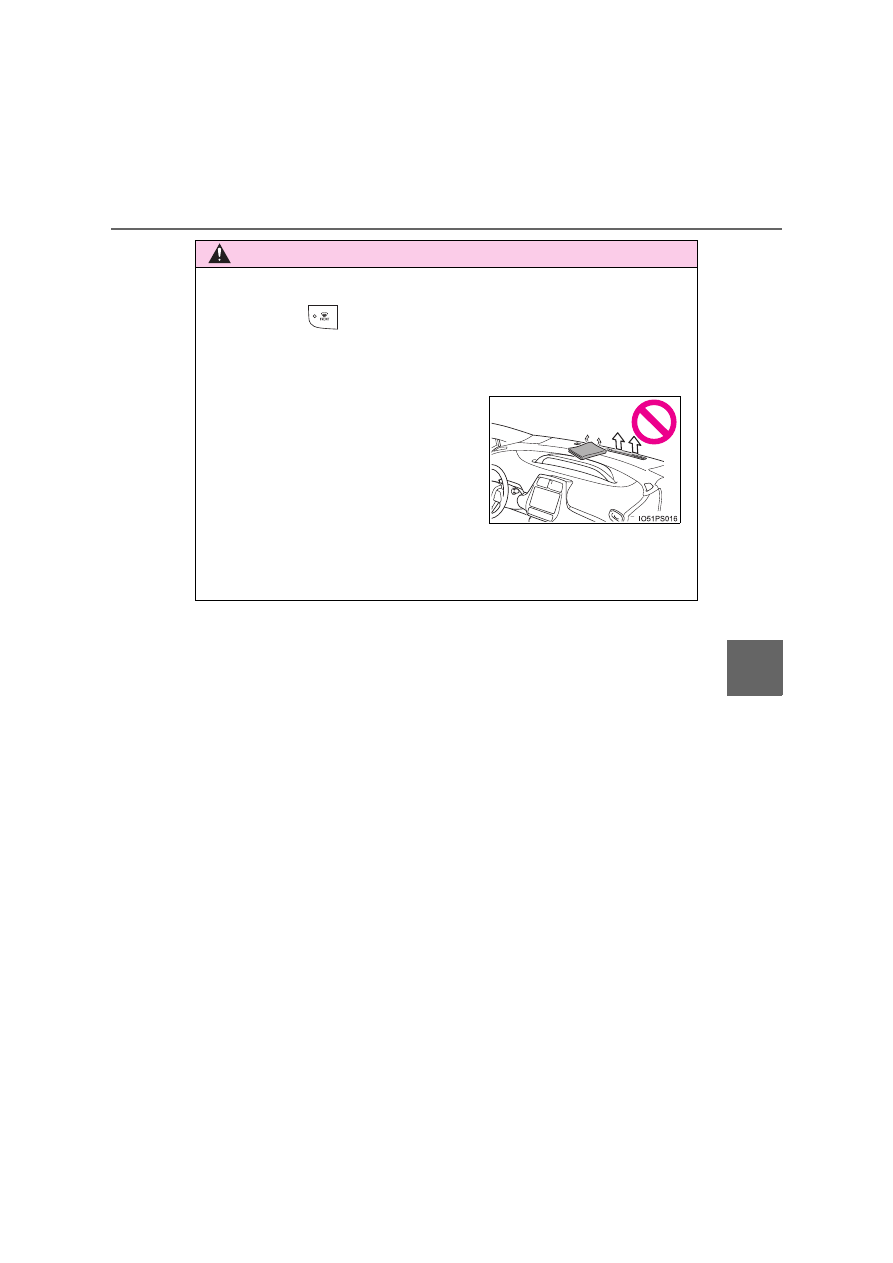
Do not place anything on the instrument
panel which may cover the air outlets.
Otherwise, air flow may be obstructed,
preventing the windshield defoggers
from defogging.

534

6-1. Using the air conditioning system and defogger

NOTICE

Humidity sensor

Do not spray the glass cleaner on the sensor or subject it to strong impacts

Do not stick anything on the sensor

To prevent 12-volt battery discharge

Do not leave the air conditioning system on longer than necessary when the
hybrid system is off.

Air outlets

The air outlets become hot when used for heating. Therefore, use caution
and adjust the air outlets accordingly.

In order to detect fog on the windshield, a
sensor which monitors the temperature
of the windshield, the surround humidity,
etc. is installed. (

P. 531)

Follow these points to avoid damaging
the sensor:

Do not disassemble the sensor

535

6-1. Using the air conditioning system and defogger

6

In

teri
or f
eatu

res

Remote Air Conditioning System

If the Remote Air Conditioning System is used while the charging
cable is connected to the vehicle, the reduction of charge in the hybrid
battery (traction battery) will be suppressed to allow you to use elec-
tricity from an external power source.

Charging will be conducted automatically after the Remote Air Condition-
ing System is stopped.

Check the temperature setting of the air conditioning system. 
(

P. 522)

The Remote Air Conditioning System will operate in accordance with the
temperature settings of the air conditioning system.

Press and hold “A/C” on the wire-
less remote control to operate the
Remote Air Conditioning System.

The system will shut off if a door is
opened.
The system can be stopped by
pressing “A/C” twice.

The Remote Air Conditioning System uses electrical energy
stored in the hybrid battery (traction battery) and allows the air
conditioning to be operated by remote control.

Before leaving the vehicle

Activating the Remote Air Conditioning System

536

6-1. Using the air conditioning system and defogger

Operating conditions

The system will only operate if all of the following conditions are met:

The shift position is in P.

The power switch is off.

*

All doors are closed.

The hood is closed.

*

: The Remote Air Conditioning System cannot be used for approximately 3

minutes and a half after the power switch is turned off.

Remote Air Conditioning System automatic shut-off

The system will automatically shut off under the following conditions:

About 10 minutes have passed since operation began

Any one of the operating conditions is not met

The system may also shut off if the charge level of the hybrid battery (traction
battery) drops to low.

Conditions affecting operation

The system may not start in the following situations:

The charge level of the hybrid battery (traction battery) is low

The outside temperature is extremely low

When the hybrid system is cool (for example, after being left for a long time
in low temperatures)

Windshield defogger

When defogging the windshield using the Remote Air Conditioning System,
defogging may be insufficient due to the power being restricted more than
during normal air conditioning operation. Also, the outside of the windshield
may fog up due to the outside temperature, humidity or air conditioning set
temperature.

Using the heater via the Remote Air Conditioning System

When the outside heat exchanger becomes frosted over, heating perfor-
mance may decline due to automatically switching to the frost removal opera-
tion.

Security feature

Any unlocked doors will be automatically locked when the system is operat-
ing. The emergency flashers flash to indicate that the doors have been locked
or the system has been turned off.
(The doors locked: Once; The system turned off: Twice)

Conditions affecting operation

P. 286

537

6-1. Using the air conditioning system and defogger

6

In

teri
or f
eatu

res

When using the Remote Air Conditioning System

A charging message will be displayed on the multi-information display. Differ-
ent messages will be displayed depending on when the Remote Air Condi-
tioning System was started (after charging or during charging).

While the Remote Air Conditioning System is operating

Depending on the operating condition of the Remote Air Conditioning Sys-
tem, the electric fan may spin and an operating noise may be heard.
However, this does not indicate a malfunction.

The Remote Air Conditioning System may stop operating temporarily if
other features that use electricity (for example, the seat heater, lights, wind-
shield wipers) are in operation or if the charge level of the 12-volt battery
becomes low.

The headlights, windshield wiper, combination meter, etc. will not operate
while the Remote Air Conditioning System is operating.

Electronic key battery depletion

P. 270

When the electronic key battery is fully depleted

P. 632

Customization

Setting (e.g. Operation using “A/C” on the wireless remote control) can be
changed. (Customizable features: 

P. 726)

538

6-1. Using the air conditioning system and defogger

WARNING

Precautions for the Remote Air Conditioning System

Do not use the system if people are in the vehicle. 
Even when the system is in use, the internal temperature may still reach a
high or low level due to features such as the automatic shut-off. Children
and pets left inside the vehicle may suffer heatstroke dehydration or hypo-
thermia, or could result in death or serious injury.

Depending on the surrounding environment, signals from the wireless
switch may transmit further than expected. Pay appropriate attention to
the vehicle’s surroundings and use the switch only when necessary.

Do not operate “A/C” if the hood is open. The air conditioning may operate
unintentionally and objects may be drawn into the electrical cooling fan.

NOTICE

To prevent the hybrid battery (traction battery) from being discharged
through incorrect operation

Use “A/C” only when necessary.

539

6-1. Using the air conditioning system and defogger

6

In

teri
or f
eatu

res

Seat heaters

Seat heaters heat the front seats. 

WARNING

Care should be taken to prevent injury if anyone in the following categories
comes in contact with the seats when the heater is on:
• Babies, small children, the elderly, the sick and the physically chal-

lenged

• Persons with sensitive skin
• Persons who are fatigued
• Persons who have taken alcohol or drugs that induce sleep (sleeping

drugs, cold remedies, etc.)

Observe the following precautions to prevent minor burns or overheating: 
• Do not cover the seat with a blanket or cushion when using the seat

heater.

• Do not use seat heater more than necessary. 

NOTICE

Do not put heavy objects that have an uneven surface on the seat and do
not stick sharp objects (needles, nails, etc.) into the seat.

To prevent 12-volt battery discharge, do not use the functions when the
hybrid system is off.

540

6-1. Using the air conditioning system and defogger

Heats the seat at low tempera-
ture (LO)
Heats the seat at high tempera-
ture (HI)

The indicator light comes on when
one side of the switch is pressed.
To stop operation, gently press the
other side of the switch.

The seat heaters can be used when the power switch is in ON mode.

When not in use, turn off the switch. The indicator light turns off.

Operating instructions

indicator

indicator

1

2

541

6-2. Using the interior lights

6

In

teri
or f
eatu

res

Interior lights list

Rear interior light (

P. 543)

Front personal/interior lights (

P. 542)

Shift lever lighting
Footwell lights
Front door courtesy lights

1
2
3
4
5

542

6-2. Using the interior lights

Turns the lights off
Turns the door position on
Turns the lights on

Turns the lights on/off

Front interior light

1
2
3

Front personal lights

543

6-2. Using the interior lights

6

In

teri
or f
eatu

res

Turns the switch to the door
position (door linked)

Operation is linked with the front
interior light main switch. When the
switch is off, the light does not illu-
minate.

Turns the light on

Illuminated entry system

The lights automatically turn on/off according to power switch mode, the pres-
ence of the electronic key, whether the doors are locked/unlocked, and
whether the doors are opened/closed.

To prevent the 12-volt battery from being discharged

If the interior lights remain on when the power switch is turned off, the light
will go off automatically after 20 minutes.

Customization

Settings (e.g. the time elapsed before the lights turn off) can be changed.
(Customizable features: 

P. 726)

Rear interior light

1

2

NOTICE

To prevent 12-volt battery discharge, do not leave the lights on longer than
necessary when the hybrid system is off.

544

6-3. Using the storage features

List of storage features

Auxiliary boxes (

P. 548)

Glove box (

P. 545)

Bottle holders/door pockets 
(

P. 547)

Cup holders (

P. 546)

Seat back pockets (

P. 549)

Console box (

P. 545)

WARNING

Do not leave glasses, lighters or spray cans in the storage spaces, as this
may cause the following when cabin temperature becomes high:
• Glasses may be deformed by heat or cracked if they come into contact

with other stored items.

• Lighters or spray cans may explode. If they come into contact with other

stored items, the lighter may catch fire or the spray can may release
gas, causing a fire hazard.

When driving or when the storage compartments are not in use, keep the
lids closed.
In the event of sudden braking or sudden swerving, an accident may occur
due to an occupant being struck by an open lid or the items stored inside.

1
2
3

4
5
6

545

6-3. Using the storage features

6

In

teri
or f
eatu

res

Pull up the lever.

The glove box light turns on when the tail lights are on.

Press the knob and open the lid.

Glove box

Console box

Vehicles without solar charging system:
The tray slides forward/backward and can
be removed.

546

6-3. Using the storage features

Cup holders

Front

Rear

Pull down the armrest.

WARNING

Do not place anything other than cups or beverage cans in the cup holders.
Other items may be thrown out of the holders in the event of an accident or
sudden braking, causing injury. If possible, cover hot drinks to prevent
burns.

547

6-3. Using the storage features

6

In

teri
or f
eatu

res

When storing a bottle, close the cap.

The bottle may not be stored depending on its size or shape.

Bottle holders/door pockets

Front doors

Rear doors

NOTICE

Put the cap on before stowing a bottle. Do not place open bottles or glass
and paper cups containing liquid in the bottle holders.
The contents may spill and glasses may break.

548

6-3. Using the storage features

Auxiliary boxes

Type A

Type B (if equipped)

Press in the lid.

The overhead console is useful for
temporarily storing small items.

Vehicles with the wireless char-
ger: 

P. 557

Type C (if equipped)

WARNING

Type A: 
Do not store items heavier than 200 g (0.44 lb.).
Doing so may cause the auxiliary box to open and the items inside may fall
out, resulting in an accident.


Content      ..     30      31      32      33     ..