Toyota Prius Plug-in Hybrid (2023 year). Manual in english - page 25
 

  Index      Toyota     Toyota Prius Plug-in Hybrid (2023 year). Manual in english


Search            copyright infringement  


Content      ..     23      24      25      26     ..


Toyota Prius Plug-in Hybrid (2023 year). Manual in english - page 25


408

5-5. Using the driving support systems

Adjusting the set speed by the lever
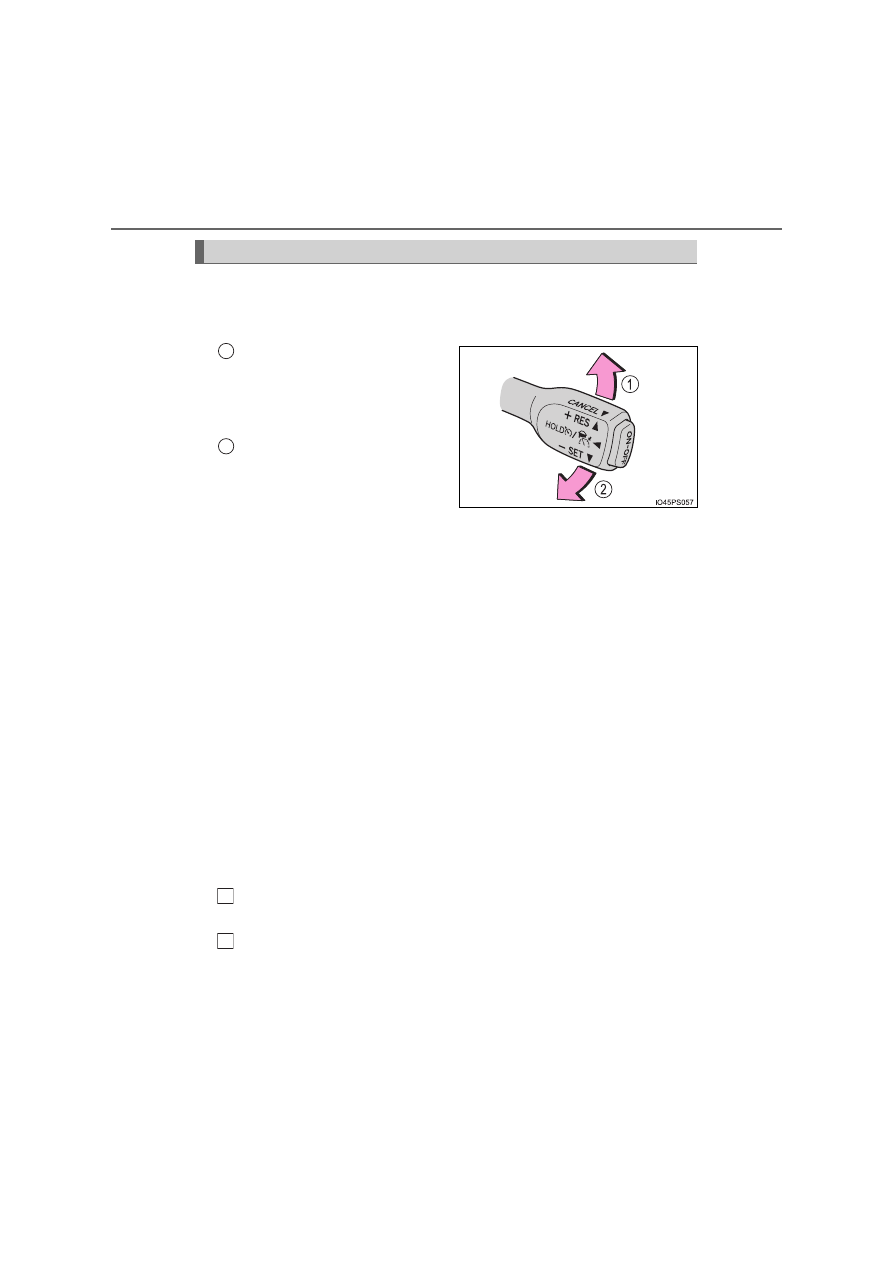
To change the set speed, operate the lever until the desired set
speed is displayed.

Increases the speed

(Except when the vehicle has
been stopped by system control
in vehicle-to-vehicle distance
control mode)

Decreases the speed

Fine adjustment: Momentarily
move the lever in the desired
direction.
Large adjustment: Hold the lever up or down to change the speed,
and release when the desired speed is reached.
In the vehicle-to-vehicle distance control mode, the set speed will
be increased or decreased as follows:

Fine adjustment: By 1 km/h (0.6 mph)

*

1

 or 1 mph (1.6 km/h)

*

2

 each

time the lever is operated
Large adjustment: Increases or decreases in 5 km/h (3.1 mph)

*

1

 or 5

mph (8 km/h)

*

2

 increments for as long as the lever is held

In the constant speed control mode (

P. 412), the set speed will be

increased or decreased as follows:

Fine adjustment: By 1 km/h (0.6 mph)

*

1

 or 1 mph (1.6 km/h)

*

2

 each

time the lever is operated
Large adjustment: The speed will continue to change while the lever is
held.

*

1

: When the set speed is shown in “km/h”

*

2

: When the set speed is shown in “MPH”

Increasing the set speed by the accelerator pedal

Accelerate with accelerator pedal operation to the desired vehi-
cle speed.
Push the lever down.

Adjusting the set speed

1

2

1

2

409

5-5. Using the driving support systems

5

D

riv

in

g

Pressing the switch changes the
vehicle-to-vehicle distance as fol-
lows:

Long
Medium
Short

Select a distance from the table below. Note that the distances shown
correspond to a vehicle speed of 80 km/h (50 mph). Vehicle-to-vehicle
distance increases/decreases in accordance with vehicle speed.
When the vehicle is stopped by system control, the vehicle stops at a
certain vehicle-to-vehicle distance depending on the situation.

Changing the vehicle-to-vehicle distance (vehicle-to-vehicle dis-
tance control mode)

Preceding 
vehicle mark

1
2
3

Vehicle-to-vehicle distance settings (vehicle-to-vehicle distance
control mode)

Distance options

Vehicle-to-vehicle distance

Long

Approximately 50 m (160 ft.)

Medium

Approximately 40 m (130 ft.)

Short

Approximately 30 m (100 ft.)

410

5-5. Using the driving support systems

After the vehicle ahead of you
starts off, push the lever up.
Your vehicle will also resume fol-
low-up cruising if the accelerator
pedal is depressed after the vehi-
cle ahead of you starts off.

Pulling the lever toward you
cancels the speed control.

The speed control is also canceled
when the brake pedal is
depressed.
(When the vehicle has been
stopped by system control,
depressing the brake pedal does
not cancel the setting.)

Pushing the lever up resumes the cruise control and returns vehicle
speed to the set speed.

Resuming follow-up cruising when the vehicle has been stopped
by system control (vehicle-to-vehicle distance control mode)

Canceling and resuming the speed control

1

2

411

5-5. Using the driving support systems

5

D

riv

in

g

When your vehicle is too close to
a vehicle ahead, and sufficient
automatic deceleration via the
cruise control is not possible, the
display will flash and the buzzer
will sound to alert the driver. An
example of this would be if
another driver cuts in front of you
while you are following a vehicle.
Depress the brake pedal to
ensure an appropriate vehicle-to-
vehicle distance.

Warnings may not occur when

In the following instances, warnings may not occur even when the
vehicle-to-vehicle distance is small.

When the speed of the preceding vehicle matches or exceeds
your vehicle speed

When the preceding vehicle is traveling at an extremely slow
speed

Immediately after the cruise control speed was set

When depressing the accelerator pedal

Approach warning (vehicle-to-vehicle distance control mode)

412

5-5. Using the driving support systems

When constant speed control mode is selected, your vehicle will main-
tain a set speed without controlling the vehicle-to-vehicle distance.
Select this mode only when vehicle-to-vehicle distance control mode
does not function correctly due to a dirty radar, etc.

With the cruise control off,
press and hold the “ON-OFF”
button for 1.5 seconds or more.

Immediately after the “ON-OFF”
button is pressed, the dynamic
radar cruise control indicator will
come on. Afterwards, it switches to
the cruise control indicator.
Switching to constant speed con-
trol mode is only possible when
operating the lever with the cruise
control off.

Accelerate or decelerate, with
accelerator pedal operation, to
the desired vehicle speed (at or
above approximately 30 km/h
[20 mph]) and push the lever
down to set the speed.

Cruise control “SET” indicator will
come on.
The vehicle speed at the moment
the lever is released becomes the
set speed.
Adjusting the speed setting: 

P. 408

Canceling and resuming the speed setting: 

P. 410

Selecting constant speed control mode

1

2

413

5-5. Using the driving support systems

5

D

riv

in

g

When this function is enabled and the system is operating in vehicle-
to-vehicle distance control mode (

P. 405), when a speed limit sign is

detected, the recognized speed limit will be displayed with an up/
down arrow. The set speed can be increased/reduced to the recog-
nized speed limit by pushing the lever up or down.

When the current set speed is
lower than the recognized
speed limit

Push the lever up.

When the current set speed is
higher than the recognized
speed limit

Push the lever down.

Dynamic Radar Cruise Control with Road Sign Assist can be enabled/

disabled in 

 on the multi-information display. (

P. 220)

When the Dynamic Radar Cruise Control with Road Sign Assist is
operating, while driving down a hill, the vehicle speed may exceed the
set speed.
In this case, the displayed set vehicle speed will be highlighted and a
buzzer will sound to alert the driver.

Dynamic Radar Cruise Control with Road Sign Assist

Enabling/Disabling the Dynamic Radar Cruise Control with Road
Sign Assist

414

5-5. Using the driving support systems

Dynamic radar cruise control with full-speed range can be set when

The shift position is in D.

The desired set speed can be set when the vehicle speed is approximately
30 km/h (20 mph) or more.
(However, when the vehicle speed is set while driving at below approxi-
mately 30 km/h [20 mph], the set speed will be set to approximately 30 km/h
[20 mph].)

Accelerating after setting the vehicle speed

The vehicle can accelerate by operating the accelerator pedal. After acceler-
ating, the set speed resumes. However, during vehicle-to-vehicle distance
control mode, the vehicle speed may decrease below the set speed in order
to maintain the distance to the preceding vehicle.

When the vehicle stops while follow-up cruising

Pushing the lever up while the vehicle ahead stops will resume follow-up
cruising if the vehicle ahead starts off within approximately 3 seconds after
the lever is pushed up.

If the vehicle ahead starts off within 3 seconds after your vehicle stops, fol-
low-up cruising will be resumed.

Automatic cancelation of vehicle-to-vehicle distance control mode

Vehicle-to-vehicle distance control mode is automatically canceled in the fol-
lowing situations.

VSC is activated.

TRC is activated for a period of time.

When the VSC or TRC system is turned off.

The sensor cannot detect correctly because it is covered in some way.

When the brake control or output restriction control of a driving support sys-
tem operates.
(For example: Pre-Collision System, Drive-Start Control)

The parking brake is operated.

The vehicle is stopped by system control on a steep incline.

The following are detected when the vehicle has been stopped by system
control:
• The driver is not wearing a seat belt.
• The driver’s door is opened.
• The vehicle has been stopped for about 3 minutes.
The shift position may automatically change to P. (

P. 332)

If vehicle-to-vehicle distance control mode is automatically canceled for any
reasons other than the above, there may be a malfunction in the system.
Contact any authorized Toyota retailer or Toyota authorized repairer, or any
reliable repairer.

415

5-5. Using the driving support systems

5

D

riv

in

g

Automatic cancelation of constant speed control mode

Constant speed control mode is automatically canceled in the following situa-
tions:

Actual vehicle speed is more than approximately 16 km/h (10 mph) below
the set vehicle speed.

Actual vehicle speed falls below approximately 30 km/h (20 mph).

VSC is activated.

TRC is activated for a period of time.

When the VSC or TRC system is turned off.

When the brake control or output restriction control of a driving support sys-
tem operates.
(For example: Pre-Collision System, Drive-Start Control)

If constant speed control mode is automatically canceled for any reasons
other than the above, there may be a malfunction in the system. Contact any
authorized Toyota retailer or Toyota authorized repairer, or any reliable
repairer.

The Dynamic Radar Cruise Control with Road Sign Assist may not oper-
ate properly when

As the Dynamic Radar Cruise Control with Road Sign Assist may not oper-
ate properly in conditions in which RSA may not operate or detect correctly
(

P. 399), when using this function, make sure to check the speed limit

sign displayed.
In the following situations, the set speed may not be changed to the recog-
nized speed limit by pushing the lever up or down.

If speed limit information is not available

When the recognized speed limit is the same as the set speed

When the recognized speed limit is outside of the speed range that the
dynamic radar cruise control system can operate

Brake operation

A brake operation sound may be heard and the brake pedal response may
change, but these are not malfunctions.

Warning messages and buzzers for dynamic radar cruise control with
full-speed range

Warning messages and buzzers are used to indicate a system malfunction or
to inform the driver of the need for caution while driving. If a warning message
is shown on the multi-information display, read the message and follow the
instructions. (

P. 366, 667)

416

5-5. Using the driving support systems

When the sensor may not be correctly detecting the vehicle ahead

In the case of the following and depending on the conditions, operate the
brake pedal when deceleration of the system is insufficient or operate the
accelerator pedal when acceleration is required.
As the sensor may not be able to correctly detect these types of vehicles, the
approach warning (

P. 411) may not be activated.

Vehicles that cut in suddenly

Vehicles traveling at low speeds

Vehicles that are not moving in the same lane

Vehicles with small rear ends (trailers with no load on board, etc.)

Motorcycles traveling in the same lane

When water or snow thrown up by the surrounding vehicles hinders the
detecting of the sensor

When your vehicle is pointing upwards
(caused by a heavy load in the luggage
compartment, etc.)

Preceding vehicle has an extremely high
ground clearance

417

5-5. Using the driving support systems

5

D

riv

in

g

Conditions under which the vehicle-to-vehicle distance control mode
may not function correctly

In the case of the following conditions, operate the brake pedal (or accelera-
tor pedal, depending on the situation) as necessary.
As the sensor may not be able to correctly detect vehicles ahead, the system
may not operate properly.

When the vehicle ahead of you decelerates suddenly

When driving on a road surrounded by a structure, such as in a tunnel or on
a bridge

While the vehicle speed is decreasing to the set speed after the vehicle
accelerates by depressing the accelerator pedal

When the road curves or when the lanes
are narrow

When steering wheel operation or your
position in the lane is unstable

418

5-5. Using the driving support systems

Driving mode select switch

Repeatedly press the switch until the system changes to the intended
driving mode.

Each time the switch is pressed, the driving mode changes in the following
order and the “ECO MODE” and “PWR MODE” indicators turn on or off
accordingly.

In response to driving conditions, one of 3 driving modes can be
selected.

Driving modes

419

5-5. Using the driving support systems

5

D

riv

in

g

Normal mode
Suitable for normal driving.

When normal mode is selected, the “ECO MODE” and “PWR MODE”
indicators turn off.

Power mode
Suitable for when crisp handling and enhanced accelerator
response are desired, such as when driving on mountainous roads.

When power mode is selected, the “PWR MODE” indicator will illumi-
nate on the main display.

Eco drive mode
Suitable for driving that improves fuel economy by generating
torque in response to accelerator pedal operations more smoothly
than in normal mode.

When Eco drive mode is selected, the “ECO MODE” indicator will illumi-
nate on the main display.
While the air conditioning is being used, the fan speed setting mode will
be changed to “ECO” mode automatically (

P. 526), allowing for driving

that leads to even better fuel economy.

Automatic deactivation of power mode

Power mode will be canceled and changed to normal mode automatically
when the power switch is turned off.

However, normal mode and eco drive mode will not be canceled automati-
cally until the switch is pressed, even if the power switch is turned off.

1

2

3

420

5-5. Using the driving support systems

Speed limiter

Press the switch to activate the
speed limiter.

Press the switch once more to
deactivate the speed limiter.

Accelerate or decelerate to the
desired speed and push the lever
down to set the desired maximum
speed.

If the lever is pushed down while
the vehicle is stopped or being
driven of 30 km/h (19 mph) or less,
the set speed will be 30 km/h
(19 mph).

A desired maximum speed can be set using the cruise control
switch. 
The speed limiter prevents vehicle speed from exceeding the set
speed.

Setting the vehicle speed

421

5-5. Using the driving support systems

5

D

riv

in

g

Increase speed
Decrease speed

Hold the lever until the desired
speed setting is obtained.
Fine adjustment of the set speed
can be made by lightly pushing the
lever up or down and releasing it.

Cancel

Pull the lever towards you to can-
cel the speed limiter.

Resume

To resume use of the speed limiter,
push the lever up.

Exceeding the set speed

In the following situations, the vehicle speed exceeds the set speed, and
main display will be highlighted:

Adjusting the speed setting

1
2

Canceling and resuming the speed limiter

1

2

When fully depressing the accelerator
pedal

When driving down a hill (a buzzer also
sounds)

422

5-5. Using the driving support systems

Automatic speed limiter cancellation

The set speed is automatically canceled in any of the situations:

Cruise control is activated.

When the VSC system and/or TRC system is turned off by pressing the
VSC OFF switch.

If the “Speed Limiter Malfunction Visit Your Dealer” is displayed on the
multi-information display

Stop in a safe location, turn the power switch off and back on again, and then
set the speed limiter. If the speed limiter cannot be set, the system may be
malfunctioning. Even though the vehicle can be driven normally, have the
vehicle inspected by any authorized Toyota retailer or Toyota authorized
repairer, or any reliable repairer.

WARNING

To avoid operating the speed limiter by mistake

Keep the speed limiter switch off when not in use.

Situations unsuitable for speed limiter

Do not use the speed limiter in either of the following situations. 
Doing so may result in control of the vehicle being lost and could cause a
serious or fatal accident.

On slippery roads, such as those covered with rain, ice or snow

On steep hills

NOTICE

When a warning is issued using the meter display and buzzer after exceed-
ing the set speed limit on a steep decline, depress the brake pedal to decel-
erate.

423

5-5. Using the driving support systems

5

D

riv

in

g

BSM (Blind Spot Monitor)

The Blind Spot Monitor is a system that has 2 functions;

The Blind Spot Monitor function 
Assists the driver in making the decision when changing lanes

The Rear Crossing Traffic Alert function 
Assists the driver when backing up

These functions use same sensors.

Outside rear view mirror indicators

Blind Spot Monitor function: 
When a vehicle is detected in the blind spot, the outside rear view mirror
indicator comes on while the turn signal lever is not operated. If the turn
signal lever is operated toward the detected side, the outside rear view
mirror indicator flashes.
Rear Crossing Traffic Alert function: 
When a vehicle approaching from the right or left rear of the vehicle is
detected, the outside rear view mirror indicators flash.

: If equipped

Summary of the Blind Spot Monitor

1


Content      ..     23      24      25      26     ..