Toyota Prius (2023 year). Manual in english - page 29
 

  Index      Toyota     Toyota Prius (2023 year). Manual in english


Search            copyright infringement  


Content      ..     27      28      29      30     ..


Toyota Prius (2023 year). Manual in english - page 29


483

5-3. Using the storage features

5

In

teri
or f
eatu

res

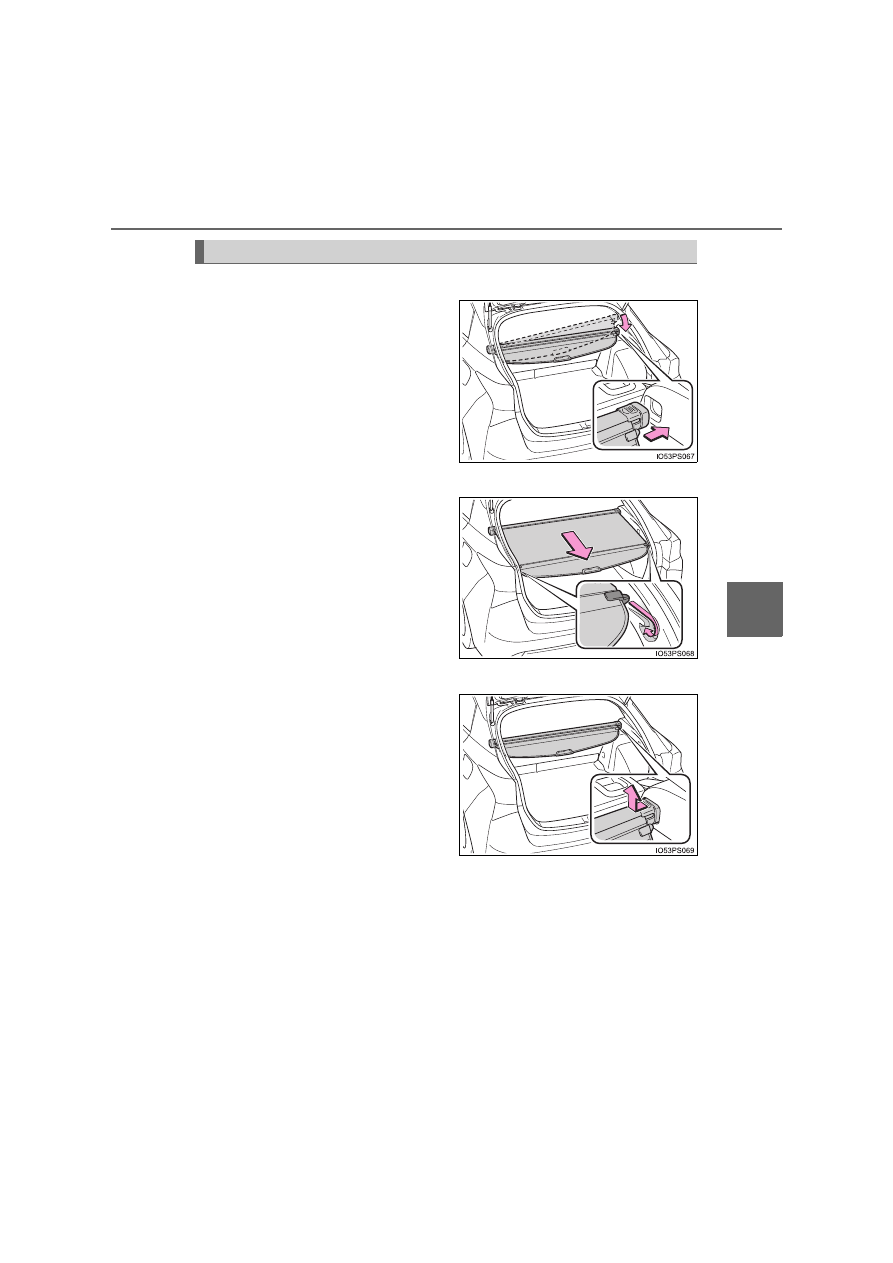
Installing the luggage cover

Install one side of the luggage
cover to the holder. While push-
ing that side in, install the other
side to the opposite holder.

Using the luggage cover

Pull out the luggage cover and
secure it to the hook brackets.

Removing the luggage cover

Push one end of the luggage
cover inward and remove it
from the holder.

Luggage cover

484

5-3. Using the storage features

Stowing the luggage cover (except vehicles with full-size spare
tire)

Open the deck board and
secure it with the shopping
hooks.

Store cover in the deck under
box.

Close the deck board.

1

2

WARNING

Do not place anything on the luggage cover. In the event of sudden brak-
ing or turning, the item may go flying and strike an occupant. This could
lead to an unexpected accident, resulting in death or serious injury.

Do not allow children to climb on the luggage cover. Climbing on the lug-
gage cover could result in damage to the luggage cover, possibly causing
death or serious injury to the child.

Make sure that the rear edge of the cover is laying flat. If the cover is
installed with the rear edge raised, the view from the rear window may be
obstructed, which could cause an accident.

Make sure that seat belts are not caught up in the luggage cover. If a seat
belt is caught up in the cover, it may not be able to restrain passengers
properly.

3

485

5-4. Using the other interior features

5

In

teri
or f
eatu

res

Other interior features

To set the visor in the forward
position, flip it down.
To set the visor in the side posi-
tion, flip down, unhook, and
swing it to the side.

Slide the cover to open.

The light turns on when the cover
is opened.

If the vanity lights remain on when the power switch is turned off, the light will
go off automatically after 20 minutes.

Sun visors

1

2

Vanity mirrors

NOTICE

To prevent 12-volt battery discharge, do not leave the vanity lights on for
extended periods while the hybrid system is off.

486

5-4. Using the other interior features

Please use as a power supply for electronic goods that use less than
12 V DC/10 A (power consumption of 120 W).

The power outlet can be used when

The power switch is in ACCESSORY or ON mode.

When stopping the hybrid system

Disconnect electrical devices with charging functions, such as mobile battery
packs.
If such devices are left connected, the hybrid system may not stop normally.

Power outlets

Front

Rear

Open the lid.

Open the lid.

NOTICE

To avoid damaging the power outlets, close the lid when the power outlet
is not in use. 
Foreign objects or liquids that enter the power outlets may cause a short
circuit.

To prevent 12-volt battery discharge, do not use the power outlet longer
than necessary when the hybrid system is off.

487

5-4. Using the other interior features

5

In

teri
or f
eatu

res

A portable device can be charged by just placing Qi standard wireless
charge compatible portable devices according to the Wireless Power
Consortium, such as smart phones and mobile batteries, etc., on the
charge area.
This function cannot be used with portable devices that are larger
than the charging area. Also, depending on the portable device, it may
not operate as normal. Please read the operation manual for portable
devices to be used.

The “Qi” symbol

The “Qi” symbol is a trademark of the Wireless Power Consortium.

Name for all parts

Power supply switch
Operation indicator light
Charge area

Wireless charger (if equipped)

1
2
3

488

5-4. Using the other interior features

Using the wireless charger

Press the power supply
switch of the wireless char-
ger.

Switches on and off with each
press of the power supply
switch.
When turned on, the operation
indicator light (green) comes on.
Even with the hybrid system off,
the on/off state of the power
supply switch is memorized.

Place the charging side of
the portable device down.

When charging, the operation
indicator light (orange) comes
on.
If charging is not occurring, try
placing the portable device as
close to the center of the
charging area as possible.
When charging is complete, the operation indicator light (green) comes
on.

Recharging function

• When charging is complete and after a fixed time in the charge

suspension state, charging restarts.

• When the portable device is moved, charging is stopped for a

moment and then it restarts.

1

2

489

5-4. Using the other interior features

5

In

teri
or f
eatu

res

Lighting conditions of operation indicator light

*

: Depending on the portable device, there are cases where the operation

indicator light will continue being lit up orange even after the charging is
complete.

When the operation indicator light flashes
When an error occurs, the operation indicator light flashes an
orange color. Handle the error based on the following table.

Operation indicator light

Conditions

Turning off

When the Wireless charger power supply is
off

Green (comes on)

On Standby (charging possible state)

When charging is complete

*

Orange (comes on)

When placing the portable device on the
charging area (detecting the portable device)

Charging

Operation indicator 

light

Suspected causes

Handling method

Flashing repeatedly
once every second
(Orange)

Vehicle to charger com-
munication failure.

Contact any autho-
rized Toyota retailer or
Toyota authorized
repairer, or any reliable
repairer.

Repeatedly flashes
3 times continuously
(Orange)

A foreign substance is
between the portable
device and charge area.

Remove the foreign
substance from
between portable
device and the charge
area.

The portable device is
out of sync due to the
device being shifted from
its position.

Place the portable
device near the center
of the charge area.

Repeatedly flashes
4 times continuously
(Orange)

Temperature rising
within the wireless char-
ger.

Stop charging at once
and start charging
again after for a while.

490

5-4. Using the other interior features

The wireless charger can be operated when

The power switch is in ACCESSORY or ON mode.

Usable portable devices

Qi standard wireless charge standard can be used on compatible devices. 
However, not all Qi standard devices and compatibility are guaranteed. 
Starting with mobile phones and smart phones, it is aimed for low power elec-
trically supplied portable devices of no more than 5W.

When covers and accessories are attached to portable devices

Do not charge in situations where cover and accessories not able to handle
Qi are attached to the portable device. Depending on the type of cover and
accessory, it may not be possible to charge. When charging is not performed
even with the portable device placed on the charge area, remove the cover
and accessories.

While charging, noise enters the AM radio

Turn off the wireless charger and confirm that the noise has decreased. If the
noise decreases, continuously pushing the power supply switch of the wire-
less charger for 2 seconds, the frequency of the charger can be changed and
the noise can be reduced. 
Also, on that occasion, the operation indicator light will flash orange 2 times.

Important points of the wireless charger

If the electronic key cannot be detected within the vehicle interior, charging
cannot be done. When the door is opened and closed, charging may be
temporarily suspended.

When charging, the wireless charging device and portable device will get
warmer, however this is not a malfunction. 
When a portable device gets warm while charging, charging may stop due
to the protection function on the portable device side. In this case, when the
temperature of the portable device drops significantly, charge again.

Operation sounds

When the power supply is turned on, while searching for the portable device a
sound will be produced, however this is not a malfunction.

491

5-4. Using the other interior features

5

In

teri
or f
eatu

res

WARNING

Caution while driving

When charging a portable device, for safety reasons, the driver should not
operate the main part of the portable device while driving.

Caution regarding interference with electronic devices

People with implantable cardiac pacemakers, cardiac resynchronization
therapy-pacemakers or implantable cardioverter defibrillators, as well as
any other electrical medical device, should consult their physician about the
usage of the wireless charger. The operations of the wireless charger may
have an affect on medical devices.

To prevent damage or burns

Observe the following precautions. 
Failure to do so may result in a possibility of equipment failure and damage,
catch fire, burns due to overheat.

Do not insert any metallic objects between the charging area and the por-
table device while charging

Do not attach stickers, metallic objects, etc., to the charger area or porta-
ble device

Do not cover with cloth, etc., and charge

Do not charge portable devices other than designated

Do not attempt to dismantle for disassembly or modifications

Do not hit or apply a strong force

492

5-4. Using the other interior features

NOTICE

Conditions in which the function may not operate correctly

In the following conditions, it may not operate correctly

The portable device is fully charged

There is foreign matter between the charge area and portable device

The temperature of the portable device gets higher from charging

The charging surface of the portable device is facing up

The placement of the portable device is out of alignment with the charge
area

Near a TV tower, electric power plant, gas station, radio station, large dis-
play, airport or other facility that generates strong radio waves or electrical
noise

When the electronic key is in contact with, or is covered by the following
metallic objects
• Cards to which aluminum foil is attached
• Cigarette boxes that have aluminum foil inside
• Metallic wallets or bags
• Coins
• Hand warmers made of metal
• Media such as CDs and DVDs

When other wireless keys (that emit radio waves) are being used nearby

In addition, excluding the above-mentioned, when the charger does not per-
form normally or the operation indicator light is flashing continuously, it is
considered that the wireless charger is malfunctioning. Contact any autho-
rized Toyota retailer or Toyota authorized repairer, or any reliable repairer.

To prevent failure or damage to data

Do not bring magnetic cards, such as credit cards, or magnetic recording
media, etc., close to the charger while charging, otherwise, data may dis-
appear under the influence of magnetism. Also, do not bring precision
instruments such as wrist watches, etc., close to the charger, as such
objects may break.

Do not leave portable devices in the cabin. The temperature inside the
cabin may become high, when under the sun, and cause damage to the
device.

To prevent 12-volt battery discharge

When the hybrid system is stopped, do not use the wireless charger for a
long time.

493

5-4. Using the other interior features

5

In

teri
or f
eatu

res

Pull the armrest down for use.

The coat hooks are provided with
the rear assist grips.

Armrest

NOTICE

To prevent damage to the armrest, do not apply too much load on the arm-
rest.

Coat hooks

WARNING

Do not hang coat hangers or other hard or sharp objects on the hook. If the
SRS curtain shield airbags deploy, these items may become projectiles,
causing death or serious injury.

494

5-4. Using the other interior features

An assist grip installed on the ceil-
ing can be used to support your
body while sitting on the seat.

Assist grips

WARNING

Do not use the assist grip when getting in or out of the vehicle or rising from
your seat.

NOTICE

To prevent damage to the assist grip, do not hang any heavy object or put a
heavy load on the assist grip.

495

6

Maintenance and care

6-1. Maintenance and care

Cleaning and protecting 

the vehicle exterior ..........496

Cleaning and protecting 

the vehicle interior ...........502

6-2. Maintenance

Maintenance 

requirements....................505

6-3. Do-it-yourself maintenance

Do-it-yourself service 

precautions ......................508

Hood ..................................511
Positioning a floor jack.......513
Engine compartment..........514
Tires...................................528
Tire inflation pressure ........537
Wheels...............................539
Air conditioning filter ..........542
Cleaning the hybrid battery 

(traction battery) air intake 
vent and filter ...................545

Wiper insert 

replacement.....................550

Electronic key battery ........554
Checking and replacing 

fuses ................................557

Light bulbs .........................561

496

6-1. Maintenance and care

Cleaning and protecting the vehicle exterior

Working from top to bottom, liberally apply water to the vehicle
body, wheel wells and underside of the vehicle to remove any dirt
and dust.

Wash the vehicle body using a sponge or soft cloth, such as a
chamois.

For hard-to-remove marks, use car wash soap and rinse thoroughly
with water.

Wipe away any water.

Wax the vehicle when the waterproof coating deteriorates.

If water does not bead on a clean surface, apply wax when the vehicle
body is cool.

Automatic car washes

Fold the mirrors before washing the vehicle. Start washing from the front of
the vehicle. Make sure to extend the mirrors before driving.

Brushes used in automatic car washes may scratch the vehicle surface,
parts (wheel, etc.) and harm your vehicle’s paint.

Rear spoiler may not be washable in some automatic car washes. There
may also be an increased risk of damage to vehicle.

High pressure car washes

As water may enter the cabin, do not bring the nozzle tip near the gaps
around the doors or perimeter of the windows, or spray these areas continu-
ously.

Perform the following to protect the vehicle and maintain it in
prime condition:

497

6-1. Maintenance and care

6

M

a

in

te

nan
ce and

 ca

re

Note for a smart entry & start system

If the door handle becomes wet while the electronic key is within the effective
range, the door may lock and unlock repeatedly. In that case, follow the fol-
lowing correction procedures to wash the vehicle:

Place the key in a position 2 m (6 ft.) or more separate from the vehicle
while the vehicle is being washed. (Take care to ensure that the key is not
stolen.)

Set the electronic key to battery-saving mode to disable the smart entry &
start system. (

P. 189)

Wheels and wheel ornaments

Remove any dirt immediately by using a neutral detergent.

Wash detergent off with water immediately after use.

To protect the paint from damage, make sure to observe the following pre-
cautions.
• Do not use acidic, alkaline or abrasive detergent
• Do not use hard brushes
• Do not use detergent on the wheels when they are hot, such as after driv-

ing or parking in hot weather

Brake pads and calipers

Rust may form if the vehicle is parked with wet brake pads or disc rotors,
causing them to stick. Before parking the vehicle after it is washed, drive
slowly and apply the brakes several times to dry the parts.

Bumpers

Do not scrub with abrasive cleaners.

Front side windows water-repellent coating (if equipped)

The following precautions can extend the effectiveness of the water-repellent
coating.

Remove any dirt, etc. from the front side windows regularly.

Do not allow dirt and dust to accumulate on the windows for a long period.
Clean the windows with a soft, damp cloth as soon as possible.

Do not use wax or glass cleaners that contain abrasives when cleaning the
windows.

Do not use any metallic objects to remove condensation build up.

Plated portions

If dirt cannot be removed, clean the parts as follows:

Use a soft cloth dampened with an approximately 5% solution of neutral
detergent and water to clean the dirt off.

Wipe the surface with a dry, soft cloth to remove any remaining moisture.

To remove oily deposits, use alcohol wet wipes or a similar product.

498

6-1. Maintenance and care

WARNING

When washing the vehicle

Do not apply water to the inside of the engine compartment. Doing so may
cause the electrical components etc. to catch fire.

When cleaning the windshield (vehicles with rain-sensing windshield
wipers)

When a wet rag or similar is held close to the raindrop sensor

If something bumps against the windshield

If you directly touch the raindrop sensor body or if something bumps into
the raindrop sensor

Precautions regarding the exhaust pipe

Exhaust gasses cause the exhaust pipe to become quite hot.
When washing the vehicle, be careful not to touch the pipe until it has
cooled sufficiently, as touching a hot exhaust pipe can cause burns.

Precaution regarding the rear bumper with Blind Spot Monitor (if
equipped)

If the paint of the rear bumper is chipped or scratched, the system may mal-
function. If this occurs, consult any authorized Toyota retailer or Toyota
authorized repairer, or any reliable repairer.

Set the wiper switch to the off position.

If the wiper switch is in the 

 posi-

tion, the wipers may operate unexpect-
edly in the following situations, and may
result in hands being caught or other
serious injuries and cause damage to the
wiper blades.

When the upper part of the windshield
where the raindrop sensor is located is
touched by hand

Off


Content      ..     27      28      29      30     ..