Toyota Prius (2023 year). Manual in english - page 26
 

  Index      Toyota     Toyota Prius (2023 year). Manual in english


Search            copyright infringement  


Content      ..     24      25      26      27     ..


Toyota Prius (2023 year). Manual in english - page 26


434

4-5. Using the driving support systems

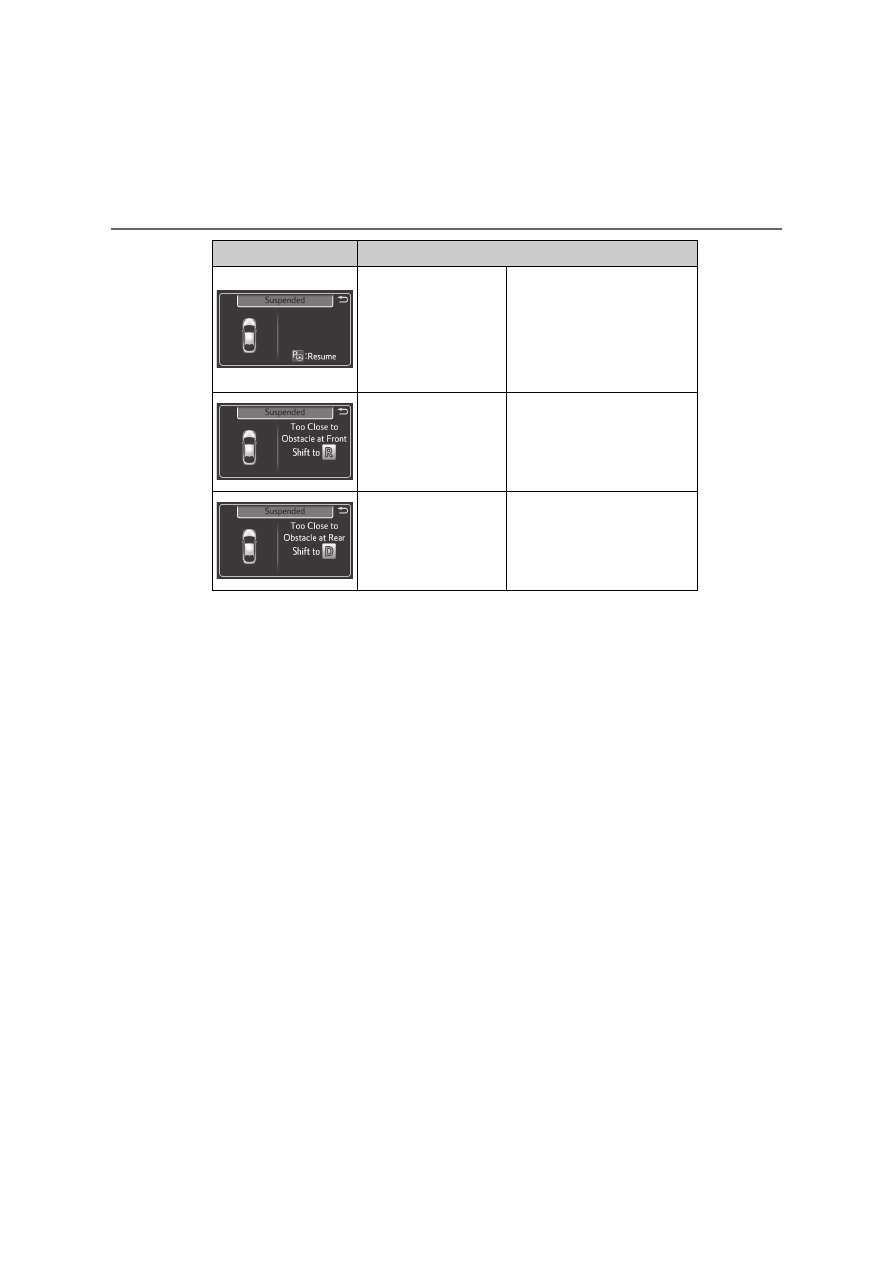
Assist control is tem-
porarily stopped
(able to be restarted)

Stop the vehicle and
rest your hands on the
steering wheel without
applying any force.
Then press the S-IPA
switch to restart assist
control.

The vehicle moved
too close to an obsta-
cle in front of the
vehicle.

Press the S-IPA switch
after changing the shift
position to R to restart
assist control.

The vehicle moved
too close to an obsta-
cle to the rear of the
vehicle.

Press the S-IPA switch
after changing the shift
position to D to restart
assist control.

Message

Situation/Handling method

435

4-5. Using the driving support systems

4

D

riv

in

g

Sensors

Detect the vehicle to help determine the parking spot. 

Front side sensors
Rear side sensors

Precautions during use

1
2

The sensor detection range when using
back-in parking assist mode

Intended parking spot

The sensor detection range when using
parallel parking assist mode

Intended parking spot

1

1

436

4-5. Using the driving support systems

When there is a parked vehicle behind the target parking spot, it may not be
detected due to the distance. Also, depending on the shape of the vehicle
and other conditions, the detectable range may shorten or detection may
not be possible.

The Simple Intelligent Parking Assist System may not operate if grating, dia-
mond plates or similar materials are detected on the surface of the parking
space.

Objects other than parked vehicles, such
as poles and walls, may not be detected.
Also, even if these objects can be
detected, the target parking spot may
deviate.

Poles
Wall

Also, the target parking spot may devi-
ate when a pedestrian, etc. is detected.

Pedestrian

1

2

1

437

4-5. Using the driving support systems

4

D

riv

in

g

WARNING

Do not rely solely upon the Simple Intelligent Parking Assist System. As
with unequipped vehicles, move forward and back up carefully while
directly confirming the safety of your surroundings and the area to the rear
of the vehicle.

Do not back up while viewing the multi-information display. Backing up
while only viewing the monitor screen may cause a collision or lead to an
accident, as the image displayed on the monitor screen may differ from
actual conditions. Make sure to visually check the surrounding areas and
the area to the rear of the vehicle with and without the mirror while backing
up.

Drive slowly while adjusting your speed by depressing the brake pedal
when backing up or moving forward.

If it seems the vehicle may make contact with a pedestrian, another vehi-
cle or any other obstacles, stop the vehicle by depressing the brake pedal,
and then press the S-IPA switch to turn off the system.

Use the system in a parking lot with a flat surface.

Observe the following precautions, as the steering wheel automatically
turns during use.
• There is risk of a necktie, scarf, your arm, etc. being caught on the

steering wheel. Please do not allow your upper body to be close to the
steering wheel. Also, do not allow children close to the steering wheel.

• There is a possibility of injury when the steering wheel turns if you have

long fingernails.

• In case of emergency, stop the vehicle by depressing the brake pedal,

and then press the S-IPA switch to turn off the system.

Always confirm that there is appropriate space before attempting to park
the vehicle and operate the system.

438

4-5. Using the driving support systems

WARNING

Do not use the system in the following situations, as the system may be
unable to correctly assist you in reaching the target parking spot and may
lead to an unexpected accident.
• In an area that is not a parking lot
• A parking lot that is not paved and has no parking space lines, such as

a sand or gravel parking lot

• A parking lot that has a slope or undulations in the road
• A frozen, snow-covered or slippery road
• The asphalt is melting due to hot weather
• There is an obstacle between the vehicle and the target parking spot
• Using tire chains or compact spare tire (if equipped)

Do not use tire other than that provided by the manufacturer. The system
may not operate properly. When replacing tires, contact any authorized
Toyota retailer or Toyota authorized repairer, or any reliable repairer.

The system may not be able position the vehicle in the set location in the
following situations.
• The tires are extremely worn or the tire pressure is low
• The vehicle is carrying very heavy load
• The vehicle is tilted due to having luggage, etc. located on one side of

the vehicle

• There are road heaters installed in the parking lot to prevent the road

surface from freezing.

In any other situations when the set position and vehicle position greatly
differ, have the vehicle inspected by any authorized Toyota retailer or
Toyota authorized repairer, or any reliable repairer.

Make sure to observe the following precautions regarding the exit parallel
parking assist mode.
Exit parallel parking assist mode is a function used when departing from a
parallel parking spot. However, this function may not be usable if obsta-
cles or people are detected in front of the vehicle. Only use this function
when departing from a parallel parking spot. In the event that the steering
control operates, either turn the system off using the S-IPA switch or oper-
ate the steering wheel to stop the control.

If exit parallel parking assist mode is mistakenly used in the following situ-
ations, the vehicle may make contact with an obstacle.
The departure function is operated in a direction where an obstacle is
present, but the obstacle is not detected by the side sensors (situations
such as when the vehicle is directly beside a pole).

439

4-5. Using the driving support systems

4

D

riv

in

g

WARNING

Observe the following precautions, as the sensors may stop functioning
properly which may lead to an accident.
• Do not subject the sensor to strong shocks by hitting it, etc. The sen-

sors may not function properly.

• When using a high-pressure washer to wash the vehicle, do not spray

water directly on the sensors. Equipment may not function properly if
subjected to an impact from strong water pressure. If the vehicle
bumper strikes something, equipment may not operate properly due to
a sensor malfunction. Have the vehicle inspected at any authorized
Toyota retailer or Toyota authorized repairer, or any reliable repairer.

In the following situations, the sensors may not operate normally and may
lead to an accident. Drive carefully.
• Obstacles cannot be detected in the side areas until a scan of the side

areas is completed. (

P. 388)

• Even after the scan of the side areas is completed, obstacles such as

other vehicles, people or animals that approach from the sides cannot
be detected.

• The sensor is frozen (if it thaws, the system returns to normal). 

A warning message may display at particularly low temperatures due to
the sensor freezing and it may not detect parked vehicles.

• The sensor is blocked by someone’s hand.
• The vehicle is tilted a large amount.
• The temperature is extremely hot or cold.
• The vehicle is driven on undulating roads, slopes, gravel roads, in areas

with tall grass, etc.

• An ultrasonic wave source is nearby, such as the horn or sensors of

another vehicle, a motorcycle engine or the air brake of a large vehicle.

• Heavy rain or a water strikes the vehicle.
• The angle of the sensor may be deviated when assist control starts

even if there is a parked vehicle in the target parking spot. Have the
vehicle inspected at any authorized Toyota retailer or Toyota authorized
repairer, or any reliable repairer.

• Do not install any accessories within the sensor detection range.

440

4-5. Using the driving support systems

GPF (Gasoline Particulate Filter) system

If “Exhaust Filter Full See Owner’s Manual” is shown on the multi-infor-
mation display

The message may be displayed while high load driving with particulate mat-
ter accumulating.

Hybrid system output (engine speed) is restricted when a certain amount of
particulate matter accumulates, however, it is possible to drive the vehicle
unless the malfunction indicator lamp comes on.

Particulate matter can accumulate more quickly if the vehicle is frequently
driven short trips or at low speeds, or if the hybrid system is regularly started
in an extremely cold environment. Excessive accumulation of particulate
matter can be prevented by periodically driving long distances continuously
with intermittent releasing of the accelerator pedal, such as when driving on
highways and freeways.

If the malfunction indicator lamp comes on or “Exhaust Filter Full Visit
Your Dealer” is shown on the multi-information display

The amount of accumulated particulate matter has exceeded a certain level.
Have the vehicle inspected by any authorized Toyota retailer or Toyota autho-
rized repairer, or any reliable repairer immediately.

: If equipped

The GPF system collects particulate matter in the exhaust gas
by using an exhaust gas filter.
The system will operate to regenerate the filter automatically,
depending on the vehicle conditions.

NOTICE

To prevent the GPF system from not operating properly

Do not use fuel other than the specified type

Do not modify the exhaust pipes

441

4

4-5. Using the driving support systems

D

riv

in

g

Driving assist systems

ECB (Electronically Controlled Brake System)

The electronically controlled system generates braking force corre-
sponding to the brake operation 

ABS (Anti-lock Brake System)

Helps to prevent wheel lock when the brakes are applied suddenly,
or if the brakes are applied while driving on a slippery road surface

Brake assist

Generates an increased level of braking force after the brake pedal
is depressed when the system detects a panic stop situation

VSC (Vehicle Stability Control)

Helps the driver to control skidding when swerving suddenly or
turning on slippery road surfaces.

VSC+ (Vehicle Stability Control+)

Provides cooperative control of the ABS, TRC, VSC and EPS.
Helps to maintain directional stability when swerving on slippery
road surfaces by controlling steering performance.

TRC (Traction Control) 

Helps to maintain drive power and prevent the drive wheels from
spinning when starting the vehicle or accelerating on slippery roads

Active Cornering Assist (ACA)

Helps to prevent the vehicle from drifting to the outer side by per-
forming inner wheel brake control when attempting to accelerate
while turning

To keep driving safety and performance, the following systems
operate automatically in response to various driving situations.
Be aware, however, that these systems are supplementary and
should not be relied upon too heavily when operating the vehi-
cle. 

442

4-5. Using the driving support systems

Hill-start assist control

Helps to reduce the backward movement of the vehicle when start-
ing on an uphill

EPS (Electric Power Steering) 

Employs an electric motor to reduce the amount of effort needed to
turn the steering wheel

Emergency brake signal

When the brakes are applied suddenly, the emergency flashers
automatically flash to alert the vehicle behind.

E-Four (Electronic On-Demand AWD system) (AWD models)

Automatically switches from front-wheel drive to all-wheel drive
(AWD) according to the driving conditions, helping to ensure reli-
able handling and stability. Examples of conditions where the sys-
tem will switch to AWD are when cornering, going uphill, starting off
or accelerating, and when the road surface is slippery due to snow,
rain, etc.

The slip indicator light will flash
while the TRC/VSC/ABS systems
are operating.

When the TRC/VSC/ABS systems are operating

443

4-5. Using the driving support systems

4

D

riv

in

g

If the vehicle gets stuck in mud, dirt or snow, the TRC system may

reduce power from the hybrid system to the wheels. Pressing 

to turn the system off may make it easier for you to rock the vehicle in
order to free it.

To turn the TRC system off,
quickly press and release

.

The “Traction Control Turned Off”
will be shown on the multi-informa-
tion display.

Press 

 again to turn the sys-

tem back on.

Turning off both TRC and VSC systems

To turn the TRC and VSC systems off, press and hold 

 for more than 3

seconds while the vehicle is stopped.
The VSC OFF indicator will come on and the “Traction Control Turned Off”
will be shown on the multi-information display.

*

Press 

 again to turn the systems back on.

*

: On vehicles with pre-collision system, pre-collision brake assist and pre-

collision braking will also be disabled. The PCS warning light will come on
and the message will be shown on the multi-information display. (

P. 582)

When the message is displayed on the multi-information display show-

ing that TRC has been disabled even if 

 has not been pressed

TRC is temporary deactivated. If the information continues to show, contact
any authorized Toyota retailer or Toyota authorized repairer, or any reliable
repairer.

Disabling the TRC system

444

4-5. Using the driving support systems

Operating conditions of hill-start assist control

When the following four conditions are met, the hill-start assist control will
operate:

The shift position is in a position other than P or N (when starting off forward/
backward on an upward incline)

The vehicle is stopped

The accelerator pedal is not depressed

The parking brake is not engaged

Automatic system cancelation of hill-start assist control

The hill-start assist control will turn off in any of the following situations:

Shift the shift position to P or N

The accelerator pedal is depressed

The parking brake is engaged

No more than 2 seconds have elapsed after the brake pedal is released.

Sounds and vibrations caused by the ABS, brake assist, VSC, TRC and
hill-start assist control systems

A sound may be heard from the engine compartment when the brake pedal
is depressed repeatedly, when the hybrid system is started or just after the
vehicle begins to move. This sound does not indicate that a malfunction has
occurred in any of these systems.

Any of the following conditions may occur when the above systems are
operating. None of these indicates that a malfunction has occurred.
• Vibrations may be felt through the vehicle body and steering.
• A motor sound may be heard also after the vehicle comes to a stop.

ECB operating sound

ECB operating sound may be heard in the following cases, but it does not
indicate that a malfunction has occurred.

Operating sound heard from the engine compartment when the brake pedal
is operated.

Motor sound of the brake system heard from the front part of the vehicle
when the driver’s door is opened.

Operating sound heard from the engine compartment when one or two min-
utes passed after the stop of the hybrid system.

Active Cornering Assist operation sounds and vibrations

When the Active Cornering Assist is operated, operation sounds and vibra-
tions may be generated from the brake system, but this is not a malfunction.

EPS operation sound

When the steering wheel is operated, a motor sound (whirring sound) may be
heard. This does not indicate a malfunction.

445

4-5. Using the driving support systems

4

D

riv

in

g

Automatic reactivation of TRC and VSC systems

After turning the TRC and VSC systems off, the systems will be automatically
re-enabled in the following situations:

When the power switch is turned off

If only the TRC system is turned off, the TRC will turn on when vehicle
speed increases
If both the TRC and VSC systems are turned off, automatic re-enabling will
not occur when vehicle speed increases.

Operating conditions of Active Cornering Assist

The system operates when the following occurs.

TRC/VSC can operate

The driver is attempting to accelerate while turning

The system detects that the vehicle is drifting to the outer side

The brake pedal is released

Reduced effectiveness of the EPS system

The effectiveness of the EPS system is reduced to prevent the system from
overheating when there is frequent steering input over an extended period of
time. The steering wheel may feel heavy as a result. Should this occur, refrain
from excessive steering input or stop the vehicle and turn the hybrid system
off. The EPS system should return to normal within 10 minutes.

Electric power steering system warning light (warning buzzer)

P. 581

Operating conditions of emergency brake signal

When the following conditions are met, the emergency brake signal will oper-
ate:

The emergency flashers are off.

Actual vehicle speed is over 55 km/h (35 mph).

The system judges from the vehicle deceleration that it is a sudden braking
operation.

Automatic system cancelation of emergency brake signal

The emergency brake signal will be canceled in any of the following situa-
tions:

The emergency flashers are turned on.

The system judges from the vehicle deceleration that is not a sudden brak-
ing operation.

446

4-5. Using the driving support systems

When a message related to AWD system is displayed on the multi-infor-
mation display (AWD models)

Perform the following actions.

Message

Details

Actions

“AWD System Over-

heated 

Switching to 2WD 

Mode”

AWD system is over-
heating.

Stop the vehicle for a
certain amount of time
or drive the vehicle at
approximately 10 km/h
(6 mph) or more to
reduce the overload to
the system. Once the
display message on the
multi-information dis-
play turns off, there is
no problem continuing
to drive.

“AWD System Over-

heated 

2WD Mode Engaged”

The vehicle switched
from all-wheel drive
(AWD) to front wheel
drive due to overheat-
ing.

“AWD System Malfunc-

tion 

2WD Mode Engaged 

Visit Your Dealer”

A malfunction occurred
in the AWD system,
and the vehicle
switched to front wheel
drive.

Have the vehicle
inspected by any
authorized Toyota
retailer or Toyota autho-
rized repairer, or any
reliable repairer imme-
diately.

447

4-5. Using the driving support systems

4

D

riv

in

g

WARNING

The ABS does not operate effectively when

The limits of tire gripping performance have been exceeded (such as
excessively worn tires on a snow covered road).

The vehicle hydroplanes while driving at high speed on wet or slick roads.

Stopping distance when the ABS is operating may exceed that of nor-
mal conditions

The ABS is not designed to shorten the vehicle’s stopping distance. Always
maintain a safe distance from the vehicle in front of you, especially in the
following situations:

When driving on dirt, gravel or snow-covered roads

When driving with tire chains

When driving over bumps in the road

When driving over roads with potholes or uneven surfaces

TRC/VSC may not operate effectively when

Directional control and power may not be achievable while driving on slip-
pery road surfaces, even if the TRC/VSC system is operating. Drive the
vehicle carefully in conditions where stability and power may be lost.

Active Cornering Assist does not operate effectively when

Do not overly rely on Active Cornering Assist. Active Cornering Assist may
not operate effectively when accelerating down slopes or driving on slip-
pery road surfaces.

When Active Cornering Assist frequently operates, Active Cornering
Assist may temporarily stop operating to ensure proper operation of the
brakes, TRC and VSC.

Hill-start assist control does not operate effectively when

Do not overly rely on hill-start assist control. Hill-start assist control may
not operate effectively on steep inclines and roads covered with ice.

Unlike the parking brake, hill-start assist control is not intended to hold the
vehicle stationary for an extended period of time. Do not attempt to use
hill-start assist control to hold the vehicle on an incline, as doing so may
lead to an accident.

When the TRC/ABS/VSC is activated

The slip indicator light flashes. Always drive carefully. Reckless driving may
cause an accident. Exercise particular care when the indicator light flashes.

448

4-5. Using the driving support systems

WARNING

When the TRC/VSC systems are turned off

Be especially careful and drive at a speed appropriate to the road condi-
tions. As these are the systems to help ensure vehicle stability and driving
force, do not turn the TRC/VSC systems off unless necessary.

Replacing tires

Make sure that all tires are of the specified size, brand, tread pattern and
total load capacity. In addition, make sure that the tires are inflated to the
recommended tire inflation pressure level.
The ABS, TRC and VSC systems will not function correctly if different tires
are installed on the vehicle.
Contact any authorized Toyota retailer or Toyota authorized repairer, or any
reliable repairer for further information when replacing tires or wheels.

Handling of tires and the suspension

Using tires with any kind of problem or modifying the suspension will affect
the driving assist systems, and may cause a system to malfunction.

449

4

4-6. Driving tips

D

riv

in

g

Hybrid vehicle driving tips

Using Eco drive mode

When using Eco drive mode, the torque corresponding to the accel-
erator pedal depression amount can be generated more smoothly
than it is in normal conditions. In addition, the operation of the air
conditioning system (heating/cooling) will be minimized, improving
the fuel economy. (

P. 351)

Use of Hybrid System Indicator

The Eco-friendly driving is possible by keeping the Hybrid System
Indicator within Eco area. (

P. 132)

Shift position operation

Shift the shift position to D when stopped at a traffic light, or driving
in heavy traffic etc. Shift the shift position to P when parking. When
using the N, there is no positive effect on fuel consumption. In the
N, the gasoline engine operates but electricity cannot be gener-
ated. Also, when using the air conditioning system, etc., the hybrid
battery (traction battery) power is consumed.

Accelerator pedal/brake pedal operation

Drive your vehicle smoothly. Avoid abrupt acceleration and
deceleration. Gradual acceleration and deceleration will make
more effective use of the electric motor (traction motor) without
having to use gasoline engine power.

Avoid repeated acceleration. Repeated acceleration consumes
hybrid battery (traction battery) power, resulting in poor fuel con-
sumption. Battery power can be restored by driving with the
accelerator pedal slightly released.

For economical and ecological driving, pay attention to the fol-
lowing points:


Content      ..     24      25      26      27     ..