Toyota Land Cruiser Prado (2023 year). Manual in english - page 21
 

  Index      Manuals     Toyota Land Cruiser Prado (2023 year). Manual in english


Search            copyright infringement  


Content      ..     19      20      21      22     ..


Toyota Land Cruiser Prado (2023 year). Manual in english - page 21


336

4-5. Using the driving support systems

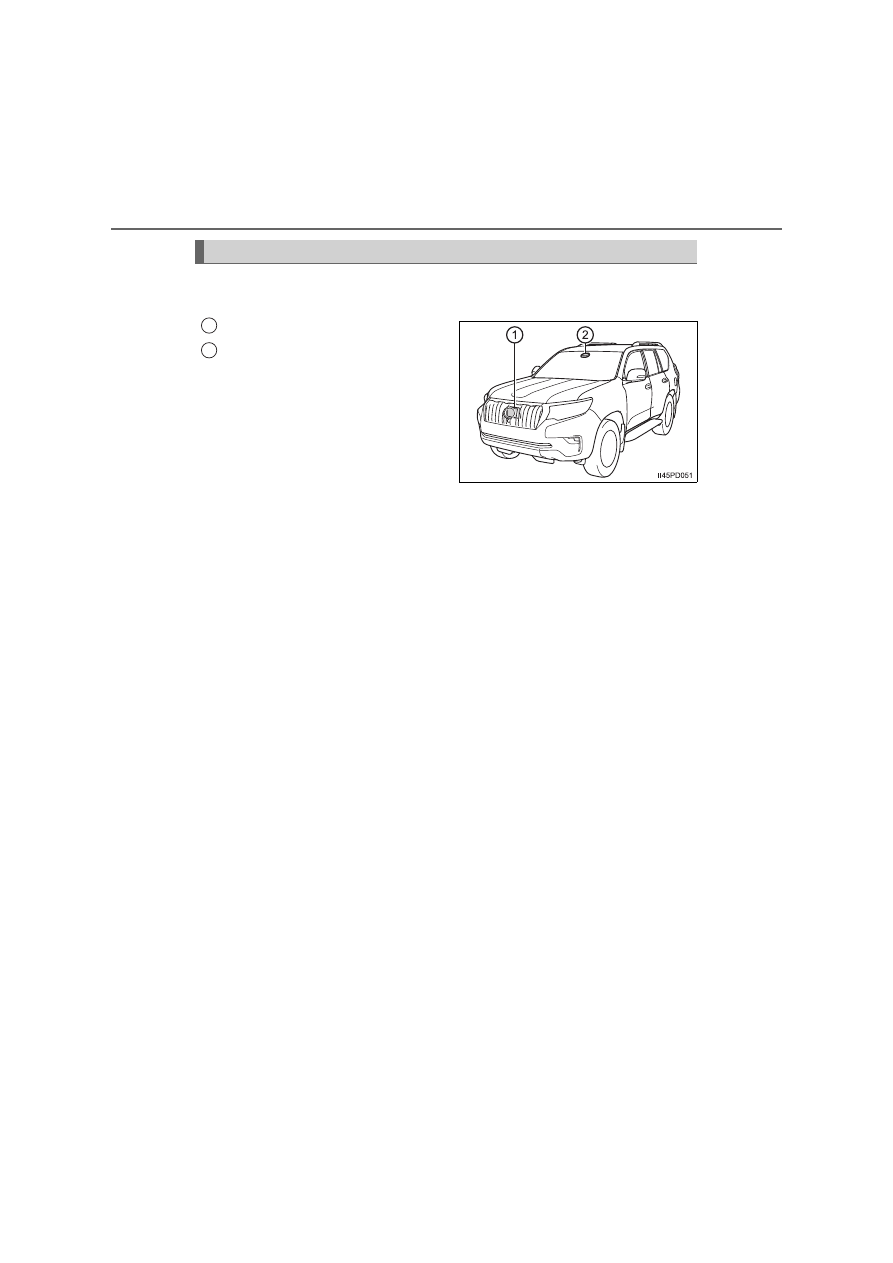
Two types of sensors, located behind the front grille and windshield,
detect information necessary to operate the drive assist systems.

Radar sensor
Front camera

Sensors

1
2

337

4-5. Using the driving support systems

4

D

riv

in

g

WARNING

To avoid malfunction of the radar sensor

Observe the following precautions. 
Otherwise, the radar sensor may not operate properly, possibly leading to
an accident resulting in death or serious injury.

Keep the radar sensor and the radar sensor cover clean at all times.

Do not attach accessories, stickers (including transparent stickers) or
other items to the radar sensor, radar sensor cover or surrounding area.

Do not subject the radar sensor or its surrounding area to a strong impact. 
If the radar sensor, front grille, or front bumper has been subjected to a
strong impact, have the vehicle inspected by any authorized Toyota
retailer or Toyota authorized repairer, or any reliable repairer.

Do not disassemble the radar sensor.

Do not modify or paint the radar sensor or radar sensor cover.

In the following cases, the radar sensor must be recalibrated. Contact any
authorized Toyota retailer or Toyota authorized repairer, or any reliable
repairer for details.
• When the radar sensor or front grille are removed and installed, or

replaced

• When the front bumper is replaced

Radar sensor
Radar sensor cover

If the front of the radar sensor or the
front or back of the radar sensor cover
is dirty or covered with water droplets,
snow, etc., clean it.
Clean the radar sensor and radar sen-
sor cover with a soft cloth to avoid
damaging them.

1

2

338

4-5. Using the driving support systems

WARNING

To avoid malfunction of the front camera

Observe the following precautions.
Otherwise, the front camera may not operate properly, possibly leading to
an accident resulting in death or serious injury.

Keep the windshield clean at all times.
• If the windshield is dirty or covered with an oily film, water droplets,

snow, etc., clean the windshield.

• If a glass coating agent is applied to the windshield, it will still be neces-

sary to use the windshield wipers to remove water droplets, etc. from
the area of the windshield in front of the front camera.

• If the inner side of the windshield where the front camera is installed is

dirty, contact any authorized Toyota retailer or Toyota authorized
repairer, or any reliable repairer.

If the part of the windshield in front of the front camera is fogged up or cov-
ered with condensation, or ice, use the windshield defogger to remove the
fog, condensation, or ice. (

P. 501, 510)

If water droplets cannot be properly removed from the area of the wind-
shield in front of the front camera by the windshield wipers, replace the
wiper insert or wiper blade.

Do not attach window tint to the windshield.

Replace the windshield if it is damaged or cracked. 
After replacing the windshield, the front camera must be recalibrated. Con-
tact any authorized Toyota retailer or Toyota authorized repairer, or any
reliable repairer for details.

Do not allow liquids to contact the front camera.

Do not allow bright lights to shine into the front camera.

Do not attach objects, such as stickers,
transparent stickers, etc., to the outer
side of the windshield in front of the
front camera (shaded area in the illus-
tration).
A: From the top of the windshield to
approximately 1 cm (0.4 in.) below the
bottom of the front camera
B: Approximately 20 cm (7.9 in.)
(Approximately 10 cm [4.0 in.] to the
right and left from the center of the front
camera)

339

4-5. Using the driving support systems

4

D

riv

in

g

WARNING

Do not dirty or damage the front camera. 
When cleaning the inside of the windshield, do not allow glass cleaner to
contact the lens of the front camera. Also, do not touch the lens. 
If the lens is dirty or damaged, contact any authorized Toyota retailer or
Toyota authorized repairer, or any reliable repairer.

Do not subject the front camera to a strong impact.

Do not change the installation position or direction of the front camera or
remove it. 

Do not disassemble the front camera.

Do not modify any components of the vehicle around the front camera
(inside rear view mirror, etc.) or ceiling.

Do not attach any accessories to the hood, front grille or front bumper that
may obstruct the front camera. Contact any authorized Toyota retailer or
Toyota authorized repairer, or any reliable repairer for details.

If a surfboard or other long object is to be mounted on the roof, make sure
that it will not obstruct the front camera.

Do not modify the headlights or other lights.

340

4-5. Using the driving support systems

If a warning message is displayed on the multi-information display

A system may be temporarily unavailable or there may be a malfunction in
the system.

In the following situations, perform the actions specified in the table. When
the normal operating conditions are detected, the message will disappear
and the system will become operational.

If the message does not disappear, contact any authorized Toyota retailer or
Toyota authorized repairer, or any reliable repairer.

Situation

Actions

When the area around a cam-
era is covered with dirt, mois-
ture (fogged up, covered with
condensation, ice, etc.), or
other foreign matter

Using the wiper and A/C function,
remove the dirt and other attached mat-
ter. (

P. 501, 510)

When the temperature around
the front camera is outside of
the operational range, such as
when the vehicle is in the sun or
in an extremely cold environ-
ment

If the front camera is hot, such as after
the vehicle had been parked in the sun,
use the air conditioning system to
decrease the temperature around the
front camera.

If a sunshade was used when the vehi-
cle was parked, depending on its type,
the sunlight reflected from the surface
of the sunshade may cause the tem-
perature of the front camera to become
excessively high.

If the front camera is cold, such after the
vehicle is parked in an extremely cold
environment, use the air conditioning
system to increase the temperature
around the front camera.

The area in front of the front
camera is obstructed, such as
when the hood is open or a
sticker is attached to the part of
the windshield in front of the
front camera.

Close the hood, remove the sticker, etc.
to clear the obstruction.

When “Pre-Collision System
Unavailable” is displayed.

Check whether there is attached materi-
als on the radar sensor and radar sensor
cover, and if there is, remove it.

341

4-5. Using the driving support systems

4

D

riv

in

g

In the following situations, if the situation has changed (or the vehicle has
been driven for some time) and the normal operating conditions are
detected, the message will disappear and the system will become opera-
tional. 

If the message does not disappear, contact any authorized Toyota retailer or
Toyota authorized repairer, or any reliable repairer.

• When the temperature around the radar sensor is outside of the opera-

tional range, such as when the vehicle is in the sun or in an extremely
cold environment

• When the front camera cannot detect objects in front of the vehicle, such

as when driving in the dark, snow, or fog, or when bright lights are shining
into the front camera

• Depending on the conditions in the vicinity of the vehicle, the radar may

judge the surrounding environment can not be properly recognized. In
that case, “Pre-Collision System Unavailable” is displayed.

342

4-5. Using the driving support systems

PCS (Pre-Collision System)

The countries and areas for each region listed in the table are current
as of August 2022. However, depending on when the vehicle was
sold, the countries and areas of each region may be different. Contact
your Toyota dealer for details.

: If equipped

The pre-collision system uses a radar sensor and front camera
to detect objects (

P. 342) in front of the vehicle. When the sys-

tem determines that the possibility of a frontal collision with an
object is high, a warning operates to urge the driver to take eva-
sive action and the potential brake pressure is increased to help
the driver avoid the collision. If the system determines that the
possibility of a frontal collision with an object is extremely high,
the brakes are automatically applied to help avoid the collision
or help reduce the impact of the collision.

The pre-collision system can be disabled/enabled and the warning
timing can be changed. (

P. 346)

Detectable objects

Regions

Detectable 

objects

Countries/areas

A

• Vehicles
• Bicyclists
• Pedestrians

Iceland, Ireland, United Kingdom, Italy,
Ukraine, Estonia, Austria, Netherlands,
Kazakhstan, Cyprus, Greece, Croatia, Gibral-
tar, Switzerland, Sweden, Spain, Slovakia,
Slovenia, Czech Republic, Denmark, Ger-
many, Norway, Hungary, Finland, France, Bul-
garia, Belgium, Poland, Portugal, Macedonia,
Malta, Monaco, Serbia, Montenegro, Latvia,
Lithuania, Romania, Russia, Israel, Turkey
and Canary Islands

B

Vehicles

Azerbaijan, Georgia and Armenia

343

4-5. Using the driving support systems

4

D

riv

in

g

Pre-collision warning

When the system determines
that the possibility of a frontal
collision is high, a buzzer will
sound and a warning message
will be displayed on the multi-
information display to urge the
driver to take evasive action.

Pre-collision brake assist

When the system determines that the possibility of a frontal colli-
sion is high, the system applies greater braking force in relation to
how strongly the brake pedal is depressed.

Pre-collision braking

If the system determines that the possibility of a frontal collision is
extremely high, the brakes are automatically applied to help avoid
the collision or reduce the impact of the collision.

Suspension control (if equipped)

When the system determines that the possibility of a frontal colli-
sion is high, the Adaptive Variable Suspension System (

P. 417)

will control the damping force of the shock absorbers to help main-
tain an appropriate vehicle posture.

System functions

344

4-5. Using the driving support systems

WARNING

Limitations of the pre-collision system

The driver is solely responsible for safe driving. Always drive safely, taking
care to observe your surroundings. 
Do not use the pre-collision system instead of normal braking operations
under any circumstances. This system will not prevent collisions or lessen
collision damage or injury in every situation. Do not overly rely on this sys-
tem. Failure to do so may lead to an accident, resulting in death or serious
injury.

Although this system is designed to help avoid a collision or help reduce
the impact of the collision, its effectiveness may change according to vari-
ous conditions, therefore the system may not always be able to achieve
the same level of performance. 
Read the following conditions carefully. Do not overly rely on this system
and always drive carefully.
• Conditions under which the system may operate even if there is no pos-

sibility of a collision: 

P. 348

• Conditions under which the system may not operate properly: 

P. 350

Do not attempt to test the operation of the pre-collision system yourself. 
Depending on the objects used for testing (dummies, cardboard objects
imitating detectable objects, etc.), the system may not operate properly,
possibly leading to an accident.

Pre-collision braking

When the pre-collision braking function is operating, a large amount of
braking force will be applied.

If the vehicle is stopped by the operation of the pre-collision braking func-
tion, the pre-collision braking function operation will be canceled after
approximately 2 seconds. Depress the brake pedal as necessary.

The pre-collision braking function may not operate if certain operations are
performed by the driver. If the accelerator pedal is being depressed
strongly or the steering wheel is being turned, the system may determine
that the driver is taking evasive action and possibly prevent the pre-colli-
sion braking function from operating.

In some situations, while the pre-collision braking function is operating,
operation of the function may be canceled if the accelerator pedal is
depressed strongly or the steering wheel is turned and the system deter-
mines that the driver is taking evasive action.

If the brake pedal is being depressed, the system may determine that the
driver is taking evasive action and possibly delay the operation timing of
the pre-collision braking function.

345

4-5. Using the driving support systems

4

D

riv

in

g

WARNING

When to disable the pre-collision system

In the following situations, disable the system, as it may not operate prop-
erly, possibly leading to an accident resulting in death or serious injury:

When the vehicle is being towed

When your vehicle is towing another vehicle

When transporting the vehicle via truck, boat, train or similar means of
transportation

When the vehicle is raised on a lift with the engine running on and the tires
are allowed to rotate freely

When inspecting the vehicle using a drum tester such as a chassis
dynamometer or speedometer tester, or when using an on vehicle wheel
balancer

When a strong impact is applied to the front bumper or front grille, due to
an accident or other reasons

If the vehicle cannot be driven in a stable manner, such as when the vehi-
cle has been in an accident or is malfunctioning

When the vehicle is driven in a sporty manner or off-road

When the tires are not properly inflated

When the tires are very worn

When tires of a size other than specified are installed

When tire chains are installed

When a compact spare tire or an emergency tire puncture repair kit is
used

If equipment (snow plow, etc.) that may obstruct the radar sensor or front
camera is temporarily installed to the vehicle

346

4-5. Using the driving support systems

Enabling/disabling the pre-collision system

The pre-collision system can be enabled/disabled on 

 (

P. 145)

of the multi-information display.

The system is automatically enabled each time the engine switch is
turned to the “ON” position (vehicles without smart entry & start system)
or IGNITION ON mode (vehicles with smart entry & start system).

If the system is disabled, the
PCS warning light will turn on
and a message will be dis-
played on the multi-information
display.

Changing the pre-collision warning timing

The pre-collision warning timing can be changed on 

 (

P. 145)

of the multi-information display.

The warning timing setting is retained when the engine switch is turned
off.
However, if the pre-collision system is disabled and re-enabled, the
operation timing will return to the default setting (middle).

Early
Middle

This is the default setting.

Late

Changing settings of the pre-collision system

1
2

3

347

4-5. Using the driving support systems

4

D

riv

in

g

Operational conditions

The pre-collision system is enabled and the system determines that the pos-
sibility of a frontal collision with a detected object is high.
Each function is operational at the following speed

Pre-collision warning

Pre-collision brake assist

Pre-collision braking

*

: Applicable to vehicles designed for regions that detection of pedestrians

and/or bicyclists is possible (

P. 342)

The system may not operate in the following situations:

If a battery terminal has been disconnected and reconnected and then the
vehicle has not been driven for a certain amount of time

If the shift lever is in R

When the VSC OFF indicator is illuminated (only the pre-collision warning
function will be operational)

Detectable objects

Vehicle speed

Relative speed between 

your vehicle and object

Vehicles

Approx. 10 to 180 km/h
(7 to 110 mph)

Approx. 10 to 180 km/h
(7 to 110 mph)

Bicyclists and pedestri-
ans

*

Approx. 10 to 80 km/h
(7 to 50 mph)

Approx. 10 to 80 km/h
(7 to 50 mph)

Detectable objects

Vehicle speed

Relative speed between 

your vehicle and object

Vehicles

Approx. 30 to 180 km/h
(20 to 110 mph)

Approx. 30 to 180 km/h
(20 to 110 mph)

Bicyclists and pedestri-
ans

*

Approx. 30 to 80 km/h
(20 to 50 mph)

Approx. 30 to 80 km/h
(20 to 50 mph)

Detectable objects

Vehicle speed

Relative speed between 

your vehicle and object

Vehicles

Approx. 10 to 180 km/h
(7 to 110 mph)

Approx. 10 to 180 km/h
(7 to 110 mph)

Bicyclists and pedestri-
ans

*

Approx. 10 to 80 km/h
(7 to 50 mph)

Approx. 10 to 80 km/h
(7 to 50 mph)

348

4-5. Using the driving support systems

Object detection function

Cancelation of the pre-collision braking

If either of the following occur while the pre-collision braking function is oper-
ating, it will be canceled:

The accelerator pedal is depressed strongly.

The steering wheel is turned sharply or abruptly.

Conditions under which the system may operate even if there is no pos-
sibility of a collision

In some situations such as the following, the system may determine that
there is a possibility of a frontal collision and operate.
• When passing a detectable object, etc.
• When changing lanes while overtaking a detectable object, etc.

• When rapidly closing on a detectable object, etc.
• When approaching objects on the roadside, such as detectable objects,

guardrails, utility poles, trees, or walls

The system detects objects based on
their size, profile, motion, etc. However,
an object may not be detected depending
on the surrounding brightness and the
motion, posture, and angle of the
detected object, preventing the system
from operating properly. (

P. 350) 

The illustration shows an image of detect-
able objects.

Region A

Region B

• When approaching a detectable

object in an adjacent lane or on the
roadside, such as when changing the
course of travel or driving on a wind-
ing road

349

4-5. Using the driving support systems

4

D

riv

in

g

• When there are patterns or paint in front of your vehicle that may be mis-

taken for a detectable object

• When the front of your vehicle is hit by water, snow, dust, etc.

• When a detectable object approaches very close and then stops before

entering the path of your vehicle

• If the front of your vehicle is raised or lowered, such as when on an

uneven or undulating road surface

• When driving on a road surrounded by a structure, such as in a tunnel or

on an iron bridge

• When there is a metal object (manhole cover, steel plate, etc.), steps, or a

protrusion in front of your vehicle

• When approaching an electric toll gate barrier, parking area barrier, or

other barrier that opens and closes

• When there is a detectable object or

other object by the roadside at the
entrance of a curve

• When overtaking a detectable object

that is changing lanes or making a
right/left turn

• When passing a detectable object in

an oncoming lane that is stopped to
make a right/left turn

• When passing under an object (road

sign, billboard, etc.)

350

4-5. Using the driving support systems

• When using an automatic car wash

• When driving through steam or smoke
• When driving near an object that reflects radio waves, such as a large

truck or guardrail

• When driving near a TV tower, broadcasting station, electric power plant,

or other location where strong radio waves or electrical noise may be
present

Situations in which the system may not operate properly

In some situations such as the following, an object may not be detected by
the radar sensor and front camera, preventing the system from operating
properly:
• When a detectable object is approaching your vehicle
• When your vehicle or a detectable object is wobbling
• If a detectable object makes an abrupt maneuver (such as sudden swerv-

ing, acceleration or deceleration)

• When your vehicle approaches a detectable object rapidly

• When a detectable object is near a wall, fence, guardrail, manhole cover,

vehicle, steel plate on the road, etc.

• When a detectable object is under a structure
• When part of a detectable object is hidden by an object, such as large

baggage, an umbrella, or guardrail

• When multiple detectable objects are close together
• If the sun or other light is shining directly on a detectable object
• When a detectable object is a shade of white and looks extremely bright
• When a detectable object appears to be nearly the same color or bright-

ness as its surroundings

• If a detectable object cuts or suddenly emerges in front of your vehicle
• When the front of your vehicle is hit by water, snow, dust, etc.

• When driving through or under

objects that may contact your vehicle,
such as thick grass, tree branches, or
a banner

• When a detectable object is not

directly in front of your vehicle

351

4-5. Using the driving support systems

4

D

riv

in

g

• When a very bright light ahead, such as the sun or the headlights of

oncoming traffic, shines directly into the front camera

• When approaching the side or front of a vehicle ahead
• If a vehicle ahead is a bicycle

*

1

 or motorcycle

• If a vehicle ahead is narrow, such as a personal mobility vehicle
• If a preceding vehicle has a small rear end, such as an unloaded truck

• If a vehicle ahead is carrying a load which protrudes past its rear bumper
• If a vehicle ahead is irregularly shaped, such as a tractor or side car
• If a vehicle ahead is a child sized bicycle, a bicycle that is carrying a large

load, a bicycle ridden by more than one person, or a uniquely shaped
bicycle (bicycle with a child seat, tandem bicycle, etc.)

*

2

• If a pedestrian/or the riding height of a bicyclist ahead is shorter than

approximately 1 m (3.2 ft.) or taller than approximately 2 m (6.5 ft.)

*

2

• If a pedestrian/bicyclist is wearing oversized clothing (a rain coat, long

skirt, etc.), making their silhouette obscure

*

2

• If a pedestrian is bending forward or squatting or bicyclist is bending for-

ward

*

2

• If a pedestrian/bicyclist is moving fast

*

2

• If a pedestrian is pushing a stroller, wheelchair, bicycle or other vehicle

*

2

• When driving in inclement weather such as heavy rain, fog, snow or a

sandstorm

• When driving through steam or smoke
• When the surrounding area is dim, such as at dawn or dusk, or while at

night or in a tunnel, making a detectable object appear to be nearly the
same color as its surroundings

• When driving in a place where the surrounding brightness changes sud-

denly, such as at the entrance or exit of a tunnel

• After the engine has started the vehicle has not been driven for a certain

amount of time

• While making a left/right turn and for a few seconds after making a left/

right turn

• If a preceding vehicle has a low rear

end, such as a low bed trailer

• If a vehicle ahead has extremely high

ground clearance


Content      ..     19      20      21      22     ..