Toyota Tundra (2023 year). Manual in english - page 15
 

  Index      Toyota     Toyota Tundra (2023 year). Manual in english


Search            copyright infringement  


Content      ..     13      14      15      16     ..


Toyota Tundra (2023 year). Manual in english - page 15


239

4-5. Using the driving support systems

4

Dr

iv

ing

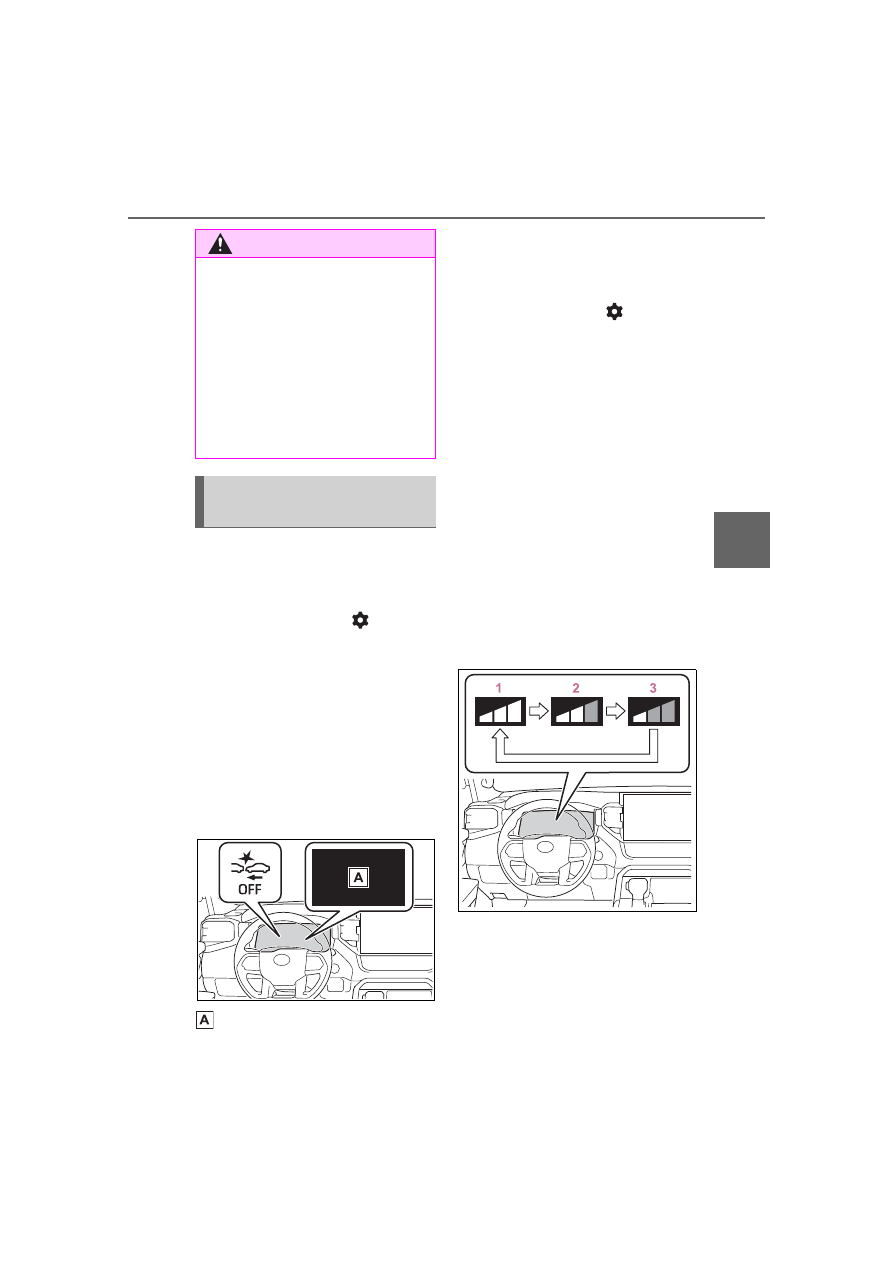
Enabling/disabling the pre-
collision system

The pre-collision system can be 
enabled/disabled on 


(

P.573) of the multi-informa-

tion display.

The system is automatically 
enabled each time the engine 
switch is turned to ON.

If the system is disabled, the 
PCS warning light will turn on 
and a message will be displayed 
on the multi-information display.

“Pre-Collision System OFF”

Changing the pre-collision 
warning timing

The pre-collision warning timing 
can be changed on 


(

P.573) of the multi-informa-

tion display.

The warning timing setting is 
retained when the engine switch is 
turned off. However, if the pre-colli-
sion system is disabled and re-
enabled, the operation timing will 
return to the default setting (mid-
dle).

If the pre-collision warning tim-
ing is changed, emergency 
steering assist timing will also 
be changed accordingly.
If late is selected, emergency 
steering assist would not oper-
ate in case of an emergency.

1

Early

2

Middle

This is the default setting.

3

Late

WARNING

If equipment (snow plow, etc.) 

that may obstruct the radar sen-

sor or front camera is temporar-

ily installed to the vehicle

When the vehicle is lifted up, 

except in the following cases

• When using a Toyota official lift 

kit up to 4 in. (101 mm), includ-

ing tire height. Aftermarket lift 

kits may degrade system perfor-

mance.

Changing settings of the 
pre-collision system

240

4-5. Using the driving support systems

Operational conditions for each pre-collision function

The pre-collision system is enabled and the system determines that the pos-

sibility of a frontal collision with a detected object is high.
The system may not operate in the following situations:
• If a battery terminal has been disconnected and reconnected and then the 

vehicle has not been driven for a certain amount of time

• If the shift lever is in R
• When the VSC OFF indicator is illuminated (only the pre-collision warning 

function will be operational)

The operation speeds and operation cancelation for each function is listed 

below.

Pre-collision warning

While the pre-collision warning function is operating, if the steering wheel is 

operated heavily or suddenly, the pre-collision warning may be canceled.

Pre-collision brake assist

Pre-collision braking

If either of the following occur while the pre-collision braking function is oper-

ating, it will be canceled:
• The accelerator pedal is depressed strongly.

Detectable objects

Vehicle speed

Relative speed between 

your vehicle and object

Vehicles

Approx. 7 to 110 mph 
(10 to 180 km/h)

Approx. 7 to 110 mph 
(10 to 180 km/h)

Bicyclists and pedestri-
ans

Approx. 7 to 50 mph (10 
to 80 km/h)

Approx. 7 to 50 mph (10 
to 80 km/h)

Detectable objects

Vehicle speed

Relative speed between 

your vehicle and object

Vehicles

Approx. 20 to 110 mph 
(30 to 180 km/h)

Approx. 20 to 110 mph 
(30 to 180 km/h)

Bicyclists and pedestri-
ans

Approx. 20 to 50 mph 
(30 to 80 km/h)

Approx. 20 to 50 mph 
(30 to 80 km/h)

Detectable objects

Vehicle speed

Relative speed between 

your vehicle and object

Vehicles

Approx. 7 to 110 mph 
(10 to 180 km/h)

Approx. 7 to 110 mph 
(10 to 180 km/h)

Bicyclists and pedestri-
ans

Approx. 7 to 50 mph (10 
to 80 km/h)

Approx. 7 to 50 mph (10 
to 80 km/h)

241

4-5. Using the driving support systems

4

Dr

iv

ing

• The steering wheel is turned sharply or abruptly.

Emergency steering assist

When the turn signal lights are flashing, emergency steering assist will not 
operate in case of an emergency.
The emergency steering assist will be disabled automatically when the sys-
tem judges that a trailer is connected.

If any of the following occur while the emergency steering assist function is 

operating, it will be canceled:
• The accelerator pedal is depressed strongly.
• The steering wheel is turned sharply or abruptly.
• The brake pedal is depressed.

Intersection right/left turn assistance (pre-collision warning)

When the turn signal lights are not flashing, support for turning left or right at 
an intersection which targets oncoming vehicles does not work.
When the system judges that a trailer is detected, intersection support is dis-
abled for vehicles and pedestrians.

Intersection right/left turn assistance (pre-collision braking)

When the turn signal lights are not flashing, support for turning left or right at 
an intersection which targets oncoming vehicles does not work.
When the system judges that a trailer is detected, intersection support is dis-
abled for vehicles and pedestrians.

Detectable objects

Vehicle speed

Relative speed between 

your vehicle and object

Pedestrians

Approx. 31 to 50 mph 

(50 to 80 km/h)

Approx. 31 to 50 mph 

(50 to 80 km/h)

Detect-

able 

objects

Vehicle speed

Oncoming vehicle 

speed

Relative speed 

between your vehi-

cle and object

Vehicles

Approx. 7 to 15 mph 

(10 to 25 km/h)

Approx. 20 to 35 

mph (30 to 55 km/h)

Approx. 25 to 50 

mph (40 to 80 km/h)

Pedestri-

ans

Approx. 7 to 15 mph 

(10 to 25 km/h)

-

Approx. 7 to 15 mph 

(10 to 25 km/h)

242

4-5. Using the driving support systems

Object detection function

The system detects objects based 

on their size, profile, motion, etc. 

However, an object may not be 

detected depending on the sur-

rounding brightness and the motion, 

posture, and angle of the detected 

object, preventing the system from 

operating properly. (

P.244)

The illustration shows an image of 

detectable objects.

Conditions under which the 

system may operate even if 

there is no possibility of a colli-

sion

In some situations such as the fol-

lowing, the system may determine 

that there is a possibility of a fron-

tal collision and operate.

• When passing a detectable object, 

etc.

• When changing lanes while over-

taking a detectable object, etc.

• When approaching a detectable 

object in an adjacent lane or on 

the roadside, such as when 

changing the course of travel or 

driving on a winding road

• When rapidly closing on a detect-

able object, etc.

• When approaching objects on the 

roadside, such as detectable 

objects, guardrails, utility poles, 

trees, or walls

• When there is a detectable object 

or other object by the roadside at 

the entrance of a curve

• When there are patterns or paint 

in front of your vehicle that may be 

mistaken for a detectable object

• When the front of your vehicle is 

hit by water, snow, dust, etc.

• When overtaking a detectable 

object that is changing lanes or 

making a right/left turn

Detect-

able 

objects

Vehicle speed

Oncoming vehicle 

speed

Relative speed 

between your vehi-

cle and object

Vehicles

Approx. 10 to 15 

mph (15 to 25 km/h)

Approx. 20 to 28 

mph (30 to 45 km/h)

Approx. 28 to 43 

mph (45 to 70 km/h)

Pedestri-

ans

Approx. 7 to 15 mph 

(10 to 25 km/h)

-

Approx. 7 to 15 mph 

(10 to 25 km/h)

243

4-5. Using the driving support systems

4

Dr

iv

ing

• When passing a detectable object 

in an oncoming lane that is 

stopped to make a right/left turn

• When a detectable object 

approaches very close and then 

stops before entering the path of 

your vehicle

• If the front of your vehicle is raised 

or lowered, such as when on an 

uneven or undulating road surface

• When driving on a road sur-

rounded by a structure, such as in 

a tunnel or on an iron bridge

• When there is a metal object 

(manhole cover, steel plate, etc.), 

steps, or a protrusion in front of 

your vehicle

• When passing under an object 

(road sign, billboard, etc.)

• When approaching an electric toll 

gate barrier, parking area barrier, 

or other barrier that opens and 

closes

• When using an automatic car 

wash

• When driving through or under 

objects that may contact your 

vehicle, such as thick grass, tree 

branches, or a banner

• When driving through steam or 

smoke

• When driving near an object that 

reflects radio waves, such as a 

large truck or guardrail

• When driving near a TV tower, 

broadcasting station, electric 

power plant, radar equipped vehi-

cles, etc., or other location where 

strong radio waves or electrical 

noise may be present

• When there are many things 

which can reflect the radio waves 

of the radar in the vicinity (tunnels, 

truss bridges, gravel roads, snow 

covered road that have tracks, 

etc.)

• While making a right/left turn, 

when an oncoming vehicle or a 

crossing pedestrian has already 

exited the path of your vehicle

• While making a right/left turn, 

closely in front of an oncoming 

vehicle or a crossing pedestrian.

• While making a right/left turn, 

when an oncoming vehicle or a 

crossing pedestrian stops before 

entering the path of your vehicle

• While making a right/left turn, 

when an oncoming vehicle turns 

right/left in front of your vehicle

• While steering into the direction of 

244

4-5. Using the driving support systems

oncoming traffic

• When the vehicle is lifted up using 

an aftermarket lift kit

• When the vehicle is lifted up more 

than 4 in. (101 mm)

Situations in which the system 

may not operate properly

In some situations such as the fol-

lowing, an object may not be 

detected by the radar sensor and 

front camera, preventing the sys-

tem from operating properly:

• When a detectable object is 

approaching your vehicle

• When your vehicle or a detectable 

object is wobbling

• If a detectable object makes an 

abrupt maneuver (such as sudden 

swerving, acceleration or deceler-

ation)

• When your vehicle approaches a 

detectable object rapidly

• When a detectable object is not 

directly in front of your vehicle

• When a detectable object is near 

a wall, fence, guardrail, manhole 

cover, vehicle, steel plate on the 

road, etc.

• When a detectable object is under 

a structure

• When part of a detectable object 

is hidden by an object, such as 

large baggage, an umbrella, or 

guardrail

• When there are many things 

which can reflect the radio waves 

of the radar in the vicinity (tunnels, 

truss bridges, gravel roads, snow 

covered road that have tracks, 

etc.)

• When there is an effect on the 

radio waves to the radar that is 

installed on another vehicle

• When multiple detectable objects 

are close together

• If the sun or other light is shining 

directly on a detectable object

• When a detectable object is a 

shade of white and looks 

extremely bright

• When a detectable object appears 

to be nearly the same color or 

brightness as its surroundings

• If a detectable object cuts or sud-

denly emerges in front of your 

vehicle

• When the front of your vehicle is 

hit by water, snow, dust, etc.

• When a very bright light ahead, 

such as the sun or the headlights 

of oncoming traffic, shines directly 

into the front camera

• When approaching the side or 

front of a vehicle ahead

• If a vehicle ahead is a motorcycle

• If a vehicle ahead is narrow, such 

as a personal mobility vehicle

• If a preceding vehicle has a small 

rear end, such as an unloaded 

truck

• If a preceding vehicle has a low 

rear end, such as a low bed trailer

• If a vehicle ahead has extremely 

high ground clearance

• If a vehicle ahead is carrying a 

load which protrudes past its rear 

bumper

• If a vehicle ahead is irregularly 

245

4-5. Using the driving support systems

4

Dr

iv

ing

shaped, such as a tractor or side 

car

• If a vehicle ahead is a child sized 

bicycle, a bicycle that is carrying a 

large load, a bicycle ridden by 

more than one person, or a 

uniquely shaped bicycle (bicycle 

with a child seat, tandem bicycle, 

etc.)

• If a pedestrian/or the riding height 

of a bicyclist ahead is shorter than 

approximately 3.2 ft. (1 m) or taller 

than approximately 6.5 ft. (2 m)

• If a pedestrian/bicyclist is wearing 

oversized clothing (a rain coat, 

long skirt, etc.), making their sil-

houette obscure

• If a pedestrian is bending forward 

or squatting or bicyclist is bending 

forward

• If a pedestrian/bicyclist is moving 

fast

• If a pedestrian is pushing a 

stroller, wheelchair, bicycle or 

other vehicle

• When driving in inclement weather 

such as heavy rain, fog, snow or a 

sandstorm

• When driving through steam or 

smoke

• When the surrounding area is dim, 

such as at dawn or dusk, or while 

at night or in a tunnel, making a 

detectable object appear to be 

nearly the same color as its sur-

roundings

• When driving in a place where the 

surrounding brightness changes 

suddenly, such as at the entrance 

or exit of a tunnel

• After the engine has started the 

vehicle has not been driven for a 

certain amount of time

• While making a left/right turn and 

for a few seconds after making a 

left/right turn

• While driving on a curve and for a 

few seconds after driving on a 

curve

• If your vehicle is skidding

• If the front of the vehicle is raised 

or lowered

• If the wheels are misaligned

• If a wiper blade is blocking the 

front camera

• The vehicle is being driven at 

extremely high speeds

• When driving on a hill

• If the radar sensor or front camera 

is misaligned

• When driving in a traffic lane sep-

arated by more than one lane 

where oncoming vehicles are driv-

ing while making a right/left turn

• When largely out of place with the 

opposite facing targeted oncom-

ing vehicle during a right/left turn

• While making a right/left turn, 

when a pedestrian approaches 

from behind or side of your vehicle

• When the vehicle is lifted up using 

an aftermarket lift kit

• When the vehicle is lifted up more 

than 4 in. (101 mm)

In addition to the above, in some 

situations, such as the following, 

the emergency steering assist 

246

4-5. Using the driving support systems

may not operate.

• When the white (yellow) lane lines 

are difficult to see, such as when 

they are faint, diverging/merging, 

or a shadow is cast upon them

• When the lane is wider or nar-

rower than normal

• When there is a light and dark pat-

tern on the road surface, such as 

due to road repairs

• When a pedestrian is detected 

near the centerline of the vehicle

• When the target is too close

• When there is insufficient safe or 

unobstructed space for the vehicle 

to be steered into

• If oncoming vehicle is present

• If VSC function is operating

In some situations such as the fol-

lowing, sufficient braking force or 

steering force may not be 

obtained, preventing the system 

from performing properly:

• If the braking functions cannot 

operate to their full extent, such as 

when the brake parts are 

extremely cold, extremely hot, or 

wet

• If the vehicle is not properly main-

tained (brakes or tires are exces-

sively worn, improper tire inflation 

pressure, etc.)

• When the vehicle is being driven 

on a gravel road or other slippery 

surface

• When the road surface has deep 

wheel tracks

• When driving on a hill road

• When driving on a road that has 

inclines to the left or right

• When your vehicles is towing a 

trailer or another vehicle

• When your vehicle is lifted up

If VSC is disabled

If VSC is disabled (

P.392), the 

pre-collision brake assist and pre-

collision braking functions are also 

disabled.

The PCS warning light will turn on 

and “VSC Turned OFF Pre-Colli-

sion Brake System Unavailable” 

will be displayed on the multi-

information display.

247

4-5. Using the driving support systems

4

Dr

iv

ing

*

: If equipped

While driving on a road with 
clear white (yellow) lane lines, 
the LTA system warns the driver 
if the vehicle may deviate from 
the current lane

*

, and also can 

slightly operate the steering 
wheel to help avoid deviation 
from the lane. Also, while the 
dynamic radar cruise control 
with full-speed range is operat-
ing, this system will operate the 
steering wheel to maintain the 
vehicle’s lane position.
The LTA system recognizes 
white (yellow) lane lines

*

 using 

the front camera. Additionally, it 
detects preceding vehicles 
using the front camera and 
radar.

*

: May recognize the boundaries 

between the asphalt and the side 
of the road, such as grass, soil, or 
the curb, to be road lanes

LTA (Lane Tracing 

Assist)

*

Summary of functions

WARNING

Before using LTA system

Do not rely solely upon the LTA 

system. The LTA system does 

not automatically drive the vehi-

cle or reduce the amount of 

attention that must be paid to 

the area in front of the vehicle. 

The driver must always assume 

full responsibility for driving 

safely by paying careful atten-

tion to the surrounding condi-

tions and operating the steering 

wheel to correct the path of the 

vehicle. Also, the driver must 

take adequate breaks when 

fatigued, such as from driving 

for a long period of time.

Failure to perform appropriate 

driving operations and pay care-

ful attention may lead to an 

accident, resulting in death or 

serious injury.

When connecting a trailer which 

can be connected with Toyota’s 

official TBC ECU, the lane cen-

tering function will be disabled 

automatically when LTA detects 

a trailer connection.When other 

trailer is connected, turn off the 

lane centering function if a 

trailer is connected and it is not 

automatically disabled.After 

trailer disconnect and power 

switch is turned off, lance cen-

tering function can be turned on.

This vehicle has Automatic 

Trailer Detection feature that 

can detect certain trailers under 

certain conditions. After trailer is 

detected, lane centering func-

tion will be disabled. In certain 

conditions, there is a possibility 

of falsely detecting trailer when 

there is no actual trailer. n that 

case, lane centering function 

will be disabled. To activate lane 

centering function, turn power 

switch to off and then turn it on 

again.

248

4-5. Using the driving support systems

WARNING

Following scenes has possibility 

of false detection of trailer: 

Crowded environments such as 

parking lots or camping 

grounds, closely following vehi-

cles such traffic jam, drive 

through, parallel parking, etc.

Do not use the lane centering 

system and steering assist func-

tion when the vehicle is lifted 

unless using a Toyota official lift 

up kit up to 4 in. (101 mm), 

including tire height. Aftermar-

ket lift kits may degrade system 

performance.

Situations unsuitable for LTA 

system

In the following situations, use the 

LTA switch to turn the system off. 

Failure to do so may lead to an 

accident, resulting in death or 

serious injury.

Vehicle is driven on a road sur-

face which is slippery due to 

rainy weather, fallen snow, 

freezing, etc.

Vehicle is driven on a snow-cov-

ered road.

White (yellow) lines are difficult 

to see due to rain, snow, fog, 

dust, etc.

Vehicle is driven in a temporary 

lane or restricted lane due to 

construction work.

Vehicle is driven in a construc-

tion zone.

A spare tire, tire chains, etc., 

are equipped.

When the tires have been 

excessively worn, or when the 

tire inflation pressure is low.

When your vehicles is towing a 

trailer or another vehicle, except 

when the following condition is 

met.

• When the other vehicle is a 

trailer properly attached and 

connected to Toyota’s official 

TBC ECU. (

P.186)

When the vehicle is lifted up, 

except in the following cases.

• When using a Toyota official lift 

kit up to 4 in. (101 mm), includ-

ing tire height. Aftermarket lift 

kits may degrade system perfor-

mance.

Preventing LTA system mal-

functions and operations per-

formed by mistake

Do not modify the headlights or 

place stickers, etc., on the sur-

face of the lights.

Do not modify the suspension, 

etc. If the suspension, etc., 

needs to be replaced, contact 

your Toyota dealer.

Do not install or place anything 

on the hood or grille. Also, do 

not install a grille guard (bull 

bars, kangaroo bar, etc.).

If your windshield needs 

repairs, contact your Toyota 

dealer.

Conditions in which functions 

may not operate properly

In the following situations, the 

functions may not operate prop-

erly and the vehicle may depart 

from its lane. Drive safely by 

always paying careful attention to 

your surroundings and operate 

the steering wheel to correct the 

path of the vehicle without relying 

solely on the functions.

249

4-5. Using the driving support systems

4

Dr

iv

ing

WARNING

When the follow-up cruising dis-

play is displayed (

P.253) an

the preceding vehicle changes 

lanes. (Your vehicle may follow 

the preceding vehicle and also 

change lanes.)

When the follow-up cruising dis-

play is displayed (

P.253) an

the preceding vehicle is sway-

ing. (Your vehicle may sway 

accordingly and depart from the 

lane.)

When the follow-up cruising dis-

play is displayed (

P.253) an

the preceding vehicle departs 

from its lane. (Your vehicle may 

follow the preceding vehicle and 

depart from the lane.)

When the follow-up cruising dis-

play is displayed (

P.253) an

the preceding vehicle is being 

driven extremely close to the 

left/right lane line. (Your vehicle 

may follow the preceding vehi-

cle and depart from the lane.)

Vehicle is being driven around a 

sharp curve.

Objects or patterns that could 

be mistaken for white (yellow) 

lines are present on the side of 

the road (guardrails, reflective 

poles, etc.).

Vehicle is driven where the road 

diverges, merges, etc.

Repair marks of asphalt, white 

(yellow) lines, etc., are present 

due to road repair.

There are shadows on the road 

that run parallel with, or cover, 

the white (yellow) lines.

250

4-5. Using the driving support systems

WARNING

The vehicle is driven in an area 

without white (yellow) lines, 

such as in front of a tollgate or 

checkpoint, or at an intersec-

tion, etc.

The white (yellow) lines are 

cracked, “Botts’ dots”, “Raised 

pavement marker” or stones are 

present.

The white (yellow) lines cannot 

be seen or are difficult to see 

due to sand, etc.

The vehicle is driven on a road 

surface that is wet due to rain, 

puddles, etc.

The traffic lines are yellow 

(which may be more difficult to 

recognize than lines that are 

white).

The white (yellow) lines cross 

over a curb, etc.

The vehicle is driven on a bright 

surface, such as concrete.

The vehicle is driven on a sur-

face that is bright due to 

reflected light, etc.

The vehicle is driven in an area 

where the brightness changes 

suddenly, such as at the 

entrances and exits of tunnels, 

etc.

Light from the headlights of an 

oncoming vehicle, the sun, etc., 

enters the camera.

The vehicle is driven on a slope.

The vehicle is driven on a road 

which tilts left or right, or a wind-

ing road.

The vehicle is driven on an 

unpaved or rough road.

The traffic lane is excessively 

narrow or wide.

The vehicle is extremely tilted 

due to carrying heavy luggage 

or having improper tire pres-

sure.

The distance to the preceding 

vehicle is extremely short.

The vehicle is moving up and 

down a large amount due to 

road conditions during driving 

(poor roads or road seams).

When driving in a tunnel or at 

night with the headlights off or 

when a headlight is dim due to 

its lens being dirty or it being 

misaligned.

The vehicle is struck by a cross-

wind.

The vehicle is affected by wind 

from a vehicle driven in a 

nearby lane.

The vehicle has just changed 

lanes or crossed an intersec-

tion.

Tires which differ by structure, 

manufacturer, brand or tread 

pattern are used.

When tires of a size other than 

specified are installed.

Snow tires, etc., are equipped.

The vehicle is being driven at 

extremely high speeds.

When your vehicles is towing a 

trailer or another vehicle, except 

when the following condition is 

met.

• When the other vehicle is a 

trailer properly attached and 

connected to Toyota’s official 

TBC ECU. (

P.186)

251

4-5. Using the driving support systems

4

Dr

iv

ing

Lane departure alert func-
tion

When the system determines 
that the vehicle might depart 
from its lane

*

, a warning is dis-

played on the multi-information 
display, and either a warning 
buzzer will sound or the steering 
wheel will vibrate to alert the 
driver.

When the warning buzzer sounds 
or the steering wheel vibrates, 
check the area around your vehicle 
and carefully operate the steering 
wheel to move the vehicle back to 
the center of the lane.
Vehicle with BSM: When the sys-
tem determines that the vehicle 
might depart from its lane and that 
the possibility of a collision with an 
overtaking vehicle in the adjacent 
lane is high, the lane departure 
alert will operate even if the turn 
signals are operating.

*

: May recognize the boundaries 

between the asphalt and the side 
of the road, such as grass, soil, or 
the curb, to be road lanes

Steering assist function

When the system determines 
that the vehicle might depart 
from its lane, the system pro-
vides assistance as necessary 
by operating the steering wheel 
in small amounts for a short 
period of time to keep the vehi-
cle in its lane.

Vehicle with BSM: When the sys-
tem determines that the vehicle 
might depart from its lane and that 
the possibility of a collision with an 
overtaking vehicle in the adjacent 
lane is high, the steering assist 
function will operate even if the turn 
signals are operating.

WARNING

When the vehicle is lifted up, 

except in the following cases.

• When using a Toyota official lift 

kit up to 4 in. (101 mm), includ-

ing tire height. Aftermarket lift 

kits may degrade system perfor-

mance.

Functions included in LTA 
system

252

4-5. Using the driving support systems

Vehicle sway warning func-
tion

When the vehicle is swaying 
within a lane, the warning 
buzzer will sound and a mes-
sage will be displayed on the 
multi-information display to alert 
the driver.

Lane centering function

This function is linked with 
dynamic radar cruise control 
with full-speed range and pro-
vides the required assistance by 
operating the steering wheel to 
keep the vehicle in its current 
lane.

When dynamic radar cruise control 
with full-speed range is not operat-
ing, the lane centering function 
does not operate.
In situations where the white (yel-
low) lane lines are difficult to see or 
are not visible, such as when in a 
traffic jam, this function will operate 
to help follow a preceding vehicle 
by monitoring the position of the 
preceding vehicle.

253

4-5. Using the driving support systems

4

Dr

iv

ing

Press the LTA switch to turn the 
LTA system on

The LTA indicator illuminates and a 
message is displayed on the multi-
information display.

Press the LTA switch again to 
turn the LTA system off.

When the LTA system is turned on 
or off, operation of the LTA system 
continues in the same condition the 
next time the hybrid system started.

“LTA Steering Assist Active 

Lane Centering Active”

LTA indicator

The illumination condition of the 
indicator informs the driver of the 
system operation status.
Illuminated in white: LTA system is 
operating.
Illuminated in green: Steering wheel 
assistance of the steering assist 
function or lane centering function 
is operating.
Flashing in orange: Lane departure 
alert function is operating.

Operation display of steering 
wheel operation support

Displayed when the multi-informa-
tion display is switched to the driv-
ing support system information 
screen.
Indicates that steering wheel assis-
tance of the steering assist function 
or lane centering function is operat-
ing.
Both outer sides of the lane are dis-
played: Indicates that steering 
wheel assist of the lane centering 
function is operating.
One outer side of the lane is dis-

Turning LTA system on

Indications on multi-infor-
mation display

254

4-5. Using the driving support systems

played: Indicates that steering 
wheel assist of the steering assist 
function is operating.
Both outer sides of the lane are 
flashing: Alerts the driver that their 
input is necessary to stay in the 
center of the lane (lane centering 
function).

Follow-up cruising display

Displayed when the multi-informa-
tion display is switched to the driv-
ing support system information 
screen.
Indicates that steering assist of the 
lane centering function is operating 
by monitoring the position of a pre-
ceding vehicle.
When the follow-up cruising display 
is displayed, if the preceding vehi-
cle moves, your vehicle may move 
in the same way. Always pay care-
ful attention to your surroundings 
and operate the steering wheel as 
necessary to correct the path of the 
vehicle and ensure safety.

Lane departure alert function 
display

Displayed when the multi-informa-
tion display is switched to the driv-
ing support system information 
screen.

Inside of displayed lines is 
white

Indicates that the system is rec-
ognizing white (yellow) lines

*

When the vehicle departs from 
its lane, the white line displayed 
on the side the vehicle departs 
from flashes orange.

Inside of displayed lines is 
black

Indicates that the system is not 
able to recognize white (yellow) 
lines

*

 or is temporarily canceled.

*

: May recognize the boundaries 

between the asphalt and the side 
of the road, such as grass, soil, or 
the curb, to be road lanes

Operation conditions of each 

function

Lane departure alert function

This function operates when all of 
the following conditions are met.
• LTA is turned on.

• Vehicle speed is approximately 32 

mph (50 km/h) or more.

*1

• System recognizes white (yellow) 

lane lines

*2

. (When a white [yel-

low] line

*2

 is recognized on only 

one side, the system will operate 

only for the recognized side.)

• Width of traffic lane is approxi-

mately 9.8 ft. (3 m) or more.

• Turn signal lever is not operated. 

(Vehicle with BSM: Except when 

another vehicle is in the lane on 


Content      ..     13      14      15      16     ..