Toyota 4Runner (2023 year). Manual in english - page 12
 

  Index      Toyota     Toyota 4Runner (2023 year). Manual in english


Search            copyright infringement  


Content      ..     10      11      12      13     ..


Toyota 4Runner (2023 year). Manual in english - page 12


193

4-1. Before driving

4

Drivin

g

Always place wheel blocks under both the vehicle’s and the trailer’s
wheels  when  parking. Apply  the  parking  brake  firmly,  and  put  the
transmission in P. Avoid parking on a slope, but if unavoidable, do
so only after performing the following:

Apply the brakes and keep them applied.
Have someone place wheel blocks under both the vehicle’s and
trailer’s wheels.
When the  wheel blocks are  in place, release the brakes slowly
until the blocks absorb the load.
Apply the parking brake firmly.
Shift into P and turn off the engine.

When restarting after parking on a slope:

With the transmission in P, start the engine. Be sure to keep the
brake pedal pressed.
Shift into a forward gear. If reversing, shift into R.
Release  the  parking  brake  and  brake  pedal,  and  slowly  pull  or
back away from the wheel blocks. Stop and apply the brakes.
Have someone retrieve the blocks.

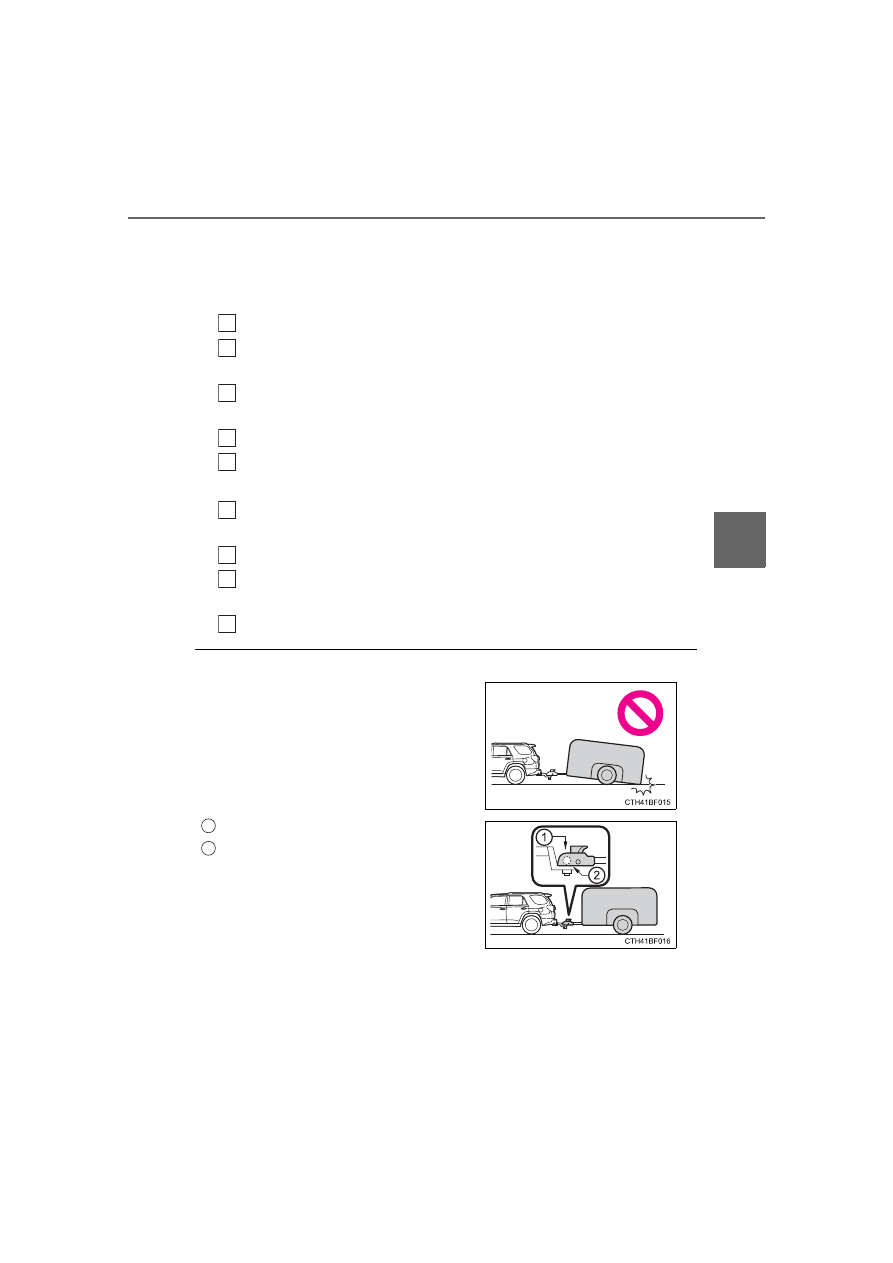
Matching trailer ball height to trailer coupler height

1

2

3

4

5

1

2

3

4

No  matter  which  class  of  tow  hitch
applies,  for  a  more  safe  trailer  hookup,
the  trailer  ball  setup  must  be  the  proper
height for the coupler on the trailer.

Coupler 
Trailer ball

1

2

194

4-1. Before driving

Before towing

Check that the following conditions are met:

Ensure that your vehicle’s tires are properly inflated. (

P. 532)

Trailer tires are inflated according to the trailer manufacturer’s recommen-
dation.

All trailer lights work as required by law.

All lights work each time you connect them.

The trailer ball is set at the proper height for the coupler on the trailer.

The trailer is level when it is hitched. 
Do not drive if the trailer is not level, and check for improper tongue weight,
overloading, worn suspension, or other possible causes.

The trailer cargo is securely loaded.

The  rear  view  mirrors  conform  to  all  applicable  federal,  state/provincial  or
local regulations. If they do not, install rear view mirrors appropriate for tow-
ing purposes.

When towing a trailer

Disable the following systems, as the systems may not operate properly.

LDA (Lane Departure Alert) (

P. 249)

Dynamic radar cruise control (

P. 257)

BSM (Blind Spot Monitor) (

P. 270)

Intuitive parking assist (

P. 277)

RCTA (Rear Cross Traffic Alert) function (

P. 286)

Break-in schedule

If  your  vehicle  is  new  or  equipped  with  any  new  power  train  components
(such as an engine, transmission, differential or wheel bearing), Toyota rec-
ommends that you do not tow a trailer until the vehicle has been driven for
over 500 miles (800 km).
After the vehicle has been driven for over 500 miles (800 km), you can start
towing. However, for the next 500 miles (800 km), drive the vehicle at a speed
of  less  than  45  mph  (72  km/h)  when  towing  a  trailer,  and  avoid  full  throttle
acceleration.

Maintenance

If you tow a trailer, your vehicle will require more frequent maintenance due
to  the  additional  load.  (See  “Scheduled  Maintenance  Guide”  or  “Owner’s
Manual Supplement”.)

Retighten the fixing bolts of the towing ball and bracket after approximately
600 miles (1000 km) of trailer towing.

195

4-1. Before driving

4

Drivin

g

If trailer sway occurs

One  or  more  factors  (crosswinds,  passing  vehicles,  rough  roads,  etc.)  can
adversely affect handling of your vehicle and trailer, causing instability.

If trailer swaying occurs:
• Firmly grip the steering wheel. Steer straight ahead.

Do not try to control trailer swaying by turning the steering wheel.

• Begin releasing the accelerator pedal immediately but very gradually to

reduce speed.
Do not increase speed. Do not apply vehicle brakes.

If you make no extreme correction with the steering or brakes, your vehicle
and trailer should stabilize. (if enabled, Trailer Sway Control can also help to
stabilize the vehicle and trailer.)

After the trailer swaying has stopped:
• Stop in a safe place. Get all occupants out of the vehicle.
• Check the tires of the vehicle and the trailer.
• Check the load in the trailer.

Make sure the load has not shifted.
Make sure the tongue weight is appropriate, if possible.

• Check the load in the vehicle.

Make sure the vehicle is not overloaded after occupants get in.

If you cannot find any problems, the speed at which trailer swaying occurred
is beyond the limit of your particular vehicle-trailer combination.
Drive at a lower speed to prevent instability. Remember that swaying of the
towing vehicle-trailer increases as speed increases.

196

4-1. Before driving

WARNING

Trailer towing precautions

To tow a trailer safely, use extreme care and drive the vehicle in accordance
with the trailer’s characteristics and operating conditions. Failure to do  so
could cause an accident resulting in death or serious injury. Vehicle stability
and braking performance are affected by trailer stability, brake setting and
performance, and the hitch. Your vehicle will handle differently when towing
a trailer.

To avoid accident or injury

Do not exceed the TWR, unbraked TWR, GCWR, GVWR or GAWR.

If the gross trailer weight is over 2000 lb. (907 kg), a sway control device
with sufficient capacity is required.

Adjust the tongue weight within the appropriate range. Place heavier loads
as close to the trailer axle as possible.

Do not exceed 65 mph (104 km/h), the posted towing speed limit or the
speed  limit  for  your  trailer  as  set  forth  in  your  trailer  owner’s  manual,
whichever is lowest. Slow down sufficiently before making a turn, in cross
winds,  on  wet  or  slippery  surface,  etc.  to  help  avoid  an  accident.  If  you
experience a vehicle-trailer instability from reducing a certain speed, slow
down  and  make  sure  you  keep  your  vehicle  speed  under  the  speed  of
which you experience the instability.

Do not make jerky, abrupt or sharp turns.

Do not apply the brakes suddenly as you may skid, resulting in jackknifing
and loss of vehicle control. This is especially true on wet or slippery sur-
faces.

Do  not  exceed  the  trailer  hitch  assembly  weight,  gross  vehicle  weight,
gross axle weight and trailer tongue weight capacities.

Do not use cruise control when towing.

Slow  down  and  downshift  before  descending  steep  or  long  downhill
grades. Do not make sudden downshifts while descending steep or long
downhill grades.

Vehicle-trailer  instability  is  more  likely  on  steep  long  downhills.  Before
descending steep or long downhill grades, slow down and downshift. Do
not  make  sudden  downshifts  when  descending  steep  or  long  downhill
grades.  Avoid  holding  the  brake  pedal  down  too  long  or  applying  the
brakes too frequently. This could cause the brakes to overheat and result
in reduced braking efficiency.

197

4-1. Before driving

4

D

riv

in

g

WARNING

Hitch

Trailer hitch assemblies have different weight capacities established by the
hitch manufacturer. Even though the vehicle may be physically capable of
towing a higher weight, the operator must determine the maximum weight
rating  of  the  particular  hitch  assembly  and  never  exceed  the  maximum
weight rating specified for the trailer-hitch. Exceeding the maximum weight
rating set by the trailer-hitch manufacturer can cause an accident resulting
in death or serious personal injuries.

When towing a trailer

Toyota recommends trailers with brakes that conform to any applicable fed-
eral and state/provincial regulations.

If  the  gross  trailer  weight  exceeds  unbraked  TWR,  trailer  brakes  are
required. Toyota recommends trailers with brakes that conform to all appli-
cable federal and state/provincial regulations.

Never tap into your vehicle’s hydraulic system, as this will lower the vehi-
cle’s braking effectiveness.

Never tow a trailer without using a safety chain securely attached to both
the trailer and the vehicle. If damage occurs to the coupling unit or hitch
ball, there is danger of the trailer wandering into another lane.

NOTICE

When installing a trailer hitch

Use  only  the  position  recommended  by  your Toyota  dealer.  Do  not  install
the trailer hitch on the bumper; this may cause body damage.

Do not directly splice trailer lights

Do not directly splice trailer lights. Directly splicing trailer lights may damage
your vehicle’s electrical system and cause a malfunction.

198

4-1. Before driving

Dinghy towing

Your vehicle is not designed to be dinghy towed (with 4 wheels
on the ground) behind a motor home. 

NOTICE

To avoid serious damage to your vehicle

Do not tow your vehicle with the four wheels on the ground.

199

4

Drivin

g

4-2. Driving procedures

Check that the parking brake is set.
Check that the shift lever is set in P.
Firmly depress the brake pedal.

 and a message will be displayed on the multi-information display. 

If it is not displayed, the engine cannot be started.

Press the engine switch shortly
and firmly.

When operating the engine switch,
one  short,  firm  press  is  enough.  It
is not necessary to press and hold
the switch.
The engine will crank until it starts
or for up to 30 seconds, whichever
is less.
Continue  depressing  the  brake
pedal until the engine is completely
started.
The  engine  can  be  started  from
any engine switch mode.

Engine (ignition) switch

Performing  the  following  operations  when  carrying  the  elec-
tronic key on your person starts the engine or changes engine
switch modes.

Starting the engine

1

2

3

4

200

4-2. Driving procedures

Stop the vehicle.
Set the parking brake (

P. 211), and shift the shift lever to P.

Press the engine switch.
Release the brake pedal and check that “ACCESSORY” or “IGNI-
TION ON” is not shown on the meter.

Modes  can  be  changed  by  pressing  the  engine  switch  with  brake
pedal released. (The mode changes each time the switch is pressed.)

Off

*

The  emergency  flashers  can  be
used.

ACCESSORY mode

Some  electrical  components  such
as the audio system can be used.
“ACCESSORY”  will  be  displayed
on the multi-information display.

IGNITION ON mode

All  electrical  components  can  be
used.
“IGNITION  ON”  will  be  displayed
on the multi-information display.

*

: If the shift lever is in a position other than P when turning off the engine,

the engine switch will be turned to ACCESSORY mode, not to off.

Stopping the engine

Changing engine switch modes

1

2

3

4

1

2

3

201

4-2. Driving procedures

4

Drivin

g

If the engine is stopped with the shift lever in a position other than P,
the  engine  switch  will  not  be  turned  off  but  instead  be  turned  to
ACCESSORY  mode.  Perform  the  following  procedure  to  turn  the
switch off:

Check that the parking brake is set.
Shift the shift lever to P.
Check  that  “Turn Power  Off”  is  displayed on the multi-information
display and then press the engine switch once.
Check  that  “Turn  Power  Off”  on  the  multi-information  display  is
turned off.

Auto power off function

If the vehicle is left in ACCESSORY mode for more than 20 minutes or IGNI-
TION  ON  mode  (the  engine  is  not  running)  for  more  than  an  hour  with  the
shift  lever  in  P,  the  engine  switch  will  automatically  turn  off.  However,  this
function cannot entirely prevent battery discharge. Do not leave the vehicle
with the engine switch in ACCESSORY or IGNITION ON mode for long peri-
ods of time when the engine is not running.

Automatic engine shut off feature

The  vehicle  is  equipped  with  a  feature  that  automatically  shuts  off  the
engine when the shift lever is in P with the engine running for an extended
period.

The  engine  will  automatically  shut  off  after  approximately  1  hour  if  it  has
been left running while the shift lever is in P.

The  timer  for  the  automatic  engine  shut  off  feature  will  reset  if  the  brake
pedal is depressed or if the shift lever is in a position other than P.

After  the  vehicle  is  parked,  if  the  door  is  locked  with  the  door  lock  switch
(

P. 108) from the inside or the mechanical key (

P. 512) from the outside,

the automatic engine shut off feature will be disabled. The timer for the auto-
matic  engine  shut  off  feature  will  be  re-enabled  if  the  driver’s  door  is
opened.

Electronic key battery depletion

P. 104

Conditions affecting operation

P. 117

Notes for the entry function

P. 118

When stopping the engine with the shift lever in a position other
than P

1

2

3

4

202

4-2. Driving procedures

If the engine does not start

The engine immobilizer system may not have been deactivated. (

P. 78) 

Contact your Toyota dealer.

Check that the shift lever is securely set in P. The engine may not start if the
shift lever is displaced out of P.

When a message requesting the smart key system be inspected is dis-
played on the multi-information display

The  system  may  be  malfunctioning.  Have  the  vehicle  inspected  by  your
Toyota dealer immediately.

If the electronic key battery is depleted

P. 447

Operation of the engine switch

If the switch is not pressed shortly and firmly, the engine switch mode may
not change or the engine may not start.

203

4-2. Driving procedures

4

D

riv

in

g

WARNING

When starting the engine

Always start the engine while sitting in the driver’s seat. Do not depress the
accelerator pedal while starting the engine under any circumstances.
Doing so may cause an accident resulting in death or serious injury.

Caution while driving

If engine failure occurs while the vehicle is moving, do not lock or open the
doors until the vehicle reaches a safe and complete stop.

Stopping the engine in an emergency

If you want to stop the engine in an emergency while driving the vehicle,
press  and  hold  the  engine  switch  for  more  than  2  seconds,  or  press  it
briefly 3 times or more in succession. (

P. 467)

However, do not touch the engine switch while driving except in an emer-
gency. Turning the engine off while driving will not cause loss of steering or
braking control, but the power assist to these systems will be lost. This will
make it more difficult to steer and brake, so you should pull over and stop
the vehicle as soon as it is safe to do so.

If  the  engine  switch  is  operated  while  the  vehicle  is  running,  a  warning
message  will  be  shown  on  the  multi-information  display  and  a  buzzer
sounds.

When parking

Exhaust gases  include harmful  carbon  monoxide  (CO), which is colorless
and odorless. Observe the following precautions.
Failure  to  do  so  may  cause  exhaust  gases  to  enter  the  vehicle  and  may
lead to an accident caused by light-headedness, or may lead to death or a
serious health hazard.

If  the  vehicle  is  in  a  poorly  ventilated  area  or  a  closed  area,  such  as  a
garage, stop the engine.

Do not leave the vehicle with the engine running for a long time. If such a
situation cannot be avoided, park the vehicle in an open space and ensure
that exhaust fumes do not enter the vehicle interior.

Do not leave the engine running in an area with snow build-up, or where it
is snowing. If snowbanks build up around the vehicle while the engine is
running, exhaust gases may collect and enter the vehicle.

204

4-2. Driving procedures

NOTICE

To prevent battery discharge

Do not leave the engine switch in ACCESSORY or IGNITION ON mode
for long periods of time without the engine running.

If “ACCESSORY” or “IGNITION ON” is displayed on the multi-information
display,  the  engine  switch  is  not  off.  Exit  the  vehicle  after  turning  the
engine switch off.

Do not stop the engine when the shift lever is in a position other than P. If
the engine is stopped in another shift lever position, the engine switch will
not be turned off but instead be turned to ACCESSORY mode. If the vehi-
cle is left in ACCESSORY mode, battery discharge may occur.

When starting the engine

Do not race a cold engine.

If the engine becomes difficult to start or stalls frequently, have your vehi-
cle checked by your Toyota dealer immediately.

Symptoms indicating a malfunction with the engine switch

If the engine switch seems to be operating somewhat differently than usual,
such  as  the  switch  sticking  slightly,  there  may  be  a  malfunction.  Contact
your Toyota dealer immediately.

205

4-2. Driving procedures

4

Drivin

g

While the engine switch is in IGNITION ON mode, move the
shift lever with the brake pedal depressed.

When  shifting  the  shift  lever  between  P  and  D,  make  sure  that  the
vehicle is completely stopped. 

Automatic transmission

Shifting the shift lever

206

4-2. Driving procedures

*

1

: To improve fuel efficiency and reduce noises, set the shift lever in the D

position for normal driving.

*

2

: Selecting shift ranges using S mode restricts the upper limit of the possible

gear  ranges,  controls  engine  braking  forces,  and  prevents  unnecessary
upshifting

When the shift lever is in the S position, the shift lever can be oper-
ated as follows:

Upshifting
Downshifting

The initial shift range in S mode is set automatically to “4” according to
vehicle speed. However, the initial shift range may be set to “3” if AI-
SHIFT has operated while the shift lever was in the D position. 
(

P. 207)

Shift ranges and their functions

You can choose from 5 levels of engine braking force.
A lower shift range will provide greater engine braking force than a
higher shift range, and the engine speed will also increase.

Shift position purpose

Shift position

Objective or function

P

Parking the vehicle/starting the engine

R

Reversing

N

Neutral

D

Normal driving

*

1

S

S mode driving

*

2

Changing shift ranges in S mode

1

2

207

4-2. Driving procedures

4

Drivin

g

S mode

When the shift range is “3” or lower, holding the shift lever toward “+” sets the
shift range to “5”.

AI-SHIFT

AI-SHIFT  automatically  selects  the  optimal  gear  according  to  driver  perfor-
mance and driving conditions.
AI-SHIFT  automatically  operates  when  the  shift  lever  is  in  the  D  position.
(Shifting the shift lever to the S position or paddle shifting cancels the func-
tion.)
The engine speed may remain high after releasing the accelerator pedal. This
does not indicate a malfunction.

When driving with Dynamic radar cruise control system

Engine braking will not occur in S mode, even when downshifting to “3”.
(

P. 257)

Restraining sudden start (Drive-start Control)

P. 167

Shift lock system

The shift lock system is a system to prevent accidental operation of the shift
lever in starting.
The shift lever can be shifted from P only when the engine switch is in the
IGNITION ON mode the brake pedal is depressed and the shift release but-
ton is pushed.

208

4-2. Driving procedures

If the shift lever cannot be shifted from P

First, check whether the brake pedal is being depressed. 
If the shift lever cannot be shifted with your foot on the brake pedal, there may
be a problem with the shift lock system. Have the vehicle inspected by your
Toyota dealer immediately.
The following steps may be used as an emergency measure to ensure that
the shift lever can be shifted.
Releasing the shift lock:

Set the parking brake.
Turn the engine switch is off.
Depress the brake pedal.

If the “S” indicator does not come on even after shifting the shift lever to
S

This may indicate a malfunction in the automatic transmission system. Have
the vehicle inspected by your Toyota dealer immediately. 
(In this situation, the transmission will operate in the same manner as when
the shift lever is in D.)

Downshift restriction warning buzzer (S mode)

To help ensure safety and driving performance, downshifting operation may
sometimes  be  restricted.  In  some  circumstances,  downshifting  may  not  be
possible even when the shift lever is operated. (A buzzer will sound twice.) 

Pry the cover up with a flathead screw-
driver or equivalent tool.
To prevent damage to the cover, cover
the tip of the screwdriver with a rag.

Press the shift lock override button.
The shift lever can be shifted while the
button is pressed.

1

2

3

4

5


Content      ..     10      11      12      13     ..