Toyota Camry Hybrid (2022 year). Manual in english - page 20
318
4-5. Using the driving support systems
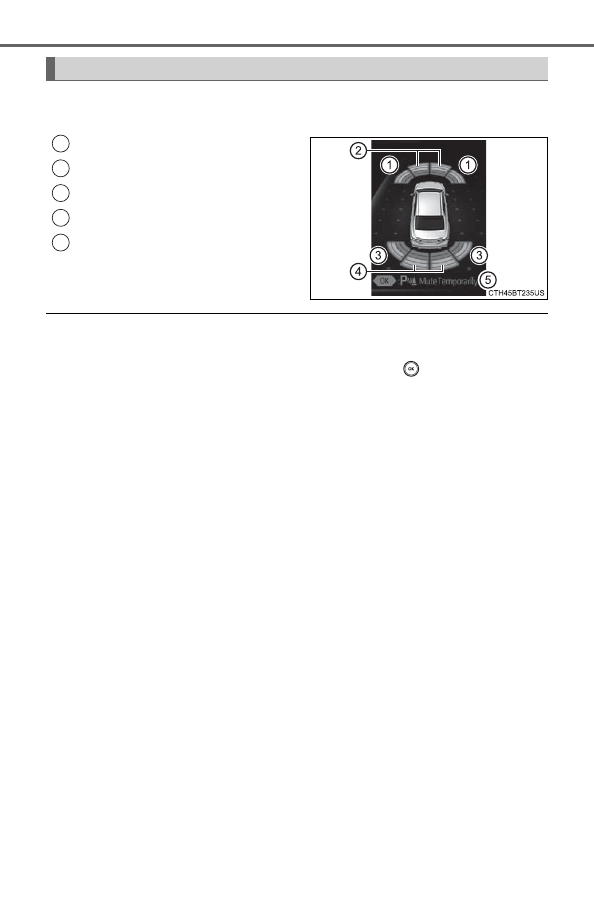
When the sensors detect an object, the following displays inform the
driver of the position and distance to the object.
Front corner sensor operation
Front center sensor operation
Rear corner sensor operation
Rear center sensor operation
Select to mute the buzzer
sounds.
■
Muting the buzzer sound
●
To mute the buzzer sound
The buzzer can be temporarily muted by pressing
of the meter con-
trol switches while an object detection display is shown on the multi-infor-
mation display.
●
To cancel the mute
Mute will be automatically cancelled in the following situations.
• When the shift position is changed
• When the vehicle speed exceeds a certain speed.
• When the intuitive parking assist is turned off once and turned on again
• When the power switch is turned off once and turned to ON mode again
• When a sensor is malfunctioning
Display
1
2
3
4
5