Toyota Highlander (2022 year). Manual in english - page 20
 

  Index      Toyota     Toyota Highlander (2022 year). Manual in english


Search            copyright infringement  


Content      ..     18      19      20      21     ..


Toyota Highlander (2022 year). Manual in english - page 20


319

4-5. Using the driving support systems

4

Dr

iv

ing

wheel

Dynamic Torque Control 
AWD system (AWD models)

Automatically switches from 
front-wheel drive to all-wheel 
drive (AWD) according to the 
driving conditions, helping to 
ensure reliable handling and 
stability. Examples of conditions 
where the system will switch to 
AWD are when cornering, going 
uphill, starting off or accelerat-
ing, and when the road surface 
is slippery due to snow, rain, etc.

Dynamic Torque Vectoring 
AWD system (AWD models)

Automatically switches from 
front-wheel drive to all-wheel 
drive (AWD) according to the 
driving conditions, helping to 
ensure reliable handling and 
stability. Examples of conditions 
where the system will switch to 
AWD are when cornering, going 
uphill, starting off or accelerat-
ing, and when the road surface 
is slippery due to snow, rain, etc.
Also, when the vehicle is corner-
ing, the drive torque distribution 
between the front and rear 
wheels and between the rear left 
and right wheels is precisely 
controlled to improve drivability 
and stability.

The Secondary Collision 
Brake

When the SRS airbag sensor 
detects a collision and the sys-

tem operates, the brakes and 
brake lights are automatically 
controlled to reduce the vehicle 
speed and help reduce the pos-
sibility of further damage due to 
a secondary collision.

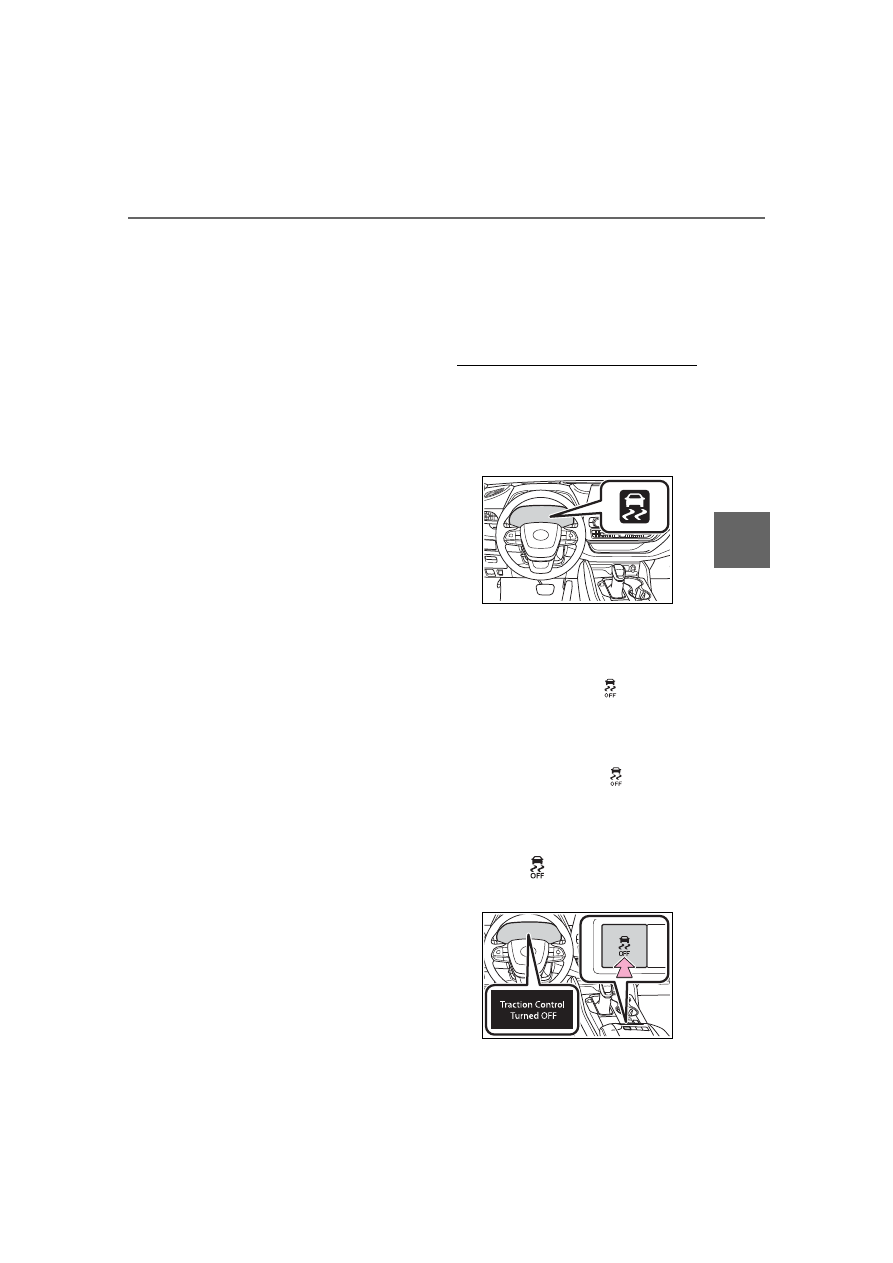
When the TRAC/VSC/Trailer 

Sway Control systems are oper-

ating

The slip indicator light will flash 

while the TRAC/VSC/Trailer Sway 

Control systems are operating.

Disabling the TRAC system

If the vehicle gets stuck in mud, dirt 

or snow, the TRAC system may 

reduce power from the engine to the 
wheels. Pressing the 

 switch to 

turn the system off may make it eas-

ier for you to rock the vehicle in 

order to free it.
To turn the TRAC system off, quickly 
press and release the 

 switch.

The “Traction Control Turned OFF” 
will be shown on the multi-informa-
tion display.

Press the 

 switch again to turn 

the system back on.

320

4-5. Using the driving support systems

Turning off both TRAC, VSC 

and Trailer Sway Control sys-

tems

To turn the TRAC, VSC and Trailer 

Sway Control systems off, press 
and hold the 

 switch for more 

than 3 seconds while the vehicle is 

stopped.
The VSC OFF indicator light will 
come on and the “Traction Control 
Turned OFF” will be shown on the 
multi-information display.

*

Press the 

 switch again to turn 

the system back on.

*

: On vehicles with PCS (Pre-Colli-

sion System), PCS will also be 
disabled (only Pre-Collision warn-
ing is available). The PCS warning 
light will come on and a message 
will be displayed on the 
multi-information display. 
(

P.235)

When the message is dis-

played on the multi-information 

display showing that TRAC has 
been disabled even if the 


switch has not been pressed

TRAC is temporary deactivated. If 

the information continues to show, 

contact your Toyota dealer.

Operating conditions of 

hill-start assist control

When the following four conditions 

are met, the hill-start assist control 

will operate:

The shift lever is in a position 

other than P or N (when starting 

off forward/backward on an 

upward incline)

The vehicle is stopped

The accelerator pedal is not 

depressed

The parking brake is not engaged

Automatic system cancelation 

of hill-start assist control

The hill-start assist control will turn 

off in any of the following situations:

The shift lever is shifted to P or N

The accelerator pedal is 

depressed

The parking brake is engaged

2 seconds at maximum elapsed 

after the brake pedal is released

Sounds and vibrations caused 

by the ABS, brake assist, VSC, 

Trailer Sway Control, TRAC and 

hill-start assist control systems

A sound may be heard from the 

engine compartment when the 

brake pedal is depressed repeat-

edly, when the engine is started or 

just after the vehicle begins to 

move. This sound does not indi-

cate that a malfunction has 

occurred in any of these systems.

Any of the following conditions 

may occur when the above sys-

tems are operating. None of these 

indicates that a malfunction has 

occurred.

• Vibrations may be felt through the 

vehicle body and steering.

• A motor sound may be heard also 

after the vehicle comes to a stop.

• The brake pedal may pulsate 

slightly after the ABS is activated.

• The brake pedal may move down 

slightly after the ABS is activated.

Active Cornering Assist opera-

tion sounds and vibrations

When the Active Cornering Assist is 

operated, operation sounds and 

vibrations may be generated from 

the brake system, but this is not a 

malfunction.

AWD system operation sounds 

and vibrations when switching 

between AWD and front wheel 

drive

When the vehicle switches from 

AWD to front wheel drive and vice 

versa, operation sounds and vibra-

321

4-5. Using the driving support systems

4

Dr

iv

ing

tions may be generated, but this is 

not a malfunction.

EPS operation sound

When the steering wheel is oper-

ated, a motor sound (whirring 

sound) may be heard. This does not 

indicate a malfunction.

Reduced effectiveness of the 

EPS system

The effectiveness of the EPS sys-

tem is reduced to prevent the sys-

tem from overheating when there is 

frequent steering input over an 

extended period of time. The steer-

ing wheel may feel heavy as a 

result. Should this occur, refrain 

from excessive steering input or 

stop the vehicle and turn the engine 

off. The EPS system should return 

to normal within 10 minutes.

Automatic reactivation of 

TRAC, Trailer Sway Control and 

VSC systems

After turning the TRAC, Trailer 

Sway Control and VSC systems off, 

the systems will be automatically 

re-enabled in the following situa-

tions:

When the engine switch is turned 

OFF

If only the TRAC system is turned 

off, the TRAC will turn on when 

vehicle speed increases

If both the TRAC and VSC sys-

tems are turned off, automatic 

re-enabling will not occur when 

vehicle speed increases.

Operating conditions of Active 

Cornering Assist

The system operates when the fol-

lowing occurs.

TRAC/VSC can operate

The driver is attempting to accel-

erate while turning

The system detects that the vehi-

cle is drifting to the outer side

The brake pedal is released

Secondary Collision Brake 

operating conditions

The system operates when the SRS 

airbag sensor detects a collision 

while the vehicle is in motion.

However, the system does not oper-

ate in any of the following situations.

The vehicle speed is below 6 mph 

(10 km/h)

Components are damaged

Secondary Collision Brake 

automatic cancellation

The system is automatically can-

celed in any of the following situa-

tions.

The vehicle speed drops below 

approximately 6 mph (10 km/h)

A certain amount of time elapses 

during operation

The accelerator pedal is 

depressed a large amount

WARNING

The ABS does not operate 

effectively when

The limits of tire gripping perfor-

mance have been exceeded 

(such as excessively worn tires 

on a snow covered road).

The vehicle hydroplanes while 

driving at high speed on wet or 

slick roads.

Stopping distance when the 

ABS is operating may exceed 

that of normal conditions

The ABS is not designed to 

shorten the vehicle’s stopping dis-

tance. Always maintain a safe dis-

tance from the vehicle in front of 

you, especially in the following sit-

uations:

When driving on dirt, gravel or 

snow-covered roads

When driving with tire chains

322

4-5. Using the driving support systems

WARNING

When driving over bumps in the 

road

When driving over roads with 

potholes or uneven surfaces

TRAC/VSC may not operate 

effectively when

Directional control and power may 

not be achievable while driving on 

slippery road surfaces, even if the 

TRAC/VSC system is operating. 

Drive the vehicle carefully in con-

ditions where stability and power 

may be lost.

Active Cornering Assist does 

not operate effectively when

Do not overly rely on Active 

Cornering Assist. Active Corner-

ing Assist may not operate 

effectively when accelerating 

down slopes or driving on slip-

pery road surfaces.

When Active Cornering Assist 

frequently operates, Active Cor-

nering Assist may temporarily 

stop operating to ensure proper 

operation of the brakes, TRAC 

and VSC.

Hill-start assist control does 

not operate effectively when

Do not overly rely on hill-start 

assist control. Hill-start assist 

control may not operate effec-

tively on steep inclines and 

roads covered with ice.

Unlike the parking brake, 

hill-start assist control is not 

intended to hold the vehicle sta-

tionary for an extended period 

of time. Do not attempt to use 

hill-start assist control to hold 

the vehicle on an incline, as 

doing so may lead to an acci-

dent.

When the TRAC/VSC/Trailer 

Sway Control is activated

The slip indicator light flashes. 

Always drive carefully. Reckless 

driving may cause an accident. 

Exercise particular care when the 

indicator light flashes.

When the TRAC/VSC/Trailer 

Sway Control systems are 

turned off

Be especially careful and drive 

at a speed appropriate to the 

road conditions. As these are 

the systems to help ensure 

vehicle stability and driving 

force, do not turn the 

TRAC/VSC/Trailer Sway Con-

trol systems off unless neces-

sary.

Trailer Sway Control is part of 

the VSC system and will not 

operate if VSC is turned off or 

experiences a malfunction.

Dynamic Torque Vectoring 

AWD system

The cornering performance of the 

AWD system has been improved. 

However, do not overly rely on the 

system and drive with caution.

Replacing tires

Make sure that all tires are of the 

specified size, brand, tread pat-

tern and total load capacity. In 

addition, make sure that the tires 

are inflated to the recommended 

tire inflation pressure level.
The ABS, TRAC, Trailer Sway 

Control and VSC systems will not 

function correctly if different tires 

are installed on the vehicle.

Contact your Toyota dealer for fur-

ther information when replacing 

tires or wheels.

323

4-5. Using the driving support systems

4

Dr

iv

ing

WARNING

Handling of tires and the sus-

pension

Using tires with any kind of prob-

lem or modifying the suspension 

will affect the driving assist sys-

tems, and may cause a system to 

malfunction.

Trailer Sway Control precau-

tion

The Trailer Sway Control system 

is not able to reduce trailer sway 

in all situations. Depending on 

many factors such as the condi-

tions of the vehicle, trailer, road 

surface and driving environment, 

the Trailer Sway Control system 

may not be effective. Refer to 

your trailer owner’s manual for 

information on how to tow your 

trailer properly.

If trailer sway occurs

Observe the following precau-

tions.

Failing to do so may cause death 

or serious injury.

Firmly grip the steering wheel. 

Steer straight ahead. Do not try 

to control trailer sway by turning 

the steering wheel.

Begin releasing the accelerator 

pedal immediately but very 

gradually to reduce speed.

Do not increase speed. Do not 

apply vehicle brakes.

If you make no extreme correction 

with the steering or brakes, your 

vehicle and trailer should stabi-

lize. (

P.191)

Secondary Collision Brake

Do not rely solely upon the Sec-

ondary Collision Brake. This sys-

tem is designed to help reduce 

the possibility of further damage 

due to a secondary collision, how-

ever, that effect changes accord-

ing to various conditions. Overly 

relying on the system may result 

in death or serious injury.

324

4-6. Driving tips

4-6.Driving tips

Use fluids that are appropriate 
to the prevailing outside tem-
peratures.

• Engine oil
• Engine coolant
• Washer fluid

Have a service technician 
inspect the condition of the 
battery.

Have the vehicle fitted with 
four snow tires or purchase a 
set of tire chains for the front 
tires.

Ensure that all tires are the same 
size and brand, and that chains 
match the size of the tires.

Perform the following according 
to the driving conditions:

Winter driving tips

Carry out the necessary 
preparations and inspec-
tions before driving the 
vehicle in winter. Always 
drive the vehicle in a man-
ner appropriate to the pre-
vailing weather conditions.

Pre-winter preparations

WARNING

Driving with snow tires

Observe the following precautions 

to reduce the risk of accidents.

Failure to do so may result in a 

loss of vehicle control and cause 

death or serious injury.

Use tires of the specified size.

Maintain the recommended 

level of air pressure.

Do not drive in excess of 75 

mph (120 km/h), regardless of 

the type of snow tires being 

used.

Use snow tires on all, not just 

some wheels.

Driving with tire chains

Observe the following precautions 

to reduce the risk of accidents.

Failure to do so may result in the 

vehicle being unable to be driven 

safely, and may cause death or 

serious injury.

Do not drive in excess of the 

speed limit specified for the tire 

chains being used, or 30 mph 

(50 km/h), whichever is lower.

Avoid driving on bumpy road 

surfaces or over potholes.

Avoid sudden acceleration, 

abrupt steering, sudden brak-

ing and shifting operations that 

cause sudden engine braking.

Slow down sufficiently before 

entering a curve to ensure that 

vehicle control is maintained.

Do not use the LTA (Lane Trac-

ing Assist) system.

NOTICE

Repairing or replacing snow 

tires

Request repairs or replacement of 

snow tires from Toyota dealers or 

legitimate tire retailers.

This is because the removal and 

attachment of snow tires affects 

the operation of the tire pressure 

warning valves and transmitters.

Before driving the vehicle

325

4-6. Driving tips

4

Dr

iv

ing

Do not try to forcibly open a 
window or move a wiper that 
is frozen. Pour warm water 
over the frozen area to melt 
the ice. Wipe away the water 
immediately to prevent it from 
freezing.

To ensure proper operation of 
the climate control system 
fan, remove any snow that 
has accumulated on the air 
inlet vents in front of the wind-
shield.

Check for and remove any 
excess ice or snow that may 
have accumulated on the 
exterior lights, vehicle’s roof, 
chassis, around the tires or on 
the brakes.

Remove any snow or mud 
from the bottom of your shoes 
before getting in the vehicle.

Accelerate the vehicle slowly, 
keep a safe distance between 
you and the vehicle ahead, and 
drive at a reduced speed suit-
able to road conditions.

Park the vehicle and move 
the shift lever to P without set-
ting the parking brake. The 
parking brake may freeze up, 
preventing it from being 
released. If the vehicle is 

parked without setting the 
parking brake, make sure to 
block the wheels. Failure to 
do so may be dangerous 
because it may cause the 
vehicle to move unexpectedly, 
possibly leading to an acci-
dent.

When the parking brake is in auto-
matic mode, release the parking 
brake after shifting the shift lever to 
P. (

P.210)

If the vehicle is parked without 
setting the parking brake, 
confirm that the shift lever 
cannot be moved out of P

*

.

*

: The shift lever will be locked if it is 

attempted to be shifted from P to 
any other position without 
depressing the brake pedal. If the 
shift lever can be shifted from P, 
there may be a problem with the 
shift lock system. Have the vehi-
cle inspected by your Toyota 
dealer immediately.

Use the correct tire chain size 
when mounting the tire chains.
Chain size is regulated for each 
tire size.

When driving the vehicle

When parking the vehicle

Selecting tire chains

326

4-6. Driving tips

Side chain (0.12 in. [3 mm] in 
diameter)
Side chain (0.39 in. [10 mm] 
in width)
Side chain (1.18 in. [30 mm] 
in length)
Cross chain (0.16 in. [4 mm] 
in diameter)
Cross chain (0.55 in. [14 mm] 
in width)
Cross chain (0.98 in. [25 mm] 
in length)

Regulations regarding the use 
of tire chains vary depending on 
location and type of road. 
Always check local regulations 
before installing chains.

Tire chain installation

Observe the following precautions 

when installing and removing 

chains:

Install and remove tire chains in a 

safe location.

Install tire chains on the front tires 

only. Do not install tire chains on 

the rear tires.

Install tire chains on front tires as 

tightly as possible. Retighten 

chains after driving 1/4

1/2 mile 

(0.5

1.0 km).

Install tire chains following the 

instructions provided with the tire 

chains.

Regulations on the use of 
tire chains

NOTICE

Fitting tire chains

The tire pressure warning valves 

and transmitters may not function 

correctly when tire chains are fit-

ted.

327

4-6. Driving tips

4

Dr

iv

ing

Specific design characteris-
tics give it a higher center of 
gravity than ordinary passen-
ger cars. This vehicle design 
feature causes this type of 
vehicle to be more likely to 
rollover. And, utility vehicles 
have a significantly higher 
rollover rate than other types 
of vehicles.

An advantage of the higher 
ground clearance is a better 
view of the road allowing you 
to anticipate problems.

It is not designed for corner-
ing at the same speeds as 
ordinary passenger cars any 
more than low-slung sports 
cars are designed to perform 
satisfactorily under off-road 
conditions. Therefore, sharp 
turns at excessive speeds 
may cause the vehicle to roll-
over.

Utility vehicle precau-

tions

This vehicle belongs to the 
utility vehicle class, which 
has higher ground clear-
ance and narrower tread in 
relation to the height of its 
center of gravity.

Utility vehicle feature

WARNING

Utility vehicle precautions

Always observe the following pre-

cautions to minimize the risk of 

death, serious injury or damage to 

your vehicle:

In a rollover crash, an unbelted 

person is significantly more 

likely to die than a person wear-

ing a seat belt. Therefore, the 

driver and all passengers 

should always fasten their seat 

belts.

Avoid sharp turns or abrupt 

maneuvers, if at all possible.

Failure to operate this vehicle 

correctly may result in loss of 

control or vehicle rollover caus-

ing death or serious injury.

Loading cargo on the roof lug-

gage carrier (if equipped) will 

make the center of the vehicle 

gravity higher. Avoid high 

speeds, sudden starts, sharp 

turns, sudden braking or abrupt 

maneuvers, otherwise it may 

result in loss of control or vehi-

cle rollover due to failure to 

operate this vehicle correctly.

Always slow down in gusty 

crosswinds. Because of its pro-

file and higher center of gravity, 

your vehicle is more sensitive to 

side winds than an ordinary 

passenger car. Slowing down 

will allow you to have better 

control.

Do not drive horizontally across 

steep slopes. Driving straight up 

or straight down is preferred. 

Your vehicle (or any similar 

off-road vehicle) can tip over 

sideways much more easily 

than forward or backward.

328

4-6. Driving tips

When driving your vehicle 
off-road, please observe the fol-
lowing precautions to ensure 
your driving enjoyment and to 
help prevent the closure of 
areas to off-road vehicles:

Drive your vehicle only in 
areas where off-road vehicles 
are permitted to travel.

Respect private property. Get 
owner’s permission before 
entering private property.

Do not enter areas that are 
closed. Honor gates, barriers 
and signs that restrict travel.

Stay on established roads. 
When conditions are wet, 
driving techniques should be 
changed or travel delayed to 
prevent damage to roads.

Additional information for 

off-road driving

For owners in U.S. mainland, 

Hawaii and Puerto Rico:

To obtain additional information per-

taining to driving your vehicle 

off-road, consult the following orga-

nizations.

State and Local Parks and Recre-

ation Departments

State Motor Vehicle Bureau

Recreational Vehicle Clubs

U.S. Forest Service and Bureau of 

Land Management

Off-road driving

WARNING

Off-road driving precautions

Always observe the following pre-

cautions to minimize the risk of 

death, serious injury or damage to 

your vehicle:

Drive carefully when off the 

road. Do not take unnecessary 

risks by driving in dangerous 

places.

Do not grip the steering wheel 

spokes when driving off-road. A 

bad bump could jerk the wheel 

and injure your hands. Keep 

both hands and especially your 

thumbs on the outside of the 

rim.

Always check your brakes for 

effectiveness immediately after 

driving in sand, mud, water or 

snow.

After driving through tall grass, 

mud, rock, sand, rivers, etc., 

check that there is no grass, 

bush, paper, rags, stone, sand, 

etc. adhering or trapped on the 

underbody. Clear off any such 

matter from the underbody. If 

the vehicle is used with these 

materials trapped or adhering to 

the underbody, a breakdown or 

fire could occur.

When driving off-road or in rug-

ged terrain, do not drive at 

excessive speeds, jump, make 

sharp turns, strike objects, etc. 

This may cause loss of control 

or vehicle rollover causing 

death or serious injury. You are 

also risking expensive damage 

to your vehicle’s suspension 

and chassis.

329

4-6. Driving tips

4

Dr

iv

ing

NOTICE

To prevent water damage

Take all necessary safety mea-

sures to ensure that water dam-

age to the engine or other 

components does not occur.

Water entering the engine air 

intake will cause severe engine 

damage.

Water entering the automatic 

transmission will cause deterio-

ration in shift quality, locking up 

of your transmission accompa-

nied by vibration, and ultimately 

damage.

Water can wash the grease 

from wheel bearings, causing 

rusting and premature failure, 

and may also enter the differen-

tial, transmission and transfer 

case, reducing the gear oil’s 

lubricating qualities.

When you drive through 

water

If driving through water, such as 

when crossing shallow streams, 

first check the depth of the water 

and the bottom of the riverbed for 

firmness. Drive slowly and avoid 

deep water.

Inspection after off-road driv-

ing

Sand and mud that has accu-

mulated in brake drums and 

around brake discs may affect 

braking efficiency and may 

damage brake system compo-

nents.

Always perform a maintenance 

inspection after each day of 

off-road driving that has taken 

you through rough terrain, sand, 

mud, or water. For scheduled 

maintenance information, refer 

to the “Scheduled Maintenance 

Guide” or “Owner’s Manual 

Supplement”.

330

4-6. Driving tips

331

5

5

Interior

 featur

es

Interior features

.

5-1. Toyota multi-operation 

touch

Toyota multi-operation touch

..................................

332

5-2. Using the air conditioning 

system and defogger

Front manual air condition-

ing system .................

334

Front automatic air condi-

tioning system ...........

339

Rear manual air condition-

ing system .................

352

Rear automatic air condi-

tioning system ...........

354

Heated steering wheel/seat 

heaters/seat ventilators

..................................

358

5-3. Using the interior lights

Interior lights list ..........

361

5-4. Using the storage features

List of storage features

..................................

364

Luggage compartment fea-

tures ..........................

369

5-5. Using the other interior 

features

Other interior features .

373

Garage door opener....

385

332

5-1. Toyota multi-operation touch

5-1.Toyota multi-operation touch

*

: Vehicle with the 12.3-inch display

The following functions can be 
displayed and operated on the 
toyota multi-operation touch.

Operate a switch to change the dis-
played function screen.
The displayed function can also be 
changed by performing an up or 
down flick operation on the Toyota 
multi-operation touch.

Select to display the air con-
ditioning control screen. 
(

P.346, 356)

Select to display the seats cli-
mate screen. (

P.359, 360)

Select to display the audio 
control screen.

*

Select to display the fuel con-
sumption screen.  (

P.108)

2WD models: Select to dis-
play the setting screen. 
(

P.333)

AWD models: Select to dis-
play the vehicle information 
screen. (

P.88)

*

: Refer to the “NAVIGATION AND 

MULTIMEDIA SYSTEM 
OWNER’S MANUAL”.

Moving screens on the Toy-
ota multi-operation touch

Selecting 

 or 

 to change 

its displayed position on the Toy-
ota multi-operation touch.

The screen position can also be 
changed by perform a left or right 
flick operation on a screen.

Displaying a screen in full 
screen

Selecting 

 or 

 on the 

energy monitor/consumption 
screen or vehicle information 
screen will display that screen in 
full screen.

Select 

 or 

 to return to the 

split-screen display.

Toyota multi-opera-

tion touch

*

The Toyota multi-operation 
touch allows a screen, such 
as the air conditioning con-
trol screen, and the naviga-
tion screen to be displayed 
and operated simultane-
ously.

Toyota multi-operation 
touch overview

Toyota multi-operation 
touch operation

333

5-1. Toyota multi-operation touch

5

Interior

 featur

es

AWD models: Select “Setting” 
on the vehicle information 
screen to display the setting 
screen.

Select slide operation on/off
Display the software informa-
tion

Toyota multi-operation 
touch settings

Copyright

334

5-2. Using the air conditioning system and defogger

5-2.Using the air conditioning system and defogger

*

: If equipped

Fan speed control switch
On/off switch
Windshield defogger switch
“A/C” switch
Outside/recirculated air mode switch
Temperature control switch
“MAX A/C” switch
“REAR” switch

Press the switch to turn the rear air conditioning system on/off. (

P.352)

When the rear air conditioning system is on, the indicator illuminates on the 
“REAR” switch.

Airflow mode control switch
Rear window defogger and outside rear view mirror defoggers 
switch
Windshield wiper de-icer switch

Adjusting the temperature 
setting

To adjust the temperature set-
ting, turn the temperature con-
trol switch clockwise (warm) or 
counterclockwise (cool).

If “A/C” switch is not pressed, the 

system will blow ambient tempera-
ture air or heated air.

Fan speed setting

To adjust the fan speed, turn the 
fan speed control switch clock-
wise (increase) or counterclock-
wise (decrease).

Front manual air conditioning system

*

Air conditioning controls


Content      ..     18      19      20      21     ..