Toyota RAV4 Hybrid (2020 year). Manual in english - part 7
400
5-2. Basic information before operation
1
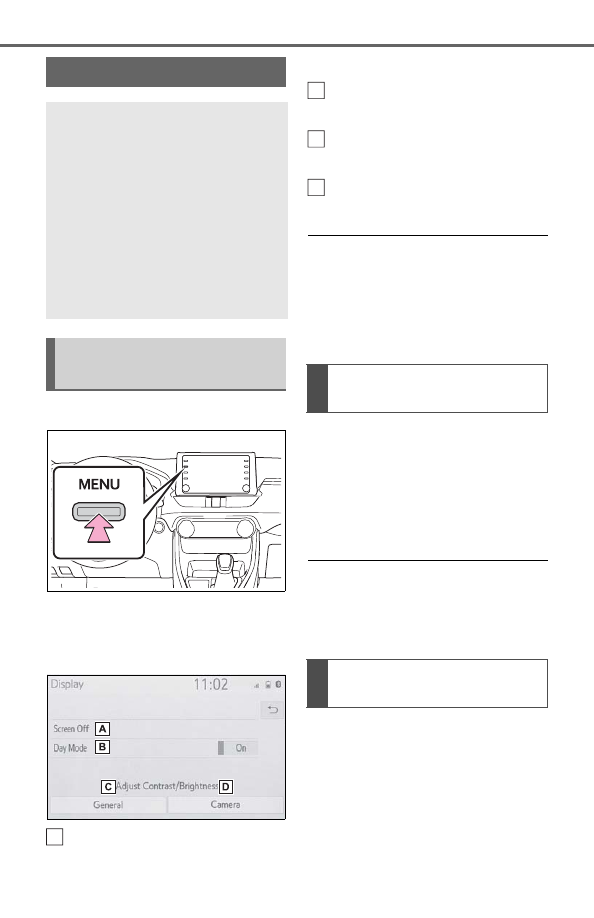
Press the “MENU” button.
2
Select “Display”.
3
Select the desired items to
be set.
Select to turn the screen off.
To turn it on, press any but-
ton.
Select to turn day mode
on/off. (
Select to adjust the screen
display. (
Select to adjust the camera
display.
●
When the screen is viewed
through polarized sunglasses, a
rainbow pattern may appear on
the screen due to optical charac-
teristics of the screen. If this is dis-
turbing, please operate the screen
without polarized sunglasses.
Depending on the position of the
headlight switch, the screen
changes to day or night mode.
This feature is available when
the headlight is switched on.
1
Select “Day Mode”.
●
If the screen is set to day mode
with the headlight switch turned
on, this condition is memorized
even with the hybrid system
turned off.
The contrast and brightness of
the screen can be adjusted
according to the brightness of
your surroundings.
1
Select “General” or “Cam-
era”.
2
Select the desired item.
Screen adjustment
The contrast and brightness
of the screen display and
the image of the camera dis-
play can be adjusted. The
screen can also be turned
off, and/or changed to either
day or night mode.
(For information regarding
audio/visual screen adjust-
ment:
Displaying the screen
adjustment screen
A
Changing between day
and night mode
Adjusting the con-
trast/brightness
B
C
D