Toyota Camry (2020 year). Manual in english - part 5
 

  Index      Toyota     Toyota Camry (2020 year). Manual in english


Search            copyright infringement  


Content      ..     3      4      5      6     ..


Toyota Camry (2020 year). Manual in english - part 5


264

4-5. Using the driving support systems

CAMRY_U

The illustration used is intended as an example, and may differ from
the image that is actually displayed on the multi-information display.

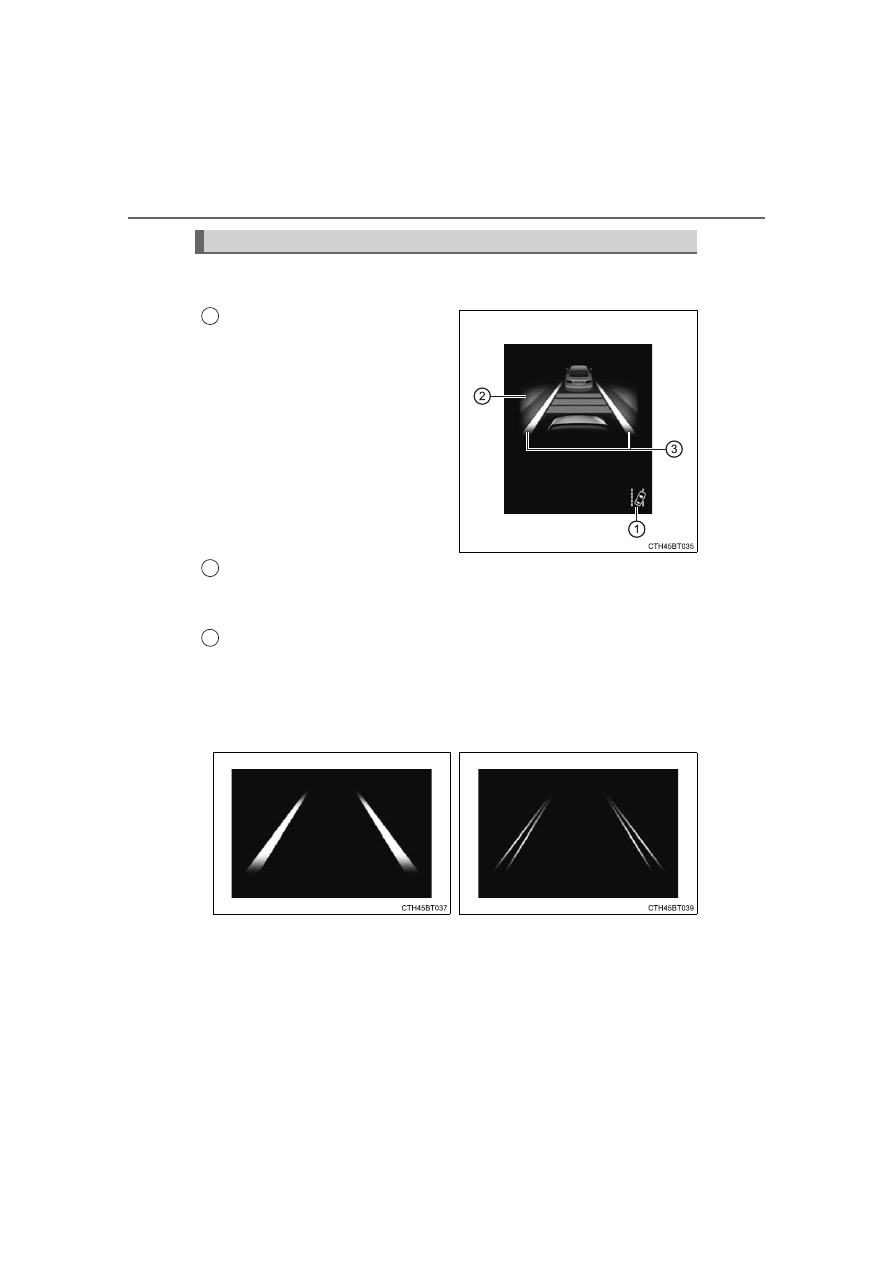
LDA indicator
The illumination condition of the
indicator  informs  the  driver  of
the system operation status.

Illuminated in white: 
LDA system is operating.
Illuminated in green: 
Steering  wheel  assistance  of  the
steering  control  function  is  operat-
ing.
Flashing in yellow: 
Lane  departure  alert  function  is
operating.

Operation display of steering wheel operation support
Indicates  that  steering  wheel  assistance  of  the  steering  control
function is operating.
Lane departure alert function display
Displayed  when  the  multi-information  display  is  switched  to  the
driving assist system information screen.

Indications on the multi-information display

1

2

3

Inside  of  displayed  white  lines
is white

Inside of displayed white lines
is black

Indicates that the system is recog-
nizing  white  (yellow)  lines.  When
the  vehicle  departs  from  its  lane,
the  white  line  displayed  on  the
side  the  vehicle  departs  from
flashes yellow.

Indicates  that  the  system  is  not
able  to  recognize  white  (yellow)
lines or is temporarily canceled.

-------------------------------------------------------------------------------------------------------------------------------------------------------------

265

4-5. Using the driving support systems

4

Drivin

g

CAMRY_U

Operation conditions of each function

Lane departure alert function
This function operates when all of the following conditions are met.
• LDA is turned on.
• Vehicle speed is approximately 32 mph (50 km/h) or more.
• System recognizes white (yellow) lines.
• Width of traffic lane is approximately 9.8 ft. (3 m) or more.
• Turn signal lever is not operated.
• Vehicle is driven on a straight road or around a gentle curve with a radius

of more than approximately 492 ft. (150 m).

• No system malfunctions are detected. (

P. 268)

Steering control function
This function operates when all of the following conditions are met in addi-
tion to the operation conditions for the lane departure alert function.
• Setting  for  “Steering Assist”  in 

  (4.2-inch  display)  or 

  (7-inch  dis-

play) of the multi-information display is set to “On”. (

P. 100, 112)

• Vehicle is not accelerated or decelerated by a certain amount or more.
• Steering  wheel  is  not  operated  with  a  steering  force  level  suitable  for

changing lanes.

• ABS, VSC, TRAC and PCS are not operating.
• TRAC or VSC is not turned off.

Vehicle sway warning
This function operates when all of the following conditions are met.
• Setting for “Sway Warning” in 

 (4.2-inch display) or 

 (7-inch display)

of the multi-information display is set to “On”. (

P. 100, 112)

• Vehicle speed is approximately 32 mph (50 km/h) or more.
• Width of traffic lane is approximately 9.8 ft. (3 m) or more.
• No system malfunctions are detected. (

P. 268)

-------------------------------------------------------------------------------------------------------------------------------------------------------------

266

4-5. Using the driving support systems

CAMRY_U

Temporary cancellation of functions

When the operation conditions are no longer met, a function may be tempo-
rarily canceled. However, when the operation conditions are met again, oper-
ation of the function is automatically restored. (

P. 265)

Steering control function

Depending  on  the  vehicle  speed,  lane  departure  situation,  road  conditions,
etc., the driver may not feel the function is operating or the function may not
operate at all.

Lane departure alert function

The warning buzzer may be difficult to hear due to external noise, audio play-
back, etc.

Hands off steering wheel warning

If the driver continues to keep their hands off of the steering wheel, a buzzer
sounds and a warning message and the symbol shown in the illustration are
displayed on the multi-information display. This warning also operates in the
same way when the driver continuously operates the steering wheel only a
small amount. Always keep your hands on the steering wheel when using this
system, regardless of warnings.
Depending on the vehicle and road conditions, the warning may not operate.

Vehicle sway warning function

White (yellow) lines are only on one side of road

The  LDA  system  will  not  operate  for  the  side  on  which  white  (yellow)  lines
could not be recognized.

When  the  system  determines  that  the
driver  has  removed  their  hands  from  the
steering  wheel  while  the  steering  control
function is operating, a warning message
urging  the  driver  to  hold  the  steering
wheel and the symbol shown in the illus-
tration are displayed on the multi-informa-
tion display.

When  the  system  determines  that  the
vehicle is swaying while the vehicle sway
warning  function  is  operating,  a  buzzer
sounds  and  a  warning  message  urging
the driver to rest and the symbol shown in
the  illustration  are  simultaneously  dis-
played on the multi-information display.
Depending on the vehicle and road condi-
tions, the warning may not operate.

-------------------------------------------------------------------------------------------------------------------------------------------------------------

267

4-5. Using the driving support systems

4

Drivin

g

CAMRY_U

Conditions in which functions may not operate properly

In  the  following  situations,  the  front  camera  may  not  detect  white  (yellow)
lines and various functions may not operate normally.

There  are  shadows  on  the  road  that  run  parallel  with,  or  cover,  the  white
(yellow) lines.

The vehicle is driven in an area without white (yellow) lines, such as in front
of a tollgate or checkpoint, or at an intersection, etc.

The  white  (yellow)  lines  are  cracked,  “Botts’  dots”,  “Raised  pavement
marker” or stones are present.

The white (yellow) lines cannot be seen or are difficult to see due to sand,
etc.

The vehicle is driven on a road surface that is wet due to rain, puddles, etc.

The  traffic lines are yellow (which may be more difficult to  recognize  than
lines that are white).

The white (yellow) lines cross over a curb, etc.

The vehicle is driven on a bright surface, such as concrete.

The vehicle is driven on a surface that is bright due to reflected light, etc.

The  vehicle  is  driven  in  an  area  where  the  brightness  changes  suddenly,
such as at the entrances and exits of tunnels, etc.

Light from the headlights of an oncoming vehicle, the sun, etc. enters the
camera.

The vehicle is driven where the road diverges, merges, etc.

The vehicle is driven on a slope.

The vehicle is driven on a road which tilts left or right, or a winding road.

The vehicle is driven on an unpaved or rough road.

The vehicle is driven around a sharp curve.

The traffic lane is excessively narrow or wide.

The  vehicle  is  extremely  tilted  due  to  carrying  heavy  luggage  or  having
improper tire pressure.

The distance to the preceding vehicle is extremely short.

The vehicle is moving up and down a large amount due to road conditions
during driving (poor roads or road seams).

The headlight lenses are dirty and emit a faint amount of light at night, or the
beam axis has deviated.

The vehicle is struck by a crosswind.

The vehicle has just changed lanes or crossed an intersection.

Snow tires, etc. are equipped.

-------------------------------------------------------------------------------------------------------------------------------------------------------------

268

4-5. Using the driving support systems

CAMRY_U

If the  LDA indicator  is illuminated in yellow and a warning message  is
displayed on the multi-information display

P. 501

Customization

Some functions can be customized. (

P. 100, 112)

-------------------------------------------------------------------------------------------------------------------------------------------------------------

269

4-5. Using the driving support systems

4

Drivin

g

CAMRY_U

In vehicle-to-vehicle distance control mode, the vehicle automatically
accelerates, decelerates and stops to match the speed changes of the
preceding vehicle  even  if  the accelerator  pedal  is  not  depressed.  In
constant speed control mode, the vehicle runs at a fixed speed.
Use  the  dynamic  radar  cruise  control  with  full-speed  range  on  free-
ways and highways.

Vehicle-to-vehicle distance control mode (

P. 273)

Constant speed control mode (

P. 279)

Meter display

Display
Set speed
Indicators

Operation switches

Vehicle-to-vehicle 

distance

switch
“+ RES” switch
Cruise control main switch
Cancel switch
“- SET” switch

Dynamic radar cruise control

with full-

speed range

: If equipped

Summary of functions

1

2

3

1

2

3

4

5

-------------------------------------------------------------------------------------------------------------------------------------------------------------

270

4-5. Using the driving support systems

CAMRY_U

WARNING

Before using dynamic radar cruise control with full-speed range

Driving safely is the sole responsibility of the driver. Do not rely solely on
the system, and drive safely by always paying careful attention to your sur-
roundings.

The  dynamic  radar  cruise  control  with  full-speed  range  provides  driving
assistance to reduce the driver's burden. However, there are limitations to
the assistance provided.
Read the following conditions carefully. Do not overly rely on this system
and always drive carefully.
• When the sensor may not be correctly detecting the vehicle ahead: 

P. 281

• Conditions  under  which  the  vehicle-to-vehicle  distance  control  mode

may not function correctly: 

P. 282

Set the speed appropriately depending on the speed limit, traffic flow, road
conditions, weather conditions, etc. The driver is responsible for checking
the set speed.

Even when the system is functioning normally, the condition of the preced-
ing  vehicle  as  detected  by  the  system  may  differ  from  the  condition
observed  by  the  driver.  Therefore,  the  driver  must  always  remain  alert,
assess the danger of each situation and drive safely. Relying on this sys-
tem or assuming the system ensures safety while driving can lead to an
accident, resulting in death or serious injury.

Switch the dynamic radar cruise control with full-speed range off using the
cruise control main switch when not in use.

-------------------------------------------------------------------------------------------------------------------------------------------------------------

271

4-5. Using the driving support systems

4

Drivin

g

CAMRY_U

WARNING

Cautions regarding the driving assist systems

Observe the following precautions, as there are limitations to the assistance
provided by the system.
Failure to do so may cause an accident resulting in death or serious injury.

Assisting the driver to measure following distance
The dynamic radar cruise control with full-speed range is only intended to
help the driver in determining the following distance between the driver’s
own vehicle and a designated vehicle traveling ahead. It is not a mecha-
nism that allows careless or inattentive driving, and it is not a system that
can  assist  the  driver  in  low-visibility  conditions.  It  is  still  necessary  for
driver to pay close attention to the vehicle’s surroundings.

Assisting the driver to judge proper following distance
The  dynamic  radar  cruise  control  with  full-speed  range  determines
whether  the  following  distance  between  the  driver’s  own  vehicle  and  a
designated vehicle traveling ahead is within a set range. It is not capable
of making any other type of judgement. Therefore, it is absolutely neces-
sary for the driver to remain vigilant and to determine whether or not there
is a possibility of danger in any given situation.

Assisting the driver to operate the vehicle
The dynamic radar cruise control with full-speed range has limited capabil-
ity to prevent or avoid a collision with a vehicle traveling ahead. Therefore,
if there is ever any danger, the driver must take immediate and direct con-
trol of the vehicle and act appropriately in order to ensure the safety of all
involved.

-------------------------------------------------------------------------------------------------------------------------------------------------------------

272

4-5. Using the driving support systems

CAMRY_U

WARNING

Situations unsuitable for dynamic radar cruise control with full-speed
range

Do not use dynamic radar cruise control with full-speed range in any of the
following situations.
Doing so may result in inappropriate speed control and could cause an acci-
dent resulting in death or serious injury.

Roads where there are pedestrians, cyclists, etc.

In heavy traffic

On roads with sharp bends

On winding roads

On slippery roads, such as those covered with rain, ice or snow

On steep downhills, or where there are sudden changes between sharp up
and down gradients 
Vehicle speed may exceed the set speed when driving down a steep hill.

At entrances to freeways and highways

When weather conditions are bad enough that they may prevent the sen-
sors from detecting correctly (fog, snow, sandstorm, heavy rain, etc.)

When there is rain, snow, etc. on the front surface of the radar sensor or
front camera

In traffic conditions that require frequent repeated acceleration and decel-
eration

During emergency towing

When an approach warning buzzer is heard often

-------------------------------------------------------------------------------------------------------------------------------------------------------------

273

4-5. Using the driving support systems

4

Drivin

g

CAMRY_U

This mode employs a radar sensor to detect the presence of vehicles
up  to  approximately  328  ft.  (100  m)  ahead,  determines  the  current
vehicle-to-vehicle following distance, and operates to maintain a suit-
able following distance from the vehicle ahead.

Note  that  vehicle-to-vehicle  distance  will  close  in  when  traveling  on  long
downhill slopes.

Example of constant speed cruising
When there are no vehicles ahead

The vehicle travels at the speed set by the driver. The desired vehicle-to-
vehicle  distance  can  also  be  set  by  operating  the  vehicle-to-vehicle  dis-
tance switch.

Example of deceleration cruising and follow-up cruising
When  a  preceding  vehicle  driving  slower  than  the  set  speed
appears

When a vehicle is detected running ahead of you, the system automatically
decelerates  your  vehicle.  When  a  greater  reduction  in  vehicle  speed  is
necessary, the system applies the brakes (the stop lights will come on at
this time). The system will respond to changes in the speed of the vehicle
ahead in order to maintain the vehicle-to-vehicle distance set by the driver.
Approach  warning  warns  you  when  the  system  cannot  decelerate  suffi-
ciently to prevent your vehicle from closing in on the vehicle ahead.
When the vehicle ahead of you stops, your vehicle will also stop (vehicle is
stopped by system control). After the vehicle ahead starts off, pressing the
“+ RES” switch or depressing the accelerator pedal will resume follow-up
cruising.

Driving in vehicle-to-vehicle distance control mode

1

2

-------------------------------------------------------------------------------------------------------------------------------------------------------------

274

4-5. Using the driving support systems

CAMRY_U

Example of acceleration 
When  there  are  no  longer  any  preceding  vehicles  driving  slower
than the set speed

The system accelerates until the set speed is reached. The system then
returns to constant speed cruising.

Press  the  cruise  control  main
switch  to  activate  the  cruise
control.

Dynamic  radar  cruise  control  indi-
cator will come on and a message
will be displayed on the multi-infor-
mation display.
Press  the  switch  again  to  deacti-
vate the cruise control.
If  the  cruise  control  main  switch  is  pressed  and  held  for  1.5  seconds  or
more, the system turns on in constant speed control mode. (

P. 279)

Accelerate  or  decelerate,  with
accelerator  pedal  operation,  to
the desired vehicle speed (at or
above  approximately  30  mph
[50 km/h]) and press the “- SET”
switch to set the speed.

Cruise  control  “SET”  indicator  will
come on.
The  vehicle  speed  at  the  moment
the switch is released becomes the
set speed.
If the switch is operated while the vehicle speed is below approximately 30
mph (50 km/h) and a preceding vehicle is present, the set speed will be
adjusted to approximately 30 mph (50 km/h).

Setting  the  vehicle  speed  (vehicle-to-vehicle  distance  control
mode)

3

1

2

-------------------------------------------------------------------------------------------------------------------------------------------------------------

275

4-5. Using the driving support systems

4

Drivin

g

CAMRY_U

To change the set speed, operate the “+ RES” or “- SET” switch until
the desired set speed is displayed.

Increases the speed

(Except when the vehicle has been
stopped by system control in vehi-
cle-to-vehicle 

distance 

control

mode)

Decreases the speed

Fine adjustment: Press the switch.

Large  adjustment:  Press  and  hold  the  switch  to  change  the  speed,
and release when the desired speed is reached.
In the vehicle-to-vehicle distance control mode, the set speed will be
increased or decreased as follows:

For U.S. mainland and Hawaii

Fine adjustment: By 1 mph (1.6 km/h)

*

1

 or 1 km/h (0.6 mph)

*

2

 each time

the switch is pressed
Large adjustment: Increases or decreases in 1 mph (1.6 km/h)

*

1

 or 1 km/h

(0.6 mph)

*

2

 increments for as long as the switch is held

For Canada, Guam, A.Samoa and Puerto Rico

Fine adjustment: By 1 mph (1.6 km/h)

*

1

 or 1 km/h (0.6mph)

*

2

 each time

the switch is pressed
Large adjustment: Increases or decreases in 5 mph (8 km/h)

*

1

 or 5 km/h

(3.1 mph)

*

2

 increments for as long as the switch is held

In the constant speed control mode (

P. 279), the set speed will be

increased or decreased as follows:

Fine adjustment: By 1 mph (1.6 km/h)

*

1

 or 1 km/h (0.6 mph)

*

2

 each time

the switch is pressed
Large adjustment: The  speed  will continue  to  change while the switch is
held.

*

1

:  When the set speed is shown in “MPH”

*

2

:  When the set speed is shown in “km/h”

Adjusting the set speed

1

2

-------------------------------------------------------------------------------------------------------------------------------------------------------------

276

4-5. Using the driving support systems

CAMRY_U

Pressing  the  switch  changes  the
vehicle-to-vehicle  distance  as  fol-
lows:

Long
Medium
Short

The  vehicle-to-vehicle  distance  is
set  automatically  to  long  mode
when the engine switch is turned to
IGNITION ON mode.
If a vehicle is running ahead of you, the preceding vehicle mark will also be
displayed.

Select a distance from the table below. Note that the distances shown
correspond to a vehicle speed of 50 mph (80 km/h). Vehicle-to-vehicle
distance  increases/decreases  in  accordance  with  vehicle  speed.
When the vehicle is stopped by system control, the vehicle stops at a
certain vehicle-to-vehicle distance depending on the situation.

Changing the vehicle-to-vehicle distance (vehicle-to-vehicle dis-
tance control mode)

Preceding 
vehicle mark

1

2

3

Vehicle-to-vehicle distance settings (vehicle-to-vehicle distance
control mode)

Distance options

Vehicle-to-vehicle distance

Long

Approximately 160 ft. (50 m)

Medium

Approximately 130 ft. (40 m)

Short

Approximately 100 ft. (30 m)

-------------------------------------------------------------------------------------------------------------------------------------------------------------

277

4-5. Using the driving support systems

4

Drivin

g

CAMRY_U

After  the  vehicle  ahead  of  you
starts  off,  press  the  “+  RES”
switch.
Your  vehicle  will  also  resume  fol-
low-up  cruising  if  the  accelerator
pedal is depressed after the vehi-
cle ahead of you starts off.

Pressing the cancel switch can-
cels the speed control.

The speed control is also canceled
when 

the 

brake 

pedal 

is

depressed.
(When  the  vehicle  has  been
stopped 

by 

system 

control,

depressing  the  brake  pedal  does
not cancel the setting.)

Pressing the “+ RES” switch resumes the cruise control and returns
vehicle speed to the set speed.

However,  when  a  vehicle  ahead  is  not  detected,  cruise  control  does  not
resume when the vehicle speed is approximately 25 mph (40 km/h) or less.

Resuming follow-up cruising when the vehicle has been stopped
by system control (vehicle-to-vehicle distance control mode)

Canceling and resuming the speed control

1

2

-------------------------------------------------------------------------------------------------------------------------------------------------------------

278

4-5. Using the driving support systems

CAMRY_U

When your vehicle is too close to
a  vehicle  ahead,  and  sufficient
automatic  deceleration  via  the
cruise  control  is  not  possible,  the
display  will  flash  and  the  buzzer
will  sound  to  alert  the  driver.  An
example  of  this  would  be  if
another driver cuts in front of you
while you are following a vehicle.
Depress  the  brake  pedal  to
ensure  an  appropriate  vehicle-to-
vehicle distance.

Warnings may not occur when

In the following instances, warnings may not occur even when the
vehicle-to-vehicle distance is small.

When  the  speed  of  the  preceding  vehicle  matches  or  exceeds
your vehicle speed

When  the  preceding  vehicle  is  traveling  at  an  extremely  slow
speed

Immediately after the cruise control speed was set

When depressing the accelerator pedal

Approach warning (vehicle-to-vehicle distance control mode)

-------------------------------------------------------------------------------------------------------------------------------------------------------------

279

4-5. Using the driving support systems

4

Drivin

g

CAMRY_U

When constant speed control mode is selected, your vehicle will main-
tain  a  set  speed  without  controlling  the  vehicle-to-vehicle  distance.
Select this mode only when vehicle-to-vehicle distance control mode
does not function correctly due to a dirty radar sensor, etc.

With  the  cruise  control  off,
press  and  hold  the  cruise  con-
trol main switch for 1.5 seconds
or more.

Immediately  after  the  switch  is
pressed,  the  dynamic  radar  cruise
control  indicator  will  come  on.
Afterwards, it switches to the cruise
control indicator.
Switching to constant speed control mode is only possible when operating
the switch with the cruise control off.

Accelerate  or  decelerate,  with
accelerator  pedal  operation,  to
the desired vehicle speed (at or
above  approximately  25  mph
[40 km/h]) and press the “- SET”
switch to set the speed.

Cruise  control  “SET”  indicator  will
come on.
The  vehicle  speed  at  the  moment
the switch is released becomes the
set speed.
Adjusting the speed setting: 

P. 275

Canceling and resuming the speed setting: 

P. 277

Selecting constant speed control mode

1

2

-------------------------------------------------------------------------------------------------------------------------------------------------------------

280

4-5. Using the driving support systems

CAMRY_U

Dynamic radar cruise control with full-speed range can be set when

The shift lever is in D or range 4 or higher of S has been selected. 

Range 4 or higher of D has been selected by using the paddle shift switch. 
(vehicles with paddle shift switches)

Vehicle  speed  is  at  or  above  approximately  30  mph  (50  km/h).  However,
when a preceding vehicle is detected, the dynamic radar cruise control with
full-speed range can be set even if the vehicle speed is at or below approxi-
mately 30 mph (50 km/h).

Accelerating after setting the vehicle speed

The vehicle can accelerate by operating the accelerator pedal. After acceler-
ating,  the  set  speed  resumes.  However,  during  vehicle-to-vehicle  distance
control mode, the vehicle speed may decrease below the set speed in order
to maintain the distance to the preceding vehicle.

When the vehicle stops while follow-up cruising

Pressing the “+ RES” switch while the vehicle ahead stops will resume fol-
low-up  cruising  if  the  vehicle  ahead  starts  off  within  approximately  3  sec-
onds after the switch is pressed.

If the vehicle ahead starts off within 3 seconds after your vehicle stops, fol-
low-up cruising will be resumed.

Automatic cancelation of vehicle-to-vehicle distance control mode

Vehicle-to-vehicle distance control mode is automatically canceled in the fol-
lowing situations:

Actual vehicle speed falls at or below approximately 25 mph (40 km/h) when
there are no vehicles ahead.

The preceding vehicle leaves the lane when your vehicle is following at a
vehicle speed at or below approximately 25 mph (40 km/h). Otherwise, the
sensor cannot properly detect the vehicle. (“Radar Cruise Control Unavail-
able” is displayed on the multi-information display)

VSC is activated.

TRAC is activated for a period of time.

When the VSC or TRAC system is turned off.

The sensor cannot detect correctly because it is covered in some way.

Pre-collision braking is activated.

The parking brake is operated.

The vehicle is stopped by system control on a steep incline.

The following are detected when the vehicle has been stopped by system
control:
• The driver is not wearing a seat belt.
• The driver’s door is opened.
• The vehicle has been stopped for about 3 minutes

If vehicle-to-vehicle distance control mode is automatically canceled for any
other reason, there may be a malfunction in the system. Contact your Toyota
dealer.

-------------------------------------------------------------------------------------------------------------------------------------------------------------

281

4-5. Using the driving support systems

4

Drivin

g

CAMRY_U

Automatic cancelation of constant speed control mode

Constant speed control mode is automatically canceled in the following situa-
tions:

Actual vehicle speed is more than approximately 10 mph (16 km/h) below
the set vehicle speed.

Actual vehicle speed falls below approximately 25 mph (40 km/h).

VSC is activated.

TRAC is activated for a period of time.

When the VSC or TRAC system is turned off.

Pre-collision braking is activated.

If constant speed control mode is automatically canceled for any other rea-
son, there may be a malfunction in the system. Contact your Toyota dealer.

Brake system operation sound

If the brakes are applied automatically while the vehicle is in vehicle-to-vehi-
cle  distance  control  mode,  a  brake  system  operation  sound  may  be  heard.
This does not indicate a malfunction.

Warning  messages  and  buzzers  for  dynamic  radar  cruise  control  with
full-speed range

Warning messages and buzzers are used to indicate a system malfunction or
to inform the driver of the need for caution while driving. If a warning message
is shown on the multi-information display, read the message and follow the
instructions.

When the sensor may not be correctly detecting the vehicle ahead

In  the  case  of  the  following  and  depending  on  the  conditions,  operate  the
brake  pedal  when  deceleration  of  the  system  is  insufficient  or  operate  the
accelerator pedal when acceleration is required.
As the sensor may not be able to correctly detect these types of vehicles, the
approach warning (

P. 278) may not be activated.

Vehicles that cut in suddenly

Vehicles traveling at low speeds

Vehicles that are not moving in the same lane

Vehicles with small rear ends (trailers with no load on board, etc.)

Motorcycles traveling in the same lane

-------------------------------------------------------------------------------------------------------------------------------------------------------------

282

4-5. Using the driving support systems

CAMRY_U

When  water  or  snow  thrown  up  by  the  surrounding  vehicles  hinders  the
detecting of the sensor

Conditions  under  which  the  vehicle-to-vehicle  distance  control  mode
may not function correctly

In the case of the following conditions, operate the brake pedal (or accelera-
tor pedal, depending on the situation) as necessary.
As the sensor may not be able to correctly detect vehicles ahead, the system
may not operate properly.

When the vehicle ahead of you decelerates suddenly

When driving on a road surrounded by a structure, such as in a tunnel or on
a bridge

While  the  vehicle  speed  is  decreasing  to  the  set  speed  after  the  vehicle
accelerates by depressing the accelerator pedal

When  your  vehicle  is  pointing  upwards
(caused by a heavy load in the luggage
compartment, etc.)

Preceding  vehicle  has  an  extremely
high ground clearance

When  the  road  curves  or  when  the
lanes are narrow

When steering wheel operation or your
position in the lane is unstable

-------------------------------------------------------------------------------------------------------------------------------------------------------------

283

4-5. Using the driving support systems

4

Drivin

g

CAMRY_U

In vehicle-to-vehicle distance control mode, the vehicle automatically
accelerates and decelerates to match the speed changes of the pre-
ceding vehicle even if the accelerator pedal is not depressed. In con-
stant speed control mode, the vehicle runs at a fixed speed.
Use the dynamic radar cruise control on freeways and highways.

Vehicle-to-vehicle distance control mode (

P. 287)

Constant speed control mode (

P. 292)

Meter display

Display
Set speed
Indicators

Operation switches

Vehicle-to-vehicle 

distance

switch
“+ RES” switch
Cruise control main switch
Cancel switch
“- SET” switch

Dynamic radar cruise control

: If equipped

Summary of functions

1

2

3

1

2

3

4

5

-------------------------------------------------------------------------------------------------------------------------------------------------------------

284

4-5. Using the driving support systems

CAMRY_U

WARNING

Before using dynamic radar cruise control

Driving safely is the sole responsibility of the driver. Do not rely solely on
the system, and drive safely by always paying careful attention to your sur-
roundings.

The dynamic radar cruise control provides driving assistance to reduce the
driver's burden. However, there are limitations to the assistance provided.
Read the following conditions carefully. Do not overly rely on this system
and always drive carefully.
• When the sensor may not be correctly detecting the vehicle ahead: 

P. 295

• Conditions  under  which  the  vehicle-to-vehicle  distance  control  mode

may not function correctly: 

P. 296

Set the speed appropriately depending on the speed limit, traffic flow, road
conditions, weather conditions, etc. The driver is responsible for checking
the set speed.

Even when the system is functioning normally, the condition of the preced-
ing  vehicle  as  detected  by  the  system  may  differ  from  the  condition
observed  by  the  driver.  Therefore,  the  driver  must  always  remain  alert,
assess the danger of each situation and drive safely. Relying on this sys-
tem or assuming the system ensures safety while driving can lead to an
accident, resulting in death or serious injury.

Switch the dynamic radar cruise control off using the cruise control main
switch when not in use.

-------------------------------------------------------------------------------------------------------------------------------------------------------------

285

4-5. Using the driving support systems

4

Drivin

g

CAMRY_U

WARNING

Cautions regarding the driving assist systems

Observe the following precautions, as there are limitations to the assistance
provided by the system.
Failure to do so may cause an accident resulting in death or serious injury.

Assisting the driver to measure following distance
The  dynamic  radar  cruise  control  is  only  intended  to  help  the  driver  in
determining the following distance between the driver’s own vehicle and a
designated vehicle traveling ahead. It is not a mechanism that allows care-
less or inattentive driving, and it is not a system that can assist the driver in
low-visibility conditions. It is still necessary for driver to pay close attention
to the vehicle’s surroundings.

Assisting the driver to judge proper following distance
The  dynamic  radar  cruise  control  determines  whether  the  following  dis-
tance between the driver’s own vehicle and a designated vehicle traveling
ahead is within a set range. It is not capable of making any other type of
judgement. Therefore,  it  is  absolutely  necessary  for  the  driver  to  remain
vigilant and to determine whether or not there is a possibility of danger in
any given situation.

Assisting the driver to operate the vehicle
The dynamic radar cruise control has limited capability to prevent or avoid
a  collision  with a  vehicle  traveling  ahead. Therefore,  if  there  is  ever  any
danger,  the  driver  must  take  immediate  and  direct  control  of  the  vehicle
and act appropriately in order to ensure the safety of all involved.

-------------------------------------------------------------------------------------------------------------------------------------------------------------

286

4-5. Using the driving support systems

CAMRY_U

WARNING

Situations unsuitable for dynamic radar cruise control

Do not use dynamic radar cruise control in any of the following situations.
Doing so may result in inappropriate speed control and could cause an acci-
dent resulting in death or serious injury.

Roads where there are pedestrians, cyclists, etc.

In heavy traffic

On roads with sharp bends

On winding roads

On slippery roads, such as those covered with rain, ice or snow

On steep downhills, or where there are sudden changes between sharp up
and down gradients 
Vehicle speed may exceed the set speed when driving down a steep hill.

At entrances to freeways and highways

When weather conditions are bad enough that they may prevent the sen-
sors from detecting correctly (fog, snow, sandstorm, heavy rain, etc.)

When there is rain, snow, etc. on the front surface of the radar sensor or
front camera

In traffic conditions that require frequent repeated acceleration and decel-
eration

During emergency towing

When an approach warning buzzer is heard often

-------------------------------------------------------------------------------------------------------------------------------------------------------------

287

4-5. Using the driving support systems

4

Drivin

g

CAMRY_U

This mode employs a radar sensor to detect the presence of vehicles
up  to  approximately  328  ft.  (100  m)  ahead,  determines  the  current
vehicle-to-vehicle following distance, and operates to maintain a suit-
able following distance from the vehicle ahead.

Note  that  vehicle-to-vehicle  distance  will  close  in  when  traveling  on  long
downhill slopes.

Example of constant speed cruising
When there are no vehicles ahead

The vehicle travels at the speed set by the driver. The desired vehicle-to-
vehicle  distance  can  also  be  set  by  operating  the  vehicle-to-vehicle  dis-
tance switch.

Example of deceleration cruising and follow-up cruising
When  a  preceding  vehicle  driving  slower  than  the  set  speed
appears

When a vehicle is detected running ahead of you, the system automatically
decelerates  your  vehicle.  When  a  greater  reduction  in  vehicle  speed  is
necessary, the system applies the brakes (the stop lights will come on at
this time). The system will respond to changes in the speed of the vehicle
ahead in order to maintain the vehicle-to-vehicle distance set by the driver.
Approach  warning  warns  you  when  the  system  cannot  decelerate  suffi-
ciently to prevent your vehicle from closing in on the vehicle ahead.

Example of acceleration 
When  there  are  no  longer  any  preceding  vehicles  driving  slower
than the set speed

The system accelerates until the set speed is reached. The system then
returns to constant speed cruising.

Driving in vehicle-to-vehicle distance control mode

1

2

3

-------------------------------------------------------------------------------------------------------------------------------------------------------------

288

4-5. Using the driving support systems

CAMRY_U

Press  the  cruise  control  main
switch  to  activate  the  cruise
control.

Dynamic  radar  cruise  control  indi-
cator will come on and a message
will be displayed on the multi-infor-
mation display.
Press  the  switch  again  to  deacti-
vate the cruise control.
If  the  cruise  control  main  switch  is  pressed  and  held  for  1.5  seconds  or
more, the system turns on in constant speed control mode. (

P. 292)

Accelerate  or  decelerate,  with
accelerator  pedal  operation,  to
the desired vehicle speed (at or
above  approximately  30  mph
[50  km/h])  and  press  the  “-
SET” switch to set the speed.

Cruise  control  “SET”  indicator  will
come on.
The  vehicle  speed  at  the  moment
the switch is released becomes the
set speed.

Setting  the  vehicle  speed  (vehicle-to-vehicle  distance  control
mode)

1

2

-------------------------------------------------------------------------------------------------------------------------------------------------------------

289

4-5. Using the driving support systems

4

Drivin

g

CAMRY_U

To change the set speed, operate the “+ RES” or “- SET” switch until
the desired set speed is displayed.

Increases the speed
Decreases the speed

Fine adjustment: Press the switch.
Large adjustment: Press and hold
the  switch  to  change  the  speed,
and  release  when  the  desired
speed is reached.

In the vehicle-to-vehicle distance control mode, the set speed will be
increased or decreased as follows:

For U.S. mainland and Hawaii

Fine adjustment: By 1 mph (1.6 km/h)

*

1

 or 1 km/h (0.6 mph)

*

2

 each time

the switch is pressed
Large adjustment: Increases or decreases in 1 mph (1.6 km/h)

*

1

 or 1 km/h

(0.6 mph)

*

2

 increments for as long as the switch is held

For Canada, Guam, A.Samoa and Pueruto Rico

Fine adjustment: By 1 mph (1.6 km/h)

*

1

 or 1 km/h (0.6 mph)

*

2

 each time

the switch is pressed
Large adjustment: Increases or decreases in 5 mph (8 km/h)

*

1

 or 5 km/h

(3.1 mph)

*

2

 increments for as long as the switch is held

In the constant speed control mode (

P. 292), the set speed will be

increased or decreased as follows:

Fine adjustment: By 1 mph (1.6 km/h)

*

1

 or 1 km/h (0.6 mph)

*

2

 each time

the switch is pressed
Large adjustment: The  speed  will continue  to  change while the switch is
held.

*

1

:  When the set speed is shown in “MPH”

*

2

:  When the set speed is shown in “km/h”

Adjusting the set speed

1

2

-------------------------------------------------------------------------------------------------------------------------------------------------------------

290

4-5. Using the driving support systems

CAMRY_U

Pressing  the  switch  changes  the
vehicle-to-vehicle  distance  as  fol-
lows:

Long
Medium
Short

The  vehicle-to-vehicle  distance  is
set  automatically  to  long  mode
when the engine switch is turned to
IGNITION ON mode.
If a vehicle is running ahead of you, the preceding vehicle mark will also be
displayed.

Select a distance from the table below. Note that the distances shown
correspond to a vehicle speed of 50 mph (80 km/h). Vehicle-to-vehicle
distance increases/decreases in accordance with vehicle speed.

Changing the vehicle-to-vehicle distance (vehicle-to-vehicle dis-
tance control mode)

Preceding 

vehicle mark

1

2

3

Vehicle-to-vehicle distance settings (vehicle-to-vehicle distance
control mode)

Distance options

Vehicle-to-vehicle distance

Long

Approximately 160 ft. (50 m)

Medium

Approximately 130 ft. (40 m)

Short

Approximately 100 ft. (30 m)

-------------------------------------------------------------------------------------------------------------------------------------------------------------

291

4-5. Using the driving support systems

4

Drivin

g

CAMRY_U

Pressing the cancel switch can-
cels the speed control.

The speed control is also canceled
when 

the 

brake 

pedal 

is

depressed.

Pressing  the  “+  RES”  switch
resumes the cruise control and
returns vehicle speed to the set
speed.

However,  cruise  control  does  not  resume  when  the  vehicle  speed  is
approximately 25 mph (40 km/h) or less.

When your vehicle is too close to
a  vehicle  ahead,  and  sufficient
automatic  deceleration  via  the
cruise  control  is  not  possible,  the
display  will  flash  and  the  buzzer
will  sound  to  alert  the  driver.  An
example  of  this  would  be  if
another driver cuts in front of you
while you are following a vehicle.
Depress  the  brake  pedal  to
ensure  an  appropriate  vehicle-to-
vehicle distance.

Warnings may not occur when

In the following instances, warnings may not occur even when the
vehicle-to-vehicle distance is small.

When  the  speed  of  the  preceding  vehicle  matches  or  exceeds
your vehicle speed

When  the  preceding  vehicle  is  traveling  at  an  extremely  slow
speed

Immediately after the cruise control speed was set

When depressing the accelerator pedal

Canceling and resuming the speed control

1

2

Approach warning (vehicle-to-vehicle distance control mode)

-------------------------------------------------------------------------------------------------------------------------------------------------------------

292

4-5. Using the driving support systems

CAMRY_U

When constant speed control mode is selected, your vehicle will main-
tain  a  set  speed  without  controlling  the  vehicle-to-vehicle  distance.
Select this mode only when vehicle-to-vehicle distance control mode
does not function correctly due to a dirty radar sensor, etc.

With  the  cruise  control  off,
press  and  hold  the  cruise  con-
trol main switch for 1.5 seconds
or more.

Immediately  after  the  switch  is
pressed,  the  dynamic  radar  cruise
control  indicator  will  come  on.
Afterwards, it switches to the cruise
control indicator.
Switching to constant speed control mode is only possible when operating
the switch with the cruise control off.

Accelerate  or  decelerate,  with
accelerator  pedal  operation,  to
the desired vehicle speed (at or
above  approximately  25  mph
[40  km/h])  and  press  the  “-
SET” switch to set the speed.

Cruise  control  “SET”  indicator  will
come on.
The  vehicle  speed  at  the  moment
the switch is released becomes the
set speed.
Adjusting the speed setting: 

P. 289

Canceling and resuming the speed setting: 

P. 291

Selecting constant speed control mode

1

2

-------------------------------------------------------------------------------------------------------------------------------------------------------------

293

4-5. Using the driving support systems

4

Drivin

g

CAMRY_U

Dynamic radar cruise control can be set when

The shift lever is in D or range 4 or higher of S has been selected.

Range 4 or higher of D has been selected by using the paddle shift switch.
(vehicles with paddle shift switches)

Vehicle speed is at or above approximately 30 mph (50 km/h).

Accelerating after setting the vehicle speed

The vehicle can accelerate by operating the accelerator pedal. After acceler-
ating,  the  set  speed  resumes.  However,  during  vehicle-to-vehicle  distance
control mode, the vehicle speed may decrease below the set speed in order
to maintain the distance to the preceding vehicle.

When the vehicle stops while follow-up cruising

Pressing the “+ RES” switch while the vehicle ahead stops will resume fol-
low-up  cruising  if  the  vehicle  ahead  starts  off  within  approximately  3  sec-
onds after the switch is pressed.

If the vehicle ahead starts off within 3 seconds after your vehicle stops, fol-
low-up cruising will be resumed.

Automatic cancelation of vehicle-to-vehicle distance control mode

Vehicle-to-vehicle distance control mode is automatically canceled in the fol-
lowing situations:

Actual vehicle speed falls at or below approximately 25 mph (40 km/h).

VSC is activated.

TRAC is activated for a period of time.

When the VSC or TRAC system is turned off.

The sensor cannot detect correctly because it is covered in some way.

Pre-collision braking is activated.

If vehicle-to-vehicle distance control mode is automatically canceled for any
other reason, there may be a malfunction in the system. Contact your Toyota
dealer.

-------------------------------------------------------------------------------------------------------------------------------------------------------------

294

4-5. Using the driving support systems

CAMRY_U

Automatic cancelation of constant speed control mode

Constant speed control mode is automatically canceled in the following situa-
tions:

Actual vehicle speed is more than approximately 10 mph (16 km/h) below
the set vehicle speed.

Actual vehicle speed falls below approximately 25 mph (40 km/h).

VSC is activated.

TRAC is activated for a period of time.

When the VSC or TRAC system is turned off.

Pre-collision braking is activated.

If constant speed control mode is automatically canceled for any other rea-
son, there may be a malfunction in the system. Contact your Toyota dealer.

Brake system operation sound

If the brakes are applied automatically while the vehicle is in vehicle-to-vehi-
cle  distance  control  mode,  a  brake  system  operation  sound  may  be  heard.
This does not indicate a malfunction.

Warning messages and buzzers for dynamic radar cruise control

Warning messages and buzzers are used to indicate a system malfunction or
to inform the driver of the need for caution while driving. If a warning message
is shown on the multi-information display, read the message and follow the
instructions.

-------------------------------------------------------------------------------------------------------------------------------------------------------------

295

4-5. Using the driving support systems

4

Drivin

g

CAMRY_U

When the sensor may not be correctly detecting the vehicle ahead

In  the  case  of  the  following  and  depending  on  the  conditions,  operate  the
brake  pedal  when  deceleration  of  the  system  is  insufficient  or  operate  the
accelerator pedal when acceleration is required.
As the sensor may not be able to correctly detect these types of vehicles, the
approach warning (

P. 291) may not be activated.

Vehicles that cut in suddenly

Vehicles traveling at low speeds

Vehicles that are not moving in the same lane

Vehicles with small rear ends (trailers with no load on board, etc.)

Motorcycles traveling in the same lane

When  water  or  snow  thrown  up  by  the  surrounding  vehicles  hinders  the
detecting of the sensor

When  your  vehicle  is  pointing  upwards
(caused by a heavy load in the luggage
compartment, etc.)

Preceding  vehicle  has  an  extremely
high ground clearance

-------------------------------------------------------------------------------------------------------------------------------------------------------------

296

4-5. Using the driving support systems

CAMRY_U

Conditions  under  which  the  vehicle-to-vehicle  distance  control  mode
may not function correctly

In the case of the following conditions, operate the brake pedal (or accelera-
tor pedal, depending on the situation) as necessary.
As the sensor may not be able to correctly detect vehicles ahead, the system
may not operate properly.

When the vehicle ahead of you decelerates suddenly

When driving on a road surrounded by a structure, such as in a tunnel or on
a bridge

While  the  vehicle  speed  is  decreasing  to  the  set  speed  after  the  vehicle
accelerates by depressing the accelerator pedal

When  the  road  curves  or  when  the
lanes are narrow

When steering wheel operation or your
position in the lane is unstable

-------------------------------------------------------------------------------------------------------------------------------------------------------------

297

4-5. Using the driving support systems

4

Drivin

g

CAMRY_U

Meter display

Set speed
Indicators

Operation switches

“+ RES” switch
Cruise control main switch
Cancel switch
“- SET” switch

Cruise control

: If equipped

Use the cruise control to maintain a set speed without depress-
ing the accelerator pedal.

System Components

1

2

1

2

3

4

-------------------------------------------------------------------------------------------------------------------------------------------------------------

298

4-5. Using the driving support systems

CAMRY_U

Press  the  cruise  control  main
switch  to  activate  the  cruise
control. 

Cruise control indicator will be dis-
played.
Press  the  switch  again  to  deacti-
vate the cruise control.

Accelerate  or  decelerate  the
vehicle  to  the  desired  speed,
and press the “- SET” switch to
set the speed.

Cruise  control  “SET”  indicator  will
be displayed.
The  vehicle  speed  at  the  moment
the switch is released becomes the
set speed.

Setting the vehicle speed

1

2

-------------------------------------------------------------------------------------------------------------------------------------------------------------

299

4-5. Using the driving support systems

4

Drivin

g

CAMRY_U

To change the set speed, operate the “+ RES” or “- SET” switch until
the desired set speed is obtained.

Increases the speed
Decreases the speed

Fine adjustment: Press the switch.
Large  adjustment:  Press  and  hold
the  switch  to  change  the  speed,
and  release  when  the  desired
speed is reached.

The set speed will be increased or decreased as follows:

• When the set speed is shown in “MPH”

Fine  adjustment:  By  approximately  1  mph  (1.6  km/h)  each  time  the
switch is operated.
Large adjustment: The set speed can be increased or decreased contin-
ually until the switch is released.

• When the set speed is shown in “km/h”

Fine  adjustment:  By  approximately  1  km/h  (0.6  mph)  each  time  the
switch is operated
Large adjustment: The set speed can be increased or decreased contin-
ually until the switch is released.

Pressing the cancel switch can-
cels the constant speed control.

The speed setting is also canceled
when the brakes are applied.

Pressing  the  “+  RES”  switch
resumes  the  constant  speed
control.

Resuming  is  available  when  the
vehicle speed is more than approx-
imately 25 mph (40 km/h).

Adjusting the set speed

1

2

Canceling and resuming the constant speed control

1

2

-------------------------------------------------------------------------------------------------------------------------------------------------------------

300

4-5. Using the driving support systems

CAMRY_U

Cruise control can be set when

The shift lever is in D or range 4 or higher of S has been selected.

Range 4 or higher of D has been selected by using the paddle shift switch.
(vehicles with paddle shift switches)

Vehicle speed is above approximately 25 mph (40 km/h).

Accelerating after setting the vehicle speed

The vehicle can be accelerated normally. After acceleration, the set speed
resumes.

Even without canceling the cruise control, the set speed can be increased
by first accelerating the vehicle to the desired speed and then pressing the
“- SET” switch to set the new speed.

Automatic cruise control cancelation

Cruise control will stop maintaining the vehicle speed in any of the following
situations. 

Actual vehicle speed falls more than approximately 10 mph (16 km/h) below
the preset vehicle speed.
At this time, the memorized set speed is not retained.

Actual vehicle speed is below approximately 25 mph (40 km/h).

VSC is activated.

TRAC is activated for a period of time.

When the VSC or TRAC system is turned off.

If  the  warning  message  for  the  cruise  control  is  shown  on  the  multi-
information display

Press the cruise control main switch once to deactivate the system, and then
press the button again to reactivate the system.
If the cruise control speed cannot be set or if the cruise control cancels imme-
diately after being activated, there may be a malfunction in the cruise control
system. Have the vehicle inspected by your Toyota dealer. 

-------------------------------------------------------------------------------------------------------------------------------------------------------------

301

4-5. Using the driving support systems

4

Drivin

g

CAMRY_U

WARNING

To avoid operating the cruise control by mistake

Switch the cruise control off using the cruise control main switch when not in
use.

Situations unsuitable for cruise control

Do not use cruise control in any of the following situations.
Doing so may result in loss of control and could cause an accident resulting
in death or serious injury.

In heavy traffic

On roads with sharp bends

On winding roads

On slippery roads, such as those covered with rain, ice or snow

On steep hills
Vehicle speed may exceed the set speed when driving down a steep hill.

During emergency towing

-------------------------------------------------------------------------------------------------------------------------------------------------------------

302

4-5. Using the driving support systems

CAMRY_U

ABS (Anti-lock Brake System)

Helps to prevent wheel lock when the brakes are applied suddenly,
or if the brakes are applied while driving on a slippery road surface

Brake assist

Generates an increased level of braking force after the brake pedal
is depressed when the system detects a panic stop situation

VSC (Vehicle Stability Control)

Helps  the  driver  to  control  skidding  when  swerving  suddenly  or
turning on slippery road surfaces.

Enhanced VSC (Enhanced Vehicle Stability Control)

Provides cooperative control of the ABS, TRAC, VSC and EPS.
Helps  to  maintain  directional  stability  when  swerving  on  slippery
road surfaces by controlling steering performance.

Secondary Collision Brake (if equipped)

When  the  airbag  sensor  detects  a  collision  and  the  system  oper-
ates,  the  brakes  and  stop  lights  are  automatically  controlled  to
reduce the vehicle speed and help reduce the possibility of further
damage due to a secondary collision

TRAC


(Traction Control)

Helps  to  maintain  drive  power  and  prevent  the  drive  wheels  from
spinning when starting the vehicle or accelerating on slippery roads

Active Cornering Assist (ACA) (if equipped)

Helps to prevent the vehicle from sliding to the outer side by per-
forming  inner  wheel  brake  control  when  attempting  to  accelerate
while turning

Driving assist systems

To keep driving safety and performance, the following systems
operate automatically in response to various driving situations.
Be aware, however, that these systems are supplementary and
should not be relied upon too heavily when operating the vehi-
cle. 

-------------------------------------------------------------------------------------------------------------------------------------------------------------

303

4-5. Using the driving support systems

4

Drivin

g

CAMRY_U

Hill-start assist control

Helps to reduce the backward movement of the vehicle when start-
ing on an uphill

EPS (Electric Power Steering) 

Employs an electric motor to reduce the amount of effort needed to
turn the steering wheel 

PCS (Pre-Collision System) (if equipped)

P. 249

BSM (Blind Spot Monitor) (if equipped)

P. 310

Dynamic Torque Control AWD system (if equipped)

Automatically  switches  from  front-wheel  drive  to  all-wheel  drive
(AWD)  according  to  the  driving  conditions,  helping  to  ensure  reli-
able handling and stability. Examples of conditions where the sys-
tem will switch to AWD are when cornering, going uphill, starting off
or accelerating, and when the road surface is slippery due to snow,
rain, etc.

The  slip  indicator  light  will  flash
while the TRAC/VSC systems are
operating.

When the TRAC/VSC systems are operating

-------------------------------------------------------------------------------------------------------------------------------------------------------------

304

4-5. Using the driving support systems

CAMRY_U

If the vehicle gets stuck in mud, dirt or snow, the TRAC system may

reduce power from the engine to the wheels. Pressing 

 to turn

the system off may make it easier for you to rock the vehicle in order
to free it.
To  turn  the  TRAC  system  off,

quickly press and release 

.

“Traction  Control  Turned  Off”  will
be  shown  on  the  multi-information
display.

Press 

  again  to  turn  the  sys-

tem back on.

Disabling the TRAC system

-------------------------------------------------------------------------------------------------------------------------------------------------------------

305

4-5. Using the driving support systems

4

Drivin

g

CAMRY_U

Turning off both TRAC and VSC systems

To turn the TRAC and VSC systems off, press and hold 

 for more than 3

seconds while the vehicle is stopped.
The VSC OFF indicator light will come on and the “Traction Control Turned
Off” will be shown on the multi-information display

*

.

Press 

 again to turn the systems back on.

*

: On  vehicles  with  pre-collision  system,  pre-collision  brake  assist  and  pre-

collision  braking  will  also  be  disabled.  The  pre-collision  system  warning
light will come on and the message will be shown on the multi-information
display. (

P. 258)

When the message is displayed on the multi-information display show-

ing that TRAC has been disabled even if 

 has not been pressed

TRAC is temporary deactivated. If the information continues to show, contact
your Toyota dealer.

Operating conditions of hill-start assist control

When  the  following  four  conditions  are  met,  the  hill-start  assist  control  will
operate:

The shift lever is in a position other than P or N (when starting off forward/
backward on an upward incline)

The vehicle is stopped

The accelerator pedal is not depressed

The parking brake is not engaged

Automatic system cancelation of hill-start assist control

The hill-start assist control will turn off in any of the following situations:

The shift lever is shifted to P or N

The accelerator pedal is depressed

The parking brake is engaged

2 seconds at maximum elapsed after the brake pedal is released

-------------------------------------------------------------------------------------------------------------------------------------------------------------

306

4-5. Using the driving support systems

CAMRY_U

Sounds and vibrations caused by the ABS, brake assist, VSC, TRAC and
hill-start assist control systems

A sound may be heard from the engine compartment when the brake pedal
is depressed repeatedly, when the engine is started or just after the vehicle
begins  to  move.  This  sound  does  not  indicate  that  a  malfunction  has
occurred in any of these systems.

Any  of  the  following  conditions  may  occur  when  the  above  systems  are
operating. None of these indicates that a malfunction has occurred. 
• Vibrations may be felt through the vehicle body and steering.
• A motor sound may be heard also after the vehicle comes to a stop.
• The brake pedal may pulsate slightly after the ABS is activated.
• The brake pedal may move down slightly after the ABS is activated.

Active Cornering Assist operation sounds and vibrations

When  the Active Cornering Assist  is operated,  operation  sounds  and  vibra-
tions may be generated from the brake system, but this is not a malfunction.

EPS operation sound

When the steering wheel is operated, a motor sound (whirring sound) may be
heard. This does not indicate a malfunction.

Automatic reactivation of TRAC and VSC systems

After turning the TRAC and VSC systems off, the systems will be automati-
cally re-enabled in the following situations:

When the engine switch is turned off

If only the TRAC system is turned off, the TRAC will turn on when vehicle
speed increases
If both the TRAC and VSC systems are turned off, automatic re-enabling will
not occur when vehicle speed increases.

Operating conditions of Active Cornering Assist

The system operates when the following occurs.

TRAC/VSC can operate

The driver is attempting to accelerate while turning

The system detects that the vehicle is sliding to the outer side

The brake pedal is released

Secondary Collision Brake operating conditions

The system operates when the SRS airbag sensor detects a collision while
the vehicle is in motion.
However, the system does not operate in any of the following situations.

The vehicle speed is below 6 mph (10 km/h)

Components are damaged

-------------------------------------------------------------------------------------------------------------------------------------------------------------

307

4-5. Using the driving support systems

4

Drivin

g

CAMRY_U

Secondary Collision Brake automatic cancellation

The Secondary Collision Brake is automatically canceled in the following situ-
ations:

The vehicle speed drops below approximately 6 mph (10 km/h)

A certain amount of time elapses during operation

The accelerator pedal is depressed a large amount

Reduced effectiveness of the EPS system

The effectiveness of the EPS system is reduced to prevent the system from
overheating when there is frequent steering input over an extended period of
time. The steering wheel may feel heavy as a result. 
Should  this  occur,  refrain  from  excessive  steering  input  or  stop  the  vehicle
and turn the engine off. The EPS system should return to normal within 10
minutes.

If a message about AWD is shown on the multi-information display

Perform the following actions.

Message

Details/Actions

“AWD  System  Overheated

Switching to 2WD Mode”

AWD system is overheating.

Perform the following actions.

• Reduce the vehicle speed until the mes-

sage disappears.

• Stop  the  vehicle  in  a  safe  place  and  let

the engine idle.

Once  the  display  message  on  the  multi-

information  display  turns  off,  there  is  no

problem continuing to drive.

If  the  message  does  not  disappear,  have

your vehicle checked by your Toyota dealer

immediately.

“AWD  System  Overheated

2WD Mode Engaged”

The  vehicle  switched  from  all-wheel  drive

(AWD) to front wheel drive due to overheat-

ing.

Perform the following actions.

• Reduce the vehicle speed until the mes-

sage disappears.

• Stop  the  vehicle  in  a  safe  place  and  let

the engine idle.

Once  the  display  message  on  the  multi-

information display turns off, the AWD sys-

tem returns to normal.

If  the  message  does  not  disappear,  have

your vehicle checked by your Toyota dealer

immediately.

“AWD  System  Malfunction
2WD Mode Engaged 
Visit Your Dealer”

A malfunction occurred in the AWD system.

Have  your  vehicle  checked  by  your
Toyota dealer immediately.

-------------------------------------------------------------------------------------------------------------------------------------------------------------

308

4-5. Using the driving support systems

CAMRY_U

WARNING

The ABS does not operate effectively when

The  limits  of  tire  gripping  performance  have  been  exceeded  (such  as
excessively worn tires on a snow covered road).

The vehicle hydroplanes while driving at high speed on wet or slick roads.

Stopping distance when the ABS is operating may exceed that of nor-
mal conditions

The ABS is not designed to shorten the vehicle’s stopping distance. Always
maintain a safe distance from the vehicle in front of you, especially in the
following situations:

When driving on dirt, gravel or snow-covered roads

When driving with tire chains

When driving over bumps on the road

When driving over roads with potholes or uneven surfaces

TRAC/VSC may not operate effectively when

Directional control and power may not be achievable while driving on slip-
pery road surfaces, even if the TRAC/VSC system is operating. 
Drive the vehicle carefully in conditions where stability and power may be
lost.

Active Cornering Assist does not operate effectively when

Do not overly rely on Active Cornering Assist. Active Cornering Assist may
not operate effectively when accelerating down slopes or driving on slip-
pery road surfaces.

When  Active  Cornering  Assist  frequently  operates,  Active  Cornering
Assist  may  temporarily  stop  operating  to  ensure  proper  operation  of  the
brakes, TRAC and VSC.

-------------------------------------------------------------------------------------------------------------------------------------------------------------

309

4-5. Using the driving support systems

4

Drivin

g

CAMRY_U

WARNING

Hill- start assist control does not operate effectively when

Do not overly rely on hill-start assist control. Hill-start assist control may
not operate effectively on steep inclines and roads covered with ice.

Unlike the parking brake, hill-start assist control is not intended to hold the
vehicle  stationary for an  extended  period  of time. Do not attempt to  use
hill-start assist control to hold the vehicle on an incline, as doing so may
lead to an accident.

When the TRAC/VSC is activated

The slip indicator light flashes. Always drive carefully. Reckless driving may
cause an accident. Exercise particular care when the indicator light flashes.

When the TRAC/VSC systems are turned off

Be  especially  careful  and  drive  at  a  speed  appropriate  to  the  road  condi-
tions. As these are the systems to help ensure vehicle stability and driving
force, do not turn the TRAC/VSC systems off unless necessary.

Secondary Collision Brake

Do not overly rely solely upon the Secondary Collision Brake. This system
is designed to help reduce the possibility of further damage due to a sec-
ondary collision, however, that effect changes according to various condi-
tions. Overly relying on the system may result in death or serious injury.

Replacing tires

Make sure that all tires are of the specified size, brand, tread pattern and
total load capacity. In addition, make sure that the tires are inflated to the
recommended tire inflation pressure level.
The ABS, TRAC and VSC systems will not function correctly if different tires
are installed on the vehicle.
Contact  your Toyota  dealer  for  further  information  when  replacing  tires  or
wheels.

Handling of tires and the suspension

Using tires with any kind of problem or modifying the suspension will affect
the driving assist systems, and may cause a system to malfunction.

-------------------------------------------------------------------------------------------------------------------------------------------------------------

310

4-5. Using the driving support systems

CAMRY_U

The Blind Spot Monitor is a system that has 2 functions;

The BSM (Blind Spot Monitor) function
Assists the driver in making a decision when changing lanes

The RCTA (Rear Cross Traffic Alert) function
Assists the driver when backing up

These functions use same sensors.

Multi-information display

Turning the BSM function/RCTA function on/off. (

P. 311)

Outside rear view mirror indicators

BSM function:
When a vehicle is detected in the blind spot, the outside rear view mirror
indicator comes on while the turn signal lever is not operated and the out-
side rear view mirror indicator flashes while the turn signal lever is oper-
ated.
RCTA function:
When  a  vehicle  approaching  from  the  right  or  left  rear  of  the  vehicle  is
detected, the outside rear view mirror indicators flash.

“BSM” indicator/“RCTA” indicator

When  the  BSM  function/RCTA  function  is  turned  on,  the  indicator  illumi-
nates.

BSM (Blind Spot Monitor)

: If equipped

Summary of the Blind Spot Monitor

1

2

3

-------------------------------------------------------------------------------------------------------------------------------------------------------------

311

4-5. Using the driving support systems

4

Drivin

g

CAMRY_U

Audio system screen (RCTA function only)

If a vehicle approaching from the right or left at the rear of the vehicle is
detected, the RCTA icon (

P. 316) for the detected side will be displayed.

RCTA

 buzzer (

RCTA

 function only)

When  a  vehicle  approaching  from  the  right  or  left  rear  of  the  vehicle  is
detected, a buzzer sounds from behind the rear seat.

Vehicles with 4.2-inch multi-information display
Press 

/

 of the meter control switches, select 

.

Press 

/

 of the meter control switches, select 

 or 

.

Press 

 of the meter control switch.

Each time 

 is pressed, the function changes on/off.

Vehicles with 7-inch multi-information display
Press 

/

 of the meter control switches, select 

.

Press 

/

 of the meter control switches, select 

 or 

.

Press 

 of the meter control switch.

Each time 

 is pressed, the function changes on/off.

The outside rear view mirror indicators visibility

When under strong sunlight, the outside rear view mirror indicator may be dif-
ficult to see.

RCTA buzzer hearing

RCTA function may be difficult to hear over loud noises such as high audio
volume.

When  “Blind  Spot  Monitor  Unavailable”  and  “Rear  Cross  Traffic  Alert
Unavailable” are shown on the multi-information display

Ice, snow, mud, etc., may be attached to the rear bumper around the sensors. 
(

P. 313) 

The system should return to normal operation after removing the ice, snow,
mud, etc. from the rear bumper.
Additionally, the sensors may not operate normally when driving in extremely
hot or cold environments.

Turning the BSM function/RCTA function on/off

4

5

1

2

3

1

2

3

-------------------------------------------------------------------------------------------------------------------------------------------------------------

312

4-5. Using the driving support systems

CAMRY_U

When there is a malfunction in the Blind Spot Monitor

If  a  system  malfunction  is  detected  due  to  any  of  the  following  reasons,  a
warning message will be displayed:

There is a malfunction with the sensors

The sensors have become dirty

The outside temperature is extremely high or low

The sensor voltage has become abnormal

Certification for the Blind Spot Monitor

For vehicles sold in the U.S.A.

For vehicles sold in Canada

-------------------------------------------------------------------------------------------------------------------------------------------------------------

313

4-5. Using the driving support systems

4

Drivin

g

CAMRY_U

WARNING

Handling the radar sensor

One Blind Spot Monitor sensor is installed inside the left and right side of
the vehicle rear bumper respectively. Observe the following to ensure the
Blind Spot Monitor can function correctly.

If the warning message does not disappear, have the vehicle inspected
by your Toyota dealer

Do not subject a sensor or its surrounding area on the rear bumper to a
strong impact. 
If a sensor is moved even slightly off position, the system may malfunction
and vehicles may not be detected correctly. 
In  the  following  situations,  have  your  vehicle  inspected  by  your  Toyota
dealer.
• A sensor or its surrounding area is subject to a strong impact.
• If  the  surrounding  area  of  a  sensor  is  scratched  or  dented,  or  part  of

them has become disconnected.

Do not disassemble the sensor.

Do not attach accessories or stickers to the sensor or surrounding area on
the bumper.

Do not modify the sensor or surrounding area on the bumper.

Do not paint the rear bumper any color other than an official Toyota color.

Keep  the  sensor  and  its  surrounding
area on the bumper clean at all times. If
a sensor or its surrounding area on the
rear  bumper  is  dirty  or  covered  with
snow,  the  Blind  Spot  Monitor  may  not
operate  and  a  warning  message  (

P.

312) will be displayed. 
In  this  situation,  clear  off  the  dirt  or
snow  and  drive  the  vehicle  with  the
operation  conditions  of  the  BSM  func-
tion  (

P.  314)  satisfied  for  approxi-

mately 10 minutes.

-------------------------------------------------------------------------------------------------------------------------------------------------------------

314

4-5. Using the driving support systems

CAMRY_U

The BSM function uses radar sensors to detect vehicles that are trav-
eling in an adjacent lane in the area that is usually not reflected in the
outside rear view mirror (the blind spot), and advises the driver of the
vehicles existence via the outside rear view mirror indicator.

The areas that vehicles can be detected in are outlined below.
The  range  of  the  detection  area
extends to:

Approximately  11.5  ft.  (3.5  m)
from the side of the vehicle

The  first  1.6  ft.  (0.5  m)  from  the
side  of  the  vehicle  is  not  in  the
detection area

Approximately 9.8 ft. (3 m) from
the rear bumper
Approximately 3.3 ft. (1 m) for-
ward of the rear bumper

The BSM function is operational when

The BSM function is turned on

Vehicle speed is greater than approximately 10 mph (16 km/h).

The BSM function will detect a vehicle when

A vehicle in an adjacent lane overtakes your vehicle.

Another vehicle enters the detection area when it changes lanes.

BSM function

BSM function detection areas

1

2

3

WARNING

Cautions regarding the use of the system

The driver is solely responsible for safe driving. Always drive safely, taking
care to observe your surroundings.
The BSM function is a supplementary function which alerts the driver that a
vehicle is present in the blind spot. Do not overly rely on the BSM function.
The function cannot judge if it is safe to change lanes, therefore over reli-
ance could cause an accident resulting in death or serious injury.
According  to  conditions,  the  system  may  not  function  correctly. Therefore
the driver’s own visual confirmation of safety is necessary.

-------------------------------------------------------------------------------------------------------------------------------------------------------------

315

4-5. Using the driving support systems

4

Drivin

g

CAMRY_U

Conditions under which the BSM function will not detect a vehicle

The  BSM  function  is  not  designed  to  detect  the  following  types  of  vehicles
and/or objects:

Small motorcycles, bicycles, pedestrians, etc.

*

Vehicles traveling in the opposite direction

Guardrails, walls, signs, parked vehicles and similar stationary objects

*

Following vehicles that are in the same lane

*

Vehicles driving 2 lanes across from your vehicle

*

*

: Depending  on  the  conditions,  detection  of  a  vehicle  and/or  object  may

occur.

Conditions under which the BSM function may not function correctly

The BSM function may not detect vehicles correctly in the following condi-
tions:
• When the sensor is misaligned due to a strong impact to the sensor or its

surrounding area

• During bad weather such as heavy rain, fog, snow, etc.

• When ice or mud, etc., is attached to the rear bumper

• When driving on a road surface that is wet due to rain, standing water,

snow, etc.

• When there is a significant difference in speed between your vehicle and

the vehicle that enters the detection area

• When a vehicle is in the detection area from a stop and remains in the

detection area as your vehicle accelerates

• When driving up or down consecutive steep inclines, such as hills, a dip

on the road, etc.

• When driving on roads with sharp bends, consecutive curves, or uneven

surfaces

• When  multiple  vehicles  approach  with  only  a  small  gap  between  each

vehicle

• When vehicle lanes are wide, and the vehicle in the next lane is too far

away from your vehicle

• When the vehicle that enters the detection area is traveling at about the

same speed as your vehicle

• When there is a significant difference in height between your vehicle and

the vehicle that enters the detection area

• Directly after the BSM function is turned on

Instances  of  the  BSM  function  unnecessarily  detecting  a  vehicle  and/or
object may increase under the following conditions:
• When the sensor is misaligned due to a strong impact to the sensor or its

surrounding area

• When there is only a short distance between your vehicle and a guardrail,

wall, etc.

• When there is only a short distance between your vehicle and a following

vehicle

• When vehicle lanes are narrow and a vehicle driving 2 lanes across from

your vehicle enters the detection area

• When items such as a bicycle carrier are installed on the rear of the vehi-

cle

-------------------------------------------------------------------------------------------------------------------------------------------------------------

316

4-5. Using the driving support systems

CAMRY_U

The  RCTA  functions  when  your  vehicle  is  in  reverse.  It  can  detect
other vehicles approaching from the right or left rear of the vehicle. It
uses radar sensors to alert the driver of the other vehicle’s existence
through flashing the outside rear view mirror indicators and sounding
a buzzer.

RCTA icon display (if equipped)

When a vehicle approaching from the right or left at the rear of the
vehicle is detected, the following will be displayed on the audio sys-
tem screen.

: The RCTA function is malfunctioning (

P. 312)

RCTA function

Approaching vehicles

Detection areas

1

2

Toyota parking 

assist monitor

Panoramic view 

monitor

Content

A  vehicle  is  approaching  from  the
left or right at the rear of the vehicle

-------------------------------------------------------------------------------------------------------------------------------------------------------------

317

4-5. Using the driving support systems

4

Drivin

g

CAMRY_U

WARNING

Cautions regarding the use of the system

The driver is solely responsible for safe driving. Always drive safely, taking
care to observe your surroundings.
The  RCTA  function  is  only  an  assist  and  is  not  a  replacement  for  careful
driving.  Driver  must  be  careful  when  backing  up,  even  when  using  RCTA
function. The driver’s own visual confirmation of behind you and your vehi-
cle is necessary and be sure there are no pedestrians, other vehicles, etc.,
before backing up. Failure to do so could cause death or serious injury.
According  to  conditions,  the  system  may  not  function  correctly. Therefore
the driver’s own visual confirmation of safety is necessary.

-------------------------------------------------------------------------------------------------------------------------------------------------------------

318

4-5. Using the driving support systems

CAMRY_U

The areas that vehicles can be detected in are outlined below.

To give the driver a more consistent time to react, the buzzer can alert
for faster vehicles from farther away.
Example:

The RCTA function is operational when

The RCTA function is turned on.

The shift lever is in R.

Vehicle speed is less than approximately 5 mph (8 km/h).

Approaching vehicle speed is between approximately 5 mph (8 km/h) and
18 mph (28 km/h).

Conditions under which the RCTA function will not detect a vehicle

The RCTA function is not designed to detect the following types of vehicles
and/or objects: 

Small motorcycles, bicycles, pedestrians, etc.

*

Vehicles approaching from directly behind

Guardrails, walls, signs, parked vehicles and similar stationary objects

*

Vehicles moving away from your vehicle

Vehicles approaching from the parking spaces next to your vehicle

*

Vehicles backing up in the parking space next to your vehicle

*

*

: Depending  on  the  conditions,  detection  of  a  vehicle  and/or  object  may

occur.

RCTA function detection areas

Approaching vehicle

Speed

Approximate 
alert distance

Fast

18 mph (28 km/h)

65 ft. (20 m)

Slow

5 mph (8 km/h)

18 ft. (5.5 m)

1

-------------------------------------------------------------------------------------------------------------------------------------------------------------

319

4-5. Using the driving support systems

4

Drivin

g

CAMRY_U

Conditions under which the RCTA function may not function correctly

The RCTA function may not detect vehicles correctly in the following condi-
tions:
• When the sensor is misaligned due to a strong impact to the sensor or its

surrounding area

• When ice or mud, etc. is attached to the rear bumper
• During bad weather such as heavy rain, fog, snow, etc.
• When multiple vehicles approach continuously
• Shallow angle parking
• When a vehicle is approaching at high speed
• When parking on a steep incline, such as hills, a dip on the road, etc.
• Directly after the RCTA function is turned on
• Directly after the engine is started with the RCTA function on.

• When items such as a bicycle carrier are installed on the rear of the vehi-

cle

Instances  of  the  RCTA  function  unnecessarily  detecting  a  vehicle  and/or
object may increase in the following situations:
• When a vehicle passes by the side of your vehicle

• When  the  distance  between  your  vehicle  and  metal  objects,  such  as  a

guardrail, wall, sign, or parked vehicle, which may reflect electrical waves
toward the rear of the vehicle, is short

The brightness of the indicators on the outside rear view mirrors and
the volume of the RCTA buzzer can be changed on 

 (4.2-inch dis-

play)  or 

  (7-inch  display)  (

P.  102,  113)  of  the  multi-information

display.

• Vehicles  that  the  sensors  cannot

detect because of obstacles

• When  the  parking  space  faces  a

street  and  vehicles  are  being  driven
on the street

Changing settings of the indicators on the outside rear view mir-
rors and RCTA buzzer

-------------------------------------------------------------------------------------------------------------------------------------------------------------

320

4-5. Using the driving support systems

CAMRY_U

Pedestrian detection icon

Displayed automatically when a pedestrian is detected.

Mute switch

Select  to  mute  the  buzzer. The  buzzer  will  be  re-enabled  when  the  shift
lever is shifted to a position other than R.
The buzzer volume of this function changes with the RCTA buzzer volume.
(

P. 102, 114)

Rear Camera Detection Function

: If equipped

When the vehicle is backing up, the rear camera detection func-
tion  can  detect  pedestrians  in  the  detection  area  behind  the
vehicle. If a pedestrian is detected, a buzzer will sound and an
icon on the audio system screen will be displayed to inform the
driver of the pedestrian.

Display

Toyota parking assist monitor

Panoramic view monitor

1

2

-------------------------------------------------------------------------------------------------------------------------------------------------------------

321

4-5. Using the driving support systems

4

Drivin

g

CAMRY_U

If the rear camera detection func-
tion  detects  a  pedestrian  in  the
detection  area,  the  buzzer  and
icon  will  operate  as  shown  in  the
following table:

The rear camera detection function is operational when

The rear camera detection function is operational when the following condi-
tions are met:

The engine switch is in the “ON” position (vehicles without a smart key sys-
tem) or in IGNITION ON mode (vehicles with a smart key system).

The shift lever is in R.

If the rear camera detection function is malfunctioning

If a malfunction of the rear camera detection function is detected, one of the
following messages will be displayed on the audio system screen. Have the
vehicle inspected by your Toyota dealer.

“RCD malfunction.”

“Visit your dealer.”

“RCD unavailable.”

When a pedestrian is detected

Area

Buzzer

Icon

Sounds repeatedly

Blinks 3 times and then stays on

When  the  vehicle  is  stationary:
Sounds 3 times
When the vehicle is backing up:
Sounds repeatedly

When  it  is  determined  that  a
pedestrian  will  enter  area 
within  a  few  seconds:  Sounds
repeatedly

When  it  is  determined  that  a
pedestrian  will  enter  area 
within  a  few  seconds:  Blinks  3
times and then stays on

1

2

3

1

1

-------------------------------------------------------------------------------------------------------------------------------------------------------------

322

4-5. Using the driving support systems

CAMRY_U

Situations in which the system may not operate properly

Some pedestrians, such as the following, may not be detected by the Rear
Camera Detection function, preventing the function from operating properly: 
• Pedestrians who are squatting
• Pedestrians who are lying down
• Pedestrians who are running
• Pedestrians who suddenly enter the detection area 
• Pedestrians riding a bicycle, skateboard, or other light vehicle
• Pedestrians wearing unusual clothing, such as a costume
• Pedestrians whose body is partially hidden by a cart or other object 
• Pedestrians which are obscured by darkness, such as at night

In some situations, such as the following, pedestrians may not be detected
by the Rear Camera Detection function, preventing the function from operat-
ing properly:
• When backing up in inclement weather (rain, snow, fog, etc.)
• When the rear camera is obscured (dirt, snow, ice, etc. are attached) or

scratched

• When  a very  bright light,  such  as  the  sun,  or  the headlights  of  another

vehicle, shines directly into the rear camera

• When backing up in a place where the surrounding brightness changes

suddenly,  such  as  at  the  entrance  or  exit  of  a  garage  or  underground
parking lot

In some situations, such as the following, the Rear Camera Detection func-
tion  may  operate  even  though  there  are  no  pedestrians  in  the  detection
area.
• When a three dimensional object, such as a pole, traffic cone, fence, or

parked vehicle, is detected

• When a moving object, such as a car or motorcycle is detected
• When backing up toward moving objects such as flags or puddles, or air-

borne matter, such as smoke, steam, rain, or snow

• When there is a pattern on the road, due to the road being made of cob-

blestone  or  gravel  or  having  tram  rails,  traces  of  repair,  white  lines,
pedestrian crossings or fallen leaves on the surface

• When  backing  up  on  a  metal  cover  (grating),  such  as  those  used  for

drainage ditches

• When backing up toward the roadside or a bump on the road 
• When an object is reflected in a puddle or on a wet road surface
• When there are shadows on the road
• When backing up over a bump on the road 
• If the vehicle is significantly tilted, such as when carrying a heavy load 
• When backing up toward an incline/decline
• If the suspension has been modified or tires of a size other than specified

are installed

• If the rear of the vehicle is raised or lowered due to the carried load
• If an electronic compartment, such as a backlit license plate or rear fog

light, is installed near the rear camera

• If a bumper protector, such as an additional trim strip, is installed to the

rear bumper

-------------------------------------------------------------------------------------------------------------------------------------------------------------

323

4-5. Using the driving support systems

4

Drivin

g

CAMRY_U

• If the orientation of the rear camera has been changed due to a collision

or other impact, or removal and installation

• If a towing eyelet is installed to the rear of the vehicle
• When the rear camera is obscured (dirt, snow, ice, etc. are attached) or

scratched

• When water is flowing over the rear camera lens
• If there is a flashing light in the detection area, such as the emergency

flashers of another vehicle

Situations in which the Rear Camera Detection function may be difficult
to notice

If buzzer may be difficult to hear if the surrounding area is noisy, the volume
of  the  audio  system  volume  is  high,  the  air  conditioning  system  is  being
used, etc.

If the temperature in the cabin is extremely high or low, the audio system
screen may not operate correctly.

-------------------------------------------------------------------------------------------------------------------------------------------------------------

324

4-5. Using the driving support systems

CAMRY_U

Front corner sensors
Front center sensors
Rear corner sensors
Rear center sensors

Press 

/

 of the meter con-

trol switches, select 

.

Press 

/

 of the meter con-

trol switches, select 

.

Press 

 of the meter con-

trol switch.

Each time 

 is pressed, the function changes on/off.

When on, the indicator light comes on to inform the driver that the sys-
tem is operational.

Intuitive parking assist

: If equipped

The distance from your vehicle to nearby objects when parallel
parking or maneuvering into a garage is measured by the sen-
sors  and  communicated  via  the  displays  and  a  buzzer. Always
check the surrounding area when using this system. 

Types of sensors

1

2

3

4

Turning the intuitive parking assist on/off

1

2

3

-------------------------------------------------------------------------------------------------------------------------------------------------------------

325

4-5. Using the driving support systems

4

Drivin

g

CAMRY_U

When the sensors detect an object, the following displays inform the
driver of the position and distance to the object.

Multi-information display

Front  corner  sensor  opera-
tion
Front  center  sensor  opera-
tion
Rear corner sensor operation
Rear center sensor operation
Select  to  mute  the  buzzer
sounds.

Audio system screen

Intuitive parking assist
When  the  vehicle  is  moving
backward.

A  simplified  image  is  displayed
on the  upper  part  of the screen
when an object is detected.

Muting the buzzer sound

To mute the buzzer sound
The buzzer can be temporarily muted by pressing 

 of the meter con-

trol switches while an object detection display is shown on the multi-infor-

mation display.

To cancel the mute
Mute will be automatically cancelled in the following situations.
• When the shift position is changed

• When the vehicle speed has reached or exceeded approximately 6 mph

(10 km/h) with the shift lever in D

• When the intuitive parking assist is turned off once and turned on again

Vehicles without a smart key system:
• When  the  engine  switch  is  turned  off  once  and  turned  to  “ON”  position

again

Vehicles with a smart key system:
• When the engine switch is turned off once and turned to IGNITION ON

mode again

• When a sensor is malfunctioning

Display

1

2

3

4

5

1

-------------------------------------------------------------------------------------------------------------------------------------------------------------

326

4-5. Using the driving support systems

CAMRY_U

Distance display

Sensors that detect an object will illuminate continuously or blink.

*

: The images may differ from those shown in the illustrations. (

P. 325)

Sensor detection display, object distance

Multi-

informa-

tion dis-

play

*

Insert display

Approximate distance to object

Toyota 

parking 

assist 

monitor

Pan-

oramic 

view mon-

itor

Front and rear 

center sensor

Front and rear 

corner sensor

(continu-

ous)

(blinking 

slowly)

(blinking 

slowly)

Far

Near

Front 

center

sensor: 
3.3 ft. (100 cm)
to 
2.0 ft. (60 cm)
Rear 

center

sensor: 
4.9 ft. (150 cm)
to 
2.0 ft. (60 cm)

(continu-

ous)

(blinking)

(blinking)

2.0  ft.  (60  cm)
to 
1.5 ft. (45 cm)

2.0 ft. (60 cm)
to 
1.5 ft. (45 cm)

(continu-

ous)

(blinking 

rapidly)

(blinking 

rapidly)

1.5  ft.  (45  cm)
to 
1.2 ft. (35 cm)

1.5 ft. (45 cm)
to 
1.2 ft. (35 cm)

(blinking)

(continu-

ous)

(continu-

ous)

Less than 
1.2 ft. (35 cm)

Less than
1.2 ft. (35 cm)

-------------------------------------------------------------------------------------------------------------------------------------------------------------

327

4-5. Using the driving support systems

4

Drivin

g

CAMRY_U

Buzzer operation and distance to an object

A buzzer sounds when the sensors are operating.

The buzzer sounds faster as the vehicle approaches an object. 
When  the  vehicle  comes  within  the  following  distance  of  the
object, the buzzer sounds continuously: Approximately 1.2 ft. (35
cm).

When 2 or more objects are detected simultaneously, the buzzer
system responds to the nearest object. If one or both come within
the above distances, the beep will repeat a long tone, followed by
fast beeps.

Approximately 3.3 ft. (100 cm) 
Approximately 4.9 ft. (150 cm)
Approximately 2.0 ft. (60 cm) 

The  diagram  shows  the  detection
range of the sensors. Note that the
sensors cannot detect objects that
are extremely close to the vehicle.
The  range  of  the  sensors  may
change depending on the shape of
the object, etc.

Detection range of the sensors

1

2

3

-------------------------------------------------------------------------------------------------------------------------------------------------------------


Content      ..     3      4      5      6     ..