Toyota Celica (2005 year). Instruction - part 9

’05MY CELICA U (L/O 0409)
SCAN
Compact disc player
SEEK/TRACK (Seeking/Track up/down)
Radio
There are two scan features—you can ei-
Radio
ther scan the tracks on a specific disc or
You can either scan all the frequencies on
In the seek mode, the radio finds and
scan the first tracks of all the discs in the
a band or scan only the preset stations
plays the next station up or down the
magazine.
for that band.
station band.
Scanning the tracks on a disc:
To scan the preset stations:
To seek the next station, quickly push and
Quickly push and release the “SCAN” but-
Push and hold the
“SCAN” button until
release
“Ɯ” or
“Ɲ” side of the
“SEEK/
ton.
“SCAN” will appear on the display
you hear a beep. The radio will tune in
TRACK” button. Do this again to find the
and the player will scan all the tracks on
the next preset station up the band, stay
station after that.
the disc you are listening to. To stop
there for 5 seconds, and then move to the
Compact disc player
scanning, push this button again. If the
next preset station. To stop scanning,
player scanned all the tracks on the disc,
Use this button to skip up or down to a
push this button again.
it will stop scanning.
different track.
To scan all the frequencies:
With compact disc changer only—
Push
“Ɯ” or
“Ɲ” side of the
“SEEK/
Quickly push and release the “SCAN” but-
TRACK” button until the number of the
ton. The radio will find the next station up
Scanning the first tracks of all the discs
track you want to listen to appears on the
the station band, stay there for 5 seconds,
in the magazine:
display. If you want to return to the begin-
and then scan again to the next station.
Push the “SCAN” button until you hear a
ning of the current track, quickly push the
To stop scanning, push this button again.
beep.
“
·SCAN” will appear on the dis-
down side of the button one time.
play and the player will scan the first
track of the next disc. To stop scanning,
ST (Stereo reception) display
push this button again. If the player has
Your radio automatically changes to stereo
scanned all the discs, it will stop scan-
reception when a stereo broadcast is re-
ning.
ceived. “ST” appears on the display. If the
signal becomes weak, the radio reduces
the amount of channel separation to prev-
ent the weak signal from creating noise.
If the signal becomes extremely weak, the
radio switches from stereo to mono recep-
tion.
112
2005 CELICA from Sep. ’04 Prod. (OM20888U)
’05MY CELICA U (L/O 0409)
TEXT
This button is used to change the display
for the compact disc that contains text
data.
To change the display, quickly push and
release the
“TEXT” button while the com-
pact disc is playing. The display changes
in the order from the elapsed time to disc
title to track title, then back to the
elapsed time.
If this button is pushed while a compact
disc that does not contain text data is
playing,
“NO TITLE” will appear on the
display.
If the entire disc or track title does not
appear on the display, push and hold the
button until you hear a beep. The rest of
the title will appear.
TUNE (Tuning)
Turn the
“TUNE” knob clockwise to step
up the frequency. Turn the knob counter-
clockwise to step down the frequency.
113
2005 CELICA from Sep. ’04 Prod. (OM20888U)
’05MY CELICA U (L/O 0409)
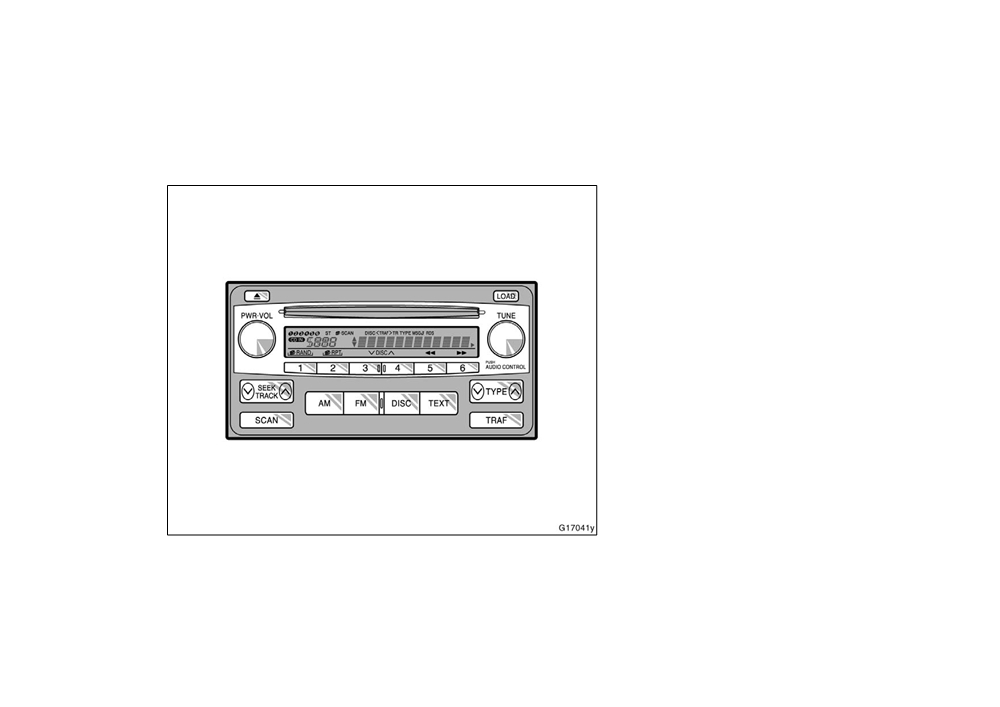
"Type 2
Details of specific buttons, controls and
features are described in the alphabetical
list that follows.
114
2005 CELICA from Sep. ’04 Prod. (OM20888U)
’05MY CELICA U (L/O 0409)
1 2 3 4 5 6 (Preset buttons)
To eject all discs at a time, press and
TRE: Adjusts high−pitched tones. The dis-
hold the eject button until you hear a
play ranges from −5 to 5.
These buttons are used to preset and
beep. The last compact disc played before
tune in radio stations.
FAD: Adjusts the sound balance between
pushing the button will be ejected first. If
the front and rear speakers. The display
To preset a station to a button: Tune in
the ejected disc is not removed for a long
ranges from F7 to R7.
the desired station.
(See
“TUNE” or
time, the eject function will be cancelled.
“SEEK/TRACK”.) Push and hold down the
BAL: Adjusts the sound balance between
button until you hear a beep—this will set
(Reverse/Fast−forward button)
the right and left speakers. The display
the station to the button. The preset but-
ranges from L7 to R7.
Push and hold “
”
(preset button 6) or
ton number will appear on the display.
DISC (Compact disc)
“
”
(preset button 5) to fast forward or
To recall a preset station: Push the button
Push the “DISC” button to play a compact
reverse within a compact disc. When you
for the station you want. The preset but-
release the button, the compact disc play-
disc.
ton number and station frequency will ap-
er will resume playing.
When the audio system is set into com-
pear on the display.
pact disc operation, the display shows the
AM
This radio can store one AM and two FM
track, or track and disc number currently
stations for each button.
(The display will
Push the “AM” button to turn on the radio
being played.
show
“AM”,
“FM1” or
“FM2” when you
and select the AM band. “AM” will appear
Error messages
push “AM” or “FM” button.)
on the display.
AUDIO CONTROL (Tone and sound bal-
If the player malfunctions, your audio sys-
(Eject button)
tem will display one of the six following
ance adjustment function)
This button is used to eject one or all
error messages.
Each time you push the
“AUDIO
compact discs.
“WAIT”: The compact disc player unit
CONTROL” knob, the mode changes. To
To eject the current compact disc, push
adjust the tone and balance, turn the
may be too hot. Allow the player to cool
and release the compact disc eject button.
knob.
down.
To eject a specific disc, push
“Ɲ” (preset
“ERROR 1”: The disc may be dirty, dam-
BAS: Adjusts low−pitched tones. The dis-
button 3) or “Ɯ” (preset button 4) until the
play ranges from −5 to 5.
aged or inserted incorrectly
(up−side
number of the disc you want to eject is
down). Clean the disc and re−insert it.
displayed. Push and release the eject but-
“NO DISC”: The compact disc changer of
ton.
separate unit is empty. Insert a disc.
115
2005 CELICA from Sep. ’04 Prod. (OM20888U)

’05MY CELICA U (L/O 0409)
“ERROR 3”: There is a problem inside
LOAD
RDS (Radio Data System) display
the system. Eject the disc or magazine.
This button is used to load the compact
The radio will automatically switch to the
Set the disc or magazine again.
discs in the compact disc player. This
RDS mode to receive an RDS station
“ERROR
4”: Over−current. Ask your
player can store up to six discs.
while turned to FM broadcasts.
“RDS” will
Toyota dealer to inspect.
appear on the display.
To load one compact disc only, quickly
“CD OPEN”: The compact disc changer
push and release the button, then insert
RAND (Random)
lid of separate unit is open. Close the
a compact disc. After the disc is loaded,
There are two random features—you can
compact disc changer lid.
the shutter of the slot will close.
either listen to the tracks on one compact
If the malfunction still exists, take your
If no compact disc is inserted, the shutter
disc in random order, or listen to the
vehicle to your Toyota dealer.
will close after
15 seconds.
tracks on all the compact discs in the
magazine in random order.
Ɲ DISC Ɯ
To load multiple compact discs, push and
hold the button
(until you hear a beep
To play the tracks on one disc in random
Use these buttons to select a disc you
when the audio system is on), then insert
order:
want to listen to.
the first compact disc. After the disc is
Quickly push and release
“RAND” (preset
Push “Ɲ” (preset button 3) or “Ɯ” (preset
loaded, the shutter of the slot will close.
button
1).
“
” will appear on the
button 4) until the number of the disc you
After a few seconds, the shutter will auto-
display and the player will perform the
want to listen appears on the display.
matically open again so the next disc can
tracks on the disc you are listening to in
FM
be inserted. The same process can be
random order. To turn off the random fea-
Push the “FM” button to turn on the radio
applied for loading the rest of the discs.
ture, push this button again.
If the player is full of discs,
“DISC FULL”
and select the FM band.
“FM1” or “FM2”
To play all the tracks in the magazine in
will appear on the display.
will appear on the display. This system
random order:
allows you to set twelve FM stations, two
If no compact disc is inserted, the shutter
Push and hold
“RAND” (preset button
1)
for each of the preset button.
will close after
15 seconds.
until you hear a beep.
“
” will ap-
PWR·VOL (Power and Volume)
pear on the display and the player will
Push “PWR·VOL” to turn the audio system
perform all the tracks on all the discs in
on and off. Turn “PWR·VOL” to adjust the
the magazine in random order. To turn off
volume.
the random feature, push this button
again.
116
2005 CELICA from Sep. ’04 Prod. (OM20888U)

’05MY CELICA U (L/O 0409)
RPT (Repeat)
SCAN
Compact disc player
There are two repeat features—you can
Radio
There are two scan features—you can ei-
either replay a disc track or a whole com-
ther scan the tracks on a specific disc or
You can either scan all the frequencies on
pact disc.
scan the first tracks of all the discs in the
a band or scan only the preset stations
magazine.
Repeating a track:
for that band.
Quickly push and release
“RPT”
(preset
Scanning the tracks on a disc:
To scan the preset stations:
button
2) while the track is playing.
Quickly push and release the “SCAN” but-
Push and hold the
“SCAN” button until
“
” will appear on the display. When
you hear a beep. The radio will tune in
ton.
“SCAN” will appear on the display
and the player will scan all the tracks on
the track ends, it will automatically replay.
the next preset station up the band, stay
the disc you are listening to. To stop
To turn off the repeat feature, push this
there for 5 seconds, and then move to the
button again.
next preset station. To stop scanning,
scanning, push this button again. If the
player scanned all the tracks on the disc,
push this button again.
Repeating a disc:
it will stop scanning.
Push and hold
“RPT”
(preset button
2)
To scan all the frequencies:
Scanning the first tracks of all the discs
until you hear a beep.
“
” will ap-
Quickly push and release the “SCAN” but-
in the magazine:
ton. The radio will find the next station up
pear on the display. The player will repeat
Push the “SCAN” button until you hear a
the station band, stay there for 5 seconds,
all the tracks on the disc you are listening
and then scan again to the next station.
beep.
“
·SCAN” will appear on the dis-
to. When the disc ends, the player will
To stop scanning, push this button again.
play and the player will scan the first
automatically go back to the first track on
track of the next disc. To stop scanning,
the disc and replay. To turn off the repeat
push this button again. If the changer has
feature, push this button again.
scanned all the discs, it will stop scan-
ning.
117
2005 CELICA from Sep. ’04 Prod. (OM20888U)

’05MY CELICA U (L/O 0409)
SEEK/TRACK (Seeking/Track up/down)
TEXT
Compact disc player
Radio
Radio
This button is used to change the display
for the compact disc that contains text
In the seek mode, the radio finds and
This button is operational only in RDS
data.
plays the next station up or down the
mode.
station band.
To change the display, quickly push and
When an RDS station transmits a text
release the
“TEXT” button while the com-
To seek the next station, quickly push and
message,
“MSG” will appear on the dis-
pact disc is playing. The display changes
release
“Ɯ” or
“Ɲ” side of the
“SEEK/
played.
in the order from the elapsed time to disc
TRACK” button. Do this again to find the
To display the text message, first push
title to track title, then back to the
station after that.
the
“TEXT” button to change the radio
elapsed time.
Compact disc player
station display. Then push the “TEXT” but-
If this button is pushed while a compact
ton once more to display, and the mes-
Use this button to skip up or down to a
disc that does not contain text data is
sage will appear on the display.
different track.
playing,
“NO TITLE” will appear on the
If the entire the message is not displayed,
Push
“Ɯ” or
“Ɲ” side of the
“SEEK/
display.
“
” will appear on the display. To display
TRACK” button until the number of the
If the entire disc or track title does not
the rest of the message, push and hold
track you want to listen to appears on the
appear on the display, push and hold the
the
“TEXT” button until you hear a beep.
display. If you want to return to the begin-
button until you hear a beep. The rest of
ning of the current track, quickly push the
After the entire message has been dis-
the title will appear.
down side of the button one time.
played, the message will disappear.
TRAF (Traffic)
ST (Stereo reception) display
The message display will be canceled if
This button turns the traffic announcement
any button that affects the display is
Your radio automatically changes to stereo
(TA) feature on and off. This button is
pushed.
reception when a stereo broadcast is re-
operational only in FM mode.
ceived. “ST” appears on the display. If the
If
no messages are received,
“NO
By pushing the
“TRAF” button,
“TRAF
signal becomes weak, the radio reduces
MESSAGE” will appear on the display, and
SEEK” will flash on the display and the
the amount of channel separation to prev-
the display returns to the previous mode.
radio will start seeking any traffic program
ent the weak signal from creating noise.
The message display will be canceled if
station.
If the signal becomes extremely weak, the
you activate any function that affects the
When a traffic program station is found,
radio switches from stereo to mono recep-
display.
“TRAF” will be displayed and you will hear
tion.
a beep.
118
2005 CELICA from Sep. ’04 Prod. (OM20888U)
’05MY CELICA U (L/O 0409)
After the traffic announcement program is
D RELIGION
over, the display returns to the previous
D MISC (Miscellaneous)
mode.
D ALERT (Emergency message)
If no traffic program station is found,
“NO
To seek or scan for the same type of
TRAF INFO” appears on the display, and
program, push the
“SEEK/TRACK” or
the display returns to the previous mode
and a beep sound.
“SCAN” button while the program type is
displayed.
To cancel the traffic announcement, push
this button again.
If no program is found,
“NOTHING” will
appear on the display. The previous pro-
TUNE (Tuning)
gram information will resume.
Turn the
“TUNE” knob clockwise to step
When the system is left untouched for
6
up the frequency. Turn the knob counter-
seconds, the program type display will
clockwise to step down the frequency.
change to the frequency display.
TYPE (Program Types)
When you push “Ɯ” or “Ɲ” of the “TYPE”
button while receiving an RDS station, the
current program type will appear on the
display. If the system is receiving a sta-
tion that is not RDS,
“NO PTY” will ap-
pear.
Repeat this operation within
6 seconds to
display the program types in the following
order:
D ROCK
D EASY LIS (Easy listening)
D CLS/JAZZ (Classical music and Jazz)
D R&B (Rhythm and Blues)
D INFORM (Information)
119
2005 CELICA from Sep. ’04 Prod. (OM20888U)
’05MY CELICA U (L/O 0409)
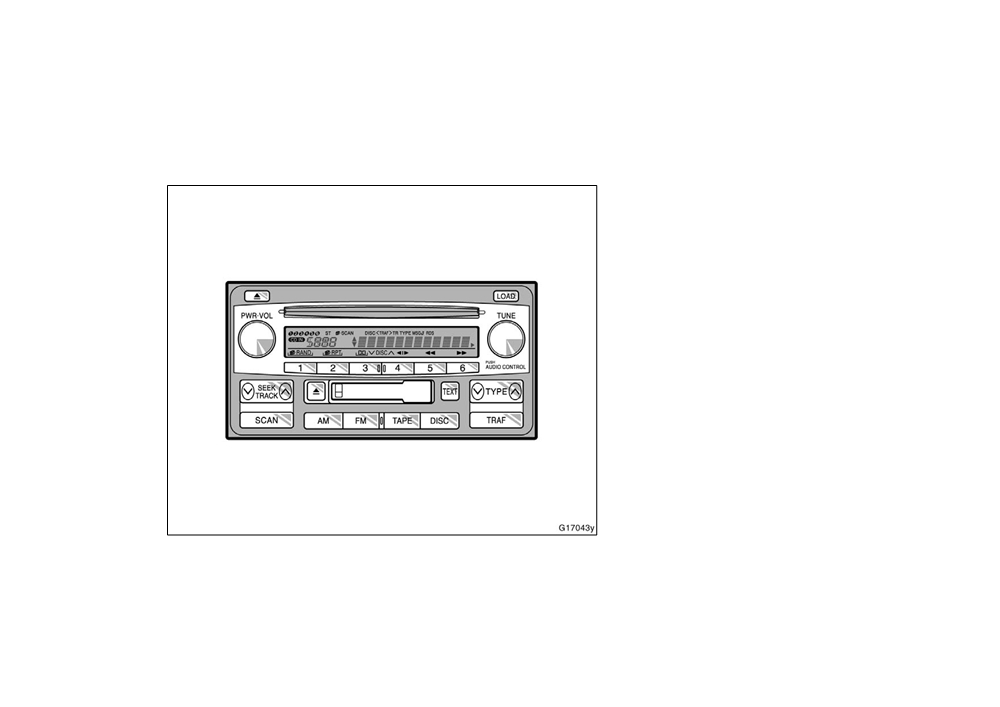
"Type 3
Details of specific buttons, controls and
features are described in the alphabetical
list that follows.
120
2005 CELICA from Sep. ’04 Prod. (OM20888U)
’05MY CELICA U (L/O 0409)
1 2 3 4 5 6 (Preset buttons)
To eject a specific disc, push
“Ɲ” (preset
(Reverse/Fast−forward button)
button 3) or “Ɯ” (preset button 4) until the
These buttons are used to preset and
Cassette player
number of the disc you want to eject is
tune in radio stations.
displayed. Push and release the eject but-
Push “
”
(preset button
6) to fast−for-
To preset a station to a button: Tune in
ton.
ward a cassette tape. “FF” will appear on
the desired station.
(See
“TUNE” or
“SEEK/TRACK”.) Push and hold down the
To eject all discs at a time, press and
the display. Push
“
”
(preset button
5)
button until you hear a beep—this will set
hold the eject button until you hear a
to rewind a tape.
“REW” will appear on
beep. The last compact disc played before
the station to the button. The preset but-
the display.
pushing the button will be ejected first. If
ton number will appear on the display.
To stop the tape while it is fast−forward-
the ejected disc is not removed for a long
To recall a preset station: Push the button
time, the eject function will be cancelled.
ing, push “
” or
“TAPE” button. To stop
for the station you want. The preset but-
the tape while it is rewinding, push “
”
ton number and station frequency will ap-
(Program)
or
“TAPE” button.
pear on the display.
Push
“
”
(preset button
4) to select
If a tape rewinds completely, the cassette
This radio can store one AM and two FM
the other side of a cassette tape. The
player will stop and then play that same
for each button.
(The display will show
display indicates which side is currently
side. If a tape fast−forwards completely,
“AM”,
“FM1” or
“FM2” when you push
selected (“
” indicates the top side, “
”
the cassette will play the other side of the
“AM” or “FM” button.)
indicates the bottom side).
tape using the auto−reverse feature.
(Eject button)
Auto−reverse feature: After the cassette
Compact disc player
Cassette player
player reaches the end of a tape side, it
Push and hold “
”
(preset button 6) or
automatically reverses and begins to play
This button is used to eject a cassette.
“
”
(preset button 5) to fast forward or
the other side. This is true whether the
Compact disc player
reverse within a compact disc. When you
cassette was playing or fast forwarding.
This button is used to eject one or all
release the button, the compact disc play-
compact discs.
er will resume playing.
To eject the current compact disc, push
AM
and release the compact disc eject button.
Push the “AM” button to turn on the radio
and select the AM band. “AM” will appear
on the display.
121
2005 CELICA from Sep. ’04 Prod. (OM20888U)

’05MY CELICA U (L/O 0409)
AUDIO CONTROL (Tone and sound bal-
Error messages
Ɲ DISC Ɯ
ance adjustment function)
If the player malfunctions, your audio sys-
Use these buttons to select a disc you
Each time you push the
“AUDIO
tem will display one of the six following
want to listen to.
CONTROL” knob, the mode changes. To
error messages.
Push “Ɲ” (preset button 3) or “Ɯ” (preset
adjust the tone and balance, turn the
“WAIT”: The compact disc player unit
button 4) until the number of the disc you
knob.
may be too hot. Allow the player to cool
want to listen to appears on the display.
BAS: Adjusts low−pitched tones. The dis-
down.
Dolbyr
B NR∗
play ranges from −5 to 5.
“ERROR 1”: The disc may be dirty, dam-
If you are listening to a tape that was
MID: Adjusts mid−pitched tones. The dis-
aged or inserted incorrectly
(up−side
recorded with Dolbyr B Noise Reduction,
play ranges from −5 to 5.
down). Clean the disc and re−insert it.
push
“
”
(preset button
3).
“
” will
TRE: Adjusts high−pitched tones. The dis-
“NO DISC”: The compact disc changer of
appear on the display. Push the button
play ranges from −5 to 5.
separate unit is empty. Insert a disc.
again to turn off Dolbyr B NR.
FAD: Adjusts the sound balance between
“ERROR 3”: There is a problem inside
The Dolby NR mode reduces tape noise
the front and rear speakers. The display
the system. Eject the disc or magazine.
by about 10 dB. For best sound reproduc-
ranges from F7 to R7.
Set the disc or magazine again.
tion, play your tapes with this button on
BAL: Adjusts the sound balance between
“ERROR
4”: Over−current. Ask your
or off according to the mode used to re-
the right and left speakers. The display
Toyota dealer to inspect.
cord the tape.
∗
ranges from L7 to R7.
: Dolby noise reduction manufactured under license from
“CD OPEN”: The compact disc changer
Dolby Laboratories Licensing Corporation. “DOLBY” and the
DISC (Compact disc)
lid of separate unit is open. Close the
double D symbol
are trademarks of Dolby Laboratories
compact disc changer lid.
Licensing Corporation.
Push the “DISC” button to play a compact
FM
disc.
If the malfunction still exists, take your
vehicle to your Toyota dealer.
Push the “FM” button to turn on the radio
When the audio system is set into com-
pact disc operation, the display shows the
and select the FM band.
“FM1” or “FM2”
will appear on the display. This system
track, or track and disc number currently
allows you to set twelve FM, two for each
being played.
of the preset button.
122
2005 CELICA from Sep. ’04 Prod. (OM20888U)

’05MY CELICA U (L/O 0409)
LOAD
RAND (Random)
RPT (Repeat)
This button is used to load the compact
There are two random features—you can
Cassette player
discs in the compact disc player. This
either listen to the tracks on one compact
Push
“RPT”
(preset button
2) while the
player can store up to six discs.
disc in random order, or listen to the
track is playing.
“
” will appear on
tracks on all the compact discs in the
To load one compact disc only, quickly
the display. When the track ends, it will
magazine in random order.
push and release the button, then insert
automatically rewind and replay. To turn
a compact disc. After the disc is loaded,
To play the tracks on one disc in random
off the repeat feature, push this button
the shutter of the slot will close.
order:
again.
Quickly push and release
“RAND” (preset
If no compact disc is inserted, the shutter
There must be at least 3 seconds of blank
will close after
15 seconds.
button
1).
“
” will appear on the
space between tracks in order for the re-
display and the player will perform the
To load multiple compact discs, push and
peat feature to work correctly.
tracks on the disc you are listening to in
hold the button
(until you hear a beep
Compact disc player
random order. To turn off the random fea-
when the audio system is on), then insert
ture, push this button again.
There are two repeat features—you can
the first compact disc. After the disc is
either replay a disc track or a whole com-
loaded, the shutter of the slot will close.
To play all the tracks in the magazine in
pact disc.
After a few seconds, the shutter will auto-
random order:
matically open again so the next disc can
Push and hold
“RAND” (preset button
1)
Repeating a track:
be inserted. The same process can be
until you hear a beep.
“
” will ap-
Quickly push and release
“RPT”
(preset
applied for loading the rest of the discs.
pear on the display and the player will
button
2) while the track is playing.
If the player is full of discs,
“DISC FULL”
perform all the tracks on all the discs in
“
” will appear on the display. When
will appear on the display.
the magazine in random order. To turn off
the track ends, it will automatically replay.
If no compact disc is inserted, the shutter
the random feature, push this button
To turn off the repeat feature, push this
will close after
15 seconds.
again.
button again.
PWR·VOL (Power and Volume)
RDS (Radio Data System) display
Push “PWR·VOL” to turn the audio system
The radio will automatically switch to the
on and off. Turn “PWR·VOL” to adjust the
RDS mode to receive an RDS station
volume.
while tuned to FM broadcasts.
“RDS” will
appear on the display.
123
2005 CELICA from Sep. ’04 Prod. (OM20888U)

’05MY CELICA U (L/O 0409)
Repeating a disc:
Compact disc player
SEEK/TRACK (Seeking/Track up/down)
Push and hold
“RPT”
(preset button
2)
There are two scan features—you can ei-
Radio
until you hear a beep.
“
” will ap-
ther scan the tracks on a specific disc or
In the seek mode, the radio finds and
pear on the display. The player will repeat
scan the first tracks of all the discs in the
plays the next station up or down the
all the tracks on the disc you are listening
magazine.
station band.
to. When the disc ends, the player will
Scanning the tracks on a disc:
To seek the next station, quickly push and
automatically go back to the first track on
Quickly push and release the “SCAN” but-
release
“Ɯ” or
“Ɲ” side of the
“SEEK/
the disc and replay. To turn off the repeat
ton.
“SCAN” will appear on the display
TRACK” button. Do this again to find the
feature, push this button again.
and the player will scan all the tracks on
station after that.
SCAN
the disc you are listening to. To stop
Cassette player
scanning, push this button again. If the
Radio
player has scanned all the tracks on the
Use this button to skip up or down to
You can either scan all the frequencies on
disc, it will stop scanning.
locate a song or recording.
a band or scan only the preset stations
Scanning the first tracks of all the discs
You can select up to nine recordings
(in-
for that band.
in the magazine:
cluding current one).
To scan the preset stations:
Push the “SCAN” button until you hear a
A blank space of at least
3 seconds is
Push and hold the
“SCAN” button until
beep.
“
·SCAN” will appear on the dis-
considered to be a start of a recording.
you hear a beep. The radio will tune in
play and the player will scan the first
the next preset station up the band, stay
When the beginning of a tape is reached,
track of the next disc. To stop scanning,
there for 5 seconds, and then move to the
the player automatically resumes play.
push this button again. If the player has
next preset station. To stop scanning,
scanned all the discs, it will stop scan-
When the end of the tape is reached, the
push this button again.
ning.
player automatically reverses sides and
To scan all the frequencies:
resumes normal play.
Quickly push and release the “SCAN” but-
In addition, the feature may not work well
ton. The radio will find the next station up
with some spoken word, live, or classical
the station band, stay there for 5 seconds,
recordings.
and then scan again to the next station.
To stop scanning, push this button again.
124
2005 CELICA from Sep. ’04 Prod. (OM20888U)

’05MY CELICA U (L/O 0409)
Compact disc player
TEXT
Compact disc player
Use this button to skip up or down to a
Radio
This button is used to change the display
different track.
for the compact disc that contains text
This button is operational only in RDS
data.
Push
“Ɯ” or
“Ɲ” side of the
“SEEK/
mode.
TRACK” button until the number of the
To change the display, quickly push and
When an RDS station transmits a text
track you want to listen to appears on the
release the
“TEXT” button while the com-
message,
“MSG” will appear on the dis-
display. If you want to return to the begin-
pact disc is playing. The display changes
played.
ning of the current track, quickly push the
in the order from the elapsed time to disc
To display the text message, first push
down side of the button one time.
title to track title, then back to the
the
“TEXT” button to change the radio
elapsed time.
ST (Stereo reception) display
station display. Then push the “TEXT” but-
If this button is pushed while a compact
Your radio automatically changes to stereo
ton once more to display, and the mes-
disc that does not contain text data is
reception when a stereo broadcast is re-
sage will appear on the display.
playing,
“NO TITLE” will appear on the
ceived. “ST” appears on the display. If the
If the entire the message is not displayed,
display.
signal becomes weak, the radio reduces
“
” will appear on the display. To display
the amount of channel separation to prev-
If the entire disc or track title does not
the rest of the message, push and hold
ent the weak signal from creating noise.
appear on the display, push and hold the
the
“TEXT” button until you hear a beep.
If the signal becomes extremely weak, the
button until you hear a beep. The rest of
After the entire message has been dis-
radio switches from stereo to mono recep-
the title will appear.
played, the message will disappear.
tion.
TRAF (Traffic)
The message display will be canceled if
TAPE
This button turns the traffic announcement
any button that affects the display is
Push the “TAPE” button to play a cassette
(TA) feature on and off. This button is
pushed.
tape.
operational only in FM mode.
If
no messages are received,
“NO
By pushing the
“TRAF” button,
“TRAF
MESSAGE” will appear on the display, and
SEEK” will flash on the display and the
the display returns to the previous mode.
radio will seek a traffic program station.
The message display will be canceled if
After the traffic announcement program is
you activate any function that affects the
over, the display returns to the previous
display.
mode.
125
2005 CELICA from Sep. ’04 Prod. (OM20888U)

’05MY CELICA U (L/O 0409)
Audio system operating hints
If no traffic program station is found,
“NO
D MISC (Miscellaneous)
NOTICE
TRAFINFO” appears on the display, and
D ALERT (Emergency message)
the display returns to the previous mode
To ensure correct audio system op-
To seek or scan for the same type of
and a beep sounds.
erations:
program, push the
“SEEK/TRACK” or
To cancel the traffic announcement, push
“SCAN” button while the program type is
z Be careful not to spill beverages
this button again.
displayed.
over the audio system.
TUNE (Tuning)
If no program is found,
“NOTHING” will
z Do not put anything other than a
Turn the
“TUNE” knob clockwise to step
appear on the display. The previous pro-
cassette tape or compact disc into
up the frequency. Turn the knob counter-
gram information will resume.
the slot.
clockwise to step down the frequency.
When the system is left untouched for
6
z The use of a cellular phone inside
TYPE (Program Types)
seconds, the program type display will
or near the vehicle may cause a
change to the frequency display.
noise from the speakers of the au-
When you push “Ɯ” or “Ɲ” of the “TYPE”
dio system which you are listening
button while receiving an RDS station, the
to. However, this does not indicate
current program type will appear on the
a malfunction.
display. If the system is receiving a sta-
tion that is not RDS,
“NO PTY” will ap-
pear.
RADIO RECEPTION
Repeat this operation within
6 seconds to
Usually, a problem with radio reception
display the program types in the following
does not mean there is a problem with
order:
your radio—it is just the normal result of
conditions outside the vehicle.
D ROCK
For example, nearby buildings and terrain
D EASY LIS (Easy listening)
can interfere with FM reception. Power
D CLS/JAZZ (Classical music and Jazz)
lines or telephone wires can interfere with
D R&B (Rhythm and Blues)
AM signals. And of course, radio signals
have a limited range. The farther you are
D INFORM (Information)
from a station, the weaker its signal will
D RELIGION
be. In addition, reception conditions
change constantly as your vehicle moves.
126
2005 CELICA from Sep. ’04 Prod. (OM20888U)