Toyota Tundra. Manual - part 174
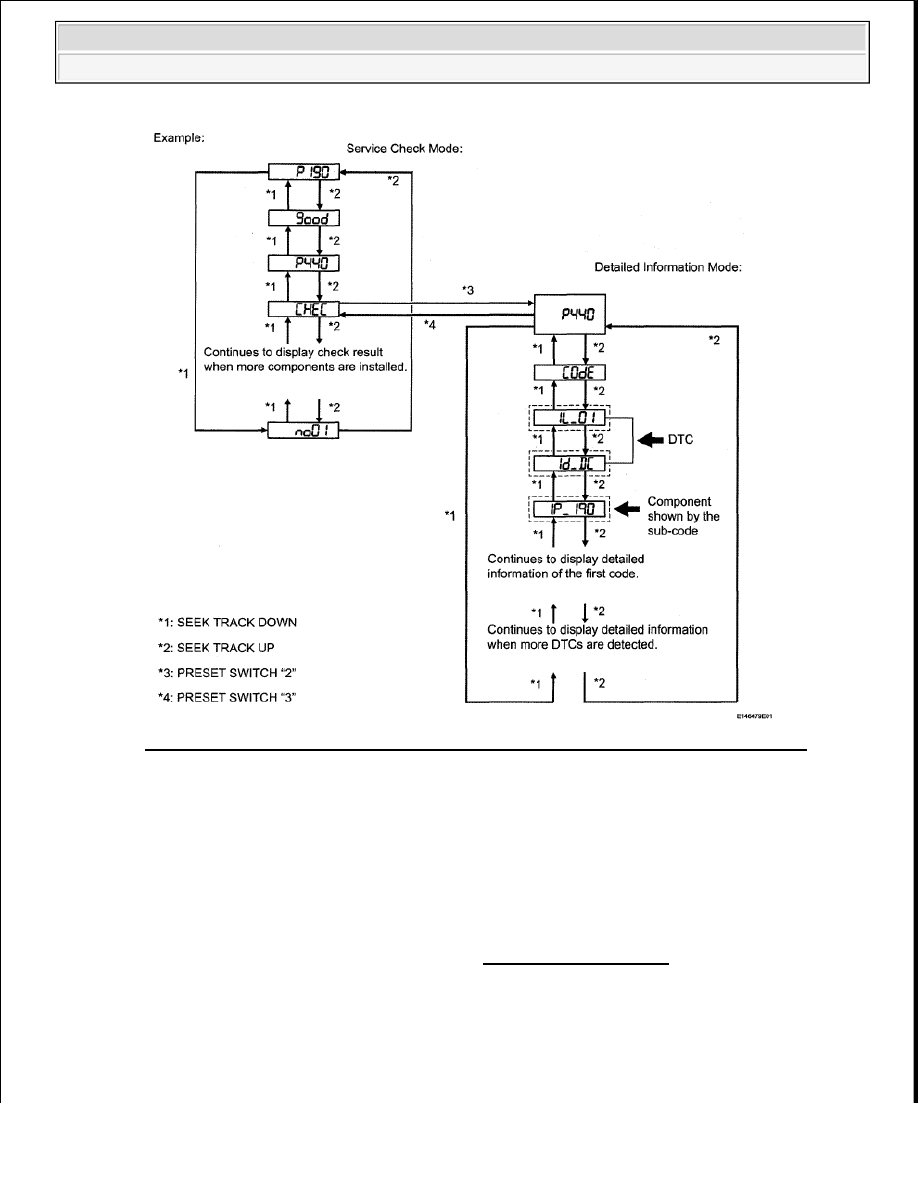
Fig. 115: Service Check Mode And Detailed Information Diagnostic Mode Flow Chart
Courtesy of TOYOTA MOTOR SALES, U.S.A., INC.
b. Press the preset switch "3" to change to "Detailed Information Mode".
c. Identify the component shown by the sub-code.
HINT:
"190 (radio receiver)" is the component shown by the subcode in the example shown in the
illustration.
For details of the DTC display, refer to "DTC CHECK / CLEAR" .
2. CHECK POWER SOURCE CIRCUIT OF COMPONENT SHOWN BY SUB-CODE
a. Inspect the power source circuit of the component shown by the sub-code.
If the power source circuit is operating normally, proceed to the next step.
2009 Toyota Tundra
2009 ACCESSORIES AND EQUIPMENT Audio/Visual - Tundra