Subaru Impreza (2023 year). Manual in english - page 12
(186,1)
When a tire is deflated, the deflated tire
and the tire pressure will be displayed on
the screen in yellow.
NOTE
.
The tire pressure values are dis-
played several minutes after driving.
.
You can set the tire pressure units.
For details about setting the units, refer
to “Tire Pressure Units”
.
Once the tire pressure monitoring
system detects the low tire pressure,
the tire pressure values will display in
yellow until the system detects the
normal tire pressure.
.
Immediately adjust the tire pressure
when the warning light illuminates.
When the tire pressure monitoring
system detects the adjusted tire pres-
sure, the warning light will turn off and
the tire pressure values will turn to
white.
.
For information about the specified
value of the air pressure, refer to
“Tires”
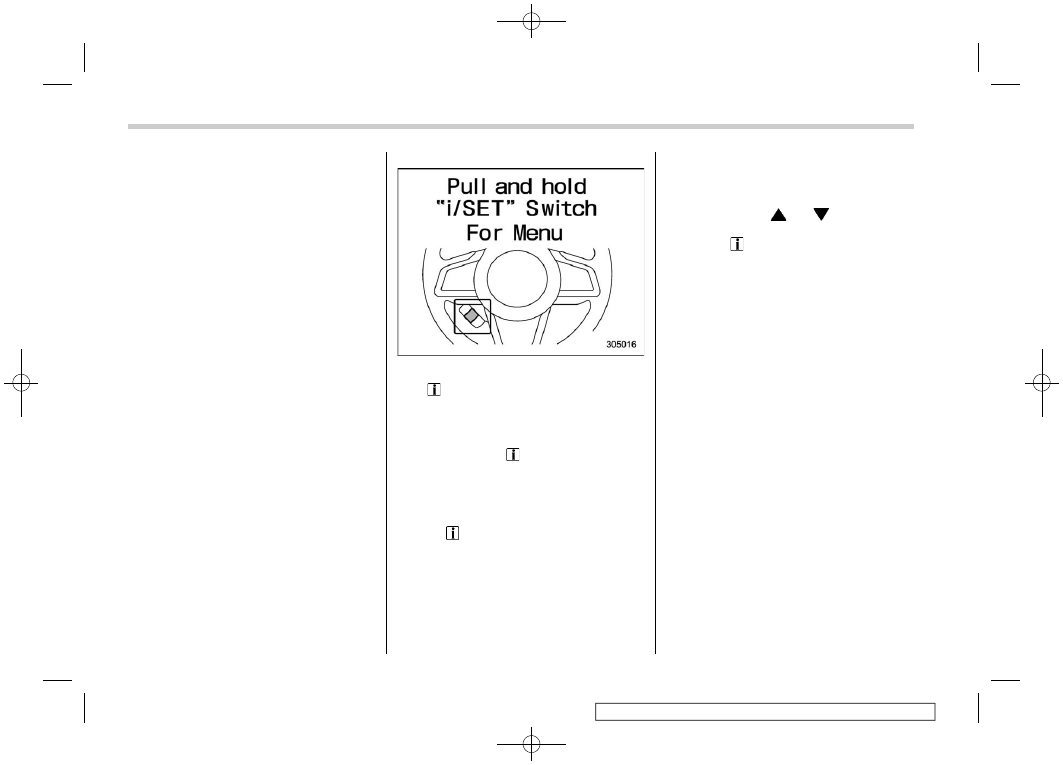
Menu screen entering screen:
While this screen is selected, pull and hold
the “
/SET” switch to enter the menu
screen.
&
Menu screens
Pull and hold the “
/SET” switch to enter
the menu screens when all of the following
conditions are satisfied.
.
The menu screen entering screen is
selected.
.
The “
” information reminder is off.
NOTE
.
While driving, the setting items
available on the combination meter
display (color LCD) are limited.
.
For function settings and adjust-
ments on the combination meter dis-
play, refer to “Function settings and
adjustments on the combination meter
display (color LCD)”
By operating the “
” or “
” switch on the
steering wheel, you can select the menu.
Pull the “
/SET” switch to enter the
selected menu.
NOTE
If you enter the “Go Back” menu, the
system will return to the previous
screen.
!
Screen Settings
After entering the “Screen Settings” menu,
select one of the following menus.
!
Welcome Screen
The combination meter display (color
LCD), multi-function display (color LCD),
and audio/navigation unit of welcome
screen can be activated or deactivated.
!
Good-bye Screen
The good-bye screen can be activated or
deactivated.
!
Gauge Initial Movement
The movement of the meter needles and
gauge needles that occurs when the
ignition switch is turned to the “ON”
position can be activated or deactivated.
Instruments and controls/Combination meter display (color LCD)
3-38