Subaru BRZ (2012 year). Manual - part 16
 

  Index      Subaru     Subaru BRZ - service manual 2012 year


Search            


Content   ..  14  15  16  17   ..


Subaru BRZ (2012 year). Manual - part 16


PI-11

Pre-delivery Inspection

PRE-DELIVERY INSPECTION

NOTE:

• The hazard lights flash twice and the buzzer

sounds twice when unlocking.

• The  hazard  lights  flash  once  and  the  buzzer

sounds once when locking.

• While  carrying  the  access  key,  check  that  the

trunk unlocks when you press the trunk opener but-

ton.

• Close  all  doors,  and  while  carrying  the  access

key, check that all doors are locked automatically

30  seconds  after  grasping  the  front  door  knob

(touching the touch sensor) to unlock doors.

• Check  the  mechanical  key  attached  to  the  ac-

cess key can be used for locking/unlocking.

• With  the  access  key  in  the  vehicle,  check  that

warning buzzer sounds and locking does not occur

when you touch the door touch sensor.
CAUTION:

Remove  the  mechanical  key  from  the  access

key and hold the mechanical key.

• With the front door locked and the access key in

the trunk (with trunk closed), check that the warning

buzzer  sounds  and  the  trunk  unlocks  when  you

press the trunk opener button.

22.SECURITY SYSTEM

• Model with keyless access function
Check that the security system operates as indicat-

ed below.

1) Turn on the security system.

2) Fully open all the door windows.

3) Remove the key from ignition switch, and then

close all doors.

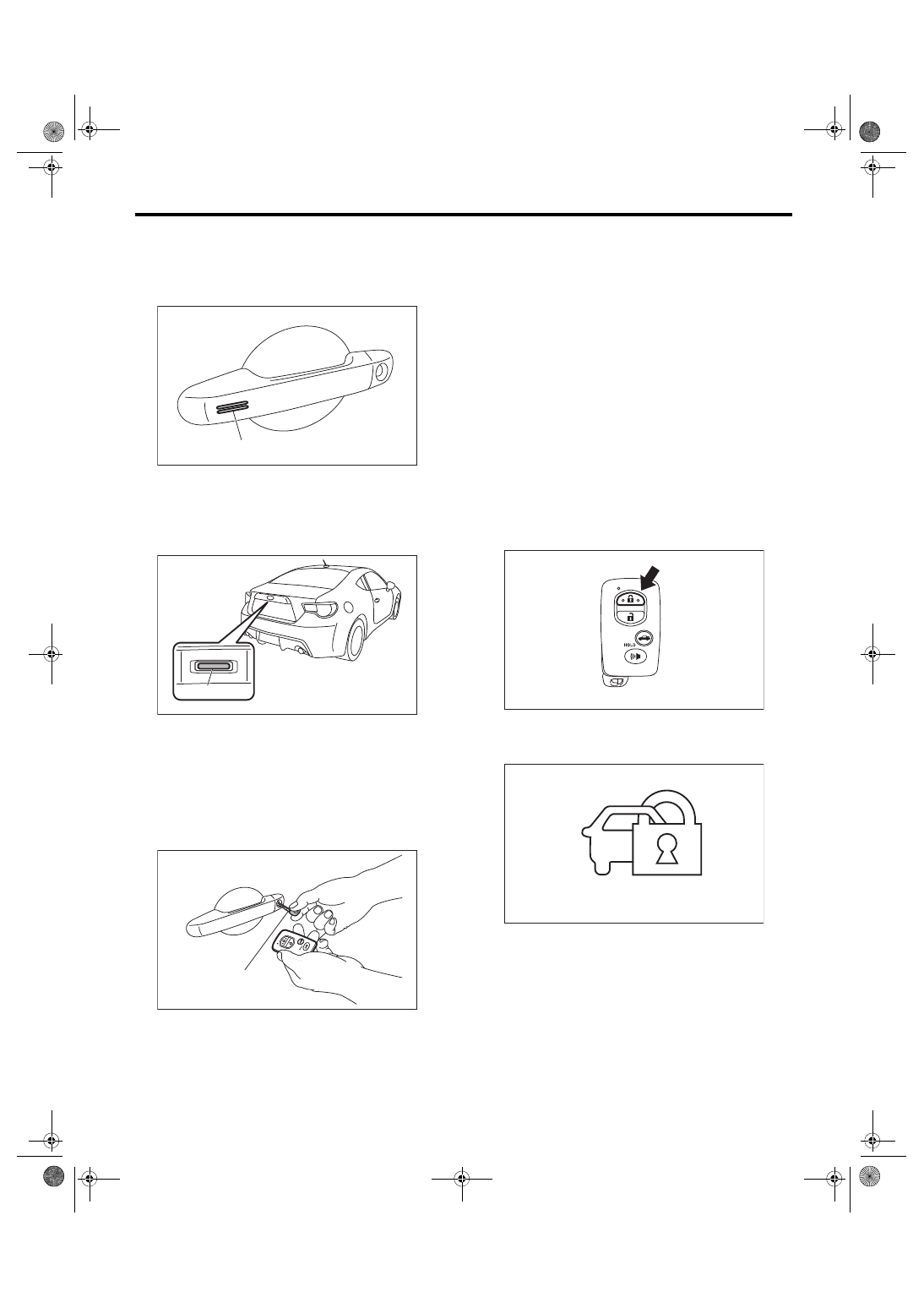
4) Press the access key “LOCK” button once.

5) When all doors are locked, the security indicator

light illuminates to indicate that the alarm system is

in the monitoring prepared condition.

6) The security indicator light flashes once for two

seconds 30 seconds after the condition of step 5) is

reached,  and  the  system  enters  the  monitoring

condition.

(A) Lock-touch sensor

(A) Trunk opener button

(A) Mechanical key

PI-00785

(A)

PI-00771

(A)

PI-00786

(A)

(1) Security indicator light

PI-00813

PI-00773

(1)

PI-12

Pre-delivery Inspection

PRE-DELIVERY INSPECTION

7) Press the access key “UNLOCK” button once.

8) The driver’s door unlocks and the alarm system

is in the non-monitoring condition.

9) Check that the alarm does not sound when any

of the doors are opened.

10) Press the access key “LOCK” button once with

one door open.

11) Check that the buzzer sounds to warn that the

door is not fully closed.

12) Close all doors.

13) Illuminates  to  indicate  monitoring  prepared

condition (indicator light illuminates).

14) The security indicator light flashes once for two

seconds 30 seconds after the condition of step 13)

is reached, and the system enters the monitoring

condition.

15) Press the “UNLOCK” button on the access key

once to turn the system into non-monitoring condi-

tion.

16) Momentarily  press  the  “LOCK”  button  of  the

power door lock switch with any one door open.

• Driver’s side

• Passenger’s side

17) Close all doors.

18) When all doors are locked, the indicator light il-

luminates to indicate that the alarm system is in the

monitoring prepared condition.

19) The security indicator light flashes once for two

seconds 30 seconds after the condition of step 18)

is reached, and the system enters the monitoring

condition.

20) When  the  alarm  system  is  in  the  monitoring

condition, use the inner lock knob or the key to un-

lock the door.

21) Check  that  the  alarm  condition  occurs  (horn

sounds continuously, hazard light flashes, security

indicator illuminates).

22) Check that the condition described in 21) con-

tinues for 60 seconds or more, or until the access

key “UNLOCK” button is pressed, or until the posi-

tion  switch  is  turned  ON  with  the  correct  access

key.

23) When  none  of  above  is  applicable,  perform

troubleshooting for the security system.

24) Turn off the security system.

PI-00814

PI-00813

PI-00814

PI-00776

PI-00779

PI-13

Pre-delivery Inspection

PRE-DELIVERY INSPECTION

23.SEAT

1) Check that each seat provides full functionality in

sliding and reclining. Check all available functions

of the rear seat such as the backrest tilt knob.

2) Check the passenger’s seat occupant detection

system.

(1) Empty the passenger’s seat and turn the ig-

nition switch to ON.

(2) Check  that  the  passenger  airbag  ON/OFF

indicator lights both turn on simultaneously for

approximately six seconds, and after turning off

for two seconds, only the OFF light illuminates.

3) Have an adult passenger sit in the passenger’s

seat, and check whether the ON light of the pas-

senger side airbag ON/OFF indicator illuminates.

4) Have the passenger get out of the passenger’s

seat, and check whether the OFF light of the pas-

senger side airbag ON/OFF indicator illuminates.

24.SEAT BELT

1) Pull out the seat belt and then release it. Check

that the belt retracts smoothly.

2) Check seat belt warning function

(1) Turn the ignition switch to ON with the driv-

er’s and passenger’s seat belt detached.

(2) Check the driver’s and passenger’s seat belt

warning  light  blink  for  approx.  6  seconds  and

the buzzer sounds intermittently.

(3) Afterwards, check that the seat belt warning

lights illuminate. (If no passenger is on the pas-

senger’s  seat,  the  seat  belt  warning  light  on

passenger’s seat does not operate.)

25.TPMS (U.S. MODEL)

1) Turn  the  ignition  switch  to  ON,  and  check  that

the  TPMS  warning  light  is  in  a  normal  operation

condition.

• Normal operation (IG ON (Light check))

2) If the TPMS warning light display does not oper-

ate normally, check and repair the system.

26.GROMMET INSTALLATION

Install the grommet contained in the glove box to

the tie-down hole.
CAUTION:

Securely install the grommet to ensure that the

tie-down  hole  is  blocked  up  by  the  grommet.

Dust or foul odors could pass into the side seal

through the tie-down hole and enter the interior

directly from the rear quarter.

27.HORN

Check if the horn sounds.

28.HAZARD LIGHT

Check that the hazard lights illuminate.

29.MAP LIGHT

After installing the fuse, check that the map light il-

luminates/turns off normally.

PI-00787

(1) Grommet

2s

IGN ON

ON

OFF

PI-00376

(1)

PI-00801

PI-14

Pre-delivery Inspection

PRE-DELIVERY INSPECTION

30.DELIVERY MODE CONNECTOR

Connect the delivery mode connector of the driv-

er's  side  A  pillar  lower  area.  After  connection,

check that the key interlock system functions.

31.IMMOBILIZER SYSTEM

1) Check that the engine starts with all keys that are

equipped  on  vehicle.  Also,  when  starting  the  en-

gine, check that the security indicator light goes off.

2) Check that the security indicator light flashes im-

mediately  after  removing  the  key.  (model  without

keyless access function)

3) Check that the security indicator light flashes im-

mediately after turning the ignition switch from ON

to  ACC  or  OFF,  or  when  the  doors  are  opened/

closed with the ignition switch at ON or ACC. (mod-

el with keyless access function)
NOTE:

If malfunctions occur, refer to “IMMOBILIZER (DI-

AGNOSIS)”.

32.STARTING CONDITION

Start the engine and check that the engine starts

smoothly. If the battery voltage is low, recharge or

replace the battery. If any noises are observed, im-

mediately stop the engine and check and repair the

abnormal components.

33.EXHAUST

Listen to the exhaust noise to see if no noises are

observed. Check that no leaks are found.

34.INDICATOR AND WARNING LIGHTS

Check that all indicator lights and warning lights are

operating correctly.

35.HEATER & VENTILATION

Operate the heater & ventilation system to check

for normal airflow outlet control, air inlet control, air-

flow capacity and heating performance.

36.AIR CONDITIONER

Operate  the  air  conditioner.  Check  that  the  A/C

compressor operates normally and enough cooling

is provided.

NOTE:

To prevent the insufficient lubrication of the air con-

ditioner, operate the air conditioner for five minutes

at idling.

37.CLOCK

Check that the clock operates normally.

38.AUDIO

1) Check if the AM/FM radio broadcasting can be

heard.

2) Check that all the radio functions work properly

and the noise level is normal.

3) Check the CD and AUX for normal operation.

4) Check that the AUX is installed into the console

without looseness.

39.NAVIGATION SYSTEM

1) Check all display functions for normal operation.

(Refer to the operation manual.)

2) Check that the navigation system operates nor-

mally.

3) Check the radio, CD player and AUX for normal

operation.

4) Check that the AUX is installed into the console

without looseness.

40.ACCESSORY POWER SUPPLY SOCKET

1) Check operation of the accessory power supply

socket in console box.

2) Check operation of the accessory power supply

socket in the glove box.

41.LIGHTING

1) Check  the  headlight  operations.  When  pulling

out  the  key,  check  if  the  headlight  illuminates  by

turning the headlight switch from OFF to ON.

2) Check the stop light operation.

3) Check other lights for normal operations.

42.VSC

• With  the  engine  running,  operate  the  VSC

SPORT switch, and check that the “VSC SPORT”

and “VSC OFF” indicator lights illuminate and that

they turn off when the switch is operated again.

• With  the  engine  running,  press  the  VSC  OFF

switch for a short period (approx. 1 sec. or less),

and check that the “TRC OFF” indicator light illumi-

nates and that it turns off when the switch is oper-

ated again.

• With  the  engine  running,  press  the  VSC  OFF

switch for a long period (approx. 3 sec. or more),

and check that the “TRC OFF” and “VSC OFF” in-

dicator lights illuminate and that they turn off when

the switch is pressed again for a short period.

(A) Delivery mode connector

(A)

PI-00795


Content   ..  14  15  16  17   ..