Smart fortwo (2016). Service Manual - part 7
Depending on the vehicle equipment, you can
call up the following menus one after the
other:
R
Distance
menu (
Y
page 112)
R
from Start
trip computer menu
(
Y
page 112)
R
from Reset
trip computer menu
(
Y
page 112)
R
Fuel consumption
menu (
Y
page 112)
R
Coolant Temperature
menu (
Y
page 113)
R
Messages and Service
menu (
Y
page 113)
R
Settings
menu (
Y
page 114)
Odometer menu
Example: distance
X
To show: press the 9 or : button on
the steering wheel to select the trip meter
display.
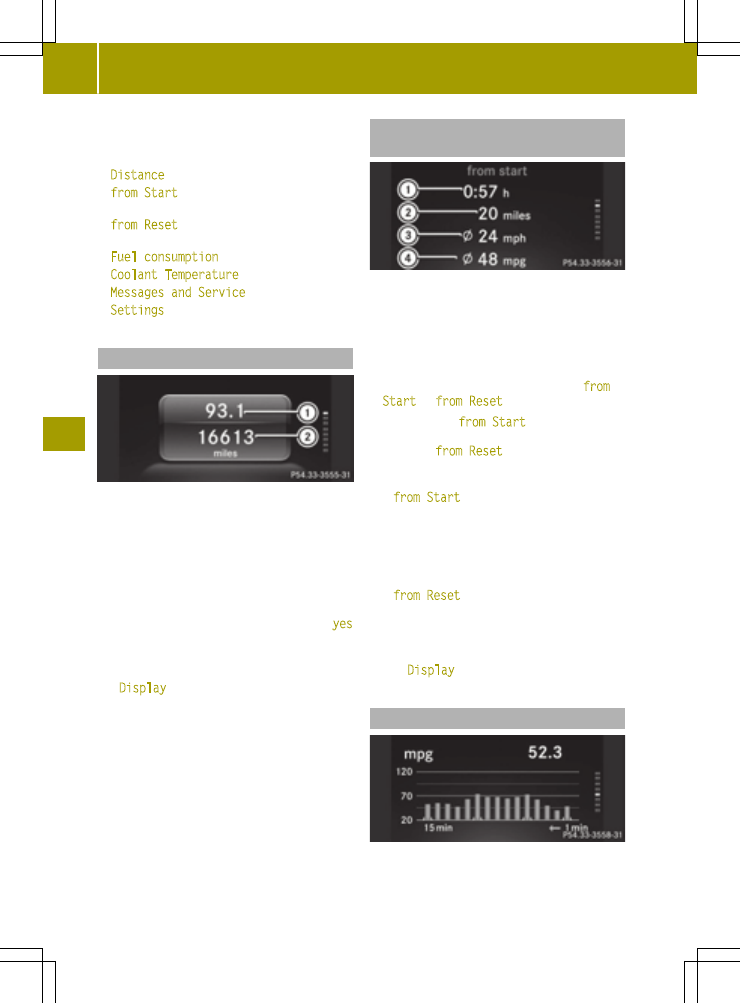
The display shows trip meter : and total
distance recorder ;.
X
To reset the data: press the a button on
the steering wheel.
X
Press the 9 or : button to select
yes
and press the a button to confirm.
The trip meter is reset.
You can change the unit for the trip meter in
the
Display
submenu (
Y
page 116).
Trip computer menu "From start" or
"From reset"
Example: trip computer "From start"
:
Elapsed time
;
Distance
=
Average speed
?
Average fuel consumption
X
To display: press the 9 or : button
on the steering wheel to select the
from
Start
or
from Reset
trip computer menu.
The data in the
from Start
trip computer
menu refers to the start of the journey. The
data in the
from Reset
trip computer sub-
menu refers to the last time the submenu was
reset.
The
from Start
trip computer is automati-
cally reset when:
R
the ignition has been switched off for more
than 4 hours.
R
999 hours have been exceeded.
R
9,999 miles have been exceeded.
The
from Reset
trip computer is automati-
cally reset if the value exceeds 9,999 hours or
99,999 miles.
The unit of distance for the journey, speed
and consumption information can be changed
in the
Display
submenu (
Y
page 116).
Fuel consumption menu
Example: fuel consumption
112
Menus and sub menus
>>
On-board
computer
and
display
s.