Skoda Fabia (2019 year). Manual - part 10
Route calculation for trailer towing
When driving with a trailer or any other accessory connected to the trailer
socket, we recommend that you switch on trailer recognition, if necessary, to
set the maximum speed for towing a trailer.
›
To calculate the route when driving with a trailer, go to the main Navigation
menu and tap the function surface → Route options → .
›
To set the maximum speed of the trailer, press the
button, then tap on
function surface → Driver assistance → Trailer recognition → Maximum speed for
trailer.
Demo mode
Demo mode provides a driving simulation to the entered destination. The func-
tion allows you to travel through the calculated route “virtually”.
When Demo mode is turned on, a menu for route guidance in Demo mode or
in normal mode is displayed before route guidance starts.
›
To activate/deactivate, go to the main Navigation menu and tap on the func-
tion surface → Advanced settings → Demo mode.
When Demo mode is activated, the route starting point can be defined.
›
In the main Navigation menu, tap the function surface Tap→ Advanced set-
tings → Define demo mode starting point.
›
Define the starting point by entering the address or the current vehicle posi-
tion.
›
The demo mode starting point can also be set provided demo mode is turned
on by tapping on the desired map location and selecting the menu item Start
Demo Mode
, Entering a destination via the map point.
Graphical driving recommendations
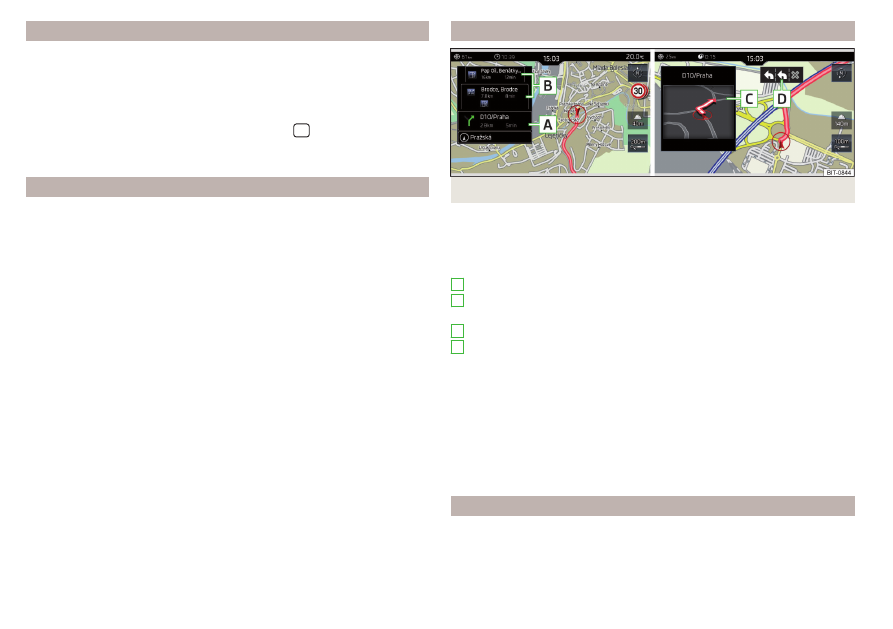
Fig. 187 Driving recommendations/driving recommendation detail
The display of the graphical driving recommendations is carried out in the split
screen Manoeuvre as well as the display of the instrument cluster.
In the Manoeuvre split screen, the following driving recommendations are dis-
played
.
Street name/street number of the current vehicle position
Driving recommendations with street names/road numbers, the route and
the travel time to the manoeuvre location
Driving recommendation details (displayed near the manoeuvre)
Lane guidance
In the Manoeuvre split screen, the Infotainment system also draws your atten-
tion to traffic obstructions received via TMC, as well as to motorways, car
parks, petrol stations or restaurants.
Speed limits
With the → Advanced settings → Note:National border crossed , display the
country-specific speed limits when crossing international borders.
These speed limits can be displayed by tapping on function surface → Top
speed in the main menu navigation.
Navigation announcements
The Infotainment system issues navigation announcements during route guid-
ance.
A
B
C
D
156
Infotainment