Seat Ateca (2022 year). Manual in english - page 18
Driving
screen are seen differently and imprecise-
ly.
●
Certain objects may not be shown or may
not be shown very clearly, for example,
posts or thin rails, due to the screen resolu-
tion or if light conditions are insufficient.
●
The cameras have blind spots in which
obstacles and people are not registered.
WARNING
The smart technology incorporated into
the Top View Camera system cannot over-
come the limits imposed by the laws of
physics and it only works within the limits of
the system. The greater convenience provi-
ded by the Area View system should never
tempt you to take any risk that may com-
promise safety. If used negligently or invol-
untarily, it may cause serious accidents
and injuries. The system is not a replace-
ment for driver awareness.
●
Adapt your speed and driving style to suit
visibility, weather, road and traffic condi-
tions.
●
Do not be distracted from the traffic by
looking at the screen.
●
Monitor the area around the vehicle at all
times, since the cameras do not capture
small children, animals and certain objects
in all situations.
●
The system will probably be unable to
represent all areas clearly.
CAUTION
●
The camera images are only two-dimen-
sional. Due to a lack of spatial depth, ob-
jects that jut out or holes on the road, for
example, are more difficult to detect or
may not be seen at all.
●
In certain circumstances, the camera
does not capture objects such as beams,
fences, posts or thin trees, which could
damage the vehicle.
●
The system displays the auxiliary lines
and boxes regardless of the vehicle's envi-
ronment, no objects are detected. The driv-
er is responsible for determining that the
vehicle will fit in the parking space.
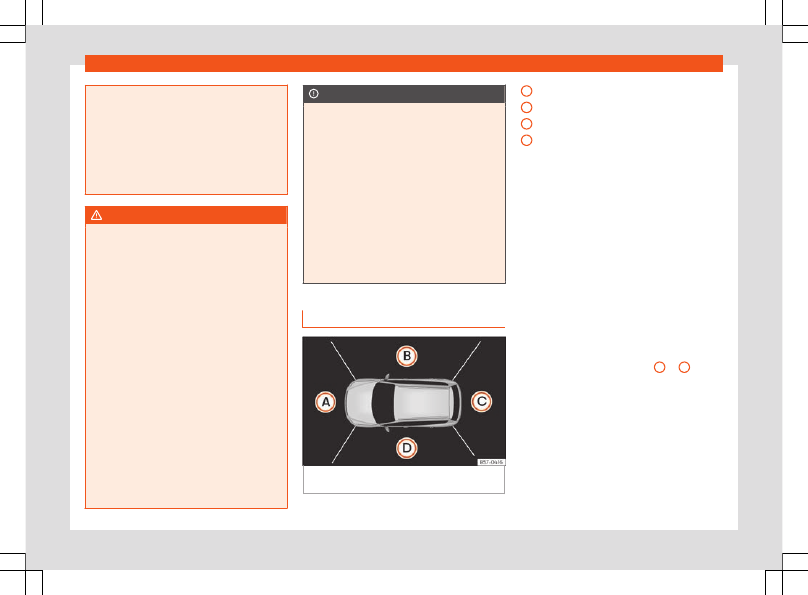
Area View system
Fig. 198
Viewing the top view system: aerial
view.
There are four different views to choose from:
Front camera area
Right camera area
Rear camera area
Left camera area
Function buttons:
Exit the current display.
Adjust the display: bright, contrast and
colour.
Three-dimensional views
Depending on the equipment: connect-
ing and disconnecting the ParkPilot
sound.
The aerial view is generated by combining
the images from all the cameras
›››
. The aerial view can be selected
by pressing the
vehicle
in the area.
Select the corresponding view by pressing
the different areas
›››
A
to
D
of the
aerial view or the reduced aerial view.
Conditions necessary for the use of the
Area View system
●
The doors and the rear lid must be closed.
●
The image must be reliable and clear. For
this reason, for example, the camera lens
must be clean.
●
The area around the vehicle must be clear-
ly and totally visible.
A
B
C
D
284