Seat Alhambra (2022 year). Manual in english - page 19
Help with parking and manoeuvring
Do not use the reverse assist system in the
following cases
●
– If there is a fault in the dynamic chassis
control (DCC).
●
If the image displayed is not very clear or
reliable (low visibility or dirty lens).
●
If the space behind the vehicle cannot be
clearly or completely recognised.
●
If the vehicle has been overloaded at the
rear.
●
If the driver is not familiar with the system.
●
If the rear lid is open.
●
If the position and installation angle of the
camera have been changed, e.g. in a rear-
end collision. Have a specialised workshop
check the system.
Optical illusions of the camera (examples)
The rear assist camera produces two-dimen-
sional images. Any cracks in or objects pro-
truding from the ground or from other vehi-
cles are more difficult to spot or cannot be
seen due to a lack of depth in the image dis-
played.
Objects or other vehicles may seem to be
closer or further away than what they really
are:
●
On changing from a flat surface to a slope
or gradient.
●
On changing from a slope or gradient to a
flat surface.
●
If the vehicle has been overloaded at the
rear.
●
On approaching protruding objects. These
objects may be outside the angle of vision of
the camera when reversing.
Note
●
SEAT recommends that you practise
parking with the rear assist system in a qui-
et location or in a car park to become fa-
miliar with the system, including the orien-
tation lines and their function.
●
The orientation lines will not be displayed
on the screen if the rear lid is open or the
factory-fitted towing bracket is electrically
connected to a trailer.
Parallel parking (mode 1)
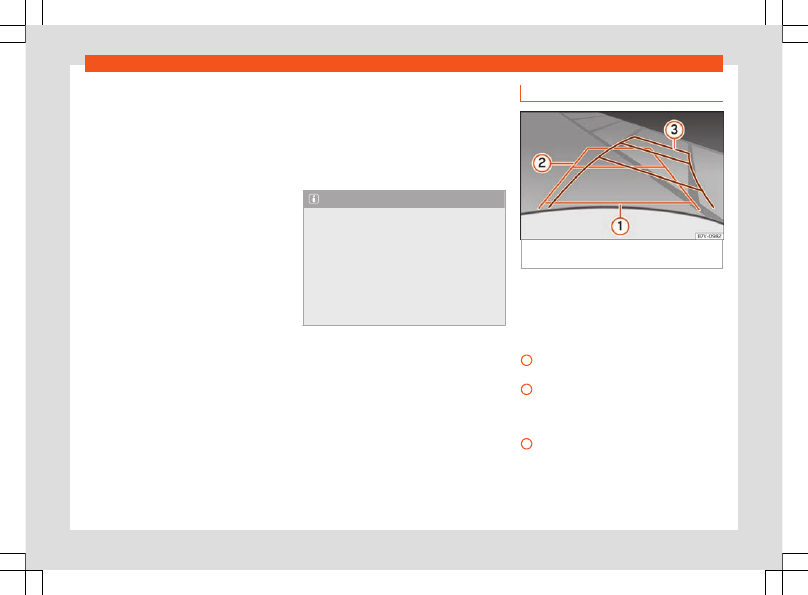
Fig. 276
Screen: orientation lines for the park-
ing space behind the vehicle.
Summary of the orientation points
Meaning of orientation lines displayed on the
screen
›››
. All of the lengths of the
orientation lines use a vehicle located on a
horizontal surface as reference.
Red: safety distance, i.e. road area loca-
ted up to 40 cm behind the vehicle.
Green: prolongation of the rear of the ve-
hicle (somewhat enlarged). The area dis-
played green ends around 2 metres be-
hind the vehicle, on the road.
Yellow: prolongation of the rear of the ve-
hicle as the steering wheel turns. The
area displayed yellow ends around 3 me-
tres behind the vehicle, on the road.
»
1
2
3
299