Renault Alaskan (2017 year). Instruction - part 5
•
Remote Control Key system (where fitted)
— “Push-button ignition switch (models with Re-
mote Control Key system)” in the “5. Starting
and driving” section
•
Oil control system (where fitted)
— “Oil control system (where fitted for diesel
engine model)” later in this section
•
Tyre Pressure information (where fitted)
— “Tyre Pressure Monitoring System (TPMS)
(where fitted)” in the “5. Starting and driving”
section
HOW TO USE THE VEHICLE
INFORMATION DISPLAY
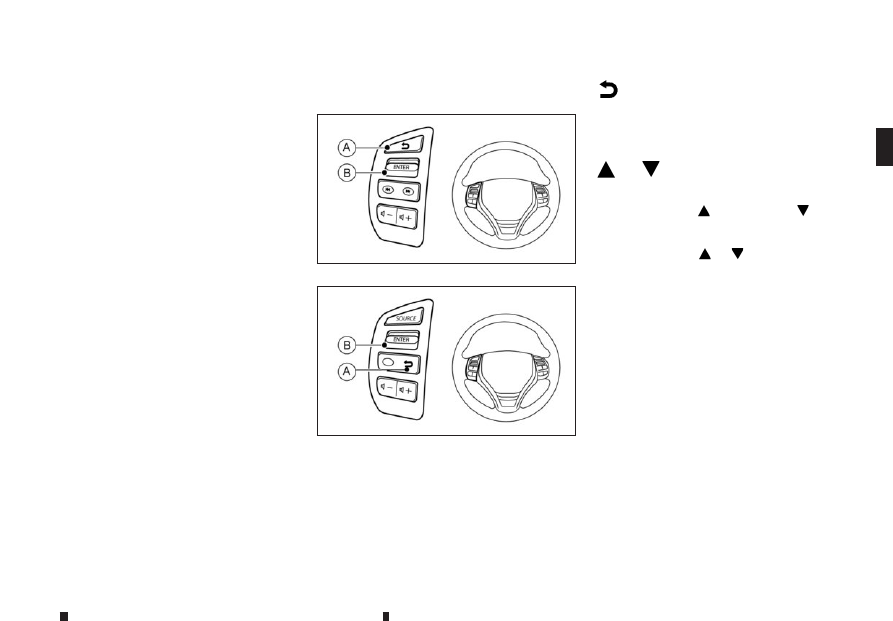
The vehicle information display can be changed us-
ing the <ENTER> and BACK buttons located on the
left side of the steering wheel.
m
Back button
j
A
Press the BACK button to return to the previous dis-
play screen or menu level, or to cancel the selection
if it is not completed.
m
or
m
Display scrolling switch
j
B
The display scrolling switch can be used in three dif-
ferent ways. Push
to scroll up or
to scroll
down through the items in the vehicle information
display. Press <ENTER>
j
B to select an item in the
display, then push
or
to scroll through the
associated menu options.
SETTINGS
The settings mode allows you to change the infor-
mation displayed in the vehicle information display:
•
[Driver Assistance]
•
[Clock]
•
[Display Settings]
•
[Vehicle Settings]
•
[Maintenance]
•
[Alert]
•
[Tyre Pressures] (where fitted)
•
[Units]
•
[Language]
•
[Factory Reset]
NIC3083
Type A
NIC3124
Type B
Instruments and controls
2-15