Peugeot 4008 (2017 year). Instruction - part 4
1
47
Instruments
4008_en_Chap01_Instruments-de-bord_ed01-2016
Permanent display
Once the data and time are set, you can
choose to have them always displayed in the
screen. to do this:
F Press the MENU button.
F Press "Setting".
F Press "Clock Screen".
Display format
You can change the display format for the date
and time:
F Press the MENU button.
F Press "Setting".
F Press "System Setting".
the date and time are displayed.
Simply touch the screen again to return to the
original display.
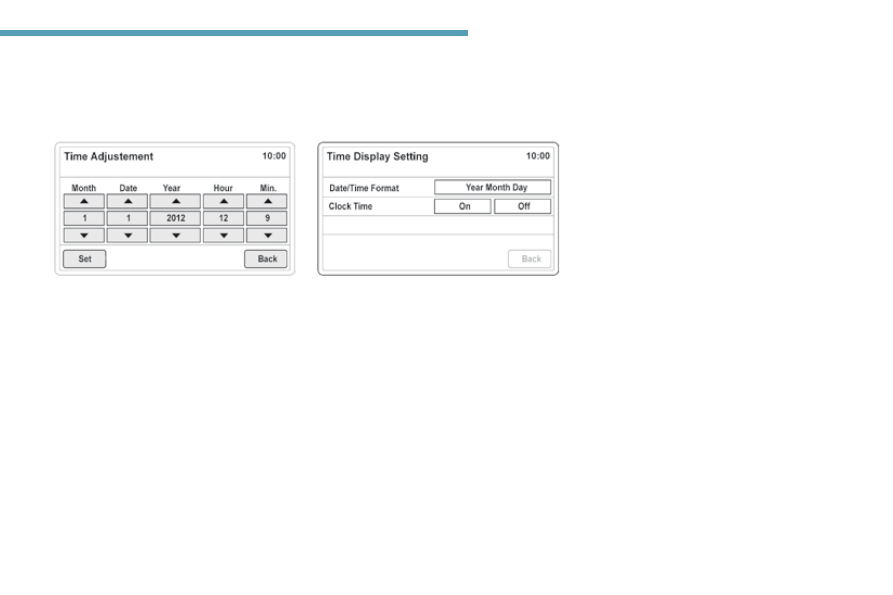
F Press "Time Setting".
F Press "
Time Display Setting".
You can then select the format for the display
of the date and time ("Date/Time Format")
and activate automatic adjustment of the time
("Clock Time").
F Press "
Time Adjustment".
F use the virtual arrows in the screen to
adjust the date and time.
F Press "Set" to confirm or "Back" to cancel
and return to the previous screen.
Month.
Date.
Year.
Hour.
Min.
Day.