Nissan Leaf (2024 year). Manual in english - page 2
 

  Index      Manuals     Nissan Leaf (2024 year). Manual in english


Search            copyright infringement  


Content      ..      1      2      3      ..


Nissan Leaf (2024 year). Manual in english - page 2


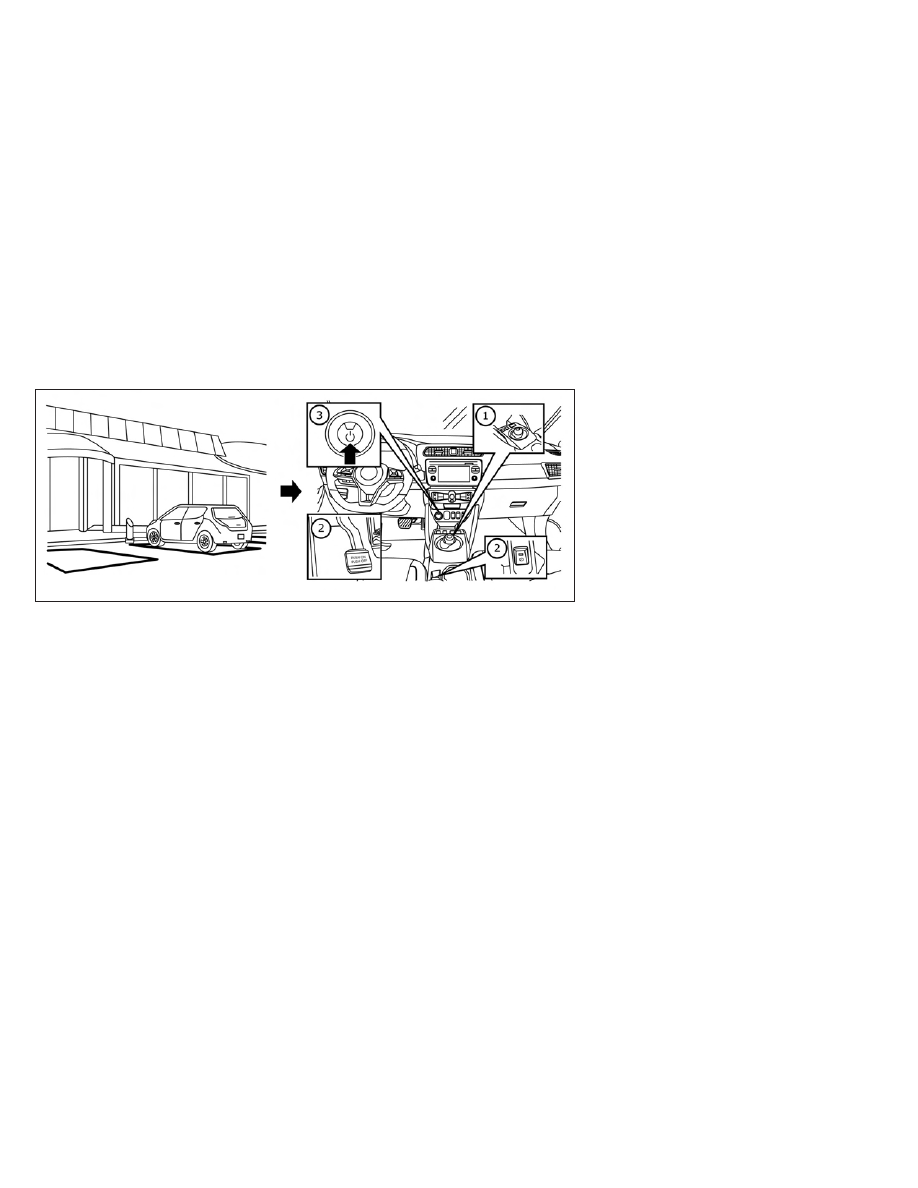
Parking the vehicle

1. When stopping the vehicle, apply the

foot brake, then push the P (Park) posi-
tion switch

O

1

on the shift lever. Confirm

that the vehicle is in the P (Park) position
by checking the shift indicator located
near the shift lever or on the vehicle in-
formation display.

2. Apply the parking brake

O

2

. For models

with the pedal type, firmly depress the
parking brake. For models with the
switch type, the electronic parking brake
is applied automatically (or for manual
operation, pull the electronic parking
brake switch up).

3. Push the power switch

O

3

to the OFF

position.

4. If a parking lot is equipped with charging

facilities, charge the Li-ion battery as
necessary. For additional information,
see “Charging” (P. CH-2).

LEV2068

EV-20

EV Overview
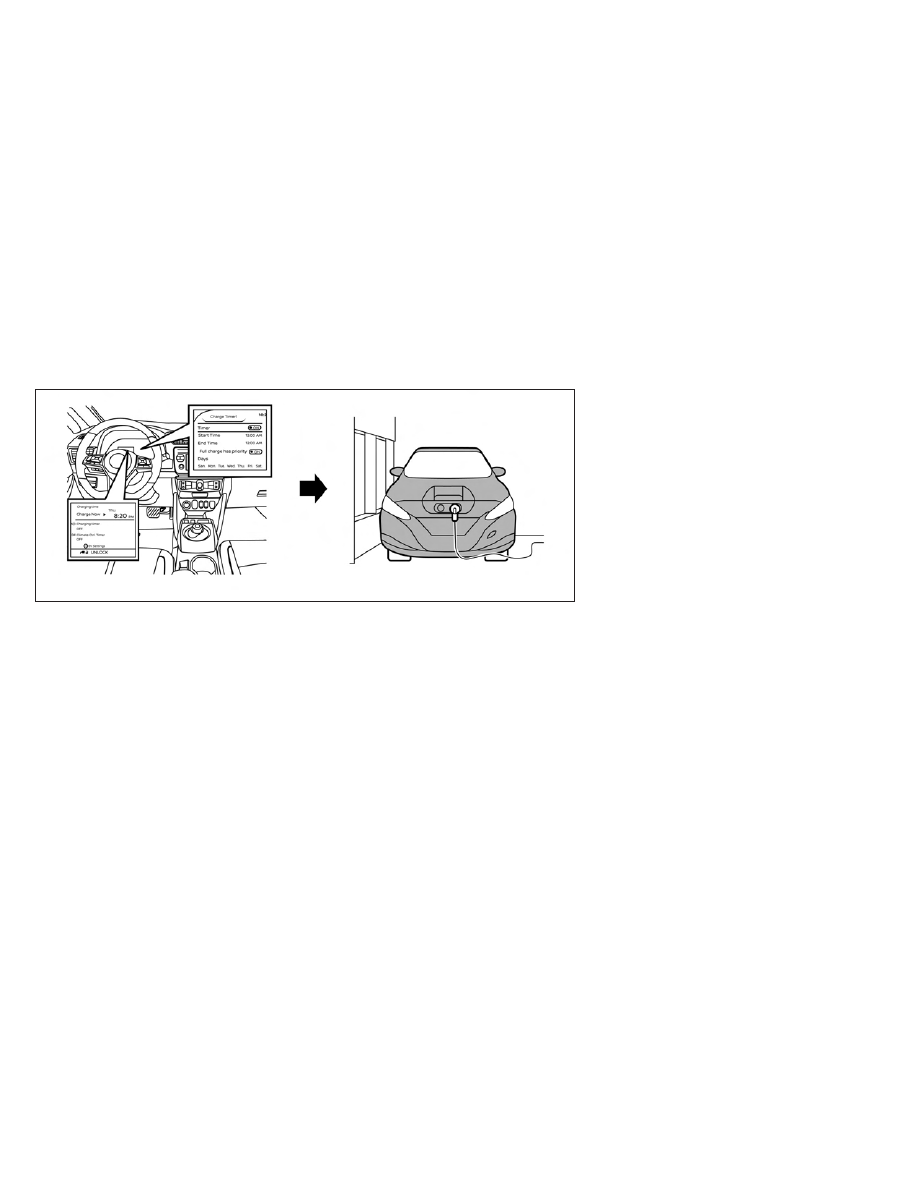
CHARGING AFTER DRIVING

Charging the Li-ion battery

When you return home, connect the ve-
hicle to the charging device installed at
your home or the EVSE plugged to outlet
using the normal charge connector.

Charge the vehicle or set the charging
timer function to have the vehicle charge
at a specific time. For additional informa-
tion, see “Charging timer” (P. CH-43).

1. When the power switch is turned off, the

settings of the charging timer, the Cli-
mate Ctrl. Timer and the charge connec-
tor lock functions and the driving range

are displayed on the vehicle information
display. For additional information, see
“Timer display” (P. CH-46).

2. Open the charge port lid and charge

port cap. For additional information, see
“Charge port lid” (P. 3-20).

3. Connect the charge connector to the

vehicle.

4. When the charging timer is turned on,

charging starts at the set time. When the
charging timer is not turned on, charg-
ing starts immediately.

NOTE:
• Charging can be started remotely, even

if the charging timer is set up.

• When you have forgotten to connect

the charge connector at home, there is a
function that can notify you via a text
message capable cellular phone, inter-
net enabled smart phone or personal
computer. For additional information,
see “Charging related remote function”
(P. CH-49) 
(models with Navigation
System).

• NISSAN recommends that you connect

the normal charge cable when getting
out of the vehicle, even if it is not going
to be used. By doing this, you can get
the most out of the remote climate
control (models with Navigation Sys-
tem) and Climate Ctrl. Timer functions
the next time you use the vehicle.

LEV2099

EV Overview

EV-21

RANGE

The distance you can drive the vehicle
(range) varies considerably depending upon
available charge, weather, temperature, us-
age, battery age, topography, and driving
style.

Refer to the Monroney label (window
sticker) for the official EPA range. Your ac-
tual range will vary and could be signifi-
cantly less, either initially or as the battery
ages and with use over time. For additional
information, see “Improve driving range”
(P. EV-22) for information on the factors that
affect vehicle range and how to use the
vehicle to maximize vehicle range.

IMPROVE DRIVING RANGE

Vehicle range depends on a number of
factors.

Actual vehicle range will vary depending
upon:
• Speed,
• Vehicle load,
• Electrical load from vehicle accessories,
• Traffic and road conditions,
• Distance driven without stopping,
• Usage,

• Driving style,
• Battery age,
• Weather or temperature,
• Topography,
• Charging habits.

NISSAN recommends the following driv-
ing habits to help maximize vehicle range:

Before driving:

• Follow recommended periodic mainte-

nance.

• Keep tires inflated to correct pressure.
• Keep wheels in correct alignment.
• Pre-heat or pre-cool the interior cabin

while the vehicle is charging.

• Remove unnecessary cargo from the

vehicle.

While driving:

• Drive in ECO mode

–– The ECO mode helps reduce power

consumption by reducing acceleration
when compared to the same accelera-
tor pedal position in the D (Drive) posi-
tion (normal mode).

• Drive at a constant speed. Maintain cruis-

ing speeds with constant accelerator po-
sitions or by using cruise control when
appropriate.

• Accelerate slowly and smoothly. Gently

press and release the accelerator pedal
for acceleration and deceleration.

• Drive at moderate speeds on the highway.
• Avoid extending highway driving with mul-

tiple quick charges.

• Avoid frequent stopping and braking. Main-

tain a safe distance behind other vehicles.

• Turn off the air conditioner/heater when

it is not necessary.

• Select a moderate temperature setting

for heating or cooling to help reduce
power consumption.

• Use the air conditioner/heater and close

windows to reduce drag when cruising at
highway speed.

• Vehicle range may be substantially re-

duced in extremely cold conditions (for
example, -4°F (-20°C)).

• Using the climate control system to heat

the cabin when the outside temperature
is below 32°F (0°C) uses more electricity
and affects vehicle range more than
when using the heater when the tem-
perature is above 32°F (0°C).

• When it is cold, use the steering wheel

heater in substitution for the heater/air
conditioner. The steering wheel heater
consumes less power than the heater/
air conditioner.

EFFICIENT USE OF YOUR VEHICLE

EV-22

EV Overview

• Release the accelerator pedal to slow

down and do not apply the brakes when
traffic and road conditions allow.

–– This vehicle is equipped with a regen-

erative brake system. The primary pur-
pose of the regenerative brake system
is to provide some power to recharge
the Li-ion battery and extend driving
range. A secondary benefit is “engine
braking” that operates based on Li-ion
battery conditions. In the D (Drive) posi-
tion, when the accelerator is released,
the regenerative brake system pro-
vides some deceleration and some
power to the Li-ion battery.

LI-ION BATTERY LIFE

The Li-ion battery's ability to hold a charge,
like all batteries, decreases with battery
age and usage which results in decreased
vehicle range when compared to the ve-
hicle range when the vehicle was new. This
is normal and expected, and does not indi-
cate a malfunction of the vehicle or Li-ion
battery.

The Li-ion battery's ability to hold a charge
can be affected by how you drive the ve-
hicle, store the vehicle, how you charge the
Li-ion battery and Li-ion battery tempera-
ture during vehicle operation and charging.

To maximize the battery's useful life, use
the following driving and charging habits
where possible:
• Avoid exposing a vehicle to extreme am-

bient temperatures for extended periods.

• Avoid storing a vehicle in temperatures

below −13°F (−25°C) for more than seven
days.

• Avoid leaving your vehicle for more than

14 days where the Li-ion battery available
charge gauge reaches a zero or near zero
(state of charge).

• Allow the vehicle and Li-ion battery to

cool down after use before charging.

• Park/store your vehicle in cool locations

out of direct sunlight and away from heat
sources.

• Avoid sustained high battery tempera-

tures (caused, for example, by exposure
to very high ambient temperatures or ex-
tending highway driving with multiple
quick charges.

• Use the normal charging or trickle charg-

ing methods to charge the Li-ion battery
and minimize the use of public Fast
Charge or Quick Charger.

• Moderate driving.
• Use of ECO mode.

• Do not operate the charging timer re-

peatedly while the charge connector is
connected to the vehicle after the Li-ion
battery charging is completed. Doing so
may discharge the 12-volt battery.

• The power of the Li-ion battery can be

checked on the Li-ion battery available
charge gauge. For additional information,
see “Li-ion battery available charge gauge”
(P. 2-9).

LI-ION BATTERY MAINTENANCE

In addition to the regular maintenance rec-
ommended by NISSAN, the LEAF requires
some special Li-ion battery inspections.
• For additional information, refer to the

NISSAN Warranty Information Booklet for
significant limitations, exclusions and
possible voiding of your warranty result-
ing from failure to have these necessary
inspections, repairs and/or adjustments
performed.

• For a detailed explanation of the Li-ion

battery inspection and intervals, see “EV
maintenance schedules (EM57 electric
motor) (P. 9-7).

EV Overview

EV-23

METERS AND INDICATORS

Various meters and gauges related to the
EV functions are displayed in the vehicle
information display.

Meter

Master warning light

The master warning light (red or yellow)

O

1

illuminates when messages are displayed
on the vehicle information display.

For additional information, see “Master
warning light (red/yellow)” (P. 2-18) (P. 2-22).

Li-ion battery temperature gauge

This gauge

O

2

displays the temperature of

the Li-ion battery.

For additional information, see “Li-ion bat-
tery temperature gauge” (P. 2-7).

LEV2084

LEV2085

EV UNIQUE INFORMATION

EV-24

EV Overview

Power meter

This meter displays the actual traction mo-
tor power consumption and the regenera-
tive brake power provided to the Li-ion
battery.

For additional information, see “Power
meter” (P. 2-8).

Driving range

This indicator displays the estimated driv-
ing range (calculated based on a program
that accounts for current driving style and
operational conditions) that can be driven
before recharging is necessary.

For additional information, see “Driving
range” (P. 2-9).

Li-ion battery available charge gauge

This indicator displays the available Li-ion
battery capacity remaining to drive the
vehicle.

For additional information, see “Li-ion bat-
tery available charge gauge” (P. 2-9).

The EV unique information is displayed on
the vehicle information display as well.
For additional information, see “Vehicle in-
formation display” (P. 2-26).

LEV2055

LIC3937

LIC3938

EV Overview

EV-25

Warning and indicator lights

The EV system uses the following EV spe-
cific warning and indicator lights:

1. Master warning light (red)

2. Master warning light (yellow)

3. 12-volt battery charge warning light

4. Plug-in indicator light

5. READY to drive indicator light

6. Power limitation indicator light

7. EV system warning light

8. Electric shift control system warning

light

9. Brake system warning light (yellow)

10. Approaching Vehicle Sound for Pedes-

trians (VSP) system OFF warning light

For additional information, see “Warning
lights, indicator lights and audible remind-
ers” (P. 2-14).

APPROACHING VEHICLE SOUND
FOR PEDESTRIANS (VSP) SYSTEM

The Approaching Vehicle Sound for Pedes-
trians (VSP) system is a function that uses
sound to alert pedestrians of the presence
of the vehicle when it is being driven at a
low speed.

When the vehicle starts to move, it pro-
duces a sound.

The sound stops when the vehicle speed
is more than 25 mph (40 km/h) while
accelerating.

LEV2102

LEV2060

EV-26

EV Overview

The sound starts when the vehicle speed
is less than 22 mph (35 km/h) while decel-
erating.

WARNING

If the sound cannot be heard, pedes-
trians may not notice the oncoming
vehicle, which may cause an accident
resulting in serious injury or death. It
is recommended that you immedi-
ately visit a NISSAN certified LEAF
dealer for VSP system inspection.

If the VSP system OFF warning light
illuminates while the power switch is
in the ON position, or in the READY
to drive position, it may indicate the
VSP system is not functioning prop-
erly. Have the VSP system checked.
It is recommended that you visit a
NISSAN certified LEAF dealer for
this service. For additional informa-
tion, see “Approaching Vehicle Sound
for Pedestrians (VSP) system OFF
warning light” (P. 2-19).

NOTE:

The volume of the (VSP) sound cannot be
raised or lowered.

ELECTRIC SHIFT CONTROL SYSTEM

This vehicle is equipped with an electric
shift control system. This control system
has three features:
• Smooth and easy shift lever operation.
• To place the vehicle in the P (Park) posi-

tion, push the P (Park) position switch on
the shift lever.

• The vehicle automatically applies the P

(Park) position when the power switch is
placed in the OFF position.

For additional information, see “Driving the
vehicle” (P. 5-14).

LED HEADLIGHT (low beam) (if so
equipped)

This vehicle uses an LED headlight for the
headlight low beam. The LED headlight has
the following features:
• Low power consumption
• The shape is very compact.

It is recommended that you visit a NISSAN
certified LEAF dealer to replace the head-
light.

DRIVING RANGE

On the vehicle information display or navi-
gation system screen (if so equipped), you
can check the estimated distance the ve-
hicle may be driven with the available Li-ion
battery charge. For additional information,
refer to the NissanConnect® Manual.

LEV2051

EV Overview

EV-27

MEMO

EV-28

EV Overview

Charging

Precautions on charging . . . . . . . . . . . . . . . . . . . . . . CH-2
Types of charge and how to charge the Li-ion
battery . . . . . . . . . . . . . . . . . . . . . . . . . . . . . . . . . . . . . . . . CH-5

How to normal charge (AC 220–240
volt) by charging device . . . . . . . . . . . . . . . . . . . CH-10
How to trickle charge (AC 110–120 volt)
by L1 EVSE . . . . . . . . . . . . . . . . . . . . . . . . . . . . . . . . . . CH-11
How to trickle charge (AC 110–120 volt)
by L1 & L2 EVSE . . . . . . . . . . . . . . . . . . . . . . . . . . . . CH-18
How to normal charge (AC 220–240
volt) by L1 & L2 EVSE . . . . . . . . . . . . . . . . . . . . . . . CH-26
How to quick charge . . . . . . . . . . . . . . . . . . . . . . CH-35
How to charge/discharge using quick
charge port . . . . . . . . . . . . . . . . . . . . . . . . . . . . . . . CH-38
Charge connector lock system . . . . . . . . . . . . CH-41

Charging methods . . . . . . . . . . . . . . . . . . . . . . . . . . . CH-43

Charging timer . . . . . . . . . . . . . . . . . . . . . . . . . . . . CH-43
Timer Display . . . . . . . . . . . . . . . . . . . . . . . . . . . . . CH-46
Immediate charge . . . . . . . . . . . . . . . . . . . . . . . . CH-48
Charging related remote function
(models with Navigation System) . . . . . . . . . . CH-49

Charging related indicator lights . . . . . . . . . . . . . CH-50

Charging status indicator lights . . . . . . . . . . . CH-50
EVSE (Electric Vehicle Supply
Equipment) control box indicator light . . . . . CH-53

Charging troubleshooting guide . . . . . . . . . . . . . CH-56

WARNING

If you use any medical electric devices,
such as an implantable cardiac pace-
maker or an implantable cardiovascu-
lar defibrillator, check with the electric
medical device manufacturer con-
cerning the effects that charging may
have on implanted devices before
starting the charge operation. Charg-
ing may affect the operation.

Make sure there is no water or foreign
materials in the charge port, charge
connector, or electrical plug, and that
they are not damaged or affected by
rust or corrosion. If any of these condi-
tions are noticeable, do not charge
the Li-ion battery. This may result in a
short circuit or electric shock and
could cause a fire which may result in
serious personal injury or death.

To avoid serious personal injury or
death when the Li-ion battery is
charging, be aware of the following
precautions.

Do not touch the metal contacts of

the charge port, charge connec-
tor, electrical plug or Genuine
NISSAN Adapter.

Do not touch the vehicle and EVSE

when there is lightning.

Do not pull, twist, bend, step on, or

drag the cable.

Make sure the charge connector is
removed from the charge port before
starting your vehicle. If the charge
connector is only partially engaged
and the connector latch is unlocked,
it is possible to place the EV in the
READY to drive position.

Do not touch the plug or the Genuine
NISSAN Adapter if they are wet or
with wet hands. Do not put the plug
or the Genuine NISSAN Adapter in
water, liquid or snow. This may cause
an electric shock which may result in
serious personal injury or death.

Do not disassemble or modify the
charge port, the EVSE or the Genuine
NISSAN Adapter. This may cause a
fire or an electric shock which may
result in serious personal injury or
death.

If you notice an unusual odor, smoke
or abnormal noises coming from the
vehicle, stop charging immediately.

Be careful not to allow your hands,
hair, jewelry or clothing to come into
contact with, or get caught in, the
traction motor cooling fan. The cool-
ing fan can start at any time during
charging.

Do not use extension cords or adapt-
ers unless they are Genuine NISSAN
parts.

Do not use the Genuine NISSAN
Adapter with any devices except the
Genuine NISSAN EVSE.

Do not allow an unattended child to
handle or use this product.

Use the EVSE with outlet and wiring
installed according to the regula-
tions/standards.

Pass the lower side belt of the EVSE
case securely through the fastener
on the bottom of the luggage board.
If the case suddenly becomes loose,
it may cause serious injury or death.

PRECAUTIONS ON CHARGING

CH-2

Charging

CAUTION

To prevent damage to the charging
equipment:

Do not close the charge port lid

without closing the charge port
cap.

Do not subject the charging equip-

ment to impact.

Do not store and use charging

equipment in locations where the
temperature is over 185°F (85°C)

Make sure the charge port cap is
closed on the charge port when
charging is finished. If the charge
port lid is closed when the charge
port cap is open, water or foreign
materials may enter the charge port.

Do not charge when a vehicle body
cover is in use. This may cause dam-
age to the charge connector.

Do not attempt to perform a jump
start on the 12-volt battery at the
same time that the Li-ion battery is
being charged. Doing so may dam-
age the vehicle or charging equip-
ment and could cause an injury. For
additional information, see “Jump
starting” (P. 6-10).

In normal charging (AC 220 - 240 volt)
and trickle charging (AC 110 - 120 volt)
using the EVSE (Electric Vehicle Sup-
ply Equipment) provided with the ve-
hicle, NISSAN recommends using an
AC 220 - 240 volt, 50A and an AC 110-
120 volt, 15A dedicated electrical cir-
cuit and outlet. The dedicated circuit
is used to help prevent circuit dam-
age or the circuit breaker from trip-
ping due to the high draw of charging
the Li-ion battery. If the dedicated

circuit is not used, the circuit may
cause adverse interference on MCB
(Moulded Circuit Board) and house-
hold electrical appliances such as
televisions and audio systems. If the
circuit is shared, and another electri-
cal device is being used at the same
time the vehicle is charging, the
breaker may trip. A qualified electri-
cian should install a dedicated circuit
if one is not already available.

NOTE:
• When charging the Li-ion battery, place

the power switch in the OFF position.
When the power switch is in the ON
position, the Li-ion battery will not
start charging.

• For your safety, if the charge connector

is connected to the vehicle while the
power switch is in the READY to drive,
the vehicle will automatically switch to
the ON position. Because charging will
not be started while the power switch
is in this position, be sure to place the
power switch in the OFF position.

• When the ambient temperature is 32°F

(0°C) or less, charging time may be lon-
ger than normal and the level to which
the Li-ion battery can be charged may
be less than at higher temperatures.

LCH2136

Charging

CH-3

• Do not operate the charging timer re-

peatedly while the charge connector
is connected to the vehicle after the
Li-ion battery charging is completed.
Doing so may discharge the 12-volt
battery. For additional information,
see “Charging timer” (P. CH-43). 
If the
Li-ion battery becomes discharged,
charge it immediately.

• The power switch can be set to the ON

position and the climate control and
navigation system (if so equipped) can
be used while the Li-ion battery is
charging. However, because these op-
erations consume Li-ion battery power,
it will take longer for the Li-ion battery
to become fully charged. Place the
power switch in the OFF position to help
reduce Li-ion battery charge time.

• If electrical power is interrupted while

charging, charging restarts automati-
cally when the electrical power is re-
stored.

• It is recommended to keep the charge

cable connected to save Li-ion battery
power, when the heater and air condi-
tioner are operating with remote opera-
tion (models with Navigation System).

• If the charge port is frozen, melt the ice

using a hair dryer. After the ice has
melted, charge the Li-ion battery. Forc-
ing the charge connector to connect
may cause a malfunction.

• If foreign materials have entered the

charge connector and charge port and
it is not possible to connect it, do not
attempt to force the connection. It is
recommended that you visit a NISSAN
certified LEAF dealer. Forcing the charge
connector to connect may cause dam-
age to the charging equipment and
vehicle.

• There is a hole on the charge port for

water drainage. If the water drainage
hole becomes blocked, or if water gets
trapped inside the charge port, do not
charge. It is recommended that you
visit a NISSAN certified LEAF dealer.

CH-4

Charging

LTI2429

TYPES OF CHARGE AND HOW TO
CHARGE THE LI-ION BATTERY

Charging

CH-5

*1: V2X (Vehicle to everything); The EV supplies electric power to a home or a building etc. (e.g. Vehicle to home (V2H), Vehicle to building
(V2B), Vehicle to grid (V2G), Vehicle to load (V2L), and Vehicle to vehicle (V2V)).

LTI2645

CH-6

Charging

This vehicle is an electric vehicle and it re-
quires electricity to operate. The Li-ion bat-
tery is the only source of power to operate
the vehicle. It is important to conserve
power and plan your charging needs when
you drive to avoid completely discharging
the Li-ion battery and being unable to drive.

There are three methods available to
charge the Li-ion battery:
• Normal charge
• Trickle charge
• Quick charge
• V2X charge/discharge

The time to completely charge the vehicle
Li-ion battery varies based on the state of
charge of the Li-ion battery, condition and
age of the Li-ion battery, temperature of
the Li-ion battery, ambient temperature
and condition of the power source con-
nected to the vehicle, and whether the
electric equipment (such as the air condi-
tioner, which consumes electric power) is
used.

Normal charge

NISSAN recommends using normal charg-
ing for usual charging of the vehicle. Use of
quick charge should be minimized in order
to help prolong Li-ion battery life.

Normal charging uses L1 & L2 EVSE (Electric
Vehicle Supply Equipment), or an SAE J1772
compliant charging device connected to a
dedicated AC 220 - 240 volt circuit. L1 & L2
EVSE is provided with the vehicle (if so
equipped). The charging device is a home
charging dock installed in your home by a
qualified electrician. Contact your NISSAN
certified LEAF dealer. For additional informa-
tion, see “How to normal charge” (P. CH-10).

Trickle charge

Trickle charging is not recommended for
regular use because it takes more time
than normal charging. Trickle charge can
be used when it is necessary to perform an
emergency charge at a destination such
as a friend’s house.

Trickle charge uses the EVSE (Electric Ve-
hicle Supply Equipment) provided with the
vehicle or an SAE J1772 compliant cord set
to connect the vehicle to an AC 110–120 volt,
15A dedicated outlet. The outlet should be
protected by a circuit breaker to avoid
overloading the circuit or other electrical
hazard.

For additional information, see “How to
trickle charge” (P. CH-11) or (P. CH-18).

Quick charge

Quick charge capability is only available
on vehicles manufactured with the quick
charge option, which includes the quick
charge port. If your vehicle does not have
such a port, quick charging cannot be used.

A vehicle equipped with a quick charge
port is compatible with most CHAdeMO
(Japanese industry standard) connectors
on charging stations. Charging stations
using this standard are UL certified and
safe to use in the US. While supported by
NISSAN, this connector may not become
the US SAE standard.

Quick charging is possible (even several
times a day). If the battery temperature is
near the red zone, in order to protect the
battery, power of the quick charging will be
limited.

Public charging:

This vehicle is compatible with any public
charging station that is SAE J1772 compli-
ant. If you attempt to charge from a non-
compliant charging station, you may not
receive a complete charge, or you may not
be able to charge at all due to hardware
and software differences. NISSAN is working
with states, municipalities, utility companies
and others to assist in the preparation

Charging

CH-7

of markets and infrastructure. However,
NISSAN makes no representations that
public charging stations will be available in
locations where you wish to operate the
vehicle, nor can NISSAN predict the period
of time it may take for public charging in-
frastructure to be developed in your area.
Depending on where you live or drive, there
may not be sufficient public charging sta-
tions available to meet your particular
needs for driving range and charging away
from your home. Trip planning is therefore
important, and you should plan trips with
these facts in mind.

Quick charge uses public charging stations
(up to 50 kW of power [for 40 kWh battery
models] / 100 kW of power [for 60 kWh bat-
tery models]).

The time needed to charge the Li-ion bat-
tery from discharged (low battery charge
indicator light illuminated) to 80% charged
using the quick charger depends on many
factors including the Li-ion battery tem-
perature and the type of quick charger
used.

It may take more time to charge the Li-ion
battery using the quick charger if the ve-
hicle is parked in a cold location for a long
time.

It may take more time to charge the Li-ion
battery using the quick charger if the tem-
perature of the Li-ion battery is high or low.

The Li-ion battery temperature gauge can
be used to estimate the approximate time
needed to charge the Li-ion battery to 80%.
If charging stops mid-charge, you can re-
start charging by pressing the start button
on the quick charger station again. Quick
charging is possible (even several times a
day). If the battery temperature is near the
red zone, in order to protect the battery,
power of the quick charging will be limited.

LHA5087

For 40 kWh battery models

CH-8

Charging

V2X charge/discharge

V2X charge/discharge capability is only
available on vehicles manufactured with
the V2X charge/discharge option, which
includes the quick charge port.

A vehicle equipped with a quick charge
port is compatible with most CHAdeMO
(Japanese industry standard) connectors
on charging stations.

Charging

stations

or

V2X

charging/

discharging devices using this standard
are UL certified and safe to use in the US.
While supported by NISSAN, this connector
may not become the US SAE standard.
V2X charging/discharging is possible (even
several times a day). If the battery tempera-
ture is near the red zone, in order to protect
the battery, power of the V2X charging/
discharging will be limited.

For additional information, consult a V2X
device manufacturer or a V2X charging/
discharging service provider.

Power limitation mode

This mode protects the health and opera-
tion of the vehicle's Li-ion battery. This
mode operates in certain extreme condi-
tions (heat, cold, low state of charge). Power
available to vehicle systems, including its
traction motor, is limited resulting in limited
performance, acceleration and top speed.
Charging may be automatically terminated,
especially with repeated quick charging in
extreme hot weather.

Checking Li-ion battery charge

The three methods for checking the amount
of charge are as follows:
• Check by using the Li-ion battery avail-

able charge gauge on the vehicle infor-
mation display when the power switch is
placed in the ON position. For additional
information, see “Li-ion battery available
charge gauge” (P. 2-9) and “Low battery
charge indicator” (P. 2-36).

• Check by using an internet enabled

smart phone or personal computer.
For additional information, refer to the
“NissanConnect® Manual”.

• Check by using the charging status indica-

tor light. For additional information, see
“Charging status indicator lights” (P. CH-50).

NOTE:
• During the charge operation, charge

continues when the power switch is
placed in the ON position.

• The Li-ion battery cannot be charged

if the quick charge connector and the
normal charge connector are con-
nected at the same time. If another
charge connector is connected mid-
charge, charging will stop.

LHA5635

For 60 kWh battery models*

*Subject to charging equipment

capability to output 100kW

Charging

CH-9

• For safety reasons, it is not possible to

switch to the READY to drive position
while a charge connector is connected.

• During charging, it is possible that the

radio may be inaudible due to noise by
the electromagnetic wave.

HOW TO NORMAL CHARGE
(AC 220–240 volt) BY CHARGING
DEVICE

WARNING

If you use any medical electric de-
vices, such as an implantable cardiac
pacemaker or an implantable cardio-
vascular defibrillator, check with the
electric medical device manufacturer
concerning the effects that charging
may have on implanted devices be-
fore starting the charge operation.
Charging may affect the operation.

Be sure to follow the precautions for
using the charging device that can
be installed in your home. Failing to
do so could result in serious injury or
death.

CAUTION

Do not use any charging equipment
that is not compatible with the LEAF.
Doing so could prevent the Li-ion bat-
tery from charging properly or could
result in damage to the vehicle or Li-ion
battery.

• Normal charge uses the charging device

(AC 220 - 240 volt, 16A or 32A) that can be
installed in your home to charge the Li-
ion battery.

• Immediate charge, charging timer and

remote charge (models with Navigation
System) can be performed in the normal
charge mode. For additional information,
see “Charging methods” (P. CH-43).

• The charging equipment communicates

with the vehicle before Li-ion battery
charging starts. If this communication
does not occur because other equipment
is used, the Li-ion battery will not charge.

• NISSAN recommends that you connect

the charging device when getting out of
the vehicle, even if it is not going to be
used. By doing this, you can get the most
out of the remote climate control (mod-
els with Navigation System) and Climate
Ctrl. Timer functions the next time you
use the vehicle.

To start normal charge:

1. Push the P (Park) position switch to place

the vehicle in the P (Park) position and
apply the parking brake.

2. When charging the Li-ion battery, place

the power switch in the OFF position.
When the power switch is in the ON po-
sition, the Li-ion battery will not start
charging.

3. Open the charge port lid and charge

port cap. For additional information, see
“Charge port lid” (P. 3-20) and “Charge
port cap” (P. 3-22).

CH-10

Charging

4. Connect the charge connector to the

charge port. If it is connected normally,
a beep will sound once.

5. If charging has started or if the battery is

waiting for the charging timer, a beep
will sound twice and the charging status
indicator light display will change. For
additional information, see “Charging
status indicator lights” (P. CH-50).

To stop normal charge:

1. Ensure that the charge connector lock

is not engaged. For additional informa-
tion, see “Charge connector lock system”
(P. CH-41).

2. Press the button on the charge connec-

tor, release the lock and remove the
charge connector from the charge port
and properly store it.

3. Close the charge port cap.

4. After closing the charge port cap on the

charge port, close the charge port lid.

NOTE:

To stop charging mid-charge, remove the
charge connector. Charging automatically
stops.

HOW TO TRICKLE CHARGE
(AC 110–120 volt) BY L1 EVSE

WARNING

If you wear a pacemaker or an im-
plantable cardiovascular defibrillator
(ICD), stay at least 6 in (15 cm) away
from the EVSE.

If you wear a pacemaker or an im-
plantable cardiovascular defibrillator
(ICD), check with the electric medical
device manufacturer concerning the
effects that charging may have on
implanted devices before starting
the charge operation. Charging may
affect the operation.

In order to avoid an electric shock or
fire due to a short circuit, connect to a
GFI (Ground Fault Interrupter) circuit
breaker and use a waterproof electri-
cal ground socket.

LCH2104

LCH2105

Charging

CH-11

Discontinue EVSE use immediately if
plug or outlet becomes hot to the
touch or if you notice any unusual
odors.

Never use extension cords or plug
adapters with EVSE.

Always unplug the EVSE when not in
use.

The Genuine NISSAN L1 EVSE charg-
ing device draws 12 amps continu-
ously while charging the Li-ion bat-
tery with AC 110–120 volt outlet. Do
not plug in to any electrical circuit
unless it is inspected by a licensed
electrician to confirm that the elec-
trical circuit can accept a 12 amp
draw. Any electrical circuit has a
much higher likelihood of being
compromised in the following condi-
tions listed below.

Improper use of the EVSE may re-

sult in a fire and serious injury or
death.

Do not use the EVSE in structures

more than 40 years old.

Do not use the EVSE in structures

using fuse-based circuit protec-
tion. Use only with electrical circuits
protected by circuit breakers.

Do not use the EVSE on electrical

circuits with two-prong outlets.

Do not use the EVSE if other de-

vices are plugged into the same
circuit.

When unplugging, be sure to pull by

the plug or the EVSE, not the cord.

Do not pull, twist, bend, step on or

drag the cable.

Do not attach or detach the

Genuine NISSAN Adapter while
the Genuine NISSAN Adapter is in-
serted into an outlet.

Do not use the Genuine NISSAN

Adapter if the plug is not fully in-
serted and not locked.

If you use the EVSE holder, handle

it with care to avoid injuries due
to contact with its edges or other
parts.

Do not use the EVSE if the cable or

cord is frayed, has broken insula-
tion, or shows any other indica-
tions of damage.

Stop using the EVSE immediately

if charging stops before comple-
tion when you move the plug or
cord.

Do not use the EVSE if the control

box, plug, the EVSE or charge con-
nector is broken, cracked, open,
corroded or shows any other indi-
cations of damage.

Do not use the EVSE if the plug has

a loose connection with the outlet
or if the outlet is damaged or
rusted.

Before you connect the EVSE, be

sure to check the rated current
shown on the EVSE to ensure that
the outlet and circuit have enough
current capacity to charge your
vehicle safely. If the capacity of the
outlet and circuit is not enough,
wiring may cause overheating or a
fire.

If in any doubt about the outlet and

circuit, consult a qualified electri-
cian.

The EVSE has parts that may

spark inside. Do not use it where
gasoline, paint, or flammable liq-
uids are used or stored.

CH-12

Charging

Do not use if a malfunction occurs

or if the EVSE has been damaged
in any manner. It is recommended
that you visit a NISSAN certified
LEAF dealer for replacement.

The EVSE contains no user ser-

viceable parts. Do not attempt to
repair the EVSE, doing so will void
your warranty.

Pass the lower side belt of the EVSE
case securely through the fastener
on the bottom of the luggage board.
If the case suddenly becomes loose,
it may cause serious injury or death.

CAUTION

Only charge using a standard AC 110 -
120 volt, 15A dedicated electrical out-
let (for example, do not use an elec-
tric generator). Failure to do so may
cause charging to fail and could cause
damage to the vehicle or the EVSE
equipment due to power surges.

NISSAN recommends using Genuine
NISSAN charging equipment to charge
the vehicle. Using non-NISSAN equip-
ment could cause the Li-ion battery to
not charge correctly and may damage
the vehicle.

Precautions on storage

• Do not store the EVSE in a place exposed

to direct sunlight.

• Do not store the EVSE in a place exposed

to wind or rain.

• Be sure to store the EVSE with the protec-

tive cap on to keep the terminal of the
charge connector away from dirt and
dust.

• Do not store the EVSE with the cable

and/or cord wound around the control
box.

• Do not store the EVSE in a condition in

which the cable and/or cord are twisted.

• The control box will become hot while the

EVSE is charging. This is not a malfunc-
tion.

LCH2136

Charging

CH-13

To start trickle charging:

NOTE:

Charging timer, remote charge (models
with navigation system) and immediate
charge can be performed in the trickle
charge mode. For additional informa-
tion, see “Charging methods” (P. CH-43).

1. Push the P (Park) position switch to place

the vehicle in the P (Park) position and
apply the parking brake.

2. When charging the Li-ion battery, place

the power switch in the OFF position.
When the power switch is in the ON po-
sition, the Li-ion battery will not start
charging.

3. Open the charge port lid. For additional

information, see “Charge port lid” (P. 3-20).

4. Take out the EVSE from the rear hatch.

5. Connect the electrical plug to the AC

110 - 120 volt, 15A dedicated electrical
outlet. If it is connected normally, the
green light on the EVSE control box indi-
cator light illuminates.

NOTE:
You can pass a cord through the holes

O

A

in the control box in order to hang it

up while the Li-ion battery is charging.
Use the EVSE with the plug in an up-
right position (the cord should extend
down from the outlet).

6. Open the charge port cap. For additional

information, see “Charge port cap” (P. 3-22).

LCH2106

CH-14

Charging

7. Remove the safety cap from the charge

connector.

8. Connect the charge connector to the

charge port. If it is connected normally,
a beep will sound once.

9. If charging has started, or if the Li-ion

battery is waiting for the charging timer, a
beep will sound twice and the charging
status indicator light display will change.
For additional information, see “Charging
status indicator lights” (P. CH-50).

10. When recharging outside, such as in

your driveway, use a commercially avail-
able padlock attached in position

O

A

to

prevent theft.

LCH2200

LCH2107

LCH2108

Charging

CH-15

To stop trickle charge:

1. Ensure that the charge connector lock is

not engaged. For additional information,
see “Charge connector lock system”
(P. CH-41).

2. Press the button on the charge connec-

tor, release the lock and remove the
charge connector from the charge port.

3. Close the charge port cap.

4. Attach the safety cap to the EVSE.

5. Remove the electrical plug from the

AC 110 - 120 volt, 15A dedicated electrical
outlet.

6. Store in its case.

NOTE: Perform the following proce-
dure to store the EVSE in the case:

a. Wind the charge cable into a size that

will allow it to be stored in the case
(approximately 14 in (36 cm) in diam-
eter). Winding the charge cable in the
direction shown below avoids short-
ening of cable life.

b. Place the EVSE into the case.

LCH2105

LCH2138

CH-16

Charging

c. Pass the lower side belt from the case

through the fastener on the bottom of
the luggage board

O

C

.

d. Hang the hook

O

D

from the case to

the ring from the trim.

e. Fix the belt

O

E

with the hook-and-loop

fastener on the side of the case by
pulling the end of the belt.

LCH2110

LCH2139

LCH2137

Charging

CH-17

WARNING

Pass the lower side belt of the EVSE
case securely through the fastener on
the bottom of the luggage board. If the
case suddenly becomes loose, it may
cause serious injury or death.

1. After closing the cap on the charge port,

close the charge port lid.

NOTE:

To stop charging mid-charge, remove the
charge connector. Charging automatically
stops.

HOW TO TRICKLE CHARGE
(AC 110–120 volt) BY L1 & L2 EVSE

WARNING

If you wear a pacemaker or an im-
plantable cardiovascular defibrilla-
tor (ICD), stay at least 6 in (15 cm)
away from the EVSE.

If you use any medical electric devices,
such as an implantable cardiac pace-
maker or an Implantable Cardiovascu-
lar Defibrillator (ICD), check with the
electric medical device manufacturer
concerning the effects that charging
may have on implanted devices before
starting the charge operation. Charg-
ing may affect the operation.

In order to avoid an electric shock or
fire due to a short circuit, connect to a
GFI (Ground Fault Interrupter) circuit
breaker and use a waterproof electri-
cal ground socket.

Discontinue EVSE use immediately if
plug or outlet becomes hot to the
touch or if you notice any unusual
odors.

Never use extension cords.

Never use plug adapters other than
the Genuine NISSAN Adapter for EVSE.

Always unplug the EVSE when not in
use.

The Genuine NISSAN L1 & L2 EVSE
draws 12 amps continuously while
charging the Li-ion battery with AC
110–120 volt outlet. Do not plug in to
any electrical circuit unless it is in-
spected by a licensed electrician to
confirm that the electrical circuit can
accept a 12 amp draw. Any electrical
circuit has a much higher likelihood
of being compromised in the follow-
ing conditions listed below.

Improper use of the EVSE may re-

sult in a fire and serious injury or
death.

Do not use the EVSE in structures

more than 40 years old.

Do not use the EVSE in structures

using fuse-based circuit protec-
tion. Use only with electrical circuits
protected by circuit breakers.

Do not use the EVSE on electrical

circuits with two-prong outlets.

Do not use the EVSE if other de-

vices are plugged into the same
circuit.

LCH2206

CH-18

Charging

When unplugging, be sure to pull

by the plug or the Genuine NISSAN
Adapter, not the cord.

Do not pull, twist, bend, step on or

drag the cable.

Do not attach or detach the

Genuine NISSAN Adapter while
the Genuine NISSAN Adapter is
inserted into an outlet.

Do not use the Genuine NISSAN

Adapter if the plug is not fully in-
serted and not locked.

If you use the EVSE holder, handle

it with care to avoid injuries due
to contact with its edges or other
parts.

Do not use the EVSE or Genuine

NISSAN Adapter if the cable or
cord is frayed, has broken insula-
tion, or shows any other indica-
tions of damage.

Stop using the EVSE or Genuine

NISSAN Adapter immediately if
charging stops before completion
when you move the Genuine
NISSAN Adapter, the plug or the
cord.

Do not use the EVSE or Genuine

NISSAN Adapter if the control box,
plug, Genuine NISSAN Adapter
or charge connector is broken,
cracked, open, corroded or shows
any other indications of damage.

Do not use the EVSE or Genuine

NISSAN Adapter if the plug or
Genuine NISSAN Adapter has a
loose connection with the outlet
or if the outlet is damaged or
rusted.

Before connecting the EVSE, be

sure to check the rated current
shown on the EVSE to ensure that
the outlet and circuit have enough
current capacity to charge your
vehicle safely. If the capacity of the
outlet and circuit is not enough,
wiring may cause overheating or a
fire

.

If in any doubt about the outlet

and circuit, consult a qualified
electrician.

The device has parts that may

spark inside. Do not use it where
gasoline, paint, or flammable liq-
uids are used or stored.

Do not use if a malfunction occurs

or if the EVSE or Genuine NISSAN
Adapter has been damaged in any
manner. It is recommended that
you visit a NISSAN certified LEAF
dealer for replacement.

The

EVSE

or

Genuine

NISSAN

Adapter contains no user service-
able parts. Do not attempt to re-
pair the EVSE or Genuine NISSAN
Adapter, doing so will void your
warranty.

Pass the lower side belt of the EVSE
case securely through the fastener
on the bottom of the luggage board.
If the case suddenly becomes loose,
it may cause serious injury or death.

Charging

CH-19

CAUTION

Only charge using a standard AC 110 -
120 volt, 15A dedicated electrical out-
let (for example, do not use an elec-
tric generator). Failure to do so may
cause charging to fail and could cause
damage to the vehicle or the EVSE due
to power surges.

NISSAN recommends using Genuine
NISSAN charging equipment to charge
the vehicle. Using non- NISSAN equip-
ment could cause the Li-ion battery to
not charge correctly and may damage
the vehicle.

Precautions on storage

• Do not store the EVSE and Genuine

NISSAN Adapter in a place exposed to
direct sunlight.

• Do not store the EVSE and Genuine

NISSAN Adapter in a place exposed to
wind or rain.

• Be sure to store the EVSE with the protec-

tive cap on to keep the terminal of the
charge connector away from dirt and
dust.

• Do not store the EVSE with the cable

and/or cord wound around the control
box.

• Do not store the EVSE in a condition in

which the cable and/or cord are twisted.

• The control box will become hot while the

EVSE is charging. This is not a malfunc-
tion.

LCH2136

CH-20

Charging

To start trickle charging:

NOTE:

Charging timer, remote charge (models
with navigation system) and immediate
charge can be performed in the trickle
charge mode. For additional informa-
tion, see “Charging methods” (P. CH-43)

1. Push the P (Park) position switch to place

the vehicle in the P (Park) position and
apply the parking brake.

2. When charging the Li-ion battery, place

the power switch in the OFF position.
When the power switch is in the ON po-
sition, the Li-ion battery will not start
charging.

3. Open the charge port lid. For additional

information, see “Charge port lid” (P. 3-20).

4. Take out the EVSE from the rear hatch.

5. Connect the electrical plug to the AC

110 - 120 volt, 15A dedicated electrical
outlet using a Genuine NISSAN Adapter.
If it is connected normally, the green light
on the EVSE control box indicator light
illuminates.

LCH2201

Charging

CH-21

NOTE:

You can pass a cord through the holes

O

A

on the control box to the holder in order
to hang it up while the Li-ion battery is
charging.
Use the EVSE with the plug in the upright
position. (The cord should extend down
from the outlet.)

6. Open the charge port cap. For additional

information, see “Charge port cap” (P. 3-22).

7. Remove the safety cap from the charge

connector.

LCH2202

LCH2200

LCH2107

CH-22

Charging

8. Connect the charge connector to the

charge port. If it is connected normally,
a beep will sound once.

9. If charging has started, or if the Li-ion bat-

tery is waiting for the charging timer, a
beep will sound twice and the charging
status indicator light display will change.
For additional information, see “Charging
status indicator lights” (P. CH-50).

10. When recharging outside, such as in

your driveway, use a commercially avail-
able padlock attached in position

O

A

to

prevent theft.

LCH2114

LCH2104

LCH2108

Charging

CH-23


Content      ..      1      2      3      ..