Nissan Quest E52. Manual - part 728
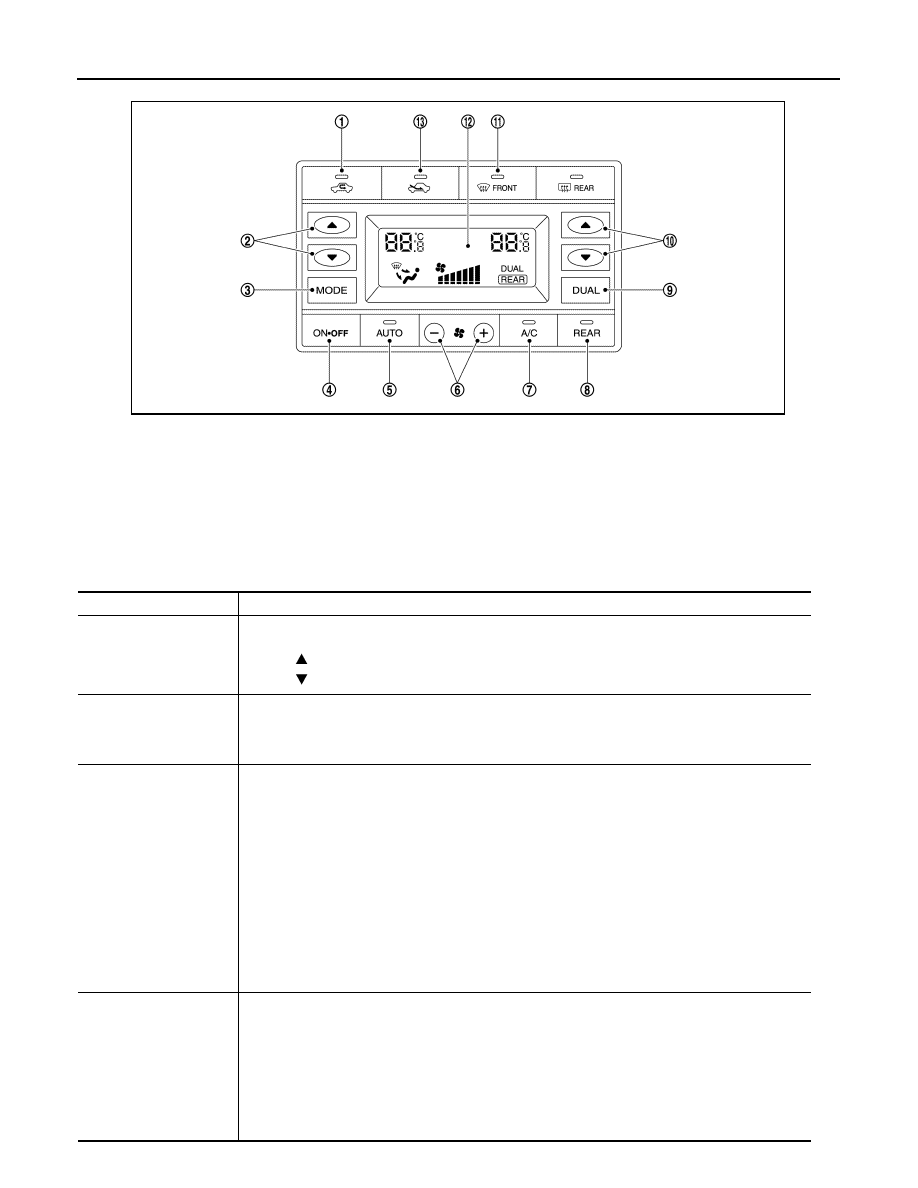
HAC-42
< SYSTEM DESCRIPTION >
[AUTOMATIC AIR CONDITIONING]
OPERATION
1.
REC switch
2.
Temperature control switch (driver
side)
3.
MODE switch
4.
ON·OFF switch
5.
AUTO switch
6.
Fan switch
7.
A/C switch
8.
REAR switch
9.
DUAL switch
10. Temperature control switch (passen-
ger side)
11.
DEF switch
12. Display
13. FRE switch
Switch name
Function
Temperature control
switch (driver side)
Setting temperature can be set according to switch operation within a range between 18
°
C (60
°
F) –
32
°
C (90
°
F) at a rate of 0.5
°
C (1
°
F) per adjustment.
• Press
: Setting temperature increases
• Press
: Setting temperature decreases
MODE switch
Air outlet changes from VENT
⇒
B/L
⇒
FOOT
⇒
VENT each time this switch is pressed.
NOTE:
Automatic air outlet control is cancelled (AUTO switch indicator turns OFF), when MODE switch is
pressed while AUTO switch indicator is ON.
ON·OFF switch
• Front air conditioning operation screen (“REAR” is not indicated)
- Rear air conditioning turns OFF simultaneously with front air conditioning, and becomes the follow-
ing status, when this switch is pressed while rear air conditioning is ON.
• Air outlet: FOOT
• Air flow: OFF
- Rear air conditioning turns ON simultaneously with front air conditioning, and operates according
to the previous setting before rear air conditioning is turned OFF, when this switch is pressed again.
• Rear air conditioning operation screen (“REAR” is indicated)
- Rear air conditioning turns OFF and becomes the following status, when this switch is pressed
while rear air conditioning is ON.
• Air outlet: FOOT
• Air flow: OFF
- Rear air conditioning operates according to the previous setting before rear air conditioning is
turned OFF, when this switch is pressed again.
AUTO switch
Rear air conditioning turns ON simultaneously with compressor control (A/C switch indicator turns
ON) and operates according to the following status, when this switch is pressed while rear air condi-
tioning operation screen (REAR is indicated) is displayed. (AUTO switch indicator turns ON/ REAR
switch indicator turns ON)
• Air outlet: Automatic control
• Air flow: Automatic control
NOTE:
When air outlet or air flow is manually operated while AUTO switch indicator is ON, AUTO switch in-
dicator turns OFF. However, automatic control continues for other functions than air outlet or air flow.
JMIIA1781ZZ