Nissan Quest E52. Manual - part 163
AV
INSPECTION AND ADJUSTMENT
AV-531
< BASIC INSPECTION >
[BOSE AUDIO WITH NAVIGATION]
C
D
E
F
G
H
I
J
K
L
M
B
A
O
P
Simplified target line adjustment method
5.
Adjust right and left cameras. Touch "APPLY" on the CONSULT screen to display adjustment results.
6.
After adjusting right and left cameras, check that the marker is properly placed on the screen and there is
no deviation in Target line 1.
NOTE:
• It can be initialized to the NISSAN factory default condition with “Initialize Camera Image Calibration”.
• The adjustment value is cancelled on this mode by performing “Initialize Camera Image Calibration”.
Is the difference corrected?
YES
>> On the CONSULT screen, touch “OK” button to complete writing to the around view monitor con-
trol unit.
NO
>> GO TO 5.
5.
PERFORM “CALIBRATING CAMERA IMAGE”
Preparation of target line
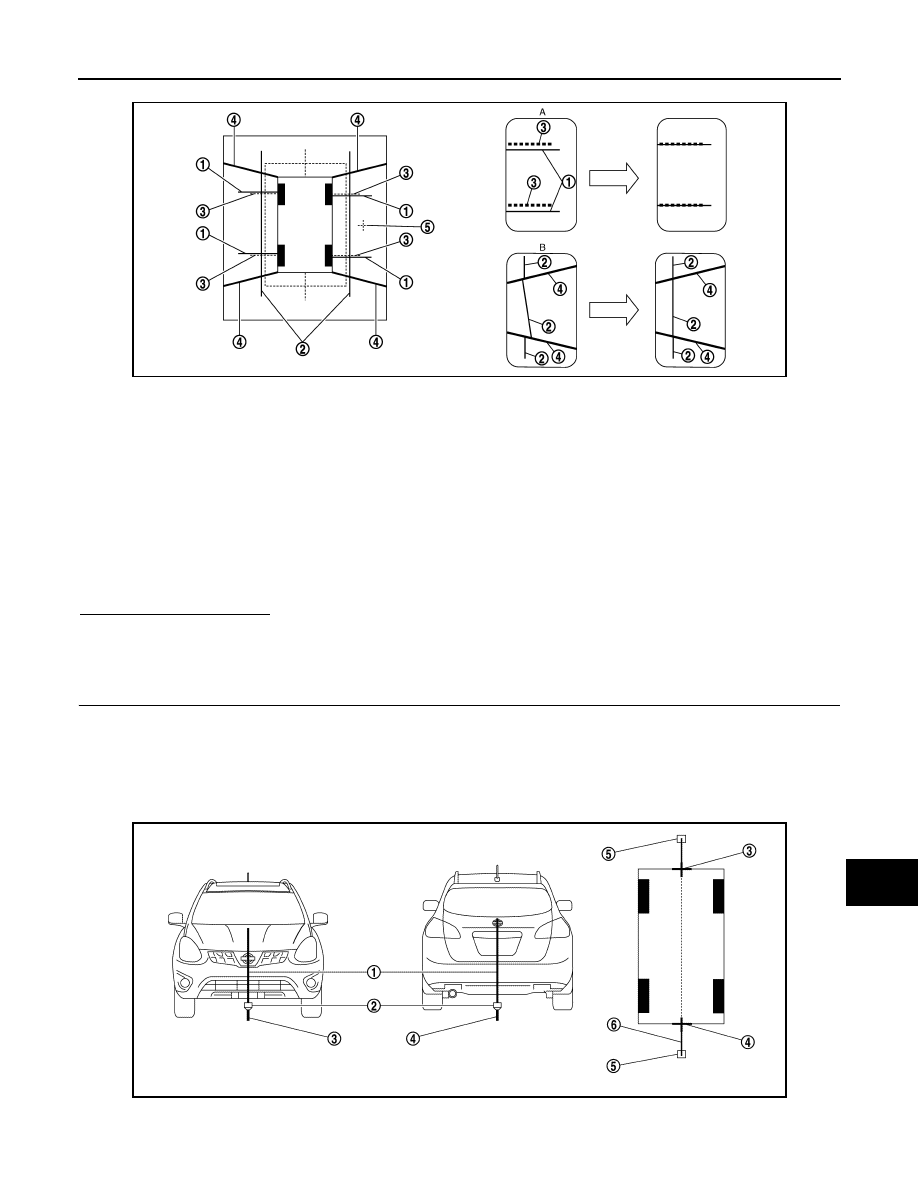
1.
Hang a string with a weight as shown in the figure. Put the points FM0, RM0 (mark) on the ground at the
center of the vehicle front end and rear end with white packing tape or a pen.
2.
Route the vinyl string under the vehicle, and then pull and fix it on the point approximately 1.0 m (39.9 in)
to the front and rear of the vehicle through the points FM0 and RM0 using packing tape.
Target line preparation procedure 1
JSNIA0929ZZ
1.
Target lines 1
2.
Target lines 2
3.
Marker for target line 1
4.
Boundary between cameras
5.
Crosshairs cursor (mark indicated
the selected camera)
A.
Adjustment method for target lines 1
(right)
B.
Adjustment method for target lines 2
(right)
JSNIA4581ZZ