Nissan Versa Sedan. Manual - part 534
 

  Index      Nissan     Nissan Versa Sedan (2014 year) - Service and Repair Manual


Search            


Content   ..  532  533  534  535   ..


Nissan Versa Sedan. Manual - part 534


LAN-14

< SYSTEM DESCRIPTION >

[CAN FUNDAMENTAL]

TROUBLE DIAGNOSIS

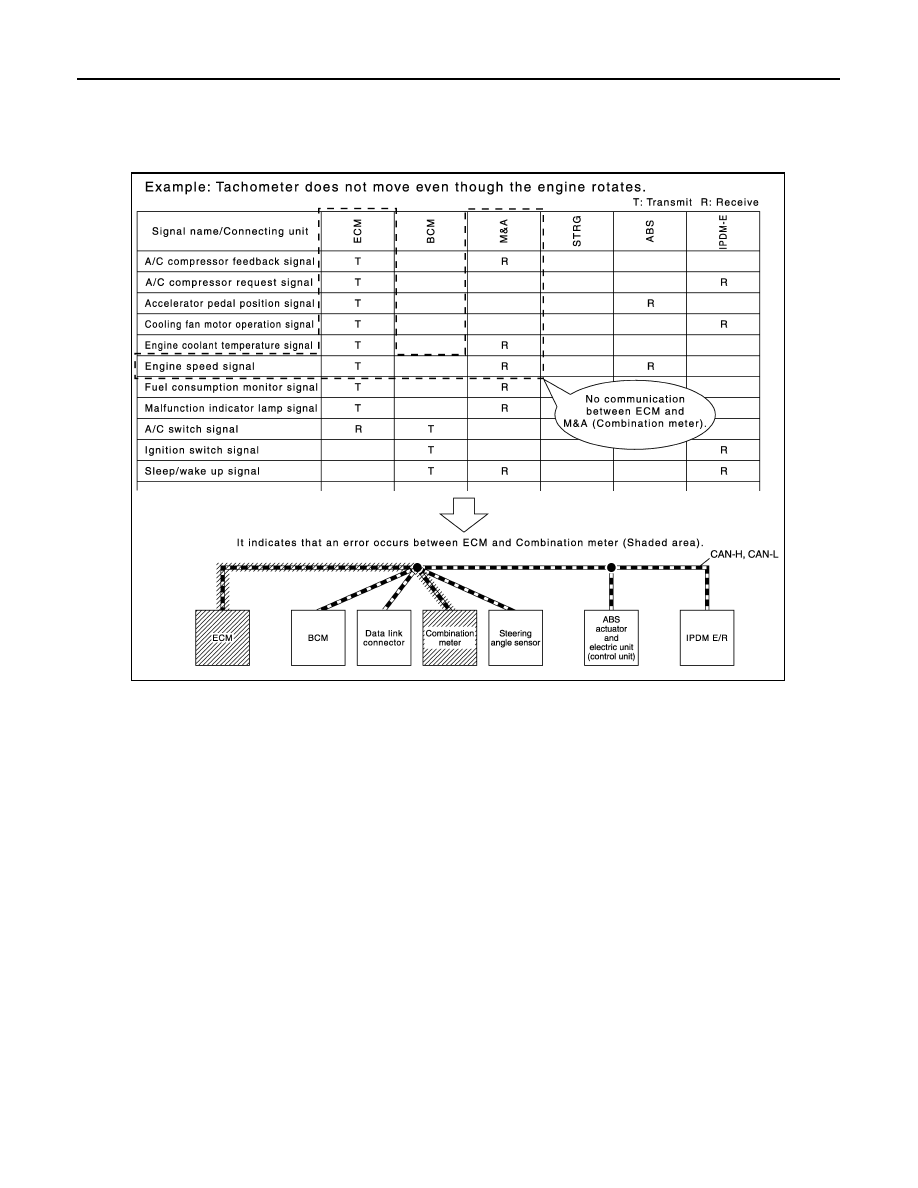
How to Use CAN Communication Signal Chart

INFOID:0000000009269342

The CAN communication signal chart lists the signals transmitted/received among control units. It is useful for

detecting the root cause by finding a signal related to the symptom, and by checking transmission and recep-

tion unit.

JSMIA0446GB

LAN

DIAGNOSIS AND REPAIR WORKFLOW

LAN-15

< BASIC INSPECTION >

[CAN FUNDAMENTAL]

C

D

E

F

G

H

I

J

K

L

B

A

O

P

N

BASIC INSPECTION

DIAGNOSIS AND REPAIR WORKFLOW

Trouble Diagnosis Flow Chart

INFOID:0000000009269343

Trouble Diagnosis Procedure

INFOID:0000000009269344

INTERVIEW WITH CUSTOMER

Interview with the customer is important to detect the root cause of CAN communication system errors and to

understand vehicle condition and symptoms for proper trouble diagnosis.

Points in interview

• What: Parts name, system name

• When: Date, Frequency

• Where: Road condition, Place

• In what condition: Driving condition/environment

• Result: Symptom

Notes for checking error symptoms:

• Check normal units as well as error symptoms.

- Example: Circuit between ECM and the combination meter is judged normal if the customer indicates

tachometer functions normally.

• When a CAN communication system error is present, multiple control units may malfunction or go into fail-

safe mode.

JSMIA0528GB

LAN-16

< BASIC INSPECTION >

[CAN FUNDAMENTAL]

DIAGNOSIS AND REPAIR WORKFLOW

• Indication of the combination meter is important to detect the root cause because it is the most obvious to

the customer, and it performs CAN communication with many units.

INSPECTION OF VEHICLE CONDITION

Check whether the symptom is reproduced or not.

NOTE:

Do not turn the ignition switch OFF or disconnect the battery cable while reproducing the error. The error may

temporarily correct itself, making it difficult to determine the root cause.

CHECK OF CAN SYSTEM TYPE (HOW TO USE CAN SYSTEM TYPE SPECIFICATION CHART)

Determine CAN system type based on vehicle equipment.

NOTE:

• This chart is used if CONSULT does not automatically recognize CAN system type.

• There are two styles for CAN system type specification charts. Depending on the number of available sys-

tem types, either style A or style B may be used.

CAN System Type Specification Chart (Style A)

NOTE:

SKIB8717E

LAN

DIAGNOSIS AND REPAIR WORKFLOW

LAN-17

< BASIC INSPECTION >

[CAN FUNDAMENTAL]

C

D

E

F

G

H

I

J

K

L

B

A

O

P

N

CAN system type is easily checked with the vehicle equipment identification information shown in the chart.

CAN System Type Specification Chart (Style B)

NOTE:

JSMIA0529GB


Content   ..  532  533  534  535   ..