содержание .. 63 64 65 66 ..
Nissan X-Trail 32. Manual - part 65
AV-252
< SYMPTOM DIAGNOSIS >
[WITH NAVIGATION]
MULTI AV SYSTEM
SYMPTOM DIAGNOSIS
MULTI AV SYSTEM
Symptom Table
INFOID:0000000010714913
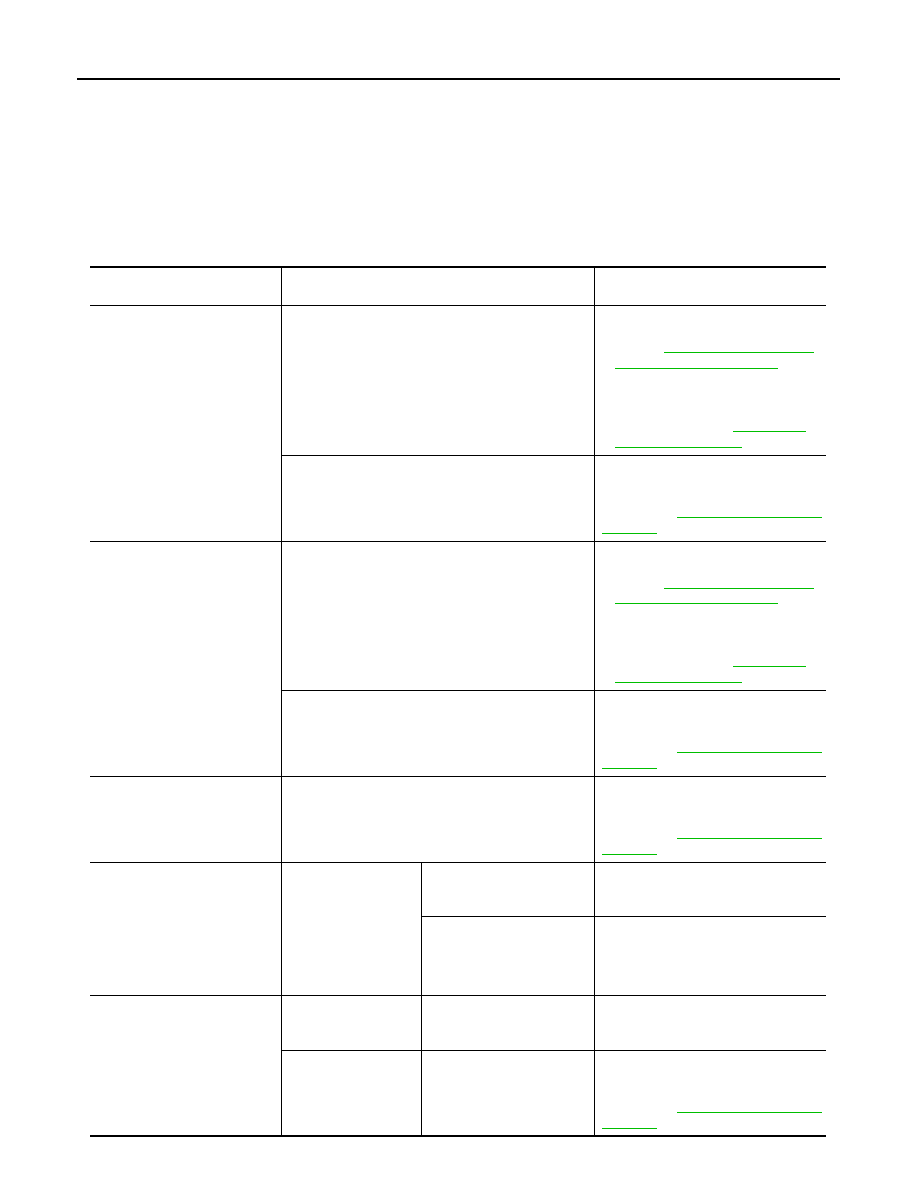
RELATED TO NAVIGATION
NOTE:
Combined part of AV switch and NAVI control unit.
Symptoms
Check items
Probable malfunction location / Action
to take
Display does not turn ON.
All switches cannot be operated.
• NAVI control unit power supply and
ground circuit.
Refer to
• Disconnect the battery negative ter-
minal. Reconnect the terminal. If the
same symptom occurs, replace NAVI
control unit. Refer to
.
All switches can be operated.
Disconnect the battery negative termi-
nal. Reconnect the terminal. If the same
symptom occurs, replace NAVI control
unit. Refer to
All switches cannot be operat-
ed.
Display does not turn ON.
• NAVI control unit power supply and
ground circuit.
Refer to
• Disconnect the battery negative ter-
minal. Reconnect the terminal. If the
same symptom occurs, replace NAVI
control unit. Refer to
.
Display turn ON.
Disconnect the battery negative termi-
nal. Reconnect the terminal. If the same
symptom occurs, replace NAVI control
unit. Refer to
Only specified switch cannot be
operated.
–
Disconnect the battery negative termi-
nal. Reconnect the terminal. If the same
symptom occurs, replace NAVI control
unit. Refer to
Map screen is not displayed.
(RGB image other than map is
normal.)
• Check that the map
SD card is in the SD
card slot.
• Check “SD Card Ac-
cess” in “SERVICE
SYSTEM SELF
TEST”, “SERVICE
MENU”.
“OK” is displayed for “SD
Card Access”.
Disconnect the battery negative termi-
nal. Reconnect the terminal. If the same
symptom occurs, replace Map SD card.
“OK” is not displayed for “SD
Card Access”.
Disconnect the battery negative termi-
nal. Reconnect the terminal. If the same
symptom occurs, replace NAVI control
unit or Map SD card.
Voice guidance is not heard
*
Check that the map
SD card is in the SD
card slot.
“OK” is displayed for SD
Card Access.
Disconnect the battery negative termi-
nal. Reconnect the terminal. If the same
symptom occurs, replace Map SD card.
Check “SD Card Ac-
cess” in “SERVICE
SYSTEM SELF
TEST”, “SERVICE
MENU”.
“OK” is not displayed for SD
Card Access.
Disconnect the battery negative termi-
nal. Reconnect the terminal. If the same
symptom occurs, replace NAVI control
unit. Refer to