Mitsubishi Eclipse Cross (2023 year). Manual in english - page 12
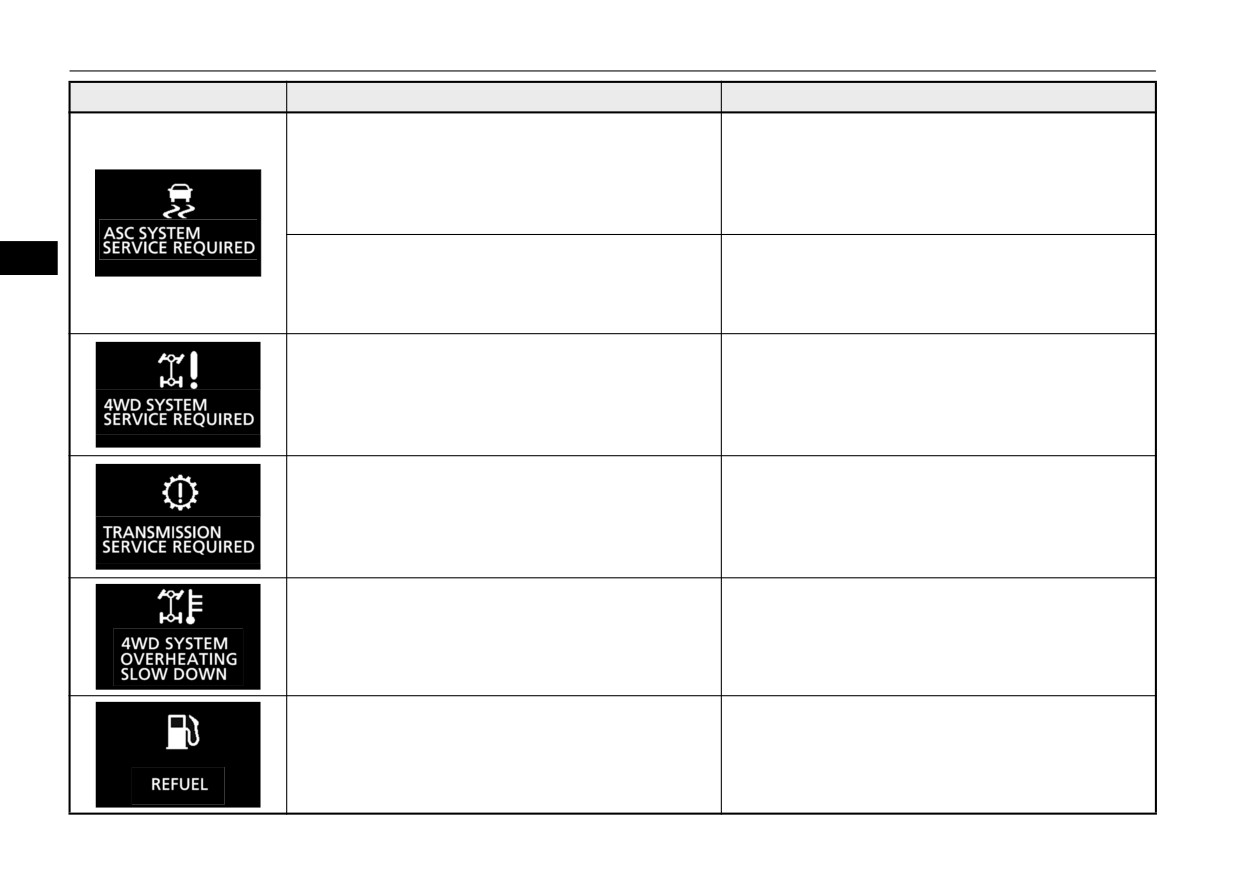
Indicator light, warning light, and information screen display list
Screen
Cause
Do this (Reference)
z
There is a fault in the active stability control (ASC).
z
Contact an authorized Mitsubishi Motors dealer or a
repair facility of your choice to have the system
checked.
Refer to “Active stability control (ASC)” on page
5-85.
z
There is a fault in the hill start assist.
z
Have the vehicle checked at an authorized
5
Mitsubishi Motors dealer or a repair facility of your
choice.
Refer to “Hill start assist” on page 5-79.
z
There is a fault in the S-AWC system.
z
Contact an authorized Mitsubishi Motors dealer or a
repair facility of your choice to have the system
checked.
Refer to “S-AWC (Super-All Wheel Control)” on
page 5-70.
z
There is a fault in the CVT.
z
Contact an authorized Mitsubishi Motors dealer or a
repair facility of your choice to have the system
checked immediately.
Refer to “Continuously variable transmission
(CVT)” on page 5-63.
z
The S-AWC system is hot.
Refer to “S-AWC (Super-All Wheel Control)” on page
5-70.
z The fuel is running low.
z Refuel immediately.
Refer to “Fuel remaining display screen” on page
5-150.
5-174
Features and controls
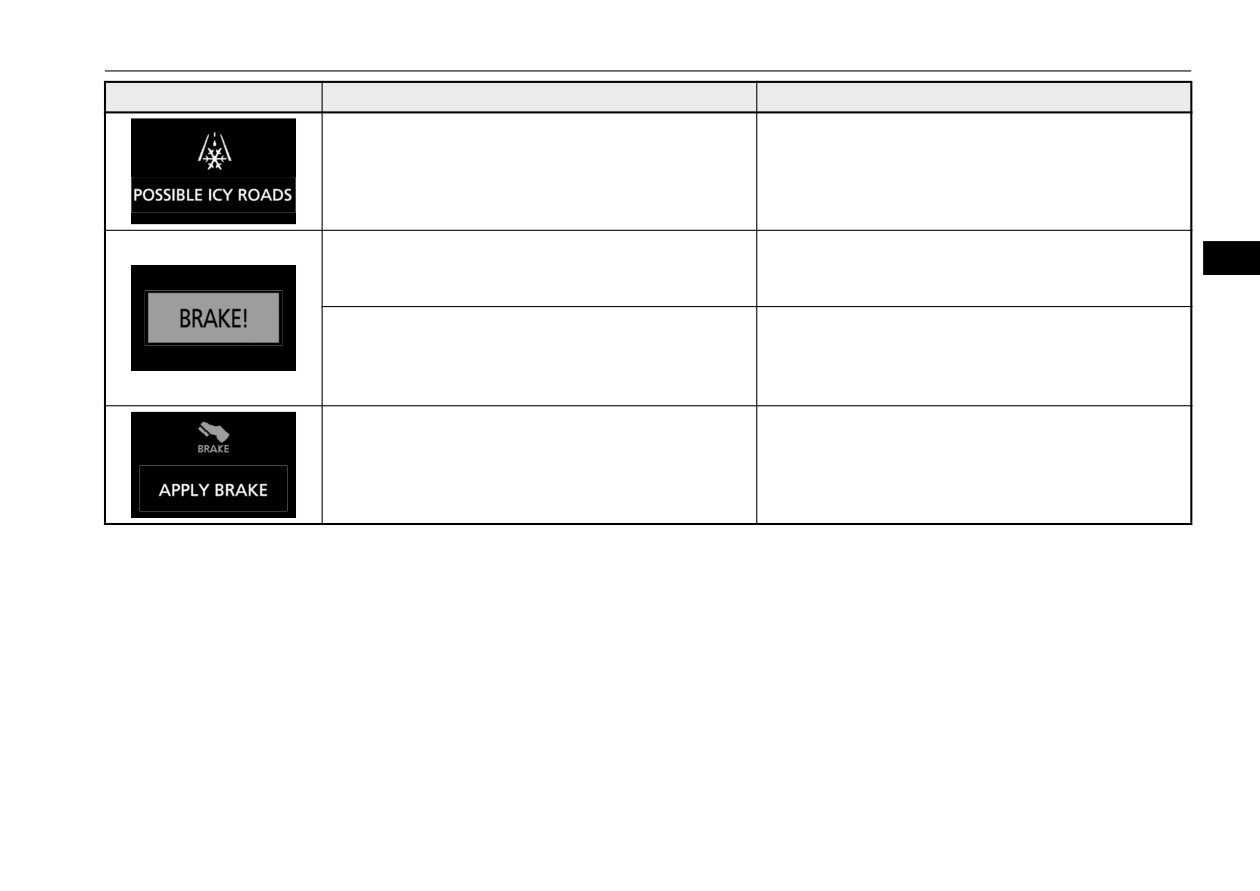
Indicator light, warning light, and information screen display list
Screen
Cause
Do this (Reference)
z The outside temperature is 37 °F (3 °C) or less.
z Be careful driving on frozen ground.
z The ground may be frozen even when this warning is
not displayed, so drive carefully.
z The Adaptive Cruise Control System (ACC) has
z Increase the following distance by depressing the
detected the approach of the vehicles in front.
brake pedal or marking other decelerating control.
5
Refer to “Approach alarm” on page 5-97.
z The Forward Collision Mitigation system (FCM) has
z Take appropriate action such as depressing the brake
detected the danger of collision.
to avoid collision.
Refer to “Forward collision warning function” on
page 5-106.
z The Electric parking brake cannot be applied auto-
z Depress the brake pedal as soon as possible.
matically.
Refer to “Brake auto hold” on page 5-77.
Features and controls
5-175
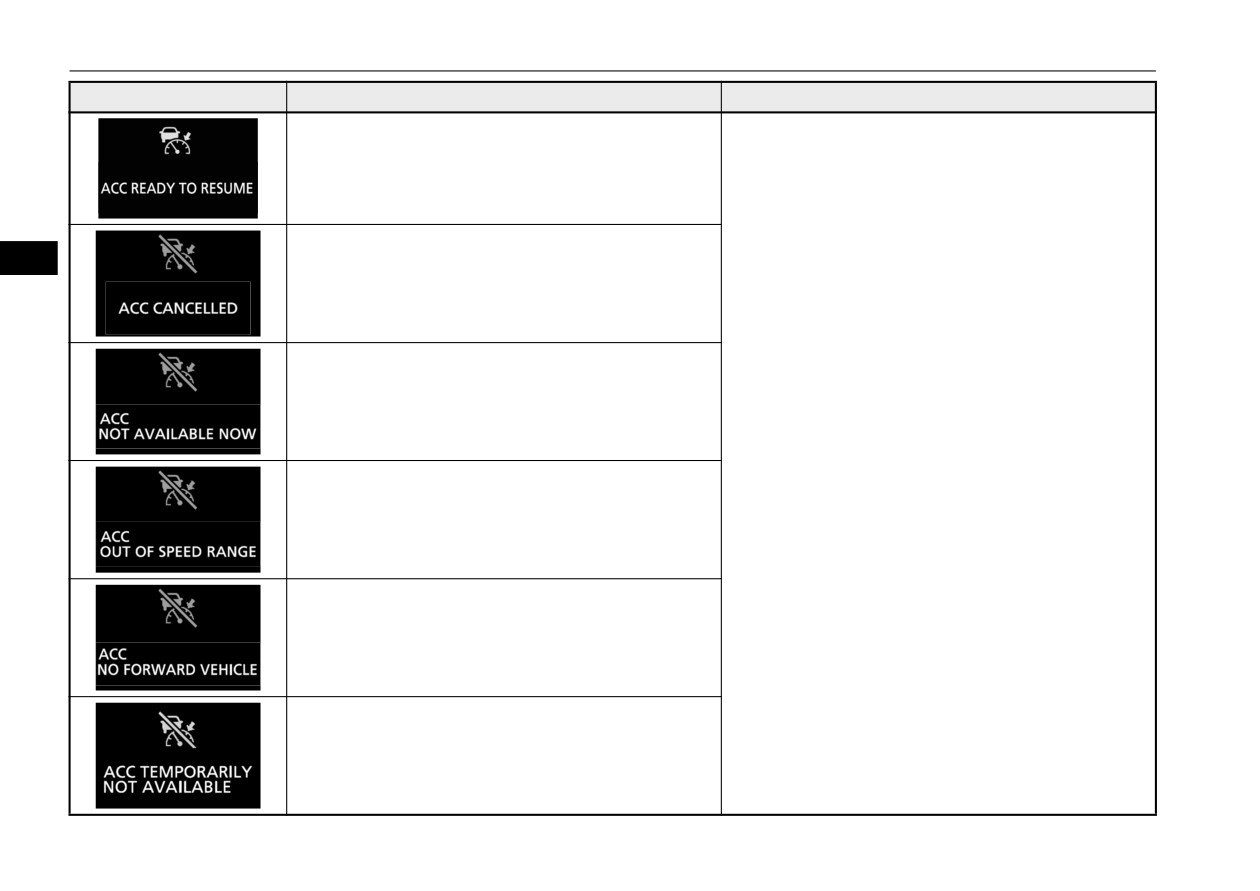
Indicator light, warning light, and information screen display list
Screen
Cause
Do this (Reference)
z The Adaptive Cruise Control System (ACC) control
Refer to “How to use ACC” on page 5-94.
is active.
z The Adaptive Cruise Control System (ACC) control
5
is automatically canceled and the system is placed in
the standby state.
z Conditions for the start of control are not met, the
Adaptive Cruise Control System (ACC) cannot start
the control.
z The Adaptive Cruise Control System (ACC) cannot
start the control because the speed is out of speed
range.
z The Adaptive Cruise Control System (ACC) cannot
start the control because not detected the approach of
the vehicles in front.
z The Adaptive Cruise Control System (ACC) is tem-
porarily unavailable due to conditions such as the
adhesion of contaminants to the sensor.
This is not a malfunction.
5-176
Features and controls
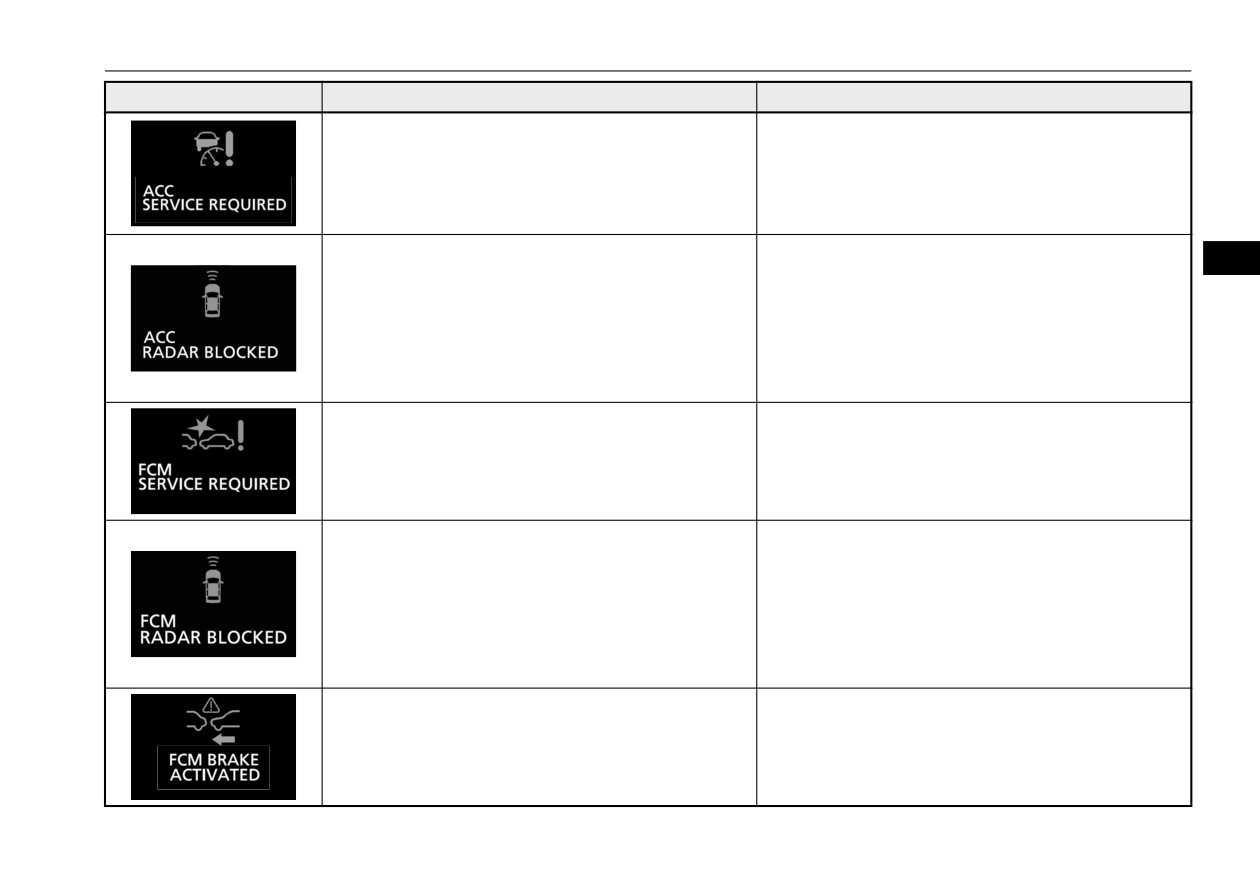
Indicator light, warning light, and information screen display list
Screen
Cause
Do this (Reference)
z
There is a fault in the Adaptive Cruise Control Sys-
z
Contact an authorized Mitsubishi Motors dealer or a
tem (ACC).
repair facility of your choice to have the system
checked.
Refer to “When ACC detects a vehicle in front
within the set distance” on page 5-96.
z
Foreign objects, such as dirt, snow or ice, adhere to
z
Remove a foreign object on the bumper surface
5
the bumper surface around the sensor.
around the sensor.
When the warning display does not disappear after
having cleaned the bumper surface around the sen-
sor, contact an authorized Mitsubishi Motors dealer
or a repair facility of your choice.
Refer to “To cancel ACC control” on page 5-100.
z
There is a fault in the Forward Collision Mitigation
z
Contact an authorized Mitsubishi Motors dealer or a
system (FCM).
repair facility of your choice to have the system
checked.
Refer to “System problem warning” on page 5-110.
z Foreign objects, such as dirt, snow or ice, adhere to
z Remove a foreign object on the bumper surface
the bumper surface around the sensor.
around the sensor.
When the warning display does not disappear after
having cleaned the bumper surface around the sen-
sor, contact an authorized Mitsubishi Motors dealer
or a repair facility of your choice.
Refer to “System problem warning” on page 5-110.
z FCM braking function of the Forward Collision Mit-
Refer to “FCM braking function” on page 5-107.
igation system (FCM) has been activated.
Features and controls
5-177
Indicator light, warning light, and information screen display list
Screen
Cause
Do this (Reference)
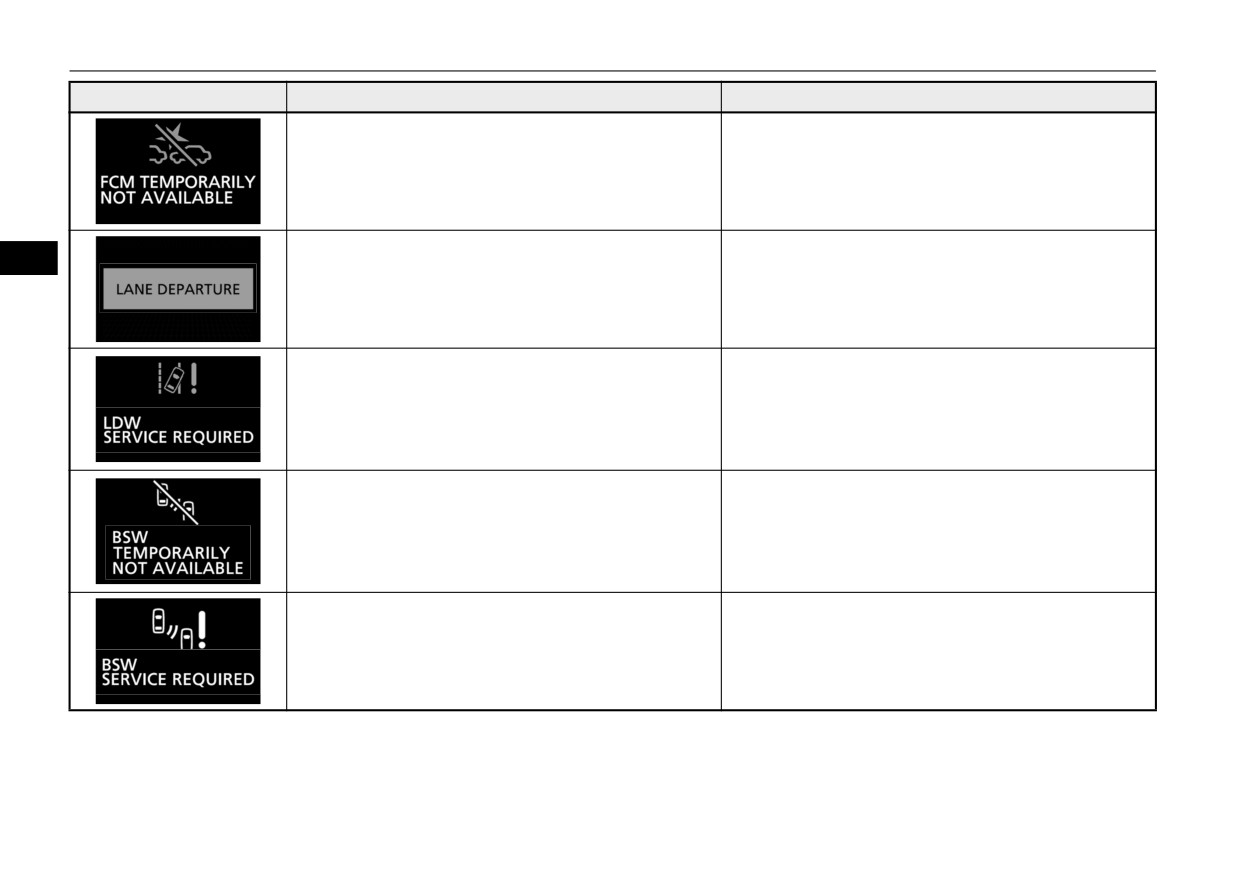
z The Forward Collision Mitigation system (FCM) is
Refer to “System problem warning” on page 5-110.
temporarily unavailable for some reason.
This is not a malfunction.
z The Lane Departure Warning (LDW) has detected
Refer to “Lane Departure Warning (LDW)” on page
5
that your vehicle is about to leave or has left the lane.
5-123.
z There is a fault in the Lane Departure Warning
z Contact an authorized Mitsubishi Motors dealer or a
(LDW).
repair facility of your choice to have the system
checked.
Refer to “Lane Departure Warning (LDW)” on page
5-123.
z The Blind Spot Warning (BSW) sensor is temporar-
z When the warning display does not disappear after
ily not available for some reason such as the environ-
waiting for a while, contact an authorized Mitsubishi
mental condition or increase of the sensor
Motors dealer.
temperature.
Refer to “When the sensor is temporarily not avail-
able” on page 5-117.
z The Blind Spot Warning (BSW) does not operate
z Immediately have your vehicle inspected at an
normally because there are some malfunctions in the
authorized Mitsubishi Motors dealer.
system.
Refer to “When there is a malfunction in the system”
on page 5-117.
5-178
Features and controls
Indicator light, warning light, and information screen display list
Screen
Cause
Do this (Reference)
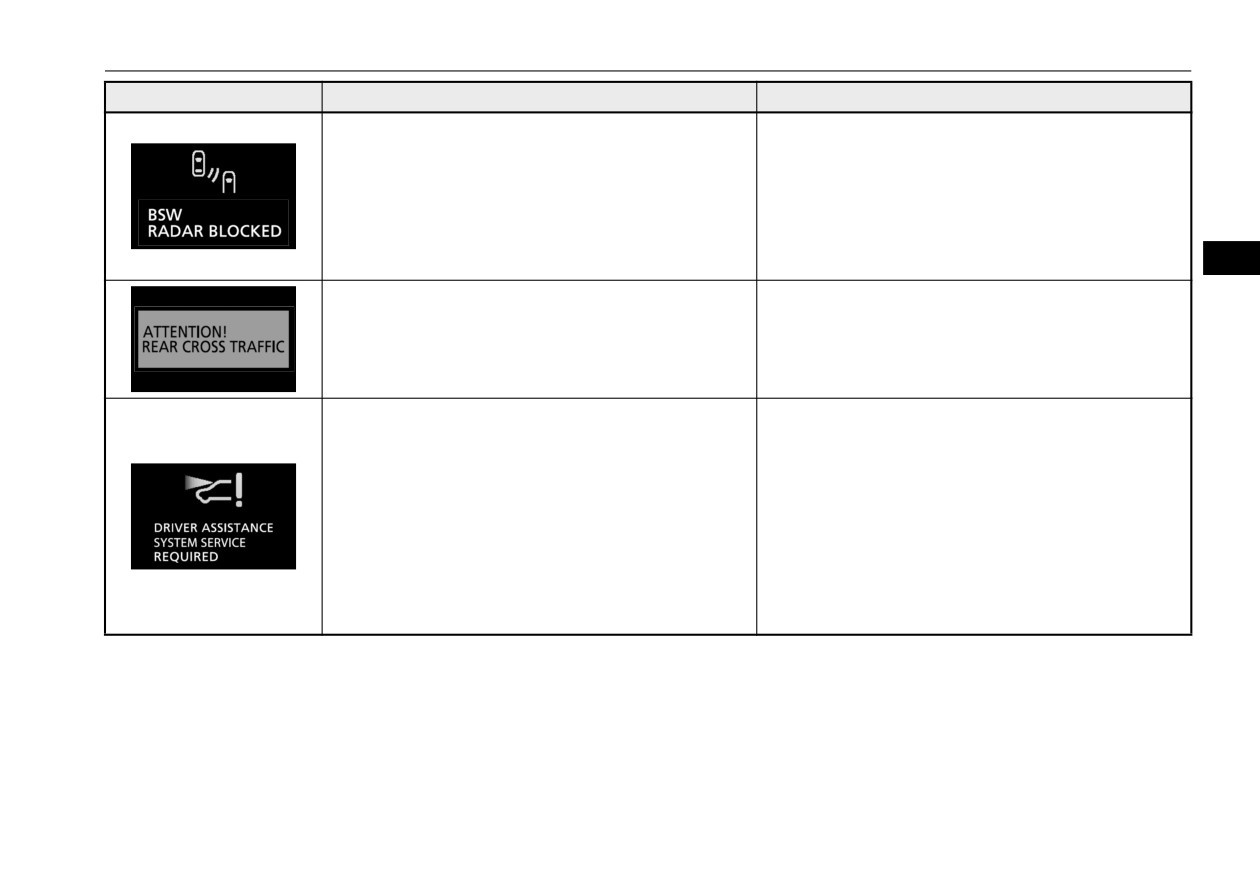
z Foreign objects, such as dirt, snow or ice, adhere to
z Remove a foreign object on the bumper surface
the bumper surface around the sensor.
around the sensor.
When the warning display does not disappear after
having cleaned the bumper surface around the sen-
sor, contact an authorized Mitsubishi Motors dealer.
Refer to “When there is a foreign object on the sen-
sor” on page 5-118.
5
z The Rear Cross Traffic Alert (RCTA) is detected the
z Pay special attention to the rear of your vehicle.
vehicle approaching your vehicle.
Refer to “Rear Cross Traffic Alert (RCTA)” on page
5-120.
z There is a fault in the sensor.
z Contact an authorized Mitsubishi Motors dealer.
Refer to “System problem warning” on page 5-110
in the section entitled “Forward Collision Mitigation
system (FCM)”.
Refer to “System problem warning” on page 5-125
in the section entitled “Lane Departure Warning
(LDW)”.
Refer to “System problem warning” on page 5-200
in the section entitled “Automatic High Beam
(AHB)”.
Features and controls
5-179
Indicator light, warning light, and information screen display list
Screen
Cause
Do this (Reference)
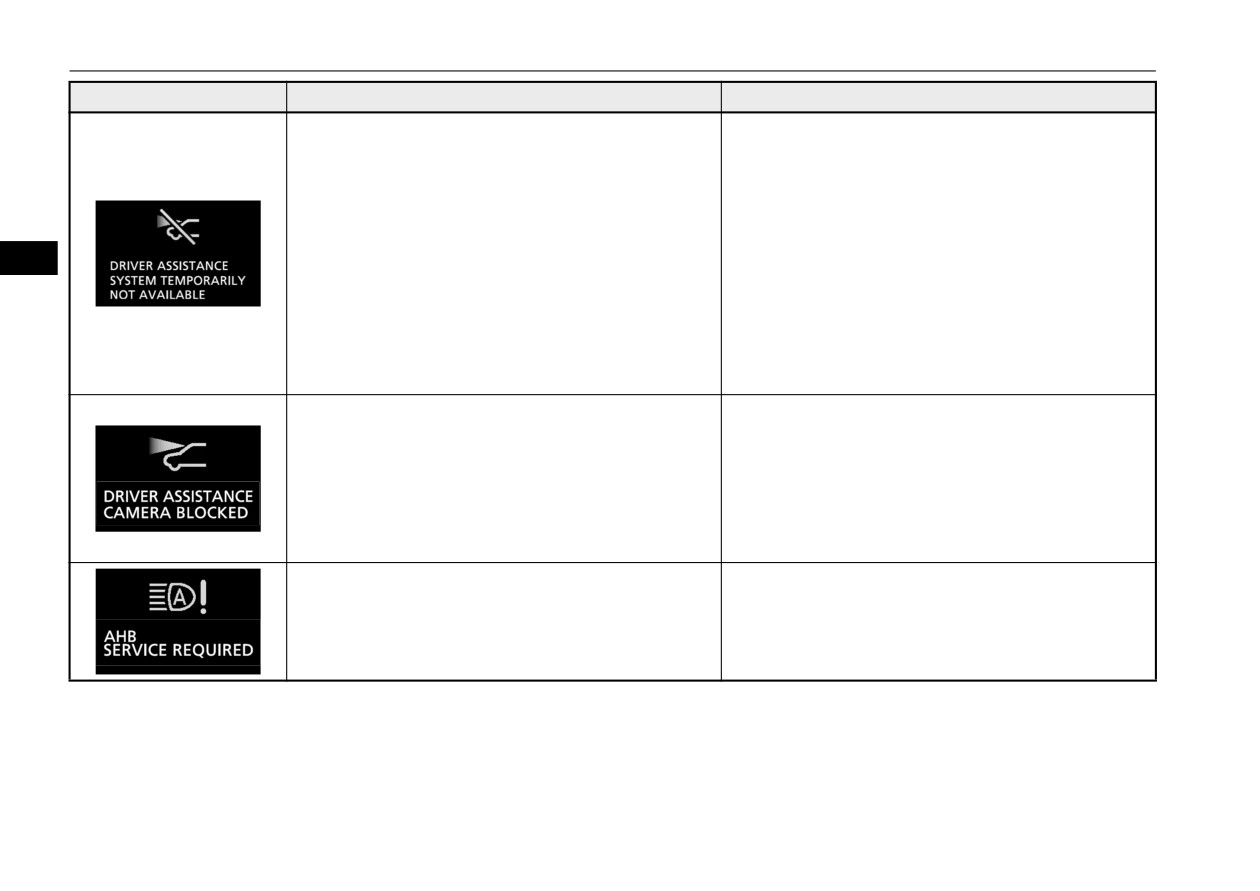
z
The Forward Collision Mitigation system (FCM),
z After the temperature of the sensor has been in
Lane Departure Warning (LDW) and Automatic
range, the system will automatically return to opera-
High Beam (AHB) are temporarily unavailable due
tion.
to the high or low temperature of the sensor.
Refer to “System problem warning” on page 5-110
in the section entitled “Forward Collision Mitigation
system (FCM)”.
5
Refer to “System problem warning” on page 5-125
in the section entitled “Lane Departure Warning
(LDW)”.
Refer to “System problem warning” on page 5-200
in the section entitled “Automatic High Beam
(AHB)”.
z
The sensor is temporarily unavailable due to condi-
Refer to “System problem warning” on page 5-110 in
tions such as the adhesion of contaminants to the
the section entitled “Forward Collision Mitigation sys-
sensor or windshield.
tem (FCM)”.
This is not a malfunction.
Refer to “System problem warning” on page 5-125 in
the section entitled “Lane Departure Warning (LDW)”.
Refer to “System problem warning” on page 5-200 in
the section entitled “Automatic High Beam (AHB)”.
z
There is a fault in the system of automatic high
z Contact an authorized Mitsubishi Motors dealer.
beam.
Refer to “System problem warning” on page 5-200.
5-180
Features and controls
Indicator light, warning light, and information screen display list
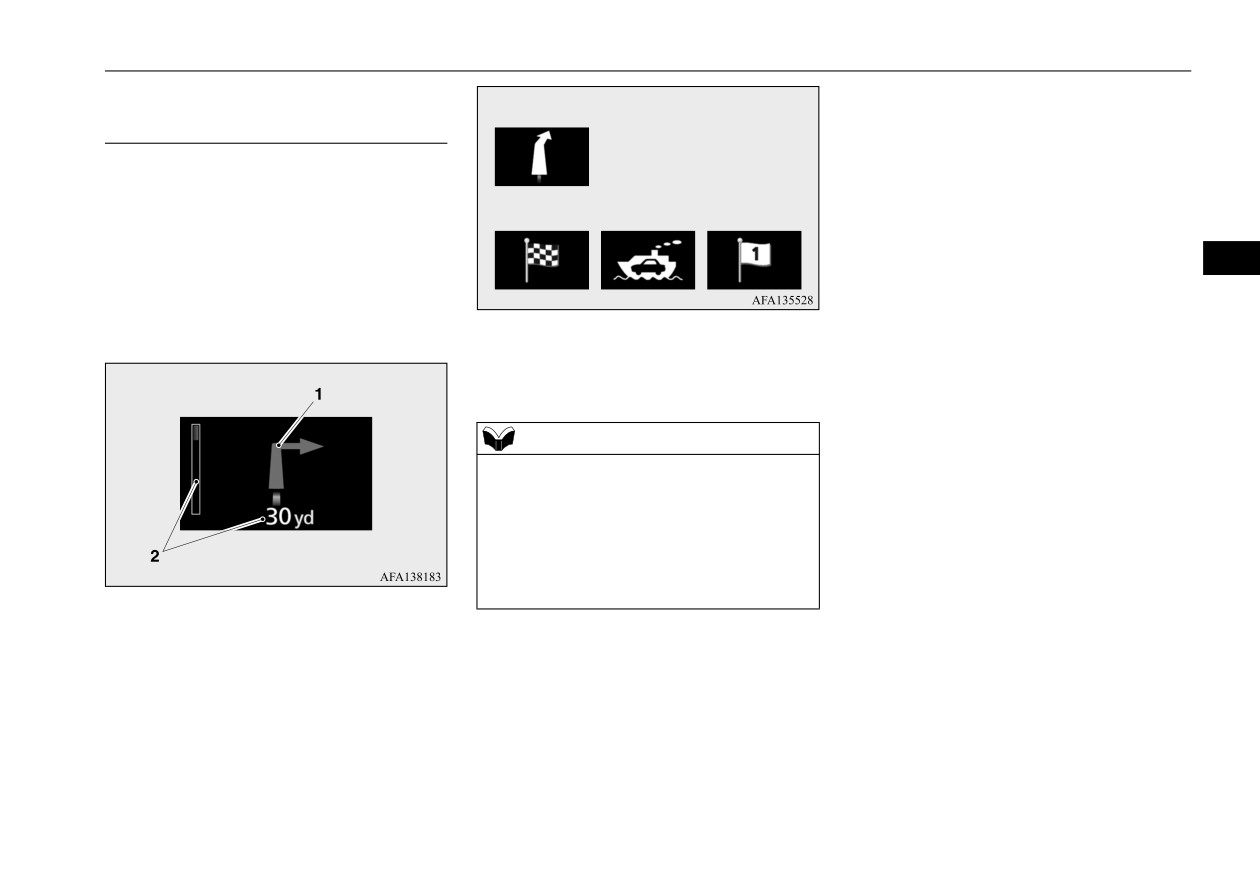
Navigation information display (if
Direction of vehicle travel (Example)
so equipped)
N00579100071
Intermediate
On vehicles equipped with the Smartphone-
destination
link Display Audio (SDA) navigation system,
Destination
Ferry terminal
(Example)
the following information on navigation will
be displayed when guidance location such as
5
junction and destination is approached after
you set the destination and started the route
guidance.
2- Remaining distance display
Shows the distance to the location where
the guidance is displayed.
NOTE
z The navigation information display can be
turned on or off.
Refer to “Changing the navigation informa-
tion display” on page 5-162.
z Please read this section and also the separate
owner’s manual for the SDA navigation sys-
tem.
1- Guidance display
Shows the direction of vehicle travel and
the guidance location.
Features and controls
5-181
Indicator light, warning light, and information screen display list
Other interrupt displays
N00558201500
Screen
Cause
Do this (Reference)
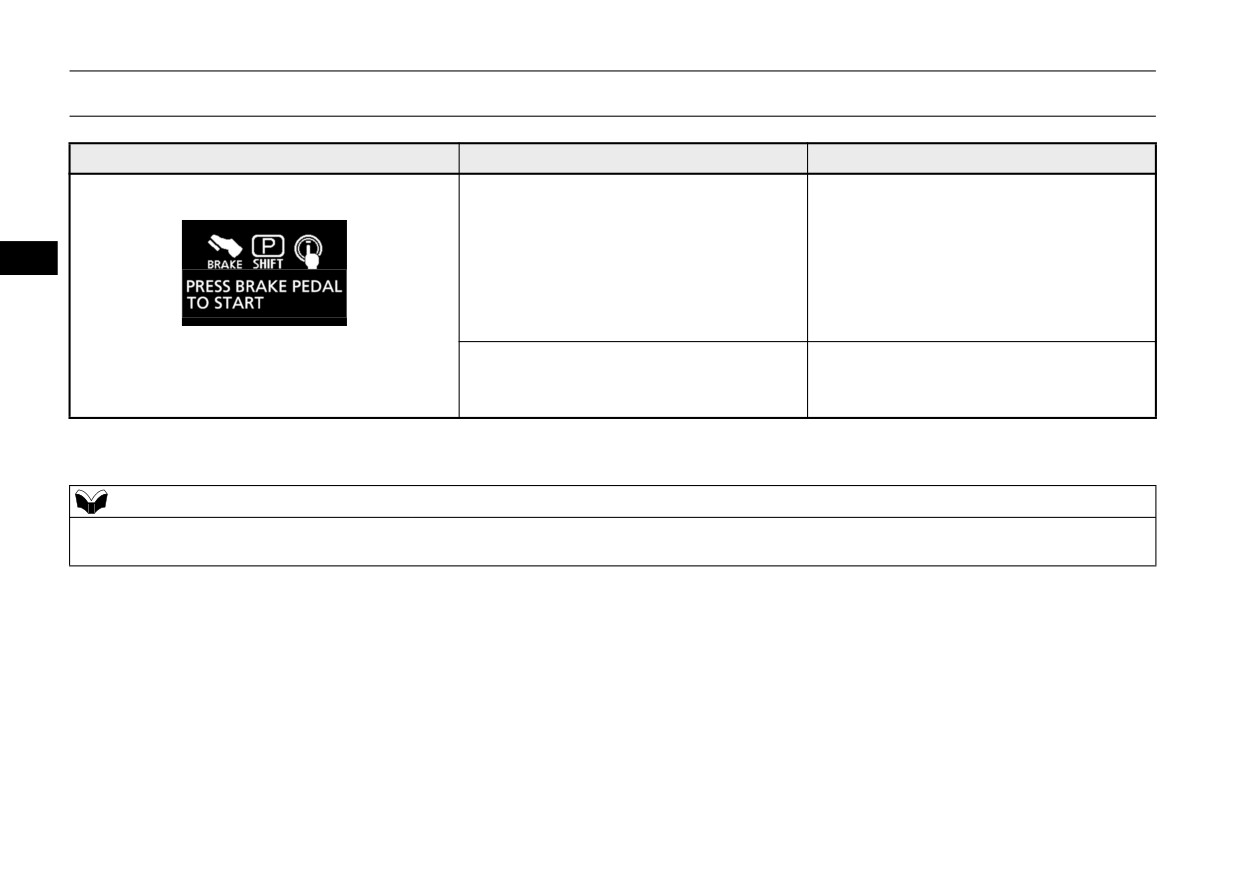
z When starting the engine, the selector
z Place the selector lever in the “P”
lever is in a position other than the “P”
(PARK) position, depress and hold the
(PARK) or the “N” (NEUTRAL) posi-
brake pedal with the right foot, and then
tion, or you pressed the engine switch
press the engine switch to start the
5
without depressing the brake pedal.
engine.
Refer to “Starting and stopping the
engine” on page 5-23.
z When communication was successful
Refer to “If the F.A.S.T.-key is not operating
after the F.A.S.T.-key was touched to the
properly” on page 5-25.
engine switch.
The operation status of each system is displayed on the information screen. For further details, refer to the appropriate page for each system.
NOTE
z When operating each system, confirm that the operation status of the system has changed on the information screen. However, the operation status of the
system may not be displayed immediately after the warning display appears even if the system is operated.
5-182
Features and controls
Indicator light, warning light, and information screen display list
Screen
System operation status
Reference
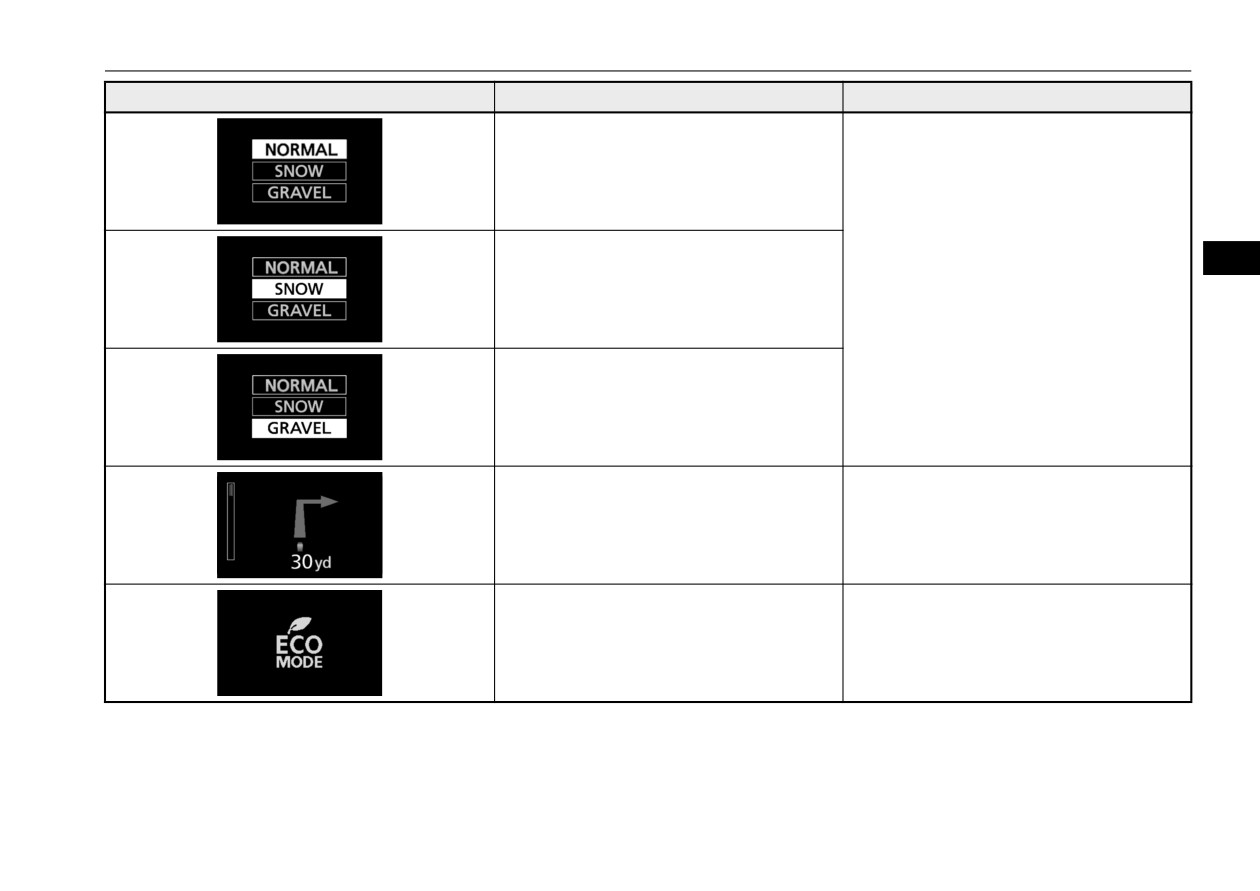
z When “NORMAL” mode of S-AWC is
Refer to “S-AWC (Super-All Wheel Con-
selected.
trol)” on page 5-70.
z When “SNOW” mode of S-AWC is
selected.
5
z When “GRAVEL” mode of S-AWC is
selected.
z When approaching the guidance location,
Refer to “Navigation information display”
etc.
on page 5-181.
z When the ECO mode is activated.
Refer to “ECO mode switch” on page 5-204.
Features and controls
5-183
Indicator light, warning light, and information screen display list
Screen
System operation status
Reference
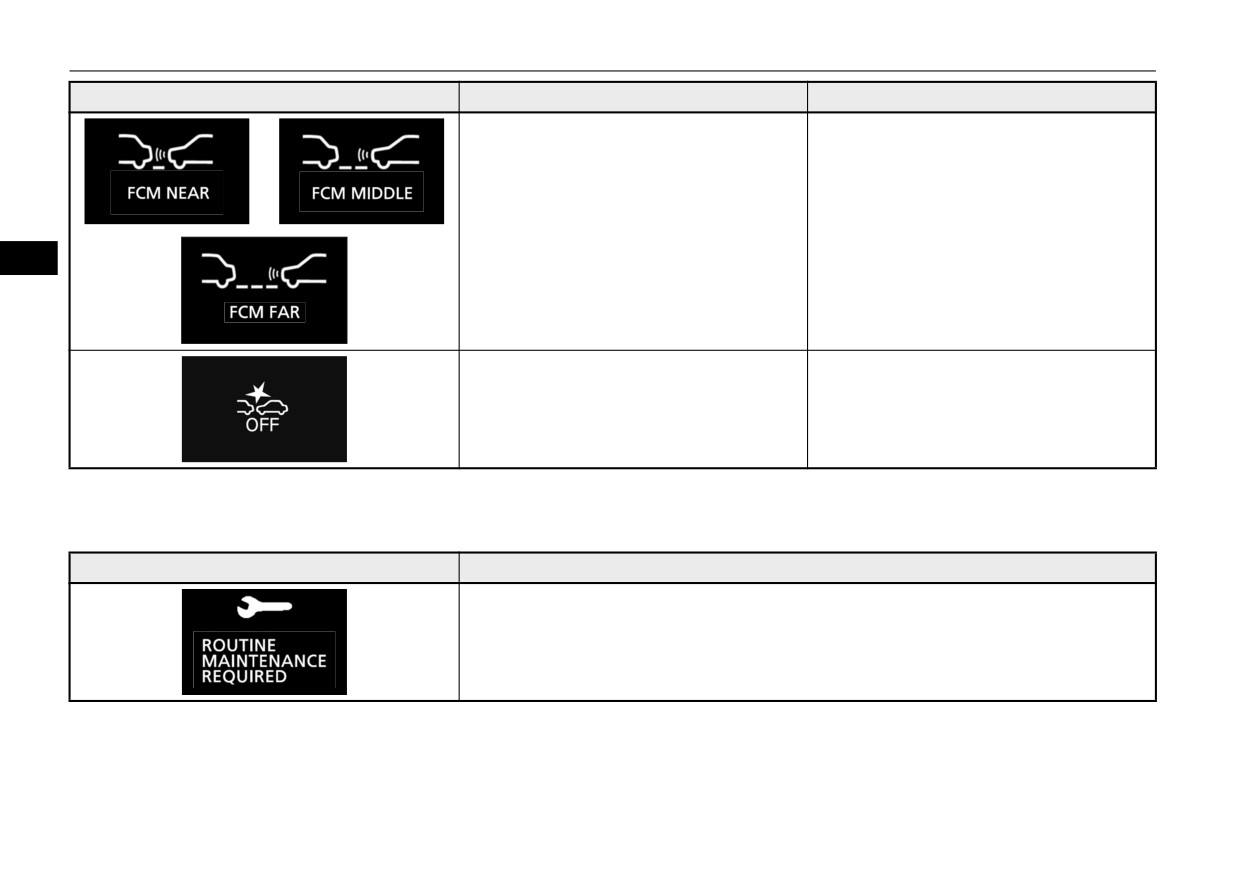
z When the Forward Collision Mitigation
Refer to “FCM ON/OFF switch” on page
system (FCM) is activated or the timing
5-109.
of an alarm is changed.
5
z When the Forward Collision Mitigation
Refer to “FCM ON/OFF switch” on page
system (FCM) is deactivated.
5-109.
This informs you that a periodic inspection is due.
Screen
Do this
Have an inspection made by an authorized Mitsubishi Motors dealer. For further details,
refer to “Service reminder” on page 5-151.
5-184
Features and controls
Indicators
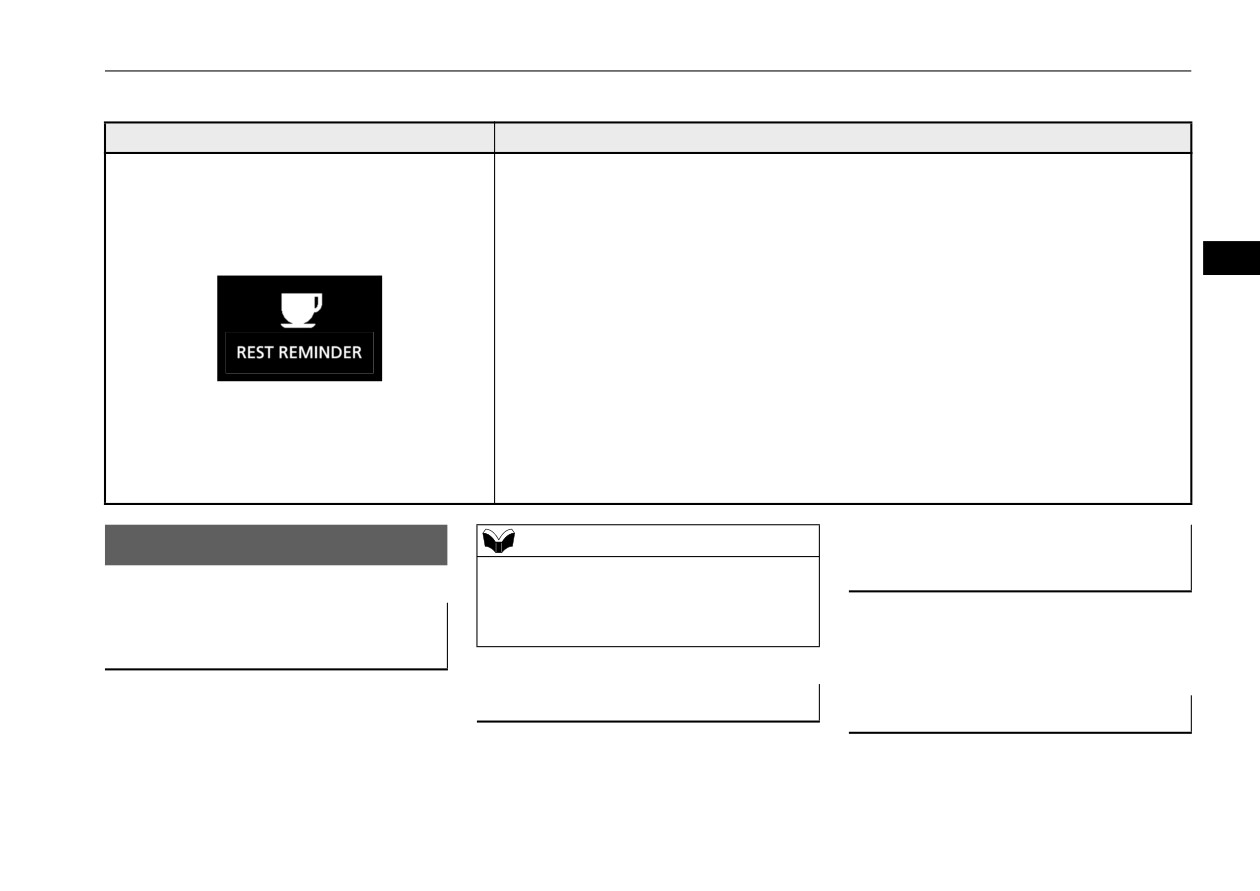
The rest time can be set.
Screen
Do this
Park the vehicle in a safe place, turn off the engine, and take a rest.
Use this display as rough guide for taking rests during a long drive.
The interval from the start of your trip until this message is displayed can be set.
Refer to “Changing the function settings” on page 5-155.
The display and buzzer alert the driver when the set time is reached. If you continue to drive
5
without having a rest, the buzzer sounds approximately every 5 minutes to encourage you to
take a rest.
z In the following cases, the time driven is reset and the display returns to the previous
display screen. After this, when the set time is reached again, the display and buzzer
encourage you to take a rest.
•The buzzer sounds three times.
•The ignition switch is turned to the “OFF” position or the operation mode is put in
OFF.
•The multi-information display switches are held (for approximately 2 seconds or
more).
Indicators
NOTE
Front fog light indicator (if so
N00519901195
z If the indicator flashes faster than usual or if
equipped)
the indicator stays on without flashing, check
N00520201286
for a malfunctioning turn signal light bulb or
Turn signal indicators/Hazard
turn signal connection.
This indicator comes on while the front fog
warning lights
lights are on.
N00520000216
The arrows will flash in time with the corre-
High beam indicator
Position indicator
sponding exterior turn signals when the turn
N00520100086
N00551301094
signal lever is used.
A blue light comes on when the headlights
This indicator light illuminates while the
are on high beam.
Both arrows will flash when the hazard warn-
parking lights are on.
ing flasher switch is pressed.
Features and controls
5-185
Warning lights
Warning lights
CAUTION
CAUTION
N00520300147
z
If the brake warning light and the Anti-lock
• Should the brakes fail, use engine braking
braking system warning light are illuminated
to reduce your speed and observe the fol-
at the same time, the braking force distribu-
lowings.
Brake warning light and buzzer
tion function will not operate, so the vehicle
[Vehicles with the parking brake of the
N00520401624
may be destabilized during sudden braking
lever type]
This light comes on when the ignition switch
under the following conditions.
Carefully pull the parking brake lever.
is turned to the “ON” position (engine off) or
• When the brake warning light does not go
[Vehicles with the Electric parking brake]
5
out even when the parking brake is
Keep pulling the Electric parking brake
the operation mode is put in ON.
released.
switch.
When the engine is started, the light should
• When the brake warning light stays on
Refer to “Electric parking brake” on page
go off a few seconds later. A warning is also
while driving.
5-51.
displayed in the multi-information display.
• If the above occurs, avoid sudden braking
The warning light also illuminates after start-
Depress the brake pedal to illuminate the
and high-speed driving. Park the vehicle in
ing the engine under the following condi-
stop lights to alert the vehicles behind you.
a safe place, and contact an authorized
tions.
Mitsubishi Motors dealer or a repair facility
of your choice immediately.
Electric parking brake warning
z When the parking brake is still applied.
z
The vehicle should be brought to a halt in the
z When the brake fluid level is low.
light (if so equipped)
following manner when brake performance
z When the brake system circuit is not
N00591200069
is deteriorated.
working properly.
• Confirm that the vehicle slows down when
This warning light will illuminate when there
you press down on the brake pedal harder
When the vehicle is moving at more than
is a fault in the Electric parking brake system.
than usual. In some cases, the brake pedal
5 mph (8 km/h) and parking brake applied, a
Normally, this warning light illuminates
may go all the way to the floor.
buzzer will sound to inform the driver that the
when the operation mode is put in ON, and
parking brake is not properly release.
goes off in a few seconds.
Before driving, be sure that the parking brake
is fully released and brake warning light is
off.
5-186
Features and controls
Warning lights
indicator comes on and stays on after refuel-
CAUTION
CAUTION
ing, stop the engine and check that the cap is
z
When the warning light remains on or does
z
If the engine malfunction indicator comes on
properly tightened. (Turn the cap clockwise
not come on, there is the possibility that the
while the engine is running, avoid driving at
until you hear clicking sounds.)
parking brake cannot be operated or
high speeds.
If this indicator does not go off after several
released. Immediately contact the nearest
During vehicle operation with the indicator
seconds or lights up while driving, have the
authorized Mitsubishi Motors dealer. When
on, the vehicle may not accelerate when you
the warning light comes on during driving,
system checked immediately at an authorized
depress the accelerator pedal.
immediately stop the vehicle in a safe place,
Mitsubishi Motors dealer or a repair facility
When the vehicle is stationary with the indi-
5
and contact an authorized Mitsubishi Motors
of your choice.
cator on, you must depress the brake pedal
dealer. If you inevitably have to park, park
more firmly than usual since the engine
the vehicle on level and stable ground, shift
idling speed is higher than usual and a vehi-
CAUTION
the selector lever in
“P” (PARK) position
cle with continuously variable transmission
and place chocks or blocks.
z
Driving for a long time with the engine mal-
(CVT) has a stronger tendency to creep for-
function indicator on may cause more dam-
ward.
age to the emission control system. This
could also affect fuel economy and drivabil-
Engine malfunction indicator
ity.
NOTE
(“SERVICE ENGINE SOON”
z
If this indicator does not come on when the
z
Do not disconnect the battery cable when the
ignition switch is turned to the “ON” posi-
or “Check engine light”)
engine malfunction indicator
(“SERVICE
tion or the operation mode is put in ON, have
N00520501902
ENGINE SOON” or “Check engine light”) is
the system checked at an authorized
on.
This indicator is a part of the onboard diag-
Mitsubishi Motors dealer or a repair facility
The engine electronic control module stores
nostic
(OBD) system which monitors the
of your choice.
critical OBD information (especially exhaust
emissions, engine control system or continu-
emission data), which may be lost if the bat-
ously variable transmission
(CVT) control
tery cable is disconnected while the engine
system. If a problem is detected in one of
malfunction indicator is on. This will make it
these systems, this indicator illuminates or
difficult to diagnose the cause of future prob-
flashes. When the ignition switch is turned to
lems.
the “ON” position or the operation mode is
put in ON, this indicator normally comes on
and goes off after the engine has started.
This indicator will come on if the fuel tank
filler cap is not properly tightened. If this
Features and controls
5-187
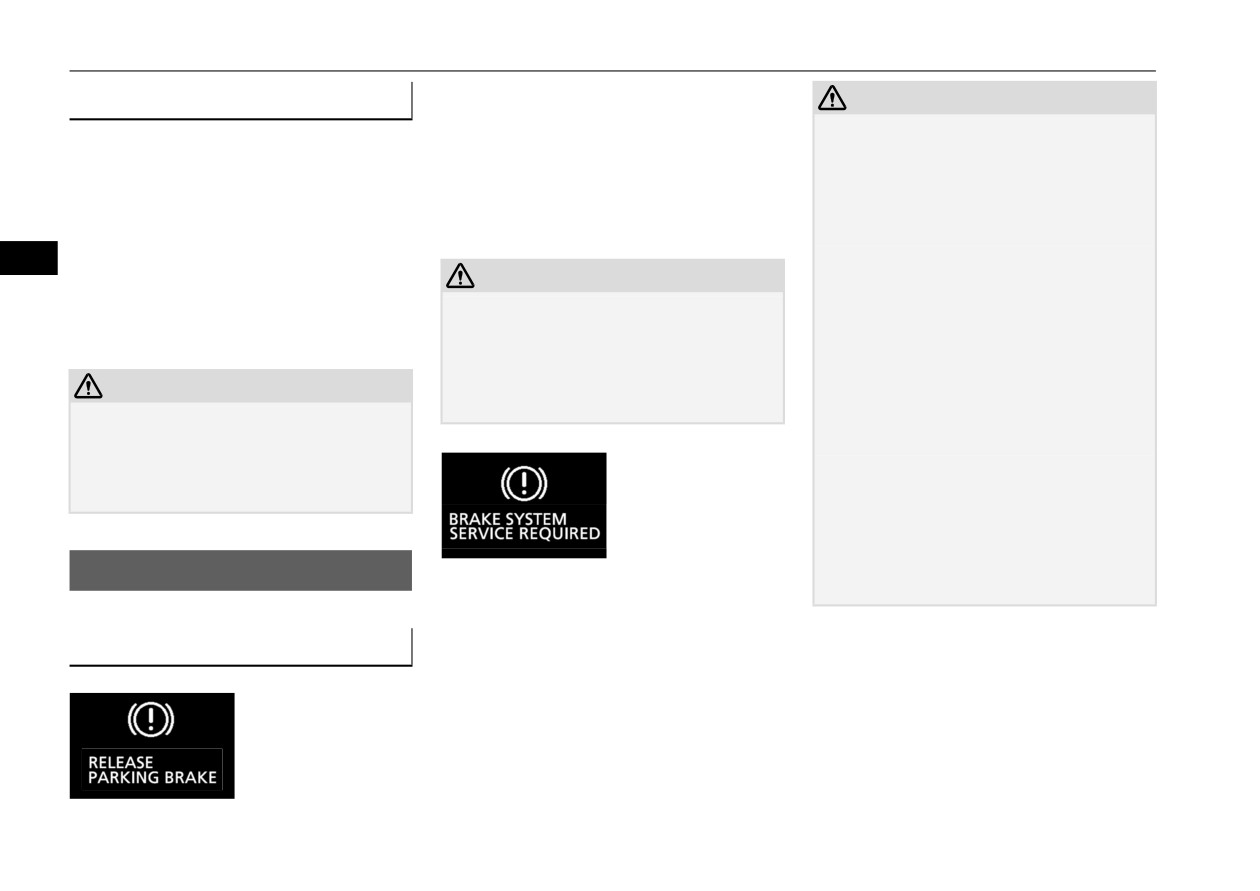
Information screen display
This warning is displayed if the vehicle is
Charging system warning light
CAUTION
being driven with the parking brake still
N00520601381
z
If this warning stays on and does not go out
applied. The brake warning light in the instru-
while driving, there is a danger of ineffective
This light comes on in the event of a malfunc-
ment cluster only comes on when the parking
braking. If this happens, park the vehicle in a
tion in the charging system or when the igni-
brake is applied.
safe place, and contact an authorized
tion switch is turned to the “ON” position
For details, refer to “Brake warning light and
Mitsubishi Motors dealer or a repair facility
(engine off) or the operation mode is put in
buzzer” on page 5-186.
of your choice immediately.
ON. The warning is also displayed in the
z
If the brake warning display, brake warning
5
multi-information display. When the engine
light, and the Anti-lock braking system
CAUTION
is started, the light should go out. Check to
warning light are illuminated at the same
z If a vehicle is driven without releasing the
make sure that the light has gone out before
time, the braking force distribution function
parking brake, the brakes will overheat,
driving.
will not operate, so the vehicle may be desta-
resulting in ineffective braking and possible
bilized during sudden braking. Avoid sudden
brake failure.
braking and high-speed driving. Park the
CAUTION
If this warning is displayed, release the park-
vehicle in a safe place, and contact an autho-
ing brake.
z If the warning light stays on while the engine
rized Mitsubishi Motors dealer or a repair
is running, park your vehicle in a safe place
facility of your choice.
immediately and contact an authorized
z
The vehicle should be brought to a halt in the
Mitsubishi Motors dealer or a repair facility
following manner when brake performance
of your choice to have the system checked.
is deteriorated.
• Confirm that the vehicle slows down when
you press down on the brake pedal harder
Information screen display
than usual. In some cases, the brake pedal
When the ignition switch is turned to the
may go all the way to the floor.
N00558301077
“ON” position or the operation mode is put in
ON, if the brake fluid is low, this warning is
Brake warning display
displayed.
N00558401241
The brake warning light in the instrument
cluster also illuminates.
For details, refer to “Brake warning light and
buzzer” on page 5-186.
5-188
Features and controls
Head Up Display (HUD) (if so equipped)
CAUTION
CAUTION
CAUTION
• Should the brakes fail, use engine braking
z If warnings are displayed while the engine is
z If this warning display comes on when the
to reduce your speed and observe the fol-
running, park your vehicle in a safe place
engine oil level is proper, have your vehicle
lowings.
immediately and contact an authorized
checked at an authorized Mitsubishi Motors
[Vehicles with the parking brake of the
Mitsubishi Motors dealer or a repair facility
dealer or a repair facility of your choice.
lever type]
of your choice to have the system checked.
Carefully pull the parking brake lever.
[Vehicles with the Electric parking brake]
NOTE
5
Keep pulling the Electric parking brake
Oil pressure warning display
z The oil pressure warning display does not
switch. (Refer to “Electric parking brake”
N00558701172
show the amount of oil. The oil level must be
on page 5-51.)
checked using the dipstick.
Depress the brake pedal to illuminate the
stop lights to alert the vehicles behind you.
Head Up Display (HUD) (if so
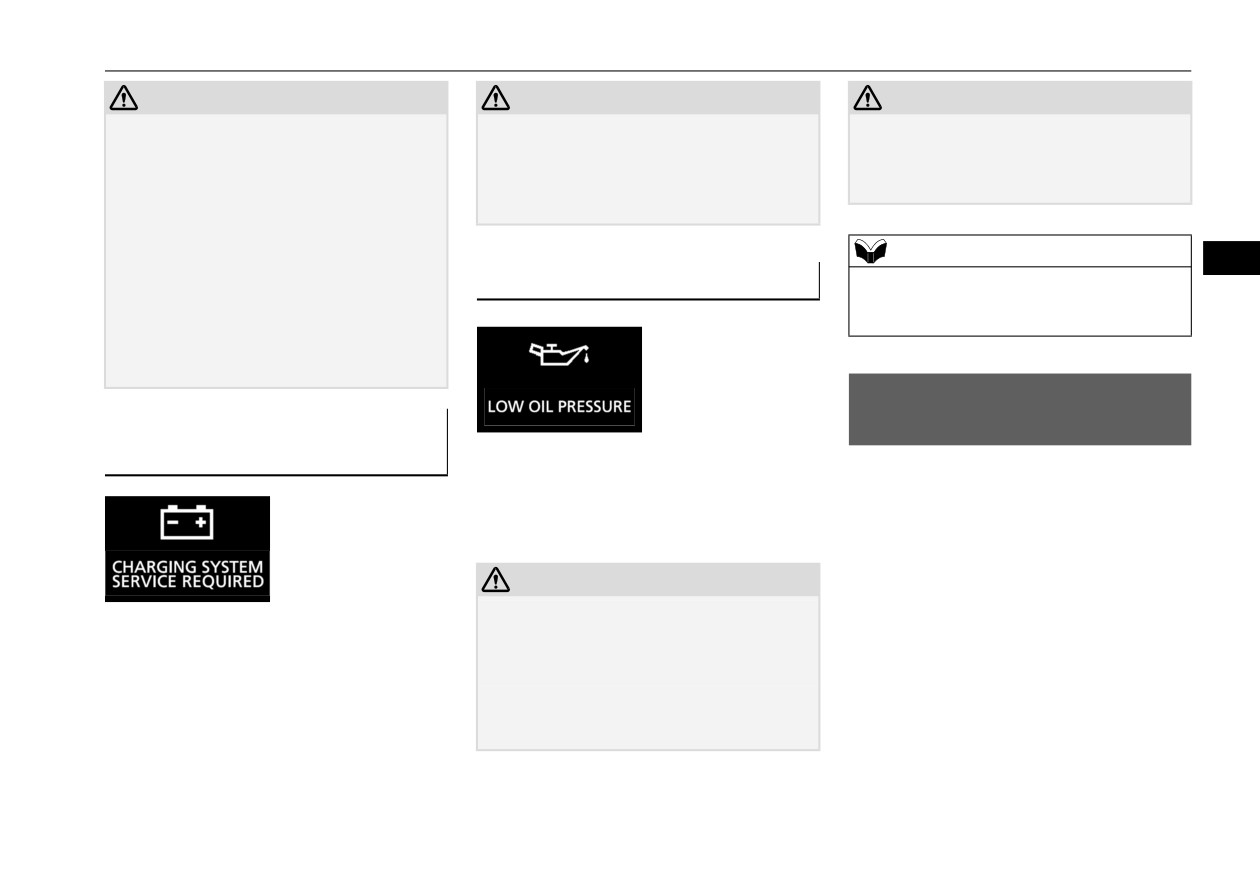
Charging system warning dis-
equipped)
play
N00594300058
If the engine oil pressure drops while the
N00558601168
engine is running, the warning display is dis-
The Head Up Display (HUD) shows informa-
played on the information screen in the multi-
tion on a transparent display so that you can
information display.
easily check the following information while
looking ahead when driving.
CAUTION
Displayed information:
z If the vehicle is driven while the engine oil is
If there is a fault in the charging system, the
low, or the oil level is normal but the warn-
z Vehicle speed
warning display is displayed on the informa-
ing is displayed, the engine may overheat
z Navigation information (if so equipped)
and damage may result.
tion screen in the multi-information display.
z Auto-speed (cruise) control information
z If the warning is displayed while the engine
The charge warning light in the instrument
z Adaptive Cruise Control System (ACC)
is running, park your vehicle in a safe place
cluster also illuminates.
immediately and check the engine oil level.
information (if so equipped)
Features and controls
5-189
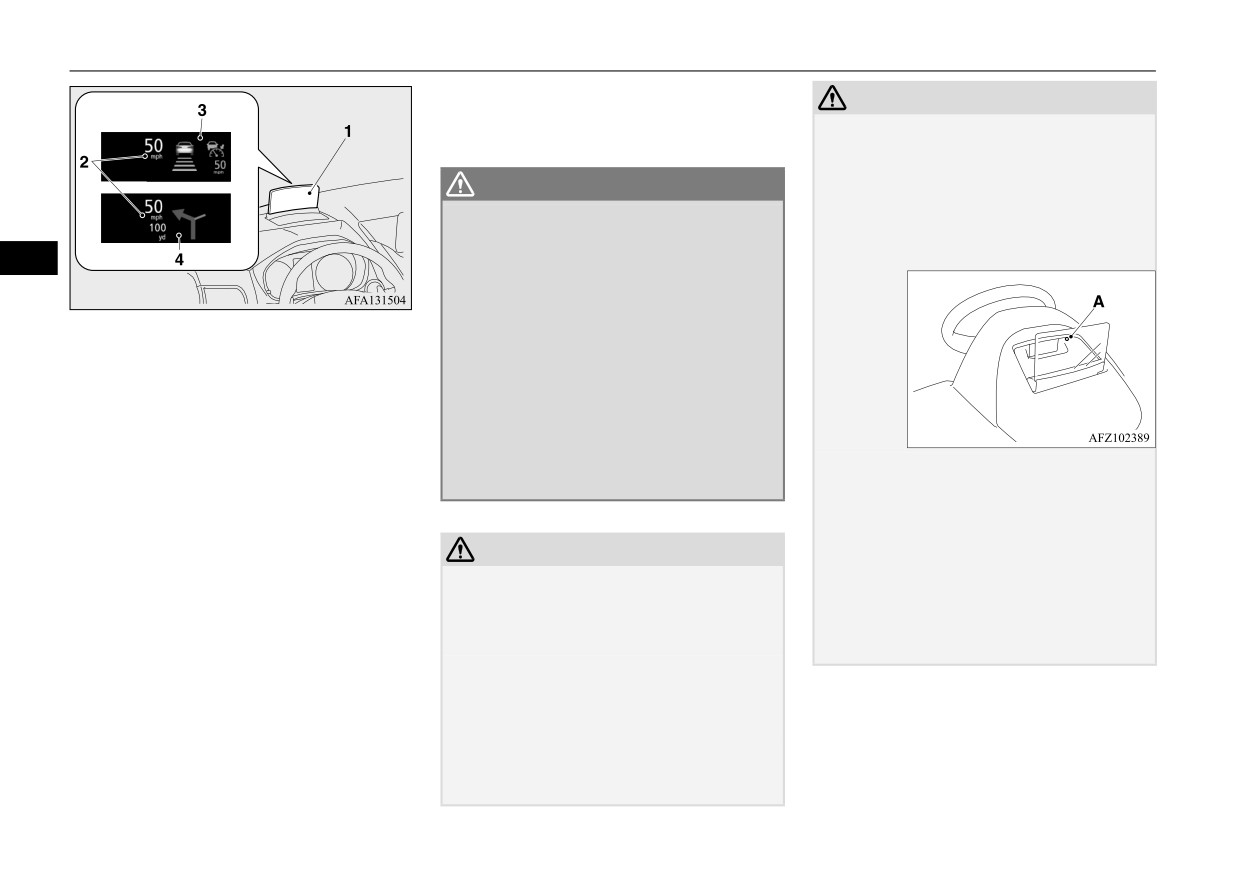
Head Up Display (HUD) (if so equipped)
Refer to “Indicator light, warning light, and
Example
CAUTION
information screen display list” on page
z
Do not affix a sticker, label, etc., to the dis-
5-164.
play. They could block the display or
obstruct the opening or closing operation,
WARNING
resulting in a malfunction. Also, the sensor
z
Always stop the vehicle in a safe place
(A) that adjusts the brightness of the display
before operating the HUD. If you operate
may not function correctly, causing the dis-
it while driving, your attention to the road
play to be difficult to see.
5
ahead may be affected, resulting in an
accident.
z
Do not spray water or spill beverages in
1-
Display
the HUD. If the switches, wires, or electri-
2-
Speed display screen
cal components become wet, they could
3-
Information display screen
malfunction or cause a vehicle fire.
4-
Navigation information display screen
If you accidentally spill a beverage, wipe
(if so equipped)
up as much liquid as possible and immedi-
ately consult an authorized Mitsubishi
Motors dealer or a repair facility of your
z
Do not shine a bright light onto the light-
When a warning is displayed on the informa-
choice.
receiving portion of the sensor (A). The sen-
tion screen in the meter, a warning will also
sor could malfunction.
be displayed on the HUD.
z
If you drop an object into the storage space
for the display and cannot retrieve it, or if the
CAUTION
Examples of displayed warnings:
display was closed while an object was in the
z
When opening or closing the display, do not
storage space and can no longer be opened,
z Door ajar warning
touch the moving parts. Otherwise, your
contact an authorized Mitsubishi Motors
hands could be caught, resulting in personal
z Seat belt reminder
dealer or a repair facility of your choice to
injury.
z Adaptive Cruise Control System (ACC)
have the system checked.
z
Do not place any objects near the HUD. The
warning (if so equipped)
objects could prevent the display from open-
z Forward Collision Mitigation system
ing or obstruct the opening operation, result-
(FCM) warning
ing in a malfunction.
z Lane Departure Warning (LDW) (if so
z
Never open, close, or adjust the angle of the
equipped)
display manually. Applying a strong force to
the display could result in a malfunction.
5-190
Features and controls
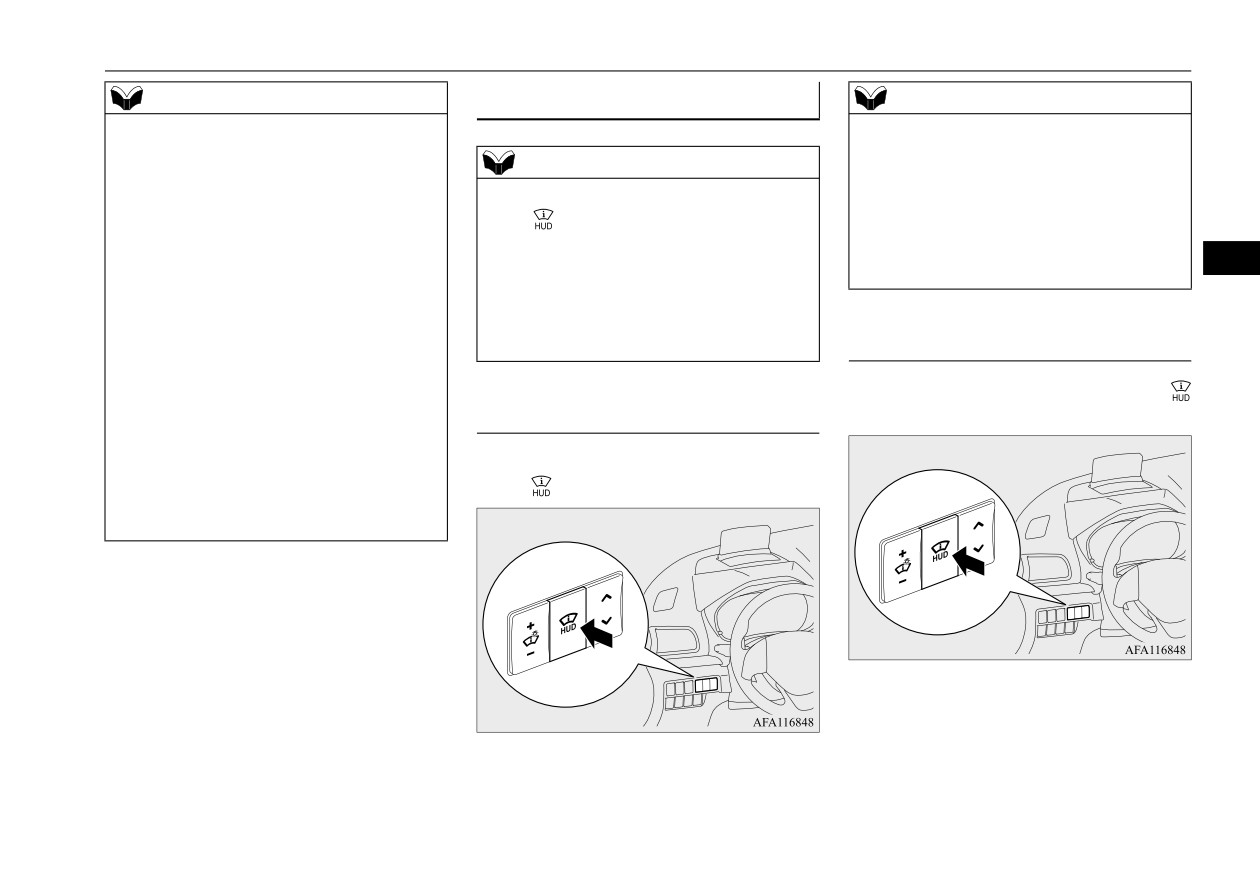
Head Up Display (HUD) (if so equipped)
NOTE
Using the HUD
NOTE
z
When you are wearing sunglasses, the dis-
z If the HUD was open when the operation
play may be difficult to see. Remove your
mode was put in OFF, the HUD will open
sunglasses or adjust the brightness of the dis-
NOTE
automatically when the operation mode is
play.
z If the display does not open or close when
put in ON.
Refer to “Adjusting the brightness of the dis-
z If the HUD was close when the operation
the
switch is pushed, check that there are
play” on page 5-192.
mode was put in OFF, the HUD will not open
no objects near the display obstructing its
z
If the battery is disconnected or the battery
automatically when the operation mode is
movement. If the display does not open or
5
voltage is low, the display will return to the
put in ON.
close even though there are no obstructions,
default angle and may be difficult to see. If
contact an authorized Mitsubishi Motors
this occurs, adjust the angle of the display.
dealer or a repair facility of your choice to
Refer to “Adjusting the angle of the display”
have the system checked.
Closing the display
on page 5-192.
z
It may be difficult to see the display depend-
1. When the display is open, push the
ing on the weather conditions (rain, snow,
Opening the display
switch.
direct sunlight, temperature, etc.). If this
occurs, adjust the angle and brightness of the
1. When the operation mode is in ON, push
display.
Refer to “Adjusting the angle of the display”
the
switch to open the display.
on page 5-192 and “Adjusting the brightness
of the display” on page 5-192.
2. The setting top screen will be displayed if
the vehicle is stopped, push the switch
again.
2. The launch screen will be displayed, and
then information will be displayed.
Features and controls
5-191
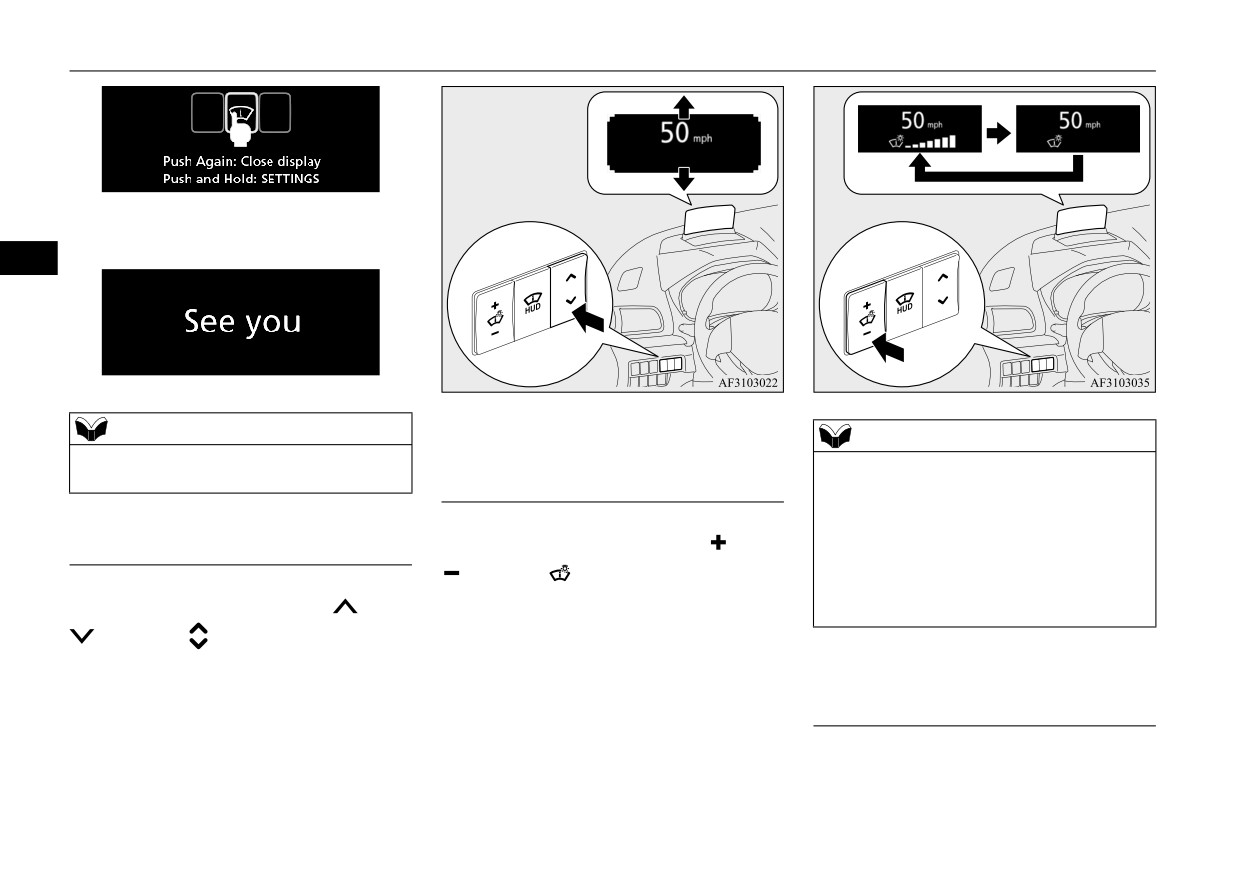
Head Up Display (HUD) (if so equipped)
3. The ending screen will be displayed, and
then the display will close.
5
NOTE
NOTE
z When the operation mode is put in OFF, the
Adjusting the brightness of the
z The nighttime and daytime brightness of the
HUD will close automatically.
display
display automatically switches depending on
whether the front side-marker lights are on
or off.
When the display is open, push the
side or
Adjusting the angle of the display
z In addition to manual adjustment, the bright-
side of the
switch to change the bright-
ness also automatically switches and adjusts
according to the brightness outside the vehi-
ness of the display. The nighttime and day-
When the display is open, push the
side or
cle.
time brightness can each be adjusted to 16
side of the
switch to adjust the angle
different levels depending on whether the
of the display to raise or lower the position
front side-marker lights are on or off.
where the information is displayed.
Switching the navigation informa-
tion display
On vehicles equipped with the Smartphone-
link Display Audio (SDA) navigation system,
5-192
Features and controls
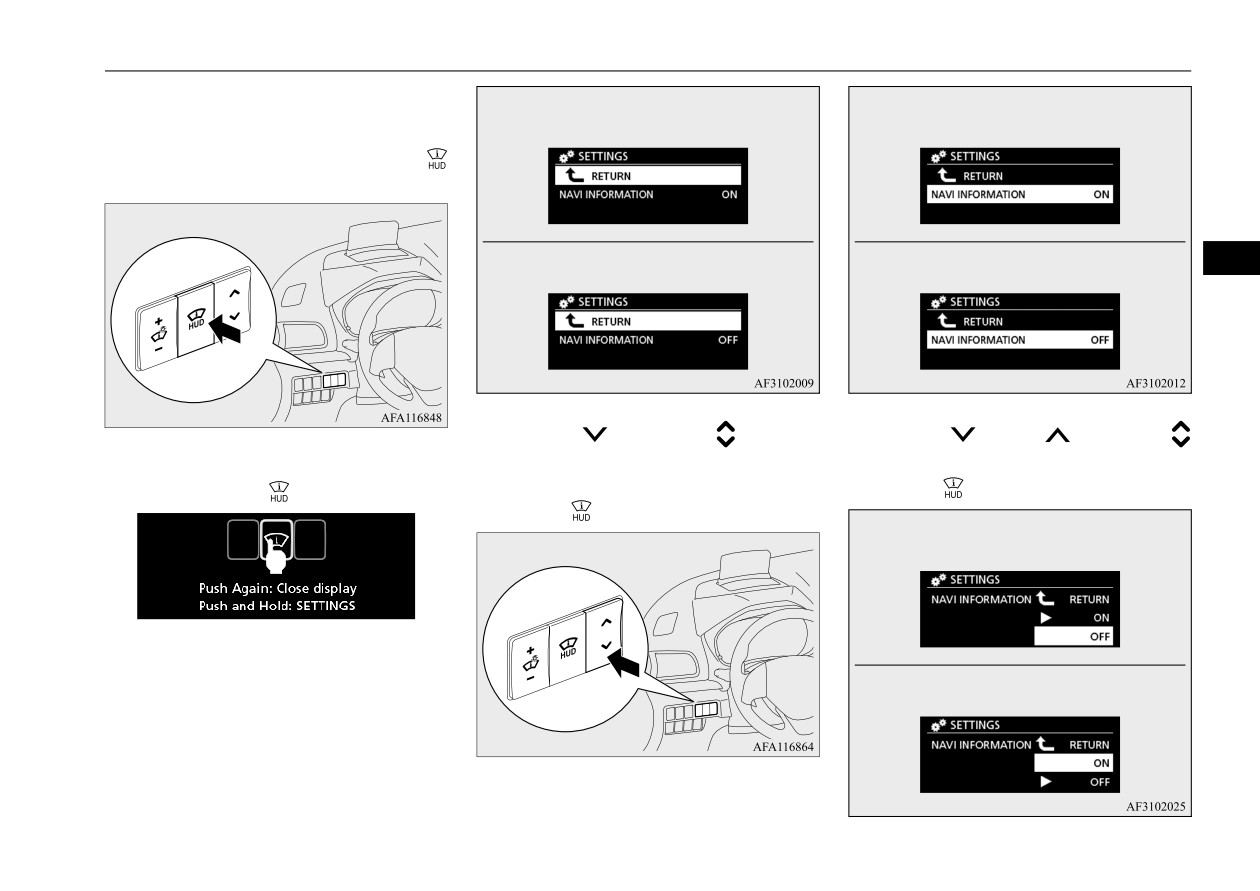
Head Up Display (HUD) (if so equipped)
you can select whether to display the naviga-
Navigation information: ON
Navigation information: ON
tion information on the display.
1. To change the display setting, push the
switch when the display is open.
Navigation information: OFF
Navigation information: OFF
5
4. Push the
side of the
switch to
5. Push the
side or
side of the
2. The setting top screen will be displayed,
select
“NAVI INFORMATION ON” or
switch to select “OFF” or “ON”, and then
“NAVI INFORMATION OFF”, and then
push and hold the
switch.
push the
switch.
push the
switch.
Navigation information: ON
3. The display setting screen will be dis-
played.
Navigation information: OFF
Features and controls
5-193
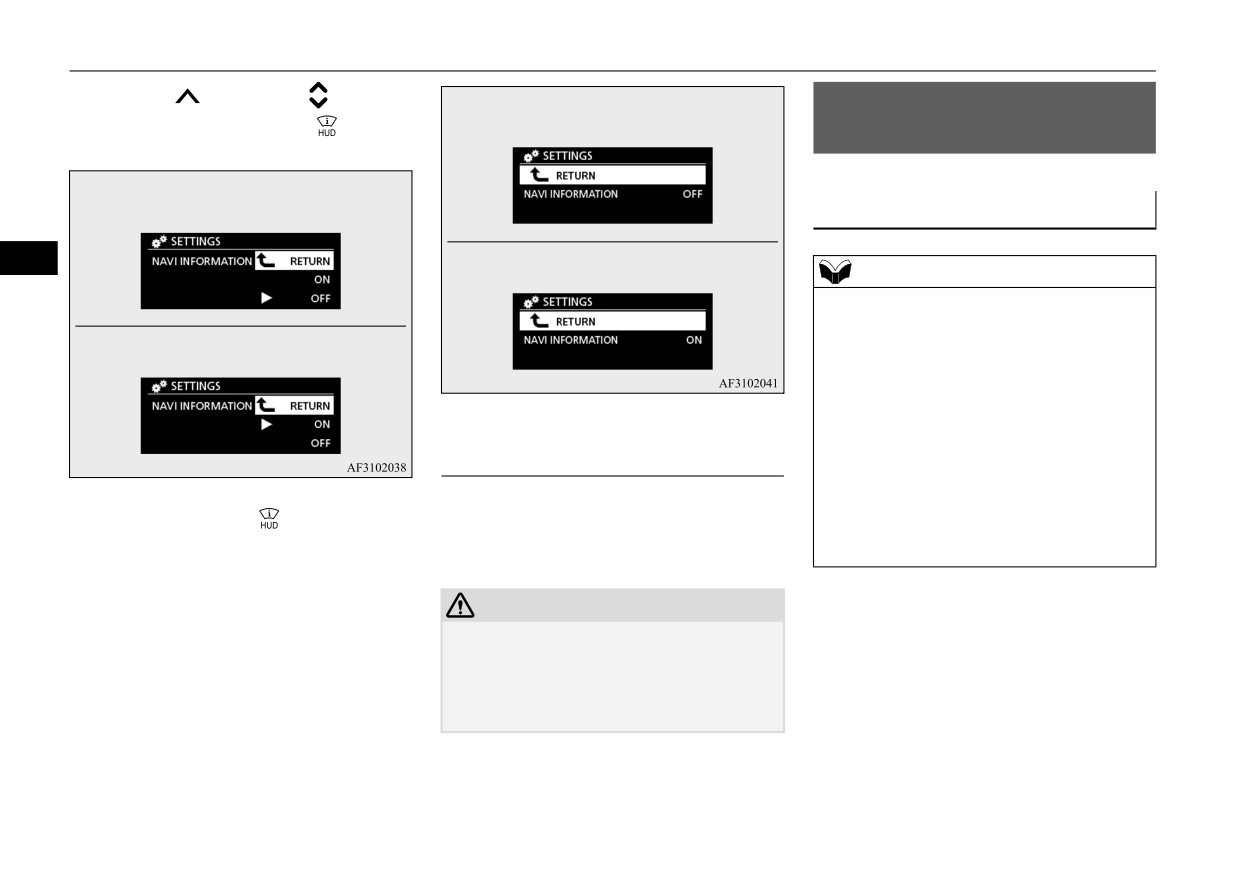
Combination headlights and dimmer switch
6. Push the
side of the
switch to
Navigation information: ON
Combination headlights and
select “RETURN”. Push the
switch to
dimmer switch
confirm the setting.
N00522502020
Navigation information: ON
Headlights
Navigation information: OFF
5
NOTE
z
Do not leave the headlights and other lights
on for a long period of time when the engine
Navigation information: OFF
is not running. The battery will run down.
z
When it rains, or when the vehicle has been
washed, the inside of the lens sometimes
becomes foggy. This is the same as when
window glass mists up on a humid day, and
does not indicate a problem. When the light
Handling the HUD
is switched on, the heat will dry out the fog.
However, if water collects inside the light,
A special coating is applied to the display and
have it checked by an authorized Mitsubishi
7. Push again the
switch
while
mirror surface. Use a finely textured, soft
Motors dealer or a repair facility of your
“RETURN” is selected
in the
setting
cloth, such as an eyeglass cleaning cloth.
choice.
screen, and the navigation system display
will be set to “OFF” or “ON”.
CAUTION
z Do not use cleaners or protectants that con-
tain silicone or wax. If these cleaners and
protectants are used on the display or mirror
surface, the coating could be scratched and
come off.
5-194
Features and controls
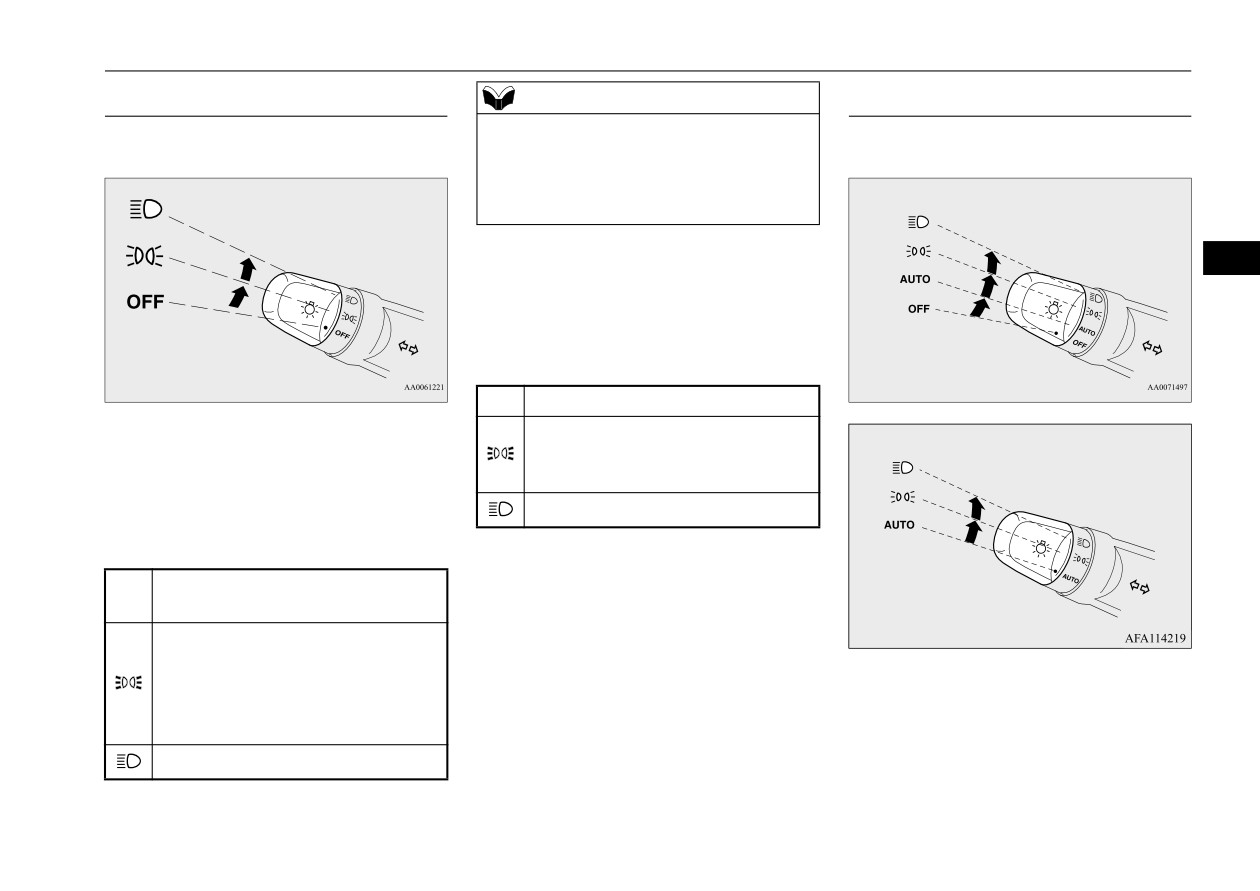
Combination headlights and dimmer switch
Type 1
NOTE
Type 2
z Once the daytime running light come on,
Rotate the switch to operate the lights.
Rotate the switch to operate the lights.
they do not go out until the ignition switch is
turned to the “OFF” or “ACC” position or
the operation mode is changed to OFF or
Vehicles with “OFF” position
ACC.
[When the engine is not running, or when the
5
engine is running but the parking brake is not
released]
The engine starts when the lights are off.
OFF
All lights off
The combinations of switch operations and
Parking, tail, front and rear side-
Vehicles without “OFF” position
illuminated lights differ in accordance with
marker lights, license plate and
the following conditions.
instrument panel lights on
[When the engine is started, and the parking
Headlights and other lights on
brake is released]
The daytime running lights illumi-
OFF
nated
The daytime running lights illumi-
nated
The combinations of switch operations and
Tail, front and rear side-marker
illuminated lights differ in accordance with
lights, license plate and instrument
the following conditions.
panel lights on
Headlights and other lights on
[When the engine is started, and the parking
brake is released]
Features and controls
5-195