Mitsubishi Outlander PHEV (2022 year). Manual in english - page 3
Quick charging (charging method with quick charger) (if so equipped)
5. Charging is complete when the charging
NOTE
NOTE
indicator turns off.
z
When the quick charge connector is con-
z
If the operation mode of the power switch is
Disconnect the quick charge connector
nected to the quick charge port, the charging
put in ON with the quick charge connector
according to the manual of the quick char-
indicator will blink. Once charging has
connected to the quick charge port, the Plug-
ger.
3
started, the charging indicator will illuminate
in Hybrid EV System cannot be started.
and the charging port courtesy light blinks
Be sure to disconnect the quick charge con-
three times.
CAUTION
nector before starting the Plug-in Hybrid EV
z
If you want to confirm the main drive lith-
z
Do not leave the quick charge connected to
System.
ium-ion battery level or the predicted charg-
the quick charge port after charging.
z
Charging will stop at approximately 80 %
ing time during charging, open one of the
Someone might stumble on the charger or
charge. This is a control for efficient charge
doors or operate the multi-information dis-
the quick charge port might get damaged.
and not a malfunction.
play switch, and the main drive lithium-ion
To achieve full charge, repeat charging from
battery level display
(E) appears on the
Step 2 again.
information screen in the multi-information
NOTE
z
Make sure that the inner lid is completely
display.
closed before closing the charging lid.
z
If quick charging has not completed nor-
Although the predicted charging time display
If the charging lid is forcibly closed without
mally, and the charging indicator continu-
(F) appears, the charging time for quick
first completely closing inner lid, the hinge
ously blinking, perform quick charging again
charging is approximately 30 minutes and
on the inner lid may be broken.
and complete it normally.
displayed “--:--” in the screen and you can-
z
When the operation mode of the power
If the charging indicator is continuously
not confirm the predicted charging time.
switch is put in ON while the charging lid is
blinking, contact a certified Mitsubishi EV
z
When an electrical component is used during
not completely closed, a warning may be dis-
dealer.
charging, charge time may become longer.
played on the information screen in the
z
You may hear operating sounds from the
multi-information display.
6. Close the inner lid and press the rear of
main drive lithium-ion battery cooling sys-
Refer to
“Warning display list” on page
tem, such as sounds from the cooling fan and
the charging lid until it clicks to close it.
5-162.
air conditioning compressor, during quick
z
On the vehicle equipped with the charging
charging. This is normal.
WARNING
lid lock, if the charging lid is closed while
z
Since the main drive lithium-ion battery
z $IWHU FKDUJLQJ EH VXUH WR FORVH WKH LQQHU
the driver’s door is locked, the charging lid
cooling system uses cool air from the air
OLG DQG WKH FKDUJLQJ OLG FRPSOHWHO\
will be locked.
conditioning system, the air conditioning
%H FDUHIXO WKDW ZDWHU RU GXVW GRHV QRW
will automatically be operated.
HQWHU LQ WKH TXLFN FKDUJH SRUW LQQHU OLG
After quick charging, you may find dehu-
DQG TXLFN FKDUJH FRQQHFWRU
midified water from the air conditioning sys-
(QWU\ RI ZDWHU RU GXVW FRXOG FDXVH D ILUH
tem under the vehicle. This is normal.
HOHFWULF VKRFN RU VKRUW FLUFXLW
General information/Charging
3-35
High-Voltage components
tional vehicles would also require the same
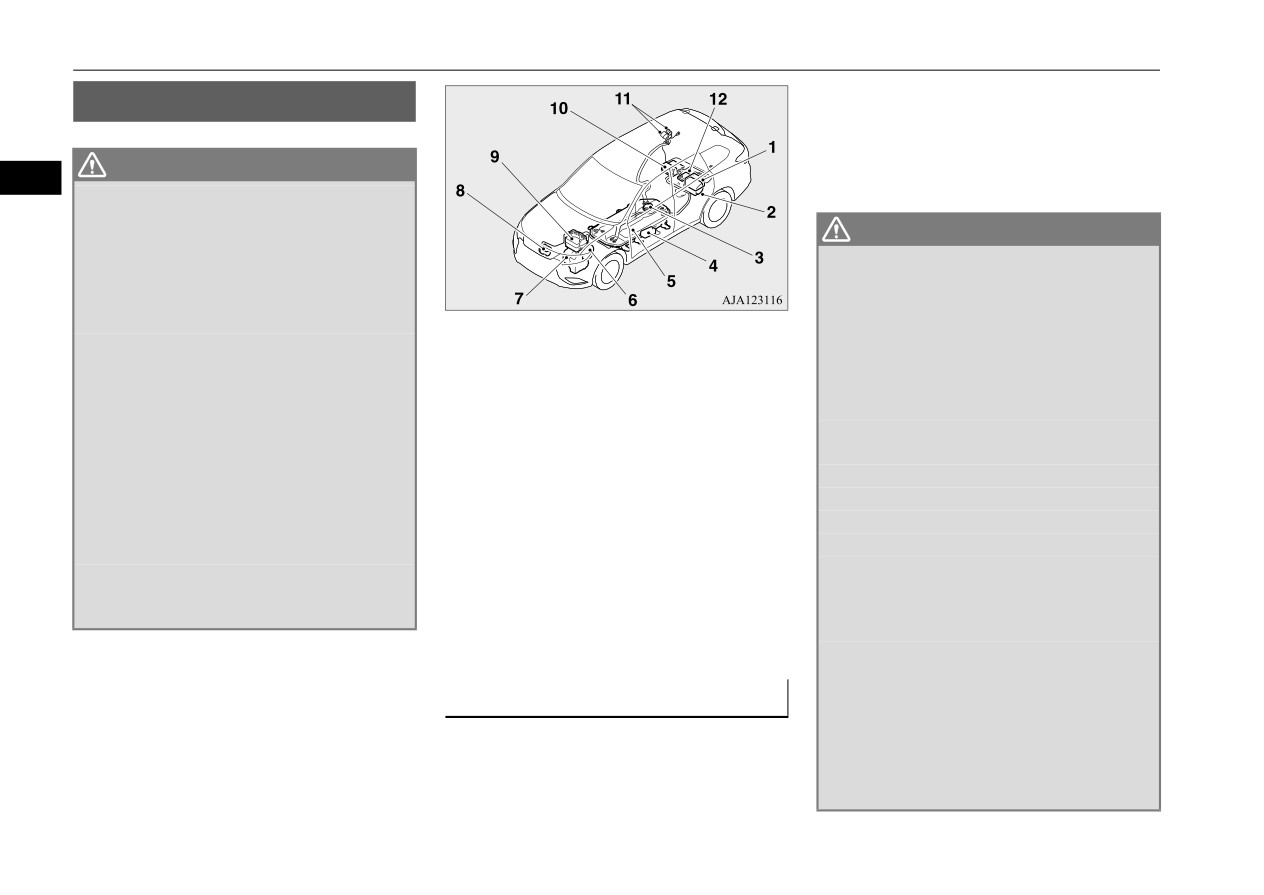
+LJK 9ROWDJH FRPSRQHQWV
response for Plug-in Hybrid electric vehicle.
N01205701066
Also follow the instructions described below
to avoid severe burns and electrical shock that
WARNING
3
may result in serious injury or death.
z
7KH 3OXJ LQ +\EULG (9 6\VWHP XVHV KLJK
YROWDJH XS WR '&
YROW
7KH V\VWHP FDQ
EH KRW GXULQJ DQG DIWHU VWDUWLQJ DQG ZKHQ
WARNING
WKH YHKLFOH LV VKXW RII
%H FDUHIXO RI ERWK
z
,I \RXU YHKLFOH LV GULYDEOH SXOO \RXU YHKL
WKH KLJK YROWDJH DQG WKH KLJK WHPSHUDWXUH
FOH RII WKH URDG WR D VDIH QHDUE\ ORFDWLRQ
)ROORZ WKH ZDUQLQJ ODEHOV WKDW DUH
DQG UHPDLQ RQ WKH VFHQH
DWWDFKHG WR WKH YHKLFOH
$OVR LI SRVVLEOH GR WKH IROORZLQJ RSHUD
1-
On board charger/DC-DC converter
z
1HYHU WRXFK GLVDVVHPEOH UHPRYH RU
WLRQV DQG VWD\ RXW RI WKH ZD\ RI DQ\
2-
Rear motor
UHSODFH KLJK YROWDJH SDUWV H[SRVHG HOHF
RQFRPLQJ WUDIILF ZKLOH DZDLWLQJ WKH
3-
Service plug
WULFDO FRPSRQHQWV FDEOHV RU FRQQHFWRUV
DUULYDO RI HPHUJHQF\ UHVSRQGHUV
4-
Electric heater
)DLOXUH WR IROORZ WKLV LQVWUXFWLRQ FDQ
$SSO\ FKRFNV WR WKH ZKHHOV
UHVXOW LQ VHYHUH EXUQV RU HOHFWULF VKRFN
5-
Main drive lithium-ion battery
3XW WKH VHOHFW SRVLWLRQ LQ WKH ³3´
3$5.
FDXVLQJ VHULRXV LQMXU\ RU GHDWK +LJK YROW
6-
Front motor
SRVLWLRQ
DJH FDEOHV DUH FRORUHG RUDQJH 7KH YHKLFOH
7-
Generator
$SSO\ WKH SDUNLQJ EUDNH
KLJK YROWDJH V\VWHP KDV QR XVHU VHUYLFH
8-
Air conditioner compressor
2SHQ WKH ZLQGRZV GRRUV DQG OLIWJDWH
DEOH SDUWV 7DNH \RXU YHKLFOH WR D FHUWLILHG
9-
Power drive unit (PDU)
3XW WKH RSHUDWLRQ PRGH LQ 2))
0LWVXELVKL (9 GHDOHU IRU DQ\ QHFHVVDU\
10- Rear electric motor control unit (MCU)
7XUQ RQ WKH KD]DUG ZDUQLQJ IODVKHUV
PDLQWHQDQFH
11- Normal charge port/Quick charge port
0RYH WKH NH\ DZD\ IURP WKH YHKLFOH WR
z
$OZD\V DVVXPH WKH KLJK YROWDJH EDWWHU\
(if so equipped)
SUHYHQW XQLQWHQGHG VWDUW XS RI WKH V\V
DQG DVVRFLDWHG FRPSRQHQWV DUH HQHUJL]HG
12-
120 V AC power supply
(if so
WHP E\ LQDGYHUWHQW FRQWDFW ZLWK D VZLWFK
DQG IXOO\ FKDUJHG
equipped)
RU LPSDFW IURP WKH FUDVK
z
1HYHU WRXFK KLJK YROWDJH ZLULQJ FRQQHF
High voltage components and wiring cables
WRUV DQG RWKHU KLJK YROWDJH SDUWV VXFK DV
are located as shown in the figure below.
WKH LQYHUWHU XQLW DQG PDLQ GULYH OLWKLXP
,Q FDVH RI D FROOLVLRQ
LRQ EDWWHU\ $Q HOHFWULF VKRFN PD\ RFFXU LI
N01205801041
H[SRVHG HOHFWULF ZLUHV DUH YLVLEOH ZKHQ
A crash or impact significant enough to
YLHZHG IURP LQVLGH RU RXWVLGH RI
\RXU
require an emergency response for conven-
YHKLFOH
)RU WKHLU ORFDWLRQV VHH
³+LJK
YROWDJH FRPSRQHQWV´ RQ SDJH
3-36
General information/Charging
High-Voltage components
WARNING
WARNING
WARNING
z
,I WKH YHKLFOH UHFHLYHV D VWURQJ LPSDFW WR
z
:KHQ \RX OHDYH WKH YHKLFOH LI SRVVLEOH
z
'R QRW DWWHPSW WR UHSDLU D GDPDJHG 3OXJ
WKH IORRU ZKLOH GULYLQJ VWRS WKH YHKLFOH LQ
RSHQ WKH ZLQGRZV GRRUV DQG OLIWJDWH WR
LQ +\EULG HOHFWULF YHKLFOH \RXUVHOI
3OHDVH
D VDIH SODFH DQG FKHFN WKH IORRU
SUHYHQW DFFXPXODWLRQ RI SRLVRQRXV FRP
FRQWDFW D FHUWLILHG 0LWVXELVKL (9 GHDOHU
z
/HDNV RU GDPDJH WR WKH PDLQ GULYH OLWK
EXVWLEOH JDVVHV
7KLV ZLOO DOVR DVVLVW LQ WKH
IRU VHUYLFH
3
LXP LRQ EDWWHU\ PD\ UHVXOW LQ D ILUH ,I \RX
UHVFXH DQG ILUH ILJKWLQJ SURFHVV
z
,Q WKH HYHQW RI DQ DFFLGHQW WKDW UHTXLUHV
GLVFRYHU WKHP FRQWDFW HPHUJHQF\ VHUYLFHV
z
$V ZLWK DQ\ YHKLFOH ILUH WKH E\SURGXFWV RI
ERG\ UHSDLU DQG SDLQWLQJ WKH YHKLFOH
LPPHGLDWHO\
6LQFH WKH IOXLG OHDN PD\ EH
FRPEXVWLRQ FDQ EH WR[LF 'R QRW LQKDOH
VKRXOG EH GHOLYHUHG WR D FHUWLILHG 0LWVXEL
OLWKLXP PDQJDQLWH IURP WKH /LWKLXP LRQ
VPRNH YDSRUV RU JDV IURP WKH YHKLFOH
VKL (9 GHDOHU WR KDYH WKH PDLQ GULYH OLWK
EDWWHU\ QHYHU WRXFK DQ\ IOXLG OHDNLQJ
0RYH WR D VDIH GLVWDQFH XSZLQG DQG XSKLOO
LXP LRQ EDWWHU\ DQG KLJK YROWDJH SDUWV
IURP WKH LQVLGH RU RXWVLGH RI WKH YHKLFOH ,I
IURP WKH YHKLFOH ILUH DQG RXW RI WKH ZD\ RI
VXFK DV WKH LQYHUWHU LQFOXGLQJ WKH
WKH IOXLG FRQWDFWV \RXU VNLQ RU H\HV ZDVK
DQ\ RQFRPLQJ WUDIILF ZKLOH DZDLWLQJ WKH
DWWDFKHG ZLULQJ KDUQHVV UHPRYHG SULRU WR
LW RII LPPHGLDWHO\ ZLWK D ODUJH DPRXQW RI
DUULYDO RI HPHUJHQF\ UHVSRQGHUV
SDLQWLQJ
,I H[SRVHG WR KHDW LQ WKH SDLQW
ZDWHU DQG UHFHLYH LPPHGLDWH PHGLFDO
z
,I \RX GHWHFW OHDNLQJ IOXLGV VSDUNV VPRNH
ERRWK WKH PDLQ GULYH OLWKLXP LRQ EDWWHU\
DWWHQWLRQ WR KHOS DYRLG VHULRXV LQMXU\
IODPHV JXUJOLQJ SRSSLQJ RU KLVVLQJ QRLVHV
ZLOO H[SHULHQFH EDWWHU\ FDSDFLW\ ORVV
z
,I \RX DUH XQDEOH WR VDIHO\ DVVHVV WKH YHKL
RULJLQDWLQJ IURP WKH KLJK YROWDJH EDWWHU\
$ GDPDJHG PDLQ GULYH OLWKLXP LRQ EDWWHU\
FOH GXH WR YHKLFOH GDPDJH GR QRW WRXFK
FRPSDUWPHQW FRQWDFW HPHUJHQF\ VHUYLFHV
FDQ DOVR SRVH VDIHW\ ULVNV WR XQWUDLQHG
WKH YHKLFOH
/HDYH WKH YHKLFOH DQG FRQWDFW
LPPHGLDWHO\ 7KLV PD\ UHVXOW LQ D ILUH
PHFKDQLFV DQG UHSDLU SHUVRQQHO
HPHUJHQF\ VHUYLFHV
$GYLVH HPHUJHQF\
z
3K\VLFDO GDPDJH WR WKH YHKLFOH RU KLJK
UHVSRQGHUV WKDW WKLV LV
3OXJ LQ
+\EULG
YROWDJH EDWWHU\ PD\ UHVXOW LQ LPPHGLDWH RU
HOHFWULF YHKLFOH
GHOD\HG UHOHDVH RI WR[LF DQG RU IODPPDEOH
NOTE
z
,I D ILUH RFFXUV LQ WKLV YHKLFOH OHDYH WKH
JDVHV DQG ILUH
z
The emergency shut-off system will be acti-
YHKLFOH DV VRRQ DV SRVVLEOH DQG FRQWDFW
z
,I \RXU YHKLFOH QHHGV WR EH WRZHG WUDQV
vated and the high-voltage system will auto-
HPHUJHQF\ VHUYLFHV 'R QRW DWWHPSW WR
SRUW WKH YHKLFOH RQ D IODWEHG WUXFN RU WRZ
matically turn off under the following
H[WLQJXLVK D ILUH E\ \RXUVHOI
,I WKH ILUH
WKH YHKLFOH HLWKHU ZLWK DOO ZKHHOV RII WKH
conditions:
LQYROYHV D OLWKLXP LRQ EDWWHU\ LW ZLOO
JURXQG
,I WKH DQ\ ZKHHOV DUH RQ WKH
• Certain front, side or rear collisions.
UHTXLUH ODUJH VXVWDLQHG YROXPHV RI ZDWHU
JURXQG ZKHQ WRZLQJ WKLV PD\ FDXVH GDP
• Certain Plug-in Hybrid EV System mal-
IRU H[WLQJXLVKPHQW
8VLQJ D VPDOO DPRXQW
DJH WR WKH HOHFWULF PRWRUV
7KLV PD\ DOVR
functions.
RI ZDWHU RU WKH LQFRUUHFW ILUH H[WLQJXLVKHU
FDXVH D ILUH LI ZLULQJ LQ WKH HOHFWULF PRWRU
z
When the emergency shut-off system is acti-
FDQ UHVXOW LQ VHULRXV LQMXU\ RU GHDWK IURP
XQLW URRP EHFRPHV GDPDJHG
5HIHU WR
vated, the ready indicator is turned off. Refer
HOHFWULFDO VKRFN
³7RZLQJ´ RQ SDJH
to “Indicator light, warning light, and infor-
mation screen display list” on page 5-160.
z
If the emergency shut-off system activates,
contact a certified Mitsubishi EV dealer.
General information/Charging
3-37
MITSUBISHI Remote Control (if so equipped)
z
Charging timer
0,768%,6+, 5HPRWH &RQ
NOTE
If you specify the charge start and/or stop
z
If you want to quickly start normal charging
WURO LI VR HTXLSSHG
time with the normal charge cable con-
even when the charging timer is already set,
N01216300052
nected, charging is started and/or stopped
you can cancel the charging timer and start
3
at that time.
the normal charging by the following meth-
The MITSUBISHI Remote Control allows
z
Remote climate control
ods.
you to operate the vehicle within the commu-
By setting the remote climate control to
[How to temporarily cancel the charging
nication range of the wireless LAN device
operate at a predetermined time, cabin
timer]
(which conforms to IEEE 802.11b and sup-
comfort can be improved or visibility can
You can temporarily cancel the charging
ports iOS or Android). The following opera-
be ensured (defrosting/demisting) before
timer by the following methods.
tions are available.
getting in the vehicle.
In addition, the predetermined charging
timer settings automatically return after the
z
Customize (function setting change)
charging timer is turned on again or the oper-
NOTE
The function setting of the F.A.S.T.-key,
ation mode of the power switch is put in ON.
z
The communication distance differs depend-
outside rear-view mirror, operation mode
• F.A.S.T.-key
ing on the wireless LAN device, due to this
of the power switch, air conditioning,
After connecting the normal charging cable
the communication may go down.
lights and windshield wipers can be
and closing all doors and the liftgate, you
changed by MITSUBISHI Remote Con-
can cancel the charging timer by pressing
trol.
the switch (A) of the F.A.S.T.-key twice
within 2 seconds.
NOTE
When the charging timer is canceled, the
z In a vehicle equipped with the Smartphone-
hazard warning lights will blink four times.
link Display Audio (SDA), it is possible to
change the setting by means of screen opera-
tions.
Refer to the separate owner’s manual for
details.
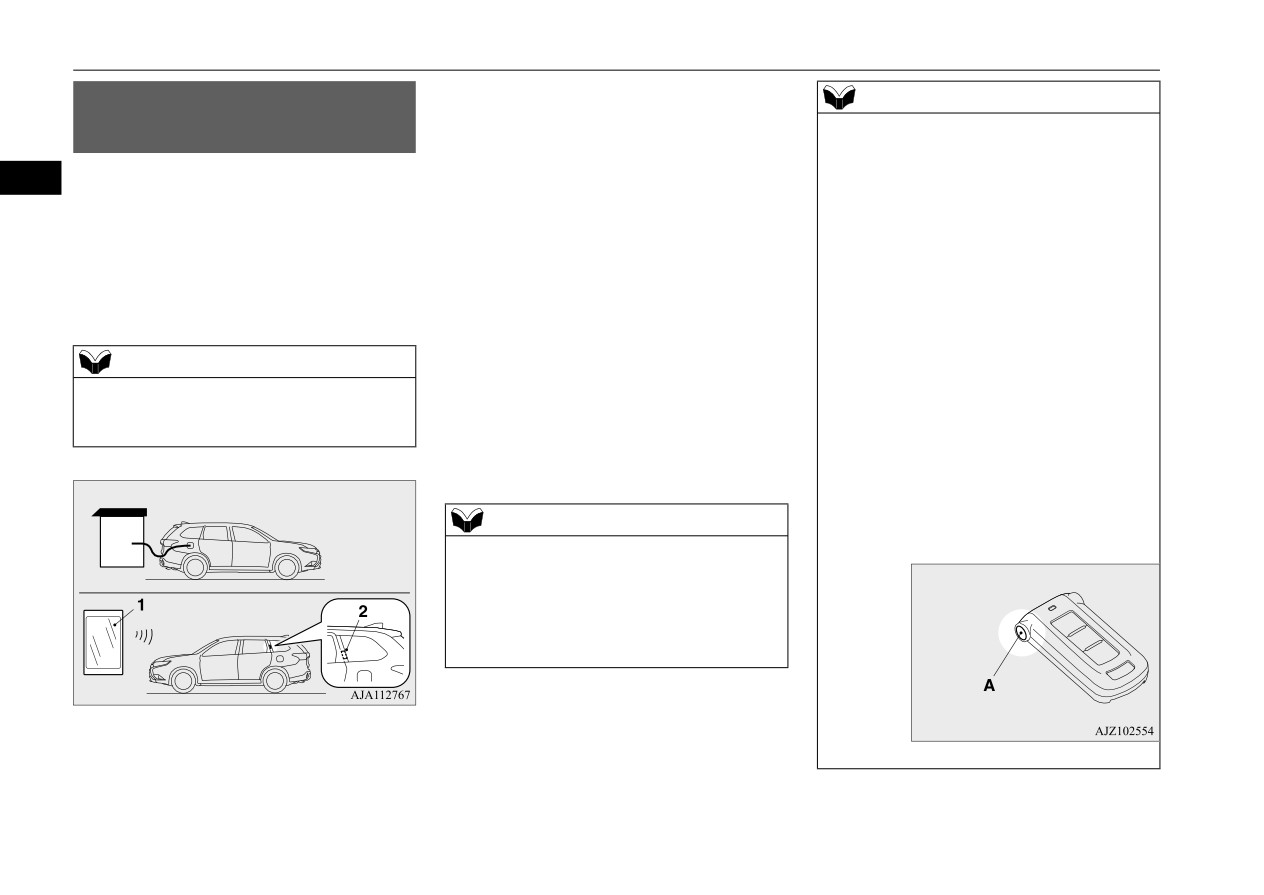
1- Wireless
LAN device
2- Antenna
• Wireless LAN device
3-38
General information/Charging
MITSUBISHI Remote Control (if so equipped)
NOTE
For the function and the operation method
[How to cancel the charging timer]
of the MITSUBISHI Remote Control,
The charging timer can be canceled by the
please visit Mitsubishi Motors’ Web site (in
following methods.
English only):
3
• Wireless LAN device
• Smartphone-link Display Audio (SDA)
z When using the charging timer, use the EV
charging cable.
If using a home or public charging device
(EVSE: Electric Vehicles Supply Equip-
ment), the charging timer may not be started.
Devices that support wireless LAN are
required to communicate with the vehicle
using the MITSUBISHI Remote Control.
products/outlander_phev2/app/remote/
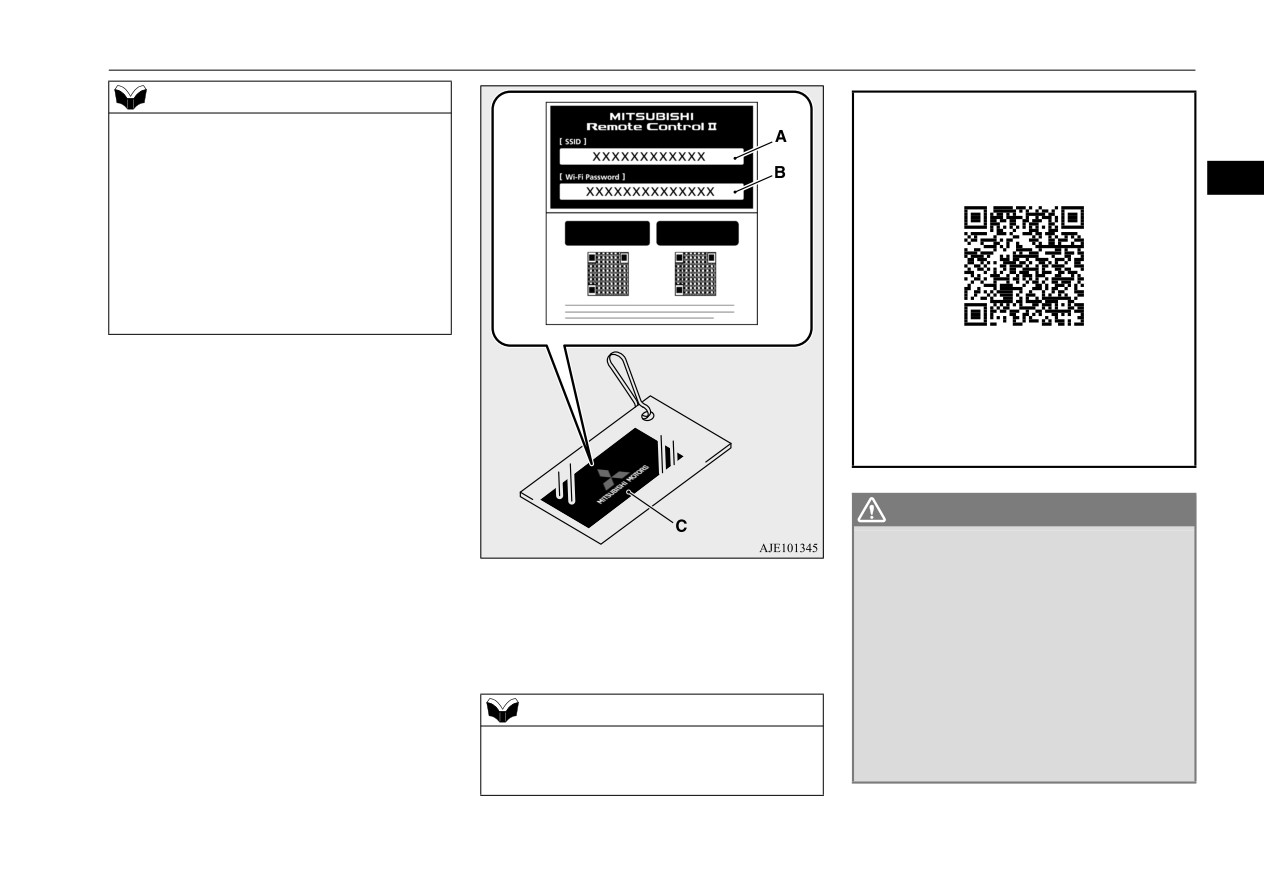
Also, an SSID* (A) and password (B) are
z
If you need further information, please
required to connect a wireless LAN device to
contact a certified Mitsubishi EV dealer.
the vehicle. The SSID and password are
described in the registration information card
(C) that is attached to the key at the time of
WARNING
your purchase of the vehicle.
z
7KH 5HPRWH &OLPDWH &RQWURO HYHQ ZKHQ
VHW FDQQRW EH UHOLHG XSRQ WR PDLQWDLQ VDIH
*:
An SSID is the identifier of an access
YHKLFOH FDELQ WHPSHUDWXUHV ZKLOH WKH YHKL
point for IEEE 802.11 series wireless
FOH LV VWRSSHG RU SDUNHG
1HYHU OHDYH FKLO
LAN. It is displayed on wireless LAN
GUHQ RU SHUVRQV UHTXLULQJ VXSHUYLVLRQ
QXUVLQJ XQDWWHQGHG LQVLGH WKH YHKLFOH
devices.
7HPSHUDWXUH LQVLGH WKH YHKLFOH FRXOG
EHFRPH H[WUHPHO\ KLJK RU ORZ UHVXOWLQJ LQ
D ULVN RI KHDW VWURNH RU K\SHUWKHUPLD WKDW
NOTE
FRXOG UHVXOW LQ GHDWK ,Q DGGLWLRQ FKLOGUHQ
z When you transfer ownership of the vehicle
FDQ DFWLYDWH VZLWFKHV DQG FRQWUROV UHVXOW
to another person, transfer the registration
LQJ LQ DQ LQMXU\ RU IDWDO DFFLGHQW
information card with the vehicle.
General information/Charging
3-39
MITSUBISHI Remote Control (if so equipped)
WARNING
NOTE
NOTE
z
7KH FRROLQJ IDQ LQ WKH HQJLQH FRPSDUW
• Due to the characteristics of radio waves,
• There is a communication device such as a
PHQW FDQ DXWRPDWLFDOO\ VWDUW GXULQJ
communication speed tends to decrease as
mobile phone or radio, or an electric device
FKDUJLQJ RU ZKLOH WKH DLU FRQGLWLRQHU LV
the communication distance increases. Use
such as a personal computer near the wire-
3
RSHUDWLQJ .HHS DZD\ IURP WKH FRROLQJ IDQ
your wireless LAN device at a short dis-
less LAN device.
XQGHU WKH KRRG
tance from the vehicle for better response.
• The wireless LAN device is in contact with
• When a microwave oven or ISM (indus-
or covered by a metal object.
trial, scientific and medical) equipment is
• The battery of the wireless LAN device has
CAUTION
being used, the communication speed and
run down.
z
Do not use a car cover except for the
range of wireless LAN devices may
z
The MITSUBISHI Remote Control cannot
Mitsubishi Motors Genuine car cover, when
decrease. Use your wireless LAN device
be used under the following conditions:
away from these appliances and equipment.
using the charging timer or the remote cli-
• The wireless LAN device is turned off.
mate control.
• If a wireless LAN device and Bluetooth®
• The MITSUBISHI Remote Control appli-
(registered trademark of Bluetooth SIG,
cation software is not installed.
Inc.) are used simultaneously, the commu-
• The MITSUBISHI Remote Control appli-
NOTE
nication speed and range of each device
cation software is not running.
may decrease. Use your wireless LAN
z
When ownership of the vehicle is transferred
• The wireless LAN device is not registered
to or from others, it is necessary to initialize
device away from Bluetooth® devices.
on the vehicle or it is not connected to the
the registration of MITSUBISHI Remote
z
Wireless LAN devices may not communicate
vehicle.
Control.
with the vehicle, or may not operate nor-
• The wireless LAN device is out of the com-
For the registration initialization procedure,
mally or stably in the following environment
munication range.
please visit our web site.
or situations. Check that the device can com-
• The wireless LAN device is connected to
municate with your vehicle before use.
other wireless LAN device.
products/outlander_phev2/app/remote/
• There is an obstruction such as a concrete
• The wireless LAN device has failed, or its
z
Keep the following points in mind when
or metal wall between the vehicle and wire-
battery has run out.
using a wireless LAN device:
less LAN device.
z
Some charging facilities have a timer func-
• Communication speed and range vary
• The vehicle is surrounded by tall vehicles
tion that turns the power on or off at a spe-
depending on the wireless LAN devices and
in a parking lot.
cific time of the day. When charging at a
the surrounding conditions (radio environ-
• There are facilities nearby that emit strong
facility with a timer function, make sure that
ment, obstacles, parking area environment,
radio waves, such as a TV tower, trans-
the charging timer is set within the time
etc.).
former substation, broadcasting station or
period when the power in the charging facil-
airport.
ity is on.
3-40
General information/Charging
MITSUBISHI Remote Control (if so equipped)
This equipment complies with FCC/IC radia-
NOTE
NOTE
tion exposure limits set forth for an uncon-
z
The 12 V starter battery is automatically and
z When the 12 V starter battery is removed,
trolled environment and meets the FCC radio
periodically charged using electrical power
the timer control of the MITSUBISHI
frequency (RF) Exposure Guidelines in Sup-
stored in the main drive lithium-ion battery.
Remote Control is reset and each function of
plement C to OET65 and RSS-102 of the IC
3
A buzzer in cabin sounds while the 12 V
the MITSUBISHI Remote Control cannot be
radio frequency (RF) Exposure rules. This
starter battery is being charged.
used. Also the main drive lithium-ion battery
z
While the remote climate control is operating
cannot be warmed up.
equipment has very low levels of RF energy
or the charging, the cooling fan or air condi-
Communicate the wireless LAN device and
that it deemed to comply without maximum
tioner compressor may start operating and its
your vehicle again.
permissive exposure evaluation (MPE). But it
sound may be heard. But this is normal.
is desirable that it should be installed and
z
The remote climate control operates in its
operated keeping the radiator at least 20 cm
*HQHUDO LQIRUPDWLRQ
own mode based on the mode selected on the
or more away from person’s body (excluding
N01216600039
wireless LAN device, regardless of the
extremities: hands, wrists, feet and ankles).
switch setting of the vehicle’s air condi-
MODEL: K9499-002
tioner.
FCC ID: RX8K9499-001
z
Air conditioning performance may deterio-
IC: 2795E-K9499001
rate or the remaining quantity of the main
drive lithium-ion battery may decrease under
This device complies with Part 15 of FCC
the following conditions:
Rules and Industry Canada licence-exempt
• In extremely hot weather.
RSS standard(s). Operation is subject to the
• In hot sunshine.
following two conditions:
• In extremely cold weather.
(1) this device may not cause interference,
z
If the remote climate control is started during
and
charging, the time until full charge may
(2) this device must accept any interference,
extend or the charging rate may decrease.
including interference that may cause unde-
z
When the remaining quantity of the main
sired operation of this device.
drive lithium-ion battery is decreased, the
remote climate control does not operate or it
may stop on the way.
CAUTION
z Changes or modifications not expressly
approved by the party responsible for com-
pliance could void the user’s authority to
operate the equipment.
General information/Charging
3-41
How to use electric device during charging
+RZ WR XVH HOHFWULF GHYLFH
WARNING
NOTE
z
$Q\ SHUVRQ ZLWK DQ HOHFWUR PHGLFDO DSSD
• During normal charging:
GXULQJ FKDUJLQJ
UDWXV VXFK DV LPSODQWDEOH FDUGLDF SDFH
The electricity consumption becomes larger
N01216700030
PDNHU RU LPSODQWDEOH FDUGLRYHUWHU
than the charge amount, the main drive lith-
3
If the operation mode of the power switch is
GHILEULOODWRU VKRXOG QRW EH LQVLGH WKH YHKL
ium-ion battery may not be charged, and
put in ON during normal charging, quick
FOH ZKHQ DLU FRQGLWLRQLQJ LV LQ RSHUDWLRQ
the remaining power of the main drive lith-
charging, V2H charging, V2H power supply,
GXULQJ FKDUJLQJ
ium-ion battery may decrease.
7KLV PD\ DIIHFW WKH RSHUDWLRQ RI HOHFWUR
• During quick charging:
you can use air conditioning, car navigation
PHGLFDO DSSDUDWXV
Charging time may become longer. Also,
system, audio equipment and so on.
z
'R QRW OHDYH FKLOGUHQ DQG SHRSOH ZKR QHHG
depending on the specifications of the
9 + 9HKLFOH WR +RPH
QXUVLQJ FDUH DQG SHWV HWF LQVLGH WKH YHKL
quick charger, the main drive lithium-ion
FOH
battery may not be charged and the remain-
Vehicle power can be used as a household
7KH LQVLGH RI WKH YHKLFOH PD\ EHFRPH KRW
ing power of the main drive lithium-ion
power supply source. Bidirectional charging
RU FROG IRU UHDVRQV VXFK DV DXWRPDWLF V\V
battery may decrease.
WHP VKXWGRZQ
z
If you use air conditioning etc. during charg-
of the vehicle or the home is carried out by
$OVR ZKHQ WKH RXWVLGH DLU WHPSHUDWXUH LV
ing, you may not be able to hear the radio
using the quick charge connector of
ORZ WKH WHPSHUDWXUH LQVLGH WKH YHKLFOH
due to strong electromagnetic waves or
CHAdeMO standard which is same as quick
PD\ IDOO UDSLGO\ ,Q WKH ZRUVW FDVH WKHUH LV
noise.
charge. “V2H charging” will charge the vehi-
D GDQJHU RI GHDWK
cle from the V2H main unit. “V2H power
$OVR VLQFH WKH ZLSHU DQG WKH HOHFWULF
supply” supplies power from the vehicle to
SDUNLQJ EUDNH FDQ EH RSHUDWHG DQ HUURU
:KHQ XVLQJ HOHFWULFDO GHYLFHV
the home via the V2H main unit.
LQ RSHUDWLRQ PD\ OHDG WR XQH[SHFWHG DFFL
N01216800031
For details of V2H, please confirm with the
GHQWV
1. Start the normal charging or the quick
instruction manual issued by the V2H maker
z
3OHDVH FKHFN WKH VXUURXQGLQJV EHIRUH
charging.
or consult the V2H maker.
XVLQJ
Refer to “Normal charging” on page 3-31.
z
'R QRW PRYH WKH VHOHFWRU OHYHU WKH YHKLFOH
Refer to “Quick charging” on page 3-32.
PD\ PRYH XQLQWHQWLRQDOO\
2. Make sure that the charging indicator on
the instrument cluster is illuminated.
NOTE
NOTE
z
When using electric devices during charging,
z If the charging indicator is not illuminated,
the charging of the main drive lithium-ion
the electrical devices will not be operated.
battery is restricted and the following cases
Check that the charging is done correctly.
occur.
3-42
General information/Charging
How to use electric device during charging
3. Put the operation mode of the power
z
When the remaining power of the main
NOTE
switch from OFF to ON.
drive lithium-ion battery further decreases
z If the information screen of the multi-infor-
Refer to “Changing the operation mode”
after air conditioning is stopped.
mation display is switched to the energy flow
on page 5-11.
z
When the outside air temperature is low
display, you can see the state of charging and
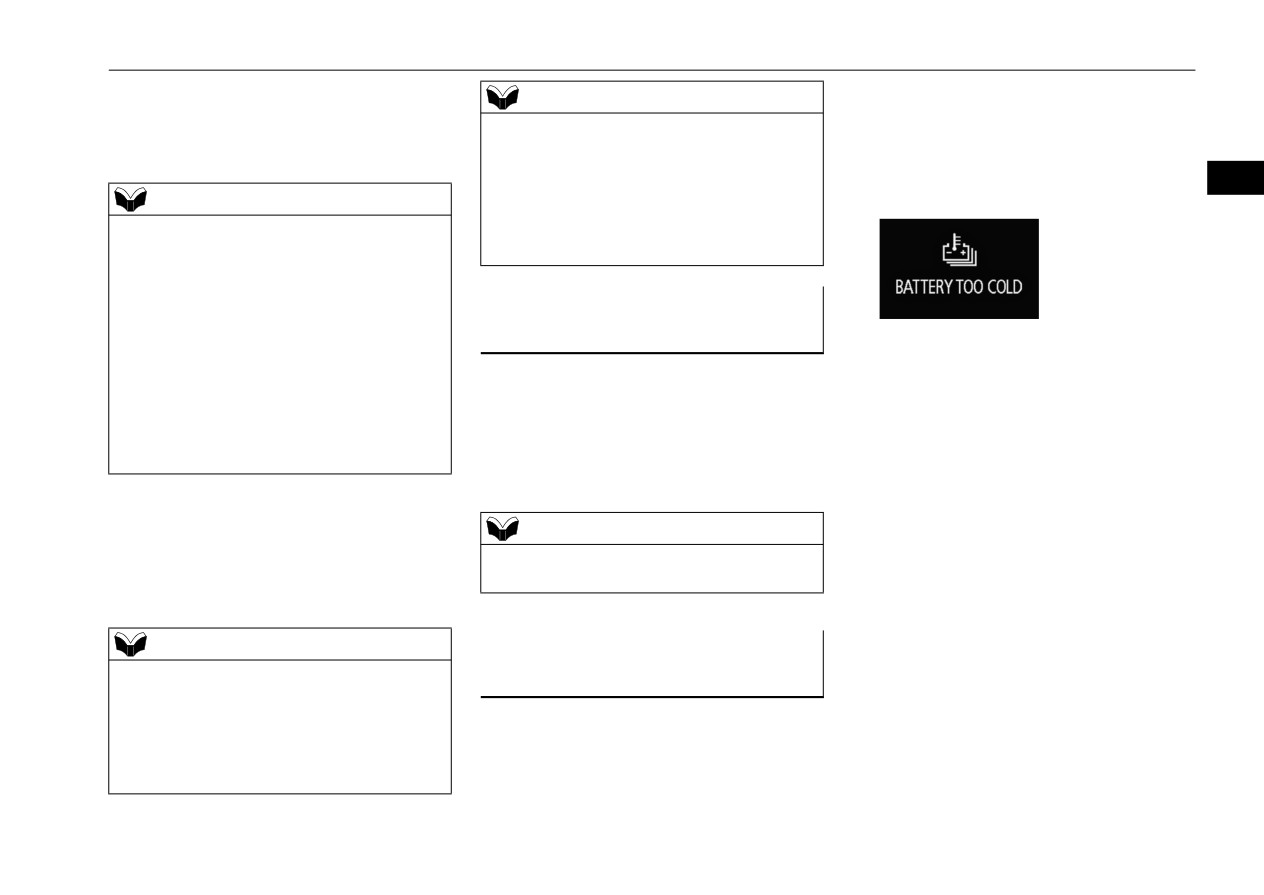
and the following warning display
3
discharging of the main drive lithium-ion
NOTE
appears.
battery.
z Always put the operation mode of the power
Refer to
“Energy flow indication during
switch in ON after the charging indicator is
charging” on page 3-44.
illuminated. Charging may not start when put
the operation mode of the power switch in
ON before the charging indicator is illumi-
:KHQ VWRSSLQJ WKH XVH RI HOHF
nated.
WULFDO GHYLFHV
z
When charging is completed.
z When the operation mode of the power
N01216900032
z
When the normal charge connector is dis-
switch is ON, the doors and tailgate cannot
connected.
Put the operation mode of the power switch
be locked by the keyless entry or the
z
When the charging stop operation is per-
in OFF. Electric devices such as air condi-
F.A.S.T.-key function. When leaving the
formed by the quick charger.
vehicle, put the operation mode in OFF and
tioning, audio equipment etc. can be stopped.
z
When quick charging time has passed 60
lock the vehicle.
Refer to “Changing the operation mode” on
minutes.
page 5-11.
z
When the stop condition
(charging
4. Electric devices such as air conditioning,
amount/charging time) on the quick char-
navigation system, audio equipment can
NOTE
ger is satisfied.
be used.
z Charging continues even if the operation
z
When charging stops due to the electrical
Refer to “Warning display list” on page
mode of the power switch is put in OFF.
power outage.
5-162.
z
When charging stops due to a failure.
z
When operating the selector lever to “N”
NOTE
$XWRPDWLF 2)) RI WKH RSHUD
(NEUTRAL) position.
(charging also
z Put the operation mode in ON and use the
stops)
WLRQ PRGH
electrical devices. If the operation mode of
N01217000030
the power switch is ACC, air conditioning
cannot be used.
In the following cases, the operation mode
z 120 V AC Power Supply (1500 W) cannot be
will be put in OFF automatically.
used during charging.
General information/Charging
3-43
How to use electric device during charging
z When the temperature of the main drive
NOTE
(QHUJ\ IORZ GLVSOD\ GXULQJ
lithium-ion battery becomes extremely
z Even when the operation mode automatically
FKDUJLQJ
low and the following warning display
put in OFF, air conditioning, car navigation
appears.
N01217200029
system, audio equipment, etc. will stop.
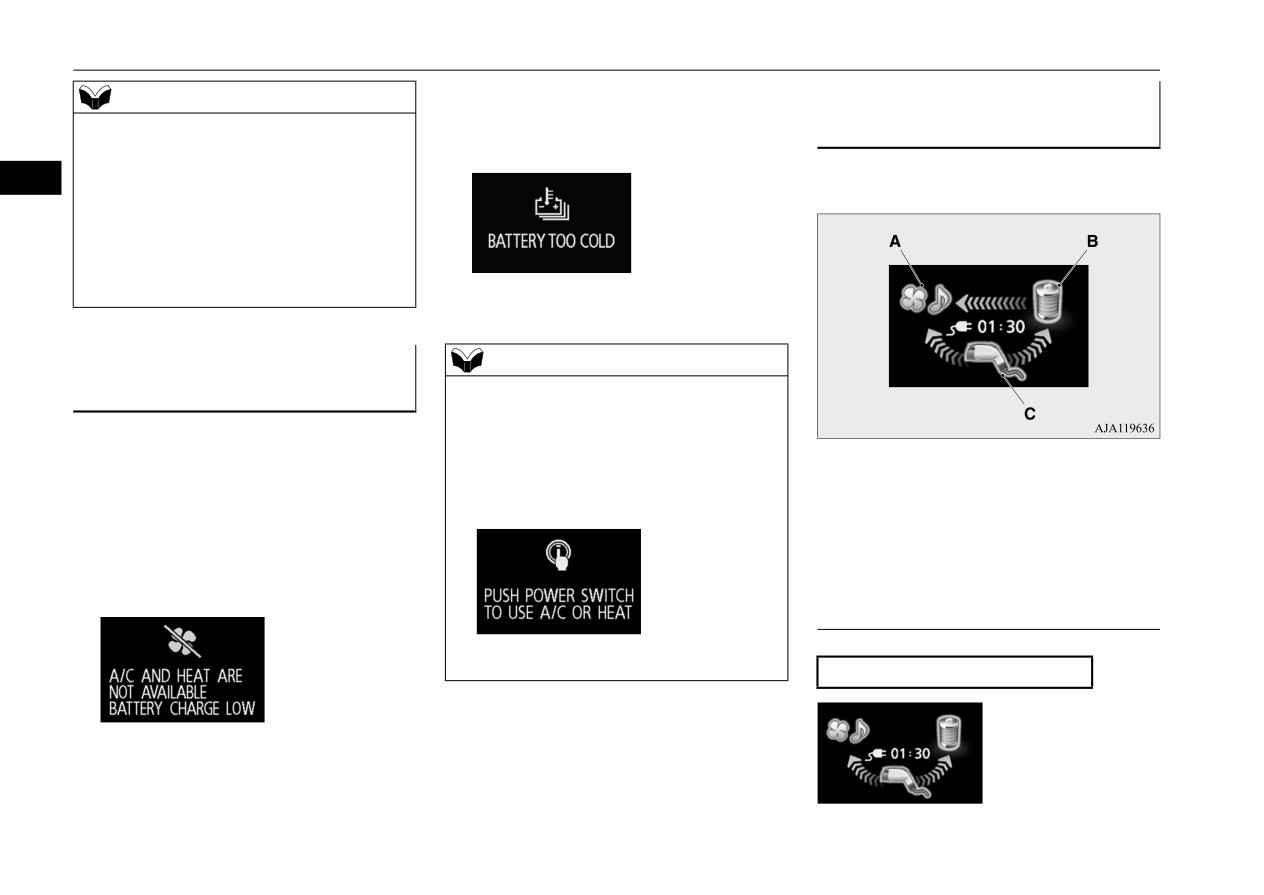
It shows the flow of energy during charging.
3
Also, the vehicle status will be the same as
putting the operation mode in OFF manually,
such as the headlights go off, the dome lights
are illuminated or the outside rearview mir-
rors are retracted automatically
(if so
Refer to “Warning display list” on page
equipped), etc..
5-162.
$XWRPDWLF VWRS RI WKH DLU FRQGL
NOTE
z To use air conditioning again after air condi-
WLRQHU
tioning automatically stops, press the power
N01217100031
switch while the following message is dis-
In the following cases, air conditioning auto-
played to put the operation mode of the
A: Various electrical devices
matically stops. When air conditioning stops,
power switch in OFF, then press the power
B: Main drive lithium-ion battery
air conditioning control panel turns off.
switch again to put the operation mode in
C: Charger
ON.
z When the remaining power of the main
drive lithium-ion battery becomes low
Blue arrow: Flow of electric energy
and the following warning display
appears.
'LVSOD\ RI HQHUJ\ IORZ H[DPSOH
Refer to
“Warning display list” on page
5-162.
:KHQ FKDUJLQJ WKH GULYH EDWWHU\
Refer to “Warning display list” on page
5-162.
3-44
General information/Charging
How to use electric device during charging
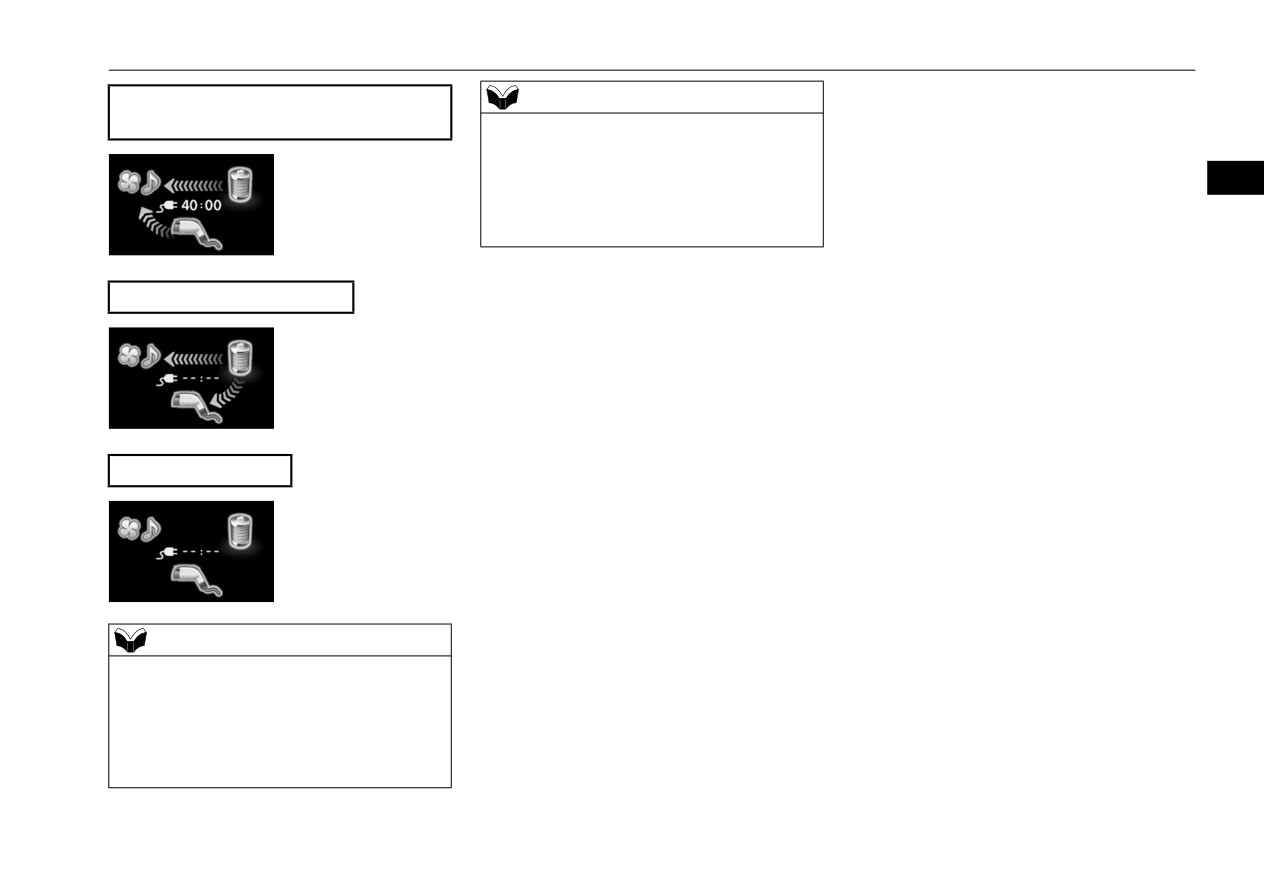
:KHQ GLVFKDUJLQJ IURP WKH PDLQ GULYH
NOTE
OLWKLXP LRQ EDWWHU\
z Energy flow display may change regardless
of the operation of air conditioning, car navi-
gation system, audio equipment, etc.
3
z If you change the settings of air condition-
ing, it may take time until the display of
energy flow stabilizes.
:KHQ WKH 9 + SRZHU VXSSO\
:KHQ QR HQHUJ\ IORZ
NOTE
z Even when you are not operating air condi-
tioning, car navigation system, audio equip-
ment, etc., since the on-board computer
consumes electricity, arrows may be dis-
played from the charger or the main drive
lithium-ion battery.
General information/Charging
3-45
Charging troubleshooting guide
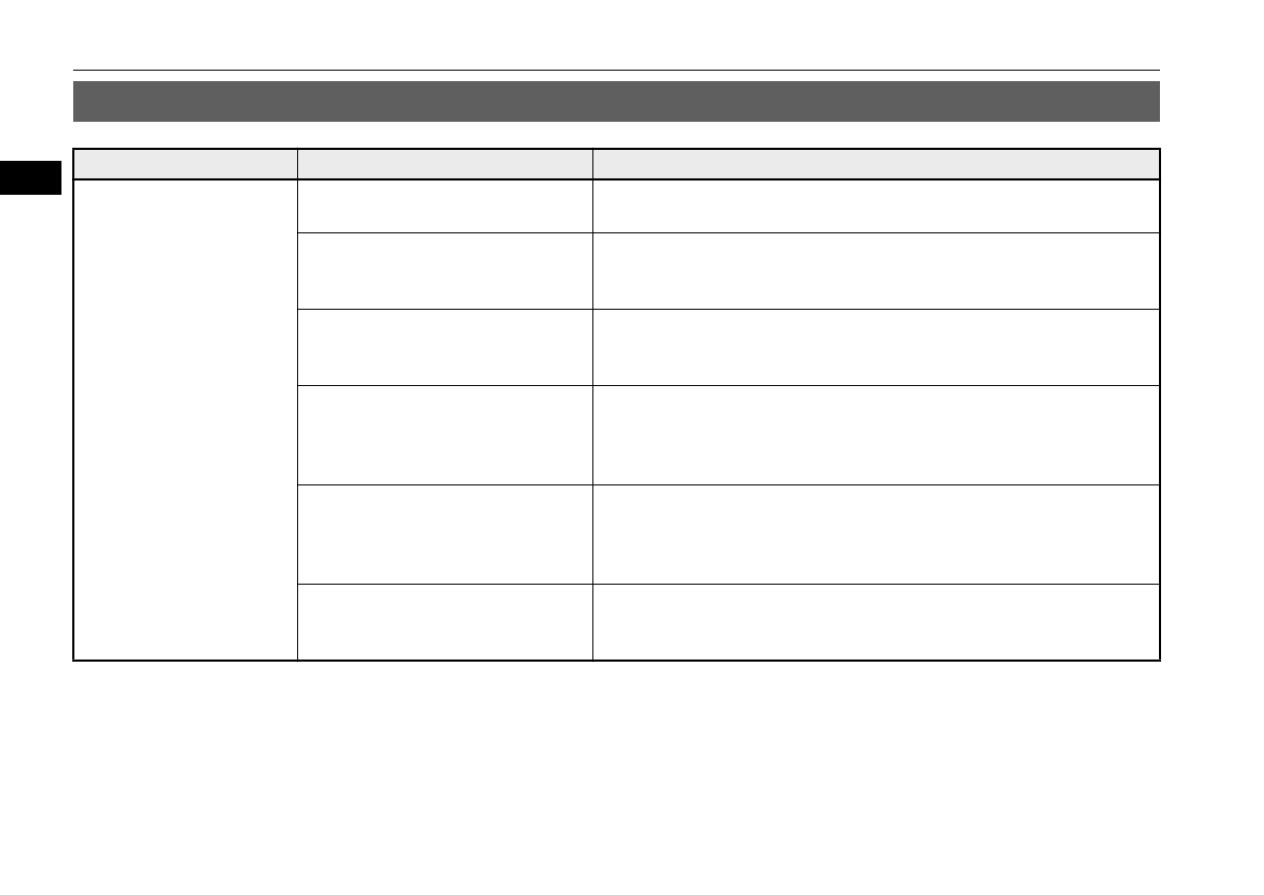
&KDUJLQJ WURXEOHVKRRWLQJ JXLGH
N01202301061
6\PSWRP
3RVVLEOH FDXVH
3RVVLEOH VROXWLRQ
3
Charging cannot be started.
The operation mode of the power
Before charging, put the operation mode of the power switch in OFF.
switch is in ON.
The main drive lithium-ion battery is
Charging cannot be performed if the main drive lithium-ion battery is
already fully charged.
already fully charged. Charging automatically turns off if the main drive
lithium-ion battery is fully charged.
The temperature of the main drive
Confirm the main drive lithium-ion battery temperature.
lithium-ion battery is too high or too
Refer to “Cautions and actions to deal with intense heat” on page 3-12 and
low to charge.
“Cautions and actions to deal with intense cold” on page 3-13.
The 12 V starter battery is discharged.
The main drive lithium-ion battery can be charged if the vehicle electrical
systems cannot be turned on. If the battery is discharged, charge or jump
start the 12 V starter battery. Refer to “Jump-starting the Plug-in Hybrid
EV system” on page 8-2.
The vehicle or the EV charging cable
The vehicle or the EV charging cable may have a malfunction. Confirm if
has a malfunction.
the warning light on the meter is illuminated. Confirm if the indicator on
the charger is indicating a malfunction. If a warning is displayed, stop
charging and contact a certified Mitsubishi EV dealer.
The fuse has blown.
Confirm if the fuse of the interior lights (dome lights) in the fuse block in
the passenger compartment located in front of the driver’s seat has blown.
Refer to “Fuses” on page 9-24.
3-46
General information/Charging
Charging troubleshooting guide
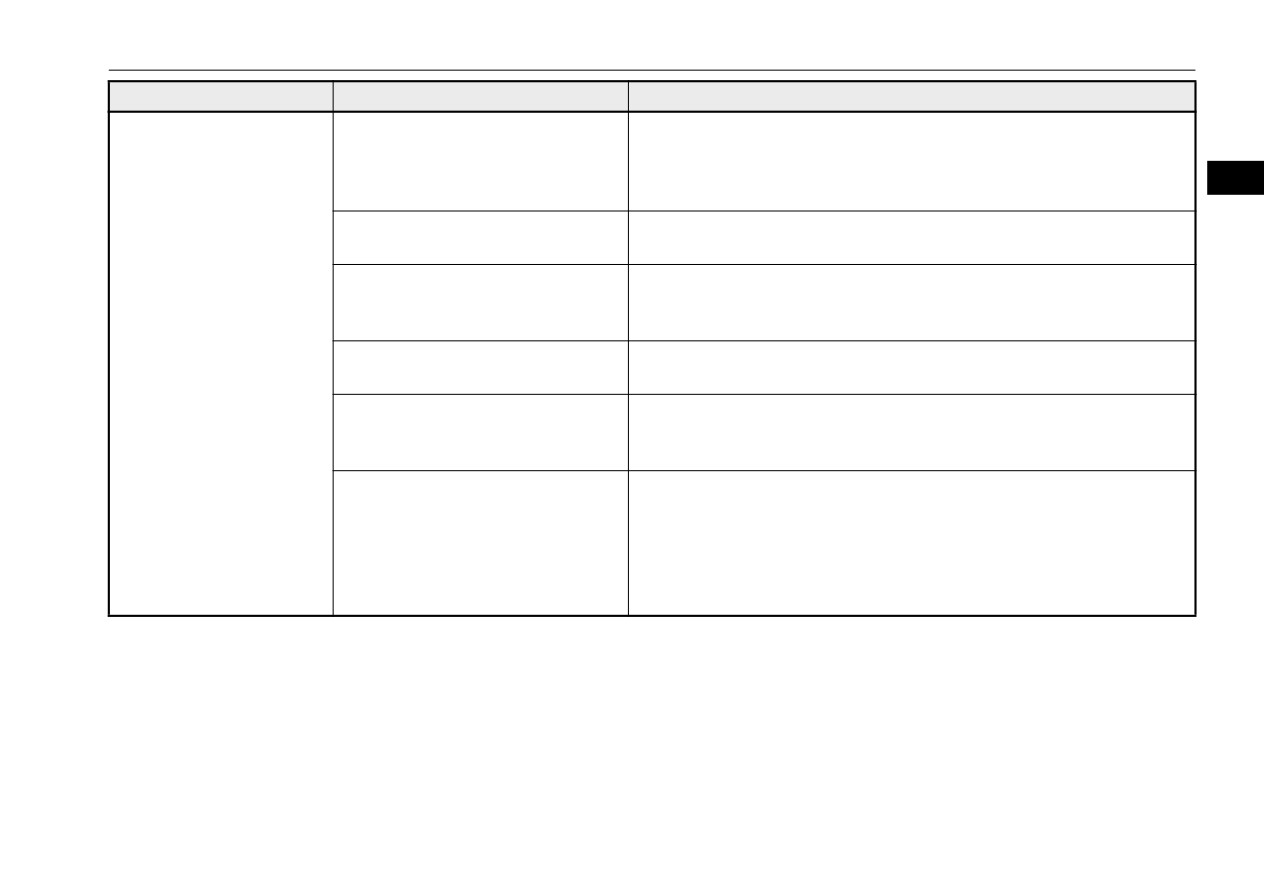
6\PSWRP
3RVVLEOH FDXVH
3RVVLEOH VROXWLRQ
Normal charging cannot be
There is no electrical power coming
Confirm that there has not been a power failure. Make sure the breaker is
started.
from the outlet.
on. If an outlet with a timer device installed is used, power will only be
available at the time set by the timer.
3
Confirm if the POWER indicator on the control box is illuminated.
The charge connector is not con-
Confirm the charge connector is connected correctly.
nected correctly.
The charge connector was connected
Disconnect the charge connector, wait for a while, then start charging pro-
and disconnected repeatedly in a
cedure again from the beginning.
short time.
A charging cable for other vehicle is
Use the EV charging cable only for your vehicle.
used.
The normal charger may not be com-
Ask an administrator or the manufacturer of the normal charger whether
patible with your vehicle.
the charger is compatible with your vehicle. Always follow the instruc-
tions shown on the normal charger.
Reservation of charging timer is set
The normal charging cannot be started when the EV charging cable is con-
up by MITSUBISHI Remote Control
nected, if the charging timer is set. Cancel all the charging timer settings,
(if so equipped) or the Smartphone-
if you want to start the normal charging immediately.
link Display Audio (SDA).
Refer to “MITSUBISHI Remote Control” on page 3-38.
For the Smartphone-link Display Audio (SDA), refer to the separate
owner’s manual.
General information/Charging
3-47
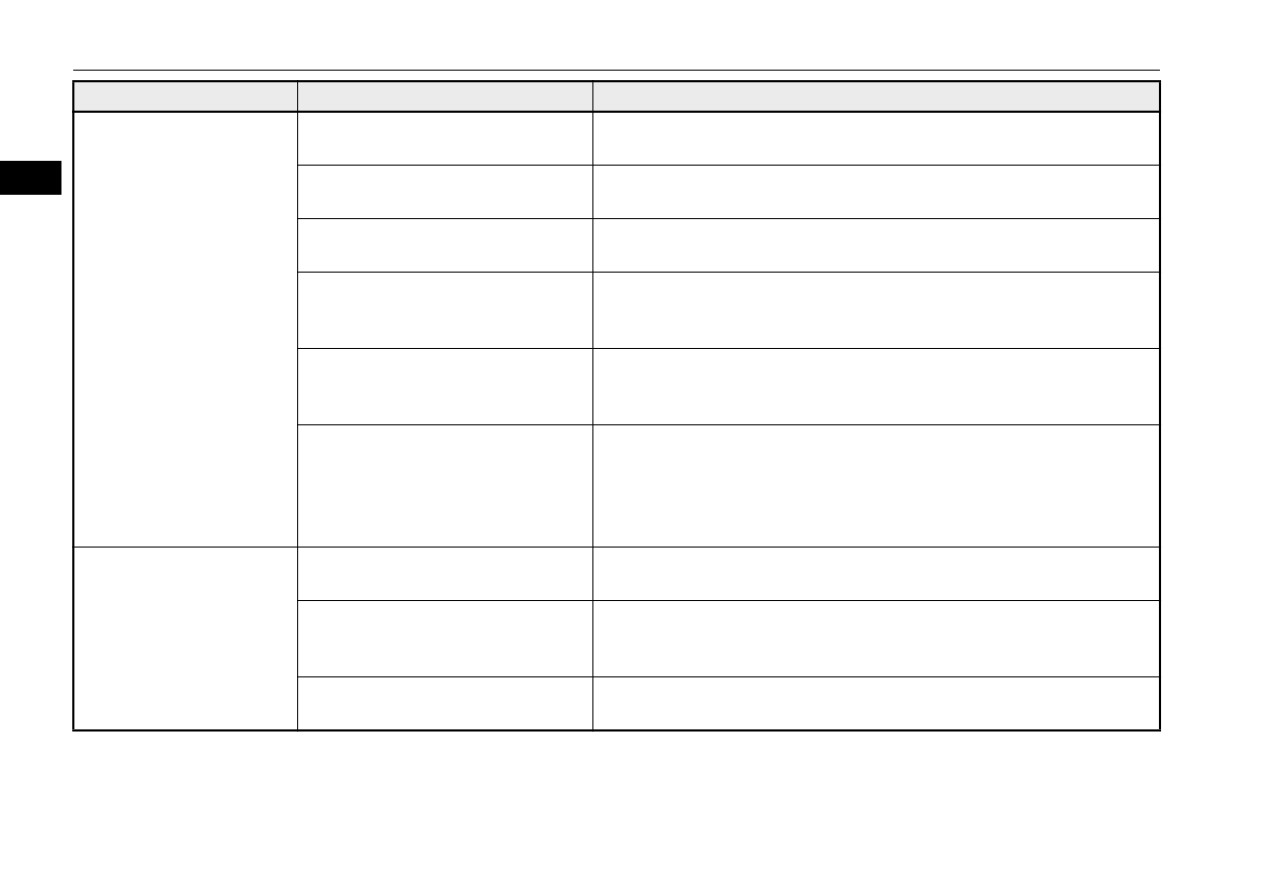
Charging troubleshooting guide
6\PSWRP
3RVVLEOH FDXVH
3RVVLEOH VROXWLRQ
Normal charging is discon-
There is no power coming from the
There may have been an electrical power failure, or the breaker may have
tinued.
outlet.
failed. Charging will resume when the power source is reset.
3
The EV charging cable has been dis-
Check that the EV charging cable has not been disconnected.
connected.
The button on the normal charge con-
If the normal charge connector button is pressed for a long period of time,
nector has been pressed.
charging will be stopped. Start the charging procedure again.
The temperature of the main drive
Confirm the main drive lithium-ion battery temperature.
lithium-ion battery is too hot or too
Refer to “Cautions and actions to deal with intense heat” on page 3-12 and
cold to charge.
“Cautions and actions to deal with intense cold” on page 3-13.
Charging is stopped by the mormal
Charging will stop depending on the timer function setting of the normal
charge timer.
charge device. If you need to charge the main drive lithium-ion battery
more, start the charging procedure again.
The Charging timer was set up by the
Cancel all the charging timer settings. Charging is automatically restarted
MITSUBISHI Remote Control (if so
if you cancel the charging timer.
equipped) or the Smartphone-link
Refer to “MITSUBISHI Remote Control” on page 3-38.
Display Audio (SDA) after starting of
For the Smartphone-link Display Audio (SDA), refer to the separate
normal charging.
owner’s manual.
Quick charging cannot be
The charge connector is not con-
Check that the charge connector is connected correctly and that it is
started.
nected correctly and/or not locked.
locked.
The self-diagnostic function of the
There is a possibility that the vehicle has a malfunction. Stop charging and
quick charge device returns a nega-
contact a certified Mitsubishi EV dealer.
tive result.
The power switch of the quick char-
Check the power switch of the quick charger.
ger is off.
Consult an administrator or a maker of the quick charger.
3-48
General information/Charging
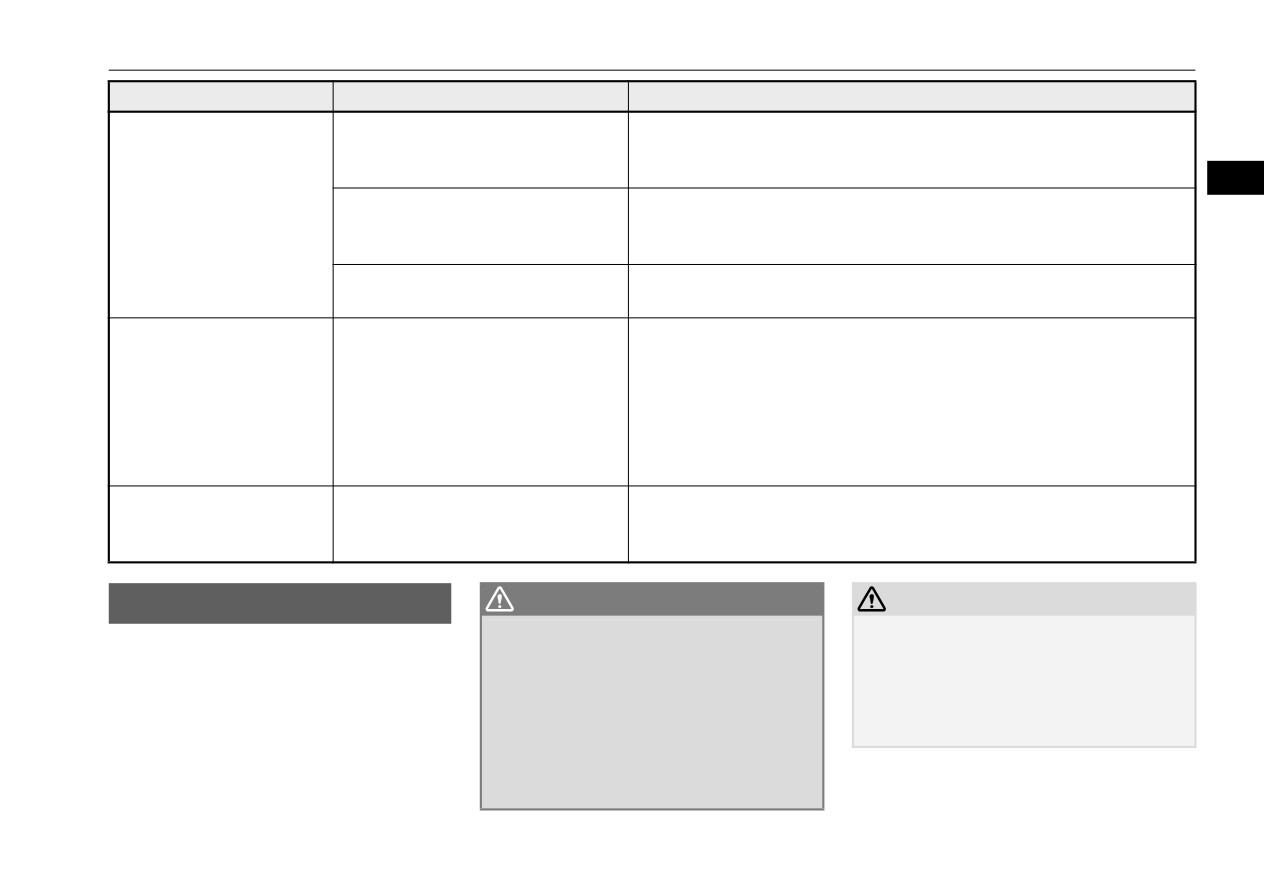
Fuel selection
6\PSWRP
3RVVLEOH FDXVH
3RVVLEOH VROXWLRQ
Quick charge is discontin-
Charging is stopped by the quick
Charging will stop depending on the timer function setting of the quick
ued.
charge timer.
charge device. If you need to charge the main drive lithium-ion battery
more, start the charging procedure again.
3
Charging stops at 80 % capacity.
Charging is designed to stop when the main drive lithium-ion battery
capacity reaches 80 %. If you need to charge the main drive lithium-ion
battery more than 80 %, start the charging procedure again.
The power supply for the quick char-
Check whether the power supply for the quick charger is off.
ger is off.
Consult an administrator or a maker of the quick charger.
The charging indicator is
Quick charging has not finished nor-
Perform quick charging again and finish it normally or contact a certified
continuously blinking even
mally.
Mitsubishi EV dealer.
if the quick charge connec-
tor is not connected into the
quick charge port when you
start the Plug-in Hybrid EV
system after quick charging.
Plug-in Hybrid EV System
The vehicle have a malfunction.
Contact a certified Mitsubishi EV dealer.
does not start after quick
If you need to push the vehicle, put the operation mode of the power
charging.
switch in ON and put the select position in the “N” (NEUTRAL) position.
)XHO VHOHFWLRQ
WARNING
CAUTION
N01207600033
z *DVROLQH LV KLJKO\ IODPPDEOH DQG H[SOR
z Using leaded gasoline in your vehicle will
VLYH
<RX FRXOG EH EXUQHG VHULRXVO\
damage the engine, catalytic converter, and
Your vehicle is designed to use unleaded gas-
LQMXUHG RU NLOOHG ZKHQ KDQGOLQJ LW
:KHQ
the oxygen sensors. Also, using leaded gaso-
oline only. It is equipped with a fuel tank
HYHU \RX UHIXHO \RXU YHKLFOH SXW WKH RSHU
line is illegal, and will void your warranty
filler pipe specifically designed to accept only
DWLRQ PRGH RI WKH SRZHU VZLWFK LQ 2))
coverage of the engine, catalytic converter,
a small diameter unleaded gasoline dispens-
DQG NHHS IODPHV VSDUNV DQG VPRNLQJ
and oxygen sensors.
ing nozzle.
PDWHULDOV DZD\ IURP WKH YHKLFOH
$OZD\V
KDQGOH IXHO LQ ZHOO YHQWLODWHG RXWGRRU
DUHDV
General information/Charging
3-49
Fuel selection
in your vehicle, provided the octane number
*DVROLQH GHWHUJHQW DGGLWLYHV
007 PHWK\OF\FORSHQWDGLHQ\O
is at least as high as that recommended for
unleaded gasoline.
PDQJDQHVH WULFDUERQ\O
In the United States, fuel suppliers are
required by law to add detergents to their gas-
3
MMT is a manganese-containing metallic
0HWKDQRO
oline to minimize fuel-injector clogging and
additive that is blended into some gasolines
minimize intake-valve deposits. Detergent
to increase the octane number. Mitsubishi
gasoline helps keep your engine in tune and
Do not operate your vehicle on gasoline con-
Motors Corporation recommends using gaso-
your emission-control system working prop-
taining methanol (wood alcohol). Using this
lines without MMT.
erly.
type of alcohol could adversely affect the
Use of gasolines blended with MMT may
vehicle’s performance and damage critical
adversely affect performance, and cause the
parts of the vehicle’s fuel system.
2FWDQH UHTXLUHPHQW
malfunction indicator on your instrument
panel to come on. If this happens, contact a
5HIRUPXODWHG JDVROLQH
certified Mitsubishi EV dealer for assistance.
Your vehicle is designed to operate on
unleaded gasoline having a minimum octane
number of 87 [(MON+RON)/2] or 91 RON.
Many areas of the country require the use of
6XOIXU LQ JDVROLQH
cleaner burning fuel referred to as “Reformu-
lated Gasoline”.
2[\JHQDWHG JDVROLQH
Your vehicle may have been designed to sat-
Reformulated gasoline contains oxygenates
isfy California’s low-emission regulations
and is specially blended to reduce vehicle
based on clean-burning low-sulfur gasoline.
Gasoline sold at some service stations con-
emissions and improve air quality.
Gasoline sold in parts of the country other
tains oxygenates such as ethanol, although
Mitsubishi Motors Corporation strongly sup-
than California is allowed to have a higher
the oxygenates may not be identified by those
ports the use of reformulated gasoline. Prop-
sulfur content. Using such gasoline could
names. Oxygenates are required in some
erly blended reformulated gasoline has no
adversely affect the vehicle’s catalytic con-
areas of the country. Oxygenated fuel can be
adverse effect on vehicle performance or the
verter and cause the engine malfunction indi-
used in your vehicle.
durability of the engine and the fuel system.
cator
(“SERVICE ENGINE SOON” or
“Check engine light”) to come on. Illumina-
(WKDQRO *DVRKRO
tion of this indicator while using high-sulfur
gasoline does not necessarily mean the vehi-
A mixture of up to 10 % ethanol (grain alco-
cle’s emission-control system is malfunction-
hol) and 90 % unleaded gasoline may be used
ing. A certified Mitsubishi EV dealer may
suggest using a different, lower-sulfur brand
3-50
General information/Charging
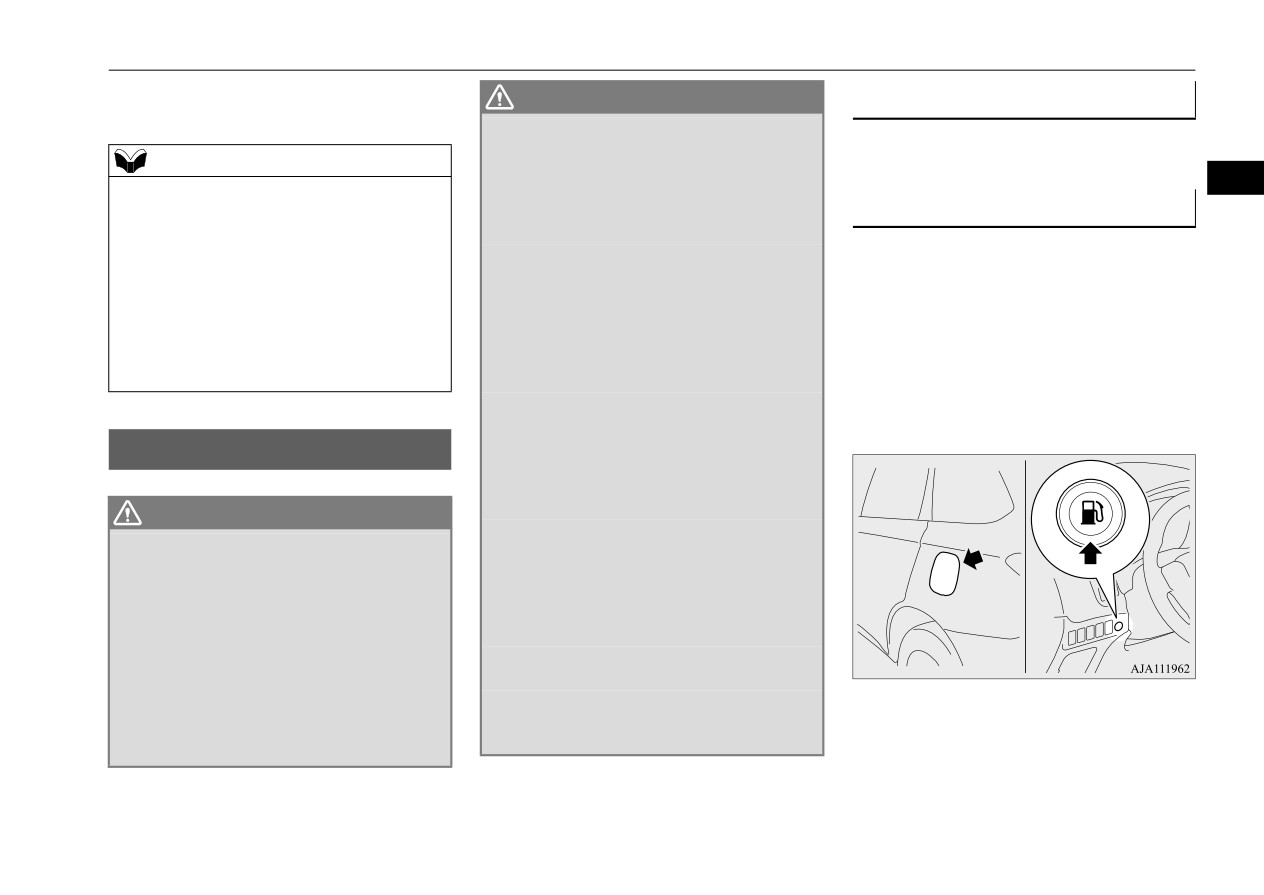
Filling the fuel tank
of unleaded gasoline to determine if the prob-
WARNING
)XHO WDQN FDSDFLW\
lem is fuel-related.
z
%HIRUH UHPRYLQJ WKH IXHO WDQN ILOOHU FDS
EH VXUH WR JHW ULG RI \RXU ERG\¶V VWDWLF
11.3 gal (43 L)
NOTE
HOHFWULFLW\ E\ WRXFKLQJ D PHWDO SDUW RI WKH
z Poor-quality gasoline can cause problems
FDU RU IXHO SXPS $Q\ VWDWLF HOHFWULFLW\ RQ
3
such as hard starting, stalling during idling,
\RXU ERG\ FRXOG FUHDWH D VSDUN WKDW
5HIXHOLQJ
abnormal engine noise, and poor accelera-
LJQLWHV IXHO YDSRU
tion. If you experience any of these prob-
z
3HUIRUP WKH ZKROH UHIXHOLQJ SURFHVV
1. Before refueling, put the operation mode
lems, try using a different brand of gasoline.
RSHQLQJ WKH IXHO WDQN ILOOHU GRRU UHPRY
of the power switch in OFF to stop the
If the engine malfunction indicator (“SER-
LQJ WKH IXHO FDS HWF E\ \RXUVHOI GR QRW
Plug-in Hybrid EV system.
VICE ENGINE SOON” or “Check engine
OHW DQ\ RWKHU SHUVRQ QHDU WKH IXHO WDQN
2. The fuel tank filler is located on the rear
light”) flashes, have the vehicle inspected as
ILOOHU
,I \RX DOORZHG D SHUVRQ WR KHOS \RX
driver side of your vehicle.
soon as possible by the nearest a certified
DQG WKDW SHUVRQ ZDV FDUU\LQJ VWDWLF HOHF
The fuel tank filler door can be opened
Mitsubishi EV dealer.
WULFLW\ IXHO YDSRU FRXOG EH LJQLWHG
from inside the vehicle by pressing the
z
1HYHU SHUIRUP FKDUJLQJ DQG UHIXHOLQJ
fuel tank filler door switch located on the
VLPXOWDQHRXVO\ 'XULQJ FKDUJLQJ
\RX
instrument panel.
FRXOG SLFN XS D IUHVK FKDUJH RI VWDWLF HOHF
)LOOLQJ WKH IXHO WDQN
WULFLW\
N01207700050
$Q\ VWDWLF HOHFWULFLW\ RQ \RXU ERG\ FRXOG
FUHDWH D VSDUN WKDW LJQLWHV IXHO YDSRU
WARNING
z
'R QRW PRYH DZD\ IURP WKH IXHO WDQN ILOOHU
z :KHQ KDQGOLQJ IXHO FRPSO\ ZLWK WKH
XQWLO UHIXHOLQJ LV ILQLVKHG
,I
\RX PRYHG
VDIHW\ UHJXODWLRQV GLVSOD\HG E\ JDUDJHV
DZD\ DQG GLG VRPHWKLQJ HOVH IRU H[DPSOH
DQG ILOOLQJ VWDWLRQV
VLWWLQJ RQ D VHDW SDUW ZD\ WKURXJK WKH
z *DVROLQH LV KLJKO\ IODPPDEOH DQG H[SOR
UHIXHOLQJ SURFHVV
\RX FRXOG SLFN XS D
VLYH
<RX FRXOG EH EXUQHG VHULRXVO\
IUHVK FKDUJH RI VWDWLF HOHFWULFLW\
LQMXUHG RU NLOOHG ZKHQ KDQGOLQJ LW
:KHQ
z
%H FDUHIXO QRW WR LQKDOH IXHO YDSRU
)XHO
UHIXHOLQJ \RXU YHKLFOH DOZD\V WXUQ RII WKH
FRQWDLQV WR[LF VXEVWDQFHV
3OXJ LQ +\EULG (9 V\VWHP DQG NHHS DZD\
z
.HHS WKH GRRUV DQG ZLQGRZV FORVHG ZKLOH
IURP IODPHV VSDUNV DQG VPRNLQJ PDWHUL
UHIXHOLQJ WKH YHKLFOH
,I WKH\ ZHUH RSHQ
DOV
$OZD\V KDQGOH IXHO LQ ZHOO YHQWLODWHG
IXHO YDSRU FRXOG JHW LQWR WKH FDELQ
RXWGRRU DUHDV
General information/Charging
3-51
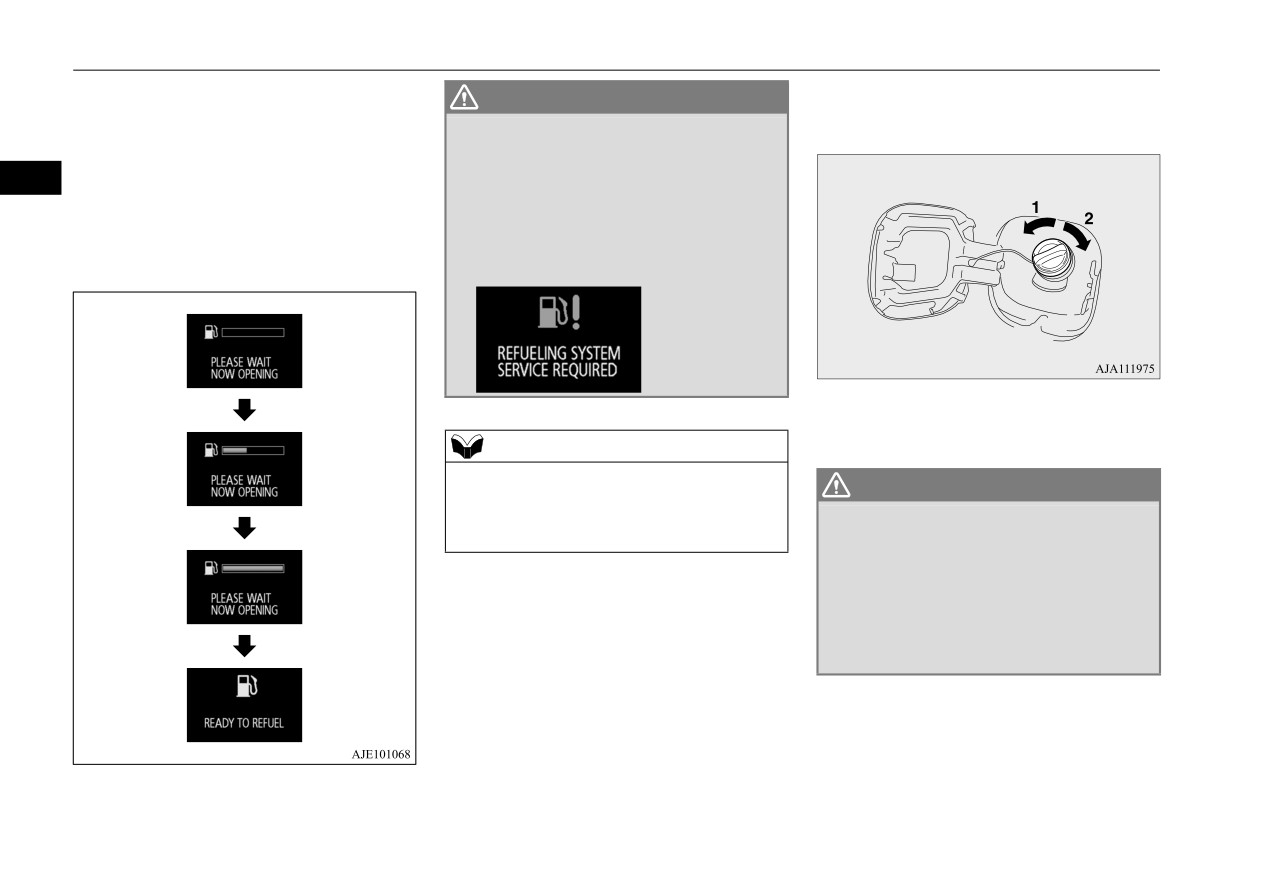
Filling the fuel tank
3. The internal pressure of the fuel tank will
4. Open the fuel tank filler pipe by slowly
WARNING
automatically be released to prevent fuel
turning the fuel tank filler cap counter-
z ,I D SUREOHP RFFXUV UHODWHG WR WKH V\VWHP
overflowing from the fuel filler.
clockwise.
IRU UHOHDVLQJ WKH LQWHUQDO SUHVVXUH RI WKH
Before opening the fuel tank filler cap,
IXHO WDQN D ZDUQLQJ ZLOO EH GLVSOD\HG RQ
3
wait until “READY TO REFUEL” is dis-
WKH LQIRUPDWLRQ VFUHHQ LQ WKH PXOWL LQIRU
played on the information screen in the
PDWLRQ GLVSOD\ DQG WKH IXHO WDQN ILOOHU
multi-information display. If the internal
GRRU FDQQRW EH RSHQHG
pressure is high, it may take several sec-
+DYH \RXU YHKLFOH LQVSHFWHG E\ D FHUWLILHG
onds.
0LWVXELVKL (9 GHDOHU DV VRRQ DV SRVVLEOH
1- Remove
2- Close
NOTE
z If the 12 V starter battery is weak or dis-
WARNING
charged, the function to release the internal
pressure of the fuel tank is disabled and the
z 6LQFH WKH IXHO V\VWHP PD\ EH XQGHU SUHV
fuel tank filler door cannot be opened.
VXUH UHPRYH WKH IXHO WDQN ILOOHU FDS
VORZO\
7KLV UHOLHYHV DQ\ SUHVVXUH RU YDF
XXP WKDW PLJKW KDYH EXLOW XS LQ WKH IXHO
WDQN ,I WKH FDS LV YHQWLQJ YDSRU RU LI \RX
KHDU D KLVVLQJ VRXQG ZDLW XQWLO WKH VRXQG
VWRSV EHIRUH UHPRYLQJ WKH FDS 2WKHUZLVH
IXHO PD\ VSUD\ RXW LQMXULQJ \RX RU RWKHUV
3-52
General information/Charging
Filling the fuel tank
7. To re-install, turn the fuel tank filler pipe
NOTE
CAUTION
cap slowly clockwise until you hear click-
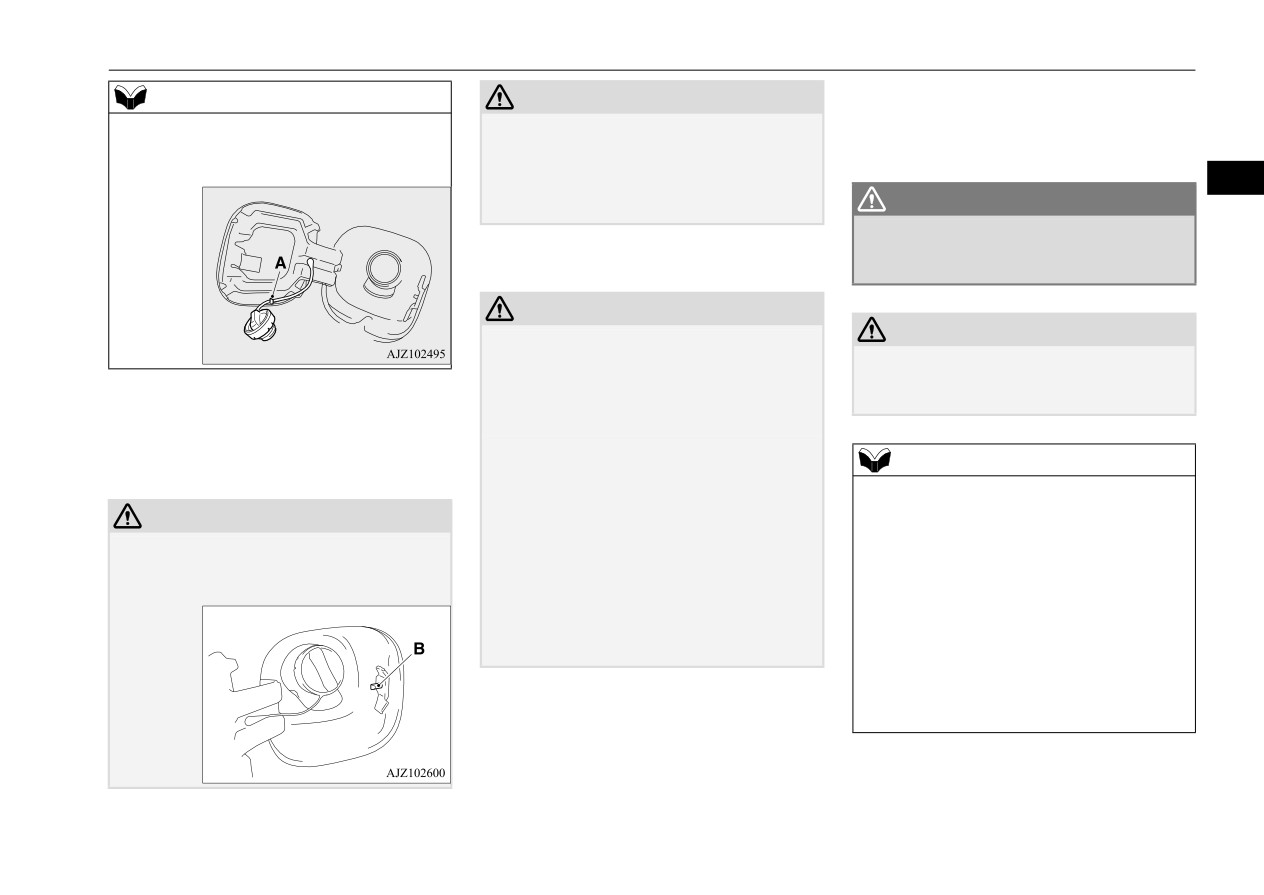
z While filling with fuel, hang the fuel cap on
z Your vehicle can only be operated using
ing sounds, then gently push the fuel tank
the hook (A) located on the inside surface of
unleaded gasoline. Serious engine and cata-
filler door closed.
the fuel tank filler door.
lytic converter damage will result if leaded
gasoline is filled into these vehicles, and
3
consequently, this must never be attempted.
WARNING
z
0DNH VXUH WKH IXHO WDQN ILOOHU FDS LV
6. When the nozzle stops automatically, do
VHFXUHO\ FORVHG
,I WKH IXHO FDS ZHUH ORRVH
not add more fuel.
IXHO FRXOG OHDN UHVXOWLQJ LQ D ILUH
CAUTION
z
To avoid fuel spillage and overfilling, do not
CAUTION
“top-off” the fuel tank. Spilled fuel could
z
If you need to replace the fuel tank filler cap,
discolor, stain, or crack the vehicle’s paint-
use only the cap specified for your model
work. If fuel spills on the paintwork, wipe it
vehicle.
5. Fueling correctly depends mainly on cor-
off with a soft cloth.
rect handling of the fuel filler nozzle. Do
z
Refueling should be completed within
30
not tilt the nozzle. Insert the nozzle in the
minutes after pressing the fuel tank filler
NOTE
fuel tank filler port as far as it goes.
door switch.
z
If the fuel tank filler cap is not tight while
After 30 minutes, the refueling system for
driving, the engine malfunction indicator
CAUTION
releasing the internal pressure of the fuel
(“SERVICE ENGINE SOON” or “Check
z Never press the pin (B) during refueling.
tank will be disabled.
engine light”) may come on when the
Doing so can cause the fuel to overflow from
Close the fuel cap and fuel tank filler door
onboard diagnostic (OBD) system performs
the fuel filler.
once.
a self check.
To prevent the fuel from overflowing, press
Always tighten the fuel tank filler cap until
the fuel tank filler door switch again to reac-
you hear at least three clicks.
tivate the refueling system.
The indicator will go off after several driving
cycles. If the indicator does not go off, con-
tact a certified Mitsubishi EV dealer as soon
as possible.
General information/Charging
3-53
Modifications to and racing of your vehicle
NOTE
WARNING
CAUTION
z If you drive with the fuel tank filler door left
z
1HYHU XVH WKH PDQXDO IXHO WDQN ILOOHU GRRU
z
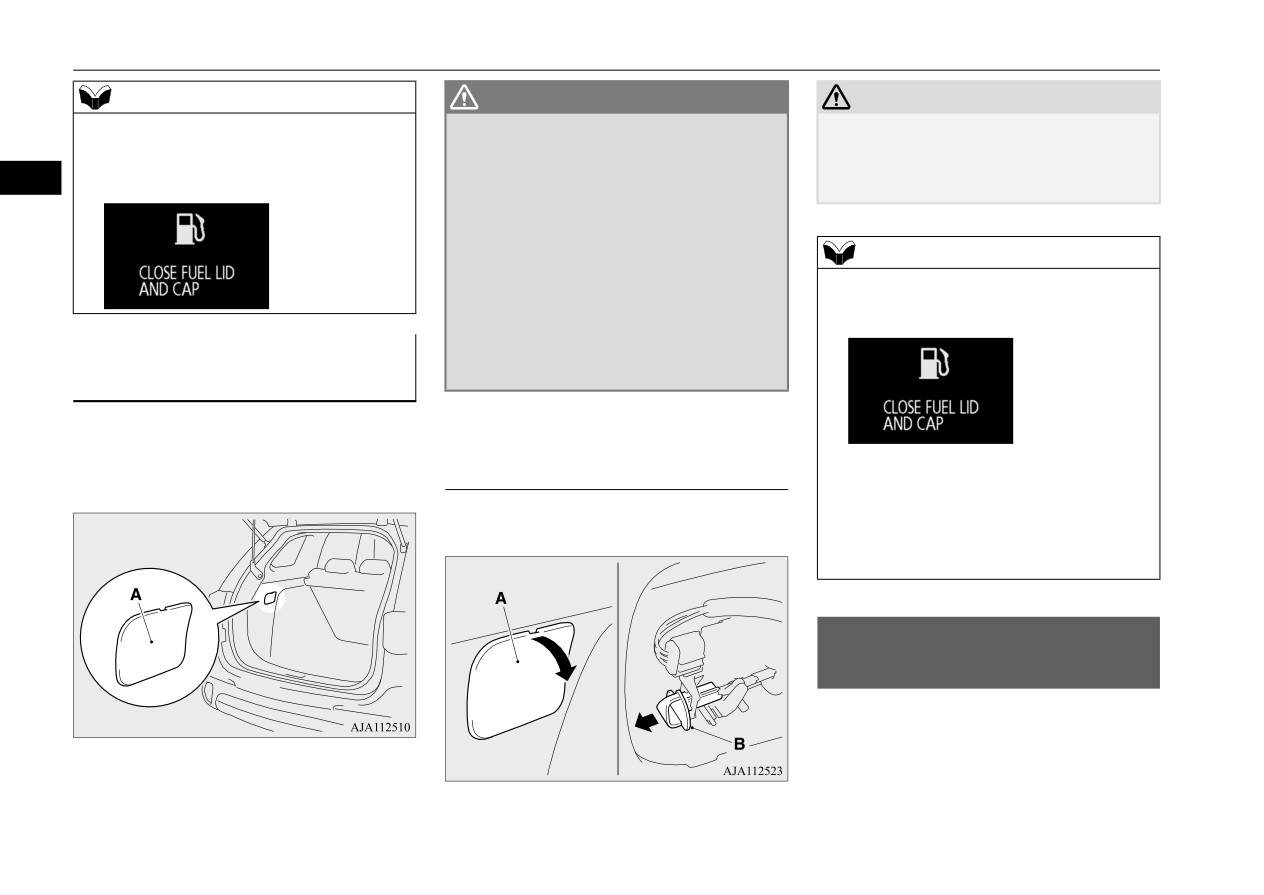
If the cover (A) is left open, luggage can
open, warning display is displayed on the
UHOHDVH OHYHU XQOHVV WKH IXHO GRRU FDQQRW
accidentally contact the manual fuel tank
information screen in the multi-information
EH RSHQHG E\ RSHUDWLQJ WKH IXHO WDQN ILOOHU
filler door release lever and the fuel tank
3
display.
GRRU VZLWFK
filler door can open.
,I WKH IXHO WDQN ILOOHU GRRU LV RSHQHG XVLQJ
WKH PDQXDO IXHO WDQN ILOOHU GRRU UHOHDVH
OHYHU WKH LQWHUQDO SUHVVXUH RI WKH IXHO WDQN
NOTE
ZLOO QRW DXWRPDWLFDOO\ EH UHOHDVHG
7R
z
When the manual fuel tank filler door release
DYRLG WKH IXHO RYHUIORZLQJ IURP WKH IXHO
lever is operated, the warning screen shown
ILOOHU UHPRYH WKH IXHO WDQN ILOOHU FDS
in the illustration may be displayed.
VORZO\ WR JUDGXDOO\ UHOHDVH WKH LQWHUQDO
,I WKH IXHO WDQN ILOOHU GRRU FDQ
SUHVVXUH RI WKH IXHO WDQN DQG UHIXHO ZLWK D
ORZHU IORZ UDWH
QRW EH RSHQHG
N01207900049
To open the fuel tank filler door, the manual
7R RSHQ WKH IXHO WDQN ILOOHU GRRU
fuel tank filler door release lever inside of the
The warning screen will disappear when;
interior trim cover (A) can be used.
PDQXDOO\
• Several seconds after the vehicle is driven
with closing the fuel tank filler door; or
1. Open the cover (A) and then pull the lever
• Approximately 30 minutes after the manual
(B) to open the fuel tank filler door.
fuel tank filler door release lever is oper-
ated.
0RGLILFDWLRQV WR DQG UDFLQJ
RI \RXU YHKLFOH
N01200501030
This vehicle should not be modified with
non-Mitsubishi Motors genuine parts. Mit-
subishi Motors designs and manufactures
high quality vehicles with an emphasis on
safety and durability. Modifications using
3-54
General information/Charging
Modifications to and racing of your vehicle
non-Mitsubishi Motors genuine parts may
z Using a cellular phone or radio set inside
,QVWDOODWLRQ RI DFFHVVRULHV
affect the performance, safety and/or durabil-
the vehicle without an external antenna
N01200601057
ity of your vehicle, and may violate applica-
may cause electrical system interference,
ble state and/or federal regulations.
which could lead to unsafe vehicle opera-
CAUTION
tion.
3
z
Before any electrical or electronic accesso-
'$0$*( 25 3(5)250
$1&( 352%
z Tires and wheels which do not meet spec-
ries are installed, consult a certified
/(06 5(68/7,1* )520 02',),&$
ifications must not be used.
Mitsubishi EV dealer.
7,216 72 25 5$&,1* 2) <285
Refer to the “Specifications” section for
z
Your vehicle is equipped with a diagnosis
9(+,&/(
$5(
127
&29(5('
information regarding wheel and tire
connector (data link connector) for checking
81'(5 :$55$17<
and servicing the electronic control system.
sizes.
Mitsubishi Motors does not recommend con-
Examples of modifications to your vehicle
necting a device other than the Scan Tool for
that can cause damage or performance prob-
WARNING
inspections and service to this connector
lems include the following:
because an unexpected problem could result.
z :KLOH GULYLQJ GR QRW XVH D FHOOXODU SKRQH
In addition, malfunctions caused by connect-
LQ D ZD\ WKDW KLQGHUV VDIH GULYLQJ
$Q\
z Failure to use Mitsubishi Motors genuine
ing a device other than the Scan Tool may
WKLQJ LQFOXGLQJ FHOOXODU SKRQH XVDJH WKDW
parts
not be covered under warranty.
GLVWUDFWV \RX IURP WKH VDIH RSHUDWLRQ RI
z Failure to use required fuel and fluids
\RXU YHKLFOH LQFUHDVHV \RXU ULVN RI DQ DFFL
GHQW
z Failure to use proper size tires and wheels
z
The installation of accessories, optional
5HIHU WR DQG IROORZ DOO VWDWH DQG ORFDO ODZV
z Modification of the fuel, intake, exhaust,
parts, etc., should only be performed
LQ
\RXU DUHD UHJDUGLQJ FHOOXODU SKRQH
emission, suspension, electric motor,
within the limits prescribed by law, and in
XVDJH ZKLOH GULYLQJ
engine, drive train, batteries (main drive
accordance with the guidelines and warn-
lithium-ion battery and 12 V starter bat-
ings contained within the documents
tery), charging systems or electrical wir-
accompanying this vehicle.
,PSRUWDQW SRLQW
ing systems
Only Mitsubishi Motors approved acces-
z Modification of any onboard com-
sories should be fitted to your vehicle.
Due to the large number of accessory and
puter/control module, including repro-
z
Improper installation of electrical parts
replacement parts provided by different man-
gramming, or replacing/adding chips to
could cause a fire. Refer to the “Modifica-
ufacturers in the market, it is not always pos-
any onboard computer/control module
tion/alterations to the electrical or fuel
sible for a certified Mitsubishi EV dealer to
systems” section within this owner’s man-
Review the Warranty and Maintenance Man-
check whether the attachment or installation
ual.
ual for further details regarding warranty cov-
of non-Mitsubishi Motors genuine parts
erage.
affects the driving safety of your vehicle.
General information/Charging
3-55