Mitsubishi Outlander (2022 year). Manual in english - page 11
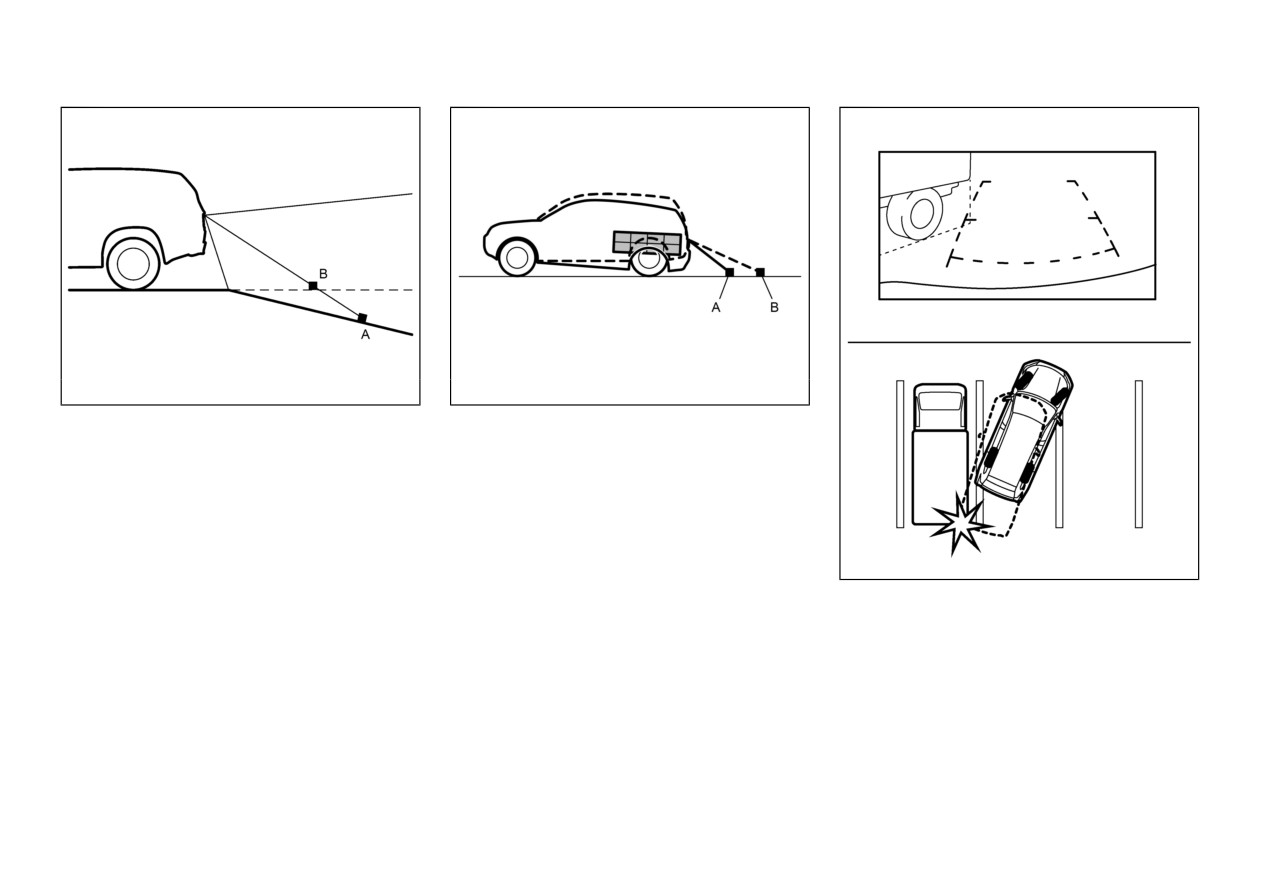
WAE0560X
WAE0477X
A: Actual objects
A: Actual objects
B: Objects shown on the screen
B: Objects shown on the screen
Backing up on a steep downhill
Weighed down by weigh
When there is a downward slope behind the
When the rear of the vehicle is weighed down
vehicle, objects shown on the screen will appear
with the weight of passengers and luggage in
to be closer than they actually are.
the vehicle, objects shown on the screen will
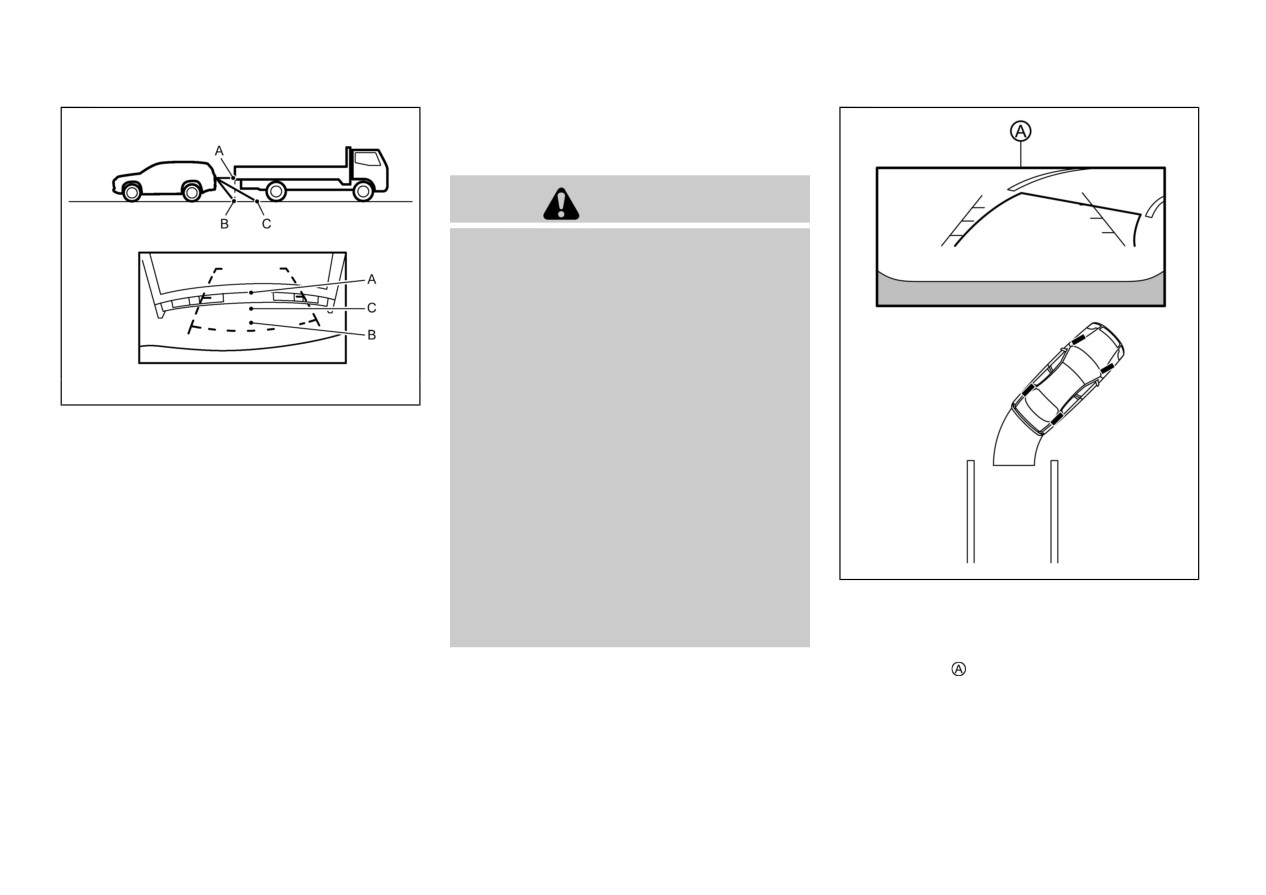
WAE0631X
appear to be farther off than they actually are.
Backing up near a projecting object
When the vehicle is approaching a truck, the
reference lines indicate that your vehicle will
clear the truck. In reality, the truck is in your
path.
Monitor, heater, air conditioner, audio and phone systems
4-5
HOW TO PARK WITH PRE-
DICTIVE COURSE LINES
WARNING
If the tires are replaced with different sized
tires, the predictive course lines may be
displayed incorrectly.
On a snow-covered or slippery road, there
may be a difference between the predictive
course line and the actual course line.
If the battery is disconnected or becomes
WAE0632X
discharged, the predictive course lines may
be displayed incorrectly. If this occurs,
please perform the following procedures:
Backing up behind a projecting
object
— Turn the steering wheel from lock
to lock while the engine is run-
When there is an object behind the vehicle that
ning.
has upper sections projecting in the direction of
the vehicle, the reference lines on the screen
— Drive the vehicle on a straight
will indicate that point A is the farthest point
road for more than 5 minutes.
and point B is the closest point to the vehicle. In
WAE0562X
When the steering wheel is turned with the
reality, point A and B are actually the same
ignition switch in the ON position, the
1.
Visually check that the parking space is safe
distance from the vehicle, and point C is farther
predictive course lines may be displayed
before parking your vehicle.
off than point A and B.
incorrectly.
2.
The rear view of the vehicle is displayed on
the screen when the shift lever is moved
to the R (Reverse) position.
4-6
Monitor, heater, air conditioner, audio and phone systems
5. When the vehicle is parked in the space
completely, move the shift lever to the P
(Park) position and apply the parking brake.
WAE0423X
ADJUSTING THE SCREEN
1. Push the MENU button
2. Touch the “Settings” key and then touch the
“Camera” key.
3. Touch the “Display Settings” key.
4. Touch the “Brightness”, “Contrast”, “Tint”,
WAE0563X
“Color”, or “Black Level” key.
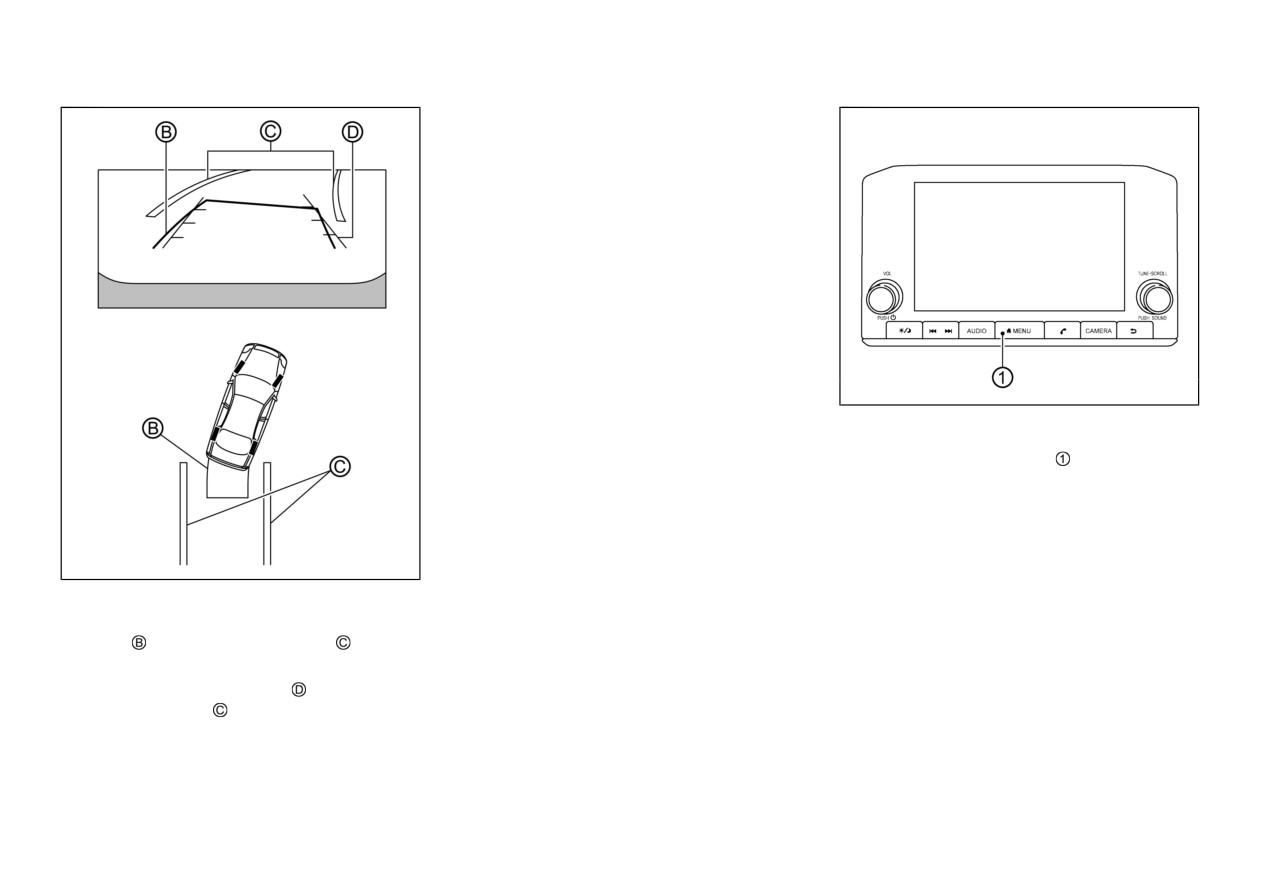
3.
Slowly back up the vehicle adjusting the
5. Adjust the item by touching the “+” or “-”
steering wheel so that the predictive course
key on the touch screen display.
lines
enter the parking space
NOTE:
4.
Maneuver the steering wheel to make the
Do not adjust any of the display settings of
vehicle width guide lines
parallel to the
the Rearview camera while the vehicle is
parking space
while referring to the
moving. Make sure the parking brake is
predictive course lines.
firmly applied.
Monitor, heater, air conditioner, audio and phone systems
4-7
HOW TO TURN ON AND OFF
not show small objects below the bumper,
not represent a system malfunction:
and may not show objects close to the
When the temperature is extremely high or
PREDICTIVE COURSE LINES
bumper or on the ground.
low, the screen may not clearly display
To turn the predictive course lines on and off
Objects viewed in the Rearview camera
objects.
when the shift lever is in the P (Park) position,
differ from actual distance because a wide-
When strong light directly shines on the
perform the following operation.
angle lens is used.
camera, objects may not be displayed
1. Push the MENU button
Objects in the Rearview camera will
clearly.
appear visually opposite compared to
2. Touch the “Settings” key and then touch the
Vertical lines may be seen in objects on the
when viewed in the rearview and door
“Camera” key.
screen. This is due to strong reflected light
mirrors.
3. Touch the “Predictive Course Lines” key to
from the bumper.
Use the displayed lines as a reference. The
turn the feature ON or OFF.
The screen may flicker under fluorescent
lines are highly affected by the number of
light.
Pushing the CAMERA button while the shift
occupants, fuel level, vehicle position, road
conditions and road grade.
The colors of objects on the Rearview
lever is in the R (Reverse) position can also turn
camera may differ somewhat from the
on and off the predictive course lines.
Make sure that the liftgate is securely
closed when backing up.
actual color of objects.
REARVIEW CAMERA SYS-
Objects on the monitor may not be clear in a
Do not put anything on the rearview
TEM LIMITATIONS
camera. The rearview camera is installed
dark environment.
above the license plate.
There may be a delay when switching
When washing the vehicle with high-
between views.
WARNING
pressure water, be sure not to spray it
If dirt, rain or snow accumulates on the
around the camera. Otherwise, water may
camera, the Rearview camera may not
Listed below are the system limitations for
enter the camera unit causing water
display objects clearly. Clean the camera.
Rearview camera. Failure to operate the
condensation on the lens, a malfunction,
vehicle in accordance with these system limita-
Do not use wax on the camera lens. Wipe
fire or an electric shock.
tions could result in serious injury or death.
off any wax with a clean cloth dampened
Do not strike the camera. It is a precision
with a diluted mild cleaning agent, then
. The system cannot completely eliminate
instrument. Otherwise, it may malfunction
blind spots and may not show every object.
wipe with a dry cloth.
or cause damage resulting in a fire or an
. Underneath the bumper and the corner
electric shock.
areas of the bumper cannot be viewed on
the Rearview camera because of its mon-
The following are operating limitations and do
itoring range limitation. The system will
4-8
Monitor, heater, air conditioner, audio and phone systems
MULTI AROUND MONITOR(if so equipped)
WAE0419X
SYSTEM MAINTENANCE
CAUTION
. Do not use alcohol, benzine or thinner to
clean the camera. This will cause disco-
loration.
WAE0425X
. Do not damage the camera as the monitor
Smartphone-link Display Audio (SDA)
screen may be adversely affected.
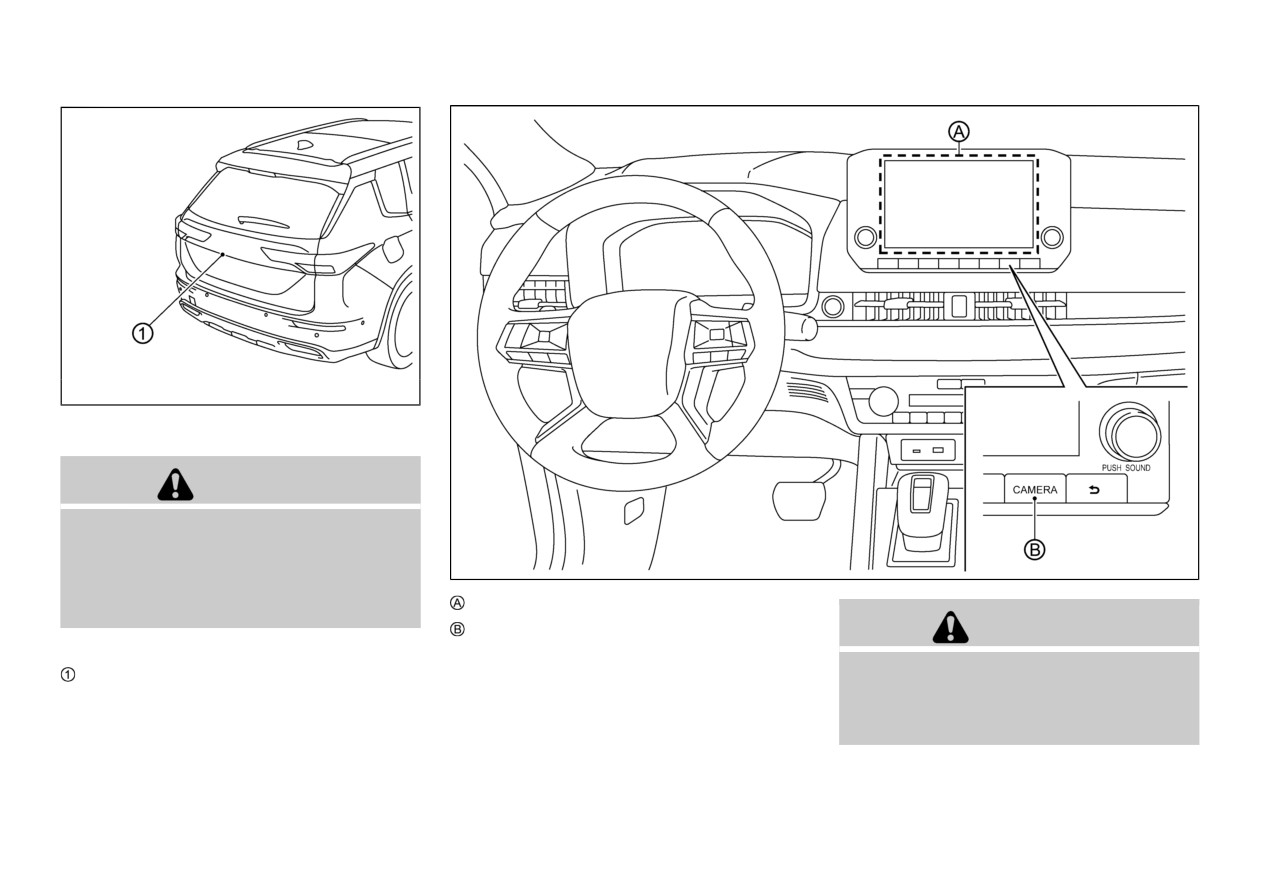
CAMERA button
WARNING
If dirt, rain or snow accumulates on the camera
, Rearview camera may not display objects
. Failure to follow the warnings and instruc-
clearly. Clean the camera by wiping it with a
tions for the proper use of the Multi
cloth dampened with a diluted mild cleaning
Around Monitor system could result in
serious injury or death.
agent and then wiping it with a dry cloth.
Monitor, heater, air conditioner, audio and phone systems
4-9
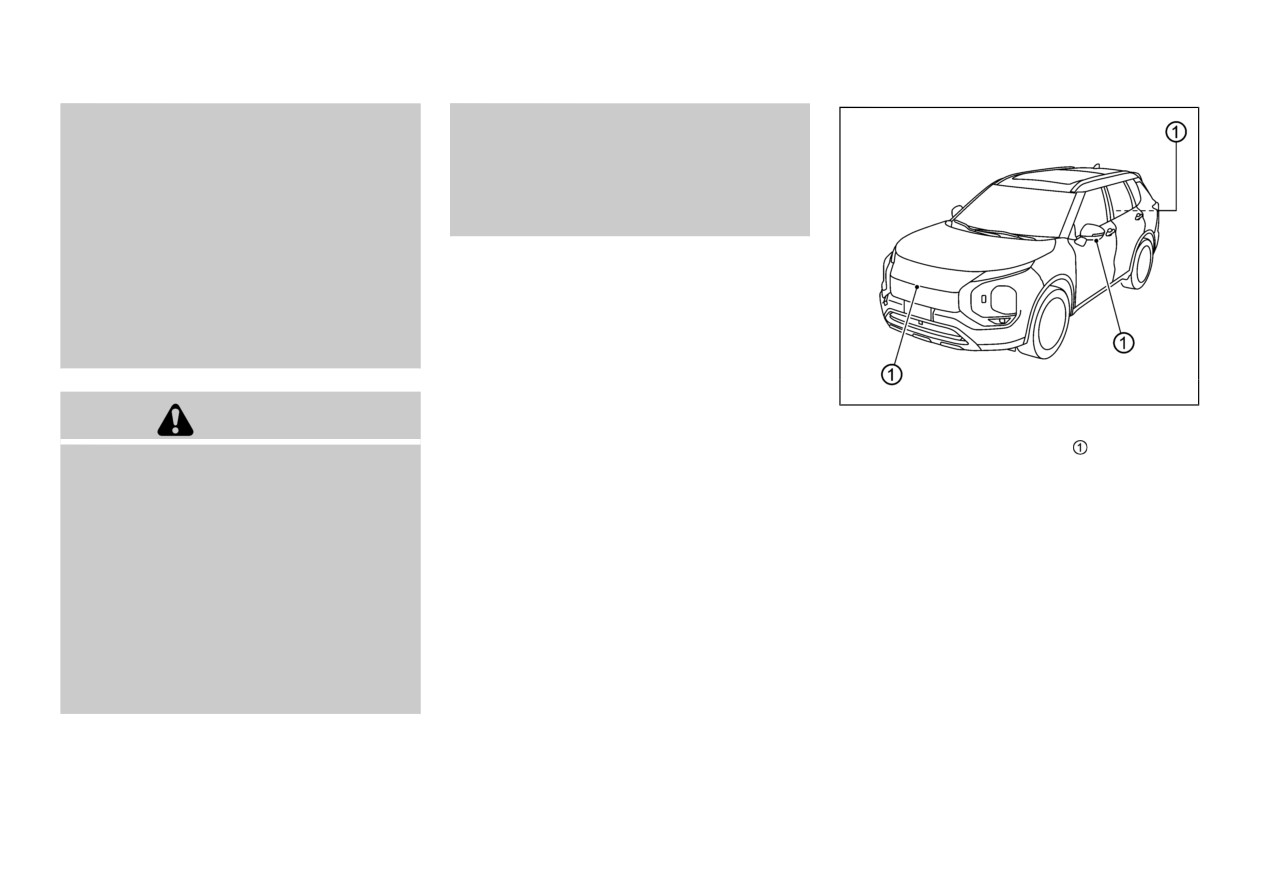
The Multi Around Monitor is a conveni-
— Do not spray the camera and its
ence feature and is not a substitute for
surroundings with high-pressure
proper vehicle operation because it has
water.
areas where objects cannot be viewed. The
four corners of the vehicle in particular,
— Make sure that the liftgate is
are areas where objects do not always
securely closed when backing up.
appear in the bird’s-eye, front, or rear
views. Always check your surroundings to
The Multi Around Monitor system is designed
be sure that it is safe to move before
as an aid to the driver in situations such as slot
operating the vehicle. Always operate the
parking or parallel parking.
vehicle slowly.
The driver is always responsible for safety
The monitor displays various views of the
during parking and other maneuvers.
position of the vehicle in a split screen format.
Not all views are available at all times.
WAE0426X
CAUTION
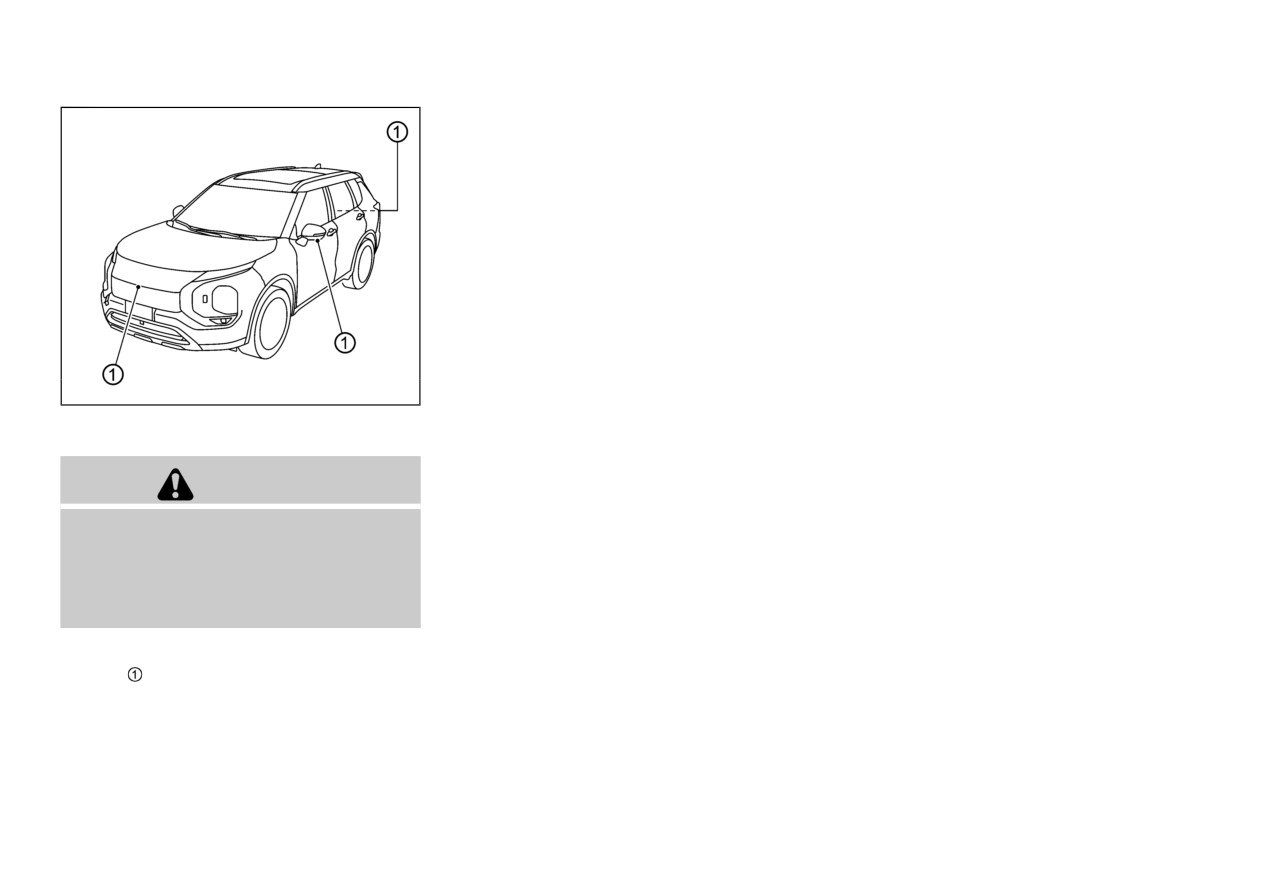
To display the multiple views, the Multi Around
Monitor system uses cameras located in the
If the camera lens gets dirty, a clear image
front grille, on the vehicle’s door mirrors and
cannot be obtained. As necessary, rinse the
one just above the vehicle’s license plate.
lens with clean water and gently wipe with
a clean, soft cloth.
To avoid damaging the camera;
— Do not rub the cover excessively
or polish it by using an abrasive
compound.
— Do not disassemble the camera.
— Do not splash hot water directly
on the lens.
4-10
Monitor, heater, air conditioner, audio and phone systems
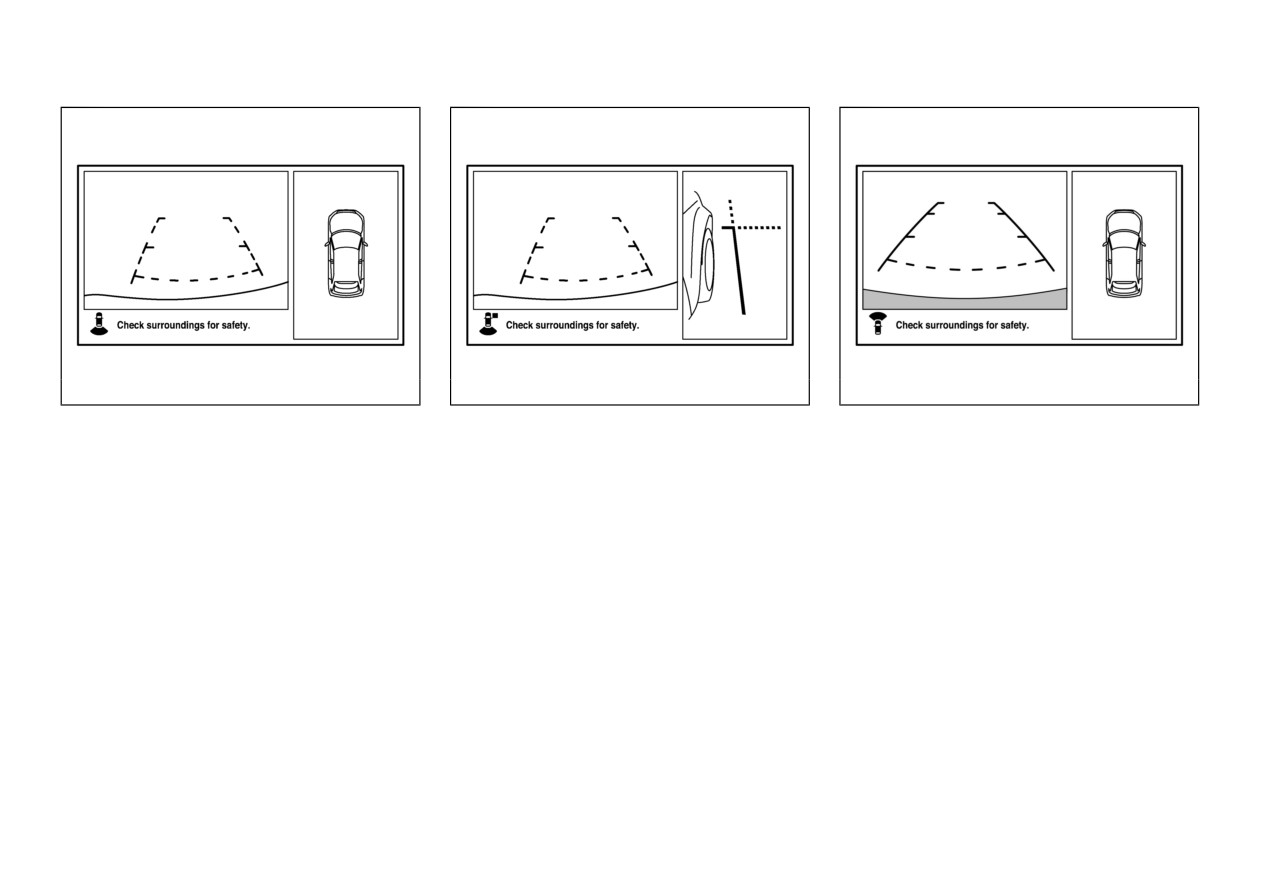
WAE0510X
WAE0511X
WAE0512X
TYPES OF VIEWS OF THE
Side-view/Rear-view mode
Bird’s eye-view/Front-view mode
MULTI AROUND MONITOR
Views of the passenger’s side of the vehicle and
Views of the surroundings of the vehicle and the
behind the vehicle are displayed.
front of the vehicle are displayed.
Bird’s eye-view/Rear-view mode
Views of the surroundings of the vehicle and
behind the vehicle are displayed.
Monitor, heater, air conditioner, audio and phone systems
4-11
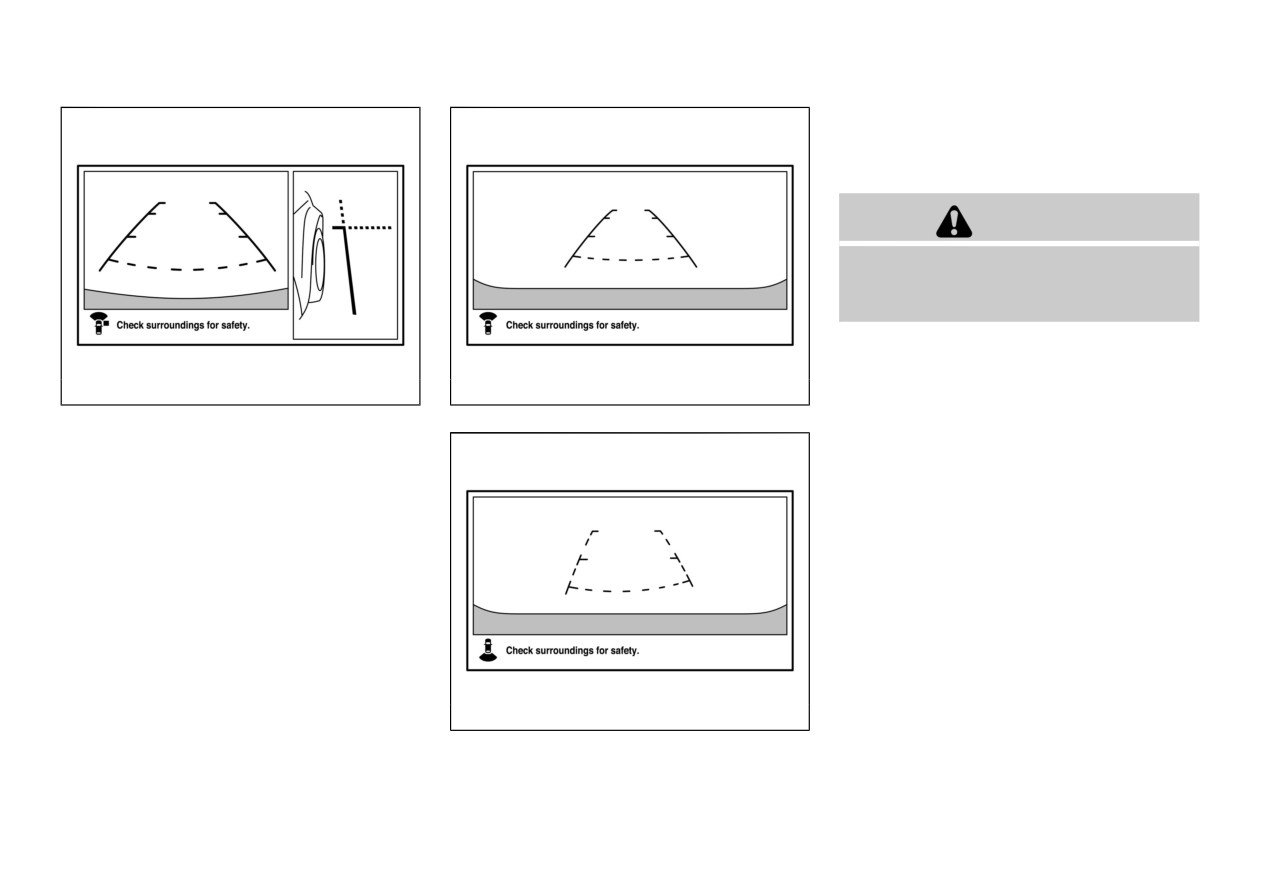
Front-wide/rear-wide view
Views of the front or rear of the vehicle are
displayed.
CAUTION
The camera uses a special lens. As a result,
images and distances shown on the screen are
not exact.
NOTE:
Because the cameras have a special lens,
the lines on the ground between parking
WAE0513X
WAE0564X
spaces may not look parallel on the
Front-wide view
screen.
Side-view/Front-view mode
Under certain circumstances, it may
Views of the passenger’s side of the vehicle and
become difficult to see an image on the
the front of the vehicle are displayed.
screen, even when the system is function-
ing correctly.
— In a dark area, such as at night.
— When water drops or condensation
are on the lens.
— When sun light or headlights shine
directly into the lens.
— When a fluorescent light shines di-
rectly into the lens.
If the atmospheric temperature is extre-
WAE0565X
mely hot or extremely cold, the camera
images may not be clear. There is no
Rear-wide view
4-12
Monitor, heater, air conditioner, audio and phone systems
abnormality.
viewed on the monitor may be different
center of the vehicle.
. If a wireless device is installed near the
than the actual distance between the
camera, the camera images may cause
vehicle and displayed objects.
electrical system interference and the
Use the displayed lines and the bird’s-eye
system may stop functioning properly.
view as a reference. The lines and the
bird’s-eye view are greatly affected by the
MULTI AROUND MONITOR
number of occupants, fuel level, vehicle
position, road condition and road grade.
SYSTEM OPERATION
If the tires are replaced with different sized
When the ignition switch is placed in the ON
tires, the predictive course lines and the
position, push the CAMERA button on the
bird’s-eye view may be displayed incor-
instrument panel or move the shift lever to the R
rectly.
(Reverse) position to operate the Multi Around
When driving the vehicle up a hill, objects
Monitor.
viewed in the monitor are farther than
The Multi Around Monitor images will be
they appear. When driving the vehicle
displayed on the Smartphone-link Display
down a hill, objects viewed in the monitor
are closer than they appear.
Audio (SDA) screen.
Objects in the rear view will appear
The screen displayed on the Multi Around
visually opposite compared to when viewed
Monitor will automatically return to the pre-
in the rearview and door mirrors.
vious screen
3 minutes after the CAMERA
Use the mirrors or actually look to
button has been pushed with the shift lever in a
properly judge distances to other objects.
position other than the R (Reverse) position.
On a snow-covered or slippery road, there
Available views
may be a difference between the predictive
course line and the actual course line.
The vehicle width and predictive course
WARNING
lines are wider than the actual width and
course.
. The distance guide lines and the vehicle
The displayed lines on the rear view will
width guide lines should be used as a
appear slightly off to the right because the
reference only when the vehicle is on a
rearview camera is not installed in the rear
paved, level surface. The apparent distance
Monitor, heater, air conditioner, audio and phone systems
4-13
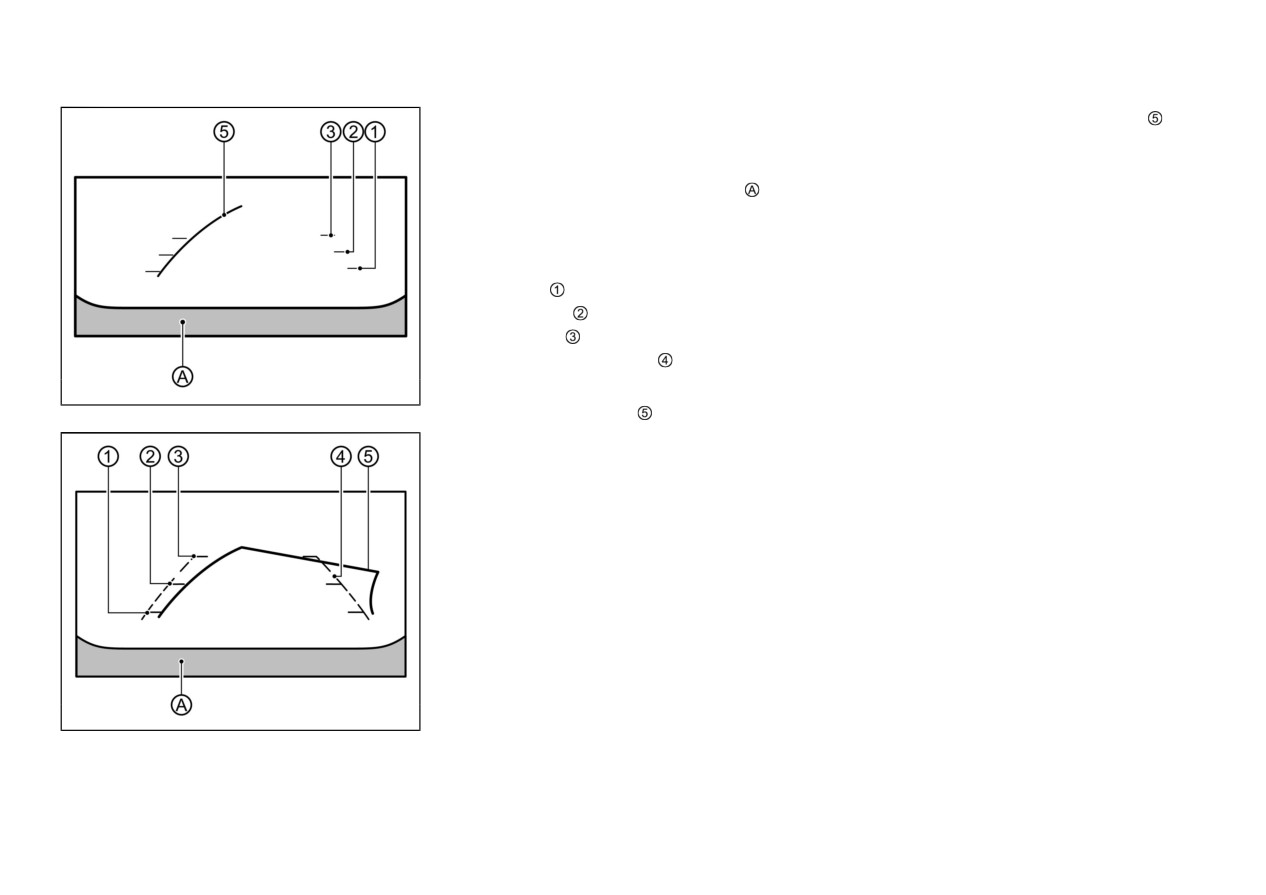
and left predictive course lines
are
Front and rear view:
displayed. When the steering wheel turns
Guiding lines that indicate the approximate
approximately 90 degrees or more, the
vehicle width and distances to objects with
predictive course line is displayed only on
reference to the vehicle body line
, are
the opposite side of the turn.
displayed on the monitor.
Distance guide lines:
Indicate distances from the vehicle body.
. Red line
: approximately 1.5 ft (0.5 m)
. Yellow line
: approximately 3 ft (1 m)
. Green line
: approximately 7 ft (2 m)
Vehicle width guide lines
:
Indicate the vehicle width.
WAE0566X
Front view
Predictive course lines
:
Indicate the predictive course when operating
the vehicle. When the monitor displays the rear
view, the predictive course lines will be
displayed on the monitor if the steering wheel
is turned. The predictive course lines will move
depending on how much the steering wheel is
turned and will not be displayed while the
steering wheel is in the straight ahead position.
The front view will not be displayed when the
vehicle speed is above 6 MPH (10 km/h).
NOTE:
. When the monitor displays the front view
and the steering wheel turns approxi-
WAE0567X
mately
90
degrees or less from the
Rear view
straight ahead position, both the right
4-14
Monitor, heater, air conditioner, audio and phone systems
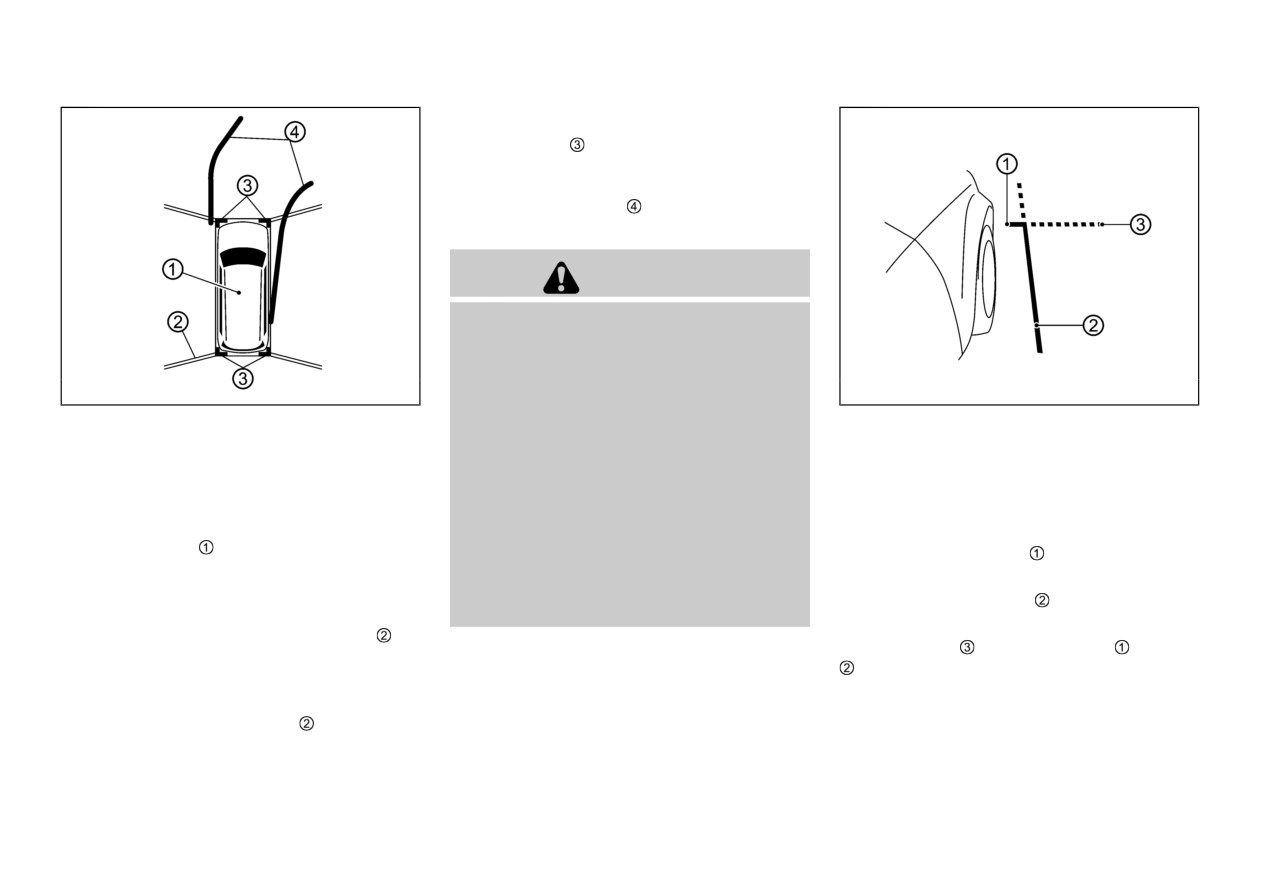
view is displayed.
The red makers
(if so equipped) are displayed
when the parking sensor is turned off or the
parking sensor is not available at the corner.
Predictive course lines indicate the predicted
course when operating the vehicle.
WARNING
Objects in the bird’s-eye view will appear
farther than the actual distance.
Tall objects, such as a curb or vehicle, may
be misaligned or not displayed at the seam
WAE0568X
WAE0569X
of the views.
Bird’s-eye view:
Objects that are above the camera cannot
Front-side view:
be displayed.
The bird’s-eye view shows the overhead view
Guiding lines:
of the vehicle which helps confirm the vehicle
The view for the bird’s-eye view may be
Guiding lines that indicate the approximate
misaligned when the camera position
position and the predictive course to a parking
alters.
width and the front end of the vehicle are
space.
displayed on the monitor.
A line on the ground may be misaligned
The vehicle icon
shows the position of the
The front-of-vehicle line shows the front part
and is not seen as being straight at the
vehicle. Note that the distance between objects
seam of the views. The misalignment will
of the vehicle.
viewed in the bird’s-eye view differs from the
increase as the line proceeds away from the
The side-of-vehicle line
shows the vehicle
actual distance.
vehicle.
width including the door mirrors.
The areas that the cameras cannot cover are
The extensions of both the front and side
indicated in black, if a parking sensor is not
lines are shown with a green dotted line.
equipped.
After the ignition switch is placed in the ON
position, the non-viewable area is highlighted
in yellow for a few seconds after the bird’s-eye
Monitor, heater, air conditioner, audio and phone systems
4-15
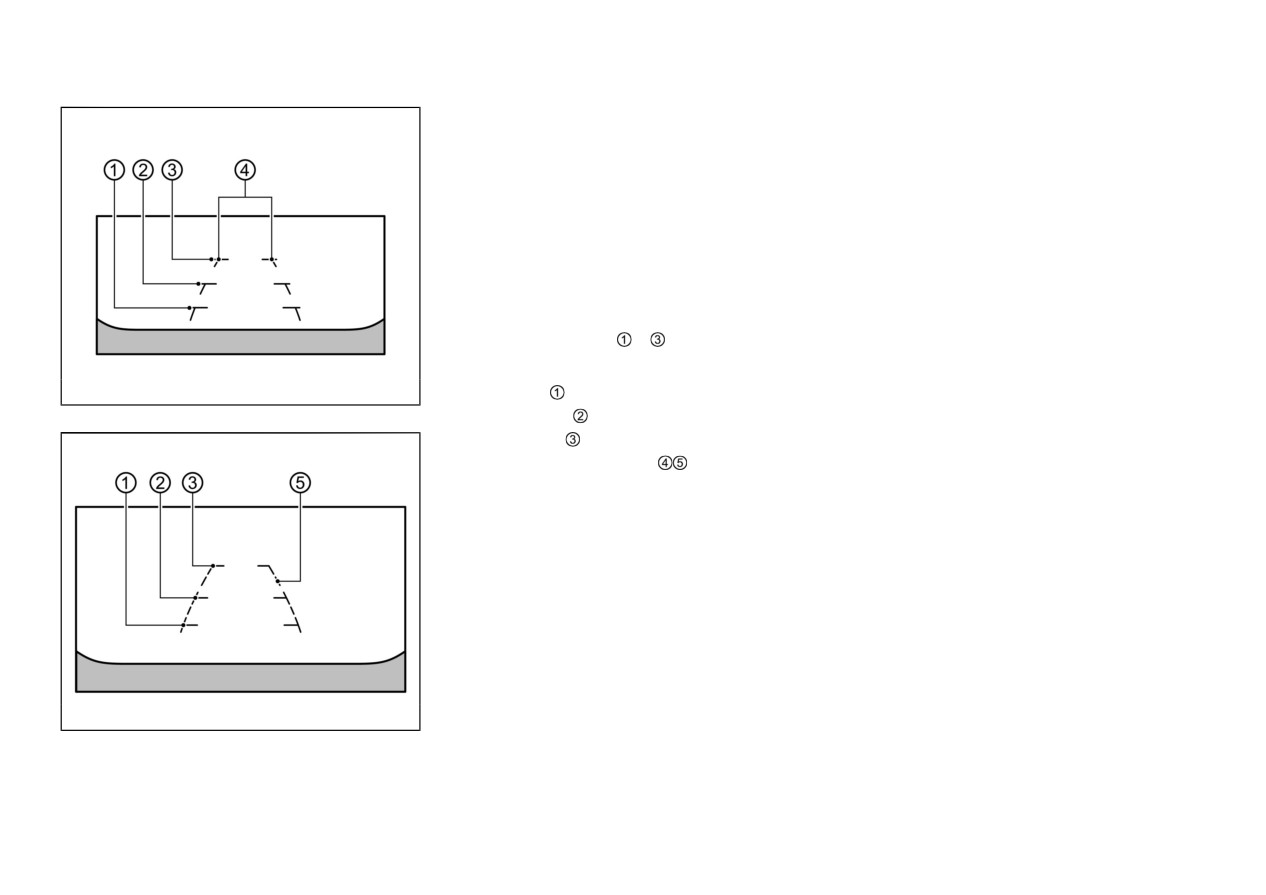
Front-wide/rear-wide view:
DIFFERENCE BETWEEN
The front-wide view/rear-wide view shows a
PREDICTIVE AND ACTUAL
wider area on the entire screen and allows
DISTANCES
checking of the blind corners on the right and
left sides. The front-wide view/rear-wide view
The displayed guidelines and their locations on
displays an approximately
180-degree area
the ground are for approximate reference only.
while the front view and the rear view display
Objects on uphill or downhill surfaces or
an approximately
150-degree area. The pre-
projecting objects will be actually located at
dictive course lines are not displayed on the
distances different from those displayed in the
front-wide view /rear-wide view.
monitor relative to the guidelines
(refer to
illustrations). When in doubt, turn around and
Distance guide lines
-
:
view the objects as you are backing up, or park
Indicate distances from the vehicle body.
and exit the vehicle to view the positioning of
WAE0570X
. Red line
: approx. 1.5 ft (0.5 m)
objects behind the vehicle.
Front-wide view
. Yellow line
: approx. 3 ft (1 m)
. Green line
: approx. 7 ft (2 m)
Vehicle width guide lines
:
Indicate the approximate vehicle width.
WAE0571X
Rear-wide view
4-16
Monitor, heater, air conditioner, audio and phone systems
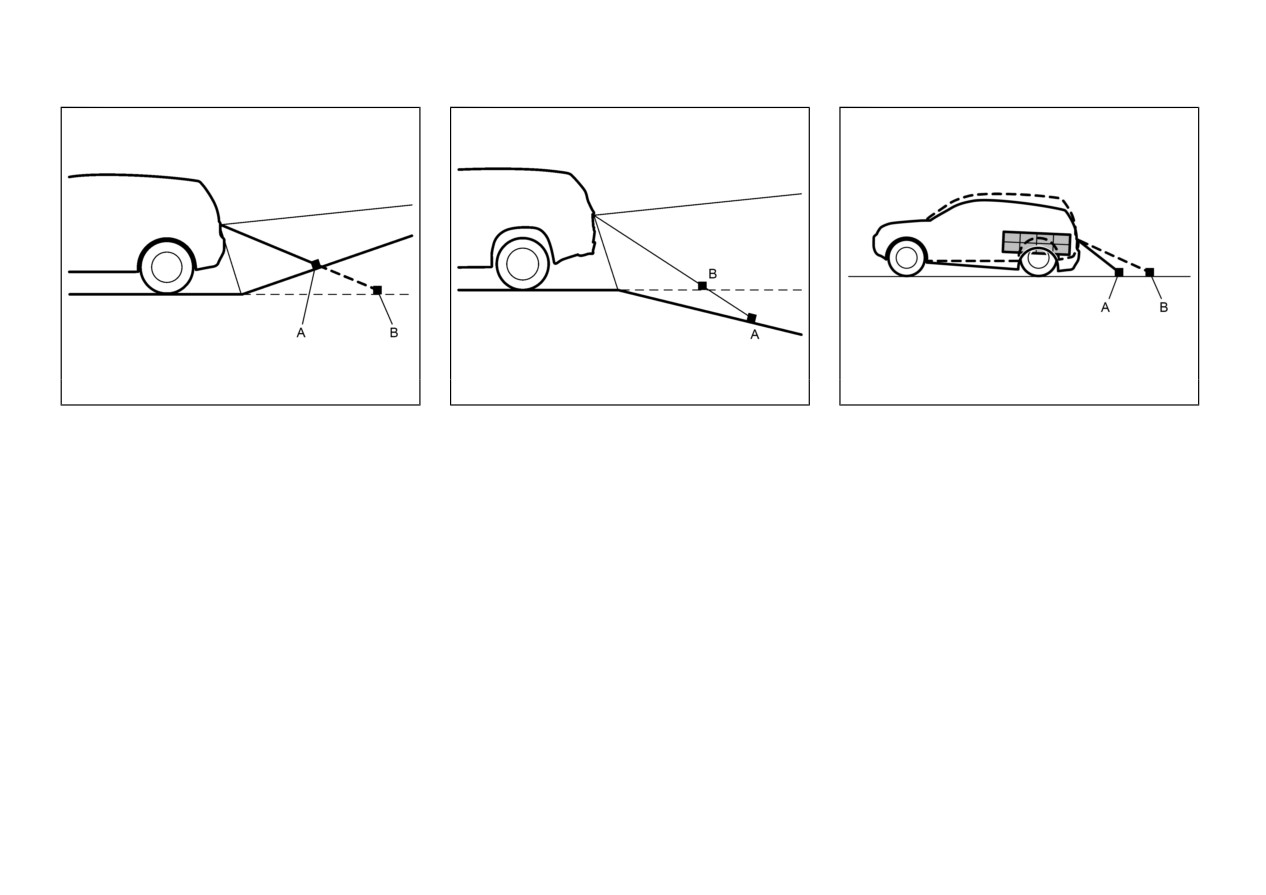
WAE0559X
WAE0560X
WAE0477X
A: Actual objects
A: Actual objects
A: Actual objects
B: Objects shown on the screen
B: Objects shown on the screen
B: Objects shown on the screen
Backing up on a steep uphill
Backing up on a steep downhill
Weighed down by weigh
When there is an upward slope behind the
When there is a downward slope behind the
When the rear of the vehicle is weighed down
vehicle, objects shown on the screen will appear
vehicle, objects shown on the screen will appear
with the weight of passengers and luggage in
to be farther off than they actually are.
to be closer than they actually are.
the vehicle, objects shown on the screen will
appear to be farther off than they actually are.
Monitor, heater, air conditioner, audio and phone systems
4-17
HOW TO PARK WITH PRE-
DICTIVE COURSE LINES
WARNING
If the tires are replaced with different sized
tires, the predictive course lines may be
displayed incorrectly.
On a snow-covered or slippery road, there
may be a difference between the predictive
course line and the actual course line.
If the battery is disconnected or becomes
WAE0632X
discharged, the predictive course lines may
be displayed incorrectly. If this occurs,
please perform the following procedures:
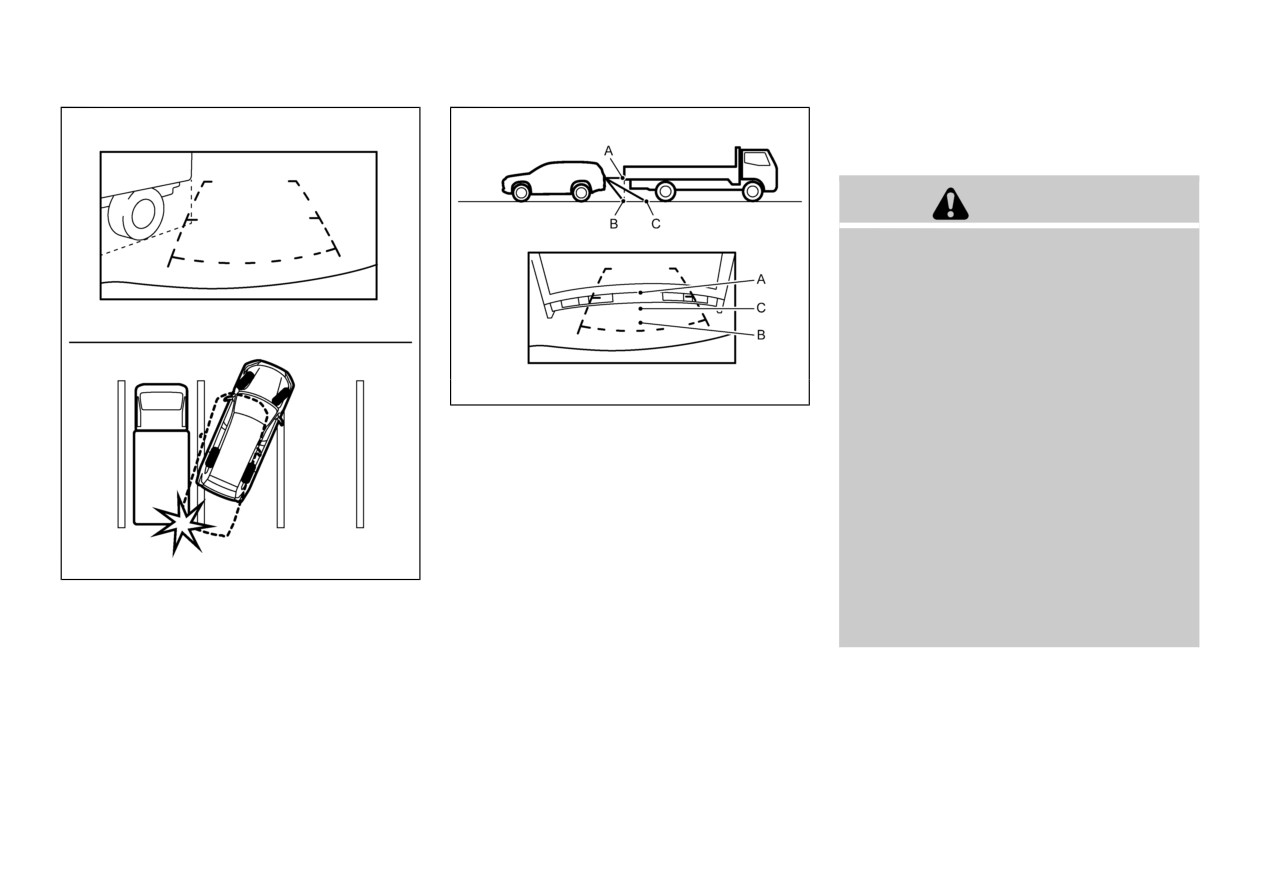
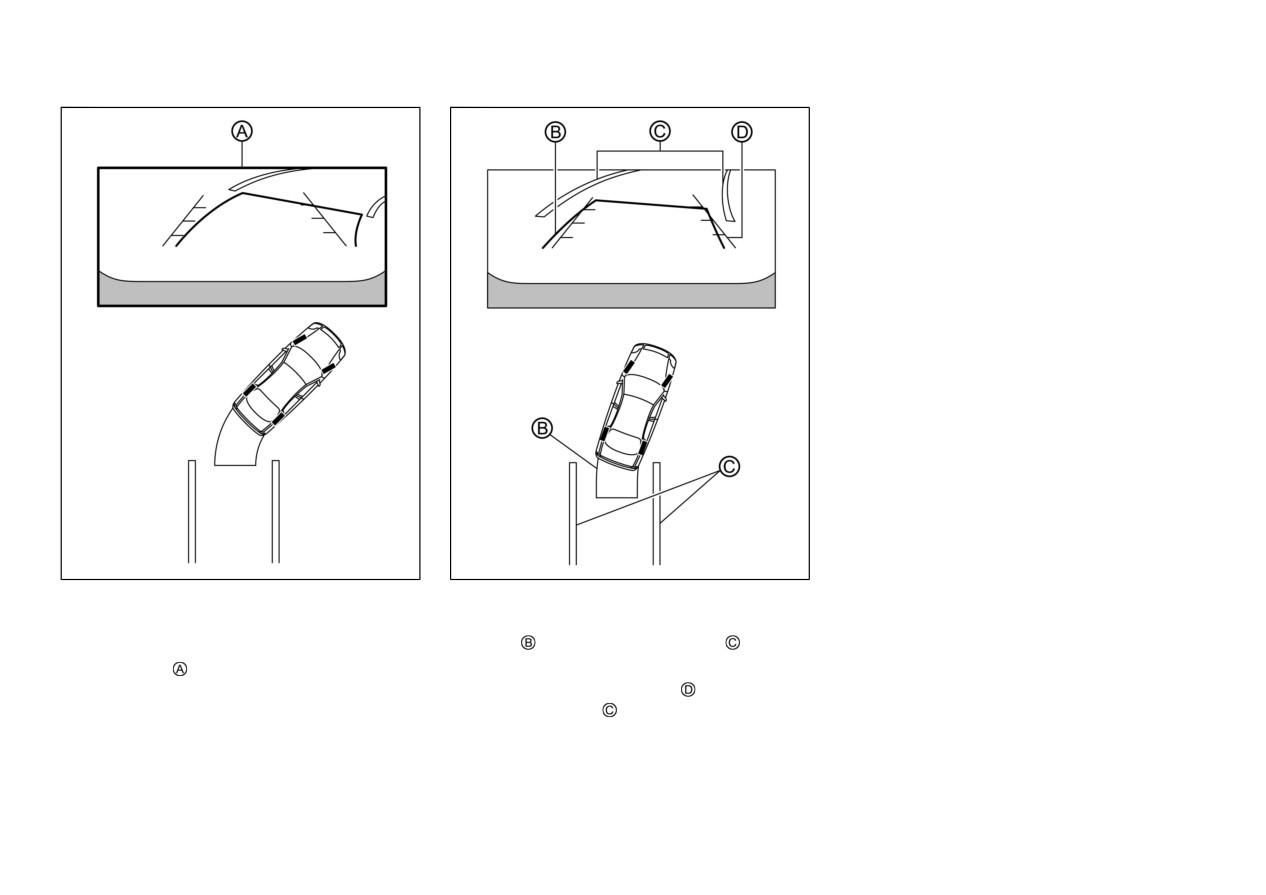
Backing up behind a projecting
object
— Turn the steering wheel from lock
to lock while the engine is run-
When there is an object behind the vehicle that
ning.
has upper sections projecting in the direction of
the vehicle, the reference lines on the screen
— Drive the vehicle on a straight
will indicate that point A is the farthest point
road for more than 5 minutes.
WAE0631X
and point B is the closest point to the vehicle. In
When the steering wheel is turned with the
reality, point A and B are actually the same
ignition switch in the ON position, the
Backing up near a projecting object
distance from the vehicle, and point C is farther
predictive course lines may be displayed
off than point A and B.
incorrectly.
When the vehicle is approaching a truck, the
reference lines indicate that your vehicle will
clear the truck. In reality, the truck is in your
path.
4-18
Monitor, heater, air conditioner, audio and phone systems
5. When the vehicle is parked in the space
completely, move the shift lever to the P
(Park) position and apply the parking brake.
HOW TO SWITCH THE DIS-
PLAY
With the ignition switch placed in the ON
position, push the CAMERA button or move
the shift lever to the R (Reverse) position to
operate the Multi Around Monitor.
The Multi Around Monitor displays different
split screen views depending on the position of
the shift lever. Push the CAMERA button to
switch between the available views.
If the shift lever is in the R (Reverse) position,
the available views are:
. Rear view/bird’s-eye view split screen
. Rear view/front-side view split screen
. Rear view
If the shift lever is in the out of R (Reverse)
position, the available views are:
WAE0562X
WAE0563X
. Front view/bird’s-eye view split screen
1.
Visually check that the parking space is safe
3.
Slowly
back
up the
vehicle
adjusting the
. Front view/front-side view split screen
before parking your vehicle.
steering wheel so that the predictive course
The display will switch from the Multi Around
lines
enter the parking space
2.
The rear view of the vehicle is displayed on
Monitor screen when:
the screen when the shift lever is moved
4.
Maneuver the steering wheel to make the
. The shift lever is in the D (Drive) position
to the R (Reverse) position.
vehicle width guide lines
parallel to the
and the vehicle speed increases above
parking space
while referring to the
approximately 6 MPH (10 km/h).
predictive course lines.
Monitor, heater, air conditioner, audio and phone systems
4-19
A different screen is selected.
HOW TO TURN ON AND OFF
PREDICTIVE COURSE LINES
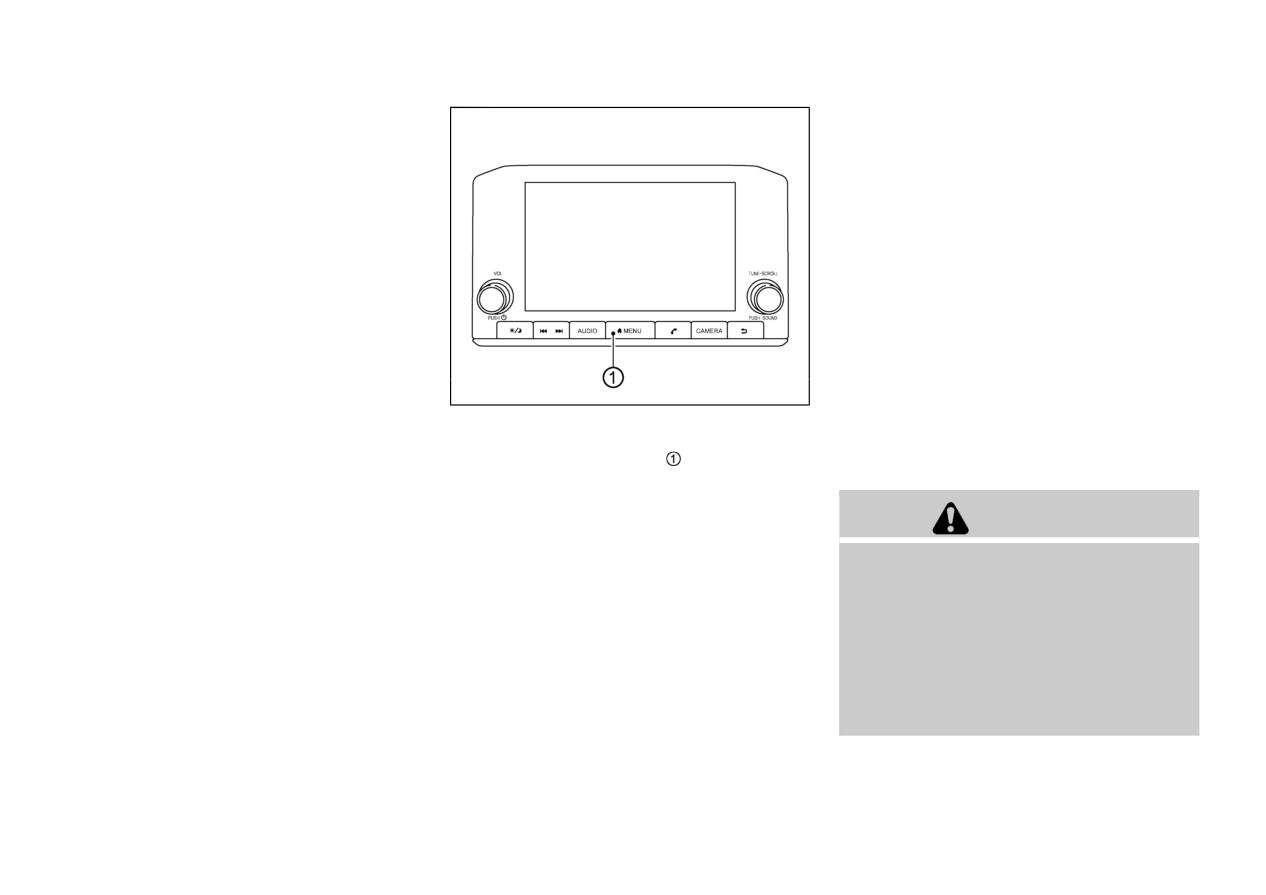
To turn the predictive course lines on and off
when the shift lever is in the P (Park) position,
perform the following operation.
1. Push the MENU button
2. Touch the “Settings” key and then touch the
“Camera” key.
3. Touch the “Predictive Course Lines” key to
turn the feature ON or OFF.
Pushing the CAMERA button while the shift
lever is in the R (Reverse) position can also turn
WAE0423X
on and off the predictive course lines.
ADJUSTING THE SCREEN
MULTI AROUND MONITOR
1. Push the MENU button
SYSTEM LIMITATIONS
2. Touch the “Settings” key and then touch the
“Camera” key.
WARNING
3. Touch the “Display Settings” key.
4. Touch the “Brightness”, “Contrast”, “Tint”,
Listed below are the system limitations for
“Color”, or “Black Level” key.
Multi Around Monitor. Failure to operate the
vehicle in accordance with these system limita-
5. Adjust the item by touching the “+” or “-”
tions could result in serious injury or death.
key on the touch screen display.
. Do not use the Multi Around Monitor with
NOTE:
the door mirrors in the stored position,
Do not adjust the display settings of the
and make sure that the liftgate is securely
Multi Around Monitor while the vehicle is
closed when operating the vehicle using the
moving. Make sure the parking brake is
Multi Around Monitor.
firmly applied.
4-20
Monitor, heater, air conditioner, audio and phone systems
The following are operating limitations and do
The apparent distance between objects
not represent a system malfunction:
viewed on the Multi Around Monitor
differs from the actual distance.
There may be a delay when switching
The cameras are installed above the front
between views.
grille, the door mirrors and above the rear
When the temperature is extremely high or
license plate. Do not put anything on the
low, the screen may not display objects
cameras.
clearly.
When washing the vehicle with highpres-
When strong light directly shines on the
sure water, be sure not to spray it around
camera, objects may not be displayed
the cameras. Otherwise, water may enter
clearly.
the camera unit causing water condensa-
tion on the lens, a malfunction, fire or an
The screen may flicker under fluorescent
electric shock.
light.
Do not strike the cameras. They are
The colors of objects on the Multi Around
precision instruments. Doing so could
Monitor may differ somewhat from the
cause a malfunction or cause damage
actual color of objects.
resulting in a fire or an electric shock.
Objects on the Multi Around Monitor may
not be clear and the color of the object may
differ in a dark environment.
There may be differences in sharpness
between each camera view of the bird’s-
eye view.
WAE0443X
Do not use wax on the camera lens. Wipe
off any wax with a clean cloth that has been
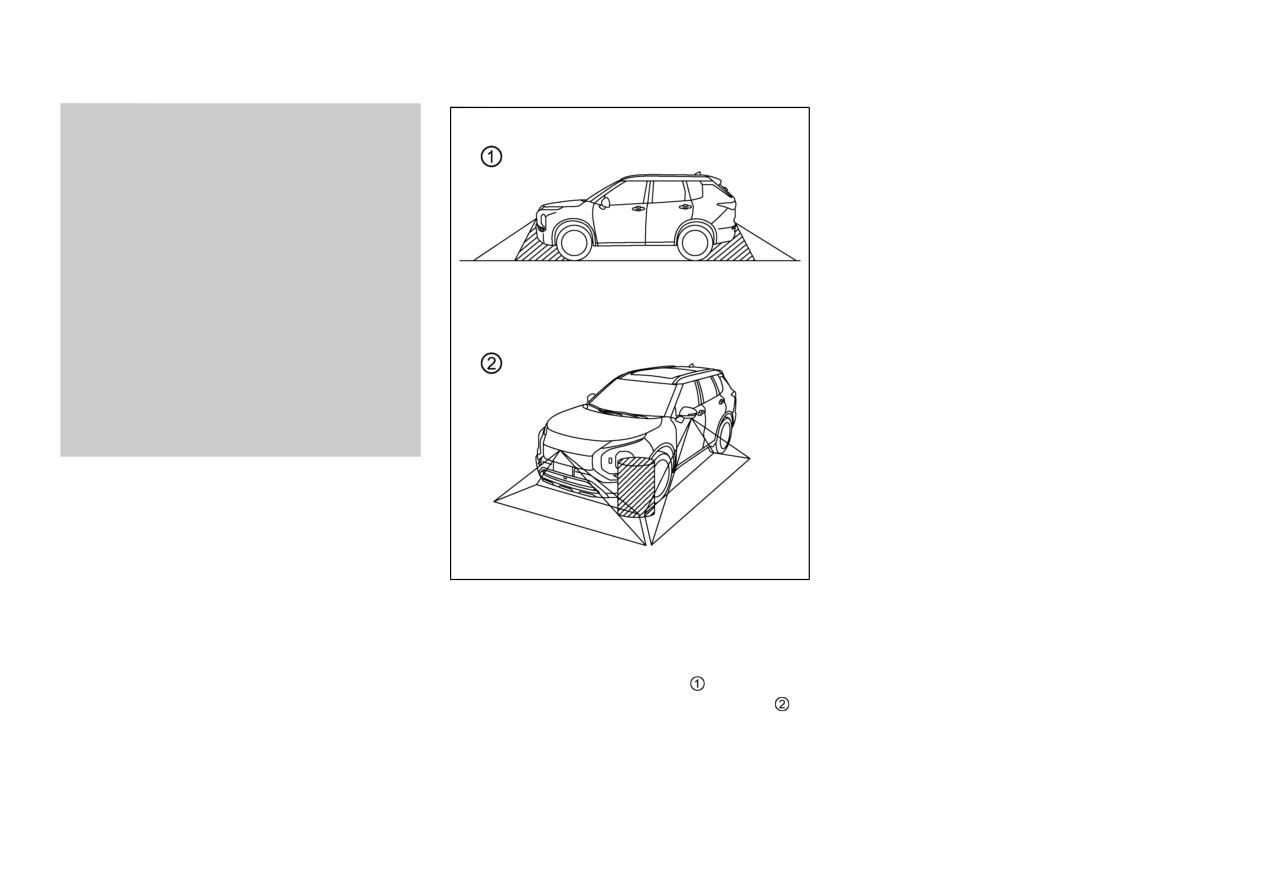
There are some areas where the system will not
show objects and the system does not warn of
dampened with a diluted mild cleaning
moving objects. When in the front or the rear
agent, then wipe with a dry cloth.
view display, an object below the bumper or on
the ground may not be viewed
. When in the
bird’s-eye view, a tall object near the seam of
the camera viewing areas will not appear in the
monitor.
Monitor, heater, air conditioner, audio and phone systems
4-21
cloth.
WAE0426X
SYSTEM MAINTENANCE
CAUTION
. Do not use alcohol, benzine or thinner to
clean the camera. This will cause disco-
loration.
. Do not damage the camera as the monitor
screen may be adversely affected.
If dirt, rain or snow accumulates on any of the
cameras
, the Multi Around Monitor may not
display objects clearly. Clean the camera by
wiping with a cloth dampened with a diluted
mild cleaning agent and then wiping with a dry
4-22
Monitor, heater, air conditioner, audio and phone systems
MOVING OBJECT DETECTION
(MOD) (if so equipped)
surroundings to ensure it is safe to
maneuver.
. The system is deactivated at speeds above
6 MPH (10 km/h). It is reactivated at lower
speeds.
. The MOD system is not designed to detect
the surrounding stationary objects.
The MOD system can inform the driver of
moving objects near the vehicle when driving
out of garages, maneuvering in parking lots and
in other such instances.
The MOD system detects moving objects by
using image processing technology on the
image shown in the display.
MOD SYSTEM OPERATION
The MOD system will turn on automatically
under the following conditions:
. When the shift lever is in the R (Reverse)
position.
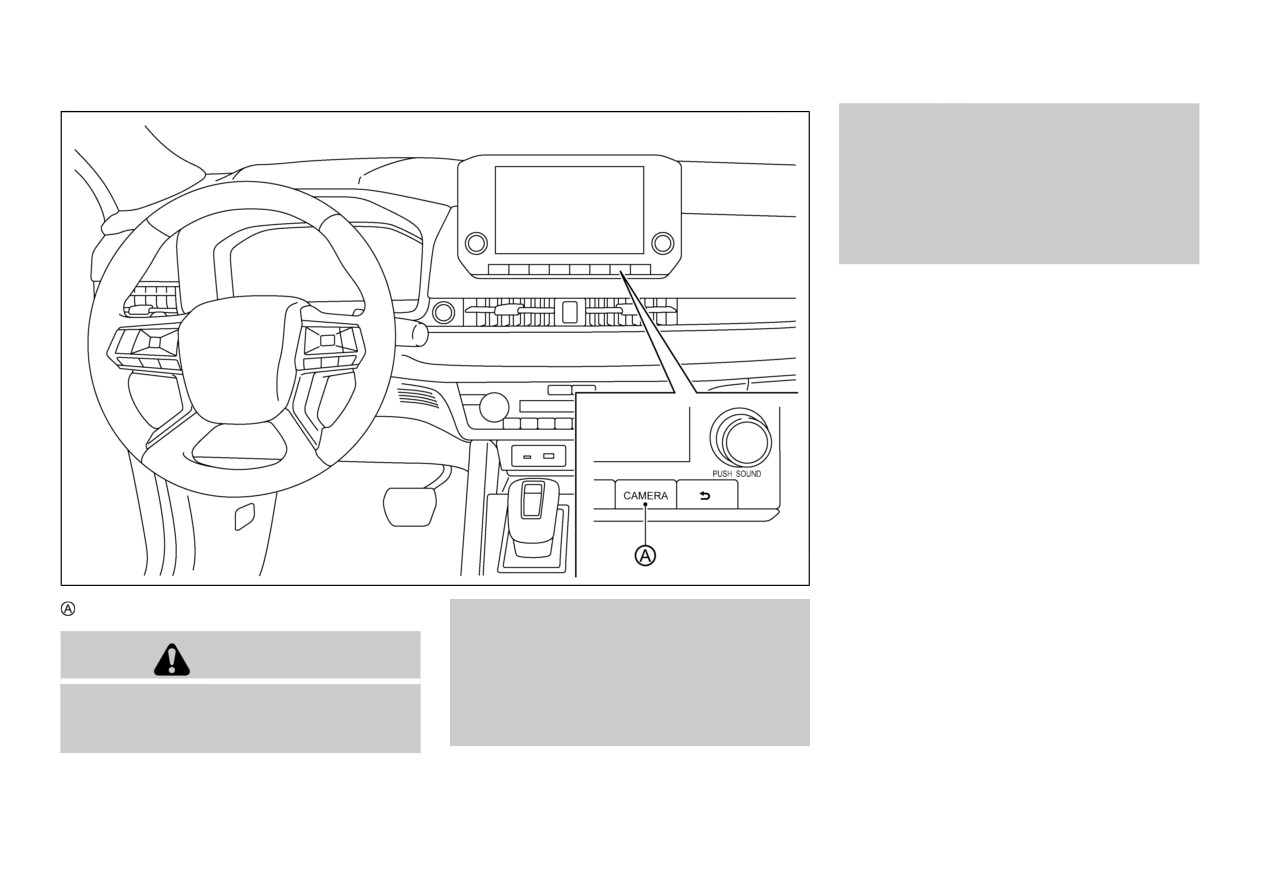
WAE0431X
. When the CAMERA button is pushed to
activate the Multi Around Monitor system
CAMERA button
on the display.
injury or death.
. When vehicle speed decreases below ap-
The MOD system is not a substitute for
proximately 6 MPH (10 km/h).
WARNING
proper vehicle operation
and is not de-
signed to prevent contact with objects
The MOD system operates in the following
surrounding the vehicle. When maneuver-
conditions when the camera view is displayed:
. Failure to follow the warnings and instruc-
ing, always use the door mirror and
tions for proper use of the Moving Object
rearview mirror and turn and check the
Detection system could result in serious
Monitor, heater, air conditioner, audio and phone systems
4-23
When the shift lever is in the P (Park) or N
NOTE:
(Neutral) position and the vehicle is
While the RCTA chime is beeping, the MOD
stopped, the MOD system detects the
system does not chime.
moving objects in the bird’s-eye view. The
MOD system will not operate if either door
is opened. If door mirrors are folded, MOD
may not operate properly.
When the shift lever is in the D (Drive)
position, and the vehicle speed is below
approximately 6 MPH (10 km/h), the MOD
system detects moving objects in the front
view.
When the shift lever is in the R (Reverse)
position and the vehicle speed is below
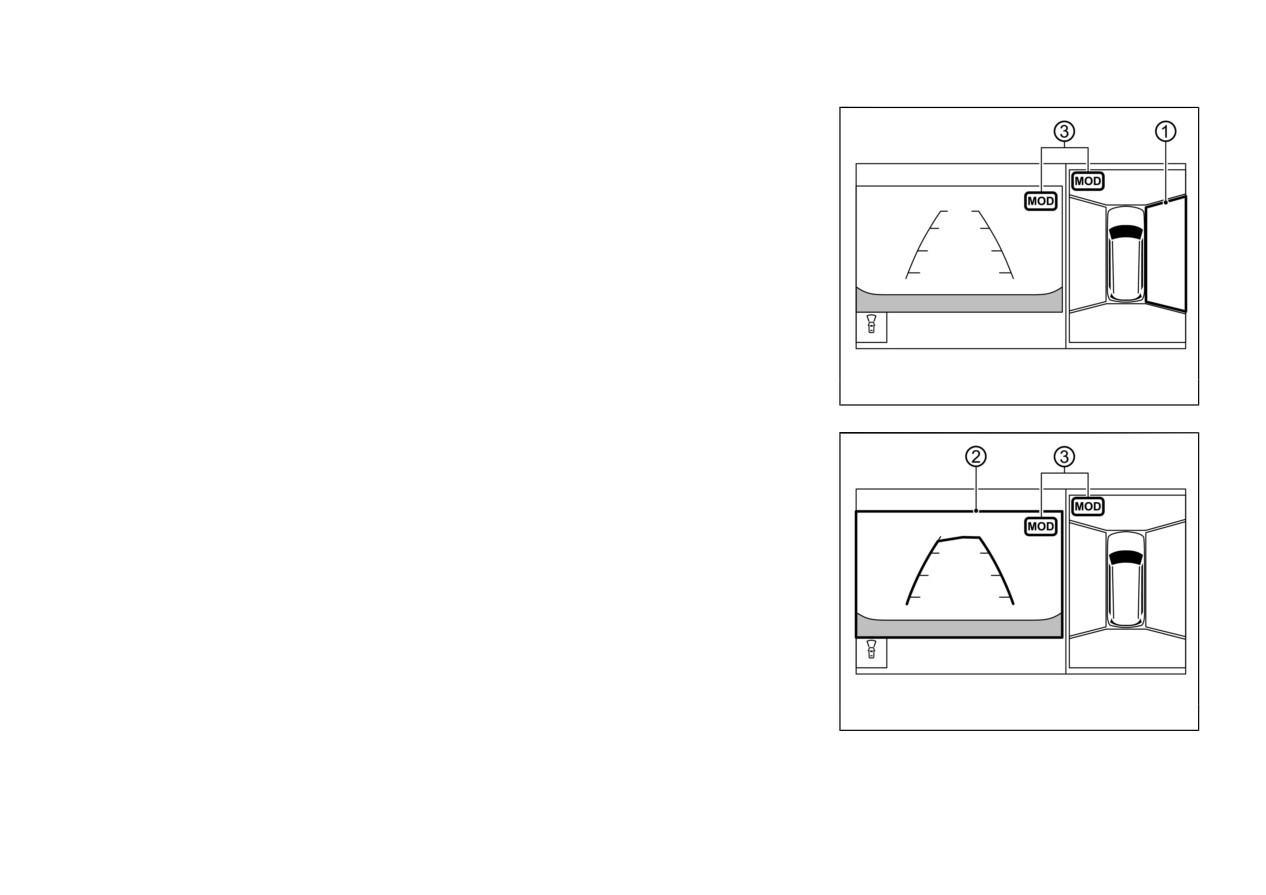
WAE0514X
approximately 6 MPH (10 km/h), the MOD
Front and bird’s-eye views
system detects moving objects in the rear
view. The MOD system will not operate if
the liftgate is open.
The MOD system does not detect moving
objects in the front-side view. The MOD icon
is not displayed on the screen when in this view.
When the MOD system detects a moving object
near the vehicle, the yellow frame will be
displayed on the view where the object is
detected and a chime will sound once. While the
MOD system continues to detect moving
objects, the yellow frame continues to be
displayed.
WAE0515X
Rear and bird’s-eye views
4-24
Monitor, heater, air conditioner, audio and phone systems
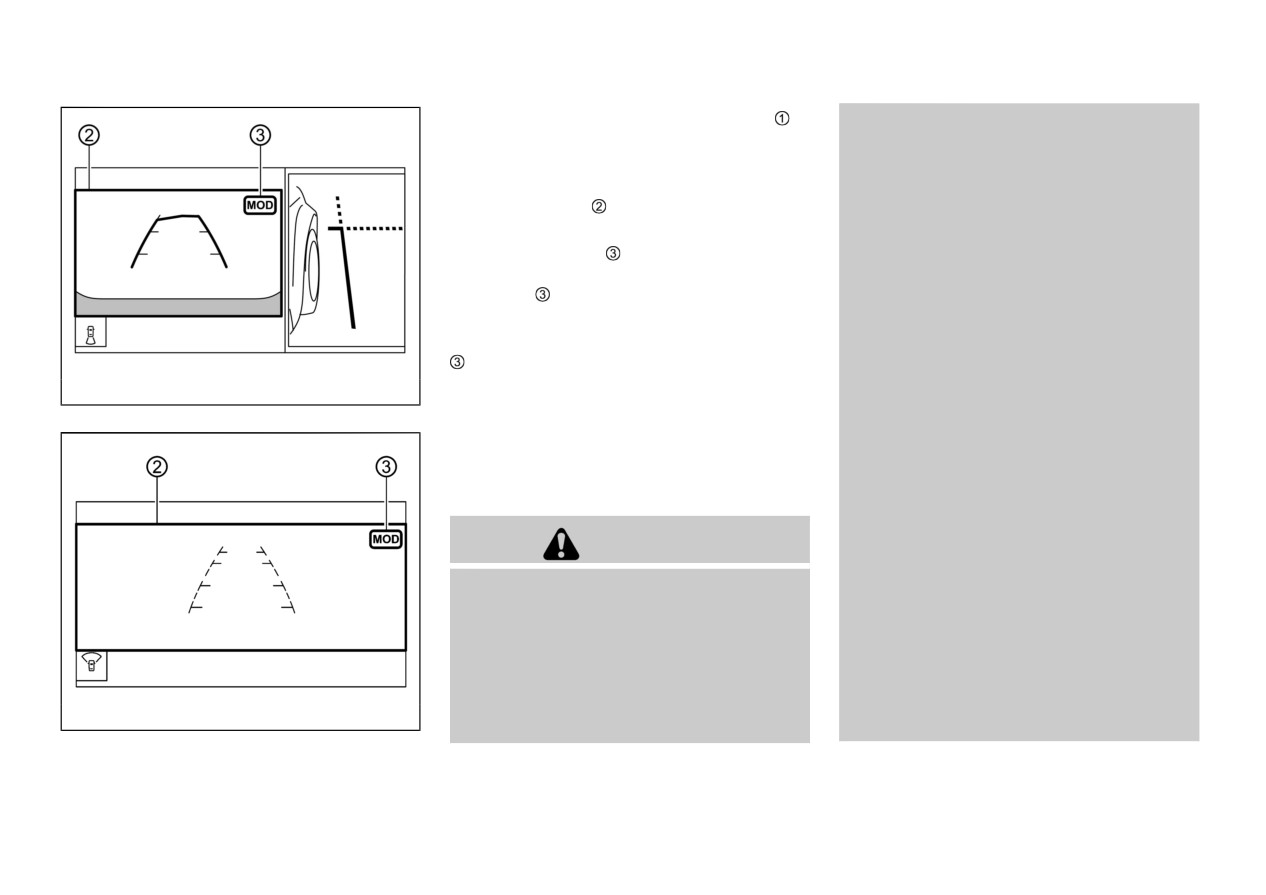
In the bird’s-eye view, the yellow frame
is
The MOD system performance will be
displayed on each camera image (front, rear,
limited according to environmental condi-
right, left) depending on where moving objects
tions and surrounding objects such as:
are detected.
— When there is low contrast be-
The yellow frame is displayed on each view
tween background and the mov-
in the front view and rear view modes.
ing objects.
A green MOD icon is displayed in the view
— When there is blinking source of
where the MOD system is operative. A gray
light.
MOD icon is displayed in the view where the
— When strong light such as an-
MOD system is not operative.
other vehicle’s headlight or sun-
If the MOD system is turned off, the MOD icon
light is present.
is not displayed.
— When camera orientation is not in
WAE0516X
TURNING MOD ON AND OFF
its usual position, such as when
Rear and front-side views
The MOD system can be turned on and off
the door mirror is folded.
using the multi-information display. (See “Dri-
— When there is dirt, water drops
ver Assistance” (P.2-23).)
or snow on the camera lens.
MOD SYSTEM LIMITATIONS
— When the position of the moving
objects in the display is not
changed.
WARNING
The MOD system might detect flowing
Listed below are the system limitations for
water droplets on the camera lens, white
MOD. Failure to operate the vehicle in
smoke from the muffler, moving shadows,
accordance with these system limitations could
etc.
result in serious injury or death.
The MOD system may not function prop-
. Excessive noise (for example, audio system
erly depending on the speed, direction,
volume or open vehicle window) will
distance or shape of the moving objects.
interfere with the chime sound, and it
If your vehicle sustains damage to the
WAE0517X
may not be heard.
parts where the camera is installed, leaving
Front-wide view / rear-wide view
Monitor, heater, air conditioner, audio and phone systems
4-25