Mitsubishi Outlander (2013+). Manual - part 681
 

  Index      Mitsubishi     Mitsubishi Outlander - service repair manual 2013 year


Search            


Content   ..  679  680  681  682   ..


Mitsubishi Outlander (2013+). Manual - part 681


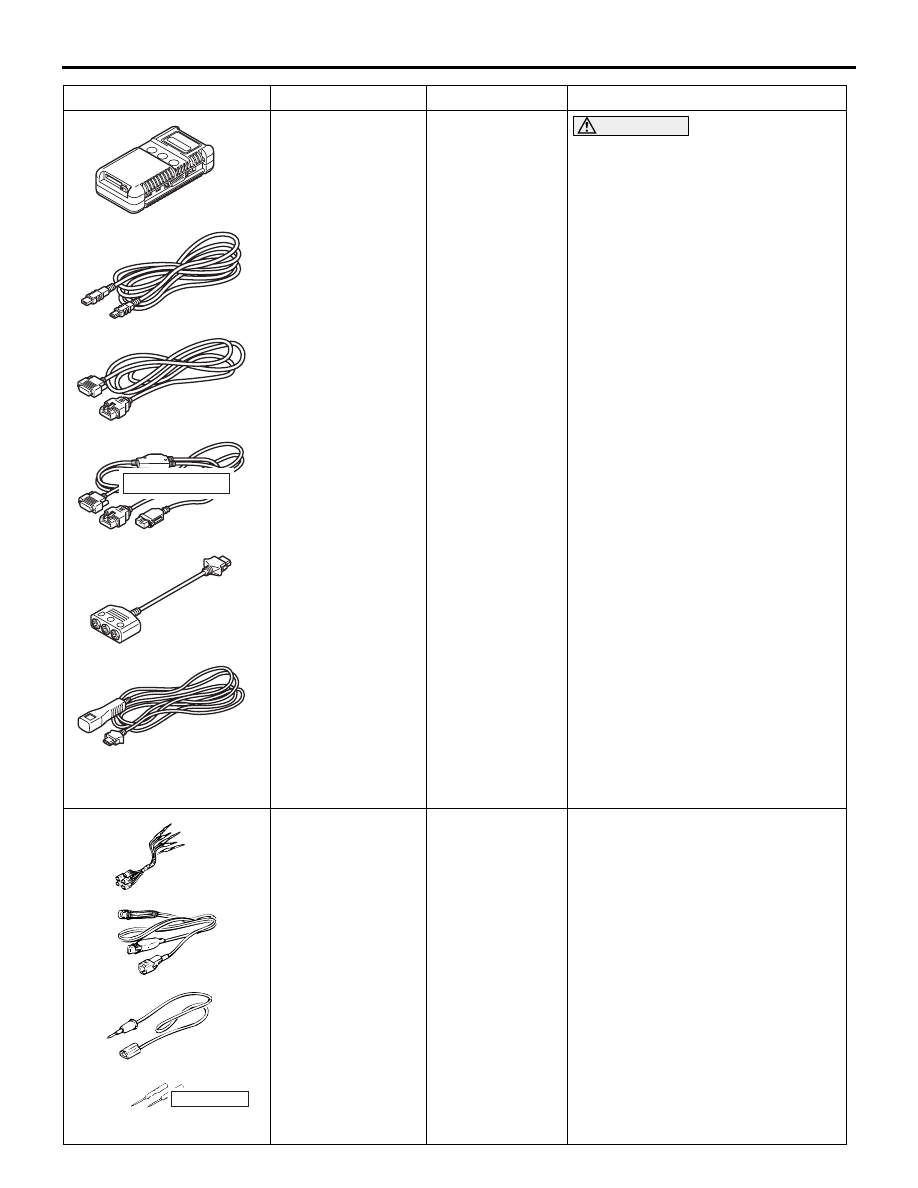
MB991910

MB991826

MB991955

MB991911

MB991824

MB991827

MB991825

a

b

c

d

e

f

DO NOT USE

RADIO AND CD PLAYER

CHASSIS ELECTRICAL

54A-209

MB991955

a. MB991824
b. MB991827
c. MB991910
d. MB991911
e. MB991825
f. MB991826

M.U.T.-III 
sub-assembly

a. Vehicle 

Communicatio
n Interface 
(V.C.I.)

b. M.U.T.-III USB 

cable

c. M.U.T.-III main 

harness A 
(Vehicles with 
CAN 
communication 
system)

d. M.U.T.-III main 

harness B 
(Vehicles 
without CAN 
communication 
system)

e. M.U.T.-III 

measure 
adapter

f. M.U.T.-III 

trigger harness

CAUTION

For vehicles with CAN 
communication, use M.U.T.-III 
main harness A to send simulated 
vehicle speed. If you connect 
M.U.T.-III main harness B instead, 
the CAN communication does not 
function correctly.
Diagnosis code check.

MB991223

a

d

c

b

DO NOT USE

BA

MB991223

a. MB991219
b. MB991220
c. MB991221
d. MB991222

Harness set

a. Check harness
b. LED harness
c. LED harness 

adapter

d. Probe

Continuity check and voltage 
measurement at harness wire or 
connector

a. For checking connector pin 

contact pressure

b. For checking power supply circuit
c. For checking power supply circuit
d. For connecting a locally sourced 

tester

Tool

Number

Name

Use

MB992006

RADIO AND CD PLAYER

CHASSIS ELECTRICAL

54A-210

TROUBLESHOOTING

AUDIO ERROR CODES <VEHICLES WITHOUT DISPLAY AUDIO>

M1544018900379

If the radio and CD player detects any malfunction in 
itself or the inserted CD, the error codes below will 
be shown on the display.

MB992006

Extra fine probe

Continuity check and voltage 
measurement at harness wire or 
connector

Tool

Number

Name

Use

Error code

Cause

Cause of trouble and its solution

CD


 CHECK DISC

Focus error

These error codes will be shown if there is any 
problem with the CD or there is excessive 
vibration on the vehicle. If the error codes are not 
displayed when the vehicle is stopped and 
another CD is inserted, there is a problem with 
the CD. Check if there is any of the following 
problems with the CD.

• Contamination, scratch, or deformation

• Formation of moisture or grease

Repair the CD and insert it again. Then, check 
that no error appears.

CD


 DISC ERROR

Abnormal disc

CD


 INTERNAL E

Mechanical error

This error codes will be shown if there is any 
internal mechanical or electrical problem in the 
radio and CD player. Replace the radio and CD 
player check that no error codes are shown.

CD


 HEAT ERROR

Protection against high 
temperature

If the internal temperature is extremely high, this 
error code will be shown. Turn off the radio and 
CD player and wait audio until they cool down. 
Wait for a while, and then turn on the radio and 
CD player again. Check that the same error does 
not appear.

USB


 FILE ERROR

File error

Displayed when an unsupported file is attempted 
to play. Change it with a supported file.

USB


 USB BUS PWR

Overcurrent 
abnormality

Displayed if there is any problem in the VBUS 
terminal of the radio and CD player. Turn off the 
radio and CD player. Wait for a while, and then 
turn on the radio and CD player again.  If the 
error code does not disappear, proceed to "The 
USB data cannot be replayed" (Refer to 

P.54A-246

).

USB


 LSI ERROR

USB internal error

Displayed if there is any problem in the USB-LSI 
in the radio and CD player. Turn off the radio and 
CD player. Wait for a while, and then turn on the 
radio and CD player again. If the error code is 
displayed, replace the radio and CD player.

RADIO AND CD PLAYER

CHASSIS ELECTRICAL

54A-211

STANDARD FLOW OF DIAGNOSTIC 
TROUBLESHOOTING

M1544004800528

Refer to GROUP 00 

− Contents of troubleshooting .

DIAGNOSIS FUNCTION

M1544013200449

HOW TO READ DIAGNOSIS CODE

GROUP 00 

− Diagnosis function .

HOW TO ERASE DIAGNOSIS CODE

GROUP 00 

− Diagnosis function .

SERVICE MODE <VEHICLES WITH 
DISPLAY AUDIO>

M1544020800012

HOW TO INITIATE THE SERVICE MODE

ACC00328

AB

MENU button

A

B

1. While pressing the "MENU" button, press "A" 

portion (shown in the illustration) on the display 
briefly. Then press "B" portion for at least two 
seconds.

Unit Diagnosis

Versions Indication

Monitor Adjustment

Serial Number Information

System Language Setting

Hands Free Module

Vehicle Setting

Memory Initialization

Back

Next

Previous

12:00

Service

ACC00176

Service Data Log

CAN Comm Confirmation

Back

Next

Previous

12:00

Service

ACC00177

2. The service mode will be initiated. Then "Service" 

screen will be displayed.

HOW TO TERMINATE THE SERVICE 
MODE

If the operations below are done, the service mode 
will be terminated.

USB


 UNSUPPORTED FORMAT

Unsupported format

Displayed when the file format stored in the USB 
device is not supported. Use a supported file 
format.

USB


 UNSUPPORTED DEVICE

Unsupported device

Displayed when an unsupported USB device is 
connected. Change it with an supported USB 
device.

iPod


 NO SONG

No playable music file 
is found.

No playable music file is stored in the iPod. Store 
music files to the iPod

®.

iPod


 VER ERROR

iPod

® cannot be 

recognised

iPod

® itself or software is not supported. Use the 

supported iPod

®.

ERROR  DC

Detection abnormal 
output to the speaker

This error code will be shown if the radio and CD 
player has an internal error or is contaminated 
with the foreign material, and there is a problem 
with output to the speaker. If it is contaminated 
with the foreign material, turn OFF the power. 
Dry the foreign material if it is liquid, and remove 
it if it is solid. Then, check if the error code is 
displayed. If the error code is displayed, replace 
the radio and CD player.

Error code

Cause

Cause of trouble and its solution

RADIO AND CD PLAYER

CHASSIS ELECTRICAL

54A-212

•  If "Back" button is selected on "Service" screen, 

the service mode will terminate and then return to 
the previous screen.

SERVICE MODE ITEM

The following items can be checked or set in the 
service mode.

• Unit Diagnosis

• Monitor Adjustment

• System Language Setting

• Vehicle Setting

• Versions Indication

• Serial Number Information

• Hands Free Module

• Memory Initialization

• Service Data Log

• CAN Comm Confirmation

Unit Diagnosis

External Device Connection Check

Ext. Device Conn. Check

Vehicle Signal Check

Speaker Check

S Meter Check

Back

12:00

Unit Diagnosis

ACC00178

1. Select "Ext. Device Conn. Check" button on "Unit 

Diagnosis" screen.

12:00

Now checking the external device connection.

Confirming connection with external device.

Please wait.

ACC00179

OK

Rear Camera

--

OK

Premium AMP

XX.XX.XX

--

DAB

OK

HFM

XXXXXXX

Back

NG Code

12:00

External Device Connection Result

ACC00180

2. "Now checking the external device connection." 

will appear, and then it will switch to "External 
Device Connection Result" screen.

• If the connection with an equipment is detected, 

"OK" will be displayed.

• If the connection with an equipment is not 

detected, "--" will be displayed.

0000

Rear Camera

0001

Premium AMP

2222

DAB

FFFF

HFM

12:00

NG Codes

ACC00181

In case other than above, "NG" is displayed.

3. If "NG" is displayed on the check result screen, 

"NG code" will be displayed by pressing the 
respective button on "External Device Connection 
Result" screen.

NOTE: If "NG" is not displayed at all, "NG code" 
button is not active.

Vehicle Signal Check


Content   ..  679  680  681  682   ..