Mitsubishi Montero (2004+). Manual - part 688
SWS DIAGNOSIS
TSB Revision
SIMPLIFIED WIRING SYSTEM (SWS)
54B-9
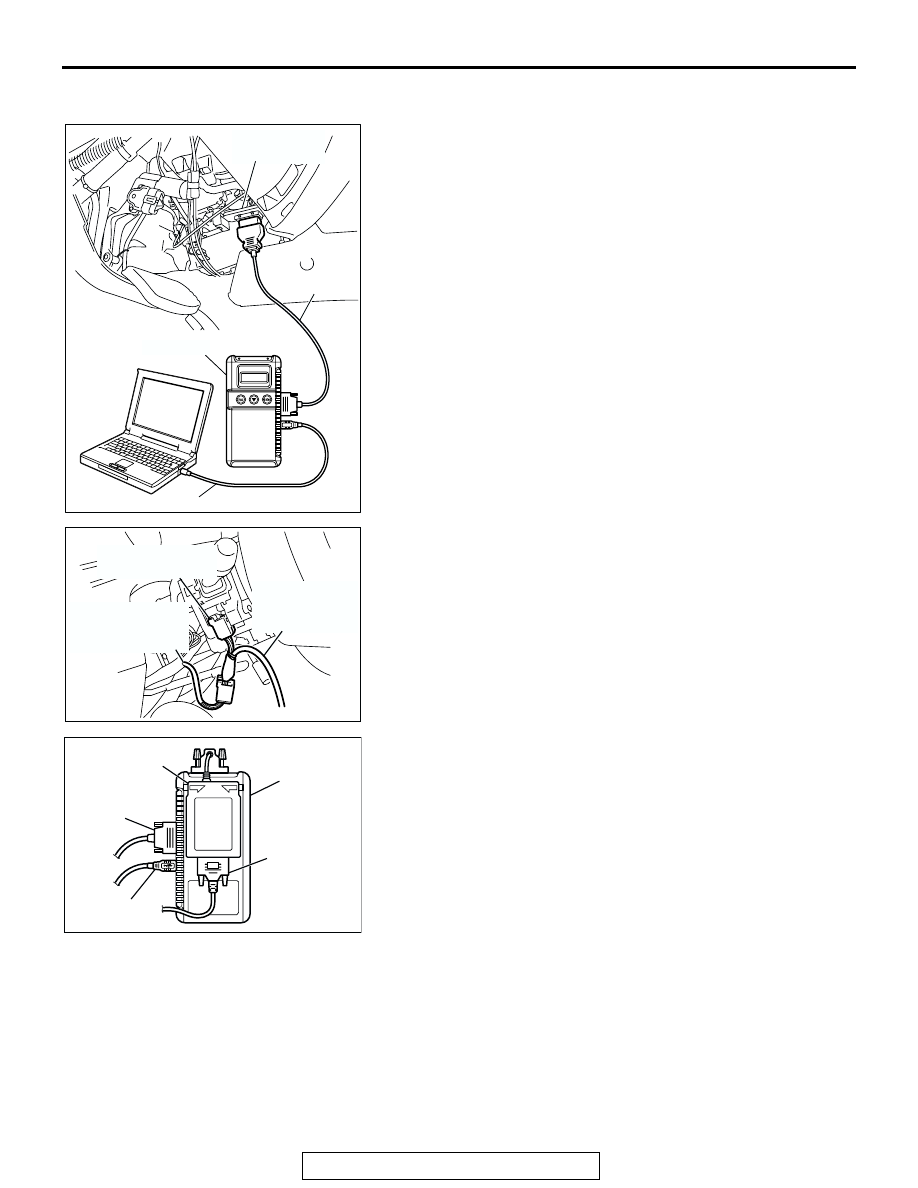
SWS communication line connecting method <SWS
monitor harness (for column-ECU)>
1. Ensure that the ignition switch is at the "LOCK" (OFF)
position.
2. Start up the personal computer.
3. Connect special tool MB991827 to special tool MB991824
and the personal computer.
4. Connect special tool MB991911 to special tool MB991824.
5. Connect special tool MB991911 to the data link connector.
6. Remove the steering column cover.
7. Remove the steering column switch connector.
8. Connect special tool MB991812 to column switch connector.
9. Connect special tool MB991812 to special tool MB991806.
10.Connect special tool MB991806 to special tool MB991824.
11.Turn the power switch of special tool MB991824 to the "ON"
position.
NOTE: When special tool MB991824 is energized, special
tool MB991824 indicator light will be illuminated in a green
color.
12.Start the MUT-III system on the personal computer.
AC307591 AB
MB991911
DATA LINK
CONNECTOR
MB991824
MB991827
AC102200
COLUMN SWITCH
CONNECTOR
COLUMN SWITCH
CONNECTOR AT
HARNESS SIDE
SWS MONITOR
HARNESS (FOR
COLUMN-ECU)
AB
AC208681
MB991806
AC
MB991812
MB991824
MB991911
MB991827