Lexus ES250 (2023 year). Manual in english - page 10
 

  Index      Manuals     Lexus ES250 (2023 year). Manual in english


Search            copyright infringement  


Content      ..     8      9      10      11     ..


Lexus ES250 (2023 year). Manual in english - page 10


169

4-5. Using the driving support systems

4

Driving

WARNING

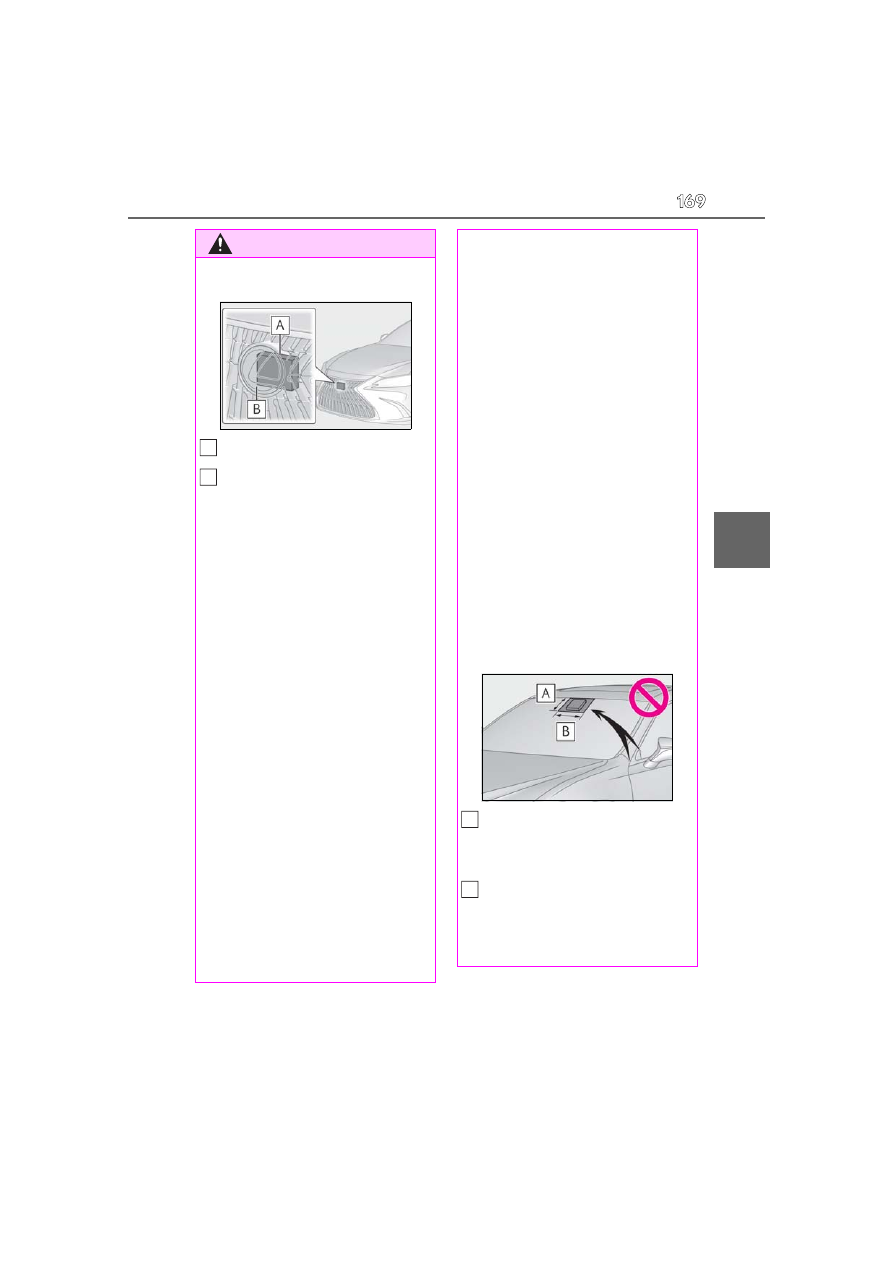
Keep the radar sensor and the radar 

sensor cover clean at all times.

Radar sensor

Radar sensor cover

If the front of the radar sensor or the front 
or back of the radar sensor cover is dirty 
or covered with water droplets, snow, 
etc., clean it. 
Clean the radar sensor and radar sensor 
cover with a soft cloth to avoid damaging 
them.

Do not attach accessories, stickers 

(including transparent stickers) or 

other items to the radar sensor, radar 

sensor cover or surrounding area.

Do not subject the radar sensor or its 

surrounding area to a strong impact. 

If the radar sensor, front grille, or front 

bumper has been subjected to a 

strong impact, have the vehicle 

inspected by your Lexus dealer.

Do not disassemble the radar sensor.

Do not modify or paint the radar sen-

sor or radar sensor cover.

In the following cases, the radar sensor 

must be recalibrated. Contact your 

Lexus dealer for details.

• When the radar sensor or front grille 

are removed and installed, or replaced

• When the front bumper is replaced

A

B

To avoid malfunction of the front 

camera

Observe the following precautions.
Otherwise, the front camera may not 

operate properly, possibly leading to an 

accident resulting in death or serious 

injury.

Keep the windshield clean at all times.

• If the windshield is dirty or covered 

with an oily film, water droplets, snow, 

etc., clean the windshield.

• If a glass coating agent is applied to the 

windshield, it will still be necessary to 

use the windshield wipers to remove 

water droplets, etc. from the area of 

the windshield in front of the front 

camera.

• If the inner side of the windshield 

where the front camera is installed is 

dirty, contact your Lexus dealer.

Do not attach objects, such as stickers, 

transparent stickers, etc., to the outer 

side of the windshield in front of the 

front camera (shaded area in the illus-

tration).

From the top of the windshield to 
approximately 0.4 in. (1 cm) below 
the bottom of the front camera

Approximately 7.9 in. (20 cm) 
(Approximately 4.0 in. [10 cm] to the 
right and left from the center of the 
front camera)

A

B

170

4-5. Using the driving support systems

WARNING

If the part of the windshield in front of 

the front camera is fogged up or cov-

ered with condensation or ice, use the 

windshield defogger to remove the 

fog, condensation or ice. (

P.256)

If water droplets cannot be properly 

removed from the area of the wind-

shield in front of the front camera by 

the windshield wipers, replace the 

wiper insert or wiper blade.

Do not attach window tint to the wind-

shield.

Replace the windshield if it is damaged 

or cracked. After replacing the wind-

shield, the front camera must be recal-

ibrated. Contact your Lexus dealer for 

details.

Do not allow liquids to contact the 

front camera.

Do not allow bright lights to shine into 

the front camera.

Do not dirty or damage the front cam-

era. 

When cleaning the inside of the wind-

shield, do not allow glass cleaner to 

contact the lens of the front camera. 

Also, do not touch the lens. 

If the lens is dirty or damaged, contact 

your Lexus dealer.

Do not subject the front camera to a 

strong impact.

Do not change the installation position 

or direction of the front camera or 

remove it.

Do not disassemble the front camera.

Do not modify any components of the 

vehicle around the front camera 

(inside rear view mirror, etc.) or ceil-

ing.

Do not attach any accessories to the 

hood, front grille or front bumper that 

may obstruct the front camera. Con-

tact your Lexus dealer for details.

If a surfboard or other long object is to 

be mounted on the roof, make sure 

that it will not obstruct the front cam-

era.

Do not modify the headlights or other 

lights.

171

4-5. Using the driving support systems

4

Driving

If a warning message is displayed on the multi-information display

A system may be temporarily unavailable or there may be a malfunction in the system.

In the following situations, perform the actions specified in the table. When the normal 

operating conditions are detected, the message will disappear and the system will 

become operational.

If the message does not disappear, contact your Lexus dealer.

In the following situations, if the situation has changed (or the vehicle has been driven for 

some time) and the normal operating conditions are detected, the message will disap-

pear and the system will become operational. 

If the message does not disappear, contact your Lexus dealer.

• When the temperature around the radar sensor is outside of the operational range, such 

as when the vehicle is in the sun or in an extremely cold environment

• When the front camera cannot detect objects in front of the vehicle, such as when driving 

in the dark, snow, or fog, or when bright lights are shining into the front camera

• Depending on the conditions in the vicinity of the vehicle, the radar may judge the sur-

rounding environment can not be properly recognized. In that case, “Pre-Collision Sys-

Situation

Actions

When the area around a camera is covered 
with dirt, moisture (fogged up, covered with 
condensation, ice, etc.), or other foreign 
matter

Using the wiper and A/C function, remove 
the dirt and other attached matter. 
(

P.256)

When the temperature around the front 
camera is outside of the operational range, 
such as when the vehicle is in the sun or in an 
extremely cold environment

If the front camera is hot, such as after the 
vehicle had been parked in the sun, use the 
air conditioning system to decrease the tem-
perature around the front camera.
If a sunshade was used when the vehicle was 
parked, depending on its type, the sunlight 
reflected from the surface of the sunshade 
may cause the temperature of the front cam-
era to become excessively high.

If the front camera is cold, such after the 
vehicle is parked in an extremely cold envi-
ronment, use the air conditioning system to 
increase the temperature around the front 
camera.

The area in front of the front camera is 
obstructed, such as when the hood is open 
or a sticker is attached to the part of the 
windshield in front of the front camera.

Close the hood, remove the sticker, etc. to 
clear the obstruction.

When “Pre-Collision System Radar In Self 
Calibration Unavailable See Owner’s Man-
ual” is displayed.

Check whether there is attached materials 
on the radar sensor and radar sensor cover, 
and if there is, remove it.

173

4-5. Using the driving support systems

4

Driving

The system can detect the following 
(The detectable objects differs 
depending on the function.):

Vehicles

Bicyclists

Pedestrians

Pre-collision warning

When the system determines that the 
possibility of a frontal collision is high, a 
buzzer will sound and a warning mes-

sage will be displayed on the multi-
information display to urge the driver 
to take evasive action.

Pre-collision brake assist

When the system determines that the 
possibility of a frontal collision is high, 
the system applies greater braking 
force in relation to how strongly the 
brake pedal is depressed.

Pre-collision braking

If the system determines that the possi-
bility of a frontal collision is extremely 
high, the brakes are automatically 
applied to help avoid the collision or 
reduce the impact of the collision.

Emergency steering assist

If the system determines that the possi-
bility of a frontal collision is high and 
that there is sufficient space for the 
vehicle to be steered into within its 
lane, and the driver has begun evasive 
maneuver or steering, emergency 
steering assist will assist the steering 
movements to help enhance the vehi-
cle stability and for lane departure pre-
vention. During operation, the 
indicator will illuminate in green.

PCS (Pre-Collision System)

The pre-collision system uses a 
radar sensor and front camera to 
detect objects (

P.173) in front of 

the vehicle. When the system 
determines that the possibility of a 
frontal collision with an object is 
high, a warning operates to urge 
the driver to take evasive action 
and the potential brake pressure is 
increased to help the driver avoid 
the collision. If the system deter-
mines that the possibility of a frontal 
collision with an object is extremely 
high, the brakes are automatically 
applied to help avoid the collision or 
help reduce the impact of the colli-
sion.

The pre-collision system can be dis-
abled/enabled and the warning tim-
ing can be changed. (

P.176)

Detectable objects

System functions

174

4-5. Using the driving support systems

Intersection right/left turn assis-
tance

If the system determines that there is a 
high possibility of a collision in the fol-
lowing situations, it will assist with Pre-
collision warning and, if necessary Pre-
collision braking.
Depending on the configuration of the 
intersection, it may not be possible to 
support.

When you turn right/left at an inter-
section and cross the path of an 
oncoming vehicle

When you turn right/left, pedestrian 
is detected in the forward direction 
and estimated to enter your vehi-
cle’s path (bicyclists are not 
detected.)

Suspension control (if equipped)

When the system determines that the 
possibility of a frontal collision is high, 
the Adaptive Variable Suspension Sys-
tem (

P.245) will control the damp-

ing force of the shock absorbers to 
help maintain an appropriate vehicle 
posture.

WARNING

Limitations of the pre-collision sys-

tem

The driver is solely responsible for safe 

driving. Always drive safely, taking 

care to observe your surroundings. 

Do not use the pre-collision system 

instead of normal braking operations 

under any circumstances. This system 

will not prevent collisions or lessen col-

lision damage or injury in every situa-

tion. Do not overly rely on this system. 

Failure to do so may lead to an acci-

dent, resulting in death or serious 

injury.

175

4-5. Using the driving support systems

4

Driving

WARNING

Although this system is designed to 

help avoid a collision or help reduce 

the impact of the collision, its effective-

ness may change according to various 

conditions, therefore the system may 

not always be able to achieve the same 

level of performance. 

Read the following conditions care-

fully. Do not overly rely on this system 

and always drive carefully.

• Conditions under which the system 

may operate even if there is no possi-

bility of a collision: 

P.179

• Conditions under which the system 

may not operate properly: 

P.181

Do not attempt to test the operation of 

the pre-collision system yourself. 

Depending on the objects used for 

testing (dummies, cardboard objects 

imitating detectable objects, etc.), the 

system may not operate properly, pos-

sibly leading to an accident.

Pre-collision braking

When the pre-collision braking func-

tion is operating, a large amount of 

braking force will be applied.

If the vehicle is stopped by the opera-

tion of the pre-collision braking func-

tion, the pre-collision braking function 

operation will be canceled after 

approximately 2 seconds. 

Depress the brake pedal as necessary.

The pre-collision braking function may 

not operate if certain operations are 

performed by the driver. If the acceler-

ator pedal is being depressed strongly 

or the steering wheel is being turned, 

the system may determine that the 

driver is taking evasive action and pos-

sibly prevent the pre-collision braking 

function from operating.

In some situations, while the pre-colli-

sion braking function is operating, 

operation of the function may be can-

celed if the accelerator pedal is 

depressed strongly or the steering 

wheel is turned and the system deter-

mines that the driver is taking evasive 

action.

If the brake pedal is being depressed, 

the system may determine that the 

driver is taking evasive action and pos-

sibly delay the operation timing of the 

pre-collision braking function.

Emergency steering assist

As emergency steering assist opera-

tion will be canceled when the system 

determines that lane departure pre-

vention function has been completed.

Emergency steering assist may not 

operate or may be cancel in the fol-

lowing cases as the system may deter-

mine the driver is taking actions.

• If the accelerator pedal is being 

depressed strongly, the steering wheel 

is being operated sharply, the brake 

pedal is being depressed or the turn 

signal lever is being operated. In this 

case, the system may determine that 

the driver is taking evasive action and 

the emergency steering assist may not 

operate.

• In some situations, while the emer-

gency steering assist is operating, 

operation of the function may be can-

celed if the accelerator pedal is 

depressed strongly, the steering wheel 

is operated sharply or the brake pedal 

is being depressed and the system 

determines that the driver is taking 

evasive action.

• When the emergency steering assist is 

operating, if the steering wheel is held 

firmly or is operated in the opposite 

direction to that which the system is 

generating torque, the function may 

be canceled.

176

4-5. Using the driving support systems

Enabling/disabling the pre-colli-
sion system

The pre-collision system can be 
enabled/disabled on 

 (

P.77) of 

the multi-information display.

The system is automatically enabled each 
time the engine switch is turned to ON.

If the system is disabled, the PCS warn-
ing light will turn on and a message will 
be displayed on the multi-information 
display.

Changing the pre-collision warn-
ing timing

The pre-collision warning timing can 
be changed on 

 (

P.77) of the 

multi-information display.

The warning timing setting is retained 
when the engine switch is turned OFF. 
However, if the pre-collision system is dis-
abled and re-enabled, the operation timing 
will return to the default setting (middle).

If the pre-collision warning timing is 

WARNING

When to disable the pre-collision sys-

tem

In the following situations, disable the 

system, as it may not operate properly, 

possibly leading to an accident resulting 

in death or serious injury:

When the vehicle is being towed

When your vehicle is towing another 

vehicle

When transporting the vehicle via 

truck, boat, train or similar means of 

transportation

When the vehicle is raised on a lift with 

the engine running and the tires are 

allowed to rotate freely

When inspecting the vehicle using a 

drum tester such as a chassis dyna-

mometer or speedometer tester, or 

when using an on vehicle wheel bal-

ancer

When a strong impact is applied to the 

front bumper or front grille, due to an 

accident or other reasons

If the vehicle cannot be driven in a sta-

ble manner, such as when the vehicle 

has been in an accident or is malfunc-

tioning

When the vehicle is driven in a sporty 

manner or off-road

When the tires are not properly 

inflated

When the tires are very worn

When tires of a size other than speci-

fied are installed

When tire chains are installed

When a compact spare tire or an 

emergency tire puncture repair kit is 

used

If equipment (snow plow, etc.) that 

may obstruct the radar sensor or front 

camera is temporarily installed to the 

vehicle

Changing settings of the pre-
collision system

177

4-5. Using the driving support systems

4

Driving

changed, emergency steering assist 
timing will also be changed accord-
ingly. If late is selected, emergency 
steering assist would not operate in 
case of an emergency.

1

Early

2

Middle

This is the default setting.

3

Late

Operational conditions for each pre-collision function

The pre-collision system is enabled and the system determines that the possibility of a fron-

tal collision with a detected object is high.
The system may not operate in the following situations:
• If a battery terminal has been disconnected and reconnected and then the vehicle has not 

been driven for a certain amount of time

• If the shift lever is in R
• When the VSC OFF indicator is illuminated (only the pre-collision warning function will 

be operational)

The operation speeds and operation cancellation for each function is listed below.

Pre-collision warning

While the pre-collision warning function is operating, if the steering wheel is operated heav-

ily or suddenly, the pre-collision warning may be cancelled.

Detectable objects

Vehicle speed

Relative speed between your 

vehicle and object

Preceding and stopped vehi-

cles

Approx. 7 to 110 mph (10 to 

180 km/h)

Approx. 7 to 110 mph (10 to 

180 km/h)

Oncoming vehicles

Approx. 7 to 110 mph (10 to 

180 km/h)

Approx. 13 to 110 mph (20 to 

180 km/h)

Bicyclists and pedestrians

Approx. 7 to 50 mph (10 to 

80 km/h)

Approx. 7 to 50 mph (10 to 

80 km/h)

178

4-5. Using the driving support systems

Pre-collision brake assist

Pre-collision braking

If either of the following occur while the pre-collision braking function is operating, it will be 

canceled:
• The accelerator pedal is depressed strongly.
• The steering wheel is turned sharply or abruptly.

Emergency steering assist

When the turn signal lights are flashing, emergency steering assist will not operate in case of 

an emergency.

If any of the following occur while the emergency steering assist function is operating, it will 

be canceled:
• The accelerator pedal is depressed strongly.
• The steering wheel is turned sharply or abruptly.
• The brake pedal is depressed.

Intersection right/left turn assistance (pre-collision warning)

When the turn signal lights are not flashing, support for turning left or right at an intersection 

which targets oncoming vehicles does not work.

Detectable objects

Vehicle speed

Relative speed between your 

vehicle and object

Preceding and stopped vehi-

cles

Approx. 20 to 110 mph (30 

to 180 km/h)

Approx. 20 to 110 mph (30 

to 180 km/h)

Bicyclists and pedestrians

Approx. 20 to 50 mph (30 

to 80 km/h)

Approx. 20 to 50 mph (30 

to 80 km/h)

Detectable objects

Vehicle speed

Relative speed between your 

vehicle and object

Preceding and stopped vehi-

cles

Approx. 7 to 110 mph (10 to 

180 km/h)

Approx. 7 to 110 mph (10 to 

180 km/h)

Oncoming vehicles

Approx. 7 to 110 mph (10 to 

180 km/h)

Approx. 13 to 110 mph (20 to 

180 km/h)

Bicyclists and pedestrians

Approx. 7 to 50 mph (10 to 

80 km/h)

Approx. 7 to 50 mph (10 to 

80 km/h)

Detectable objects

Vehicle speed

Relative speed between your 

vehicle and object

Preceding and stopped vehi-

cles, bicyclists and pedestri-

ans

Approx. 25 to 50 mph (40 

to 80 km/h)

Approx. 25 to 50 mph (40 

to 80 km/h)

179

4-5. Using the driving support systems

4

Driving

Intersection right/left turn assistance (pre-collision braking)

When the turn signal lights are not flashing, support for turning left or right at an intersection 

which targets oncoming vehicles does not work.

Object detection function

The system detects objects based on their 

size, profile, motion, etc. However, an 

object may not be detected depending on 

the surrounding brightness and the motion, 

posture, and angle of the detected object, 

preventing the system from operating 

properly. (

P.181) The illustration shows 

an image of detectable objects.

Conditions under which the system may 

operate even if there is no possibility of a 

collision

In some situations such as the following, 

the system may determine that there is a 

possibility of a frontal collision and oper-

ate.

• When passing a detectable object, etc.

• When changing lanes while overtaking a 

detectable object, etc.

• When approaching a detectable object 

in an adjacent lane or on the roadside, 

such as when changing the course of 

travel or driving on a winding road

• When rapidly closing on a detectable 

object, etc.

• When approaching objects on the road-

side, such as detectable objects, guard-

rails, utility poles, trees, or walls

• When  there  is  a  detectable object or 

other object by the roadside at the 

entrance of a curve

Detectable objects

Vehicle speed

Oncoming vehicle 

speed

Relative speed 

between your vehi-

cle and object

Oncoming vehicles

Approx. 7 to 15 mph 

(10 to 25 km/h)

Approx. 20 to 35 

mph (30 to 55 km/h)

Approx. 25 to 50 

mph (40 to 80 

km/h)

Pedestrians

Approx. 7 to 15 mph 

(10 to 25 km/h)

Approx. 7 to 15 mph 

(10 to 25 km/h)

Detectable objects

Vehicle speed

Oncoming vehicle 

speed

Relative speed 

between your vehi-

cle and object

Oncoming vehicles

Approx. 10 to 15 mph 

(15 to 25 km/h)

Approx. 20 to 28 

mph (30 to 45 km/h)

Approx. 28 to 43 

mph (45 to 70 km/h)

Pedestrians

Approx. 7 to 15 mph 

(10 to 25 km/h)

Approx. 7 to 15 mph 

(10 to 25 km/h)

180

4-5. Using the driving support systems

• When there are patterns or paint in front 

of your vehicle that may be mistaken for a 

detectable object

• When the front of your vehicle is hit by 

water, snow, dust, etc.

• When overtaking a detectable object 

that is changing lanes or making a 

right/left turn

• When passing a detectable object in an 

oncoming lane that is stopped to make a 

right/left turn

• When a detectable object approaches 

very close and then stops before entering 

the path of your vehicle

• If the front of your vehicle is raised or low-

ered, such as when on an uneven or 

undulating road surface

• When driving on a road surrounded by a 

structure, such as in a tunnel or on an iron 

bridge

• When there is a metal object (manhole 

cover, steel plate, etc.), steps, or a protru-

sion in front of your vehicle

• When passing under an object (road 

sign, billboard, etc.)

• When approaching an electric toll gate 

barrier, parking area barrier, or other 

barrier that opens and closes

• When using an automatic car wash

• When driving through or under objects 

that may contact your vehicle, such as 

thick grass, tree branches, or a banner

• When driving through steam or smoke

• When driving near an object that reflects 

radio waves, such as a large truck or 

guardrail

• When driving near a TV tower, broad-

casting station, electric power plant, 

radar equipped vehicles, etc., or other 

location where strong radio waves or 

electrical noise may be present

• When there are many things which can 

reflect the radio waves of the radar in the 

vicinity (tunnels, truss bridges, gravel 

roads, snow covered road that have 

tracks, etc.)

• While making a right/left turn, when an 

oncoming vehicle or a crossing pedes-

trian has already exited the path of your 

vehicle

• While making a right/left turn, closely in 

front of an oncoming vehicle or a cross-

ing pedestrian.

• While making a right/left turn, when an 

oncoming vehicle or a crossing pedes-

trian stops before entering the path of 

your vehicle

• While making a right/left turn, when an 

oncoming vehicle turns right/left in front 

of your vehicle

181

4-5. Using the driving support systems

4

Driving

• While steering into the direction of 

oncoming traffic

Situations in which the system may not 

operate properly

In some situations such as the following, 

an object may not be detected by the 

radar sensor and front camera, prevent-

ing the system from operating properly:

• When a detectable object is approaching 

your vehicle

• When your vehicle or a detectable object 

is wobbling

• If a detectable object makes an abrupt 

maneuver (such as sudden swerving, 

acceleration or deceleration)

• When your vehicle approaches a detect-

able object rapidly

• When a detectable object is not directly 

in front of your vehicle

• When a detectable object is near a wall, 

fence, guardrail, manhole cover, vehicle, 

steel plate on the road, etc.

• When a detectable object is under a 

structure

• When  part  of  a  detectable object is hid-

den by an object, such as large baggage, 

an umbrella, or guardrail

• When there are many things which can 

reflect the radio waves of the radar in the 

vicinity (tunnels, truss bridges, gravel 

roads, snow covered road that have 

tracks, etc.)

• When there is an effect on the radio 

waves to the radar that is installed on 

another vehicle

• When multiple detectable objects are 

close together

• If the sun or other light is shining directly 

on a detectable object

• When a detectable object is a shade of 

white and looks extremely bright

• When a detectable object appears to be 

nearly the same color or brightness as its 

surroundings

• If a detectable object cuts or suddenly 

emerges in front of your vehicle

• When the front of your vehicle is hit by 

water, snow, dust, etc.

• When a very bright light ahead, such as 

the sun or the headlights of oncoming 

traffic, shines directly into the front cam-

era

• When approaching the side or front of a 

vehicle ahead

• If a vehicle ahead is a motorcycle

• If a vehicle ahead is narrow, such as a 

personal mobility vehicle

• If a preceding vehicle has a small rear 

end, such as an unloaded truck

• If a preceding vehicle has a low rear end, 

such as a low bed trailer

• If a vehicle ahead has extremely high 

ground clearance

• If a vehicle ahead is carrying a load which 

protrudes past its rear bumper

• If a vehicle ahead is irregularly shaped, 

such as a tractor or side car

• If a vehicle ahead is a child sized bicycle, 

a bicycle that is carrying a large load, a 

182

4-5. Using the driving support systems

bicycle ridden by more than one person, 

or a uniquely shaped bicycle (bicycle with 

a child seat, tandem bicycle, etc.)

• If a pedestrian/or the riding height of a 

bicyclist ahead is shorter than approxi-

mately 3.2 ft. (1 m) or taller than approxi-

mately 6.5 ft. (2 m)

• If a pedestrian/bicyclist is wearing over-

sized clothing (a rain coat, long skirt, 

etc.), making their silhouette obscure

• If a pedestrian is bending forward or 

squatting or bicyclist is bending forward

• If a pedestrian/bicyclist is moving fast

• If a pedestrian is pushing a stroller, 

wheelchair, bicycle or other vehicle

• When driving in inclement weather such 

as heavy rain, fog, snow or a sandstorm

• When driving through steam or smoke

• When the surrounding area is dim, such 

as at dawn or dusk, or while at night or in 

a tunnel, making a detectable object 

appear to be nearly the same color as its 

surroundings

• When driving in a place where the sur-

rounding brightness changes suddenly, 

such as at the entrance or exit of a tunnel

• After the engine has started the vehicle 

has not been driven for a certain amount 

of time

• While making a left/right turn and for a 

few seconds after making a left/right turn

• While driving on a curve and for a few 

seconds after driving on a curve

• If your vehicle is skidding

• If the front of the vehicle is raised or low-

ered

• If the wheels are misaligned

• If a wiper blade is blocking the front cam-

era

• The vehicle is being driven at extremely 

high speeds

• When driving on a hill

• If the radar sensor or front camera is mis-

aligned

• When driving in a traffic lane separated 

by more than one lane where oncoming 

vehicles are driving while making a 

right/left turn

• When largely out of place with the oppo-

site facing targeted oncoming vehicle 

during a right/left turn

• While making a right/left turn, when a 

pedestrian approaches from behind or 

side of your vehicle

In addition to the above, in some situa-

tions, such as the following, the emer-

gency steering assist may not operate.

• When the white (yellow) lane lines are 

difficult to see, such as when they are 

faint, diverging/merging, or a shadow is 

cast upon them

• When  the  lane  is  wider or narrower than 

normal

• When there is a light and dark pattern on 

the road surface, such as due to road 

repairs

• When the target is too close

• When there is insufficient safe or unob-

structed space for the vehicle to be 

steered into

• If oncoming vehicle is present

• If VSC function is operating

In some situations such as the following, 

sufficient braking force or steering force 

may not be obtained, preventing the sys-

tem from performing properly:

• If the braking functions cannot operate to 

their full extent, such as when the brake 

183

4-5. Using the driving support systems

4

Driving

parts are extremely cold, extremely hot, 

or wet

• If the vehicle is not properly maintained 

(brakes or tires are excessively worn, 

improper tire inflation pressure, etc.)

• When the vehicle is being driven on a 

gravel road or other slippery surface

• When the road surface has deep wheel 

tracks

• When driving on a hill road

• When driving on a road that has inclines 

to the left or right

If VSC is disabled

If VSC is disabled (

P.245), the pre-

collision brake assist and pre-collision 

braking functions are also disabled.

The PCS warning light will turn on and 

“VSC Turned off Pre-Collision Brake 

System Unavailable” will be displayed on 

the multi-information display.

LTA (Lane Tracing Assist)

While driving on a road with clear 
white (yellow) lane lines, the LTA 
system warns the driver if the vehi-
cle may deviate from the current 
lane or course

*

, and also can 

slightly operate the steering wheel 
to help avoid deviation from the 
lane or course

*

. Also, while the 

dynamic radar cruise control with 
full-speed range (

P.195) is oper-

ating, this system will operate the 
steering wheel to maintain the vehi-
cle’s lane position.
The LTA system recognizes white 
(yellow) lane lines or a course

*


using the front camera. Addition-
ally, it detects preceding vehicles 
using the front camera and radar.

*

: Boundary between asphalt and the 

side of the road, such as grass, soil, or 
a curb

184

4-5. Using the driving support systems

WARNING

Before using LTA system

Do not rely solely upon the LTA sys-

tem. The LTA system does not auto-

matically drive the vehicle or reduce 

the amount of attention that must be 

paid to the area in front of the vehicle. 

The driver must always assume full 

responsibility for driving safely by pay-

ing careful attention to the surround-

ing conditions and operating the 

steering wheel to correct the path of 

the vehicle. Also, the driver must take 

adequate breaks when fatigued, such 

as from driving for a long period of 

time.

Failure to perform appropriate driving 

operations and pay careful attention 

may lead to an accident, resulting in 

death or serious injury.

Situations unsuitable for LTA system

In the following situations, use the LTA 

switch to turn the system off. Failure to do 

so may lead to an accident, resulting in 

death or serious injury.

Vehicle is driven on a road surface 

which is slippery due to rainy weather, 

fallen snow, freezing, etc.

Vehicle is driven on a snow-covered 

road.

White (yellow) lines are difficult to see 

due to rain, snow, fog, dust, etc.

Vehicle is driven in a temporary lane 

or restricted lane due to construction 

work.

Vehicle is driven in a construction 

zone.

A spare tire, tire chains, etc. are 

equipped.

When the tires have been excessively 

worn, or when the tire inflation pres-

sure is low.

During emergency towing

Preventing LTA system malfunctions 

and operations performed by mistake

Do not modify the headlights or place 

stickers, etc. on the surface of the 

lights.

Do not modify the suspension etc. If 

the suspension etc. needs to be 

replaced, contact your Lexus dealer.

Do not install or place anything on the 

hood or grille. Also, do not install a 

grille guard (bull bars, kangaroo bar, 

etc.).

If your windshield needs repairs, con-

tact your Lexus dealer.

Conditions in which functions may 

not operate properly

In the following situations, the functions 

may not operate properly and the vehi-

cle may depart from its lane. Drive safely 

by always paying careful attention to 

your surroundings and operate the 

steering wheel to correct the path of the 

vehicle without relying solely on the func-

tions.

When the follow-up cruising display is 

displayed (

P.188) and the preced-

ing vehicle changes lanes. (Your vehi-

cle may follow the preceding vehicle 

and also change lanes.)

When the follow-up cruising display is 

displayed (

P.188) and the preced-

ing vehicle is swaying. (Your vehicle 

may sway accordingly and depart from 

the lane.)

185

4-5. Using the driving support systems

4

Driving

WARNING

When the follow-up cruising display is 

displayed (

P.188) and the preced-

ing vehicle departs from its lane. (Your 

vehicle may follow the preceding vehi-

cle and depart from the lane.)

When the follow-up cruising display is 

displayed (

P.188) and the preced-

ing vehicle is being driven extremely 

close to the left/right lane line. (Your 

vehicle may follow the preceding vehi-

cle and depart from the lane.)

Vehicle is being driven around a sharp 

curve.

Objects or patterns that could be mis-

taken for white (yellow) lines are pres-

ent on the side of the road (guardrails, 

reflective poles, etc.).

Vehicle is driven where the road 

diverges, merges, etc.

Repair marks of asphalt, white (yellow) 

lines, etc. are present due to road 

repair.

There are shadows on the road that 

run parallel with, or cover, the white 

(yellow) lines.

The vehicle is driven in an area without 

white (yellow) lines, such as in front of 

a tollgate or checkpoint, or at an inter-

section, etc.

The white (yellow) lines are cracked, 

“Botts’ dots”, “Raised pavement 

marker” or stones are present.

The white (yellow) lines cannot be 

seen or are difficult to see due to sand, 

etc.

The vehicle is driven on a road surface 

that is wet due to rain, puddles, etc.

The traffic lines are yellow (which may 

be more difficult to recognize than 

lines that are white).

The white (yellow) lines cross over a 

curb, etc.

The vehicle is driven on a bright sur-

face, such as concrete.

If the edge of the road is not clear or 

straight.

The vehicle is driven on a surface that 

is bright due to reflected light, etc.

The vehicle is driven in an area where 

the brightness changes suddenly, such 

as at the entrances and exits of tunnels, 

etc.


Content      ..     8      9      10      11     ..