Lexus UX250h (2023 year). Manual in english - page 24
396
7-2. Steps to take in an emergency
■
When the electronic key does not work
properly
●
Make sure that the smart access system
with push-button start has not been deac-
tivated in the customization setting. If it is
off, turn the function on.
(Customizable features:
P.429)
●
Check if battery-saving mode is set. If it is
set, cancel the function. (
P.128)
●
The electronic key function may have
stopped. (
P.128)
■
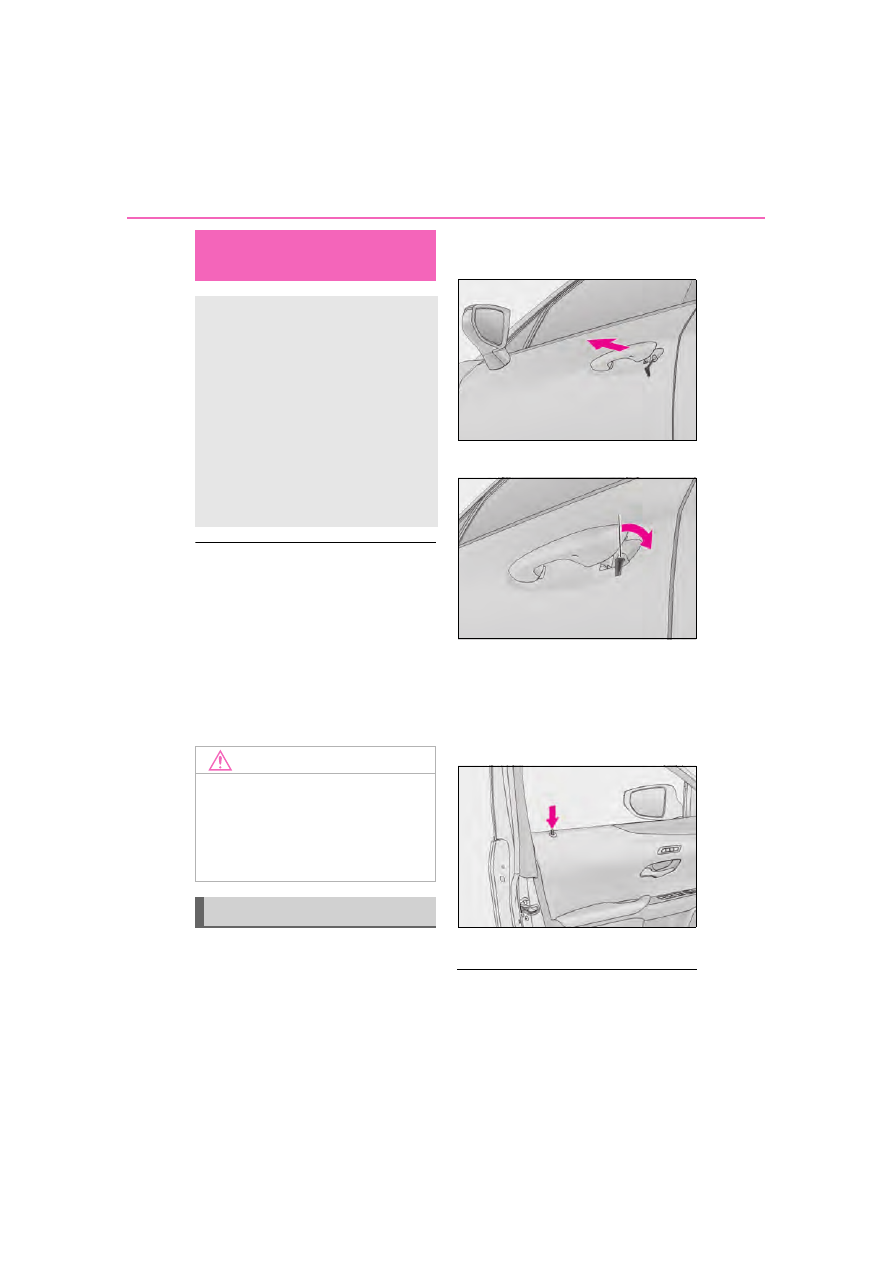
Unlocking the door
Use the mechanical key (
P.106) to
perform the following operations.
1
Insert the mechanical key while
pulling on the driver’s door handle.
2
Unlock the door.
3
Remove the key, return the handle,
and then pull the handle again.
■
Locking the door
1
With the door open, push down the
inside lock button.
2
Close the door.
■
Key linked functions
The opening and closing of the power win-
dows and moon roof (if equipped) can be
linked to key operation by a customized
If the electronic key does not
operate properly
If communication between the
electronic key and vehicle is inter-
rupted (
P.128) or the electronic
key cannot be used because the
battery is depleted, the smart
access system with push-button
start and wireless remote control
cannot be used. In such cases, the
doors can be opened and the hybrid
system can be started by following
the procedure below.
NOTICE
■
In case of a smart access system with
push-button start malfunction or
other key-related problems
Take your vehicle with all the electronic
keys provided with your vehicle, includ-
ing the card key, to your Lexus dealer.
Locking and unlocking the doors